
Quick Answer: What Makes a Process Ready for RPA?
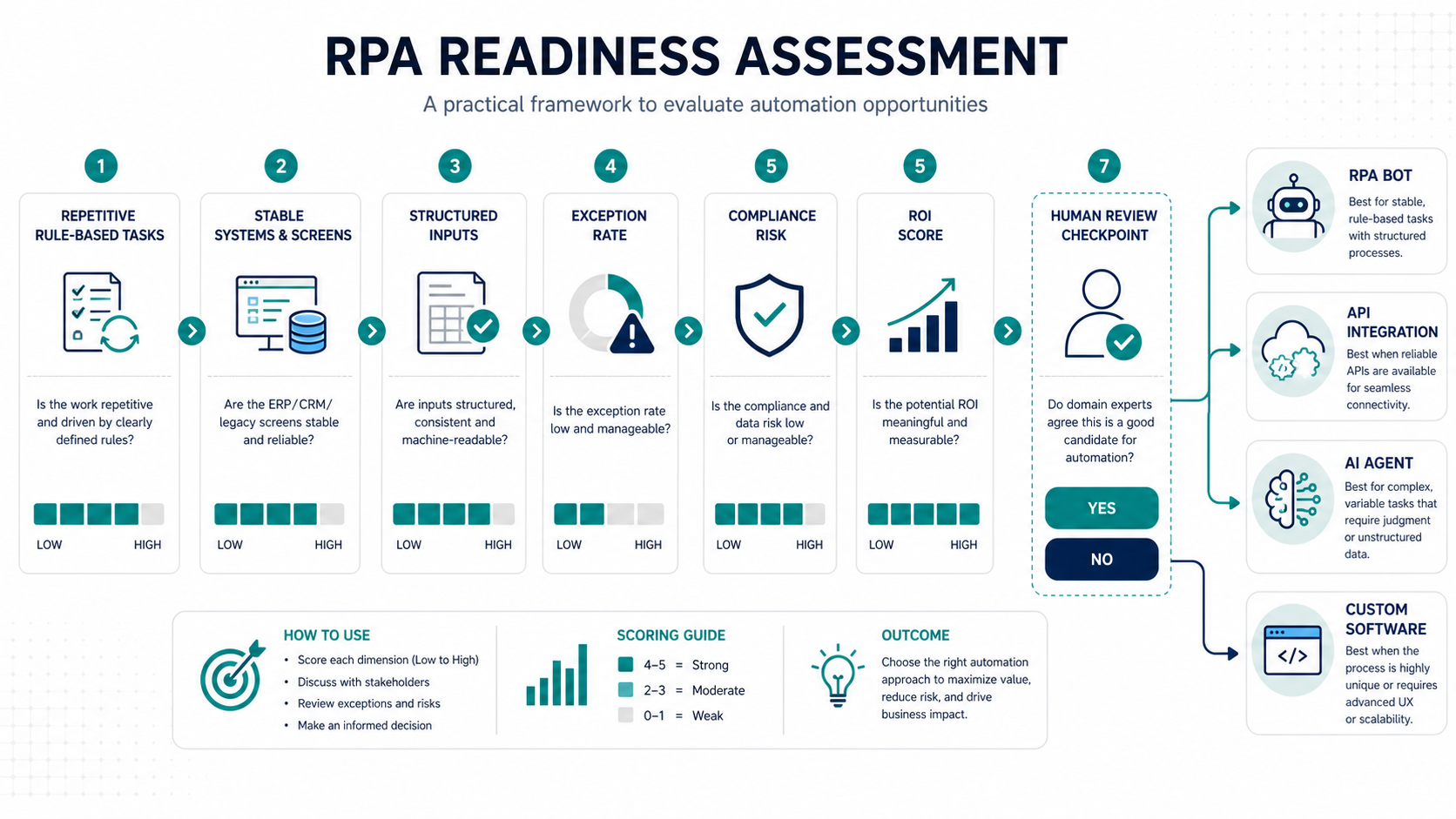
A process is ready for robotic process automation when it is repetitive, rule-based, high enough in volume, stable in its application screens, and supported by structured inputs. The strongest candidates have clear decision rules, low exception rates, measurable cycle time, and an owner who can approve how errors, handoffs, and audit logs should work.
RPA is not the right answer for every automation idea. If the workflow needs judgment, planning, document understanding, or conversation across multiple systems, start with AI workflow automation or an AI agent readiness assessment. If the problem is really poor legacy architecture, unstable screens, or missing APIs, the better first move may be legacy software modernization or a small custom integration.
The practical threshold is simple: choose RPA when the work is predictable enough for a bot, valuable enough to maintain, and controlled enough that humans still know where accountability sits.
The Best RPA Candidates
RPA is most useful when people are copying, checking, reconciling, and submitting data across systems that do not integrate cleanly. Common examples include invoice intake, order entry, employee onboarding, claims status checks, report downloads, customer record updates, compliance evidence collection, and ERP-to-CRM data reconciliation.
The strongest candidates usually share six traits. They happen often, follow explicit rules, use consistent forms or fields, depend on stable applications, produce a measurable business outcome, and have a process owner who can define exceptions. A finance workflow that handles thousands of vendor invoices every month is often a stronger RPA candidate than a strategic approval process that changes every week.
| Readiness Factor | Strong Signal | Weak Signal |
|---|---|---|
| Task volume | Daily or weekly work with measurable handling time | Rare work with low labor cost |
| Rule clarity | Documented if/then decisions and known exceptions | Unwritten judgment by a few experienced staff |
| Input quality | Structured forms, exports, emails, or fields | Unstructured documents with inconsistent meaning |
| Application stability | Stable ERP, CRM, portal, or desktop screens | Frequent UI changes, timeouts, or manual workarounds |
| Exception rate | Exceptions are low and classifiable | Most cases require human investigation |
| Business value | Cycle time, accuracy, compliance, or labor savings are visible | No baseline or unclear owner for results |
RPA Readiness Gates Before You Score
A scorecard is useful only after the workflow passes a few basic gates. Before assigning numbers, confirm that the process has an accountable owner, measurable volume, a stable target system, clear exception routing, and permission to use bot credentials or service accounts. If any gate is missing, the first action is discovery or cleanup, not bot development.
| Readiness Gate | Pass Signal | Stop Signal |
|---|---|---|
| Business owner | One owner can approve rules, exceptions, and success metrics. | No team owns the result or the process crosses departments without agreement. |
| Process baseline | Volume, handling time, error rate, rework, and backlog are known. | The team cannot prove how much manual effort exists today. |
| System access | Bot credentials, permissions, and audit logs can be designed safely. | Shared human logins, blocked automation policies, or unclear segregation of duties. |
| Exception path | Failed cases can be routed to a human queue with clear reasons. | The bot would silently skip, retry, or corrupt work when it gets stuck. |
| Change visibility | Application releases, form changes, and rule updates reach the bot owner early. | Source screens or rules change without warning. |
This is where the assessment should connect to broader robotic process automation services, not only a build estimate. A readiness pass should produce evidence that a bot can be operated safely after launch.
RPA Readiness Scoring Framework
Use a lightweight scoring model before asking for a build estimate. Score each workflow from 1 to 5 across volume, rule clarity, data quality, system stability, exception control, compliance exposure, integration availability, human review needs, and ROI potential. A process does not need a perfect score, but it should have enough strength to survive real operations after the pilot excitement fades.
A score above 35 out of 45 usually deserves deeper discovery. A score between 25 and 35 may be worth a small proof of concept if the process has strong business sponsorship. A score below 25 often needs cleanup before automation: standardize the process, improve input quality, document rules, or fix the systems that create manual work.
Use a financial estimate only after the workflow is mapped. The AI automation ROI calculator is useful for comparing candidate processes, but the inputs should stay conservative: current handling time, monthly volume, rework rate, exception percentage, bot maintenance effort, compliance value, and expected automation percentage.
How To Interpret The RPA Readiness Score
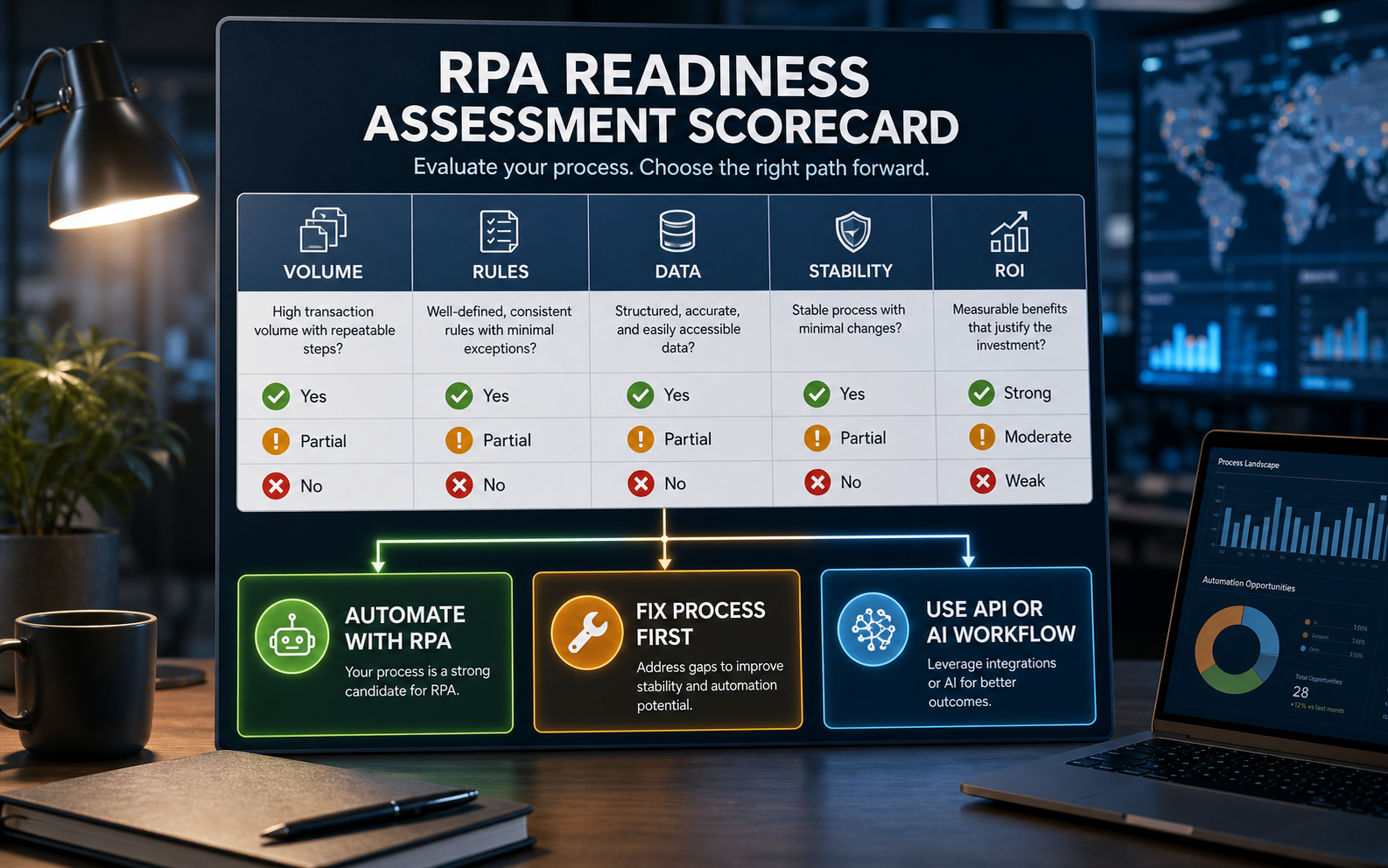
Do not average every factor blindly. A workflow can score well on volume and ROI but still fail if credentials, controls, or exception handling are unsafe. Treat the score as a decision tool with three outcomes: automate with RPA, fix the process first, or choose a different automation pattern.
| Score Range | Recommended Action | What To Do Next |
|---|---|---|
| 36-45 | Strong RPA candidate | Map the workflow in detail, confirm credentials, test sample cases, estimate build and support effort, and run a narrow pilot. |
| 28-35 | Conditional candidate | Fix the weakest factors first: input quality, rule documentation, exception categories, screen stability, or ownership. |
| 18-27 | Process cleanup first | Standardize work, reduce variants, improve data capture, define controls, and revisit automation after the process stabilizes. |
| Below 18 | Avoid RPA for now | Consider process redesign, API integration, custom workflow software, or supervised AI support instead of a bot. |
For investment planning, pair the score with the Workflow Automation Opportunity Finder and the AI Automation ROI Calculator. The score identifies fit; the ROI model tests whether the work is valuable enough to maintain.
Process Discovery Checklist
A readiness assessment should observe the real workflow, not only interview the manager. Ask the team to walk through normal cases, edge cases, rework, approvals, reports, and exception handling. Capture every system, screen, file, email, spreadsheet, rule, handoff, and timestamp. The goal is to find the boundary where automation helps without hiding process risk.
- Trigger: What starts the process, and how does the work enter the queue?
- Inputs: Which forms, emails, PDFs, exports, database records, or portals does the team use?
- Rules: Which decisions are deterministic, and which depend on business judgment?
- Systems: Which ERP, CRM, HRIS, finance, support, or legacy tools are involved?
- Credentials: Which bot accounts, permissions, audit logs, and segregation-of-duties controls are required?
- Exceptions: What causes the process to stop, and who resolves the issue?
- Outputs: What does success look like: updated record, submitted form, reconciled report, notification, or approval?
- Baseline: What are the current cycle time, error rate, rework cost, backlog, and compliance risk?
Process Mining, Task Mining, And Real Workflow Evidence
For high-volume operations, interviews alone are usually not enough. Process mining, task mining, system logs, queue exports, and screen recordings can reveal variants that managers do not see: rework loops, skipped fields, duplicate records, unofficial spreadsheets, and approval delays. Microsoft, UiPath, and Automation Anywhere all position discovery and mining as part of mature automation programs because better candidate selection reduces bot sprawl.
Use discovery evidence to answer practical questions: How many variants exist? Which steps are deterministic? Which applications cause delays? Which exceptions repeat? Which users perform the most workarounds? If the data shows that the workflow is really an integration, reporting, or case-management problem, business process automation services or custom software development may be a better fit than a screen-level bot.
When RPA Is the Wrong First Choice
RPA can automate around a system gap, but it should not become a permanent patch for every broken workflow. If application screens change often, if data lives in inconsistent documents, if most cases need reasoning, or if the workflow spans product decisions and customer conversations, a bot may become fragile quickly.
Use API integration when systems expose reliable endpoints and the process is mostly data movement. Use custom software when the workflow needs a durable operating surface, role-based approvals, dashboards, or long-term product ownership; the Custom Software Cost Estimator can help compare that path against a bot build. Use AI agents when the workflow needs planning, tool use, retrieval, or natural-language interaction across steps. NextPage's AI agent development work is a better fit for processes that need controlled reasoning rather than only screen-level repetition.
| Problem Pattern | Better Fit | Reason |
|---|---|---|
| Stable repetitive screen work | RPA | Fastest path when APIs are unavailable and rules are clear |
| Reliable APIs between systems | Integration | More durable than clicking through screens |
| Many approvals and dashboards | Custom software | Creates a controlled operating workflow |
| Unstructured documents or judgment | AI workflow or agent | Needs extraction, reasoning, and human review |
| Unstable legacy apps | Modernization first | Reduces bot fragility and maintenance cost |
Pilot Plan for the First RPA Bot
The first bot should be boring on purpose. Pick one process, one team, one set of systems, and one measurable outcome. Avoid starting with a mission-critical workflow that has many hidden exceptions. A good pilot proves that the organization can discover, build, test, monitor, and support bots safely.
- Shortlist candidates: Score 5 to 10 workflows with the readiness model.
- Choose one pilot: Pick the process with high volume, clear rules, low exception risk, and a committed owner.
- Document the current state: Record steps, screenshots, inputs, decisions, handoffs, and baseline metrics.
- Design controls: Define bot credentials, approvals, exception queues, logs, alerts, and rollback paths.
- Build the bot: Automate the happy path first, then add exception routing and audit detail.
- Test with real cases: Include normal, edge, duplicate, delayed, failed-login, and changed-screen scenarios.
- Measure results: Compare cycle time, error rate, backlog, human effort, and maintenance effort after launch.
Governance And Bot Lifecycle Ownership
RPA readiness includes the operating model after launch. Every production bot needs a process owner, technical owner, credential policy, test environment, release calendar, exception queue, monitoring view, rollback path, and maintenance budget. Without those controls, the first bot can become a fragile script that nobody wants to own.
| Lifecycle Area | Readiness Question | Evidence To Capture |
|---|---|---|
| Ownership | Who approves rule changes and failed-case handling? | Named process owner, escalation path, and support hours. |
| Security | How will bot accounts, permissions, and audit logs work? | Least-privilege access, vault plan, and segregation-of-duties review. |
| Testing | How will the team detect screen, data, or rule changes? | Regression cases, sample records, and changed-screen tests. |
| Monitoring | How will failures and exception trends be seen quickly? | Run logs, queue dashboard, alert rules, and daily exception summary. |
| Value tracking | How will the team prove the bot is still worth maintaining? | Hours saved, accuracy lift, SLA improvement, and support cost. |
This lifecycle discipline overlaps with the enterprise AI readiness checklist and the enterprise AI agent governance guide because automation still needs accountability, access control, monitoring, and human review.
Governance And Maintenance Risk
RPA programs fail when nobody owns bot health after launch. Every bot needs a process owner, technical owner, support path, change notification process, audit log, credential policy, monitoring dashboard, and maintenance budget. If the source application changes without warning, the bot should fail safely and send work to a human queue rather than silently corrupting records.
For regulated or finance workflows, control design matters as much as automation speed. Decide which actions the bot can take independently, which actions need approval, and which cases must be excluded from automation. The broader enterprise AI readiness checklist is still relevant because automation readiness includes governance, data quality, access control, and human accountability.
How NextPage Helps
NextPage helps teams turn automation ideas into practical workflow roadmaps. For RPA readiness, that means we start with process discovery, candidate scoring, system constraints, integration options, exception handling, security, support ownership, and ROI before recommending a bot build.
Sometimes the answer is RPA. Sometimes the answer is API integration, a small internal tool, an AI-assisted workflow, or legacy modernization. If the workflow needs reasoning across tools instead of deterministic screen work, compare the candidate with AI agent development and IT process automation with AI agents. Our job is to help you choose the path that reduces manual work without creating a fragile automation estate. If your team has candidate workflows, NextPage can assess them, rank the opportunities, and design the first pilot with the right controls from the beginning. For related scoping detail, the RPA development cost guide explains how readiness factors turn into budget, timeline, licensing, and support assumptions. For vendor selection and delivery planning, the custom software development company checklist can also help internal teams evaluate implementation partners.