
Quick Answer: What Should Smart TV App Testing Cover?
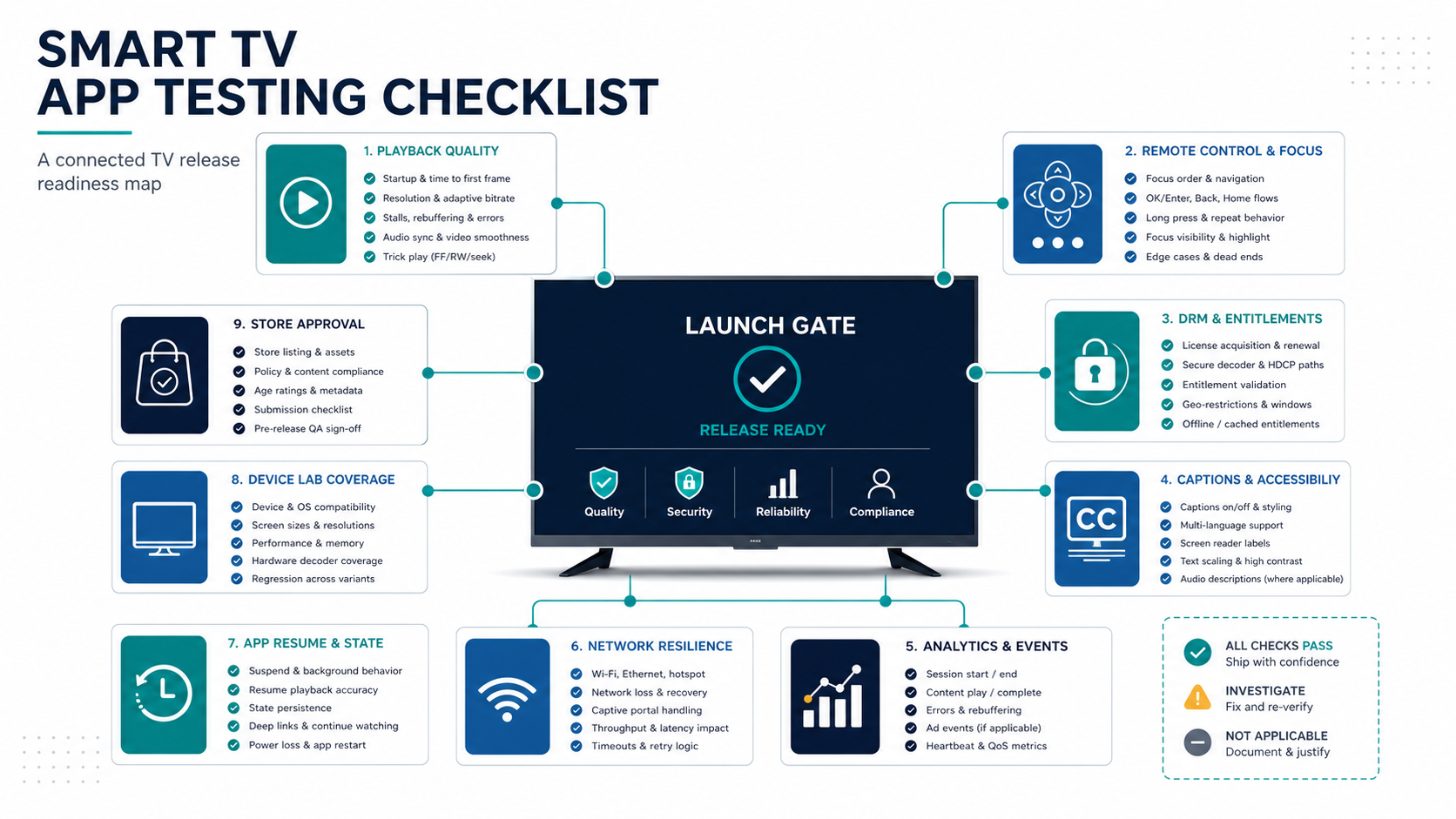
A smart TV app testing checklist should prove that playback starts reliably, remote-control navigation is predictable, DRM and entitlements work, captions and accessibility behave correctly, analytics and crash reporting are visible, store-review assets are ready, and the app survives real living-room conditions across target devices. In 2026, the checklist also needs platform certification coverage: Android TV quality criteria, Roku deep links and captions, Samsung TV UX checks, LG webOS package/device testing, Fire TV behavior, privacy disclosures, and device-specific performance evidence.
The goal is a release decision with evidence, not a ceremonial spreadsheet. Product, engineering, QA, support, and leadership should know which devices passed, which playback paths failed, which risks remain, which store reviewers can access the app, and who owns each open issue. If you already use a general Mobile App QA and Launch Checklist, treat this smart TV version as the living-room and platform-certification layer that covers remotes, streaming, DRM, app-store certification, device labs, and launch support.
Why Smart TV App Testing Is Different
A smart TV app is used from about ten feet away, often on slower hardware, with a directional remote, in long playback sessions, and across a fragmented set of TV operating systems. The failure modes are different from mobile: focus can disappear, a player can stall after resume, captions can drift, a DRM license can fail on one device family, analytics can miss playback milestones, or a store reviewer can reject the app because test accounts, metadata, privacy details, or remote behavior are incomplete.
Official platform guidance reinforces this difference. Android TV quality guidance calls out TV-specific viewing distance, remote navigation, media playback, low-memory devices, and new 2026 platform requirements. Roku certification criteria cover accounts, purchases, closed captions, deep linking, Direct to Play, UI graphics, and performance. Samsung and LG documentation both push teams toward real TV device testing, platform tooling, UX constraints, and publish-readiness checks. That is why smart TV QA belongs in scope planning, not the final week of development.
For teams still deciding platform order, pair this checklist with Android TV Vs Roku Vs Tizen Vs webOS App Development. Platform count, playback model, content rights, monetization, and device coverage decide the test budget. Leaving TV QA until the final sprint creates a launch date that looks stable only because the risky devices have not been tested yet.
1. Build The Device Lab And Platform Matrix
Smart TV QA starts with real devices. Emulators and simulators are useful during development, but they do not prove remote latency, playback performance, memory pressure, app resume, HDMI behavior, weak-network recovery, or older TV hardware. Build a matrix that maps target platforms, device generations, OS versions, remote types, regions, account states, stream types, and store-review requirements.
A practical first matrix separates launch platforms from later platforms. Android TV or Google TV may need Play quality checks, app bundle readiness, 64-bit and page-size planning, Watch Next behavior, and low-memory testing. Roku needs certification, deep linking, captions, Direct to Play, store assets, and on-device commerce rules when applicable. Samsung Tizen and LG webOS need TV-device testing, package behavior, web runtime limits, app lifecycle checks, playback format and DRM confirmation, and UX alignment.
| Matrix Area | What To Include | Why It Matters |
|---|---|---|
| Platforms | Android TV / Google TV, Roku, Fire TV, Samsung Tizen, LG webOS, Apple TV, or the chosen subset | Each platform has different runtimes, review paths, remotes, player behavior, and certification criteria. |
| Device generations | Current models, older supported models, low-memory devices, popular sticks or boxes, and major TV brands | Playback and navigation problems often appear only on older or lower-powered hardware. |
| Network states | Fast Wi-Fi, weak Wi-Fi, packet loss, DNS failure, API timeout, stream interruption, VPN or region tests, and captive-portal scenarios | Living-room usage is sensitive to buffering, retry behavior, regional rights, and confusing error states. |
| Content types | VOD, live, trailers, deep-linked content, free previews, premium content, ads, subtitles, audio tracks, and regional catalogs | Different content rights and stream formats can take different playback and review paths. |
If the team needs help turning this into an executable plan, NextPage's Smart TV app development work covers platform strategy, device coverage, remote UX, content APIs, QA, and launch operations together.
2. Test Playback Quality Before Every Release
Playback is the center of a smart TV app. Test startup time, bitrate adaptation, seek behavior, pause and resume, live-edge recovery, subtitle sync, audio track switching, DRM license acquisition, ad insertion, error recovery, and session analytics. The app can look polished and still fail the business if video start failure, buffering, or entitlement errors are common.
Run tests from realistic entry points: home rail, search result, deep link, continue watching, push or companion-app handoff, profile switch, expired session, and returning user state. Include edge cases such as app killed during playback, device sleep, network drop mid-stream, playback after logout, expired DRM authorization, and resuming a stream on another device.
- Measure video start time and first-frame time on every priority device class.
- Validate adaptive bitrate changes under constrained bandwidth and packet loss.
- Confirm player controls are usable with directional, back, play/pause, fast-forward, rewind, and voice/search buttons where relevant.
- Test content rights errors with clear messages, not generic failure screens.
- Verify analytics events for play, pause, seek, completion, buffering, ad start, ad complete, error, abandonment, deep-link launch, and app resume.
3. Validate Remote UX, Focus States, And Back Behavior
Remote-control UX is the quiet killer of smart TV retention. Every screen needs visible focus states, predictable directional movement, sane back behavior, and minimal text input. Testers should be able to navigate without a mouse, keyboard, touchscreen, or developer shortcut. If focus disappears or jumps unpredictably, the app is not ready.
Samsung's Smart TV UX checklist is a useful reminder that focusable objects should be easy to locate, remote buttons should behave as expected, playback controls should be selectable, and feedback should be clear when an operation takes time or fails. Those principles apply across TV platforms even when each platform has its own UI conventions.
| Remote UX Check | Release Question |
|---|---|
| Focus visibility | Can a viewer always see which item is selected from across the room? |
| Directional movement | Do up, down, left, and right move through rails, menus, cards, dialogs, and player controls predictably? |
| Back behavior | Does back close overlays, return to the previous screen, and avoid accidental app exits? |
| Text input | Can sign-in, search, and activation avoid painful remote typing where possible? |
4. Prove Account, Entitlement, DRM, And Commerce Flows
Smart TV account flows often involve device-code activation, QR sign-in, on-device authentication, subscription state, regional rights, household profiles, parental controls, ad rules, and content entitlements. Test each path as an end-to-end workflow. A code may appear on TV, but the backend might not bind it to the right profile. A payment may succeed, but the TV app might not refresh access. A DRM license may work on one device and fail on another.
Use the Functional Testing Checklist For Web And Mobile App Launches as a cross-system baseline, then add TV-specific activation, entitlement, DRM, and playback checks. For subscription or ad-supported services, reconcile app state, backend records, payment or ad-platform events, receipts, analytics, and support visibility.
- Test fresh sign-up, returning sign-in, device-code activation, QR activation, expired code, wrong account, logout, and profile switching.
- Verify free, trial, paid, cancelled, expired, refunded, region-blocked, and parental-control states.
- Check DRM license success, license failure, expired authorization, clock drift, device-specific restrictions, and alternate audio or subtitle tracks.
- Confirm ad requests, ad playback, ad-skipping rules, frequency caps, and fallback behavior where ads are part of the model.
5. Check Captions, Accessibility, Localization, And Living-Room Readability
Accessibility and localization problems are more visible on TV because people read from farther away and use fewer input options. Test caption availability, caption sync, audio descriptions if supported, text scaling, contrast, focus order, remote-friendly labels, and translated strings. Check that long titles, metadata, and error messages do not overflow TV layouts.
Captions deserve their own playback cases: default state, language switching, live captions, VOD captions, ad breaks, resume, seek, pause, and audio track changes. Roku guidance is especially explicit about closed caption settings and synchronization expectations, while W3C media accessibility guidance reinforces captions, audio description, media controls, and language access as part of inclusive media delivery. For broader product coverage, use the App Accessibility Checklist alongside TV-specific remote and playback cases.
6. Confirm Analytics, Crash Reporting, And Performance Signals
First-week smart TV support depends on instrumentation. Before release, verify analytics events, playback quality metrics, crash reporting, non-fatal errors, device identifiers, app version, platform, OS version, stream ID, content ID, ad session ID, consent behavior, and support correlation. If a viewer says the app buffers on a specific TV, the support team should be able to find the pattern.
Performance checks should include cold start, warm start, home rail load, poster image loading, search response, detail page load, video start, memory use, app resume, and long-session stability. Do not only test short happy paths. Leave streams running, browse heavily, switch profiles, resume the app later, and test after the device has been idle. If your team needs independent release evidence, NextPage's mobile app testing services and broader software QA testing services can help translate the same risk-based testing approach across TV, mobile, backend, and admin surfaces.
7. Prepare Store Approval And Certification Evidence
Each smart TV store or platform review can require specific metadata, screenshots, privacy disclosures, test accounts, content-rating information, reviewer instructions, demo content, support URLs, and remote behavior. Store readiness is part of QA, not a marketing afterthought. Keep the Mobile App Testing Checklist nearby for general store-readiness habits, then extend it for TV certification and playback review.
Before submission, verify app name, icon, screenshots, preview assets, descriptions, privacy policy, terms, data collection disclosures, support contact, test account credentials, subscription notes, ad disclosures, age rating, release notes, and known limitations. Reviewers should be able to access premium or restricted content through a documented path. For early scoping, the Custom Software Cost Estimator can help frame how platform count, QA depth, backend integrations, and review support affect budget.
Platform Certification And Evidence Gate
A stronger smart TV release gate connects platform rules to test proof. Do not let certification work sit in a separate checklist from QA. The same gate should show device coverage, playback evidence, DRM and entitlement results, focus/navigation proof, caption and accessibility checks, analytics visibility, store assets, reviewer access, known defects, and the go/fix/hold decision.
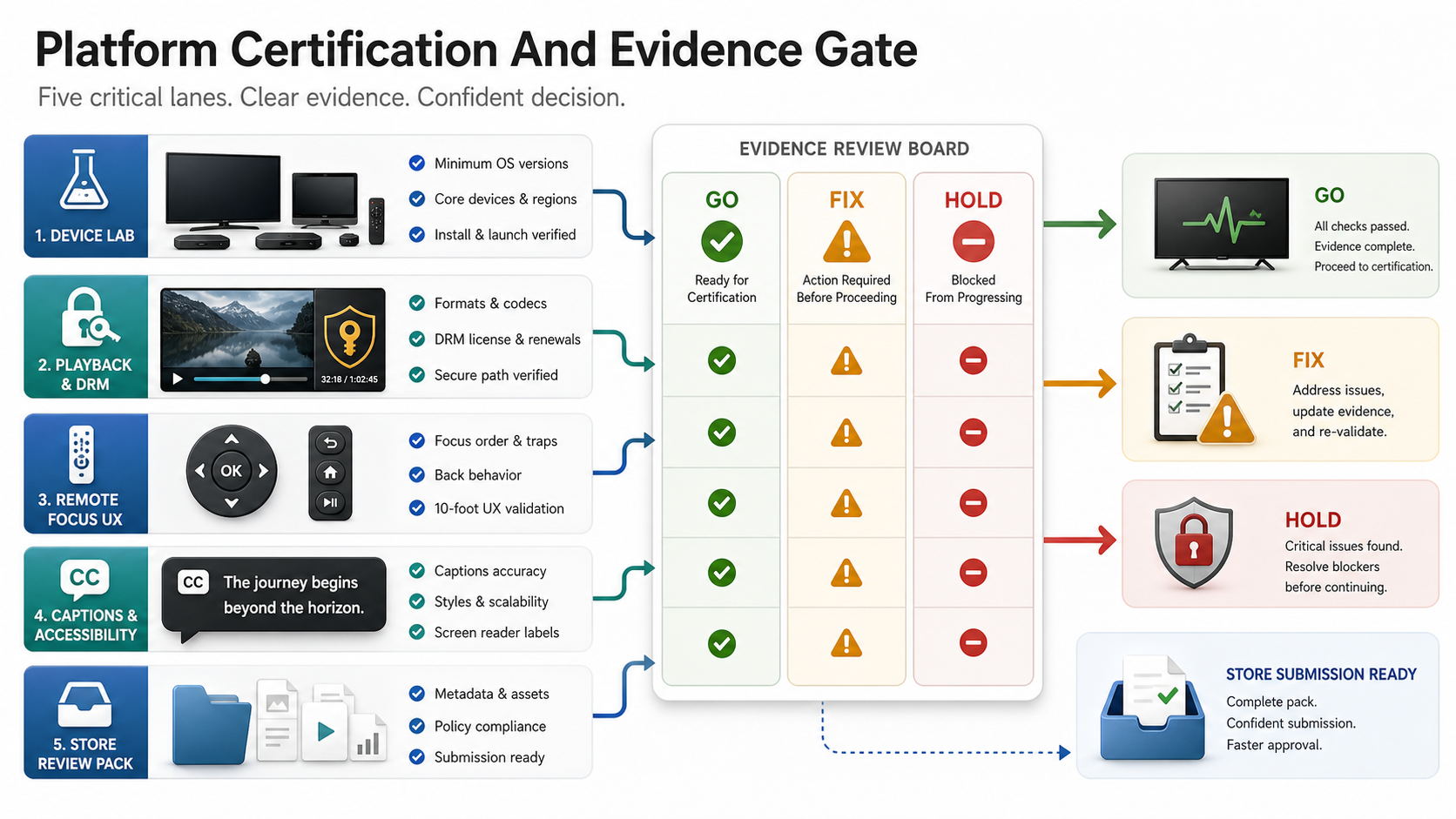
Make this gate platform-specific enough that no reviewer path is assumed. Android TV evidence may include launcher/banner behavior, media key handling, low-memory behavior, app bundle readiness, and 2026 architecture/page-size readiness. Roku evidence should include closed-caption modes, deep links for each media type, Direct to Play behavior, artwork, purchases or entitlements, and back-button behavior. Samsung and LG evidence should include real-device installation, package behavior, focus and playback controls, supported media/DRM formats, privacy disclosures, and store metadata. Fire TV evidence should include device compatibility, resume behavior, performance, resource usage, and playback controls.
| Gate | Evidence To Review | Decision Rule |
|---|---|---|
| Device lab | Priority device, OS, app version, remote, region, network, and tester results | Launch only on platforms with enough real-device evidence for the audience. |
| Playback and DRM | First-frame time, bitrate changes, license success/failure, captions, audio, ads, analytics, and error logs | Hold the build when failures affect premium content, paid access, or core playback. |
| Remote UX | Focus screenshots, navigation recordings, back behavior, activation flow, and error-state behavior | Fix before submission when a viewer can get trapped, lose focus, or accidentally exit. |
| Store review | Metadata, screenshots, privacy details, reviewer credentials, content rating, known issues, and support URL | Submit only when reviewers can complete the app's critical journeys without private help. |
The owner of each gate should be named before release candidate testing starts. QA can collect evidence, but product must decide accepted limitations, engineering must own fixes, support must prepare known-issue language, and leadership must approve any commercial risk such as launching without one platform, one device class, one region, or one monetization path. That ownership model makes the checklist useful after launch, because support and engineering can trace every first-week issue back to a decision, artifact, or missed assumption.
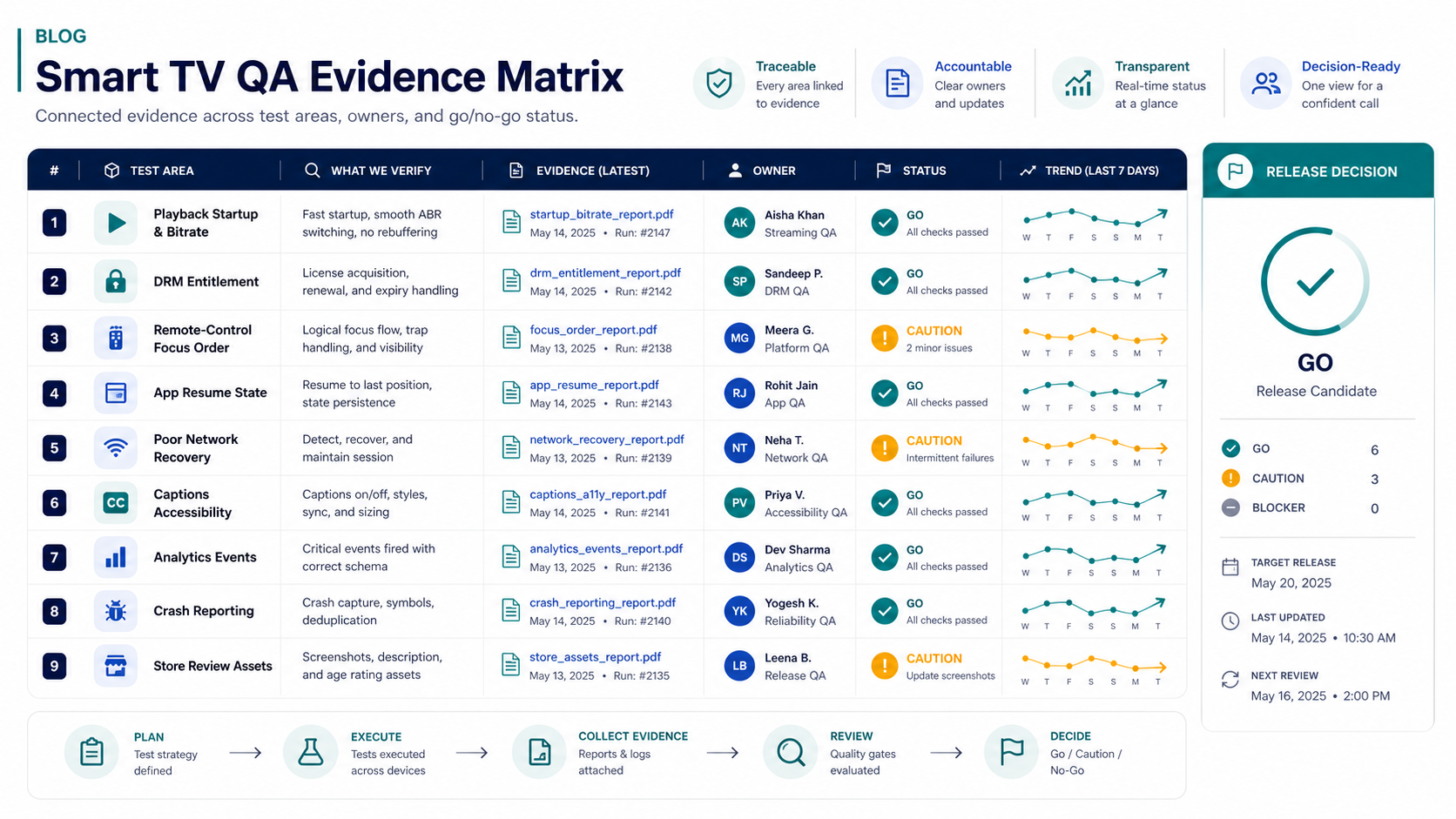
Smart TV QA Evidence Matrix
A strong checklist creates evidence that product, engineering, QA, support, and leadership can review. The matrix should identify the release risk, test coverage, owner, result, artifact, and go/no-go decision. This turns launch judgment into something visible instead of a last-minute debate in chat.
Regression coverage should be explicit for every release candidate. The Regression Testing Checklist is a useful companion when deciding which playback, account, analytics, and store-readiness checks must run before every build ships. For a portfolio example of quality evidence moving through admin and mobile workflows, see QualityHub.
Post-Launch Monitoring After Smart TV Release
Smart TV QA does not end at store approval. After launch, monitor crash-free sessions, playback start failure, buffering rate, DRM errors, ad failures, caption complaints, login failures, activation drop-off, search abandonment, app-store reviews, support tickets, and device-specific issues. Tie every major metric to app version and platform so the team can detect a bad rollout quickly.
Plan hotfix and rollback paths before release. Know which platforms allow staged rollouts, how quickly review can happen, which remote config can disable risky features, and how support will explain known issues. The Post-Launch Mobile App Maintenance Checklist gives a broader operating model for compatibility, monitoring, support, and release cadence after users are live. For OTT-specific budget planning, review OTT App Development Cost so QA, analytics, and support are not treated as optional extras.
Common Smart TV Testing Mistakes
- Testing only on emulators: Real remotes, device memory, network behavior, and playback stacks need hardware evidence.
- Leaving playback edge cases late: DRM, ads, captions, live streams, and resume behavior should be validated throughout development.
- Copying mobile UX: TV screens need remote-first focus, fewer steps, larger readable states, and less typing.
- Skipping reviewer paths: Store reviewers need credentials, test content, and clear notes or approval can stall.
- Ignoring support visibility: If analytics and crash tools cannot explain first-week failures, QA evidence is incomplete.
- Launching too many platforms at once: Broad platform coverage without device-lab depth creates expensive uncertainty.
How NextPage Helps
NextPage helps teams plan and build smart TV, OTT, mobile, and web app experiences with release evidence built into the workflow: device matrices, playback QA, backend and entitlement testing, analytics, crash reporting, app-store readiness, and post-launch support planning. Our mobile app development work covers the broader product system around the TV app too: APIs, CMS/admin tools, mobile companions, web dashboards, payments, analytics, and maintenance.
If your team is preparing a smart TV release, start by turning platform scope into a QA matrix. Then decide which launch risks must be proven before store submission and which can be monitored after release. That is the difference between shipping a TV app and shipping a TV app the support team can actually stand behind.