
A WooCommerce migration is not just a CMS task or plugin transfer. It is an ecommerce release that touches revenue, search visibility, fulfillment, tax, payment risk, customer records, analytics, and the daily work your team uses to run the store.
The safest migrations start with a checklist that makes ownership visible before anyone exports data or changes DNS. Use this guide to plan the move from Shopify, Magento, PrestaShop, BigCommerce, or a custom storefront into WooCommerce with fewer surprises. If the move is part of a broader replatforming program, connect the checklist to custom eCommerce web app development services so storefront UX, integrations, checkout behavior, and operational workflows are planned together.
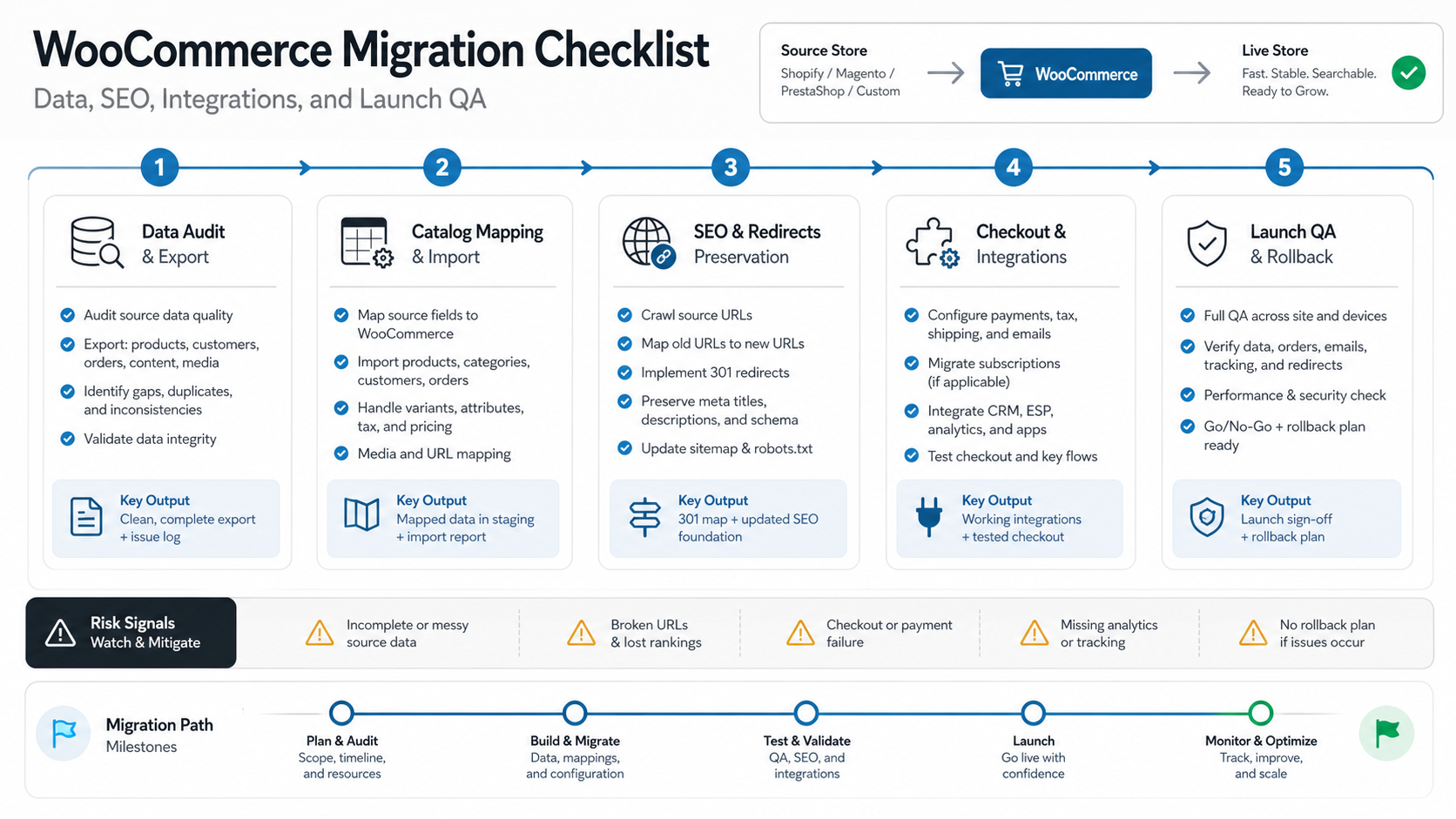
Quick Answer: What Should A WooCommerce Migration Checklist Include?
A practical WooCommerce migration checklist should cover discovery, data audit, catalog mapping, URL and SEO redirects, theme and template parity, payment and shipping setup, tax rules, CRM or ERP integrations, analytics, test orders, launch timing, rollback criteria, and post-launch monitoring.
The key is sequence. Clean the data first, map the operating workflows second, build and test in staging third, then launch with a rollback plan and a monitoring window. If your migration includes custom inventory, marketplace, subscription, loyalty, or ERP behavior, estimate those risks separately from the basic storefront migration. Teams planning broader commerce systems can compare scope drivers in our ecommerce app development cost guide.
1. Confirm Migration Readiness Before You Export Anything
Start by documenting why the store is moving to WooCommerce and what must remain unchanged after launch. A migration driven by platform cost has different risks than one driven by checkout flexibility, WordPress content control, custom product types, or ownership of data.
Create a short readiness brief with the current platform, target launch window, monthly order volume, peak sales dates, payment methods, shipping carriers, tax regions, active apps, analytics stack, CRM or ERP tools, marketing pixels, and customer support workflows. Add the people who own each area. If nobody owns tax, redirects, tracking, or fulfillment validation, the migration is not ready for build.
This is also the moment to decide what will not move. Old coupon codes, outdated product variants, abandoned apps, duplicate customer records, thin landing pages, and unused tags can create unnecessary work. A migration is a good time to simplify the store, but only after the business agrees what can be archived.
2. Audit Store Data And Clean The Catalog
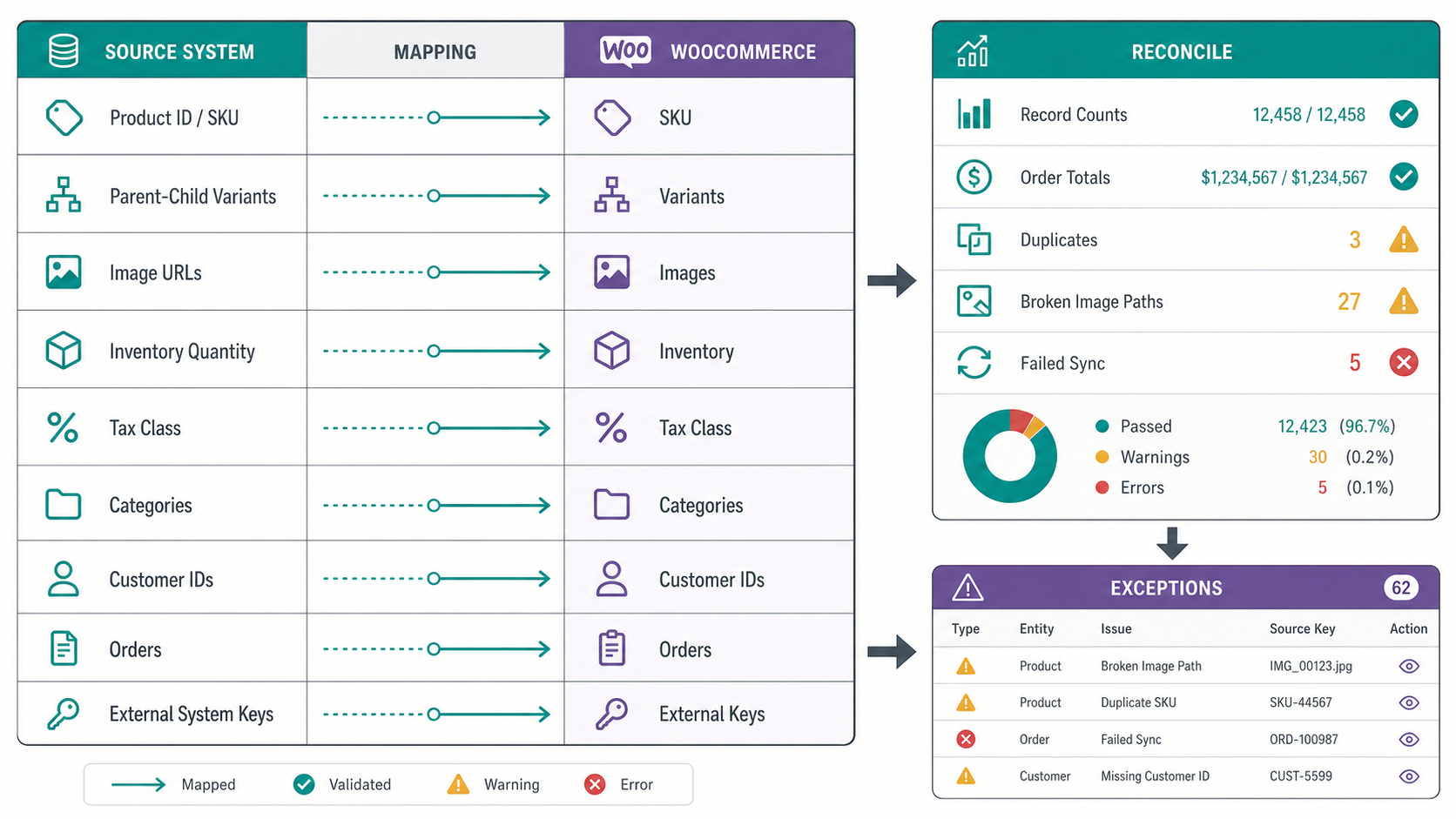
Data quality controls the whole migration. Export products, categories, SKUs, variations, prices, inventory, customers, orders, coupons, reviews, blog posts, CMS pages, images, downloadable files, and shipping classes. If catalog records, variants, customers, and orders need deeper reconciliation, pair this checklist with our WooCommerce product data migration guide. Then check for missing values, duplicate SKUs, broken image paths, inconsistent category naming, unsupported product types, and historical records that need special treatment.
For WooCommerce, pay close attention to variable products, custom attributes, subscription products, bundles, downloadable products, tax classes, and multilingual content. These are where many migrations lose detail because the source and target platforms model commerce data differently.
| Data Area | What To Check | Migration Risk |
|---|---|---|
| Products and SKUs | Unique SKU, product type, variants, inventory, tax class, images | Broken variants, wrong pricing, unavailable stock |
| Customers | Email, consent fields, addresses, account state, order history | Login issues, privacy gaps, incomplete service records |
| Orders | Status, totals, refunds, tax, shipping, payment reference | Support confusion and reporting mismatch |
| Content | Pages, blogs, meta fields, media, internal links | SEO loss and broken navigation |
| Marketing | Coupons, segments, pixels, UTM rules, feeds | Campaign interruption after launch |
Do a small sample import before the full migration. Pick complex products, recent orders, customer records with multiple addresses, and pages with images or embedded content. If the sample fails, the full migration will not improve by moving faster.
3. Map URLs, Metadata, And Redirects Before Build Starts
SEO migration should happen before theme development is considered finished. Export the current URL list from the source platform, analytics, Search Console, sitemap, and crawler data. Identify pages with traffic, backlinks, conversions, ranking keywords, or paid campaign dependencies.
Map each current URL to its WooCommerce or WordPress destination. Preserve high-value slugs when possible. Where URL structure must change, create one-to-one 301 redirects instead of sending everything to the home page or a broad category page. Include product pages, category pages, filters that receive organic traffic, CMS pages, blog posts, images that matter, and old campaign landing pages.
Also migrate title tags, meta descriptions, canonical rules, image alt text, schema assumptions, open graph data, and internal links. A technically successful store migration can still fail commercially if high-performing pages lose relevance or redirect equity.
4. Rebuild The Buying Experience, Not Just The Theme
Theme parity means more than matching colors. Review the current customer journey from landing page to product detail page, cart, checkout, account creation, order confirmation, email receipt, cancellation, return, and support contact. Then decide what WooCommerce must reproduce and what can improve.
Use a flow checklist for navigation, product filters, search, product detail content, size charts, comparison blocks, trust signals, cart drawer or cart page behavior, guest checkout, account creation, coupons, abandoned cart flows, and post-purchase emails. If the store depends on editorial content or SEO landing pages, involve a WordPress development company early enough to protect both content management and ecommerce UX.
Do not approve the theme only from desktop screenshots. Test mobile product discovery, sticky add-to-cart behavior, coupon entry, payment wallet visibility, address forms, and page speed on real devices.
5. Validate Payments, Shipping, Tax, And Checkout Rules
Checkout is the revenue-critical part of the migration. List every current payment method, gateway account, wallet, EMI or pay-later option, tax rule, shipping zone, pickup option, free-shipping threshold, coupon condition, refund flow, and fraud-review step.
Run test orders for guest checkout, logged-in checkout, each payment method, failed payments, refunds, partial refunds, tax-exempt customers, domestic shipping, international shipping, coupon stacking, free shipping, out-of-stock behavior, and email notifications. For launch planning, pair this migration checklist with a broader ecommerce launch checklist so checkout, fulfillment, analytics, and support are validated together.
If payment or shipping behavior depends on custom rules, treat it as software work. A migration is also a good time to review eCommerce conversion optimization services because checkout friction, confusing delivery rules, hidden fees, and weak trust signals often become visible during replatforming. Plugin configuration may cover the standard path, but B2B pricing, ERP-driven inventory, marketplace payouts, split shipments, subscription billing, store credits, or custom tax logic can change the budget and test plan.
6. Reconnect CRM, ERP, Inventory, Analytics, And Marketing Tools
Most migration surprises come from integrations. Build an integration inventory before development begins. Include CRM, ERP, inventory systems, warehouse tools, shipping aggregators, accounting, email marketing, SMS, reviews, subscriptions, loyalty, customer support, analytics, product feeds, marketplace syndication, and reporting dashboards.
For each integration, document the direction of data flow, trigger event, API owner, credentials, rate limits, failure handling, retry logic, field mapping, and reconciliation report. If an order fails to sync to ERP, who sees the alert? If inventory sync is delayed, what prevents overselling? If customer consent fields move to WooCommerce, where is consent stored and audited?
Custom workflows should be estimated separately from simple plugin setup. Our custom software development cost guide explains why integrations, user roles, business rules, and operational edge cases often drive more effort than page count.
When WooCommerce Migration Needs Custom Development
Many WooCommerce migrations can use native imports, mature plugins, and careful configuration. Custom development becomes necessary when the store has business rules that cannot be safely recreated through settings alone.
Flag the migration for deeper engineering review when the scope includes ERP-controlled inventory, B2B pricing, quote workflows, subscriptions, loyalty wallets, marketplace payouts, split shipments, multi-warehouse fulfillment, customer-specific catalogs, or operational dashboards. In those cases, the migration plan should define APIs, retry logic, reconciliation reports, admin roles, audit logs, and support workflows before launch.
For retail teams modernizing more than the storefront, NextPage's retail eCommerce modernization services can help connect WooCommerce planning with fulfillment, analytics, CRM, ERP, and reporting decisions.
7. Run Migration QA In Layers
Do not wait for the final week to test the migration. Test in layers: data import QA, storefront QA, checkout QA, integration QA, SEO QA, performance QA, accessibility basics, security basics, and operational acceptance.
A useful QA sequence starts with imported records. Check product counts, category counts, image counts, customer counts, order totals, tax totals, and a sample of edge cases. Then test the storefront and checkout as a buyer. Finally, test back-office workflows as the operations team: fulfill an order, cancel an order, refund an order, update stock, edit a product, apply a coupon, export reports, and handle a customer support request.
Track defects by severity. A visual alignment issue on a low-traffic page should not block launch if checkout, redirects, inventory, and order sync are clean. A small tax miscalculation or broken payment confirmation should block launch even if the design looks finished. For a release-level QA sequence beyond commerce migration, use the pre-launch QA checklist for custom software to define evidence, owners, and blockers.
8. Prepare The Launch Window, Rollback Plan, And Monitoring Checklist
Choose a launch window that avoids peak sales, major campaigns, inventory changes, and team holidays. Freeze source-platform changes as late as practical, run the final data sync, verify DNS and SSL, disable duplicate automations, confirm email deliverability, and keep support, marketing, development, and operations on the same launch channel.
The rollback plan should be specific. Define the defects that trigger rollback, the person authorized to call it, the backup state, DNS or routing steps, database restore assumptions, and customer communication plan. If rollback is not technically practical after order capture begins, state that clearly and create a stabilization plan instead.
After launch, monitor real orders, payment approvals, failed checkouts, search crawl errors, redirect hits, 404s, page speed, server logs, inventory sync, email automation, product feeds, analytics events, and support tickets. Keep the monitoring window open long enough to capture real customer behavior, not just internal test orders.
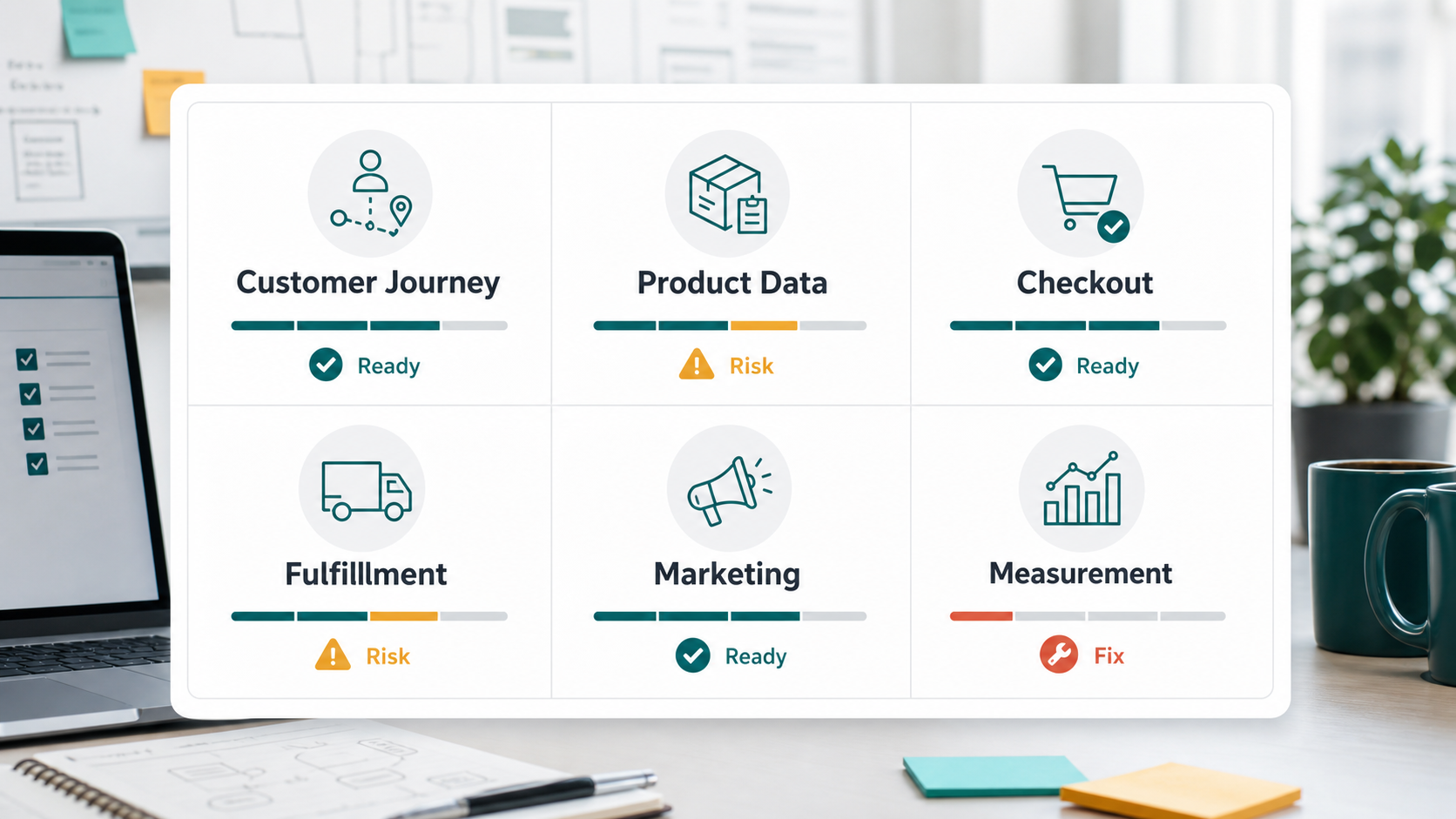
WooCommerce Migration Readiness Scorecard
Use this scorecard before scheduling launch. Any red item should have an owner and a decision before production traffic moves.
| Workstream | Green | Yellow | Red |
|---|---|---|---|
| Data | Sample and full import reconciled | Minor content gaps remain | SKU, order, or customer mismatch unresolved |
| SEO | Priority redirects and metadata validated | Low-value redirects pending | Traffic pages unmapped or crawl errors unknown |
| Checkout | All payment, tax, and shipping paths tested | Rare coupon or shipping cases pending | Failed payment, tax, or fulfillment scenarios unresolved |
| Integrations | Sync, retries, alerts, and reports tested | Manual fallback exists for one system | No owner for failed sync or missing API field |
| Launch | Freeze, rollback, support, and monitoring agreed | Monitoring owner pending | No rollback criteria or launch authority |
Common WooCommerce Migration Mistakes
- Starting with theme design before data mapping. The storefront can look correct while product types, filters, tax classes, and order history are still broken.
- Assuming plugins equal parity. Plugins help, but old business rules, marketplace behavior, and ERP workflows often need custom configuration or development.
- Redirecting too broadly. Product and category URLs with organic traffic deserve one-to-one redirect planning.
- Skipping failed-path tests. Test declined payments, out-of-stock products, refund flows, shipping exceptions, and failed integration syncs.
- Launching without operational owners. Ecommerce migration does not end at DNS. Someone must watch orders, crawl errors, support tickets, feeds, and analytics after launch.
How NextPage Helps With WooCommerce Migration Planning
NextPage can help you turn a migration idea into a scoped release plan: data audit, catalog mapping, SEO redirect planning, WooCommerce setup, custom workflow development, integration testing, launch QA, and post-launch monitoring. When migration scope includes ERP, CRM, inventory, reporting, or marketplace workflows, our custom software development team can design the integration layer instead of forcing every rule through plugins.
If your migration includes custom inventory, ERP, CRM, marketplace, subscription, loyalty, or reporting workflows, start with a risk review before committing to a launch date. If the first release still needs scope discipline, use the MVP Scope Builder to separate migration-critical workflows from later growth ideas. You can also use the custom software cost estimator to frame the integration complexity before a discovery call.