Portfolio case study

BizLedger: Business Operations And Invoicing Platform

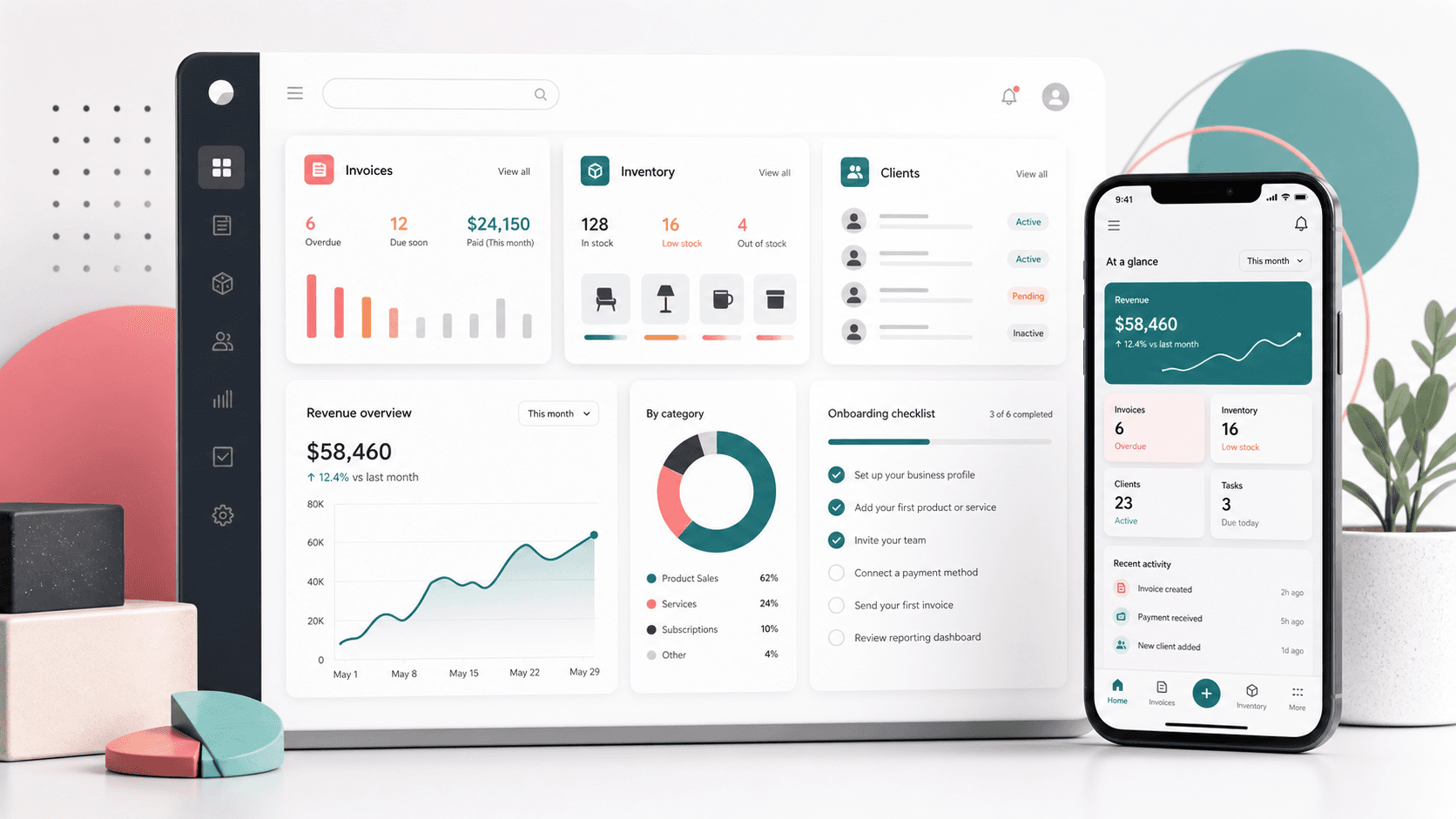
A small-business operations SaaS that brought customer records, inventory, invoicing, reporting, onboarding, pricing, and mobile acquisition flows into one focused business-management platform.

Name changed to respect NDA.

Abstract small business operations SaaS workspace with invoices, inventory, client records, dashboard metrics, onboarding, and mobile companion screens
Project scope

NextPage supported the web acquisition surface and early app onboarding experience for a business-management platform designed around daily owner, manager, and staff workflows.

2
Complementary Web Surfaces Reviewed
6+
Core Business Workflows Mapped
3
Pricing And Team Tiers Supported
Mobile
Acquisition And App Companion Path

Timeline

Marketing website and web-app onboarding review covering feature education, pricing, sign-up, login, business setup, industry profiling, and operating-dashboard direction.

The Challenge

Small businesses needed a simpler alternative to paper records, spreadsheets, separate invoice tools, and disconnected reporting.

  • Make the value proposition clear for owners who need client, inventory, invoicing, and finance workflows in one place
  • Support plan comparison for solo users, growing teams, and larger companies without creating a heavy sales journey
  • Turn sign-up into structured business setup so the app can personalize industry, currency, team-size, and payment-readiness experiences

The Solution

The product story connected a conversion-focused website with app onboarding screens that collected the business context needed to power better operations.

  • Feature-led landing pages explained customer management, inventory, invoices, dashboards, training, and support
  • Pricing flows separated starter, growth, and enterprise expectations with team, client, report, and coaching differences
  • Onboarding screens collected identity, industry, referral, currency, team size, and payment-acceptance inputs before the user reached the product dashboard

Product surfaces

What the platform brought together

The work spanned core product operations, daily user workflows, data-heavy coordination, and resilient platform management.

Client And Customer Management

A central customer record model helped business owners organize repeat customers, preferences, purchase context, and import/export needs.

  • Customer profiles
  • Purchase context
  • Import/export readiness

Inventory And Product Catalogs

Product and service records connected inventory visibility with faster invoice and receipt creation.

  • Best-selling product focus
  • Stored product lists
  • Service catalog support

Invoicing And Payment Tracking

Invoice and receipt workflows helped users send branded documents, share through common channels, and understand expected cash flow.

  • Professional invoices
  • Receipt workflows
  • Payment status visibility

Business Performance Dashboard

The dashboard direction gave owners a cleaner view of activity summaries, monthly targets, and guided improvement signals.

  • Activity summary
  • Monthly targets
  • Growth feedback

Module depth

Dedicated product blocks for the highest-value workflows

For large platforms, the conversion story depends on showing how each major module solves a specific operating problem, not only listing features.

Revenue operations

Invoices, Receipts, And Payments

The platform treated invoicing as a revenue workflow, not just a document generator, by connecting product lists, customer data, invoice sharing, and payment status.

Source evidence includes feature pages for invoicing, pricing tiers with unlimited invoicing, and app setup screens that capture payment-readiness context.

  • Create branded invoices and sales receipts from stored products and services
  • Share payment requests through email or messaging-friendly workflows
  • Track invoice and payment status so owners know what money is expected
  • Use pricing tiers to align invoicing depth with solo, growth, and enterprise use cases

Operating records

Customers, Inventory, And Business Context

The platform used customer and inventory records as the daily operating layer for small businesses that otherwise rely on notebooks or scattered spreadsheets.

Source evidence includes customer-management, product/service catalog, inventory, and dashboard sections across the public website plus setup forms for business profiling.

  • Organize client information and repeat-customer context in one place
  • Maintain product and service lists that speed up sales documentation
  • Understand which products customers buy so owners can focus stock and selling effort
  • Collect industry, currency, team-size, and referral data during onboarding

Growth path

Plan Packaging And Guided Adoption

The site and app flows helped buyers understand the right entry point while giving the product enough context to support training, coaching, support, and future dashboards.

Source evidence includes starter, growth, and enterprise plans, support/training messaging, Google sign-up, login, and multi-step business setup screens.

  • Segment solo users, growing teams, and larger companies with different user and client-record limits
  • Make training, coaching, reporting, and support part of the product promise
  • Use business setup steps to reduce blank-state friction after account creation
  • Keep mobile acquisition visible for owners who manage work on the go

Buyer priorities

What mattered most to the people evaluating the platform

Prospective buyers want to know whether the work solved real workflow, adoption, reliability, data, and operations problems. These priorities shaped the product decisions.

Reduce Tool Sprawl

The buyer needed one operating workspace for customers, stock, invoices, expenses, targets, reports, and business education.

  • Fewer spreadsheets
  • Central records
  • Shared daily context

Speed Up Adoption

New users needed simple sign-up, recognizable onboarding steps, and enough guided setup to make the first dashboard meaningful.

  • Account creation
  • Business card setup
  • Industry and team profiling

Support Growth

The product needed a clear path from solo operators to teams, coaching, audit-style reporting, and enterprise conversations.

  • Tiered pricing
  • Team roles
  • Enterprise sales path

System model

How the platform connects roles, workflows, and product surfaces

The product architecture brings every role into the same operating model, with shared data moving cleanly between web, mobile, media, and notification layers.

Small Business Operating Loop

Clients, products, invoices, reports, and coaching signals feed each other so owners can move from activity to decisions.

Platform Surface Map

The public website, onboarding app, data model, and mobile companion path work together as one product journey.

Adoption Timeline

The user path moves from discovery to plan selection, sign-up, business profiling, and daily operations.

Technology

The Stack We Used And Why

The stack section is written for buyers who need to understand the product architecture, operational trade-offs, and long-term maintainability of the system.

Web Experience

A public acquisition surface structured around SEO-friendly feature, pricing, contact, privacy, and terms routes.

Next.jsReactServer-rendered pages

App Onboarding

A web app shell for sign-up, login, business setup, profile steps, and early dashboard states.

ReactReduxReact Router

Product UI System

Reusable layout, form, card, pricing, and onboarding patterns for a lightweight SaaS interface.

SCSSBootstrapResponsive forms

Growth Channels

Acquisition and conversion pathways for owners moving from marketing education into account creation.

Google sign-inMobile app CTAPricing tiers

Business Data Model

Product-facing domain structure for customer, product/service, invoice, payment, team, and reporting workflows.

Client recordsInventory recordsInvoice records

Operational Readiness

Non-code product modules that made the SaaS feel useful for operators after first setup.

Training librarySupport flowsBusiness coaching

Keep The Public Site Fast

Server-rendered pages were a practical fit for feature education, pricing, and search-friendly acquisition.

  • Feature pages
  • Pricing page
  • Contact and legal routes

Separate Acquisition From App Work

The marketing site and app onboarding could evolve at different speeds while still sharing the same product story.

  • Website surface
  • Account setup surface
  • Dashboard direction

Use Familiar UI Patterns

Forms, pricing cards, setup steps, and dashboard panels helped small-business users recognize what to do next.

  • Plan cards
  • Stepper onboarding
  • Business profile forms

Delivery

How the product came together

The work moved from domain modeling to core platform delivery, mobile adoption, and operational hardening.

1

Map The Operating Jobs

Identify the everyday jobs small businesses need from client records and inventory to invoices, targets, and reporting.

2

Shape Acquisition Pages

Organize homepage, feature, and pricing copy around concrete business-management outcomes instead of generic SaaS claims.

3

Build Guided Onboarding

Translate sign-up into structured business setup screens that collect identity, industry, team, currency, and payment context.

4

Prepare For Daily Use

Align dashboards, support, training, plan limits, and mobile companion messaging with the operator’s repeat workflows.

Operational depth

What made the platform usable after launch

The strongest case studies are not only feature lists. They show how the system is operated, monitored, governed, and improved when real users depend on it.

Business Profile Foundation

The onboarding flow captured enough profile data to make later dashboards, invoices, and coaching more relevant.

  • Business card creation with name, company, address, country, and phone
  • Industry and referral fields for segmentation
  • Team size, currency, and payment-acceptance questions

Plan-led Expansion

Pricing tiers gave the product room to support solo users, growing teams, and large companies without rewriting the core promise.

  • Starter plan for solo users
  • Growth plan for owners, managers, and staff
  • Enterprise path for unlimited users and records

Support And Education Layer

Training, coaching, member resources, and support were treated as part of the operating experience, not only marketing copy.

  • Member-only training and resources
  • Annual business coaching promise
  • Always-available support messaging

Results

The measurable and observable lift from the work

The strongest improvements are the ones a buyer can connect to daily work: fewer disconnected tools, safer operations, clearer workflows, and more reliable product behavior.

Unified

Business Records

Customer, inventory, invoice, expense, and report concepts were presented as one operating workspace.

Guided

Onboarding

Setup screens collected business context before asking users to make sense of an empty dashboard.

Tiered

Commercial Model

Starter, growth, and enterprise packaging supported different team sizes, client volumes, reporting depth, and coaching needs.

Mobile-ready

Owner Experience

The acquisition journey kept mobile use visible for business owners managing work away from a desk.

Outcome

A stronger operating system for small business management saas

The platform reduced tool fragmentation and gave each role a clearer path from live activity to day-to-day action.

A clearer product story for small businesses that want client, inventory, invoice, payment, and report workflows in one place

A web acquisition surface that connected feature education, pricing, reviews, legal trust, and sign-up calls to action

A structured onboarding path that captured business profile, industry, referral, currency, team size, and payment-readiness data

A growth-ready packaging model that could serve solo operators, small teams, and enterprise buyers with different limits and support promises

FAQ

Frequently Asked Questions About BizLedger

Answers about the small business management saas scope, platform model, technology choices, operational workflows, and related build patterns.

What Kind Of Platform Does BizLedger Represent?

BizLedger represents a small-business management SaaS for customer records, inventory, invoicing, payments, reporting, business setup, and growth support.

Why Do Small Businesses Need A Custom Operations SaaS?

Small businesses often run on disconnected spreadsheets, paper notes, payment messages, and separate invoice tools. A focused SaaS can centralize repeat workflows and make daily decisions easier.

What Should A Similar Product Include First?

The strongest first release usually includes customer records, product/service catalogs, invoice creation, payment status, business setup, dashboard summaries, pricing limits, and support workflows.

Can This Pattern Expand Into A Larger Finance Platform?

Yes. The same foundation can expand into accounting integrations, tax-ready reports, recurring invoices, role permissions, mobile inventory updates, AI insights, and payment reconciliation.

Related services

Build a similarly ambitious product without starting from a blank page.

We can help scope the web, mobile, AI, media, and operating layers needed for your own platform.

Start a project inquiry