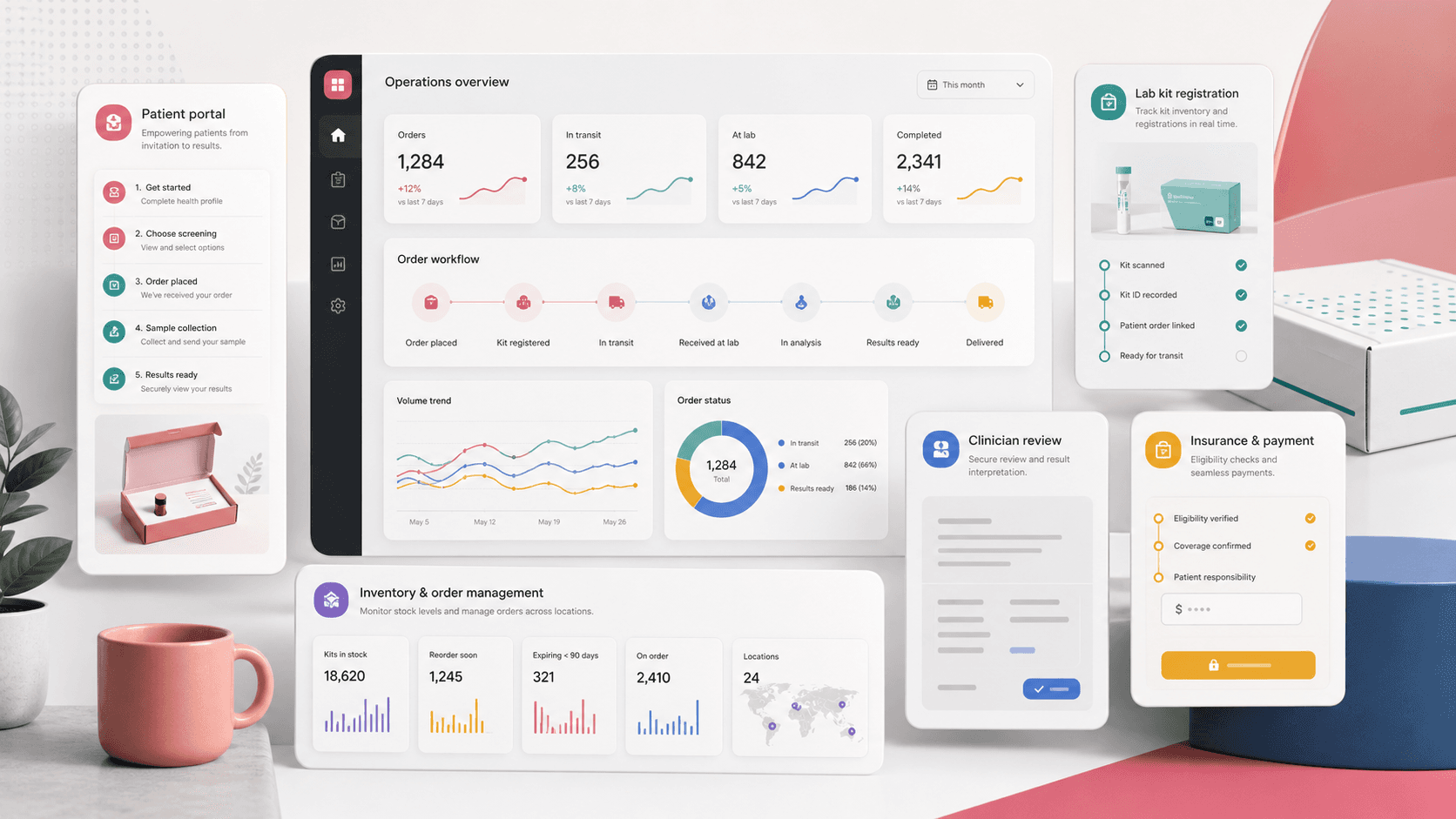
A healthcare screening operations platform that connects public test ordering, patient intake, kit registration, insurance capture, payment handling, clinician review, enterprise workflows, order operations, results, content management, and inventory support.
Product engineering across public Next.js ordering flows, React operations console, patient portal workflows, clinician and enterprise dashboards, payments, insurance capture, kit registration, content tools, and operational support screens
4
role-aware portal experiences
6
ordering and intake steps
2
connected web surfaces
CMS
pages, FAQs, snippets, and templates
Timeline
Multi-surface healthcare commerce, patient portal, and operations platform delivery
At-home screening needed one path from education to results
The product had to guide families and account holders from screening education into ordering, account setup, patient intake, insurance, payment, kit registration, shipment tracking, clinician review, and results without splitting the experience across disconnected tools.
Public users needed clear product education, eligibility context, account creation, and multi-step ordering flows
Patients, clinicians, enterprises, and administrators needed separate portals with different controls and visibility
Insurance, address validation, payment, donation, promo, and kit-code workflows had to stay attached to each order
Operations teams needed CMS, order, product, FAQ, template, testimonial, settings, inventory, and report-support tools
A screening portal with a dedicated operations console
CareKit pairs a public ordering and patient experience with an administration console so users can order and manage tests while operations teams manage orders, accounts, content, inventory, results, and support workflows.
Public pages, screening pages, learning content, registration, login, account verification, order forms, insurance intake, payment, cart, and thank-you flows
Patient portal for dashboards, accounts, orders and results, privacy, research and surveys, and profile workflows
Clinician and enterprise portals for dashboards, account management, pending approvals, orders, inventory, and organization workflows
Admin modules for users, orders, products, CMS pages, FAQs, snippets, templates, testimonials, settings, and operational reporting
Product surfaces
What the platform brought together
The work spanned core product operations, daily user workflows, data-heavy coordination, and resilient platform management.
Public screening and ordering
The public site guides users from education and account setup into a structured order journey with patient, insurance, address, kit, cart, and payment steps.
Multi-step order forms for patient details, account holder information, insurance, shipping, billing, kit codes, cart review, and confirmation
Promo code, donation, recurring-frequency, address validation, city validation, and shopping cart behavior tied to the order flow
Patient, clinician, and enterprise portals
Authenticated dashboards keep each role focused on the right patients, orders, accounts, reports, and approval queues.
Patient dashboard, accounts, orders and results, privacy, about, research, and survey flows
Clinician account management, pending approvals, order detail, inventory management, and profile settings
Enterprise dashboards, account creation, patient management, enterprise detail, and order review workflows
Order, kit, result, and insurance operations
Operational screens turn orders into trackable workflows with status labels, kit registration, report history, approvals, cancellations, insurance claims, and result sharing.
Order lists, order detail, edit forms, approval/rejection, cancellation, reissue, and pending approval flows
Kit-code validation, register-kit dialogs, tracking states, report history, generated PDFs, and result sharing
Internationalization files and content services support multilingual and reusable portal copy
Buyer priorities
What mattered most to the people evaluating the platform
Prospective buyers want to know whether the work solved real workflow, adoption, reliability, data, and operations problems. These priorities shaped the product decisions.
Trustworthy healthcare intake
Healthcare users need reassurance and clarity, especially when entering family, patient, insurance, and payment details.
Step-based order screens separate patient data, insurance, address, payment, and confirmation into manageable moments
Validation helpers and exception tooltips reduce ambiguity during sensitive intake steps
Account verification and authenticated portal routes protect follow-up access to orders and results
Role-specific operations
Administrators, clinicians, enterprises, and patients needed different dashboards without duplicating the same order data in separate systems.
Route flags and layouts separate admin, clinician, enterprise, and patient navigation
Order queues and dashboards give operational users focused views of pending and confirmed activity
At-home test workflows are judged by whether users and staff can understand exactly where an order, kit, sample, and result stand.
Status labels cover order received, kit in transit, kit registered, sample movement, and sample received states
Tracking, report history, PDF generation, and result-sharing actions connect operations with user-facing updates
Inventory and kit actions help staff recover exceptions without leaving the platform
System model
How the platform connects roles, workflows, and product surfaces
The product architecture brings every role into the same operating model, with shared data moving cleanly between web, mobile, media, and notification layers.
Ordering to results workflow
A user moves from education, account setup, patient intake, insurance, payment, kit registration, lab movement, clinician review, and results.
Public portal and operations console
The patient-facing site and internal console share the same order, account, content, and result operating model.
Role-aware healthcare operations
Patients, clinicians, enterprise users, and administrators each receive the controls that match their workflow.
Technology
The Stack We Used And Why
The stack section is written for buyers who need to understand the product architecture, operational trade-offs, and long-term maintainability of the system.
Public web and patient portal
Used for public education, authenticated user flows, account setup, order forms, cart, payment, kit registration, and patient-facing results access.
Used for dense role-aware administration across users, orders, clinicians, enterprises, products, content, settings, inventory, and reporting workflows.
Used to support order lifecycle operations, insurance capture, address validation, payment handling, file upload, kit management, and result/report actions.
The public ordering experience and the operations console needed different information density, navigation patterns, and user expectations.
Next.js supported public education, landing pages, and order flows with route-level clarity
React Router and Material UI supported dense back-office tables, sidebars, filters, and forms
Shared API service patterns kept order, user, patient, insurance, and content actions consistent across surfaces
Why Workflow State Mattered
A lab-screening order is not a single checkout event. It moves through patient intake, insurance, payment, kit handling, shipping, sample movement, review, and results.
Order process helpers let the public flow guide users through the right step sequence
Status-specific UI helped patients and staff understand the next action
Admin actions gave support teams paths for approvals, registration, claims, cancellation, and result sharing
Why CMS Tools Were Included
Healthcare screening products need ongoing copy, FAQs, templates, testimonials, and settings updates without shipping code for every content change.
Page and FAQ tools let content teams maintain education and support material
Snippet and template modules supported reusable portal messaging
Product and app-setting screens kept operational configuration close to the order system
Delivery
How the product came together
The work moved from domain modeling to core platform delivery, mobile adoption, and operational hardening.
1
Map the screening lifecycle
Define the journey from public education through account setup, patient data, insurance, payment, kit registration, sample status, and results.
2
Build the public ordering path
Create the landing, screening, signup, verification, multi-step order, cart, payment, and thank-you flows.
3
Add portal and operations control
Ship the admin, clinician, enterprise, and patient dashboards around shared order and account data.
4
Support ongoing operations
Layer in CMS pages, FAQs, templates, snippets, products, settings, inventory, reports, and result-sharing support.
Operational depth
What made the platform usable after launch
The strongest case studies are not only feature lists. They show how the system is operated, monitored, governed, and improved when real users depend on it.
Exception-aware order support
The product includes operational tools for moments when a healthcare order needs human review or correction.
Pending approval queues for clinician and enterprise users
Approve, reject, cancel, reissue, kit-register, and insurance-claim actions from order detail screens
Tracking and status messaging for order, kit, sample, and result milestones
Content and configuration ownership
Administrators can maintain product, education, and support content without turning every wording change into an engineering task.
CMS pages, FAQs, snippets, templates, testimonials, products, and settings modules
Reusable tables, pagination, filters, form controls, and notifications across admin modules
Language files and formatting helpers for consistent portal content
Healthcare intake completeness
The ordering workflow gathers the details needed to process screening orders without overwhelming users in one giant form.
Patient, address, ethnicity, gender, DOB, phone, and account-holder data capture
Shipping, billing, kit-code, promo, donation, and payment inputs connected to cart review
Results
The measurable and observable lift from the work
The strongest improvements are the ones a buyer can connect to daily work: fewer disconnected tools, safer operations, clearer workflows, and more reliable product behavior.
4 roles
Portal Coverage
Patients, clinicians, enterprises, and administrators each received role-appropriate dashboards and workflows.
6 steps
Order Journey
Patient intake, account-holder information, insurance, payment, cart, and confirmation were structured into a guided flow.
1 console
Operations Control
Orders, users, products, content, settings, inventory, templates, FAQs, and testimonials were managed from one admin surface.
Tracked
Kit And Result Lifecycle
Kit registration, shipping/status states, report history, PDF generation, and result sharing gave the platform order-level visibility.
Outcome
A stronger operating system for healthcare screening and at-home lab testing platform
The platform reduced tool fragmentation and gave each role a clearer path from live activity to day-to-day action.
A connected healthcare screening experience from public education through ordering, kit registration, and results
Role-aware dashboards for patients, clinicians, enterprises, and administrators
Operational controls for orders, approvals, insurance, products, inventory, CMS content, templates, and support
A public-safe platform pattern for healthcare commerce where trust, validation, and lifecycle visibility matter
FAQ
Frequently Asked Questions About CareKit
Answers about the healthcare screening and at-home lab testing platform scope, platform model, technology choices, operational workflows, and related build patterns.
What Kind Of Healthcare Platform Does This Case Study Represent?
It represents an at-home health screening and lab-testing operations platform with public ordering, patient intake, insurance capture, payment, kit registration, clinician and enterprise workflows, result access, and administration tools.
Why Was A Custom Platform Useful For Screening Operations?
Screening workflows combine education, eligibility, patient intake, insurance, payment, kits, shipping, approvals, lab milestones, results, and support. A custom platform keeps those steps connected instead of spreading them across forms, spreadsheets, and generic commerce tools.
Can This Pattern Support Other Diagnostic Or Wellness Programs?
Yes. The same architecture can support diagnostic kits, preventive screening, wellness programs, employer health initiatives, clinician-mediated programs, and other order-to-result healthcare workflows.
What Should A Buyer Prepare Before Building A Similar Platform?
The most useful inputs are role definitions, order status rules, intake forms, kit lifecycle states, insurance and payment requirements, content ownership needs, compliance boundaries, and examples of result and support workflows.
Related services
Build a similarly ambitious product without starting from a blank page.
We can help scope the web, mobile, AI, media, and operating layers needed for your own platform.