Portfolio case study

DayBridge: Daycare operations mobile app

A childcare operations and parent communication mobile platform that connects daycare staff, parents, child profiles, daily diaries, media galleries, alerts, messaging, classroom groups, and push notifications in one role-aware app.

Name changed to respect NDA.

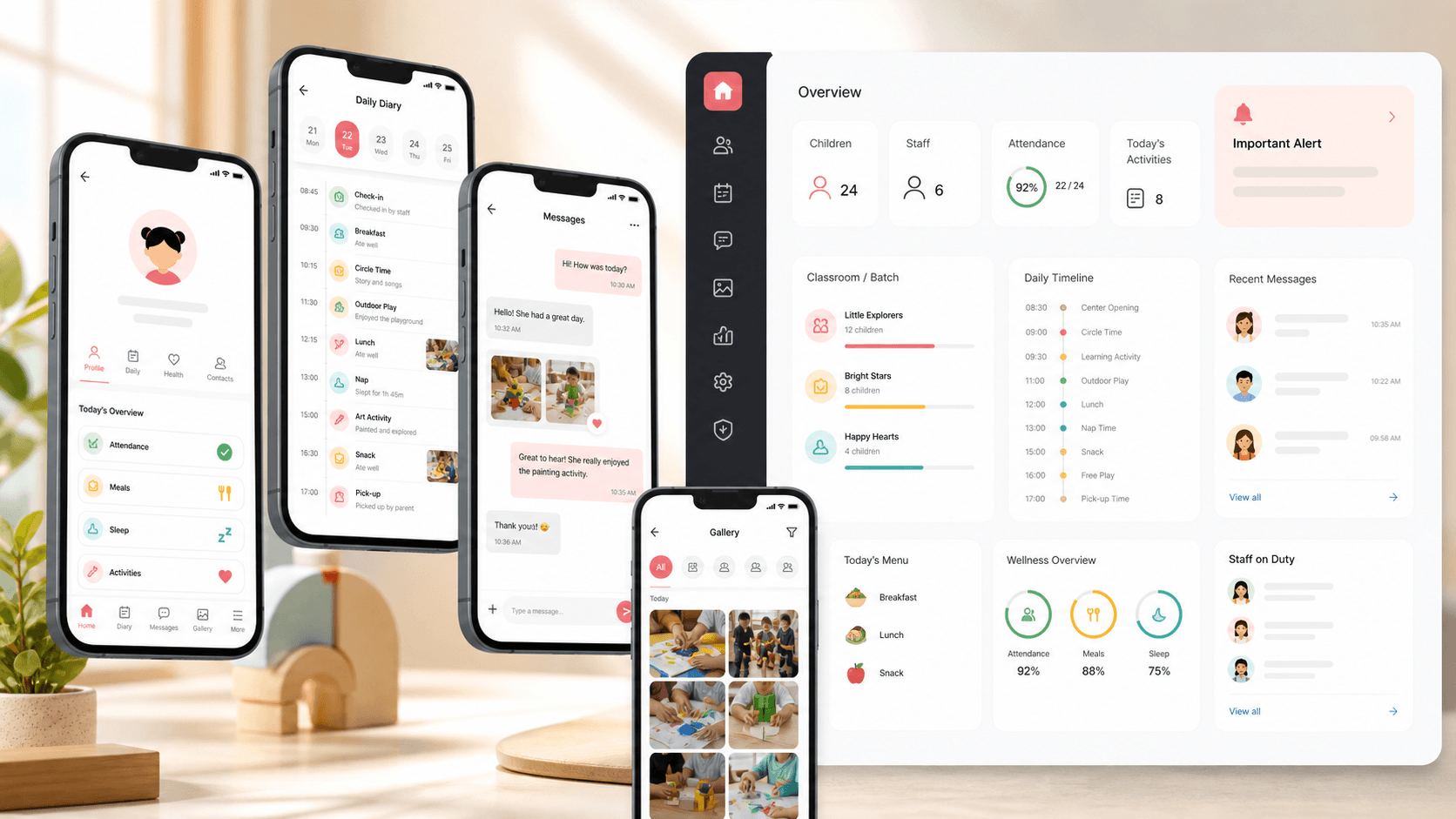
Childcare operations mobile app visual with child profile cards, diary timeline, parent staff messages, gallery tiles, alerts, and classroom roster elements
Project scope

Mobile product engineering for parent and staff workflows, child profile management, daily diary records, messaging, media sharing, alerts, multilingual UI, and notification delivery

3
role-aware experiences
Diary
daily child update workflow
Chat
parent-staff communication
Push
mobile alert delivery

Timeline

Cross-platform childcare mobile app delivery

Childcare teams needed one trusted channel for daily updates

Daycare staff and parents were coordinating child updates, photos, alerts, profile details, classroom groups, and direct messages across too many informal channels. The product needed to make daily care communication structured without making staff do extra admin work.

  • Parents needed timely visibility into daily routines, updates, photos, and staff messages
  • Staff needed fast mobile workflows for child rosters, parent links, diaries, galleries, alerts, and profiles
  • Administrators needed controls for children, parents, staff, classroom batches, and notification records
  • The app had to support multilingual labels and native-feeling iOS/Android behavior

A role-aware mobile hub for daycare communication

DayBridge gives staff, parents, and administrators focused mobile surfaces for the actions they repeat every day: child lookup, diary updates, gallery sharing, alerts, messaging, classroom grouping, and profile maintenance.

  • Staff home screens for child rosters, parent relationships, search, diary entry, gallery publishing, alerts, and messaging
  • Parent home screens for linked children, child-specific diary review, staff communication, media galleries, and notifications
  • Admin workflows for adding parents, staff, children, classroom groups, profile updates, and password changes
  • Push notification and local notification support so important updates can bring users back into the right child context

Product surfaces

What the platform brought together

The work spanned core product operations, daily user workflows, data-heavy coordination, and resilient platform management.

Child profiles and classroom groups

Staff can organize children, parents, and classrooms into a structure that makes daily care work easier to navigate.

  • Child profile creation and editing with parent relationships and profile images
  • Parent account linkage so each family sees only the children connected to them
  • Classroom and batch workflows for grouping children and assigning staff context

Daily diary workflow

Care updates are captured as structured daily records instead of loose messages that disappear in chat history.

  • Staff and parent diary surfaces for wake-up time, breakfast, absence, notes, remarks, and date-based review
  • Child-specific diary deep links so notifications can open the right record
  • Draft, save, update, and validation states that keep repeated care updates manageable on mobile

Parent-staff communication

Messaging and alerts keep family communication inside the same context as child profiles and daily care updates.

  • Thread and message workflows for parent-staff conversations
  • Alert creation, editing, notification history, and child-aware notification routing
  • Role-aware inboxes for parents and staff so each side sees the right communication surface

Media gallery and file sharing

Daycare teams can share photos and videos while keeping media connected to parent audiences and child context.

  • Gallery browsing, filtering, uploading, deletion, and media preview states
  • Camera, photo library, file transfer, and upload helpers for mobile media workflows
  • Parent gallery access so families can review shared classroom moments from the app

Buyer priorities

What mattered most to the people evaluating the platform

Prospective buyers want to know whether the work solved real workflow, adoption, reliability, data, and operations problems. These priorities shaped the product decisions.

Parent trust

Families need reassurance during the day, especially when updates involve meals, absences, notes, photos, and direct staff communication.

  • Child-specific diary entries give parents structured daily context
  • Gallery and notification flows make updates visible without relying on external chat apps
  • Linked-child access helps keep family visibility scoped and understandable

Staff speed

Care teams need mobile workflows that fit a busy classroom instead of turning every update into a desktop admin task.

  • Searchable child rosters reduce the time needed to find the right child record
  • Reusable save/update states support repeated daily diary work
  • Alerts, galleries, and messaging are reachable from role-specific mobile navigation

Operational control

Administrators need enough structure to manage parents, staff, children, groups, notifications, and profile records without exposing private family data broadly.

  • Parent-child relationships determine which child records families can access
  • Staff and admin forms support account, profile, classroom, and role management
  • Notification records and message threads give the center an auditable communication layer

System model

How the platform connects roles, workflows, and product surfaces

The product architecture brings every role into the same operating model, with shared data moving cleanly between web, mobile, media, and notification layers.

Daily care update loop

Staff updates move from child selection into diary records, notifications, parent review, and follow-up communication.

Parent, staff, and admin roles

Each role gets a focused view while sharing child, classroom, message, gallery, and notification records.

Mobile app plus communication backend

Ionic screens sit on structured API resources for children, parents, staff, diaries, galleries, messages, and alerts.

Technology

The Stack We Used And Why

The stack section is written for buyers who need to understand the product architecture, operational trade-offs, and long-term maintainability of the system.

Mobile app

Used for cross-platform iOS and Android childcare workflows with native-feeling navigation, menus, forms, alerts, loading states, and device integrations.

IonicAngularTypeScriptCordovaSCSS

Childcare records

Used to manage children, parents, staff, classrooms, diaries, galleries, alerts, notifications, and messages through structured API resources.

REST APIsContent collectionsRole filtersFile records

Communication and notifications

Used to keep families and staff aligned through direct messages, alerts, notification history, and push delivery.

OneSignalPush notificationsLocal notificationsMessage threads

Media and device features

Used for mobile gallery uploads, file transfer, profile images, camera access, and photo library integration.

Cordova CameraPhoto LibraryFile TransferMobile storage

Why Ionic And Angular

The product needed many role-specific mobile screens and a single codebase that could ship across iOS and Android.

  • Ionic provided mobile UI primitives for menus, modals, alerts, loaders, navigation, and form-heavy screens
  • Angular routing kept parent, staff, admin, profile, diary, gallery, and messaging flows organized
  • Cordova plugins gave the app access to camera, file, notification, keyboard, and platform behavior

Why Structured Childcare Records

Childcare communication depends on relationships between children, parents, staff, classrooms, dates, and media.

  • Parent-child relationship records scoped family access
  • Diary records separated parent and staff updates while preserving child and date context
  • Gallery, notification, and message records kept communication searchable and reusable

Why Push Notifications

Daycare updates are time-sensitive, so the app needed ways to bring parents back to the right screen quickly.

  • Push delivery supported alerts, diary changes, and parent-staff updates
  • Child-aware notification payloads enabled direct navigation into relevant care context
  • Notification history gave users a fallback when an alert was missed

Delivery

How the product came together

The work moved from domain modeling to core platform delivery, mobile adoption, and operational hardening.

1

Map daycare roles and records

Define how parents, staff, admins, children, classrooms, diary entries, alerts, and media relate to each other.

2

Build the mobile workflows

Create Ionic screens for login, parent home, staff home, child profiles, diaries, galleries, alerts, messaging, and profiles.

3

Connect communication paths

Wire message threads, notifications, alert records, and push delivery into parent and staff actions.

4

Prepare daily operations

Add multilingual labels, validation, loading states, media helpers, and profile management so the app works in repeat daily use.

Operational depth

What made the platform usable after launch

The strongest case studies are not only feature lists. They show how the system is operated, monitored, governed, and improved when real users depend on it.

Child-specific context

The app keeps communication anchored to the child record so updates are easier for both staff and families to understand.

  • Parent home lists linked children
  • Diary pages can open directly for a selected child
  • Parent relationships are stored separately from staff and child records

Mobile media sharing

Gallery workflows are treated as part of the communication product, not as an afterthought.

  • Staff can publish and manage shared media
  • Parents can review gallery items from a dedicated role-aware surface
  • Camera, photo library, and file-transfer plugins support native mobile upload paths

Multilingual care interface

Translation helpers let repeated labels and prompts adapt across languages used by families and staff.

  • Shared translation lookup for common interface copy
  • Role-specific pages load batches of translated labels
  • Alerts and validation copy stay consistent across the app

Results

The measurable and observable lift from the work

The strongest improvements are the ones a buyer can connect to daily work: fewer disconnected tools, safer operations, clearer workflows, and more reliable product behavior.

Role-aware

Parent And Staff Access

Parents, staff, and administrators each get mobile workflows that match their daily responsibilities.

Daily

Structured Child Updates

Diary records turn meals, absences, notes, remarks, and date-based care context into reusable child history.

Media-ready

Gallery Communication

Photo and video sharing is built into the app so families can review classroom moments without leaving the product.

Notified

Timely Mobile Follow-up

Push and local notification support helps important updates reach families and staff at the right moment.

Outcome

A stronger operating system for childcare operations and parent communication platform

The platform reduced tool fragmentation and gave each role a clearer path from live activity to day-to-day action.

A cross-platform childcare mobile app with parent, staff, and admin workflows

Structured child profiles, parent relationships, classroom groups, diary entries, gallery media, alerts, and messages

Parent-facing visibility into linked children, daily care updates, notifications, galleries, and staff communication

A mobile operations foundation that can grow into attendance, billing, richer reporting, and center-level admin analytics

FAQ

Frequently Asked Questions About DayBridge

Answers about the childcare operations and parent communication platform scope, platform model, technology choices, operational workflows, and related build patterns.

What Kind Of Product Does DayBridge Represent?

DayBridge represents a childcare operations and parent communication app for daycare teams that need child profiles, daily diaries, media sharing, alerts, messaging, classroom groups, and role-aware mobile access.

Why Does A Daycare Need Custom Mobile Software?

Childcare communication involves private family relationships, child-specific updates, daily routines, photos, alerts, and staff-parent coordination. A generic chat or spreadsheet setup cannot preserve that context cleanly.

Can This Pattern Support Larger Childcare Networks?

Yes. The same foundation can expand into attendance, billing, center dashboards, staff scheduling, parent approvals, incident reports, analytics, and multi-location operations.

What Should A Buyer Prepare Before Building A Similar App?

Useful inputs include role definitions, child profile fields, parent access rules, diary fields, notification rules, media permissions, language needs, admin workflows, and any existing childcare management system constraints.

Related services

Build a similarly ambitious product without starting from a blank page.

We can help scope the web, mobile, AI, media, and operating layers needed for your own platform.

Start a project inquiry