Portfolio case study

HeatPilot: Real-time industrial process optimization dashboard

An industrial thermal optimization dashboard that turns live process readings into operator-friendly charts, emissions visibility, efficiency signals, and AI-guided airflow recommendations.

Name changed to respect NDA.

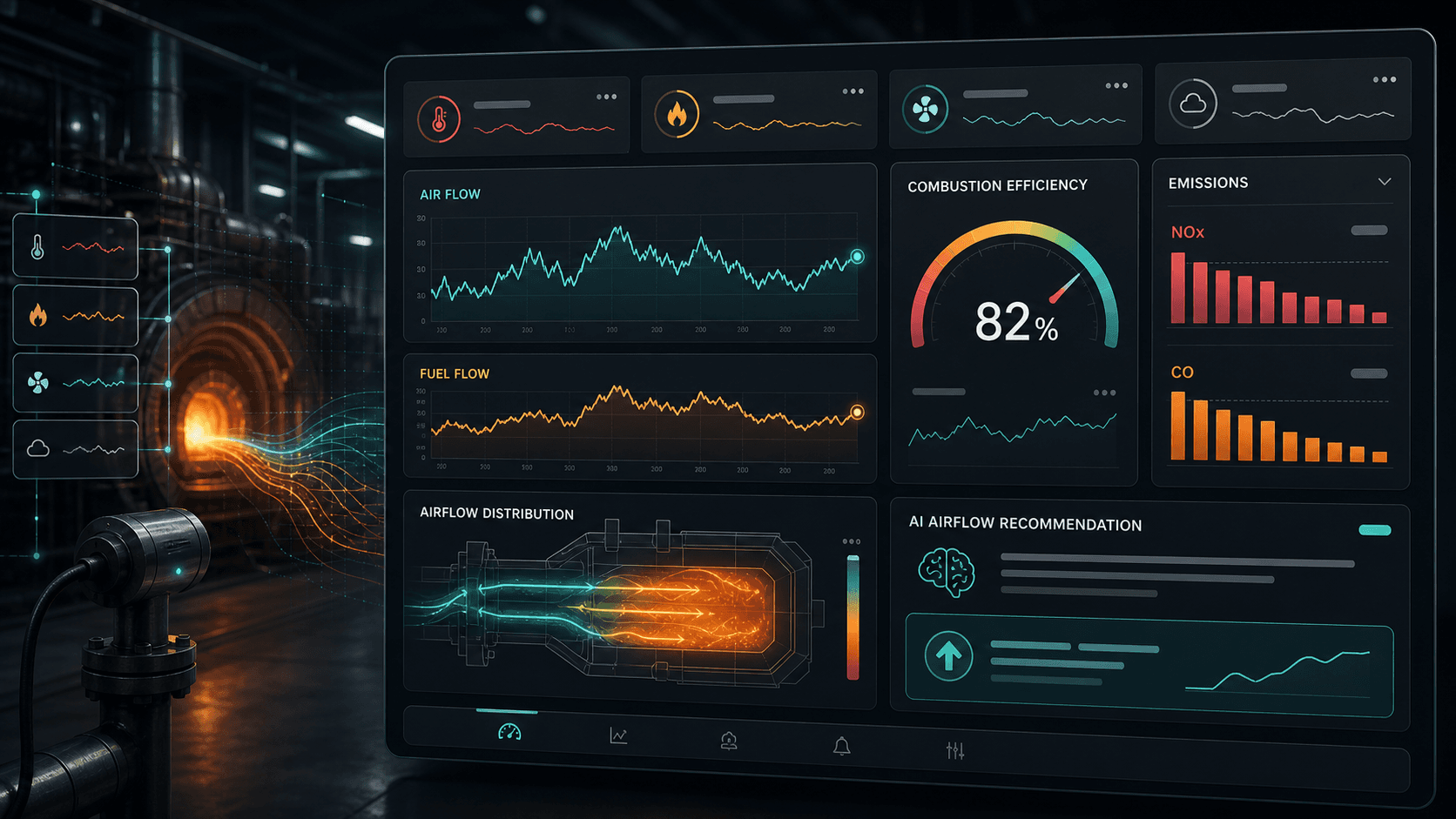
Industrial thermal optimization dashboard visual with flow charts, emissions bars, an efficiency gauge, and AI recommendation cards
Project scope

Frontend dashboard engineering, real-time visualization, CSV data integration, responsive UI, and deployment support

2s
data refresh cadence
6
operational signal groups
AI
airflow recommendation loop
PWA
deployable web dashboard

Timeline

Focused industrial analytics dashboard build

Operators needed plant data they could act on quickly

Thermal process data was valuable, but it needed to be presented as a live operating picture instead of a static spreadsheet. The dashboard had to make flow, emissions, efficiency, and control-state changes visible at a glance.

  • Air-flow and fuel-flow readings needed continuous charting rather than manual review
  • Efficiency and emissions values had to be visible in the same operator workspace
  • The interface needed a simple recommendation panel that translated readings into a suggested airflow adjustment
  • The product had to run as a lightweight browser dashboard without a heavy backend dependency

A real-time control-room view for thermal optimization

HeatPilot presents CSV-backed industrial readings as a live React dashboard with animated chart updates, emissions bars, an efficiency gauge, a cruise-control state widget, and AI recommendation messaging for airflow tuning.

  • Live line charts showed air flow and fuel flow with smooth updates every few seconds
  • Gauge and progress components made efficiency, cruise-control state, NOx, and CO values easy to scan
  • A recommendation card translated the current operating state into a suggested air-flow target
  • Login, routing, responsive behavior, and static deployment support made the dashboard practical to share and operate

Product surfaces

What the platform brought together

The work spanned core product operations, daily user workflows, data-heavy coordination, and resilient platform management.

Live process telemetry

CSV process readings were converted into a rolling stream of dashboard data so operators could watch changes over time.

  • Air flow and fuel flow line charts with continuous series updates
  • Temperature, pressure, efficiency, emissions, and recommendation values parsed from structured operating data
  • Automatic loop-back behavior when the sample stream reaches the end of the available dataset

Emissions and efficiency view

The dashboard made emissions and efficiency part of the same operating conversation as airflow and fuel flow.

  • NOx and CO values shown with proportional progress bars for fast visual scanning
  • Efficiency gauge surfaced process performance without asking operators to interpret raw rows
  • Mobile-specific chart sizing kept the operating view usable on narrower screens

AI airflow recommendation

A dedicated recommendation panel turned the current telemetry record into an explicit airflow adjustment target.

  • Recommendation and target value fields read directly from the process dataset
  • Operator-facing copy focused on a clear adjustment action rather than raw model output
  • Control-room layout kept the recommendation beside the evidence charts that justified it

Secure dashboard access and deployment

The dashboard included a simple gated entry path and static deployment structure suitable for a focused proof dashboard.

  • Login route separated dashboard access from the public entry screen
  • Hash-based routing supported static hosting and lightweight deployment
  • Service worker and manifest setup prepared the interface for installable web-app behavior

Module depth

Dedicated product blocks for the highest-value workflows

For large platforms, the conversion story depends on showing how each major module solves a specific operating problem, not only listing features.

Purpose

Make thermal optimization observable

The product gave stakeholders a single place to see how airflow, fuel flow, emissions, efficiency, and AI recommendations changed together.

Source review found chart series for air and fuel flow, parsed process readings, emissions bars, efficiency gauge logic, and recommendation values sourced from operational CSV data.

  • Replaced spreadsheet-style review with an operator dashboard
  • Kept emissions and efficiency visible during tuning decisions
  • Made the suggested airflow target prominent enough to support action

Feature depth

Real-time dashboard behavior without heavy infrastructure

The implementation focused on the fastest useful path: a React browser dashboard that could ingest structured CSV readings and animate the operating state.

The reviewed app used React, csv-to-json parsing, ApexCharts, browser timers, hash routing, and static hosting configuration.

  • Two-second refresh loop for live-feeling process updates
  • ApexCharts line and radial chart components for high-signal visualization
  • Static hosting path that avoided overbuilding the early operating dashboard

Buyer priorities

What mattered most to the people evaluating the platform

Prospective buyers want to know whether the work solved real workflow, adoption, reliability, data, and operations problems. These priorities shaped the product decisions.

Operational clarity

Industrial teams need dashboards that answer what changed, why it matters, and what action should be considered next.

  • Charts emphasized trends instead of isolated readings
  • Emissions and efficiency were framed as primary operating signals
  • The recommendation panel reduced the distance between observation and action

Lightweight rollout

The project favored a deployable web dashboard over a large platform so the team could validate the operating model quickly.

  • React and static hosting kept the delivery surface compact
  • CSV ingestion made early data integration direct and reviewable
  • Responsive sizing kept the dashboard usable beyond a single desktop monitor

AI that stays practical

The AI layer was expressed as a concrete airflow recommendation, making it easier for operators to understand what the system was suggesting.

  • Recommendations were shown beside supporting telemetry
  • Airflow targets were displayed as specific values
  • The feature supported operator decision-making instead of hiding the process behind a black box

System model

How the platform connects roles, workflows, and product surfaces

The product architecture brings every role into the same operating model, with shared data moving cleanly between web, mobile, media, and notification layers.

Telemetry to decision loop

Process readings move through ingestion, charting, emissions review, efficiency scoring, and airflow recommendation.

Operator signal map

Air flow, fuel flow, NOx, CO, efficiency, and cruise-control state stay visible as connected operating signals.

Fast proof to scalable platform

A lightweight dashboard can later expand into live sensors, API streaming, alerts, audit trails, and plant-level reporting.

Technology

The Stack We Used And Why

The stack section is written for buyers who need to understand the product architecture, operational trade-offs, and long-term maintainability of the system.

Frontend dashboard

Used to build a browser-based control-room surface with quick rendering, route separation, and responsive visual panels.

ReactJavaScriptReact RouterReact BootstrapCSS

Data ingestion

Used to convert structured process readings into chart-ready state for live dashboard playback.

CSVcsvtojsonjQuery data fetchBrowser timers

Visualization

Used to display flow trends, efficiency state, control status, and emissions readings in an operator-friendly layout.

ApexChartsLine chartsRadial gaugesProgress bars

Deployment surface

Used to keep the initial dashboard lightweight, hostable, and easy to validate without a complex server stack.

Create React AppService workerWeb app manifestStatic hosting

Why A Lightweight React Dashboard

The project needed fast visibility into industrial readings more than a large enterprise platform on day one.

  • React supported a compact stateful dashboard with clear component boundaries
  • Static hosting made the early deployment path simple and portable
  • Hash routing reduced hosting complexity for a dashboard-first product

Why CSV-Backed Playback

Structured CSV made the process data easy to inspect, replay, and convert into chart series during the proof stage.

  • The dashboard could demonstrate live behavior from a known dataset
  • Operators and stakeholders could validate readings against source rows
  • The pattern left room to replace CSV with a streaming API later

Why Recommendation-Centered AI

The AI contribution was made visible through a specific adjustment target instead of generic intelligence messaging.

  • The recommendation was tied to airflow, the operator-controlled variable
  • The target value stayed close to the telemetry that explained the decision
  • The interface avoided overwhelming users with model internals

Delivery

How the product came together

The work moved from domain modeling to core platform delivery, mobile adoption, and operational hardening.

1

Map the operating signals

Identify the core process values operators needed to see together: flow, efficiency, emissions, control state, and recommendation targets.

2

Build the live dashboard loop

Convert CSV readings into rolling chart series and timed state updates so the interface behaved like a real-time dashboard.

3

Package the decision view

Place AI recommendation output beside the evidence panels so the suggested airflow adjustment felt connected to the operating state.

4

Prepare for lightweight deployment

Add route gating, responsive chart behavior, static hosting configuration, and app-shell support for a focused rollout.

Operational depth

What made the platform usable after launch

The strongest case studies are not only feature lists. They show how the system is operated, monitored, governed, and improved when real users depend on it.

Real-time feel from structured data

The dashboard replayed process data as a rolling stream, making it useful for demos, review sessions, and early validation before deeper sensor integration.

  • Timed updates created a live operating cadence
  • Chart arrays shifted and appended values to preserve trend context
  • Loop-back behavior kept the review experience continuous

Emissions visibility beside optimization

The product treated NOx and CO as first-class operating signals, not separate compliance reports hidden outside the dashboard.

  • Emissions readings were visible on the main dashboard
  • Progress bars helped non-technical viewers scan relative intensity
  • Efficiency and emissions could be considered alongside airflow changes

Results

The measurable and observable lift from the work

The strongest improvements are the ones a buyer can connect to daily work: fewer disconnected tools, safer operations, clearer workflows, and more reliable product behavior.

Unified

Operator View

Flow trends, efficiency, emissions, control state, and recommendation output were brought into one dashboard.

Replayable

Data Model

CSV-backed readings made the dashboard easy to validate and demonstrate before connecting a production stream.

Actionable

AI Output

Recommendations were expressed as a specific airflow adjustment target instead of vague analytics language.

Outcome

A stronger operating system for industrial ai and emissions intelligence dashboard

The platform reduced tool fragmentation and gave each role a clearer path from live activity to day-to-day action.

A focused industrial analytics dashboard that made thermal process data easier to understand in real time

A cleaner operating picture across air flow, fuel flow, efficiency, emissions, and cruise-control state

An AI recommendation surface that translated process readings into a clear airflow adjustment target

A lightweight React deployment path that could support proof-stage review and later expansion into live sensor APIs

FAQ

Frequently Asked Questions About HeatPilot

Answers about the industrial ai and emissions intelligence dashboard scope, platform model, technology choices, operational workflows, and related build patterns.

What Kind Of Product Does HeatPilot Represent?

HeatPilot represents an industrial AI dashboard for thermal process monitoring, emissions visibility, efficiency tracking, and airflow optimization recommendations.

Why Use A Dashboard For Industrial Optimization?

A dashboard helps operators see process trends, emissions, efficiency, and recommended actions together, which is much easier to act on than scattered spreadsheets or delayed reports.

Can A CSV-Based Proof Become A Production System?

Yes. A proof dashboard can validate the operating model first, then evolve into live sensor ingestion, API streaming, alerts, audit logs, plant-level reporting, and role-based access.

Where Does AI Fit In A Similar Industrial Product?

AI works best when it recommends a concrete operational action, such as an airflow target, and shows that recommendation beside the telemetry that explains it.

Related services

Build a similarly ambitious product without starting from a blank page.

We can help scope the web, mobile, AI, media, and operating layers needed for your own platform.

Start a project inquiry