Portfolio case study

InkCraft: Native iOS tattoo design studio and image portfolio platform

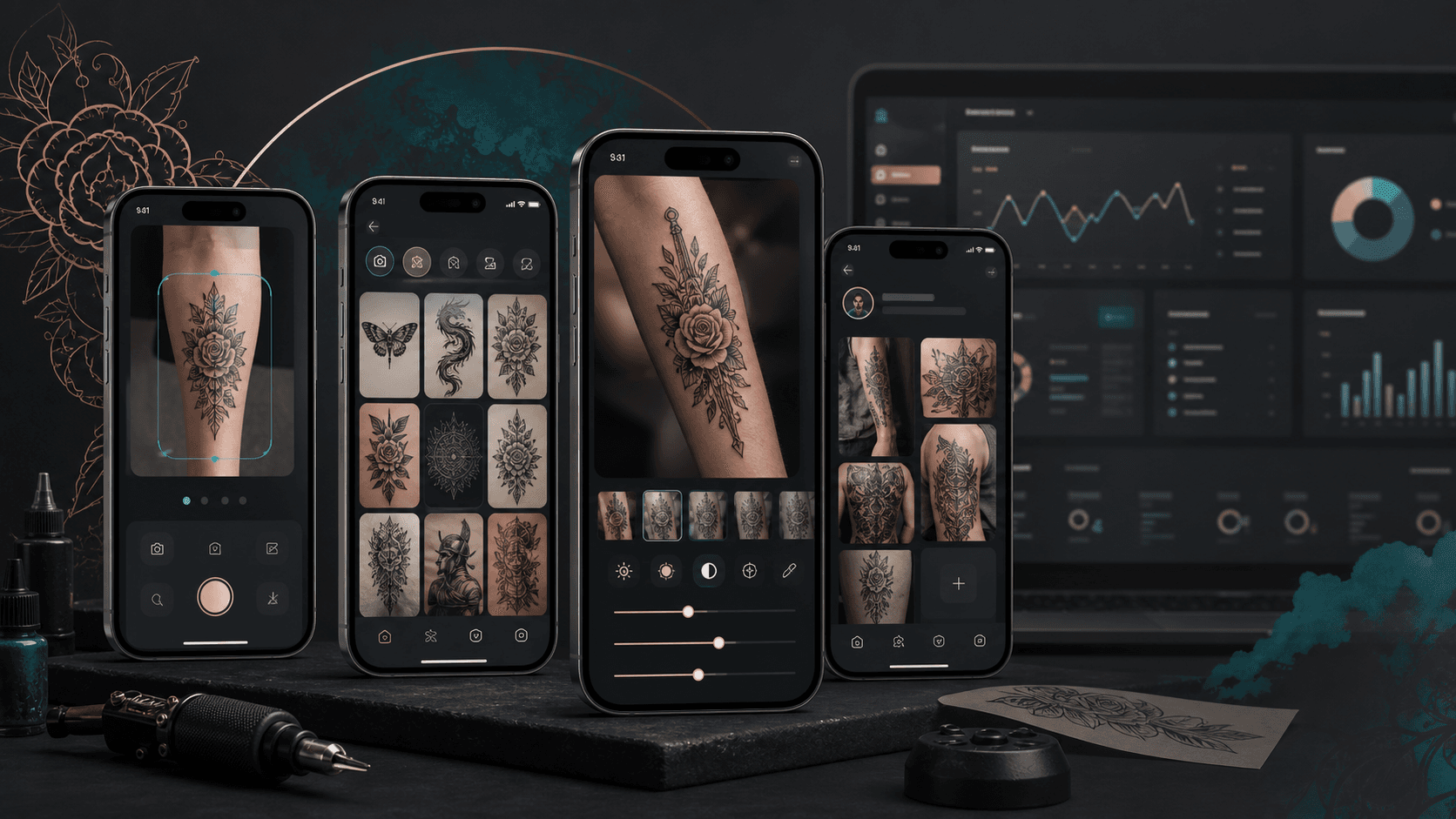
A native iOS tattoo design studio that helps users upload or capture body reference photos, browse tattoo inspiration, preview filters, adjust lighting, save edited designs, and manage a personal profile portfolio, with a React admin layer supporting operational access.

Name changed to respect NDA.

Mobile tattoo design studio visual with image upload, tattoo inspiration, lighting controls, saved designs, profile portfolio, and admin operations modules
Project scope

Native iOS app engineering, photo-editing workflows, OTP onboarding, profile portfolio management, gallery browsing, file upload integration, and React admin console support

Native iOS
mobile product surface
Core Image
filter and lighting engine
OTP
phone-based onboarding
Admin
React operations layer

Timeline

Mobile-first tattoo design app and supporting admin console delivery

Tattoo discovery needed to become interactive and personal

Users needed more than a static inspiration gallery. The app had to let them capture or upload reference photos, test visual styles, tune lighting, save versions, and return to a personal portfolio without making the experience feel technical.

  • The mobile flow needed fast onboarding before unlocking profile, settings, upload, and saved-design features
  • Image workflows had to support gallery upload, camera capture, filter previews, lighting adjustments, save actions, and sharing
  • Users needed distinct recent, saved, trending, uploaded, and profile portfolio surfaces instead of one flat image feed
  • Operations needed a separate authenticated admin surface for dashboard access and settings management

A native image studio with profile and operations support

InkCraft was shaped as a UIKit-based iOS app with storyboard-driven journeys, reusable navigation and menu views, async API clients, Core Image editing, persistent user storage, multipart uploads, and a lightweight React admin console.

  • Phone-number OTP onboarding, country-code lookup, local session storage, profile editing, logout, privacy, terms, and settings flows
  • Home discovery sections for upload or capture, recent tattoos, saved tattoos, and trending tattoo inspiration
  • Image preview, filter selection, custom lighting, brightness, contrast, gamma, shadow, save, and share workflows built around Core Image
  • React admin routing for login, protected dashboard access, settings, side navigation, and authenticated layout structure

Product surfaces

What the platform brought together

The work spanned core product operations, daily user workflows, data-heavy coordination, and resilient platform management.

Onboarding and profile portfolio

The app combines phone-based sign-in with profile details and a user-owned design portfolio.

  • OTP sign-up and login flows with country-code search and verification
  • Profile screens with user image, subscription display, edit profile actions, and personal gallery sections
  • Saved, uploaded, and generated design tabs that help users return to previous tattoo explorations

Tattoo discovery and galleries

The mobile home experience gives users multiple ways to begin and revisit design exploration.

  • Upload or capture entry points for bringing a reference photo into the editing flow
  • Recent, saved, and trending tattoo sections with view-all gallery screens
  • API-backed paginated image retrieval for saved, recent, trending, and uploaded artwork collections

Photo filters and lighting controls

The editing layer lets users preview tattoo visuals and tune image conditions before saving a version.

  • Core Image filter previews including false color, sepia, monochrome, and color adjustments
  • Custom lighting sliders for hue, saturation, exposure intensity, and gloss-style blur
  • Adjustment sliders for brightness, contrast, gamma, and shadow controls with save and share actions

Admin and operating layer

The companion admin surface supports authenticated operational access without becoming the public product story.

  • React Router based login, protected routes, private layout, dashboard, and settings screens
  • Sidebar navigation with dashboard, settings, and logout actions
  • A separate operational foundation that can grow into content, moderation, user, subscription, and gallery management

Buyer priorities

What mattered most to the people evaluating the platform

Prospective buyers want to know whether the work solved real workflow, adoption, reliability, data, and operations problems. These priorities shaped the product decisions.

A visual-first mobile experience

Tattoo decisions are emotional and visual, so the product needed to make image experimentation feel immediate on a phone.

  • Upload and capture actions sit at the start of the home workflow
  • Filter and lighting controls make the app feel like a design studio rather than a static catalog
  • Saved and profile galleries create a reason to return after the first edit

Low-friction account access

Phone OTP onboarding keeps the app approachable while still allowing personal galleries and profile data to persist.

  • Country-code lookup supports international phone entry
  • Verified sessions unlock profile, settings, uploads, and saved design workflows
  • Local user storage keeps navigation and authenticated API calls consistent across the app

Operational runway

The React admin surface gives the product a foundation for managing users, content, categories, subscriptions, and moderation as the app grows.

  • Protected admin routing separates public mobile use from operational access
  • Dashboard and settings screens establish the base shell for future management modules
  • The admin layer supports business operations without exposing private tools to mobile users

System model

How the platform connects roles, workflows, and product surfaces

The product architecture brings every role into the same operating model, with shared data moving cleanly between web, mobile, media, and notification layers.

Upload to edited design workflow

Users move from capture or upload into filter preview, lighting adjustment, save, share, and profile portfolio review.

Mobile and admin platform layers

The iOS app handles discovery and editing while the admin layer supports authenticated operational control.

User and operator roles

Tattoo explorers, returning users, admins, and support teams each interact with different parts of the product.

Technology

The Stack We Used And Why

The stack section is written for buyers who need to understand the product architecture, operational trade-offs, and long-term maintainability of the system.

Mobile app

Used for the primary user-facing tattoo design, profile, image editing, settings, and gallery experience.

SwiftUIKitStoryboardsCore ImageCore Data model structure

Image and media workflows

Used for loading remote artwork, previewing filters, tuning lighting, uploading edited images, and keeping the editing experience responsive.

Core Image filtersCIContextSDWebImageMultipartFormSVProgressHUD

Backend integration

Used for OTP flows, country-code lookup, user profile persistence, authenticated file uploads, and paginated image galleries.

REST APIsAsync/await networkingToken headersMultipart uploadsLocal storage

Admin console

Used for authenticated operational access, dashboard structure, settings, protected routing, and future management workflows.

ReactTypeScriptReact RouterSassReact Icons

Why Native iOS For The Studio Experience

The product centers on camera, gallery, image processing, and tactile sliders, making native iOS a strong fit for responsive editing and system-integrated media flows.

  • UIKit and Storyboards supported detailed mobile screen composition and navigation
  • Core Image provided a device-native foundation for filters and lighting adjustments
  • Native upload and local storage patterns kept authenticated media workflows close to the platform

Why A Separate Admin Console

The mobile app needed to remain focused on users, while the business needed an operating surface that could expand independently.

  • Protected React routes created a clean admin-only entry point
  • Dashboard and settings modules gave operations a starting point without crowding the app
  • The separation leaves room for moderation, content management, subscriptions, and analytics

Delivery

How the product came together

The work moved from domain modeling to core platform delivery, mobile adoption, and operational hardening.

1

Define the mobile journey

Map onboarding, home discovery, image upload, editing, profile, settings, and legal screens into a cohesive native app flow.

2

Build image experimentation

Implement filter previews, custom lighting controls, adjustment sliders, save actions, and share-ready edited outputs.

3

Connect API-backed galleries

Wire file uploads, paginated image retrieval, authenticated headers, and local session storage around the mobile experience.

4

Add admin foundations

Create the protected React admin shell for dashboard, settings, navigation, and future operations modules.

Operational depth

What made the platform usable after launch

The strongest case studies are not only feature lists. They show how the system is operated, monitored, governed, and improved when real users depend on it.

Media workflow continuity

The app keeps upload, edit, save, and profile review connected so users do not lose context between inspiration and final saved designs.

  • Image upload and capture feed directly into preview and edit flows
  • Saved artwork can be retrieved through profile and view-all gallery screens
  • Loading and toast components keep long-running media actions understandable

Reusable mobile UI components

Custom navigation, side menu, image button, image-label, slider, loader, and toast views reduced repeated UIKit work across screens.

  • Shared navigation and menu components support home, profile, and settings flows
  • Reusable collection and table cells support gallery, settings, and profile surfaces
  • Custom slider and image controls keep editing interactions consistent

Expansion-ready operations

The admin console starts with protected access and core navigation, giving the product room to grow beyond the mobile experience.

  • Authenticated admin routes separate operator actions from user-facing screens
  • Dashboard and settings routes establish the base for management workflows
  • The React shell can absorb moderation, analytics, subscriptions, and content controls later

Results

The measurable and observable lift from the work

The strongest improvements are the ones a buyer can connect to daily work: fewer disconnected tools, safer operations, clearer workflows, and more reliable product behavior.

Multi-surface

Product Coverage

The project combined a native iOS design studio with a supporting React admin operations shell.

Image-first

User Workflow

Upload, capture, filters, lighting controls, save, share, and profile galleries supported the core tattoo exploration loop.

Account aware

Personalization

OTP login, profile editing, local session storage, and authenticated API calls made saved portfolios possible.

API backed

Media Operations

Multipart uploads and paginated gallery reads created a foundation for cloud-backed tattoo image collections.

Outcome

A stronger operating system for mobile tattoo design and profile portfolio app

The platform reduced tool fragmentation and gave each role a clearer path from live activity to day-to-day action.

A native iOS tattoo design studio with OTP onboarding, profile editing, settings, privacy, terms, and authenticated user storage

A mobile home experience for upload or capture, recent tattoo designs, saved artwork, and trending inspiration galleries

Core Image powered filters, custom lighting controls, brightness, contrast, gamma, shadow adjustment, save, and share workflows

A React/TypeScript admin shell with login, protected dashboard routing, settings, sidebar navigation, and room for operational modules

FAQ

Frequently Asked Questions About InkCraft

Answers about the mobile tattoo design and profile portfolio app scope, platform model, technology choices, operational workflows, and related build patterns.

What Kind Of App Does InkCraft Represent?

InkCraft represents a native iOS tattoo design studio where users can upload or capture images, browse tattoo inspiration, apply filters, adjust lighting, save edited designs, and manage a personal profile portfolio.

Why Does A Tattoo Design App Need Image Editing?

Tattoo choices depend on placement, lighting, skin tone, contrast, and personal style. Image editing helps users visualize designs in context before committing to a saved idea or consultation.

How Does The Admin Layer Support The Mobile Product?

The admin layer provides an authenticated operational surface that can support dashboards, settings, content management, moderation, subscription controls, and image library operations as the product grows.

Can This Pattern Support Other Visual Commerce Apps?

Yes. The same pattern can support beauty try-on apps, fashion personalization, interior styling, creator portfolios, custom merchandise previews, and other image-led mobile products.

Related services

Build a similarly ambitious product without starting from a blank page.

We can help scope the web, mobile, AI, media, and operating layers needed for your own platform.

Start a project inquiry