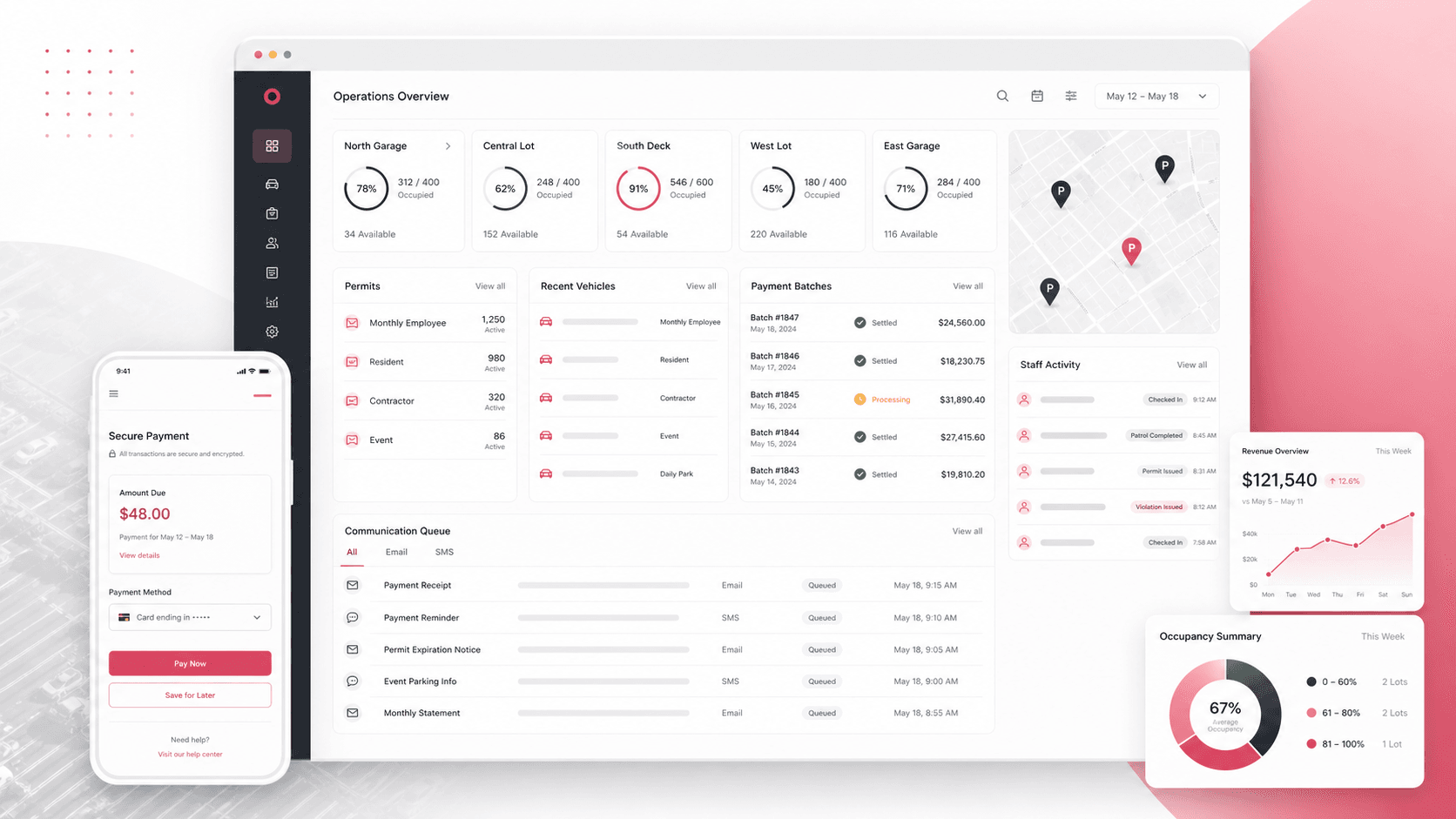
LotPilot: Parking operations and permit management platform
A parking operations platform that brings customer accounts, lot inventory, permits, vehicle records, payment links, recurring batches, staff check-ins, communications, and reporting into one role-aware web system.
Legacy web application engineering across ASP.NET Web Forms, VB.NET operations workflows, Entity Framework data models, payment processing, messaging queues, reporting, and staff administration
7
core operations areas
2
payment paths
Role
permission-aware admin access
Map
lot and check-in context
Timeline
Multi-module parking operations platform modernization and production support
Parking operations depended on too many fragile back-office steps
Parking teams needed a dependable operating layer for customer records, monthly lots, access cards, permits, payments, waiting lists, staff work, communications, and financial reports without forcing administrators to reconcile disconnected spreadsheets and payment tools.
Customer, vehicle, permit, employer, lot, and access-card records needed to stay searchable from one workspace
Staff needed role-specific access to admin, reporting, tools, and field check-in workflows
Managers needed lot utilization, availability, waiting list, payment, revenue, and customer-longevity reporting
A web operations hub for lots, parkers, payments, and staff
LotPilot centralizes the daily parking business around ASP.NET Web Forms screens, Entity Framework models, SQL-backed reports, payment actions, messaging queues, and permission-aware admin navigation.
Lot definitions, spaces, amenities, rules, local permits, event/daily/monthly parking modes, occupancy counts, and map-backed context
Payment links, manual card payments, recurring batches, ACH summaries, declined-payment handling, credits, and payment analysis reports
Email and SMS queues, templates, authorized senders, summary emails, customer messages, staff directory, check-ins, logs, and role permissions
Product surfaces
What the platform brought together
The work spanned core product operations, daily user workflows, data-heavy coordination, and resilient platform management.
Customer and vehicle operations
Administrators can search, update, and audit the parker record from one operational screen.
Customer search by name, employer, lot, permit, access number, control number, email, license plate, billing type, card expiry, and phone
Customer notes, attachments, flags, cars, colors, vehicle tags, permits, access cards, payment history, and status transitions
Pre-cancelled, active, inactive, waiting list, invoice, credit-card, and customer-year views for day-to-day account management
Lot inventory and permit control
Parking inventory is modeled as lots, spaces, permits, amenities, rules, occupancy status, and public registration settings.
Lot definitions cover spaces, assigned spaces, rates, notes, card fees, rules, manager email, capacity, status, and access-card replacement fees
Lot spaces can be added, assigned, edited, removed, and reviewed with customer context
Custom lot registration, web access codes, permit designators, lot images, map previews, and local/daily/event/monthly modes support varied parking programs
Payments and billing operations
The platform supports both customer-facing payment links and staff-run recurring payment workflows.
Public payment link flow for card entry, transaction processing, receipt display, and account-note updates
Batch creation, scheduled payment batches, batch item status, decline counts, accepted/declined amount reporting, ACH summaries, and monthly billing tools
Payment reasons, billing types, transaction types, credit-card info, check-draft info, credits, account receivable, late payment, and payment analysis reports
Communications, staff, and controls
Operational communication, access control, and staff activity are handled inside the same back-office system.
Email templates, pending/sent email counts, authorized senders, customer email actions, summary emails, mail attachments, and email service processing
Pending and sent SMS records, text parker registrations, text transactions, enforcement devices, and customer-facing message workflows
System users, user access rights, ACL checks, login logs, IP allow/block management, staff directory, staff check-ins, system logs, and web logs
Buyer priorities
What mattered most to the people evaluating the platform
Prospective buyers want to know whether the work solved real workflow, adoption, reliability, data, and operations problems. These priorities shaped the product decisions.
Operational continuity
Parking businesses often run on long-lived systems, so the product needed to preserve known workflows while bringing critical operations into a manageable web workspace.
ASP.NET Web Forms preserved a familiar admin pattern while expanding searchable operations
Entity Framework and SQL-backed procedures kept legacy operational data connected to screens and reports
Role-aware navigation allowed staff to use the tools they needed without exposing every admin surface
Revenue assurance
Billing and collections workflows needed enough structure to catch declined payments, credits, late accounts, and batch outcomes quickly.
Batch summaries separated pending, accepted, declined, and failed payment states
Reports surfaced account receivable, late payments, credits, declined payments, and payment analysis
Manual payment links gave teams a way to request and record targeted customer payments
Lot-level control
Operators needed to understand availability, capacity, assigned spaces, rules, permits, and customer context at the lot level.
Lot definitions included capacity, active status, permit settings, rates, rules, amenities, and access-card fees
Lot spaces connected physical inventory to customer assignments
Lot utilization, availability, permit-lot, reserved-parking, and revenue reports supported management decisions
System model
How the platform connects roles, workflows, and product surfaces
The product architecture brings every role into the same operating model, with shared data moving cleanly between web, mobile, media, and notification layers.
Parker account to payment workflow
Customer records connect vehicles, permits, lots, notes, payment links, and payment history in one operating loop.
Lot operations platform layers
Admin screens, SQL data, payment processing, messaging queues, reports, and maps work together as one parking operations hub.
Role-aware operations
Admins, finance users, staff, managers, and field team members each work through permission-aware surfaces.
Technology
The Stack We Used And Why
The stack section is written for buyers who need to understand the product architecture, operational trade-offs, and long-term maintainability of the system.
Web operations app
Used for role-aware administration, customer management, lot control, billing workflows, reporting, and staff tools.
ASP.NET Web FormsVB.NETAdminLTEBootstrapjQueryDataTables
Data and reporting
Used to connect operational screens to parking records, customer views, payment history, lot inventory, and reports.
SQL views and stored procedures supported specialized reporting and customer search workflows
Dedicated report pages helped managers review utilization, availability, payments, waiting lists, and customer status
Why Payment Workflows Are First-Class
Revenue operations are central to monthly parking, so payment links, batches, ACH, declined items, and credits needed product treatment.
Customer payment links connected payment collection to account notes and receipts
Batch models tracked scheduled transactions, totals, statuses, and decline reasons
Payment reports gave teams operational visibility instead of leaving collections in processor exports
Delivery
How the product came together
The work moved from domain modeling to core platform delivery, mobile adoption, and operational hardening.
1
Map the operating model
Separate the core parking entities before shaping screens: customers, lots, spaces, cars, permits, employers, payments, users, reports, and communication.
2
Build the admin workflows
Create searchable screens for parker records, lot definitions, permits, employers, system users, payment reasons, and configuration.
3
Connect revenue operations
Tie payment links, manual card transactions, recurring batches, ACH tools, and declined-payment reporting back to customer records.
4
Operationalize communication and oversight
Add email templates, SMS queues, staff tools, check-ins, system logs, IP controls, and reporting pages for daily management.
Operational depth
What made the platform usable after launch
The strongest case studies are not only feature lists. They show how the system is operated, monitored, governed, and improved when real users depend on it.
Search is shaped around real parking questions
Operators can look up customers by the identifiers they actually have during support, billing, or lot management work.
Search includes lot, employer, permit, access number, control number, license plate, email, billing type, card expiry, and phone
Previous searches are remembered so staff can return from detail pages without rebuilding filters
Customer counts expose active, pre-cancelled, temporary permit, pending email, pending text, sent email, and sent text status
Lot setup handles more than simple capacity
The lot model supports operational exceptions, permit behavior, registration settings, and accounting context.
Lot setup includes standard rate, card fee, total capacity, QuickBooks class code, daily rate, sold-out state, and permit type
Operators can manage rules, internal notes, amenities, spaces, and customer assignments
Custom lot registration and web access codes support public-facing registration paths
Reports close the loop for managers
Dedicated reports turn daily transactions and account states into management views.
Reports cover temporary permits, lot performance, cancelled customers, payment analysis, lot utilization, customer longevity, late payments, declined payments, availability, reserved parking, waiting lists, credits, and accounts receivable
Batch reports separate accepted and declined totals for payment follow-up
Historical and charge-analysis reports support longer-term operational review
Results
The measurable and observable lift from the work
The strongest improvements are the ones a buyer can connect to daily work: fewer disconnected tools, safer operations, clearer workflows, and more reliable product behavior.
Unified
Parking Operations Workspace
Customer, lot, vehicle, permit, payment, staff, and reporting workflows are managed from the same web platform.
Revenue-ready
Billing Controls
Payment links, recurring batches, ACH summaries, declines, credits, and reports help teams keep collections visible.
Role-aware
Staff Access
Navigation and page access align admin, tools, reporting, lot, employer, and system-user capabilities with permissions.
Report-rich
Management Visibility
The platform includes operational reports across lot use, availability, payments, waiting lists, customers, and account receivables.
Outcome
A stronger operating system for parking operations and permit management platform
The platform reduced tool fragmentation and gave each role a clearer path from live activity to day-to-day action.
A legacy-compatible parking operations platform for managing customers, lots, spaces, permits, vehicles, employers, access cards, notes, and documents
A revenue operations layer covering payment links, manual card payments, monthly billing, ACH summaries, payment batches, declines, credits, and reports
A staff and controls layer with role permissions, system users, staff directory, check-ins, IP controls, system logs, email templates, email queues, and SMS queues
A public-safe portfolio page that positions the work as a complete parking operations platform without exposing real project names, production domains, credentials, source screenshots, or private identifiers
FAQ
Frequently Asked Questions About LotPilot
Answers about the parking operations and permit management platform scope, platform model, technology choices, operational workflows, and related build patterns.
What Kind Of Platform Does LotPilot Represent?
LotPilot represents a parking operations and permit management platform for customer records, lots, permits, vehicles, recurring billing, payment links, reports, staff access, and communications.
Why Does Parking Operations Need Custom Software?
Parking teams often need to connect physical lot inventory, monthly customer accounts, permits, vehicle tags, access cards, payment exceptions, waiting lists, and staff workflows in ways generic CRM or payment tools do not support.
Can This Pattern Support Legacy Modernization?
Yes. The same approach can stabilize and extend long-running ASP.NET, SQL Server, or Web Forms systems while preserving the operational workflows staff rely on.
What Should A Buyer Prepare Before Building A Similar Product?
Useful inputs include lot structures, permit rules, billing cycles, payment processor needs, customer identifiers, reporting requirements, staff roles, communication templates, and any existing legacy data model.
Related services
Build a similarly ambitious product without starting from a blank page.
We can help scope the web, mobile, AI, media, and operating layers needed for your own platform.