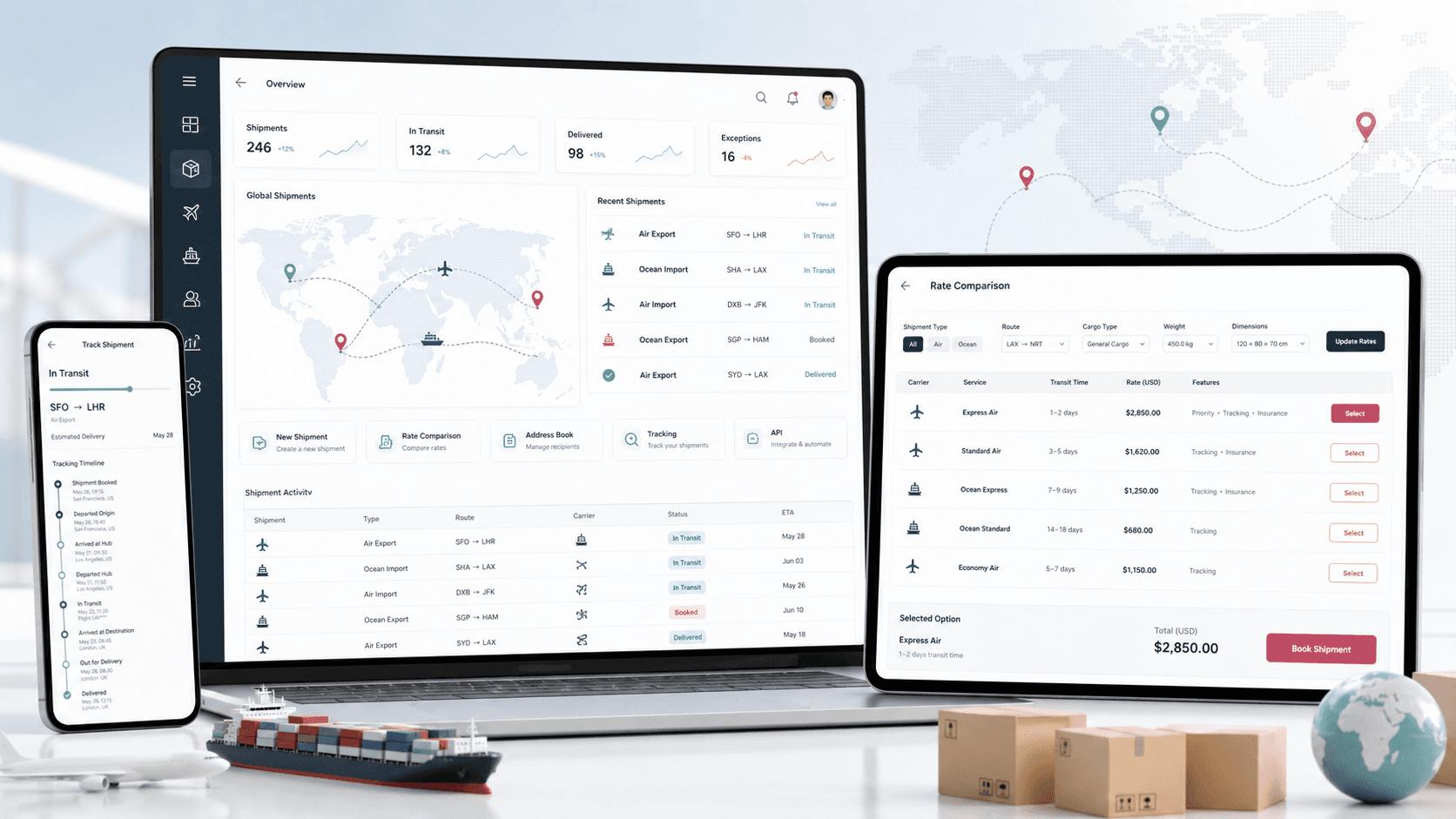
A logistics web platform that helps customers compare international shipping options, start air and ocean shipments, manage addresses, submit package details, and track carrier delivery status from one branded portal.
Customer portal, shipment workflow, carrier tracking API, address book, and Node.js operations API delivery
2
shipping modes
3
carrier tracking paths
1
customer shipping portal
API
operations and carrier layer
Timeline
Customer shipping portal and supporting logistics API build
International shipping needed a simpler customer workflow
Customers needed to compare shipping options, prepare shipment details, reuse recipient information, and check delivery progress without bouncing between manual support, carrier portals, and disconnected forms.
Air and ocean shipment intake required structured package dimensions and destination details
Customers needed saved sender, recipient, and address records for repeat shipments
Delivery visibility depended on carrier-specific tracking logic
Support teams needed contact, email, and API workflows around the customer portal
A branded web portal for quoting, booking, and tracking shipments
ParcelBridge brings customer registration, login, shipment mode selection, package details, sender/recipient forms, saved addresses, recipient books, order tracking, and carrier status lookups into one logistics experience.
Homepage and account flows guide users into air shipping, ocean shipping, tracking, help, and pricing paths
Shipment forms collect package type, dimensions, units, ship-from details, and ship-to details before confirmation
Address book and recipient book workflows reduce repeated entry for returning customers
Tracking screens combine order lookup with carrier status checks and a visual delivery timeline
Product surfaces
What the platform brought together
The work spanned core product operations, daily user workflows, data-heavy coordination, and resilient platform management.
Rate comparison and shipment intake
Customers start with shipping mode selection and package details before entering complete origin and destination information.
Air and ocean shipping flows with package rows, dimensions, quantity units, and validation
Ship-from and ship-to sections for names, phone numbers, addresses, countries, states, cities, ZIP codes, and email
Confirmation and thank-you steps that help convert quote intent into shipment requests
Customer account and reusable address data
The portal supports returning users with login, registration, saved addresses, recipient records, and profile-adjacent account actions.
Signup, login, password recovery, and session-aware navigation states
Saved address create, edit, delete, and list workflows for repeat shipment preparation
Recipient book patterns designed to reduce manual data entry for frequent shippers
Carrier tracking and delivery visibility
Order lookup connects to carrier tracking logic so customers can see shipment status without leaving the portal.
Order-number lookup connected to shipping service and tracking number data
Carrier-specific tracking paths for major parcel networks
Delivery status normalization and a customer-facing progress timeline
Operations API and support layer
A Node.js API supports carrier calls, contact mail, reference data, and operational helper endpoints behind the public experience.
Express API layer for version checks, shipment services, contact email, and reference lookups
Country, state, city, bank, and credit-union style lookup patterns that show the platform was built for searchable operational data
Email and support workflows that keep customer communication attached to the portal
Buyer priorities
What mattered most to the people evaluating the platform
Prospective buyers want to know whether the work solved real workflow, adoption, reliability, data, and operations problems. These priorities shaped the product decisions.
Conversion-focused shipping flow
The experience needed to keep customers moving from shipping intent to a complete request without forcing them into a support queue.
Mode-specific forms make air and ocean shipment paths easy to understand
Package rows support multi-item shipment preparation
Validation and confirmation steps reduce incomplete shipment submissions
Repeat customer efficiency
Saved address and recipient workflows matter because shipping customers often reuse the same people, locations, and contact details.
Address book workflows reduce repetitive form entry
Recipient records support faster checkout-style shipment creation
Login-aware navigation keeps account tools close to shipment actions
Carrier visibility inside the brand experience
Tracking needed to feel like part of the shipping platform, not a handoff to scattered carrier pages.
Carrier lookups are abstracted behind one tracking screen
Delivery states are normalized into readable customer status labels
The timeline view gives customers a clear mental model of shipment progress
System model
How the platform connects roles, workflows, and product surfaces
The product architecture brings every role into the same operating model, with shared data moving cleanly between web, mobile, media, and notification layers.
Shipment request workflow
Customers move from mode selection to package details, address entry, confirmation, and support follow-up.
Customer and operations platform
The customer portal, API layer, and carrier integrations work together to keep shipment requests and tracking in one experience.
Repeat shipping roles
Customers, senders, recipients, support users, and carrier services each interact with a different part of the logistics workflow.
Technology
The Stack We Used And Why
The stack section is written for buyers who need to understand the product architecture, operational trade-offs, and long-term maintainability of the system.
Customer web portal
Used for the branded customer experience across shipment forms, account flows, reusable address data, tracking, and support pages.
ReactReact RouterReduxRedux FormBootstrapjQuery
Operations API
Used to support carrier tracking, email workflows, reference data, and service endpoints behind the customer portal.
Node.jsExpressREST APIsSequelizeMySQL
Logistics integrations
Used to connect parcel status and tracking behavior into a single customer-facing delivery workflow.
Used for help, contact, password recovery, and shipment-support communication around customer requests.
NodemailerTransactional emailContact forms
Why A React Portal
The shipping flow needed multiple customer routes, reusable form state, and account-aware navigation while remaining easy to update.
React Router supported separate paths for shipping modes, tracking, account, help, and support
Redux Form kept multi-step shipment and address data manageable across screens
Reusable form controls helped standardize validation and dropdown-heavy logistics inputs
Why A Node API
Carrier lookups, reference data, and email workflows fit naturally behind a lightweight service layer.
Express endpoints isolated carrier-specific tracking logic from the browser UI
Sequelize and relational storage patterns supported operational lookup data
Email handling kept contact and support actions connected to shipment workflows
Delivery
How the product came together
The work moved from domain modeling to core platform delivery, mobile adoption, and operational hardening.
1
Map customer shipping paths
Define how visitors compare shipping modes, start a shipment, enter package details, and continue into account or support flows.
2
Build reusable form foundations
Create shared field, dropdown, validation, and form-state patterns for address-heavy shipment workflows.
3
Connect account and address workflows
Add login, signup, saved addresses, recipient books, and session-aware navigation around the shipping journey.
4
Add tracking and support services
Connect carrier status lookup, delivery state display, contact email, and operational API endpoints behind the web portal.
Operational depth
What made the platform usable after launch
The strongest case studies are not only feature lists. They show how the system is operated, monitored, governed, and improved when real users depend on it.
Shipment forms handle real logistics detail
The platform does more than capture a contact form; it collects package and route information that support staff can act on.
Package dimensions and unit selection support structured shipment requests
Separate origin and destination sections reduce ambiguity for international shipments
Repeatable package rows support more complex shipment preparation
Tracking is normalized for customers
Carrier response differences are translated into readable status states that customers can understand quickly.
Order lookup determines the carrier and tracking number context
Carrier-specific integrations feed one customer-facing tracking view
Delivered, pending, and provider-specific states are surfaced in a consistent interface
The account layer supports retention
Saved addresses, recipient books, login states, and shipment history-style navigation make the portal useful after the first shipment.
Returning customers can reuse contact and destination data
Account navigation keeps shipment tools visible after login
Support and help routes remain close to conversion paths
Results
The measurable and observable lift from the work
The strongest improvements are the ones a buyer can connect to daily work: fewer disconnected tools, safer operations, clearer workflows, and more reliable product behavior.
Air + ocean
Shipping Modes
Customers can choose separate air and ocean shipment paths while staying inside the same portal.
Address-led
Repeat Workflows
Saved address and recipient flows help frequent shippers prepare requests faster.
Carrier-aware
Tracking Layer
Carrier-specific status checks are wrapped in one branded delivery tracking experience.
API-backed
Operations Foundation
Node.js services support carrier calls, support email, reference data, and customer-facing workflow endpoints.
Outcome
A stronger operating system for international shipping and parcel workflow platform
The platform reduced tool fragmentation and gave each role a clearer path from live activity to day-to-day action.
A React customer portal for homepage discovery, air shipping, ocean shipping, tracking, account, addresses, recipient book, help, and contact workflows
A shipment intake flow that captures package dimensions, unit selections, sender details, recipient details, and route context
A Node.js API layer for carrier tracking, service endpoints, email support, and operational reference data
A public-safe portfolio page that presents the work as a complete logistics platform without exposing real repository names, private API hosts, source screenshots, credentials, tokens, or implementation-only identifiers
FAQ
Frequently Asked Questions About ParcelBridge
Answers about the international shipping and parcel workflow platform scope, platform model, technology choices, operational workflows, and related build patterns.
What Kind Of Logistics Platform Does ParcelBridge Represent?
ParcelBridge represents an international shipping and parcel workflow platform for shipment intake, rate comparison positioning, air and ocean shipping paths, reusable addresses, recipient records, and carrier tracking.
Why Combine Shipment Intake With Tracking?
Customers expect one branded place to start a shipment and later check delivery progress. Combining intake and tracking reduces support friction and keeps the customer relationship inside the platform.
What Makes Address Books Important In Shipping Software?
Frequent shippers often reuse senders, recipients, and destinations. Saved address workflows reduce repeated data entry and make future shipment preparation faster.
Can This Pattern Support Modern Logistics Products?
Yes. The same pattern can support customer shipping portals, parcel marketplaces, freight quote tools, carrier-tracking dashboards, fulfillment support portals, and logistics operations apps.
Related services
Build a similarly ambitious product without starting from a blank page.
We can help scope the web, mobile, AI, media, and operating layers needed for your own platform.