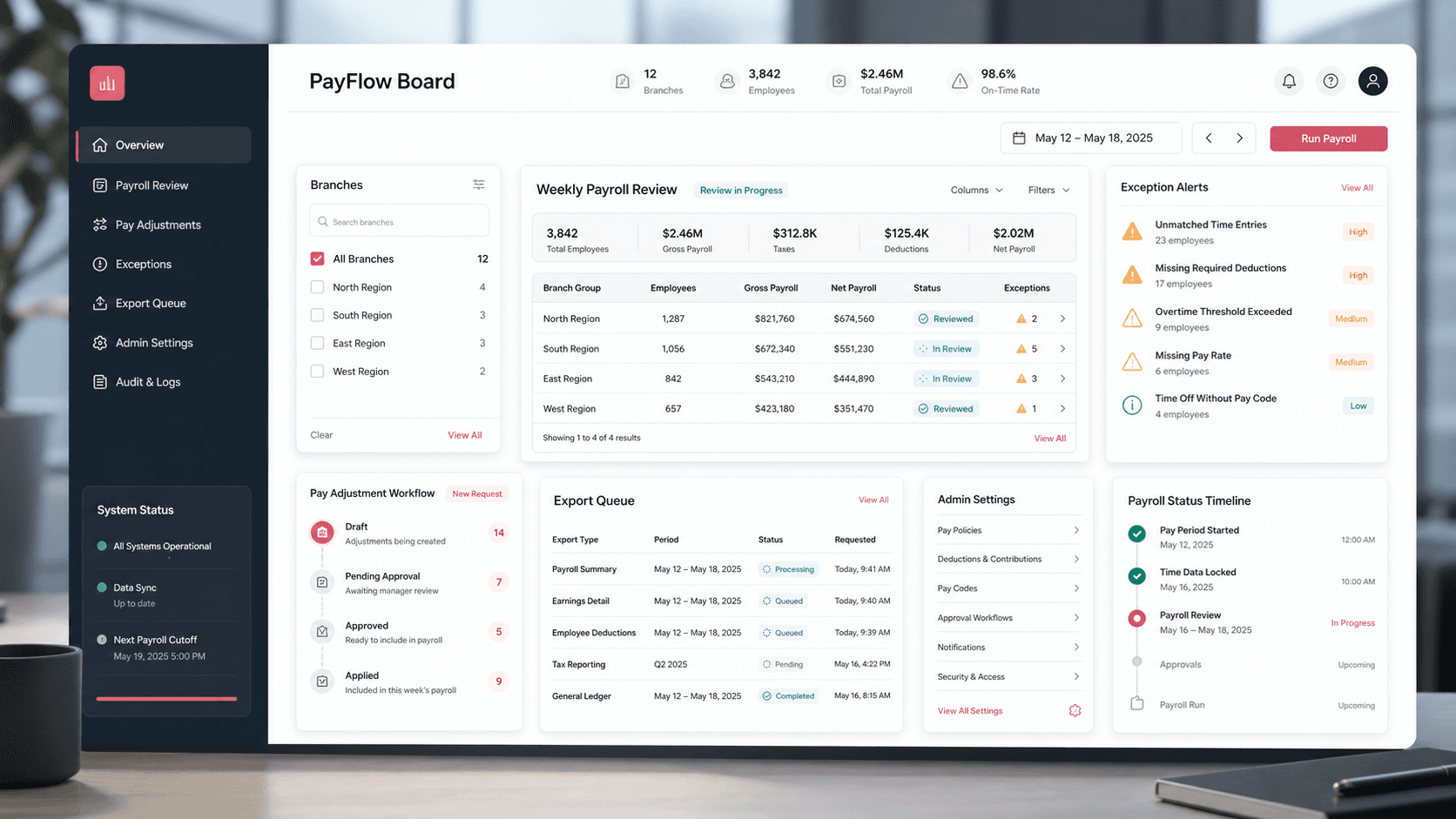
A payroll operations console that helps staffing teams review weekly time, manage branch access, handle pay adjustments, approve exceptions, and export payroll-ready batch files from one desktop workflow.
Product engineering, payroll workflow design, React dashboard, backend API, and data integration delivery
Branch
Access-Controlled Review
Weekly
Payroll Cycle Workflow
3
Export-Ready File Types
Admin
Code And Rule Controls
Timeline
Payroll operations platform build for branch-based weekly processing
Weekly payroll review needed stronger operational control
Branch teams had to collect time, review exceptions, apply wage and deduction adjustments, and produce clean payroll files without losing track of access, edits, or final submission state.
Payroll coordinators needed a desktop-grade grid for large weekly time review
Branch access and user status had to shape what each operator could see
Exceptions and pay adjustments needed review workflows before final export
Batch, proofing, and adjustment outputs had to be generated consistently for downstream payroll processing
A single payroll board for review, approval, and export
PayFlow Board turns weekly staffing data into an operational dashboard with branch filters, editable time rows, exception review, pay adjustment modals, admin settings, and exportable payroll files.
Google sign-in and session-aware branch selection for controlled payroll access
Virtualized time review grids with search, grouping, row details, totals, and debounced saves
Exception rules, approval flows, saved adjustments, and snatch/merge notices for multi-user branch work
Summary screens that generate proofing reports, batch files, and pay adjustment exports
Product surfaces
What the platform brought together
The work spanned core product operations, daily user workflows, data-heavy coordination, and resilient platform management.
Branch and week selection
Operators start from the branch, user access, and week-ending context that defines the payroll board.
Branch lists are loaded by authenticated user email
Week-ending dates and UDF identifiers carry through review, summary, and exception routes
Session storage preserves selected branch context across the working flow
Time review grid
A dense desktop grid lets payroll teams search, group, edit, and save weekly hours across assignments.
Regular, overtime, double-time, and triple-time hour inputs save through queued API requests
Virtualized tables and grouped rows support larger payroll boards
Inline totals and row detail views keep review context close to each employee record
Pay adjustments and code controls
Payroll admins can manage wage codes, deduction codes, and adjustment records without leaving the operating console.
Adjustment modals capture wage-code and deduction entries with amount, rate, bill, and notes
Admin settings expose active/display controls for wage and deduction code lists
Saved adjustments can be reviewed and removed before final processing
Exception review and payroll exports
Exception rules and summary outputs help teams move from raw entries to final payroll handoff.
Exception screens evaluate weekly hours against configurable rule and sub-rule records
Finalization flows preserve submitted batch metadata and board status
Downloadable proofing, batch, and pay adjustment files support downstream payroll operations
Module depth
Dedicated product blocks for the highest-value workflows
For large platforms, the conversion story depends on showing how each major module solves a specific operating problem, not only listing features.
Operational control
Branch-aware payroll workspace
The platform ties access, branch selection, week-ending dates, summary views, and exception pages into one controlled desktop workflow.
Source evidence includes branch lookup endpoints, access checks, user status checks, session-backed filters, and route patterns for review, summary, settings, and exception pages.
Keeps payroll operators focused on the right branch and week
Prevents unauthorized branch views from becoming everyday workflow risk
Carries the same branch/week context through editing, summary, and exception review
Finance accuracy
Editable time, adjustments, and exception handling
The payroll board centralizes high-friction review tasks so hour edits, adjustment entries, exception checks, and final exports are not scattered across separate tools.
Source evidence includes DevExpress grid usage, debounced save queues, pay adjustment models, exception rule models, saved exception endpoints, and summary export generation.
Reduces manual re-entry between time review and payroll adjustments
Supports review of regular time, overtime, deduction, and wage-code changes
Turns exception handling into a defined step before final payroll handoff
Buyer priorities
What mattered most to the people evaluating the platform
Prospective buyers want to know whether the work solved real workflow, adoption, reliability, data, and operations problems. These priorities shaped the product decisions.
Payroll accuracy
The system needed to help operators catch edits, exceptions, and missing context before payroll data moved downstream.
Grouped grids and row details gave reviewers enough context to validate time
Exception rules surfaced records that needed attention before finalization
Proofing exports made review evidence easier to share and archive
Operational throughput
Payroll review is deadline-driven, so the interface had to support dense desktop workflows instead of slow form-by-form processing.
Virtual tables, search, grouping, and filters helped teams scan large boards
Queued saves kept edit flows responsive during rapid hour entry
Batch and CSV outputs reduced manual file preparation after review
Admin governance
Finance operations needed control over the codes and display rules that shape payroll entry.
Wage-code and deduction-code settings gave admins configurable controls
Display names and active states helped keep operational lists clean
Branch/user status checks separated normal operators from admin settings
System model
How the platform connects roles, workflows, and product surfaces
The product architecture brings every role into the same operating model, with shared data moving cleanly between web, mobile, media, and notification layers.
Branch to payroll export workflow
Payroll work moves from branch/week selection through time review, adjustments, exceptions, finalization, and export.
Payroll operations roles
Branch operators, payroll admins, reviewers, and downstream finance systems each interact with a different layer of the board.
Dashboard plus data services
A React operations console sits on API endpoints, payroll records, exception rules, and export generation utilities.
Technology
The Stack We Used And Why
The stack section is written for buyers who need to understand the product architecture, operational trade-offs, and long-term maintainability of the system.
Web dashboard
Used for the desktop payroll board where operators filter branch context, edit time, review summaries, and manage adjustments.
Generate proofing reports, batch files, and pay adjustment exports so the reviewed board can move into payroll processing.
Operational depth
What made the platform usable after launch
The strongest case studies are not only feature lists. They show how the system is operated, monitored, governed, and improved when real users depend on it.
Queued time-entry saves
Rapid time edits are processed through a request queue that preserves row context and reduces save-flow collisions.
Hour edits are debounced before posting to the API
New saved-time IDs are carried into following updates for the same row
Local row state is merged with API responses to keep the grid responsive
Payroll-ready file generation
Summary actions convert reviewed records into proofing, batch, and pay adjustment files that match payroll handoff needs.
Proofing reports group branch and employee review data
Batch files serialize regular and overtime entries for payroll import
Pay adjustment CSV exports separate deduction and wage-code adjustments
Results
The measurable and observable lift from the work
The strongest improvements are the ones a buyer can connect to daily work: fewer disconnected tools, safer operations, clearer workflows, and more reliable product behavior.
Controlled
Branch-Based Access
User, branch, and week-ending context shape the review board before payroll data appears.
Editable
Weekly Time Review
Dense grids allow operators to review regular, overtime, double-time, and triple-time values in context.
Governed
Exception And Adjustment Flow
Exception rules, saved adjustments, wage codes, and deductions create a defined control layer around payroll edits.
Exportable
Payroll Handoff
Batch files, proofing reports, and pay adjustment exports reduce manual handoff work at the end of the cycle.
Outcome
A stronger operating system for payroll operations and workforce finance platform
The platform reduced tool fragmentation and gave each role a clearer path from live activity to day-to-day action.
A desktop payroll board that combines branch/week filters, time review, summary views, and admin settings
Editable weekly hour workflows with queued saves and row-level payroll context
Pay adjustment and exception review modules that support finance governance before finalization
Export-ready proofing, batch, and adjustment files for downstream payroll processing
FAQ
Frequently Asked Questions About PayFlow Board
Answers about the payroll operations and workforce finance platform scope, platform model, technology choices, operational workflows, and related build patterns.
What Kind Of Product Does PayFlow Board Represent?
PayFlow Board represents a payroll operations dashboard for staffing or branch-based teams that need to review weekly time, handle exceptions, apply adjustments, and generate payroll handoff files.
Why Does Payroll Review Need A Custom Dashboard?
Payroll review combines access control, dense employee data, branch context, exception logic, adjustment rules, and downstream export formats. A generic spreadsheet misses too much governance and audit context.
Can This Pattern Support Modern Workforce Finance Workflows?
Yes. The same pattern can support payroll automation, staffing operations, timesheet approval, workforce finance dashboards, ERP handoffs, and exception monitoring products.
Related services
Build a similarly ambitious product without starting from a blank page.
We can help scope the web, mobile, AI, media, and operating layers needed for your own platform.