Portfolio case study

PulseCX: NPS survey and customer experience operations web app

A customer experience intelligence platform that connects NPS surveys, email invitations, feedback capture, location-level dashboards, customer-care conversations, task flags, CSV exports, and scheduled reports for multi-location service teams.

Name changed to respect NDA.

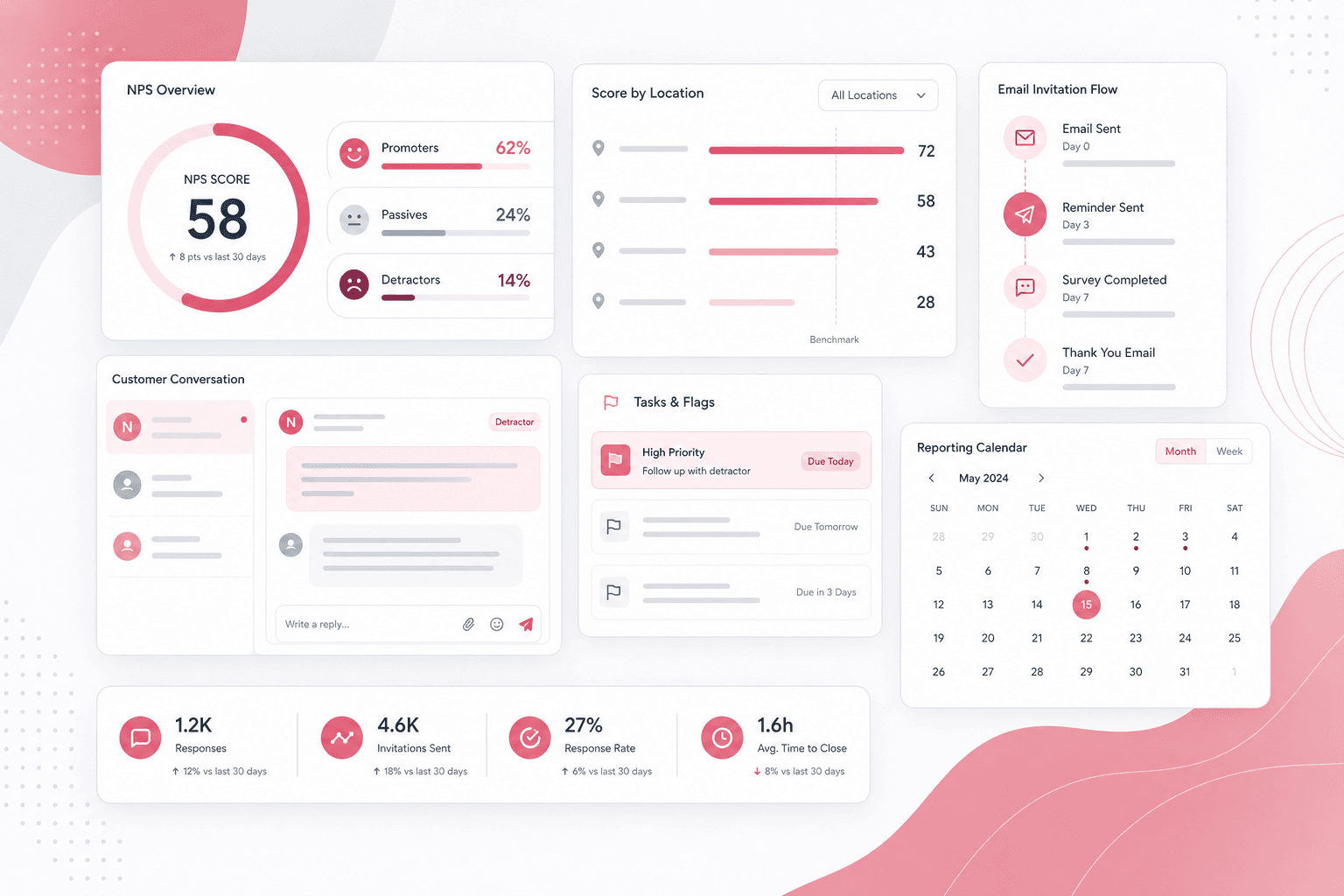
Customer experience intelligence dashboard visual with NPS score cards, location comparisons, email invitation flow, customer conversation, task flags, and reporting calendar
Project scope

Customer feedback web platform, survey workflows, email automation, reporting, data access layer, and operations tooling

NPS
survey and scoring workflows
3
promoter, passive, and detractor segments
API
customer intake and response access
Reports
daily, weekly, and monthly operations

Timeline

Legacy ASP.NET MVC customer experience platform build and reporting workflow consolidation

Customer feedback needed to become an operating workflow

Service and hospitality teams needed more than a feedback form. They needed a way to invite customers, capture NPS responses, segment issues by score, track locations and service points, follow up on conversations, and keep managers informed through repeatable reports.

  • Customer details, visit context, locations, service points, and survey responses needed to stay connected
  • Managers needed dashboards that separated promoters, passives, detractors, unread messages, and flagged issues
  • Follow-up work needed task states, templates, comments, and customer-care conversations instead of loose email threads
  • Leadership needed scheduled reporting and CSV exports without manually stitching database records together

A unified NPS operations console for feedback, follow-up, and reporting

PulseCX turns customer invitations and survey responses into a managed feedback loop: API intake creates customers, email queues send survey links, customers submit NPS scores and comments, and operations users review, flag, reply, export, and report on the results.

  • Survey creation, thank-you text, question setup, location context, and branded email templates
  • Customer intake API with service point, site, visit, reservation, bill, server, and contact fields
  • Dashboards for NPS score trends, location comparisons, promoter/passive/detractor grouping, and response counts
  • Customer-care threads, templated replies, unread counts, flagged reviews, and pending task workflows

Product surfaces

What the platform brought together

The work spanned core product operations, daily user workflows, data-heavy coordination, and resilient platform management.

Survey and invitation engine

Customer records and survey links move through a controlled invitation workflow instead of ad hoc manual outreach.

  • Survey setup with NPS questions, thank-you copy, location data, subject lines, and sender details
  • Email queue integration for customer invitations and survey reminders
  • API-backed invitation creation for external systems that push customer and visit context into the platform

Feedback capture and NPS scoring

The customer-facing feedback journey captures score, comment, completion state, and visit context for later operations review.

  • Step-based feedback flow for score selection, follow-up questions, and completion pages
  • Promoter, passive, and detractor segmentation based on the submitted Net Promoter Score
  • Duplicate/recent-review guards and response metadata for cleaner customer histories

Manager dashboards and reports

Operations users can filter and export feedback by time period, location, service point, and score category.

  • NPS trend calculations, yearly location charts, total score cards, and location arrays for reporting views
  • CSV exports for survey responses and review records
  • Daily, weekly, and monthly report generation paths for recurring manager updates

Customer-care task workflow

Negative or unresolved feedback can become a managed follow-up queue with comments, flags, read states, and replies.

  • Flagged, checked, pending, submitted, and unread states for operational triage
  • Conversation threads with customer replies, internal manager comments, and template-backed response helpers
  • Location and manager assignment logic so follow-up work reaches the right operator

Module depth

Dedicated product blocks for the highest-value workflows

For large platforms, the conversion story depends on showing how each major module solves a specific operating problem, not only listing features.

Retention operations

Detractor Feedback Becomes Follow-Up Work

Low-score responses are not left as static survey rows. They can move into customer-care conversations, flags, pending queues, manager comments, and reply workflows so teams can act while the context is still fresh.

Source evidence included feedback steps, customer review records, conversation threads, task management filters, flags, read states, comments, and reply handling.

  • Customer score, comment, and location context remain tied to the review record
  • Flags and pending queues help teams prioritize urgent follow-up
  • Conversation history gives managers a clearer view of what happened after the survey

Multi-location visibility

Location-Level NPS Reporting Supports Operators

The dashboard model turns response records into location comparisons, score segments, service filters, and exportable reports that managers can use across stores or branches.

Source evidence included dashboard calculations, location filters, service-point filters, promoter/passive/detractor counts, CSV exports, and scheduled report controllers.

  • Managers can filter feedback by date range, service, location, and score type
  • NPS calculations separate promoters, passives, and detractors for each location
  • Exports and recurring reports reduce manual reporting work for leadership

Integration readiness

External Systems Can Feed The Feedback Loop

The intake API allows outside reservation, POS, or customer systems to create customer records and queue surveys with visit context attached.

Source evidence included API endpoints for invitations, survey response listing, response access, customer fields, visit context, and API-key organization lookup.

  • Visit metadata such as bill, reservation, server, table, and location can travel with the customer record
  • API-created customers can be added directly to survey email queues
  • Response APIs keep downstream reporting and integration paths open

Buyer priorities

What mattered most to the people evaluating the platform

Prospective buyers want to know whether the work solved real workflow, adoption, reliability, data, and operations problems. These priorities shaped the product decisions.

Customer recovery

The platform needed to help teams identify and follow up on dissatisfied customers before feedback disappeared into a report.

  • Detractor segmentation keeps urgent feedback visible
  • Conversation threads and templated replies support faster response
  • Flags, unread counts, and pending queues help managers manage follow-through

Operational visibility

Multi-location teams need score trends and exports that show where experience problems are happening.

  • Location and service-point filtering supports branch-level review
  • Dashboard score calculations make NPS movement easier to compare
  • CSV exports and report emails support recurring leadership routines

Modernization readiness

The legacy MVC source provides clear domain modules that can be mapped into a modern customer experience SaaS architecture.

  • Controllers identify stable boundaries for surveys, customers, reviews, reports, templates, and tasks
  • Data-access classes expose the records needed for a typed API layer
  • Email, reporting, Slack, and scheduling hooks provide a path for operational automation

System model

How the platform connects roles, workflows, and product surfaces

The product architecture brings every role into the same operating model, with shared data moving cleanly between web, mobile, media, and notification layers.

Invitation to recovery workflow

Customer data moves from API intake to email invitation, survey response, NPS segmentation, task queue, customer-care reply, and report.

Roles in the feedback loop

Customers, location managers, customer-care teams, organization admins, and leadership each use the same feedback system differently.

Survey, care, and reporting platform

The survey engine, customer-care console, reporting layer, email automation, and integration API work together as one CX platform.

Technology

The Stack We Used And Why

The stack section is written for buyers who need to understand the product architecture, operational trade-offs, and long-term maintainability of the system.

Web application

Used for survey administration, customer dashboards, task queues, customer-care screens, reports, account access, and Razor-rendered workflows.

ASP.NET MVCC#Razor ViewsBootstrapjQuery

Data and reporting layer

Used to persist and query organizations, locations, services, customers, surveys, reviews, conversations, email queues, and score reports.

PetaPocoSQL-backed repositoriesCSV exportsNPS calculations

Messaging and automation

Used to deliver survey invitations, customer-care replies, recurring reports, status notifications, and operational alerts.

Transactional email APIsEmail templatesQuartz schedulingOperational alert webhooks

Modern target stack

A suitable modernization direction for the same customer experience product with stronger maintainability, security, and analytics.

Next.jsTypeScriptPostgreSQLPrismaRole-Based Access ControlCloud Reporting

Why The Feedback Loop Matters

NPS products become more valuable when score capture, customer context, follow-up, and reporting sit in one workflow.

  • Invitations, responses, and reports share the same customer and location records
  • Customer-care conversations keep recovery work near the original feedback
  • Manager reports connect score movement to operational action

Why Legacy MVC Still Provides Useful Evidence

The source application maps the product domain clearly even though a modern rebuild would use a newer frontend, API, and deployment model.

  • MVC controllers reveal real product areas and role workflows
  • Razor dashboards and CSV exports show the reporting needs behind the product
  • Data-access classes provide a migration map for typed service boundaries

Delivery

How the product came together

The work moved from domain modeling to core platform delivery, mobile adoption, and operational hardening.

1

Map the feedback domain

Define organizations, locations, services, customers, surveys, scores, comments, and follow-up states.

2

Build survey and intake workflows

Create survey setup, customer intake, email queueing, invitation links, and customer-facing feedback steps.

3

Add operations and reporting

Layer dashboards, exports, recurring report emails, flagged queues, customer-care conversations, and reply templates onto the response data.

4

Prepare a modernization path

Use the legacy implementation as a product map for a modern CX SaaS with typed APIs, safer secrets, analytics, and role-aware dashboards.

Operational depth

What made the platform usable after launch

The strongest case studies are not only feature lists. They show how the system is operated, monitored, governed, and improved when real users depend on it.

NPS segmentation and filtering

Promoter, passive, and detractor logic is used across dashboards, customer lists, and reporting views.

  • Score filters
  • Location comparisons
  • Service-point segmentation

Customer-care conversation history

Customer feedback can become a threaded support conversation with read states, templates, and reply tracking.

  • Conversation threads
  • Unread counts
  • Template-backed replies

Report delivery and exports

CSV exports and scheduled report flows make feedback data useful beyond the live dashboard.

  • Survey response exports
  • Weekly and monthly reports
  • Operational alerts

Results

The measurable and observable lift from the work

The strongest improvements are the ones a buyer can connect to daily work: fewer disconnected tools, safer operations, clearer workflows, and more reliable product behavior.

NPS

Score Intelligence

Survey responses are segmented into promoter, passive, and detractor groups with location and service context.

API

Customer Intake

External systems can add customer and visit context before the platform queues survey outreach.

Care

Follow-Up Workflow

Customer comments can move into conversations, flags, pending queues, and reply workflows.

Reports

Manager Visibility

CSV exports and scheduled reports keep location leaders informed without manual data assembly.

Outcome

A stronger operating system for customer experience and nps operations platform

The platform reduced tool fragmentation and gave each role a clearer path from live activity to day-to-day action.

A web-based customer experience platform that connects survey setup, email invitations, customer responses, NPS scoring, and operations dashboards

Location-aware reporting that helps managers compare experience trends across stores, service points, and time periods

Customer-care follow-up workflows with flags, pending queues, comments, read states, templates, and reply history

A public-safe modernization case study that translates legacy MVC evidence into a complete NPS and customer recovery SaaS story

FAQ

Frequently Asked Questions About PulseCX

Answers about the customer experience and nps operations platform scope, platform model, technology choices, operational workflows, and related build patterns.

What Kind Of Product Does PulseCX Represent?

PulseCX represents a customer experience operations platform for NPS survey outreach, feedback capture, location-level reporting, customer-care follow-up, task triage, and recurring manager reports.

Why Does NPS Software Need Task And Conversation Workflows?

NPS scores are most useful when teams can act on them. Task flags, conversations, read states, templates, and report delivery help turn survey data into service recovery and operational learning.

Can A Legacy Feedback Platform Be Modernized Into A SaaS Product?

Yes. Existing survey, customer, review, reporting, email, and task modules can be mapped into typed APIs, modern dashboards, role-based permissions, safer configuration, analytics, and cloud deployment.

Related services

Build a similarly ambitious product without starting from a blank page.

We can help scope the web, mobile, AI, media, and operating layers needed for your own platform.

Start a project inquiry