Portfolio case study

VenueFlow: Indoor wayfinding platform

An interactive indoor wayfinding platform that turns complex venue floor plans into searchable, zoomable, multi-level maps for visitors, staff, kiosks, and operations teams.

Name changed to respect NDA.

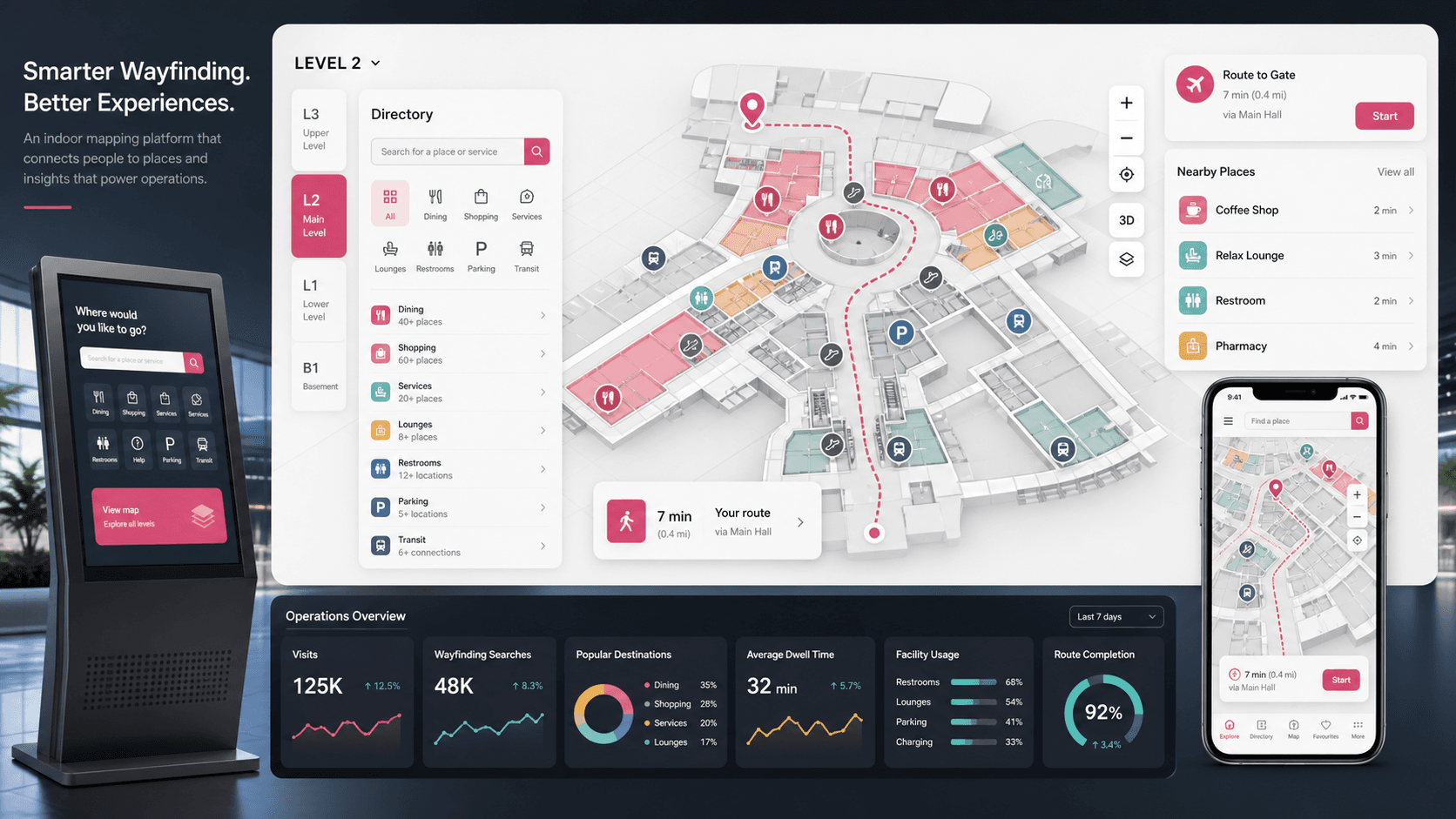
Indoor wayfinding platform visual with a venue floor map, searchable directory, facility icons, zoom controls, analytics panels, and kiosk and mobile previews
Project scope

Frontend engineering for a D3 and SVG-powered indoor map viewer, with product expansion into venue content operations, search, multi-floor navigation, embeddable map surfaces, and visitor analytics

3
mapped venue levels
SVG
floor-plan interaction layer
Search
location discovery workflow
Kiosk
visitor-facing deployment pattern

Timeline

Interactive map viewer foundation expanded into a complete wayfinding product story

Large venues needed maps visitors could actually use

Static floor plans were hard to search, hard to resize across screens, and difficult to connect with facility icons, place directories, and floor-level context. Visitors needed a faster path from intent to location.

  • Venue layouts needed to support multiple levels without forcing users to reload separate pages
  • Search and place lists had to connect directly to map regions instead of acting like detached directories
  • Facility icons, labels, descriptions, and hover details needed to stay synchronized with SVG floor-plan layers
  • The viewer had to work across desktop, kiosk-style screens, and embedded visitor experiences

A searchable indoor map viewer with operational room to grow

VenueFlow uses an SVG and D3 interaction layer to load floor maps, bind them to structured JSON metadata, and let users search, zoom, switch floors, inspect tooltips, and focus on specific places.

  • D3-powered SVG map rendering with pan, zoom, reset, and click-to-focus behavior
  • Structured floor metadata for map regions, display names, descriptions, icon paths, and searchable lists
  • Multi-floor selector for level, arrival, and departure style venue contexts
  • Responsive viewer shell with collapsible search panel and controls suitable for kiosk or web embedding

Product surfaces

What the platform brought together

The work spanned core product operations, daily user workflows, data-heavy coordination, and resilient platform management.

Interactive floor-plan viewer

The core viewer converts venue drawings into interactive map regions that visitors can inspect, zoom, and navigate.

  • SVG floor plans are loaded into the page and scaled through a responsive viewBox
  • D3 zoom handles pan, reset, zoom-in, zoom-out, and focused region transitions
  • Map regions highlight on hover and click so visitors can visually confirm the selected destination

Searchable place directory

A side-panel directory connects venue locations to the map, reducing the friction of scanning a dense floor plan.

  • Search filters place entries in real time from the visible list
  • Directory items bind to map layer identifiers so selecting a place moves the map to that location
  • Facility images, display names, and descriptions make the directory useful beyond raw room labels

Multi-level venue navigation

Floor controls let the same viewer handle different levels, zones, and passenger or visitor contexts.

  • Level selector swaps the active SVG and JSON metadata bundle
  • Up and down controls move through ordered venue levels without losing the viewer shell
  • The same model can support airport terminals, malls, hospitals, campuses, arenas, or large office complexes

Venue operations layer

The public product story expands the viewer into the operational tools buyers expect around indoor maps.

  • Content management workflows for updating places, categories, icons, and floor-plan metadata
  • Kiosk, web, and mobile embedding patterns for different visitor touchpoints
  • Analytics-ready events for searched destinations, selected facilities, floor changes, and navigation demand

Module depth

Dedicated product blocks for the highest-value workflows

For large platforms, the conversion story depends on showing how each major module solves a specific operating problem, not only listing features.

Visitor adoption

Indoor Search And Map Focus

The platform reduces wayfinding friction by letting visitors search for a facility, select it from a directory, and immediately focus the map on the matching region.

Source evidence includes searchable list filtering, structured location metadata, SVG group targeting, and animated D3 zoom transforms.

  • Search field filters the place list as the user types
  • List and map regions share layer identifiers for reliable selection
  • Tooltips combine icon, name, description, and detail entry points

Operations control

Map Data As A Maintainable Product Asset

Instead of treating the map as a flat image, the product model separates floor drawings, location metadata, icons, and display behavior so venue teams can keep maps current.

Source evidence includes separate SVG floor files, JSON metadata files, facility icon libraries, level switching, and reusable viewer controls.

  • Floor-specific JSON files keep labels and descriptions outside the drawing
  • Shared icon assets support common venue services and amenities
  • A reusable shell can load new floors, zones, and venue maps over time

Buyer priorities

What mattered most to the people evaluating the platform

Prospective buyers want to know whether the work solved real workflow, adoption, reliability, data, and operations problems. These priorities shaped the product decisions.

Visitor clarity

Wayfinding products win when people can find the right place without understanding the venue layout first.

  • Search, lists, icons, and tooltips create multiple paths to the same destination
  • Zoom and focus interactions reduce the cognitive load of dense architectural maps
  • Multi-floor controls keep arrival, departure, and level context visible

Venue maintainability

Facilities teams need a map system they can revise as stores, counters, gates, rooms, and services change.

  • Structured metadata keeps map content editable without redrawing every interaction
  • Icon and category patterns support common service updates
  • The viewer foundation can grow into a CMS-backed map operations workflow

Deployment flexibility

Indoor maps often need to appear in more than one place: website, kiosk, mobile web, QR flows, and staff tools.

  • Responsive browser-first implementation supports large and small displays
  • A static viewer can be embedded before heavier backend systems are introduced
  • Analytics hooks can later show what visitors search for and where navigation demand is highest

System model

How the platform connects roles, workflows, and product surfaces

The product architecture brings every role into the same operating model, with shared data moving cleanly between web, mobile, media, and notification layers.

Floor plan to searchable destination

Venue data moves from SVG floor plans and JSON metadata into search, directory, tooltip, and focused map interactions.

One map layer, many visitor surfaces

The same venue map foundation can power web pages, kiosks, QR flows, mobile views, and staff operations.

Wayfinding rollout path

A practical launch path starts with mapped floors, then adds search, operations updates, analytics, and embedded surfaces.

Technology

The Stack We Used And Why

The stack section is written for buyers who need to understand the product architecture, operational trade-offs, and long-term maintainability of the system.

Map interaction layer

Used for loading SVG floor plans, binding map groups to place metadata, and handling zoomable map navigation.

D3.jsSVGd3-tipJavaScript

Viewer shell

Used for responsive controls, floor selectors, collapsible search, and familiar visitor-facing UI behavior.

HTMLBootstrapMaterial Design for BootstrapjQuery

Venue content model

Used to describe places, icons, descriptions, floor-specific metadata, and searchable directory records.

JSON metadataStructured facility iconsFloor-specific SVG assets

Expanded platform layer

Recommended surrounding stack for a complete buyer-ready venue wayfinding product.

Next.jsPostgreSQLHeadless CMSMap analyticsKiosk deployment

Why SVG And D3

Indoor wayfinding needs precise interaction with drawn regions, not just tiles or static images.

  • SVG preserves floor-plan geometry and addressable region groups
  • D3 provides smooth zoom, pan, transitions, and event binding
  • JSON metadata keeps facility content separate from the drawing layer

Why Start Browser-first

The viewer needed to run anywhere a venue could show a map, from websites to touch displays.

  • A browser-first implementation can be embedded before native apps are required
  • Responsive sizing keeps the map usable across desktop and kiosk-style screens
  • The same content model can later feed mobile apps and admin tools

Delivery

How the product came together

The work moved from domain modeling to core platform delivery, mobile adoption, and operational hardening.

1

Prepare floor assets

Convert venue drawings into SVG layers that can be selected, highlighted, zoomed, and connected to metadata.

2

Bind map data

Create structured metadata for each level, including display names, descriptions, imagery, and map group references.

3

Build the interaction shell

Add search, floor switching, zoom controls, focus animations, tooltips, and responsive resizing.

4

Expand into operations

Extend the viewer foundation into CMS workflows, embeddable map surfaces, usage analytics, and venue updates.

Operational depth

What made the platform usable after launch

The strongest case studies are not only feature lists. They show how the system is operated, monitored, governed, and improved when real users depend on it.

Map content governance

Indoor maps become more durable when venue content is governed like product data instead of locked into image files.

  • Place records can carry names, descriptions, categories, and icon references
  • Floor bundles can be reviewed and replaced independently
  • A CMS layer can add approvals before public map changes go live

Visitor demand analytics

Search and click behavior can help venue teams understand what people struggle to find.

  • Search terms reveal popular destinations and missing labels
  • Floor switches and focused destinations show traffic demand by zone
  • Kiosk events can guide signage, staffing, and facility updates

Multi-surface deployment

The viewer architecture supports a path from static browser deployment to a broader venue experience platform.

  • Website embeds for pre-visit planning
  • Kiosk views for on-site navigation
  • Mobile web and QR handoff flows for visitor self-service

Results

The measurable and observable lift from the work

The strongest improvements are the ones a buyer can connect to daily work: fewer disconnected tools, safer operations, clearer workflows, and more reliable product behavior.

Multi-floor

Venue Context

The viewer supports separate floor assets and metadata bundles so visitors can switch between venue contexts from one interface.

Search-led

Destination Discovery

The directory and map share data identifiers, letting visitors move from a typed query to an exact floor-plan focus state.

SVG-native

Precise Interaction

SVG groups make regions addressable, highlightable, and zoomable without flattening the venue into a static image.

Ops-ready

Product Expansion

The viewer foundation creates a credible path toward CMS-backed updates, analytics, kiosks, and mobile wayfinding surfaces.

Outcome

A stronger operating system for indoor wayfinding and venue map platform

The platform reduced tool fragmentation and gave each role a clearer path from live activity to day-to-day action.

A browser-based interactive indoor map viewer with searchable destination lists and multi-floor controls

A structured venue content model that links floor regions, icons, names, and descriptions

A reusable wayfinding foundation that can expand into kiosk, mobile, CMS, and analytics workflows

A public-safe portfolio story focused on venue navigation value rather than private source identifiers

FAQ

Frequently Asked Questions About VenueFlow

Answers about the indoor wayfinding and venue map platform scope, platform model, technology choices, operational workflows, and related build patterns.

What Kind Of Product Does VenueFlow Represent?

VenueFlow represents an indoor wayfinding platform for complex venues such as airports, malls, hospitals, campuses, arenas, and large office facilities.

Why Use A Custom Indoor Map Instead Of A Static Floor Plan?

A custom viewer can connect places, facility icons, floor levels, tooltips, search, zoom, and analytics in ways a flat image cannot support.

Can This Viewer Grow Into A Full Venue Operations Platform?

Yes. The same foundation can support a content management layer, kiosk deployment, mobile handoff flows, facility updates, route guidance, and usage analytics.

What Should A Buyer Prepare For A Similar Wayfinding Project?

Useful inputs include cleaned floor plans, location names, icon categories, floor hierarchy, visitor search priorities, kiosk requirements, update workflows, and analytics goals.

Related services

Build a similarly ambitious product without starting from a blank page.

We can help scope the web, mobile, AI, media, and operating layers needed for your own platform.

Start a project inquiry