
A content delivery network, or CDN, is a distributed layer of edge servers that stores and delivers website assets closer to the people requesting them. Instead of asking one origin server to handle every image, script, stylesheet, download, or page request from every region, a CDN can serve cached content from a nearby edge location and keep the origin protected for the work only it can do.
The practical reason to use a CDN is simple: it can make a website faster, more reliable, easier to scale, less expensive to serve at high traffic levels, and stronger for SEO and user experience. A CDN is not a cure for poor code, heavy pages, or weak hosting, but it is often one of the highest-leverage infrastructure choices for a public website, ecommerce store, SaaS product, or media-heavy web application.
If your site is part of a larger product, portal, or dashboard, treat CDN planning as one piece of the broader web app development architecture. The strongest results come when caching, media handling, frontend performance, backend APIs, monitoring, and deployment processes are designed together.
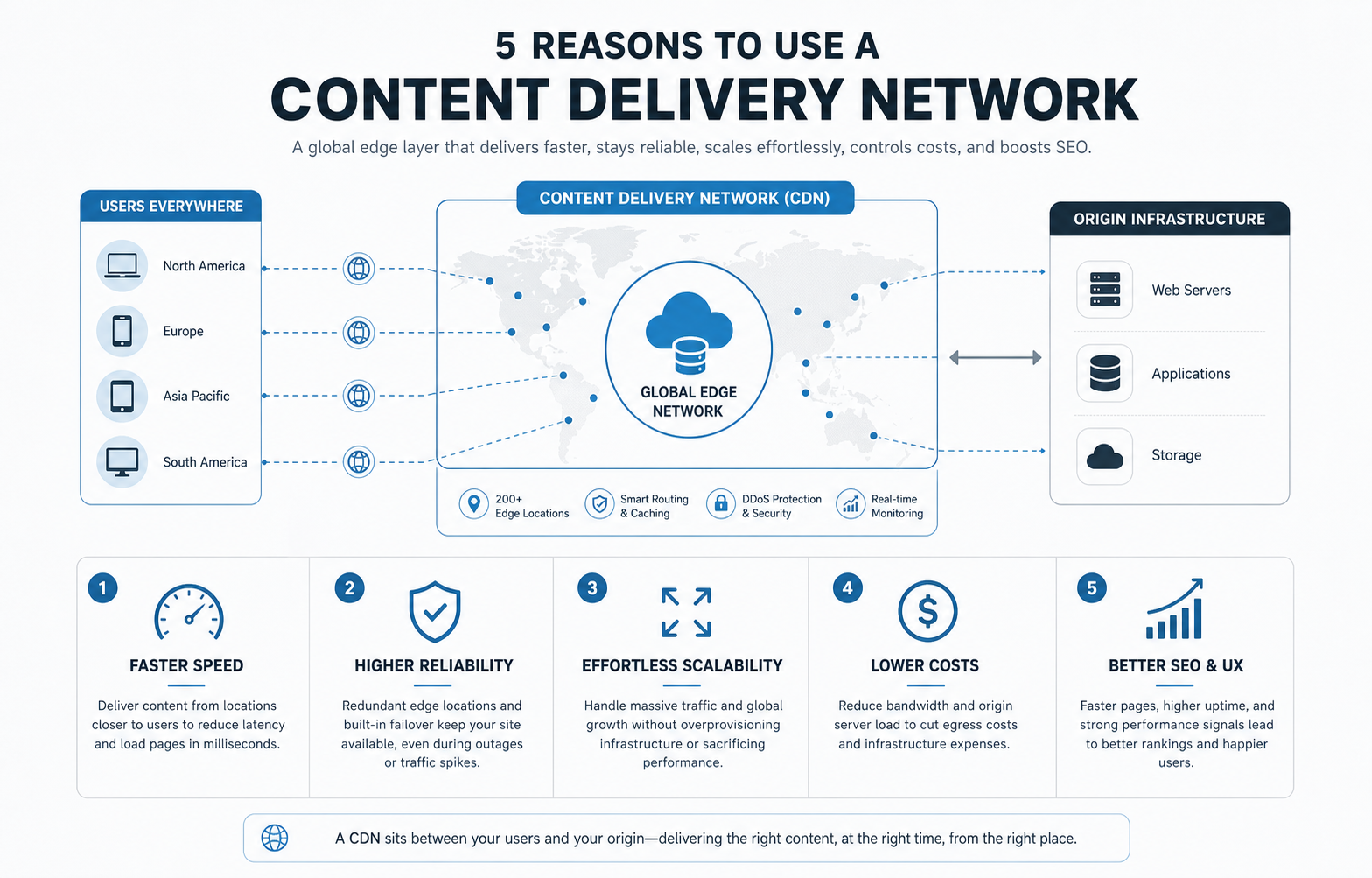
Quick Answer: Why Should You Use A CDN?
You should use a CDN when your website or application serves visitors across different regions, relies on heavy images or files, sees traffic spikes, needs better uptime, pays meaningful bandwidth costs, or depends on fast page loads for search visibility and conversion. The strongest CDN use cases combine performance, resilience, and operating cost control.
A small local brochure site may not need a complex CDN setup immediately. A content-heavy website, ecommerce storefront, SaaS app, learning platform, travel product, marketplace, or marketing site with international traffic usually benefits sooner because users, crawlers, and conversion paths are more sensitive to latency and availability.
How A CDN Works
A CDN keeps copies of selected content in edge locations around the world. When a visitor requests a page asset, the CDN checks whether the nearest edge location already has a fresh cached copy. If it does, the CDN returns that copy quickly. If it does not, the CDN fetches the asset from the origin server, stores it according to cache rules, and serves it from the edge for future requests.
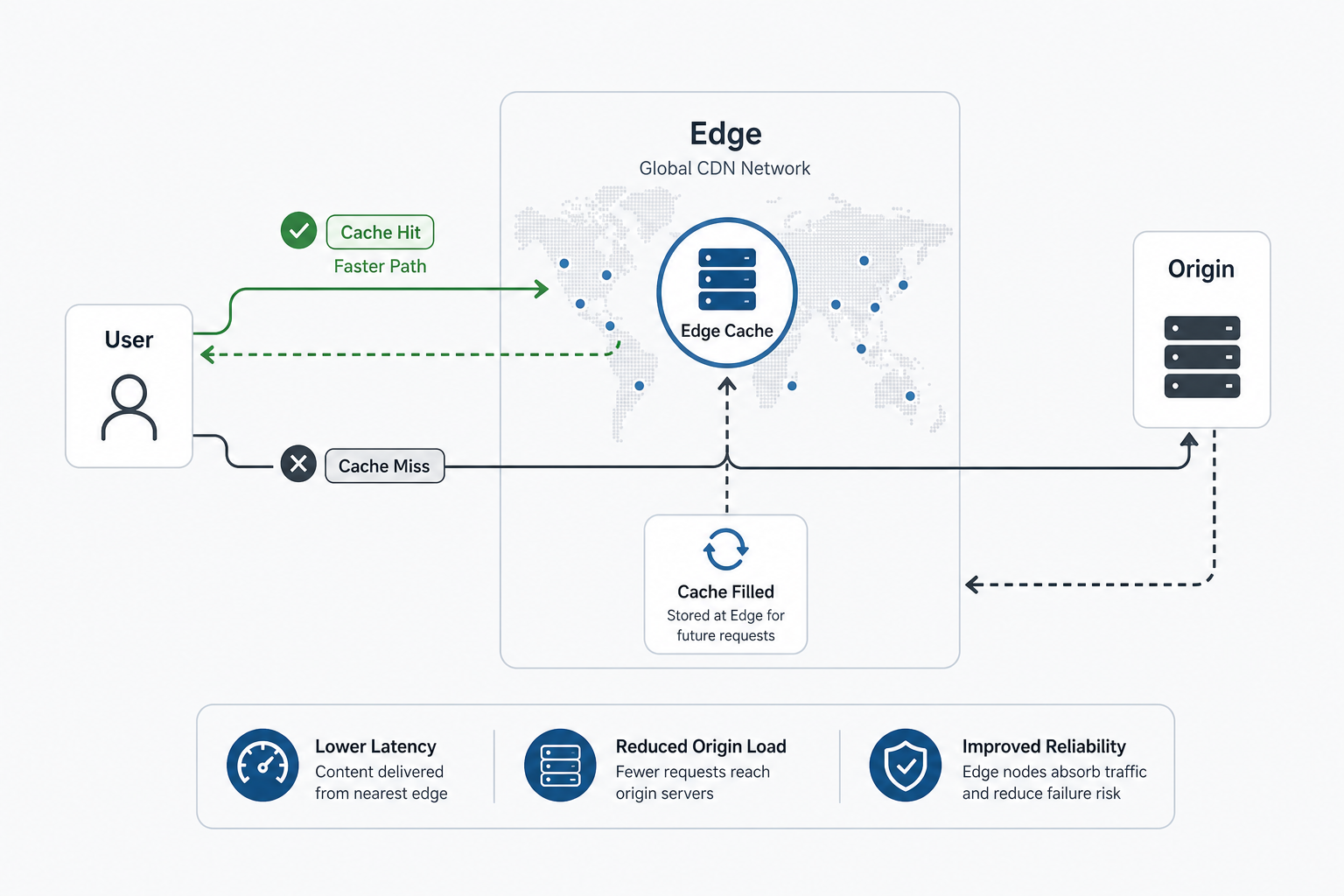
For dynamic pages, authenticated dashboards, checkout steps, and APIs, caching needs more care. Some responses should never be cached publicly. Others can use short cache windows, stale-while-revalidate rules, image optimization, or edge logic. This is why CDN configuration should be treated as engineering work, not only a hosting checkbox.
5 Reasons To Use A Content Delivery Network
The five benefits below are connected. Faster delivery improves user experience. Better caching reduces origin pressure. Reduced origin pressure supports reliability and scaling. Those operational gains can also improve cost control and SEO outcomes.
1. Faster Website Performance
The most visible CDN benefit is speed. When assets are served from a nearby edge location, the request travels a shorter network path. This can reduce latency, improve time to first byte for cacheable content, and make image, CSS, JavaScript, font, and download delivery feel more responsive.
CDNs are especially useful for image-heavy pages, landing pages, product catalogs, media libraries, course platforms, and blogs with global readers. They also pair well with modern frontend practices such as image compression, code splitting, preload discipline, and clean template design.
Do not stop at the CDN switch. If your mobile experience still feels slow, compare the implementation with the related guide on building a mobile friendly website, because slow mobile pages often come from layout, media, and script decisions as much as server distance.
2. Higher Reliability And Availability
A CDN can reduce the impact of origin slowdowns, traffic bursts, network congestion, and some availability incidents. When cached content is already available at the edge, users may continue receiving important assets even if the origin is under pressure. Many CDN providers also include failover patterns, DDoS mitigation, request filtering, TLS termination, and traffic routing controls.
Reliability still depends on the whole system. A CDN cannot repair a broken database, a failed deploy, or an application bug. It can, however, reduce how much routine asset delivery depends on one server. For product teams, this is part of the same reliability thinking used in custom platforms such as the RouteLedger fleet operations API case study, where separate services, infrastructure boundaries, and resilient workflows protect high-traffic operational use cases.
3. Easier Scalability During Traffic Spikes
Traffic spikes can happen during campaigns, product launches, seasonal sales, news mentions, app releases, or viral content. Without caching, every request can hit the origin server and database stack. With a CDN, many requests are handled at the edge, which reduces pressure on hosting infrastructure and gives teams more time to respond.
This matters most when the business cannot predict traffic perfectly. A CDN helps absorb static asset demand, smooth regional traffic patterns, and keep pages usable when attention rises suddenly. For larger platforms, combine CDN planning with backend scaling, queue design, observability, and release rollback plans.
If you are budgeting a product or platform that needs this kind of scalability, use the Custom Software Cost Estimator to model how roles, integrations, traffic assumptions, security, and infrastructure choices affect build scope.
4. Lower Bandwidth And Infrastructure Costs
A CDN can reduce bandwidth and compute pressure on the origin because repeated requests for static assets are served from edge cache. That can lower origin data transfer, reduce server load, and delay the need for larger infrastructure. For media-heavy websites, this benefit can become significant.
Cost savings are not automatic. CDN pricing, cache hit ratio, image size, invalidation patterns, traffic regions, request volume, and storage strategy all matter. A poor cache policy can produce disappointing savings. A disciplined media and cache plan can reduce waste while keeping content fresh.
Hosting quality also matters. A CDN helps delivery, but it should not hide fragile hosting or an unmaintained stack. The related post on why free hosting is bad explains why infrastructure shortcuts often create performance, support, and reliability problems later.
5. Better SEO And User Experience Signals
Search performance is affected by many things: content quality, crawlability, internal links, technical structure, page experience, authority, and user satisfaction. A CDN helps mainly by improving speed, uptime, and asset delivery consistency. Those improvements can support better Core Web Vitals, lower abandonment, and a smoother crawl experience.
A CDN is not a standalone SEO strategy. It should support clean metadata, logical headings, helpful content, schema, internal links, mobile usability, and fast rendering. Use the SEO Checklist For Websites to review the fundamentals that a CDN cannot fix by itself.
CDN Readiness Scorecard
Use a practical scorecard before adding or changing CDN providers. Score each area from 0 to 5. A higher total means the CDN decision is likely to create business value rather than just add another infrastructure tool.
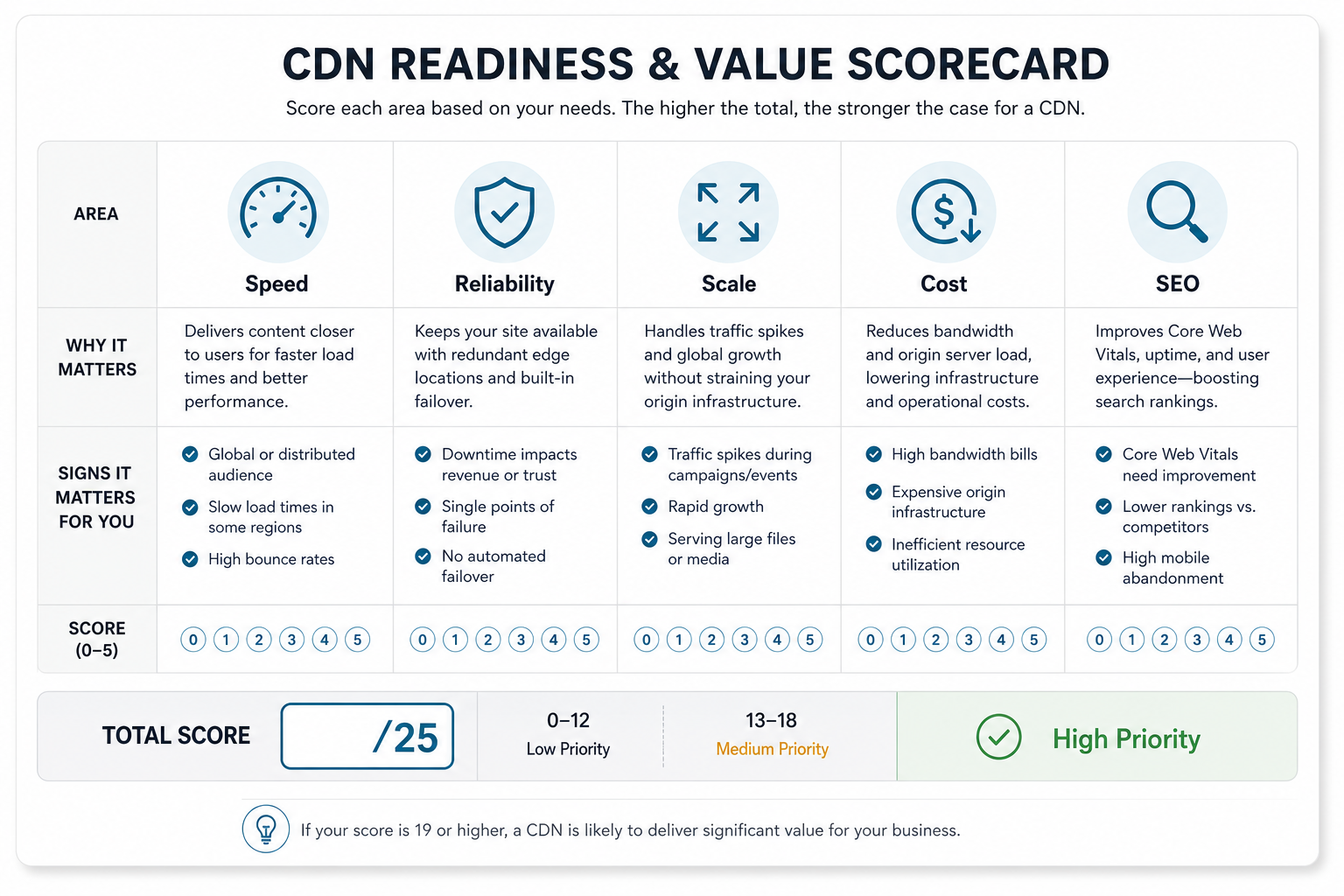
| Area | High-Value Signal | What To Check |
|---|---|---|
| Speed | Users are spread across regions or mobile performance is weak | Core Web Vitals, asset weight, latency by region |
| Reliability | Outages or slowdowns affect revenue, trust, or support load | Uptime history, origin health, failover behavior |
| Scale | Campaigns, launches, or large media files create demand spikes | Peak traffic, cache hit ratio, origin CPU and bandwidth |
| Cost | Bandwidth or origin infrastructure costs are rising | Data transfer, cache policy, image optimization, provider pricing |
| SEO/UX | Speed and uptime influence rankings, conversion, or crawl quality | Mobile UX, crawl stats, page templates, technical SEO |
What A CDN Does Not Fix
A CDN will not automatically fix bloated JavaScript, uncompressed images, poor database queries, weak hosting configuration, broken redirects, accessibility problems, or vague content. It improves delivery, but the delivered experience still depends on what you built.
That is why CDN planning should sit inside a broader performance and website improvement workflow. If the entire site is outdated, compare CDN work with a full website revamp plan. If the scope is a custom platform, pair CDN decisions with the same discovery discipline used in a custom software development company checklist.
CDN Implementation Checklist
Before turning on a CDN in production, decide what should be cached, what should stay private, how content will be invalidated, and how the team will monitor results.
- Map content types: images, fonts, scripts, stylesheets, downloads, public HTML pages, APIs, authenticated pages, and admin routes.
- Set cache rules: define TTLs, cache keys, query-string behavior, cookies, headers, and stale content policy.
- Protect private data: exclude authenticated, personalized, checkout, account, and admin responses unless the architecture explicitly supports safe edge behavior.
- Plan purging: document when to purge individual URLs, image variants, blog listings, product pages, or release assets.
- Monitor performance: compare before and after metrics for Core Web Vitals, regional latency, cache hit ratio, error rate, and origin load.
- Test fallbacks: confirm how the site behaves when the origin is slow, an edge location misses cache, or a deployment changes assets.
Final Recommendation
Use a CDN when your website or application needs faster global delivery, stronger availability, easier traffic-spike handling, better bandwidth efficiency, and improved page experience. For many public websites, the CDN decision is no longer a luxury; it is a core part of responsible delivery.
Still, the CDN should support a larger performance plan. Fix heavy assets, weak templates, poor cache rules, slow backend work, and unclear content strategy at the same time. The result is a website that loads faster, survives more demand, costs less to serve, and gives users and search engines a more reliable experience.