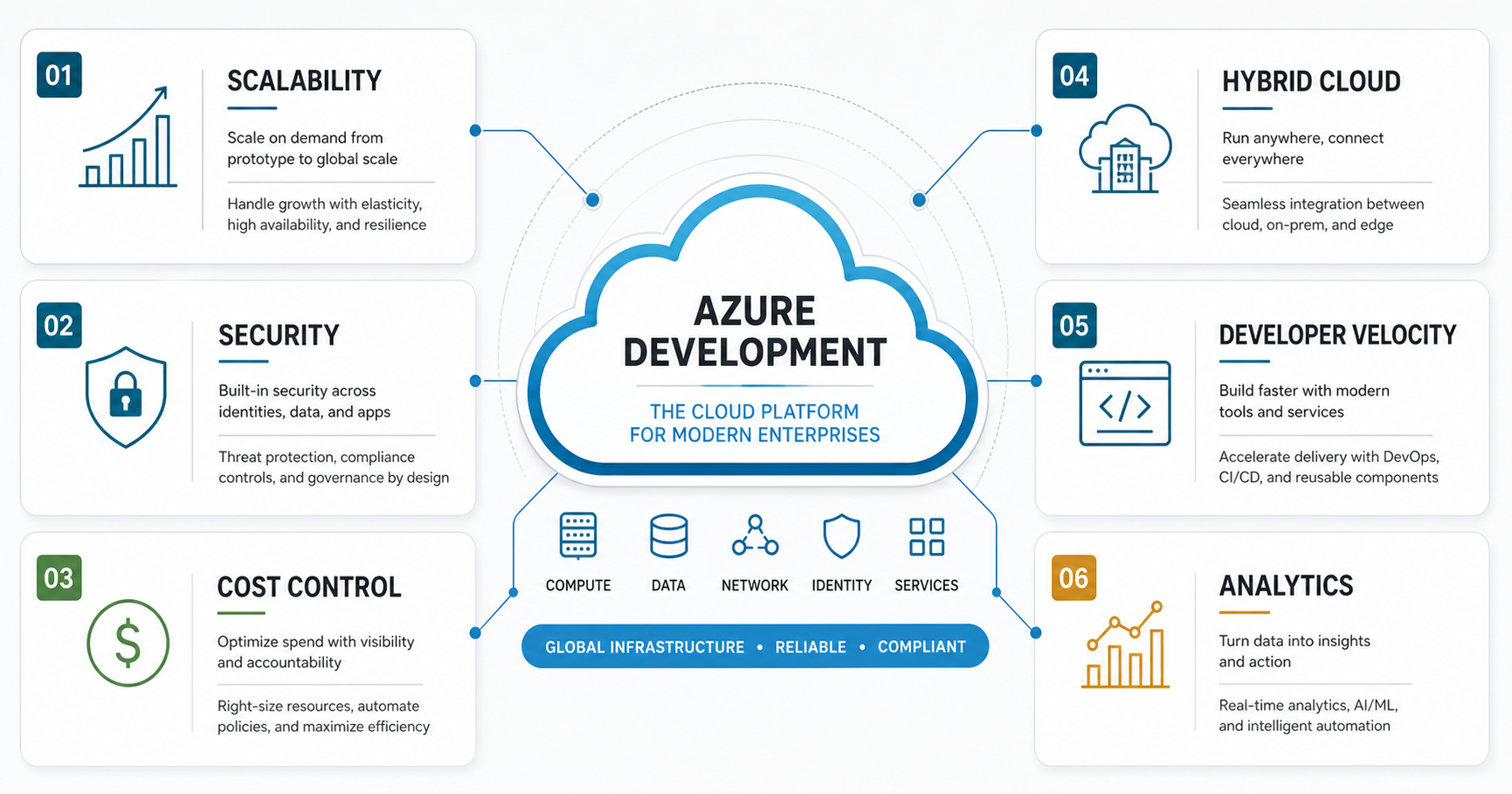

Azure development is no longer just a hosting choice. For many modern enterprises, it is a way to build applications, data platforms, integrations, AI workflows, and secure operating models on one cloud foundation. The benefit is strongest when Azure is treated as a product platform, not as a lift-and-shift destination for servers.
The practical question is not "Is Azure good?" It is "Which workloads, teams, risks, and cost controls make Azure the right platform for this business?" Microsoft now frames Azure adoption through the Cloud Adoption Framework and the Azure Well-Architected Framework, which emphasize strategy, planning, readiness, adoption, governance, security, management, reliability, cost optimization, operational excellence, and performance efficiency. That is the lens enterprises should use before investing in Azure development.
Quick Answer: Why Azure Development Benefits Modern Enterprises
Azure development benefits modern enterprises because it combines elastic infrastructure, managed application services, identity controls, data and AI services, DevOps automation, hybrid-cloud options, and cost governance in one platform. The result can be faster software delivery, stronger security controls, better resilience, and clearer cloud spending, especially for organizations already working with Microsoft identity, productivity, data, or enterprise software ecosystems.
Azure is most valuable when the organization has a clear cloud migration assessment, a prioritized workload roadmap, and an operating model for security, observability, automation, and FinOps. Without those foundations, Azure can still become expensive or complex, just like any other cloud platform.
What Is Azure Development?
Azure development means designing, building, deploying, and operating software on Microsoft Azure. That work can include web applications, APIs, mobile backends, data pipelines, analytics systems, integration layers, AI services, containerized workloads, serverless functions, and modernization of older enterprise applications.
For enterprise teams, Azure development usually spans more than code. It includes landing-zone design, identity and access management, environment strategy, CI/CD pipelines, monitoring, backup and disaster recovery, governance policies, data security, cost allocation, and release operations. The best Azure programs connect platform engineering with product delivery so teams can ship software without rebuilding compliance and infrastructure decisions for every project.
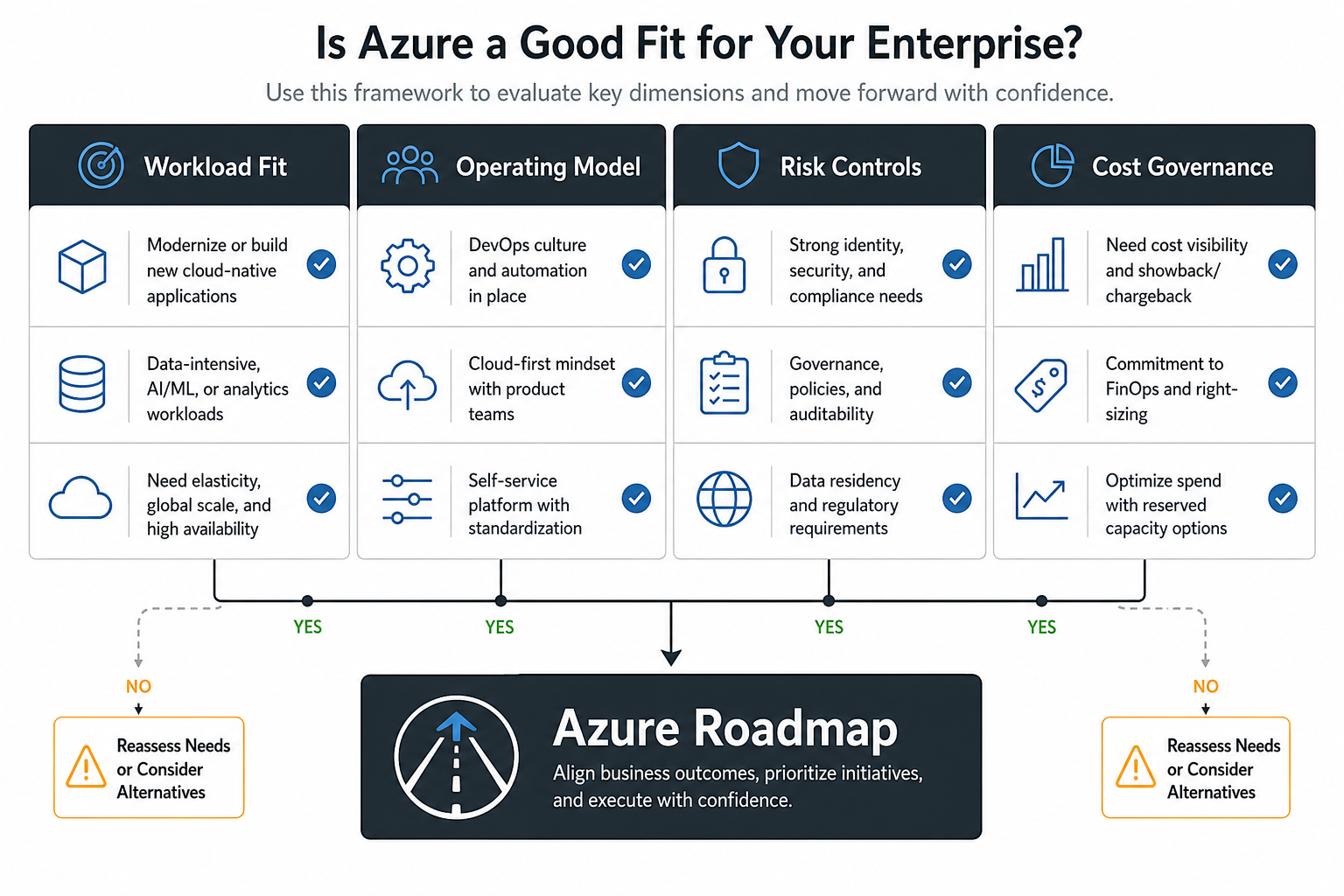
When Is Azure A Good Fit?
Azure is a strong fit when an enterprise needs to modernize Microsoft-heavy environments, support hybrid infrastructure, govern sensitive data, scale applications globally, or build data and AI capabilities with centralized identity and compliance controls. It is also a good fit when development teams need managed services, standard deployment pipelines, and repeatable environments instead of hand-maintained servers.
Azure deserves a more careful evaluation when workloads have unusual latency constraints, unclear data residency needs, immature cloud operations, or no budget ownership model. In those cases, start with a smaller proof of value and compare options before committing the entire portfolio.
6 Benefits Of Azure Development For Modern Enterprises
1. Scalable Infrastructure And Resilient Application Design
Azure helps teams scale compute, storage, databases, messaging, and application services as demand changes. That matters for customer portals, SaaS platforms, analytics jobs, seasonal traffic, and internal systems that must absorb growth without a full infrastructure rebuild.
The real benefit is not only elastic capacity. Azure also gives teams patterns for redundancy, region strategy, backup, disaster recovery, health checks, autoscaling, and managed platform services. When those patterns are designed against business requirements, the application can become easier to operate and recover.
2. Security, Identity, And Governance By Design
Enterprise software is only as strong as its identity model, access controls, audit trail, and data protection strategy. Azure gives organizations centralized controls for authentication, authorization, policy enforcement, key management, network isolation, threat monitoring, and compliance reporting.
Those capabilities are useful only when they are built into the delivery process. Teams should define environment access, privileged operations, data classification, audit requirements, and incident response before production launch. This is where Azure development overlaps with architecture, compliance, and operational ownership.
3. Cost Visibility And Consumption-Based Budgeting
Azure's pay-as-you-go model can reduce upfront infrastructure investment, but it does not automatically reduce total cost. The enterprise benefit comes from visibility: tagging, budgets, reserved capacity planning, right-sizing, lifecycle policies, and showback or chargeback models that connect cloud spend to business outcomes.
For new products, compare Azure operating costs with the broader custom software development cost: discovery, architecture, engineering, integrations, testing, security, support, and ongoing cloud operations. A cheaper hosting line item does not help if the application is harder to maintain or scale.
4. Hybrid Cloud And Enterprise Integration Options
Many enterprises cannot move every system to the cloud at once. Azure can support hybrid models where cloud applications connect to on-premises systems, legacy databases, enterprise identity, data warehouses, and existing operational workflows.
This is valuable for phased modernization. Teams can expose APIs, move analytics workloads, modernize high-change applications, or build new cloud-native services while keeping sensitive or tightly coupled systems stable until the business case for migration is clear.
5. Faster Delivery Through Managed Services And DevOps
Azure development can improve delivery speed when teams standardize the path from idea to production. Managed databases, app services, containers, serverless functions, queues, monitoring, and infrastructure-as-code pipelines reduce repeated setup work and let engineers focus on product behavior.
Delivery speed also depends on process. A strong DevOps readiness review can identify pipeline gaps, release bottlenecks, environment drift, test coverage issues, and cost controls before a cloud program scales across multiple teams.
6. Data, Analytics, And AI Readiness
Modern Azure programs often include data platforms, reporting, machine learning, workflow automation, and AI-assisted operations. Azure can support these goals with managed data stores, analytics services, integration tools, and AI services that connect to enterprise systems.
The best starting point is a narrow use case with measurable value. Before building broad automation, estimate the opportunity with an AI Automation ROI Calculator or a focused discovery sprint. If the business case is real, AI development services can then help turn the use case into a governed production workflow.
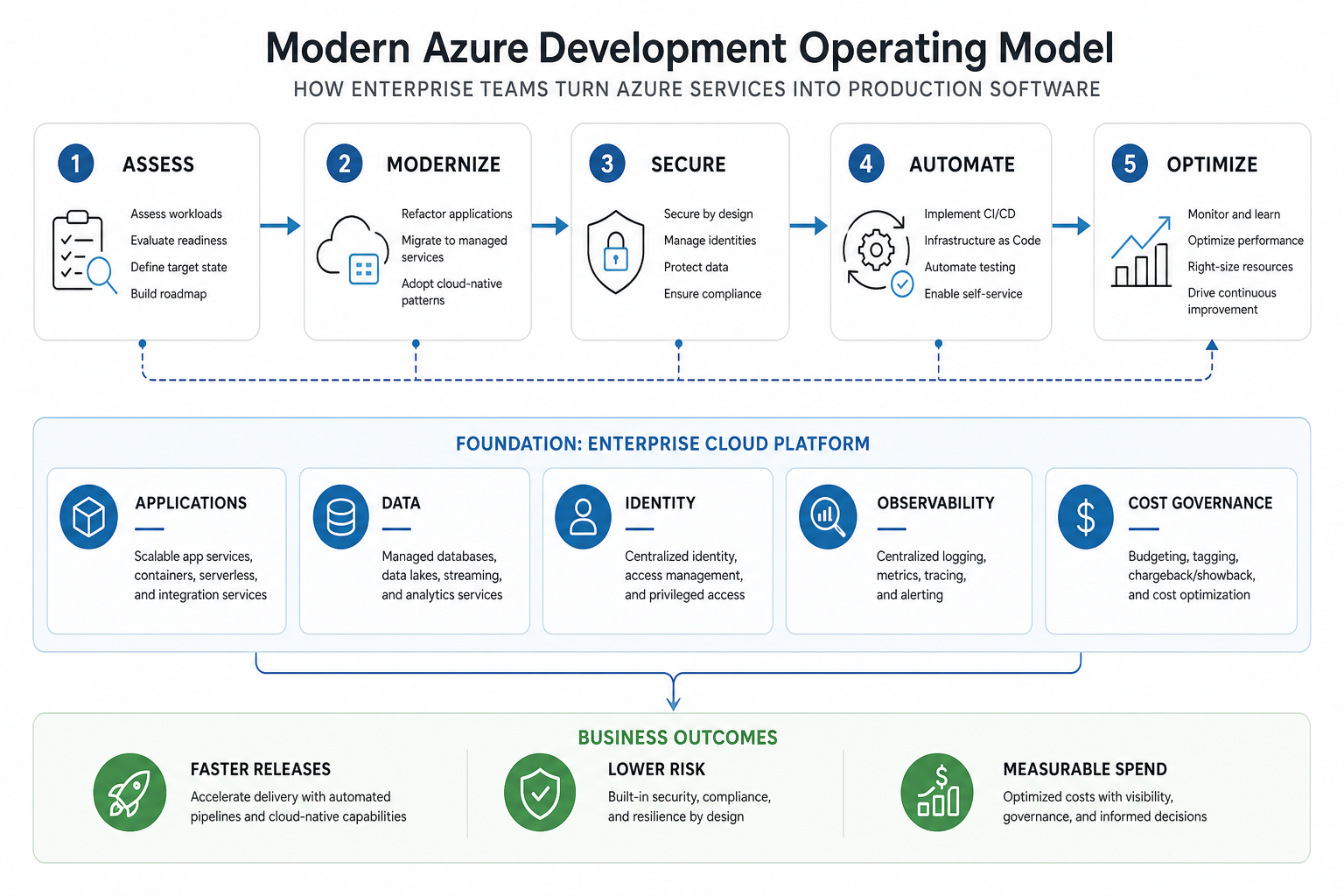
A Practical Azure Development Roadmap
An Azure program should start with business outcomes and workload priorities, not a list of services. Use this sequence to keep the work measurable:
- Assess the portfolio. Identify applications, data flows, integrations, dependencies, compliance needs, performance requirements, and operating costs.
- Choose the workload path. Decide whether each workload should be rehosted, replatformed, refactored, replaced, retired, or built cloud-native.
- Prepare the foundation. Define identity, networking, landing zones, policies, observability, backup, secrets, environment strategy, and deployment standards.
- Modernize in slices. Prioritize user-facing value and operational risk reduction instead of trying to transform the full estate in one move.
- Automate delivery. Standardize CI/CD, infrastructure as code, test automation, security scanning, and rollback paths.
- Govern cost and reliability. Review usage, right-size resources, tune performance, test recovery, and track spend against business outcomes.
Common Azure Development Mistakes To Avoid
The most common Azure mistake is treating cloud migration as a server relocation project. If the application architecture, deployment model, data strategy, and operating process stay unchanged, the business may inherit cloud bills without gaining cloud benefits.
Other common mistakes include weak tagging, no budget alerts, too many always-on environments, manual production changes, unclear data residency decisions, poor observability, and security controls added late. Enterprises should also avoid service sprawl. A smaller set of well-governed services usually beats a broad service catalog that teams do not know how to operate.
How NextPage Helps With Azure Development
NextPage helps teams turn cloud ambition into practical software delivery. That can include application assessment, modernization planning, architecture, API and backend development, DevOps automation, data workflows, AI integration, and ongoing product engineering support.
If the roadmap needs additional delivery capacity, NextPage can also provide senior delivery ownership across cloud, data, automation, and product engineering work. The goal is not to push every workload into Azure. The goal is to choose the right architecture, ship usable software, and operate it with measurable reliability, security, and cost control.
Conclusion
Azure development benefits modern enterprises when it is connected to a clear workload strategy, secure platform foundation, automated delivery process, and cost governance model. The six major benefits are scalability, security, cost visibility, hybrid integration, developer velocity, and data or AI readiness.
For best results, start with a focused assessment, choose the right workloads, design the operating model early, and measure the program against business outcomes. Azure is powerful, but the platform creates value only when the software, team process, and cloud governance mature together.