
Quick Answer: What Should An Accessibility Remediation Roadmap Include?
An accessibility remediation roadmap should turn audit findings into sequenced product, design, engineering, QA, and release work. The practical version prioritizes blockers by user impact, maps each issue to WCAG 2.2 criteria where useful, separates quick content fixes from code and design-system work, adds manual assistive-technology testing, and defines release gates so the same failures do not return in the next sprint.
This guide is for product leaders, engineering managers, QA leads, ecommerce teams, SaaS owners, banking or travel platforms, and mobile app teams that already know accessibility matters but need a plan after the audit. The goal is not to label every issue as equally urgent. The goal is to make the product more usable, reduce legal and procurement risk, and keep releases moving with evidence that product, QA, engineering, and support teams can defend after launch.
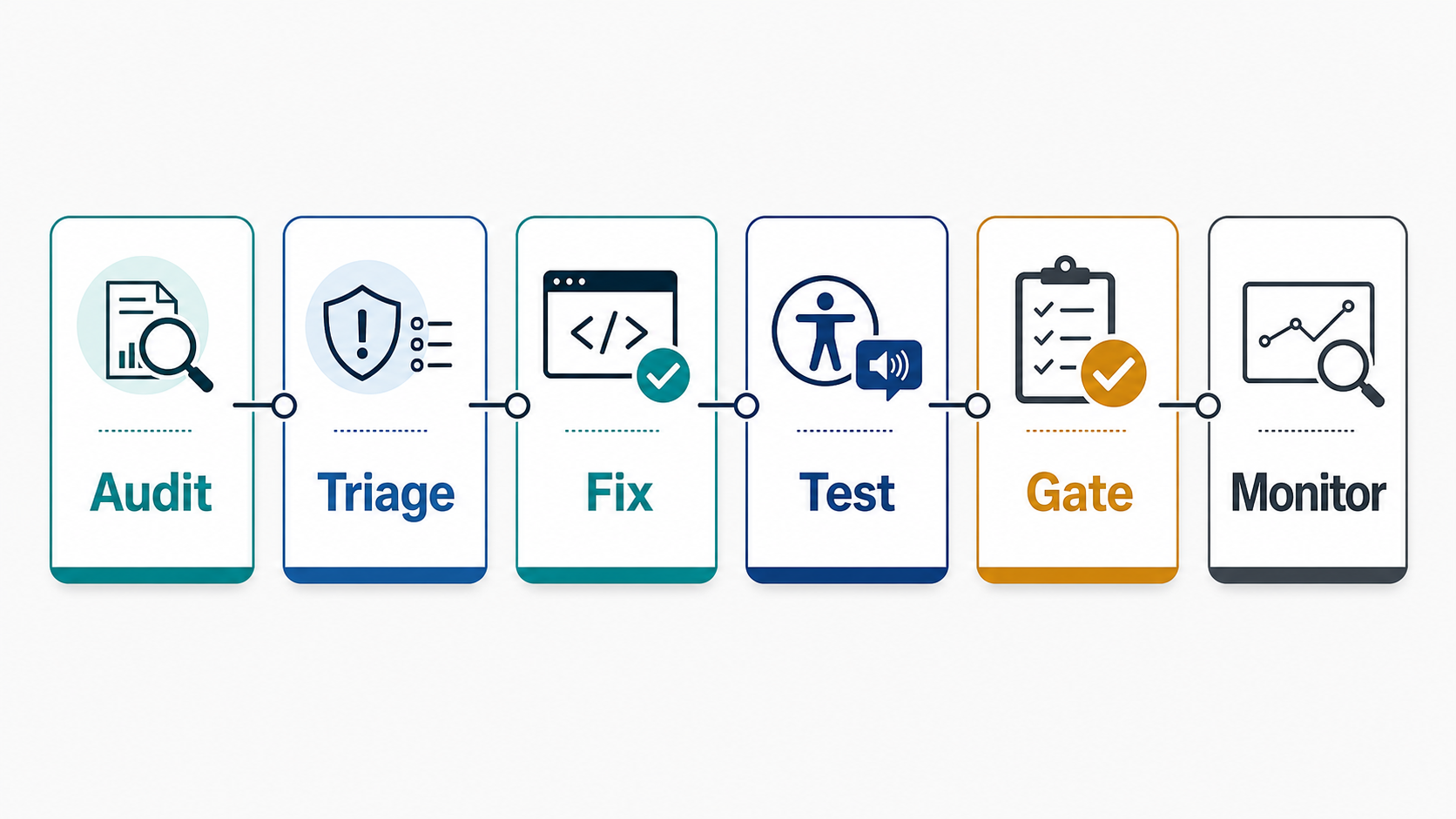
If your team needs independent test coverage, NextPage's software QA testing services can help convert accessibility findings into release-ready test evidence across web, mobile, APIs, and regression cycles.
Why Accessibility Remediation Needs A Roadmap
Accessibility work often gets stuck because teams treat the audit as the plan. An audit is a source of evidence, not a delivery sequence. It may list contrast failures, missing labels, focus traps, form errors, keyboard defects, ARIA misuse, media captions, PDF issues, and mobile touch-target problems in one long backlog. Without triage, engineering teams either fix visible low-risk items first or delay the work because the list feels too broad.
The roadmap creates order. It answers which users are blocked, which flows carry revenue or compliance risk, which fixes require design-system changes, which need backend or content owners, and which checks should become recurring QA. It also prevents a common failure: passing an automated scan while still leaving real keyboard, screen reader, focus, form, and mobile interaction problems in production.
WCAG 2.2 remains the strongest baseline for future-facing web accessibility work in 2026. W3C announced WCAG 2.2 as a W3C Recommendation in October 2023, and the W3C/WAI WCAG overview now notes that WCAG 2.2 is also available as ISO/IEC 40500:2025, with the December 2024 wording expected to move into ISO/IEC 40500:2026 later in 2026. For non-web documents, native mobile screens, kiosks, and software interfaces, W3C's WCAG2ICT 2.2 guidance helps teams translate WCAG intent beyond browser pages. W3C's mobile task force is also preparing WCAG2Mobile guidance, so cross-platform teams should treat mobile accessibility as first-class product QA, not a footnote to web compliance.
1. Anchor The Roadmap In Current Standards And Business Risk
Start by naming the compliance and usability target. Many teams choose WCAG 2.2 AA as the practical product benchmark, then map local legal, procurement, or industry expectations around it. The European Accessibility Act entered application on June 28, 2025 for covered products and services in the EU, including key digital categories such as e-commerce, banking, e-books, electronic communications, transport information, and ticketing services. Even teams outside the EU can be affected when they sell covered services into the EU market, so the roadmap should name whether the product, users, and distribution model create EAA exposure.
For 2026 planning, separate four tracks: standards alignment, covered-service risk, software/mobile interpretation, and product evidence. Standards alignment names WCAG 2.2 AA or the relevant contractual baseline. Covered-service risk identifies whether the product falls under EAA, public-sector procurement, industry policy, or enterprise vendor review. Software and mobile interpretation maps WCAG2ICT guidance to native apps, documents, kiosks, embedded widgets, and non-browser workflows. Product evidence proves that critical flows were tested with keyboard, screen reader, zoom/reflow, reduced motion, mobile assistive technology, and real recovery paths after errors.
Do not turn standards into a checkbox exercise. The roadmap should connect each requirement to user impact and product risk. A checkout button without a visible focus state can block keyboard users. A login flow that depends on a cognitive puzzle can exclude users with cognitive disabilities. A mobile control with a tiny touch target can fail users with motor impairments and hurt every user on a moving train, in a warehouse, or on a small device.
| Input | Use It For | Roadmap Output |
|---|---|---|
| WCAG 2.2 criteria | Baseline requirements and acceptance criteria. | Issue tags, fix definitions, test cases. |
| EAA or local regulations | Covered service and deadline context. | Risk notes and executive priority. |
| User analytics | High-traffic and revenue-critical flows. | Release sequence by business impact. |
| Support tickets and complaints | Real user pain and assistive-tech failures. | High-confidence remediation candidates. |
2. Build A Complete Accessibility Issue Inventory
Combine automated scans, manual keyboard checks, screen reader testing, design review, content review, and mobile-device testing. Automated tools are useful for repeatable checks such as missing alt text, some color contrast issues, empty buttons, landmark structure, form label problems, and HTML validity. They do not reliably prove whether a workflow makes sense to a screen reader user, whether focus order matches the visual task, whether an error message helps someone recover, or whether a custom component behaves correctly across browsers and devices.
Capture each issue with enough detail for implementation: page or screen, component, affected role, user impact, WCAG reference, severity, reproduction steps, screenshots or recordings, expected behavior, owner, dependency, and retest method. Add an evidence field that states how the team will prove the fix: automated rule, keyboard walkthrough, screen reader transcript, mobile device check, visual contrast review, document review, or user acceptance note. If the issue appears in a shared component, mark it as design-system or component-library work rather than creating dozens of one-off tickets.
For cross-platform products, include web, mobile web, native mobile, admin dashboards, emails, documents, and embedded widgets. Accessibility problems often hide in secondary flows such as password reset, account deletion, invoice download, checkout errors, modals, consent banners, file uploads, and notification preferences.
3. Triage By User Impact, Legal Exposure, And Engineering Dependency
Severity is not just how broken the code looks. A low-effort label fix on a rarely used marketing page should not outrank a keyboard trap in checkout, a login blocker, or an inaccessible support form. Use a triage model that combines user impact, frequency, business criticality, compliance exposure, and dependency complexity.
| Priority | Definition | Examples |
|---|---|---|
| P0 Blocker | Prevents a user group from completing a critical flow. | Keyboard trap in checkout, unlabeled login fields, screen reader cannot submit a form. |
| P1 High | Creates serious friction in important flows or covered services. | Missing focus indicators, unclear form errors, inaccessible modal, touch target failures. |
| P2 Medium | Reduces usability but has a workaround or lower traffic impact. | Weak heading hierarchy, inconsistent link text, some image alt gaps. |
| P3 Systemic | Requires shared component, design token, or content governance changes. | Design-system contrast tokens, button patterns, reusable form component behavior. |
Use the MVP scope builder style of thinking for remediation scope: define what must be fixed before the next release, what can be grouped into a design-system sprint, and what belongs in ongoing governance.
Accessibility Issue Triage Matrix
A practical accessibility backlog needs more than severity labels. Use a two-axis triage model: user impact and engineering dependency. User impact asks whether the issue blocks a critical task, creates serious friction, reduces comprehension, or mostly affects polish. Engineering dependency asks whether the fix is local content, one template, one shared component, a design-system token, backend validation behavior, or cross-platform product policy.
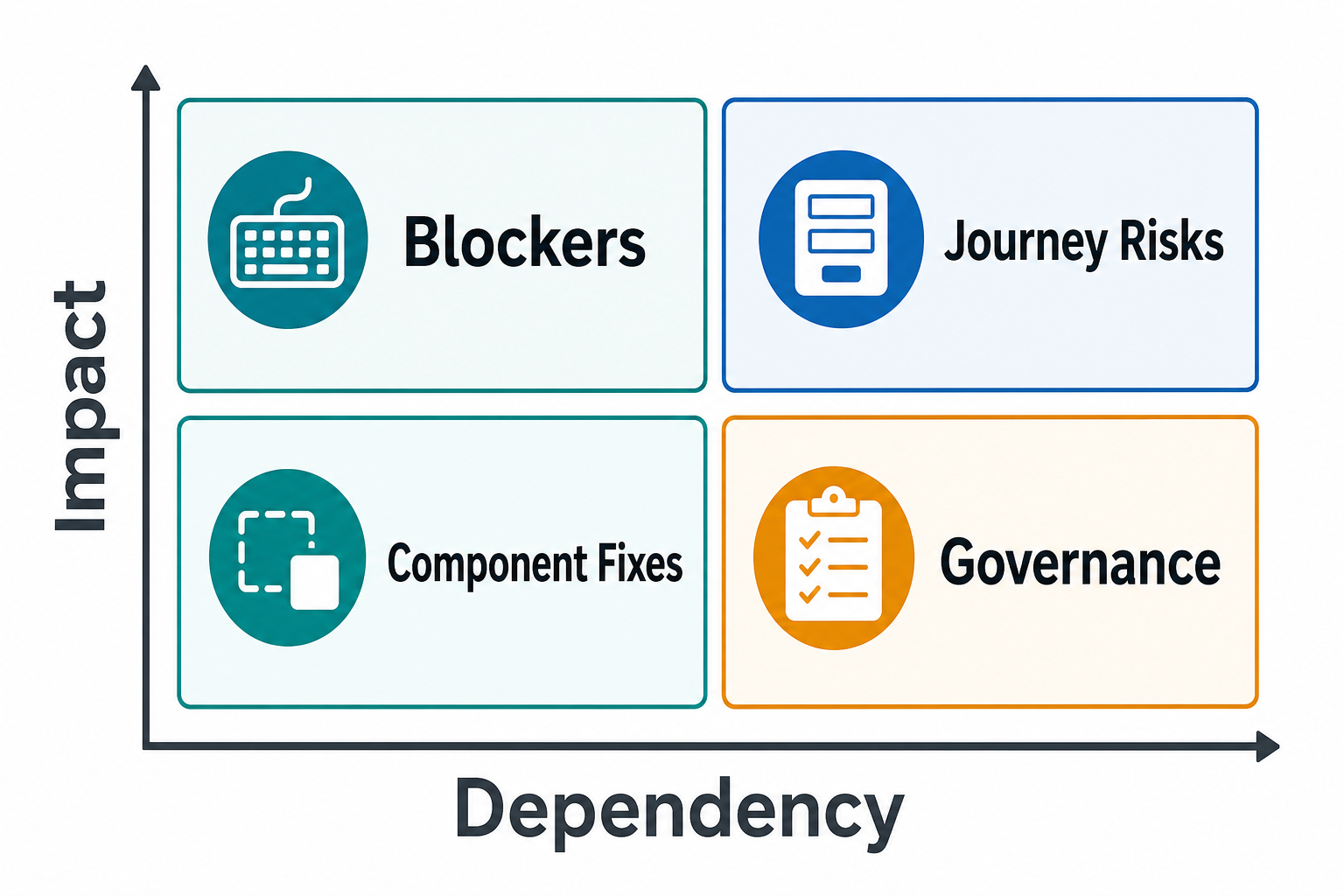
P0 issues should block release when they prevent login, checkout, search, booking, account recovery, payments, or support contact. P1 issues deserve short-term fixes when important journeys still work but create serious friction. P2 issues can be grouped into content, template, and CMS sprints. P3 issues often belong in design-system and component-library work because one shared bug can create repeated page-level failures.
| Priority | Evidence Required | Typical Owner |
|---|---|---|
| P0 blocker | Affected flow, reproduction steps, assistive-tech result, expected behavior, release risk. | Product, QA, engineering lead. |
| P1 high risk | User impact, WCAG criterion, affected templates, retest method, target release. | QA, design, frontend, mobile. |
| P2 repair | Content or template location, acceptance criteria, owner, batch plan. | Content, design, frontend. |
| P3 systemic | Component or token source, downstream pages, regression test, migration owner. | Design system and platform leads. |
For teams trying to decide what can fit in one release, pair the matrix with the MVP scope builder. For budget conversations, the custom software cost estimator can help separate content fixes from component, mobile, backend, and QA work.
4. Match Fixes To The Right Owner
Accessibility remediation is cross-functional. Designers may need to revise contrast tokens, focus states, spacing, error states, and interaction patterns. Frontend engineers may need semantic HTML, ARIA cleanup, keyboard support, modal focus management, skip links, status messages, and component-library updates. Mobile engineers may need accessibility labels, dynamic type support, focus order, target size, reduced-motion behavior, and screen reader gestures. Content owners may need headings, link text, alt text, captions, transcripts, and plain-language error copy.
Do not assign every issue to QA or frontend by default. QA can reproduce, validate, and automate what is appropriate, but product and design own many of the decisions that make a flow understandable. Backend teams may own error messages, validation timing, account recovery, document generation, and API responses that affect accessible states.
When a defect affects a reusable pattern, fix the shared pattern first. One design-system focus bug can create hundreds of page-level failures. A shared form component with proper labels, descriptions, required-state semantics, error announcement, and keyboard behavior is a better investment than patching each form separately. If the accessibility backlog exposes broader frontend debt, compare it with a legacy application modernization roadmap and NextPage's legacy web app UI modernization services instead of hiding platform work inside isolated tickets.
5. Combine Automated, Manual, And Assistive-Technology Testing
An effective test plan layers fast automation with human checks. Automated accessibility tests can run in CI for obvious regressions. Functional tests can confirm that keyboard users can navigate, submit forms, open menus, close dialogs, and recover from errors. Manual testing validates focus order, screen reader experience, content clarity, zoom/reflow, motion preferences, and mobile gestures. Android guidance recommends combining manual testing with accessibility services, analysis tools, automated tests, and user testing, which is a useful model for cross-platform remediation plans.
NextPage's functional testing services are relevant because many accessibility issues are workflow failures: forms, modals, search, filters, checkout, file uploads, account settings, and role-based dashboards. Pair that with mobile app testing services when native or hybrid app surfaces need real-device accessibility checks. For release teams, the mobile app QA and launch checklist is useful when accessibility evidence must sit beside crash, network, analytics, store, and regression coverage.
- Run automated checks on key templates and reusable components.
- Test keyboard navigation from start to finish in critical flows.
- Validate screen reader output for labels, instructions, errors, status messages, and dynamic updates.
- Check focus visibility, focus order, and recovery after modals or route changes.
- Test mobile touch targets, orientation, zoom, dynamic type, and reduced motion.
- Retest fixed issues against original reproduction steps before closing them.
6. Add Accessibility Release Gates
The roadmap should define what blocks release and what can ship with a documented follow-up. A public ecommerce checkout, banking flow, account recovery path, or travel booking funnel deserves stricter gates than a low-traffic internal admin note. Still, every exception should have an owner, rationale, and due date.
| Gate | Evidence | Owner |
|---|---|---|
| Critical flow keyboard pass | Recorded or logged keyboard-only test for login, search, checkout, forms, and account actions. | QA lead |
| Assistive-tech smoke test | Screen reader checks for labels, focus, errors, and dynamic status changes. | QA plus product |
| Shared component fixes | Design-system or component-library pull request with regression tests. | Frontend/mobile lead |
| Content remediation | Heading, link text, alt text, caption, transcript, and document checks. | Content owner |
| Exception register | Known gaps with user impact, workaround, owner, and target date. | Product owner |
The functional testing checklist for web and mobile apps can support this release gate because accessibility has to live inside the same release discipline as functional, regression, and UAT checks. When the team needs clearer release ownership, compare the gate with UAT vs functional testing vs regression testing so accessibility evidence does not get lost between QA, business users, and engineering.
Accessibility Release Gates And Regression Governance
Accessibility release gates should produce evidence, not just confidence. A strong gate names the critical flows tested, assistive technologies used, browsers and devices covered, component fixes merged, exceptions accepted, and monitoring signals that will be reviewed after launch. This protects the team from the common pattern where a sprint fixes one screen while a shared modal, menu, or form pattern keeps reintroducing the same defect.
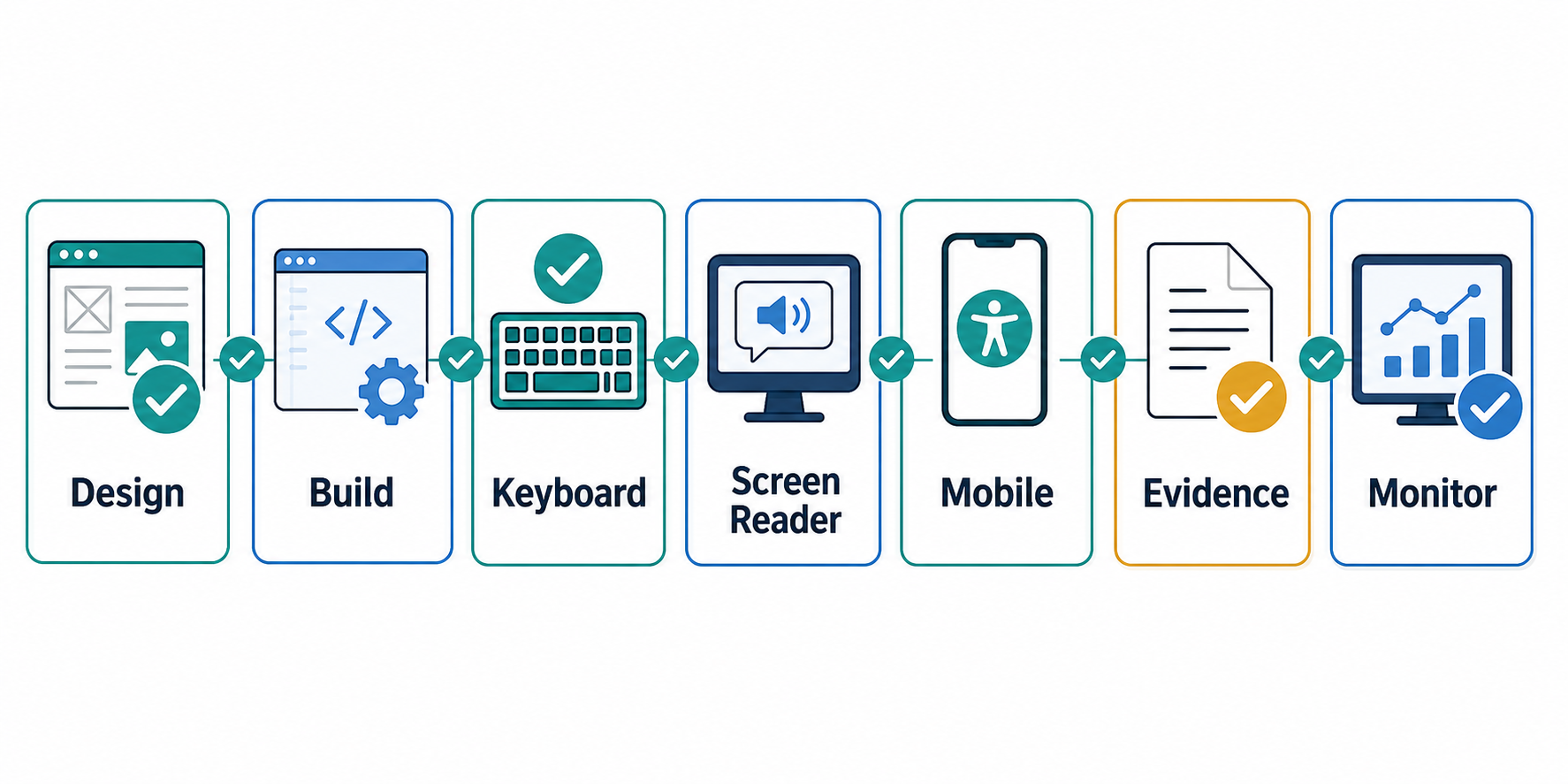
| Release Gate | Minimum Evidence | Regression Control |
|---|---|---|
| Design review | Focus states, contrast, spacing, error states, reduced motion, and responsive behavior are reviewed before build. | Design tokens and component acceptance criteria. |
| Component fix | Shared controls are corrected once and covered by regression tests where practical. | Component-library stories, unit tests, and review checklist. |
| Keyboard and screen reader pass | Critical journeys are tested end to end with recorded defects and retest notes. | Release smoke suite and manual evidence log. |
| Mobile assistive testing | VoiceOver, TalkBack, dynamic type, orientation, target size, and gestures are checked on representative devices. | Device matrix and launch checklist. |
| Exception register | Accepted gaps have user impact, workaround, owner, and target date. | Monthly governance review. |
The same discipline applies to security and performance work. The web application penetration testing checklist and mobile app performance optimization checklist both show why release evidence works best when product risk is visible before launch. For a cross-platform workflow example, the VenueCart portfolio case study shows how customer, provider, admin, and notification workflows need coordinated QA evidence.
7. Keep Accessibility From Regressing
Remediation is not finished when the first backlog is closed. Add accessibility to design reviews, component acceptance criteria, code review, QA smoke tests, content publishing, procurement checks, analytics, and support triage. Track reopened issues and recurring component failures. Review high-traffic flows after major redesigns, framework upgrades, new payment steps, new modals, new forms, and mobile app releases.
Accessibility governance should be lightweight enough to survive normal delivery. A practical monthly rhythm might include automated scan trends, open P0/P1 issues, component-library risks, exception register review, support-ticket themes, and one manual check of a critical flow. Mature teams eventually treat accessibility acceptance criteria as part of the normal definition of done.
Accessibility Remediation Roadmap Checklist
- Confirm target standard, legal context, and covered product/service risk.
- Inventory issues from automated scans, manual QA, keyboard testing, screen readers, design review, and mobile-device checks.
- Tag every issue by user impact, flow, WCAG reference, owner, reproduction steps, and retest method.
- Prioritize blockers in critical flows before low-impact cosmetic fixes.
- Group shared component and design-system failures into systemic remediation work.
- Assign design, frontend, mobile, backend, content, QA, and product owners clearly.
- Use automated checks for repeatable regressions, but require manual assistive-technology checks for critical flows.
- Define release gates, exception rules, evidence requirements, and rollback or follow-up ownership.
- Add accessibility checks to design, code, QA, content, and support governance.
- Review progress by user impact, not just percentage of audit tickets closed.
How NextPage Helps With Accessibility Remediation
NextPage helps teams convert accessibility audits into scoped remediation plans, implementation tickets, QA evidence, and release gates. We can review the product flows, prioritize blockers, fix web or mobile components, test keyboard and assistive-technology paths, and create a practical governance loop for future releases. If your product has customer, provider, admin, and notification workflows like the VenueCart marketplace case study, we can turn accessibility into cross-role release evidence instead of a detached compliance checklist.
The useful output is a working roadmap: what to fix now, what to consolidate in shared components, what to test manually, what to automate, what to document as an exception, and what evidence the product owner can use before release. For teams modernizing a web app or mobile product at the same time, NextPage can combine remediation with web app development, mobile app development, functional testing services, and QA support.