
Quick Answer: Offline Functionality For Accessible Travel Apps
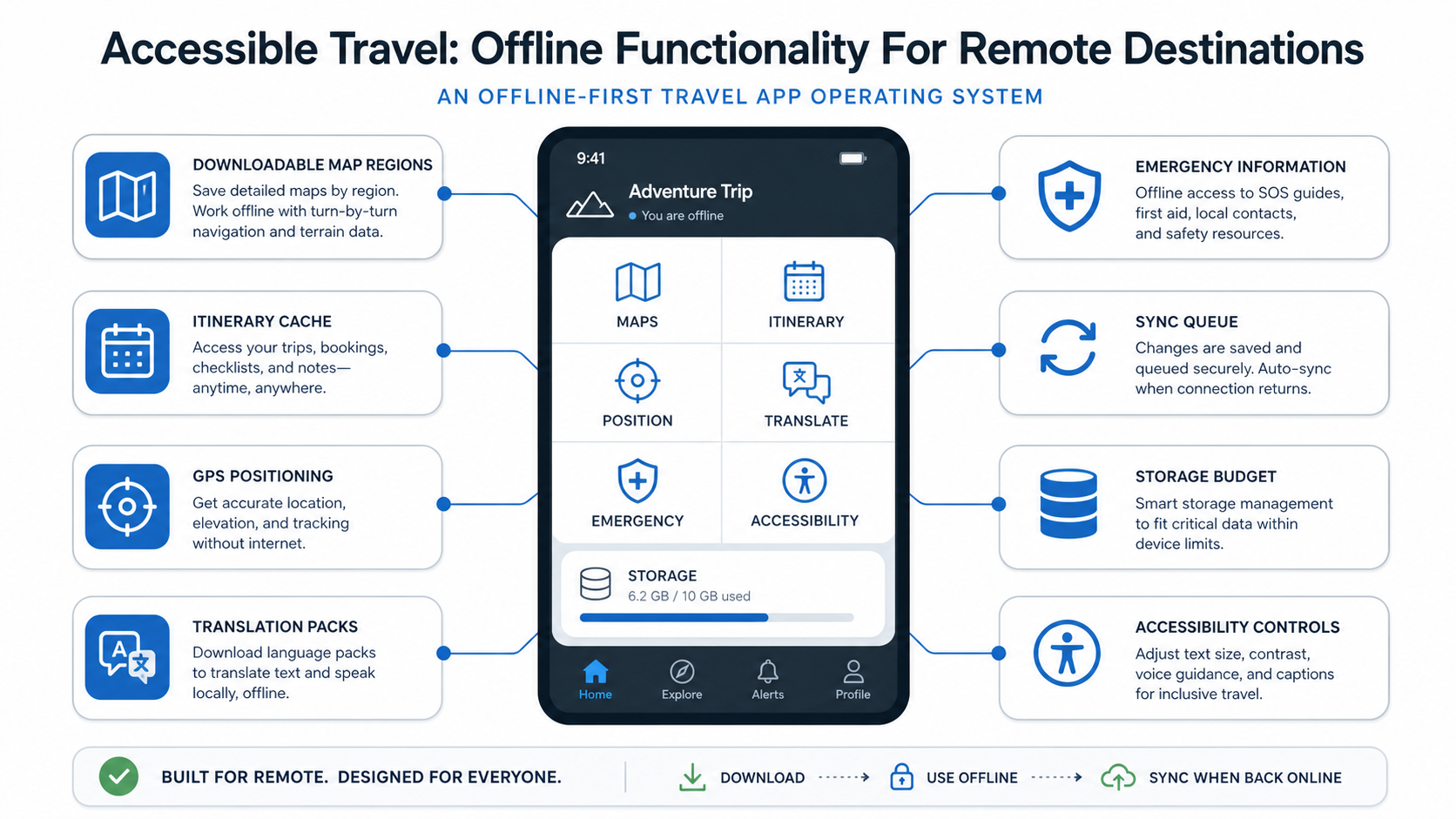
Offline functionality makes a travel app usable when the traveler is outside reliable coverage, crossing borders, moving through airports, hiking remote routes, or managing accessibility needs in unfamiliar places. For accessible travel, offline support should cover more than maps. It should keep routes, saved places, bookings, emergency details, language packs, accessibility notes, and trip checklists available on the device.
The product goal is simple: a traveler should still be able to make safe decisions when mobile data fails. That means offline maps, GPS positioning, local search, stored itinerary data, readable accessibility information, battery-aware design, and a sync model that reconciles updates when connectivity returns. If you are turning this into a product roadmap, NextPage's mobile app development team can help scope the offline-first architecture before the first build becomes too heavy.
Why Offline Travel Features Still Matter
Travel apps often assume constant connectivity, but real trips do not. Remote destinations, underground transport, mountains, national parks, rural roads, cruise stops, international roaming limits, and overloaded event networks can all interrupt service. For travelers with mobility, hearing, vision, cognitive, or medical needs, that interruption can create more than inconvenience. It can affect safety, confidence, and independence.
The original post focused mostly on offline maps. Maps are important, but they are only one layer. A stronger product experience lets users save the details they will need later: accessible entrances, step-free routes, opening hours, restroom availability, booking references, local emergency numbers, medication notes, companion contact details, and hotel or transport instructions.
Offline design is also a retention feature. Travelers remember the app that worked when everything else failed. That trust can drive repeat usage, reviews, referrals, and premium conversion.
Offline Maps Versus An Offline-First Travel App
Offline maps help users navigate without data, but an offline-first travel app supports the full trip workflow. It should answer: where am I, where do I need to go, what do I need to know, what is accessible, what is already booked, what changed, and what should sync later?
| Capability | Basic offline map | Offline-first travel app |
|---|---|---|
| Navigation | Downloaded map tiles and GPS | Routes, saved places, transit notes, and fallback instructions |
| Accessibility | Limited location labels | Step-free access, surface notes, elevator status, restroom details, and user preferences |
| Trip planning | Pins and favorites | Bookings, itinerary, checklists, contacts, emergency resources, and reminders |
| Data model | Mostly static map regions | Versioned offline packages with conflict-aware sync |
| Business value | Navigation utility | Higher trust, retention, premium scope, and service integration |
For budget planning, offline support should be scoped as a product system rather than a single feature. The travel app development cost guide is a useful companion when comparing a lightweight itinerary planner against a booking-enabled, marketplace, or AI-personalized travel platform.
Core Offline Features For Remote Destinations
A useful offline travel app starts with downloadable destination packages. Each package should include map data, saved locations, points of interest, route notes, accessibility tags, booking references, basic language phrases, emergency information, and any trip-specific checklist items. Users should be able to choose a city, region, trail, route, or itinerary and understand how much storage it requires before downloading.
GPS tracking should work without a network connection, but the experience should set expectations clearly. GPS can locate the device, while real-time road closures, transit delays, rideshare availability, or venue status may need connectivity. The interface should distinguish cached facts from live data so travelers do not make risky assumptions.
Search also needs offline logic. Users should be able to search saved places, downloaded points of interest, booking details, and notes without hitting a server. Filters such as wheelchair access, quiet spaces, medical facilities, family-friendly stops, or low-walking routes can turn offline search into a real accessibility tool.
Offline Data Architecture And Sync
Offline functionality depends on deliberate data architecture. Treat offline data as versioned packages with clear boundaries: maps, places, itinerary, user notes, accessibility attributes, media, translations, and emergency content. Each package needs an update policy, expiry behavior, and storage limit. Without those controls, the app can become slow, bloated, or unreliable.
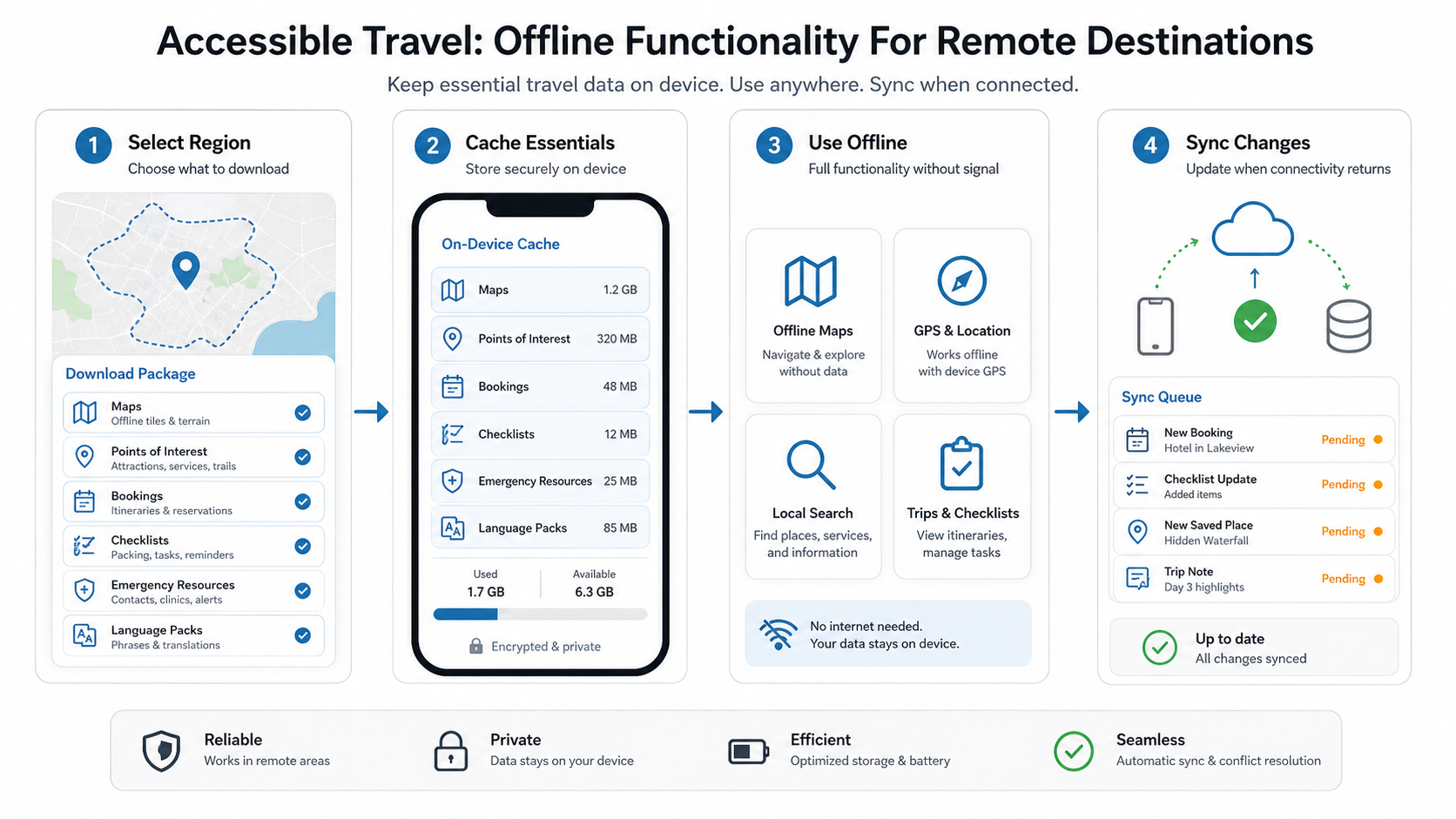
The sync queue is where many products fail. A traveler may save a place, edit a note, mark a booking complete, or report an accessibility issue while offline. The app should queue those changes, show sync status, retry safely, and avoid overwriting newer server data without warning. This is especially important for group travel, caregiver handoffs, or guided-tour workflows where multiple people may edit shared trip information.
Location-heavy apps can borrow patterns from transportation products. This guide on GPS integration for taxi booking apps is relevant when thinking about device positioning, map performance, and reliability expectations.
Accessibility Requirements For Offline Travel
Accessible travel is not only about whether a location has a ramp. Travelers may need screen reader support, large text, offline audio instructions, low-cognitive-load flows, color contrast, predictable navigation, haptic cues, downloadable documents, companion sharing, medical reminders, and emergency contacts. These controls must work offline, not only on the connected version of the app.
Design the offline mode around stressful moments. A user may be tired, lost, in bright sunlight, using one hand, conserving battery, or trying to communicate in another language. The interface should expose the most important actions first: current location, route back, saved itinerary, emergency information, accessibility notes, translation, and contact sharing.
Accessibility data should also show provenance and freshness. If a venue accessibility note came from a user review six months ago, that is different from a verified operator update yesterday. Store enough context offline so users can judge confidence.
Preparation Workflows Before The Trip
The best offline experience starts before the traveler loses connectivity. The app should prompt users to download destination packages, confirm storage, update maps on Wi-Fi, save bookings, add emergency contacts, and review accessibility needs. A pre-trip readiness checklist can prevent many failures later.
Preparation should be specific rather than generic. If the itinerary includes mountain roads, prompt for offline maps and emergency numbers. If it includes international travel, prompt for translation packs, roaming warnings, embassy information, and offline booking copies. If it includes accessibility needs, prompt for step-free route alternatives, venue notes, medication reminders, and companion contact permissions.
This is also where payment and booking details matter. If the app supports deposits, reservations, marketplace purchases, or provider bookings, users need offline access to confirmations and support instructions. The travel payment guide on secure payment gateways in travel apps can help teams think through booking and transaction flows that must remain understandable after payment is complete.
Product Readiness Scorecard
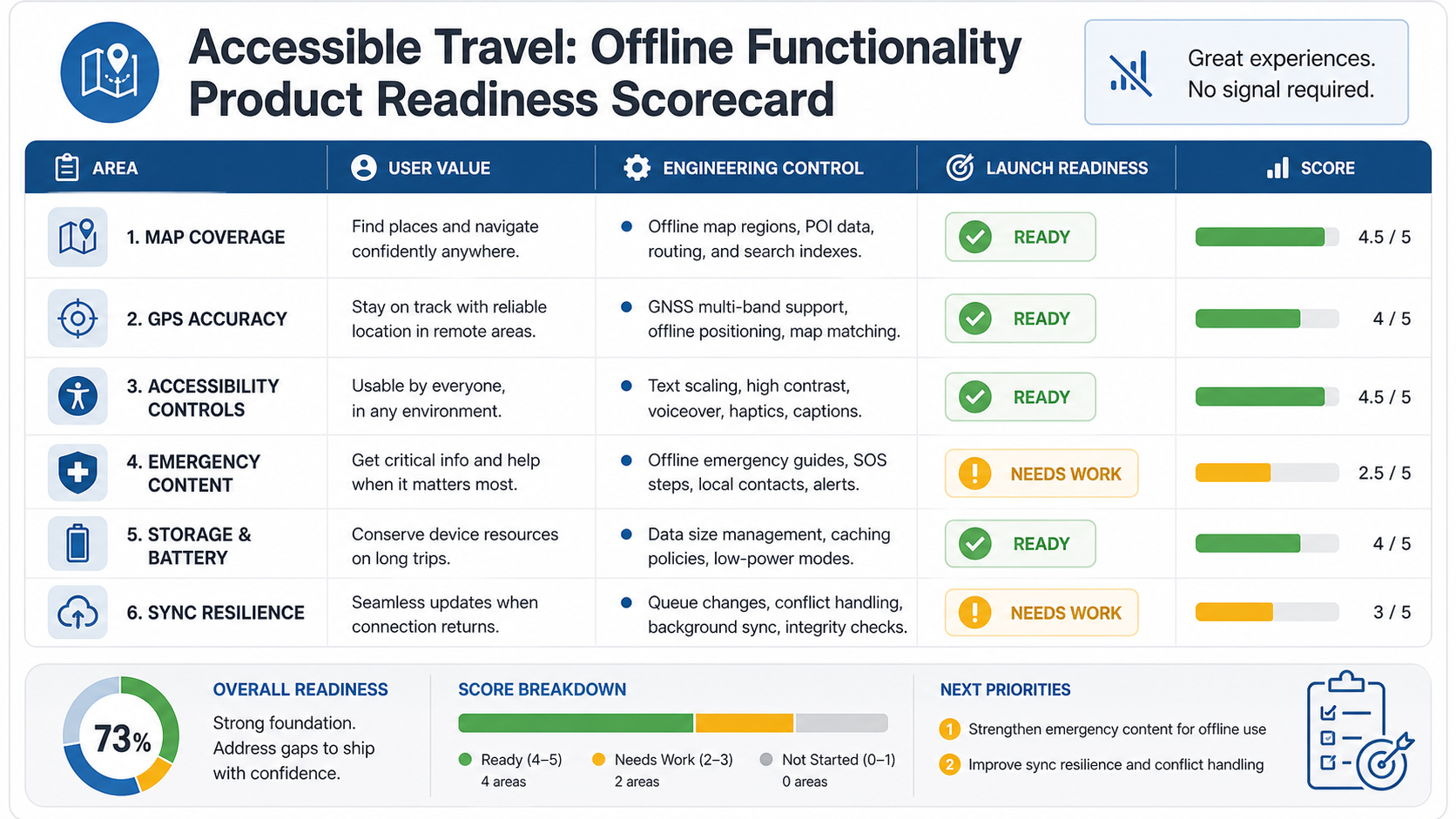
Before launch, evaluate offline travel functionality against real trip conditions. A demo that works in a conference room is not enough. Test on low battery, poor signal, airplane mode, old devices, large map downloads, limited storage, accessibility settings, screen readers, larger font sizes, and delayed sync.
| Readiness area | What to verify | Launch risk if weak |
|---|---|---|
| Map coverage | Downloaded regions match the itinerary and route alternatives | Users lose confidence when coverage gaps appear |
| Accessibility controls | Screen readers, large text, contrast, haptics, and saved access notes work offline | The app fails the users it claims to support |
| Storage and battery | Packages are compressed, explain size, and avoid background drain | Users delete the app before the trip |
| Emergency content | Contacts, local numbers, medical notes, and fallback instructions are available offline | Critical information is unavailable in high-stress moments |
| Sync resilience | Queued edits retry safely and display clear status | Notes, reports, or booking changes disappear |
MVP Scope For An Offline Travel App
A focused MVP should prove the core offline promise before expanding into a full marketplace or itinerary platform. Start with destination package downloads, saved itinerary, offline map view, GPS position, saved places, accessibility notes, emergency content, and a simple sync queue. Add booking, payments, provider inventory, AI recommendations, or group collaboration only when the first loop works reliably.
Use a cost model before committing to scope. The Custom Software Cost Estimator can help compare a lean offline travel MVP against a broader product with booking, marketplace, AI personalization, and provider dashboards.
Common Mistakes To Avoid
The biggest mistake is treating offline mode as a download button. Users need confidence, not just cached map tiles. Other common mistakes include hiding storage requirements, failing on low-end devices, burying emergency information, relying on tiny map labels, not supporting accessibility settings, syncing silently without status, and presenting stale live data as current.
Another mistake is overloading the first release. Offline maps, bookings, live transit, AI recommendations, payments, social sharing, and marketplace operations can all be valuable, but they do not need to ship at once. The right first version should make remote travel safer and easier in one clear use case.
How NextPage Can Help
NextPage helps product teams design and build travel apps that work in real-world conditions: offline storage, GPS workflows, itinerary logic, accessible UX, booking integrations, payment flows, admin tools, analytics, and scalable mobile backends. The work starts with product discovery and architecture decisions so offline functionality is built into the system, not patched on late.
If your travel app needs to support remote destinations, accessibility needs, or unreliable connectivity, start by defining the smallest offline experience that earns trust. From there, NextPage can help turn the roadmap into a practical mobile product that travelers can rely on when the network disappears.