
Advanced editing tools are what turn a basic photo app into a serious creative product. Cropping, filters, and brightness controls help users make quick improvements, but creators eventually need selective edits, masks, color grading, HDR workflows, healing tools, brushes, layers, RAW support, and non-destructive history.
The hard part is not naming those features. The hard part is deciding which advanced tools belong in the first product roadmap, how they should feel inside a mobile interface, and what engineering foundation they need so the app stays fast, reversible, and trustworthy.
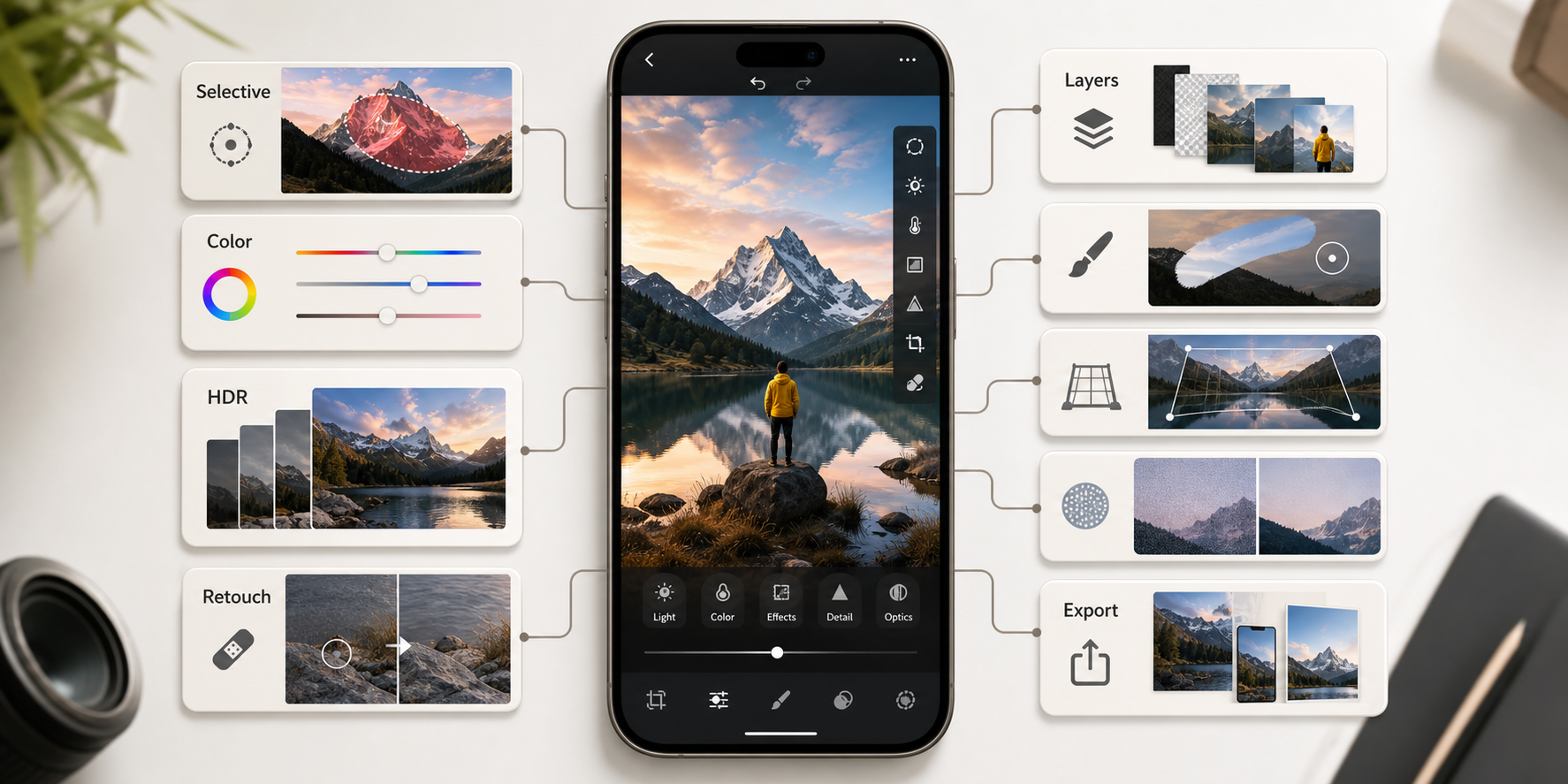
Quick Answer: Which Advanced Editing Tools Should A Photo App Include?
A serious photo editing app should include selective adjustments, gradient and radial masks, advanced color grading, HDR merge, frequency separation or portrait retouching, noise reduction, perspective correction, blending modes, customizable brushes, layers, and non-destructive edit history. If the app targets prosumers or professional creators, add RAW support, batch export, preset management, AI-assisted cleanup, and strong privacy controls.
Teams should plan these capabilities as a specialized mobile app development effort because advanced image editing affects device performance, permissions, offline behavior, storage, GPU previews, export quality, and app store readiness.
What The Original Post Was Missing
The original article listed useful tools, but it did not explain product priority, user value, architecture, launch sequencing, QA, or monetization impact. It also had no featured image, no inline visuals, no excerpt, no structured FAQs, and only one outdated internal link.
This optimization keeps the original idea and turns it into a fuller planning guide for founders, product owners, and teams deciding how advanced photo editing should work inside an app.
Advanced Tool Selection Matrix
Use this matrix before committing every feature to the first release. Each tool should map to a user goal, an engineering requirement, and a sensible launch stage. If a feature cannot clear those three tests, it may belong in a later release.
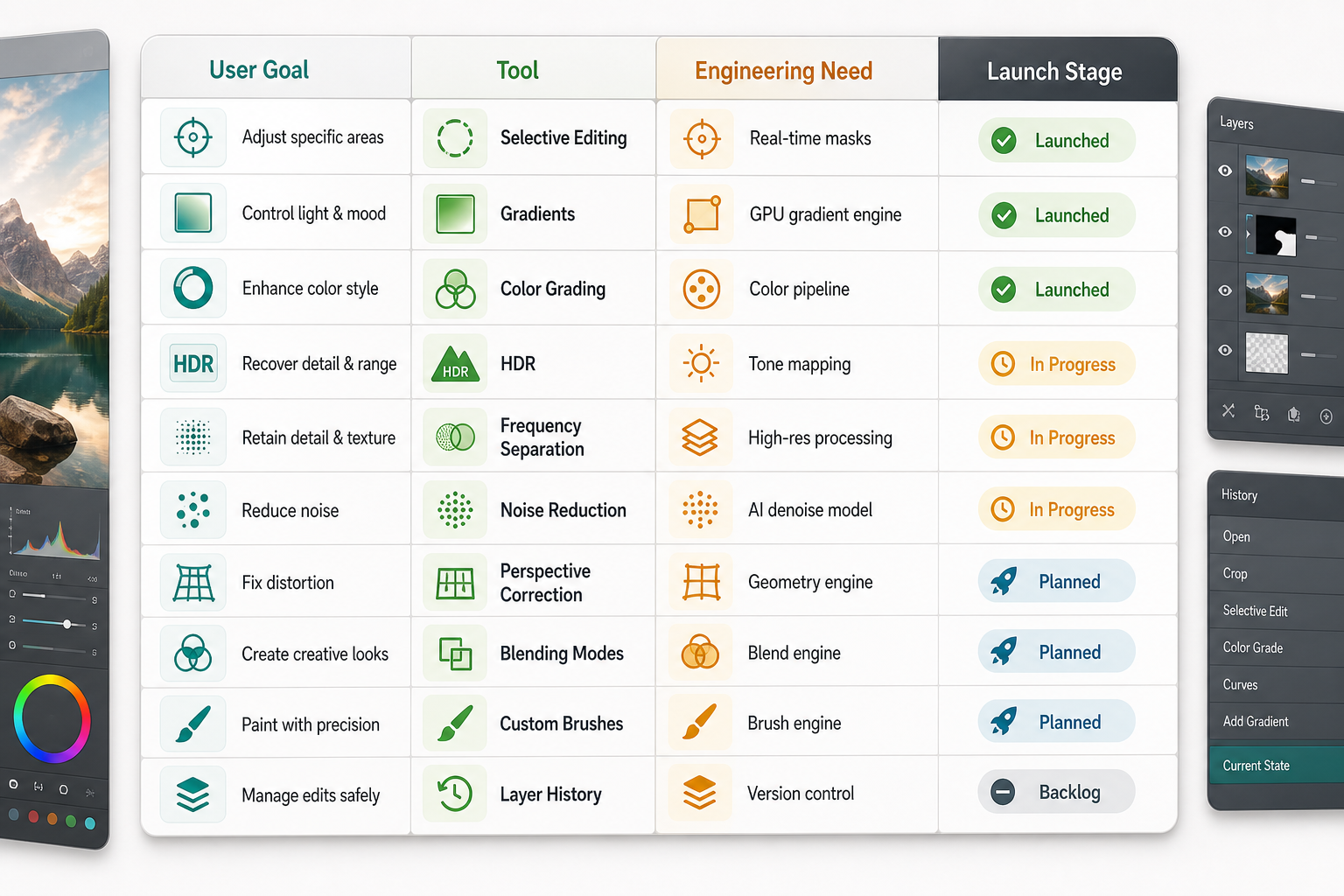
| Tool family | User goal | Engineering need | Best launch stage |
|---|---|---|---|
| Selective edits and masks | Improve one part of an image without affecting the rest. | Fast mask previews, editable regions, brush controls, and undo history. | Creator-focused MVP or early growth. |
| Color grading and curves | Create a repeatable look with precise tonal control. | Color pipeline, previews, presets, HSL controls, and export consistency. | Growth or pro tier. |
| HDR and RAW workflows | Recover detail and support higher-quality source files. | Large-file handling, memory safety, background processing, and metadata care. | Pro tier. |
| Retouching and cleanup | Remove distractions while keeping the image believable. | Healing algorithms, object selection, AI assistance, and before-after comparison. | Growth or pro tier. |
| Layers and blending modes | Build complex creative compositions. | Non-destructive edit graph, layer ordering, opacity, masks, and export flattening. | Pro tier or creator expansion. |
1. Selective Editing, Masks, And Local Adjustments
Selective editing lets users adjust a subject, sky, background, product, face, or object without changing the entire image. Useful controls include brush masks, linear gradients, radial gradients, luminance masks, color range masks, feathering, invert selection, and mask refinement.
The experience should stay understandable. Let users see the selected area, toggle the mask overlay, compare before and after, and revise the selection after applying edits. These details matter more than adding a long menu of controls.
2. Gradient And Radial Filters
Gradient and radial filters are practical tools for balancing skies, drawing attention to a subject, softening backgrounds, and controlling light. They are popular because they give users targeted control without requiring full layer knowledge.
For mobile UX, keep the handles large enough for thumbs, make falloff visible, and allow users to reposition the filter after the adjustment. A small interaction detail can determine whether the tool feels professional or frustrating.
3. Advanced Color Grading
Advanced color tools include curves, HSL, split toning, color wheels, LUT-like presets, white balance, selective saturation, and tone mapping. These features help creators build a recognizable style instead of applying the same fixed filter to every image.
Color grading also creates product retention. Saved looks, reusable presets, favorites, and batch application give users a reason to return. For a broader foundation, the post on must-have photo editing app features explains how color tools fit into the full editing workflow.
4. HDR, RAW Support, And Dynamic Range
HDR editing helps users recover shadow and highlight detail in difficult lighting. RAW support gives experienced users more latitude over white balance, exposure, detail, and color. Both features can make the app feel more capable, but both increase engineering complexity.
Large files can create memory pressure, slow previews, failed exports, and battery drain. Plan for background processing, progressive previews, device capability checks, and clear messages when a file is too large for a specific operation.
5. Retouching, Frequency Separation, And AI Cleanup
Retouching tools should remove distractions without making people look artificial. Common capabilities include spot healing, clone repair, skin texture control, object removal, dust cleanup, red-eye correction, and portrait-safe smoothing.
Frequency separation can help advanced users edit texture and color separately, while AI cleanup can reduce manual effort. The product still needs guardrails: before-after comparison, reversible edits, consent-aware photo handling, and clear disclosure when images are processed in the cloud.
6. Noise Reduction, Sharpening, And Detail Recovery
Low-light mobile photos often need noise reduction, sharpening, and detail recovery. These tools should avoid the common failure mode of making images look waxy or over-processed. Give users strength controls, preview zoom, and reset options.
Noise reduction is also a performance feature. Real-time previews can be expensive, so many apps use lower-resolution previews during editing and a higher-quality pass during export.
7. Perspective Correction And Lens Fixes
Perspective correction matters for architecture, interiors, product photography, documents, travel shots, and social content. Users need straightening, vertical and horizontal correction, lens distortion repair, crop-safe previews, and quick auto-correction when the horizon or building edges are obvious.
This is a good example of an advanced feature that can still feel simple. A clear auto button plus manual handles often works better than exposing every mathematical control.
8. Layers, Blending Modes, And Custom Brushes
Layers and blending modes unlock overlays, double exposure, text effects, background replacement, lighting effects, and complex compositions. Custom brushes support dodging, burning, masking, texture work, and selective creative effects.
These features require a stronger mental model. The app should show layer order, opacity, visibility, masks, blending mode, and edit history without overwhelming casual users. Consider introducing them behind a creator or pro workspace rather than putting them into the default beginner flow.
9. Non-Destructive Editing And Layer History
Non-destructive editing protects the original image and lets users revise decisions. Instead of baking every change into the image immediately, the app stores edit instructions, masks, layer settings, and history states that can be replayed or adjusted later.
This is one of the most important architecture decisions in a photo editing app. It affects storage, sync, export, collaboration, undo, presets, and long-term maintainability.
Advanced Editing App Architecture
Advanced tools need a reliable editing pipeline. The app must coordinate media permissions, import, preview generation, mask data, edit instructions, local cache, cloud sync, AI services, export queues, analytics, and privacy states.
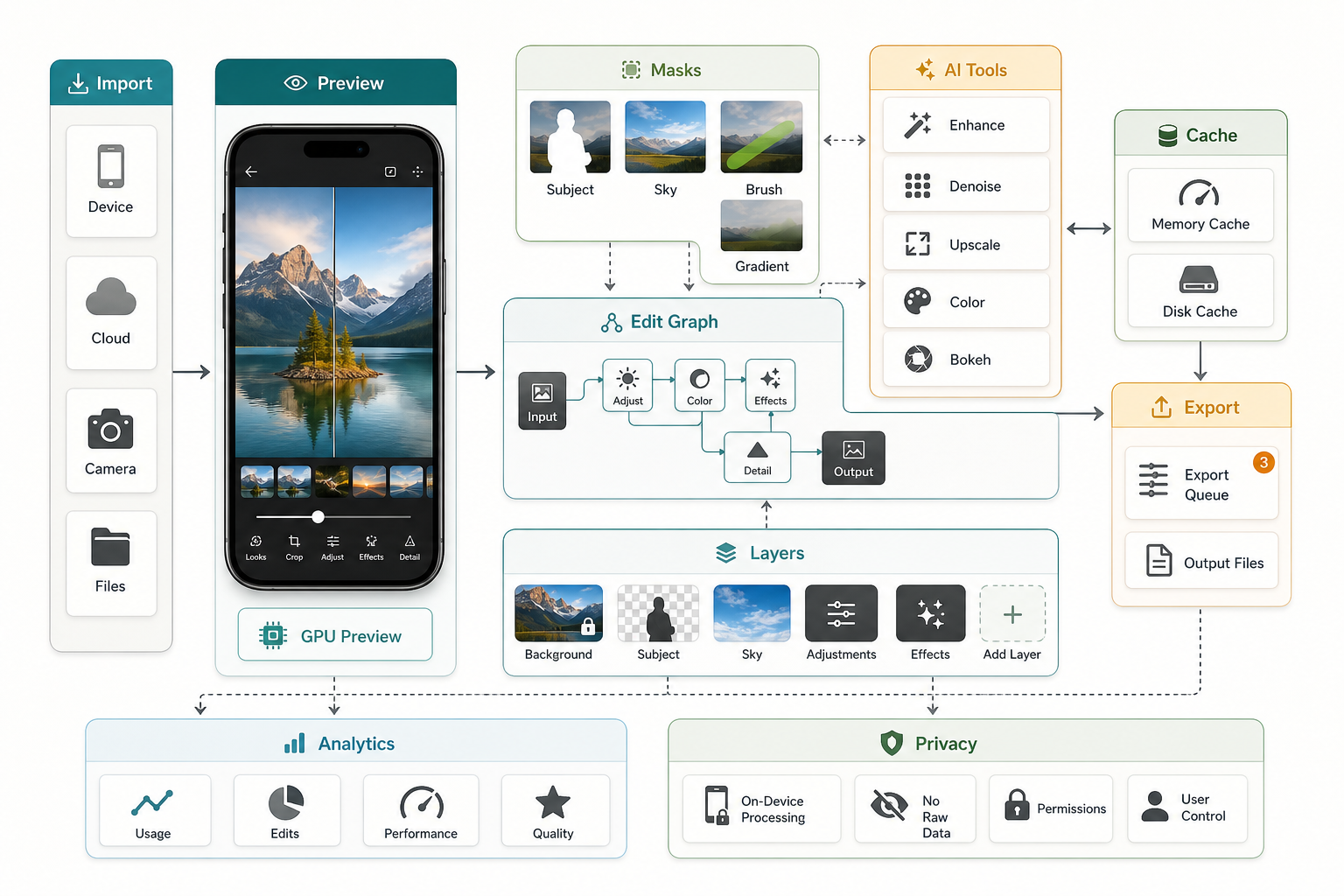
For media-heavy products, this often becomes a custom software development problem as much as a mobile UI problem. Account sync, subscriptions, storage, content moderation, admin tools, analytics, and observability all shape the user experience.
NextPage's SoundCrate mobile media case study is a useful reference for performance-sensitive mobile media workflows involving native behavior, downloads, accounts, and continuous playback.
10. AI Enhancement And Cloud Processing
AI tools can support object removal, sky replacement, background cleanup, portrait enhancement, auto color, caption generation, and smart presets. The best AI features are clear about what they do and let users adjust the result rather than accepting a black-box output.
Decide early what runs on-device and what runs in the cloud. Cloud processing can improve quality, but it changes cost, latency, privacy, and compliance. If AI processing is part of the roadmap, disclose what leaves the device and give users a way to understand the tradeoff.
11. Export, Social Sharing, And Growth Loops
Advanced editing only matters if the final image can leave the app cleanly. Export should support common aspect ratios, file formats, compression choices, watermarking, metadata decisions, background export, and share-sheet behavior.
Social workflows can become a growth loop when they are designed around creator intent. The guide to social sharing integration for photo editing apps covers engagement, sharing friction, and retention in more detail.
Launch Roadmap For Advanced Editing Tools
Do not launch every advanced tool at once. Start with a complete core loop, then add creator tools, AI assistance, pro workflows, and scale features in stages. This sequencing keeps the product releasable while still pointing toward a serious editing platform.
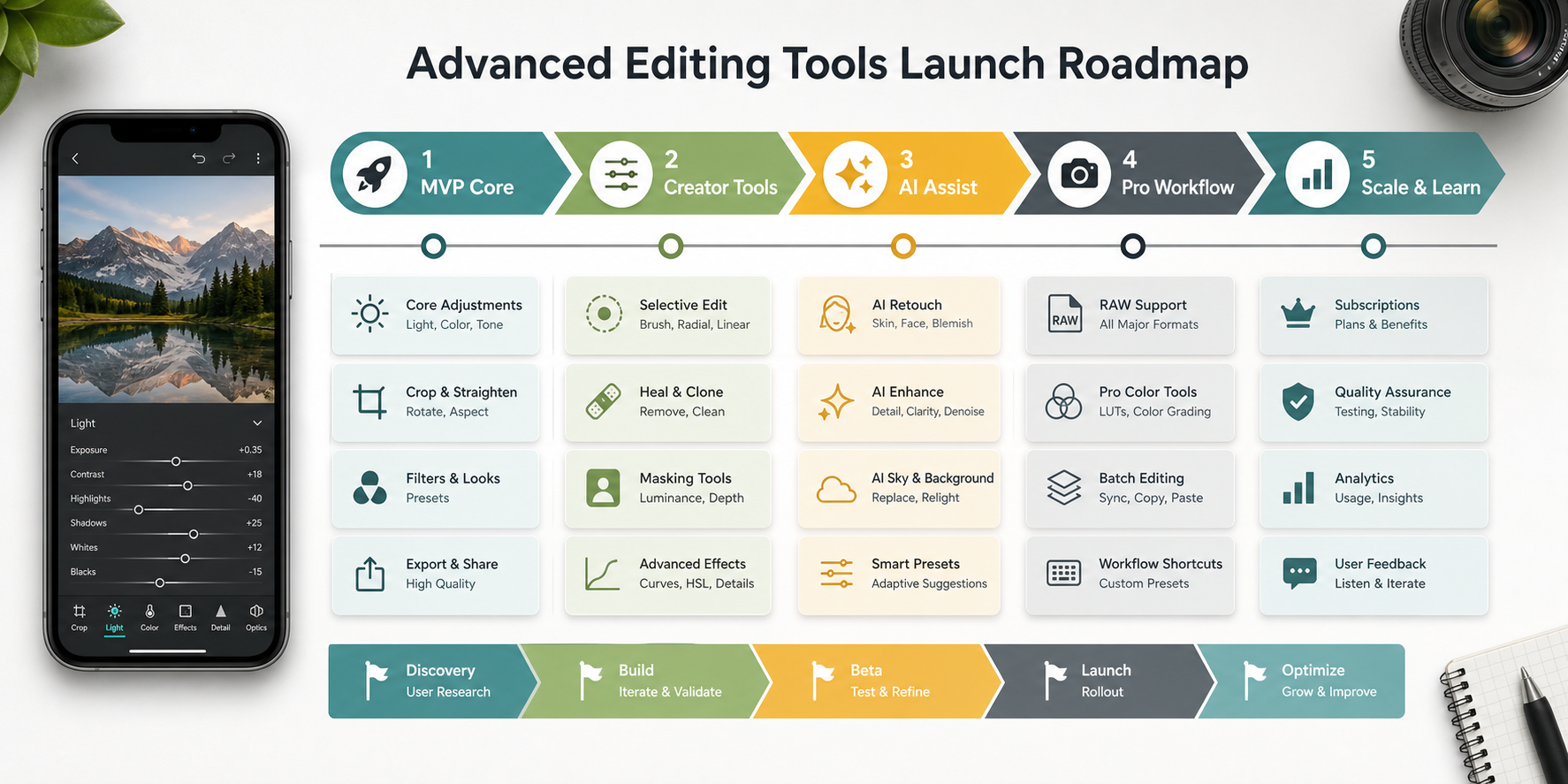
| Stage | Recommended focus | Risk to manage |
|---|---|---|
| MVP core | Import, correction, presets, crop, export, undo, and stable performance. | A broad toolset that still cannot complete a polished edit. |
| Creator tools | Masks, gradients, HSL, retouching, saved styles, and social export. | Controls becoming too complex for mobile users. |
| AI assist | Object cleanup, auto enhance, background help, and smart presets. | Cloud cost, privacy expectations, and inconsistent results. |
| Pro workflow | RAW, layers, blending, batch export, and advanced color. | Performance bottlenecks and difficult QA matrices. |
| Scale and learn | Subscriptions, analytics, admin tools, experiments, and retention loops. | Revenue mechanics that interrupt the creative flow. |
Cost And Scope Considerations
Advanced photo editing tools can look simple on a feature list but become expensive when they require real-time previews, high-resolution export, cloud processing, account sync, subscriptions, and device-specific QA. Scope depends on the edit engine, supported file types, offline behavior, AI features, and how much control users need.
Use the custom software cost estimator to get a directional range before planning the full build. It is especially useful when comparing a lean creator MVP against a pro editing roadmap.
QA, Privacy, And App Store Readiness
Advanced editing apps should be tested across low-memory devices, large images, RAW files, interrupted sessions, permission changes, offline use, slow networks, failed exports, background processing, and accessibility states. A single crash during export can damage trust more than a missing feature.
Privacy also matters because photo apps touch personal media. Ask only for permissions the app needs, support limited photo library access where possible, explain cloud processing clearly, and avoid uploading original files without explicit user understanding.
Final Recommendation
Build advanced editing tools around user intent, not feature quantity. Start with the editing outcomes that matter most to your audience, design the mobile interaction carefully, and invest early in a non-destructive architecture. That foundation will make selective edits, masks, color grading, retouching, AI cleanup, RAW workflows, and pro exports easier to ship without weakening the core experience.
For additional context on how mobile photographers evaluate editing products, read the supporting guide to photo editing apps for mobile photographers.