
Agentic AI FinOps is the practice of forecasting, observing, and controlling the cost of AI agents at the workflow level. A useful budget does not stop at model tokens. It includes retrieval, tool calls, cloud infrastructure, observability, retries, human review, security controls, and the business value created by each completed agent run.
This matters because agents behave differently from simple chatbots. A single user request can trigger planning, multiple model calls, database reads, API calls, browser actions, file operations, approval steps, and repeated retries. Without cost controls, the team may not know whether a workflow costs cents, dollars, or more until after usage scales.
The practical answer is to treat each agent workflow like a product unit. Define the trigger, expected output, value signal, cost ceiling, human-review rule, and stop condition before production rollout. If your team is still choosing the first workflow, use an AI Agent Readiness Assessment before a build sprint. Cost governance is easiest when workflow scope, data access, integration depth, and review risk are clear from the start. If the same program also includes RAG, copilots, or custom workflow software, compare the FinOps plan with the practical cost drivers in the LLM app development cost guide so model usage, retrieval, integration, evaluation, and maintenance are not budgeted separately.
Quick Answer: What Should Agentic AI FinOps Track?
Track cost per successful workflow outcome, not only cost per prompt. For an AI sales-research agent, the unit may be one qualified account brief. For an invoice exception agent, it may be one resolved exception. For a support triage agent, it may be one ticket categorized with evidence and escalation routing.
A useful agentic AI cost model has seven budget lines:
| Budget Line | What To Track | Why It Matters |
|---|---|---|
| Model calls | Input tokens, output tokens, model tier, planning loops, evaluator calls. | This is the visible AI bill, but rarely the whole bill. |
| Retrieval context | Vector search, document reads, context windows, reranking, summarization. | Large context can silently raise cost and latency. |
| Tool calls | APIs, browser actions, database writes, third-party tools, webhooks. | Agents spend money when they act, not just when they reason. |
| Cloud workload | Compute, storage, queues, orchestration, logs, network, environments. | Agent systems still run as software infrastructure. |
| Observability | Traces, prompt logs, evaluations, dashboards, alerts, retention. | You cannot optimize or govern what you do not measure. |
| Human review | Approvals, exception handling, QA sampling, supervisor time. | Human labor is often the cost that decides ROI. |
| Failure and retry cost | Rejected actions, repeated calls, fallback paths, rework, incident review. | Unbounded retries can turn small defects into recurring spend. |
Why 2026 Changes Agentic AI FinOps
Agentic AI FinOps is becoming urgent because AI spend is no longer isolated inside experiments. Flexera's 2026 cloud research reports that AI adoption is now a major driver of cloud spend and waste, while governance groups such as Cloud Centers of Excellence are becoming more common. For agent programs, that means cost ownership must connect finance, product, engineering, security, and operations before usage grows.
The FinOps Foundation's AI working group frames AI cost management as a shared operating practice rather than a single vendor-bill review. That matters for agents because the unit of cost is not one token. It is an end-to-end workflow with model calls, orchestration, retrieval, tool actions, infrastructure, observability, review labor, and rework.
Current AI FinOps discussions are also moving toward per-request attribution. Each agent run should carry enough metadata to show owner, workflow, environment, model route, prompt version, tool chain, outcome status, and review decision. Without that trail, teams can see an AI bill but cannot tell whether a spike came from useful adoption, broken retries, broader retrieval, shadow IT, or a risky autonomy change.
Agent governance is also moving from abstract policy to runtime control. Gartner's 2026 agent-governance guidance warns that enterprises can over-trust agents or lock them down so tightly that teams route work through unapproved tools. The practical middle path is staged autonomy: observe, advise, act with approval, and only then act autonomously when monitoring, rollback, and accountability are strong enough.
Why Agentic AI Costs Are Different From Chatbot Costs
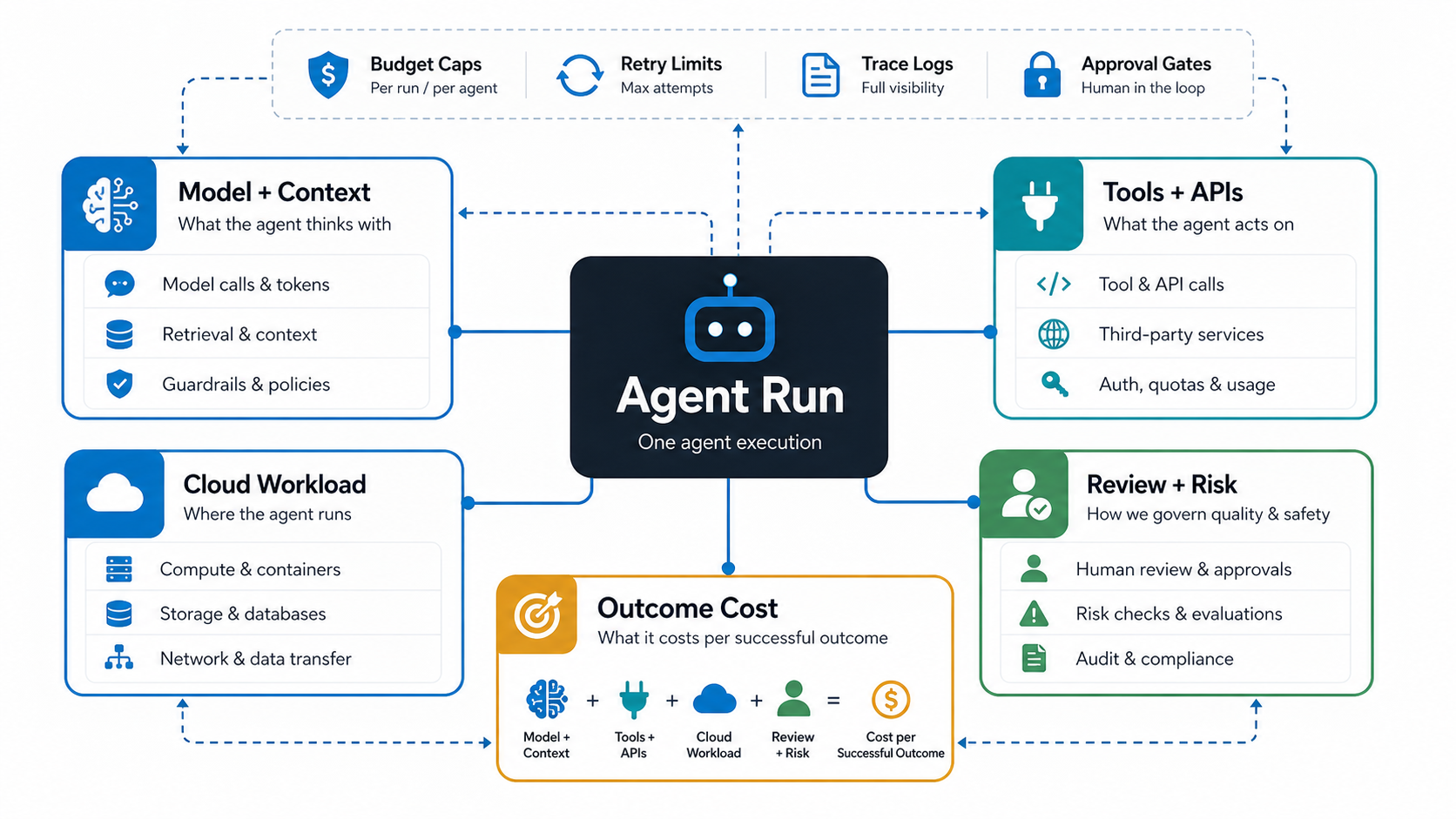
A chatbot usually answers a question. An agent works through a process. That shift changes the cost pattern. The model may plan, call a retrieval system, choose a tool, validate the result, call another model, ask for human approval, and write back to a system of record.
That can be valuable when the workflow has enough volume and business impact. It is risky when teams allow open-ended reasoning, broad tool permissions, vague prompts, or weak stop rules. The cost problem is not only expensive model calls. It is a lack of boundaries around what the agent is allowed to attempt.
NextPage's agentic AI development services work treats cost, safety, and business value as part of the architecture. The same principle belongs in FinOps: each workflow needs an operating envelope before it touches production data or production actions.
Build A Unit-Economics Model Before Scaling
Start with one repeatable workflow and write the unit economics in plain language. Do not begin with a generic monthly AI budget. A broad budget hides the workflows that are profitable, wasteful, risky, or under-instrumented.
Use this formula as a starting point:
Agent value per workflow = labor avoided + revenue protected + cycle time reduced + quality improvement - model cost - tool cost - infrastructure cost - review cost - failure cost.
This does not need perfect precision on day one. It needs enough structure to compare workflows. A low-cost agent that solves a low-value task may be less attractive than a higher-cost agent that reduces a painful operational bottleneck. The AI Automation ROI Calculator can help estimate the people-time side before deeper instrumentation is ready.
| Workflow Metric | Planning Question | Decision Signal |
|---|---|---|
| Cost per successful run | What does one completed outcome cost after retries and review? | Use this as the primary FinOps unit. |
| Success rate | How often does the agent complete the workflow without rework? | Low success raises hidden labor and retry cost. |
| Review minutes | How much human approval or correction is needed? | High review cost may still be acceptable for high-risk work. |
| Latency | How long does the workflow take end to end? | Slow agents can create operational queues. |
| Tool failure rate | Which APIs, permissions, or data sources cause repeated attempts? | Fix integration quality before widening usage. |
| Business value | What measurable outcome improves when the agent runs? | Scale only when value is visible. |
Control Model Calls, Context, And Routing
Model-call cost is the easiest line to see, so it often gets too much attention. Still, it needs discipline. Track input tokens, output tokens, selected model, temperature or reasoning mode, prompt version, tool plan, retrieval size, and evaluator calls.
The best control is not always using the cheapest model. It is routing the right step to the right model. A workflow may use a smaller model for classification, a stronger model for reasoning, deterministic rules for validation, cached responses for repeat lookups, retrieval limits for approved context, and a human reviewer for final approval. Good routing reduces waste without weakening quality.
Prompt and context caching should be explicit design choices for repeat-heavy workflows. If the same policy, contract, product catalog, support knowledge base, or account history is sent into every run, cache the stable context, cap the retrieved chunks, and measure cache-hit rate beside quality. Pair that with prompt engineering services discipline so prompt versions, evaluator prompts, and fallback prompts are treated as cost-impacting release assets.
For teams building RAG, copilots, or agent workflows, LLM development should include prompt versioning, retrieval limits, evaluation samples, model routing, cache policy, and observability from the start. A model upgrade, prompt change, or larger context window should be treated like a cost-impacting release, not a hidden configuration tweak.
Build The Agent FinOps Control Stack
A useful control stack starts before the first production run. Each agent workflow should have a cost owner, value owner, technical owner, approval owner, and rollback owner. Without that map, teams can see spend after the fact but cannot decide whether a spike is waste, growth, abuse, or a valid increase in business activity.
| Control Layer | What To Define | Cost Signal |
|---|---|---|
| Workflow boundary | Trigger, output, allowed systems, disallowed actions, and completion criteria. | Cost per eligible request and cost per completed outcome. |
| Model routing | Which steps use small models, stronger reasoning models, deterministic rules, or human review. | Token spend by step, model tier, and quality impact. |
| Retrieval policy | Allowed sources, chunk limits, reranking rules, cache strategy, and freshness requirements. | Context cost, latency, source quality, and failed retrieval rate. |
| Tool permissions | Read/write scope, approval levels, rate limits, retry limits, and idempotency requirements. | Tool cost, failed action cost, and exception volume. |
| Observability | Trace fields, evaluation samples, retention windows, dashboards, and alert thresholds. | Spend spikes, quality drift, review minutes, and rollback triggers. |
This is where generative AI development and agentic engineering overlap. The model layer is only one budget line; the operating layer determines whether the agent can be measured, governed, and improved.
Budget Tool Calls, Cloud Workload, And Observability
Agents create cost outside the model vendor bill. They may call CRMs, ERPs, ticketing systems, data warehouses, browser automation, email APIs, search tools, document processors, and workflow engines. Some calls have direct vendor costs. Others create indirect cost through latency, rate limits, failed retries, or operational risk.
Cloud cost also grows when teams add queues, workers, vector databases, file storage, trace retention, evaluation jobs, and background schedulers. Observability is not optional, but it needs a retention policy. Keep enough traces to debug, audit, and optimize. Do not keep unlimited prompt, tool, and artifact logs without a reason. AWS, Google Cloud, and Microsoft guidance all point toward the same operating pattern: choose fit-for-purpose models, reduce unnecessary context, cache or reuse repeated work, monitor workload-level cost, and treat AI infrastructure as an application architecture problem rather than a raw token meter.
An agentic AI infrastructure readiness review should cover queues, rate limits, tool permissions, cost dashboards, and failure modes before high-volume rollout. FinOps depends on engineering observability, not spreadsheet estimates alone.
Use A Unit-Economics Matrix For Each Agent Workflow
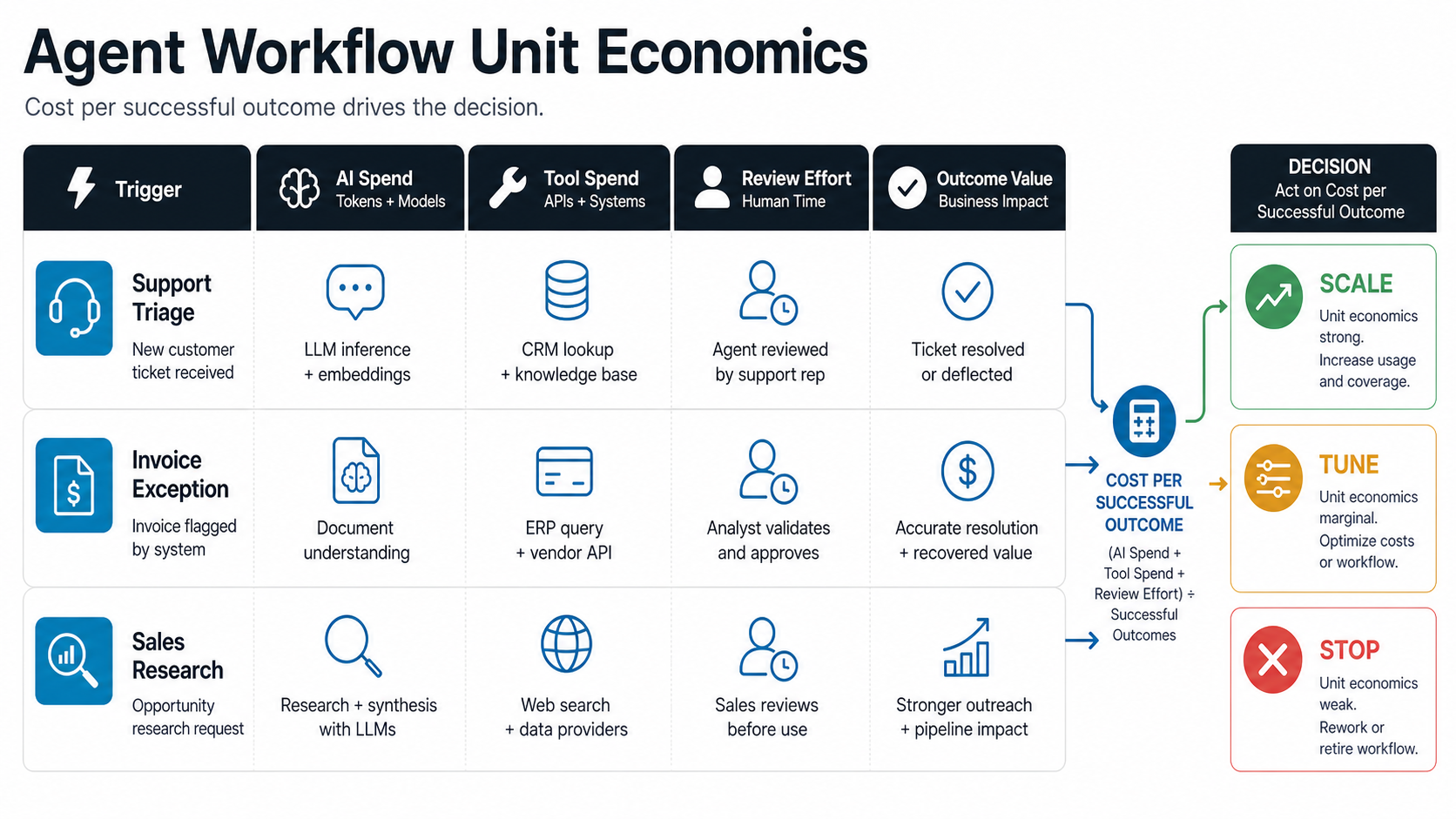
A matrix makes the budget easier to govern. Create one row per workflow and one column per cost driver. Then add a target, an alert threshold, and an owner.
| Matrix Column | Example | Owner |
|---|---|---|
| Trigger | New support ticket with billing keywords. | Product or operations owner. |
| Expected outcome | Ticket categorized, source evidence attached, priority set. | Workflow owner. |
| Token budget | Maximum input and output budget per run. | AI engineering. |
| Tool budget | Allowed APIs, retry limit, rate limit, write permissions. | Engineering and security. |
| Review rule | Human approval required for refunds, legal, or high-value accounts. | Operations and risk owner. |
| Stop rule | Escalate after two failed tool calls or low confidence. | AI engineering. |
| Value signal | Time saved, backlog reduced, SLA protected, revenue retained. | Business owner. |
This format keeps FinOps from becoming a finance-only afterthought. Finance can see cost. Product can see value. Engineering can see the controls that make the agent reliable.
Use Observability As A Cost-Quality Loop
Observability should earn its budget by showing where agent spend creates value and where it creates noise. A trace is useful when it connects the user request, prompt version, model choice, retrieved sources, tool calls, review decision, final outcome, cost, latency, and failure reason. If those fields are missing, FinOps teams can see a bill but not the behavior behind it.
The cost-quality loop should review a small set of metrics every week during pilot rollout: cost per successful run, success rate, escalation rate, retry rate, human review minutes, model spend by step, tool failure rate, and post-release incident rate. Pair that with an AI agent observability checklist so the team can decide whether to tune prompts, shrink context, fix tools, widen autonomy, or roll back a risky workflow.
| Signal | Waste Pattern | FinOps Action |
|---|---|---|
| High retry rate | The agent repeats failed tool calls or validation loops. | Add stop rules, fix tool contracts, or route to review earlier. |
| High context cost | Retrieval sends too many chunks or full documents into the model. | Tighten chunk selection, cache summaries, and test smaller context windows. |
| High review minutes | Human approval saves quality but erases ROI. | Split high-risk actions from low-risk actions and automate only proven paths. |
| Quality drift | Spend falls while escalations, rework, or incidents rise. | Restore stronger model routing, add evaluation gates, or pause expansion. |
Guardrails That Prevent Runaway Agent Spend
Runaway agent spend usually comes from one of five patterns: broad goals, weak tool permissions, repeated retries, excessive context, or missing escalation paths. The fix is not to block agents. The fix is to define boundaries that let agents do useful work safely.
- Budget caps: set per-run, per-user, per-workflow, and monthly limits before production.
- Tool allowlists: give the agent only the APIs and actions required for the workflow.
- Retry limits: stop after a defined number of failed tool calls, low-confidence outputs, or validation failures.
- Context limits: cap retrieved documents, chunk counts, and summarization loops.
- Human approval gates: require review for refunds, account changes, sensitive data, legal risk, or irreversible actions.
- Prompt and policy versioning: log which version created each action so cost and quality changes are traceable.
- Evaluation samples: audit a representative set of outputs to avoid optimizing cost while quality falls.
- Per-request attribution: log owner, workflow, environment, model route, cache hit, tool chain, outcome status, and approval decision for every production run.
Security and FinOps should work together. The same audit logs that help control tool permissions also help explain cost. NextPage's secure AI agent development checklist covers the permission and audit side that cost teams need for trustworthy reporting. For larger programs, connect the same rules to enterprise AI agent governance so budget caps, approval levels, monitoring, and rollback criteria are reviewed together.
Who Owns Agentic AI FinOps?
Agentic AI FinOps needs shared ownership. If finance owns it alone, the discussion becomes cost cutting. If engineering owns it alone, the discussion may miss business value. If product owns it alone, the team may underweight infrastructure, privacy, and operational controls.
| Role | FinOps Responsibility |
|---|---|
| Product owner | Defines the workflow, success metric, value signal, and launch threshold. |
| AI engineering | Controls model routing, prompts, retrieval, tools, traces, and stop rules. |
| Platform or cloud team | Tracks infrastructure, queues, storage, dashboards, rate limits, and reliability. |
| Security and governance | Approves tool permissions, data handling, audit logs, and review gates. |
| Finance or operations | Reviews cost per outcome, budget caps, and ROI reporting. |
A good operating model starts with one high-value workflow, a measurable baseline, and a weekly cost-quality review during early rollout. Once the workflow stabilizes, move the review cadence to monthly and use alerts for unusual spikes. If the agent is part of broader AI workflow automation, keep the agent metrics tied to the underlying business process instead of reporting AI spend in isolation.
Agentic AI FinOps Implementation Roadmap
Teams do not need a large FinOps program before the first agent. They need a practical roadmap that grows with production usage.
- Select one workflow: choose a repeated workflow with clear value, bounded data, and known review criteria.
- Estimate the run: model expected tokens, tool calls, context size, cloud workload, and review minutes.
- Define controls: set budget caps, retry limits, escalation paths, tool allowlists, and approval gates.
- Instrument traces: log prompt version, model, token use, tool calls, retrieved sources, outcome status, review time, and failure reason.
- Run a pilot: compare cost per successful run against the baseline process, including review labor and failed-run cleanup.
- Optimize: tune model routing, context size, caching, prompt structure, tool reliability, and review thresholds.
- Scale carefully: expand only when cost, quality, value, permissions, and rollback signals are stable.
If your team needs help choosing the right first workflow, start with AI development services discovery rather than a broad automation mandate. Agentic AI works best when the workflow is specific enough to measure and valuable enough to justify operational discipline.
Common Agentic AI FinOps Mistakes
The first mistake is measuring only tokens. Token cost matters, but the workflow can still be expensive because of human review, failed integrations, excessive retrieval, or long-running cloud jobs.
The second mistake is optimizing cost before quality. A cheaper model that creates more escalations, rework, or incorrect actions can increase total cost. Track accuracy, escalation rate, and review effort alongside spend.
The third mistake is leaving agents open-ended. Agents need goals, boundaries, and stop rules. If the agent can keep trying indefinitely, it can keep spending indefinitely.
The fourth mistake is treating observability as overhead. Trace data is what lets teams find waste, diagnose failures, prove value, and satisfy governance requirements.
The fifth mistake is ignoring caching and context policy. A workflow can look expensive because every run repeats the same long instructions, documents, or knowledge-base context instead of reusing approved stable context.
The sixth mistake is scaling autonomy before the cost envelope is proven. A workflow that works in shadow mode may still become too expensive when it gains write permissions, more traffic, broader retrieval, or fewer review gates.
How NextPage Can Help
NextPage helps teams build agentic AI systems with cost, governance, and production reliability built in. We can help select the first workflow, estimate unit economics, design model routing, define tool permissions, build observability, add review gates, and create dashboards that show cost per successful outcome. We can also help separate agent workflows that should stay advisory from workflows ready for approved action or limited autonomy.
If your AI agent roadmap is moving from experiments to production, the next step is not a bigger model budget. It is a controlled workflow plan that finance, product, security, and engineering can all understand.