
Quick Answer: Agriculture Software Development Cost
Agriculture software development cost usually depends less on the word "agriculture" and more on the operating model the software must support. A focused farm operations MVP can often be scoped around field records, crop planning, inventory, task assignments, simple reports, and mobile access. A connected agritech platform with IoT sensors, weather data, equipment telemetry, satellite imagery, AI forecasting, multi-farm permissions, and offline-first mobile workflows needs a much larger budget because the risk moves from screens to data reliability, integrations, and field usability.
For planning, treat the budget as a phased product roadmap. A lean MVP may validate one crop, region, team, or workflow. An integrated platform adds device and third-party data. An advanced precision agriculture system adds predictive analytics, automation, compliance evidence, and scale across farms, agronomists, suppliers, or cooperatives. Use NextPage's Custom Software Cost Estimator to model the first budget band, then narrow scope with the MVP Scope Builder before committing to a full build. If the first release needs field staff adoption, route mobile scope through a realistic mobile app development timeline instead of pricing it like an admin dashboard.
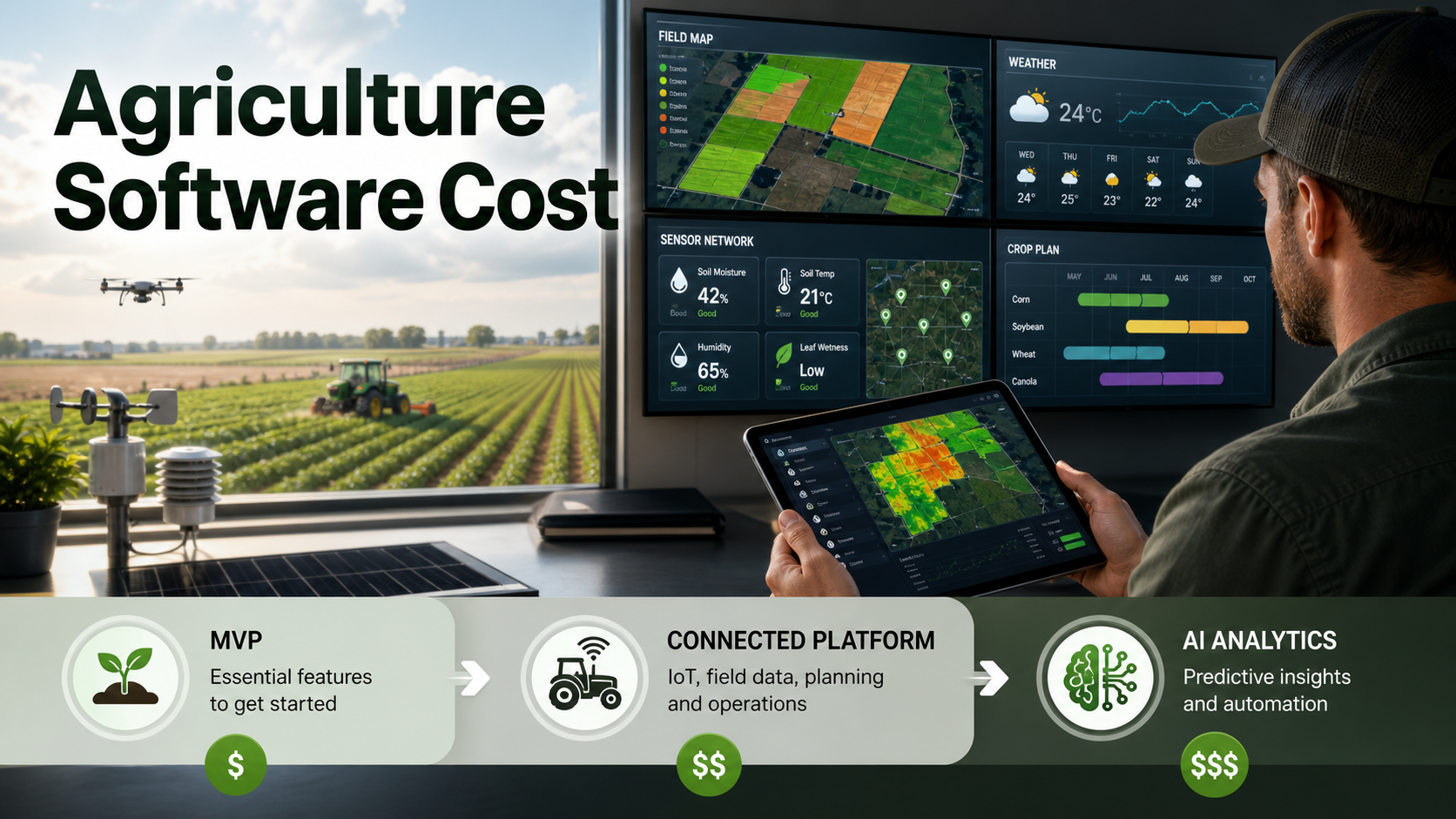
Why Agriculture Software Cost Varies So Much
A farm management platform is not one fixed product category. It can be a mobile recordkeeping app for one farm, a cooperative portal, an inventory and procurement system, a smart irrigation dashboard, an agronomist workflow tool, a traceability platform, or a full precision agriculture command center. Each version has different users, data sources, integrations, and support expectations.
USDA precision agriculture adoption data also shows why usability and rollout strategy matter. In the USDA ERS precision agriculture chart published in 2024, yield monitors, yield maps, and soil maps appeared on 68 percent of large-scale crop-producing farms, while small family farms had the lowest adoption rates across each technology category. A credible cost plan should therefore answer two questions: what workflow creates value first, and what data, hardware, or support dependency could delay adoption outside the most digitally mature farms?
The most expensive agritech projects are rarely expensive because the dashboard has many pages. They are expensive because the software must normalize field boundaries, sensor readings, weather feeds, equipment data, roles, crop plans, mobile sync conflicts, alert rules, and analytics in a way that field teams can trust during real operating windows.
Agriculture Software Cost Bands By Scope
These bands are planning ranges, not quotes. Final pricing depends on discovery, region, team model, integrations, infrastructure, QA depth, and whether the project includes hardware procurement or only software integration.
| Scope | Typical Build | Common Cost Drivers | Planning Range |
|---|---|---|---|
| Focused MVP | Farm records, crop plans, task lists, inventory, simple dashboards, mobile field notes | User roles, mobile UX, basic reporting, import/export, admin panel | $35K-$90K+ |
| Integrated Operations Platform | MVP scope plus weather APIs, equipment or sensor data, procurement, maps, alerts, multi-farm permissions | Data normalization, API reliability, offline sync, QA environments, role-based access | $90K-$220K+ |
| Advanced Precision Agriculture Platform | Integrated platform plus AI forecasting, smart irrigation, satellite/drone data, automation, compliance, partner portals | Model validation, telemetry scale, edge cases, security, observability, seasonal pilots | $220K-$500K+ |
Competitor pages often publish broad ranges such as $35,000 to $200,000, which is useful as a starting signal but not enough for budgeting. Current farm-management software references also show a wide SaaS pricing spread, from free or low monthly plans for simple farm records to enterprise subscriptions for multi-site operations. The better custom-build question is which features must be correct in the first season and which can wait until the product proves operational value.
For procurement, separate build cost from total operating cost. Field onboarding, device replacement, weather API usage, map or imagery subscriptions, data cleanup, seasonal support, and reporting changes can all outlive the initial build. A practical estimate should show what the software team builds, what vendors provide, and what the operations team must keep current after launch.
Use a custom build when workflow fit, data ownership, integrations, or buyer-facing differentiation justify the investment. If the product is closer to a reusable agritech platform, compare the operating model with SaaS development services and web app development scope so tenant roles, billing, dashboards, security, and support tooling are budgeted from the start.
Agriculture Software Scope-Control Matrix
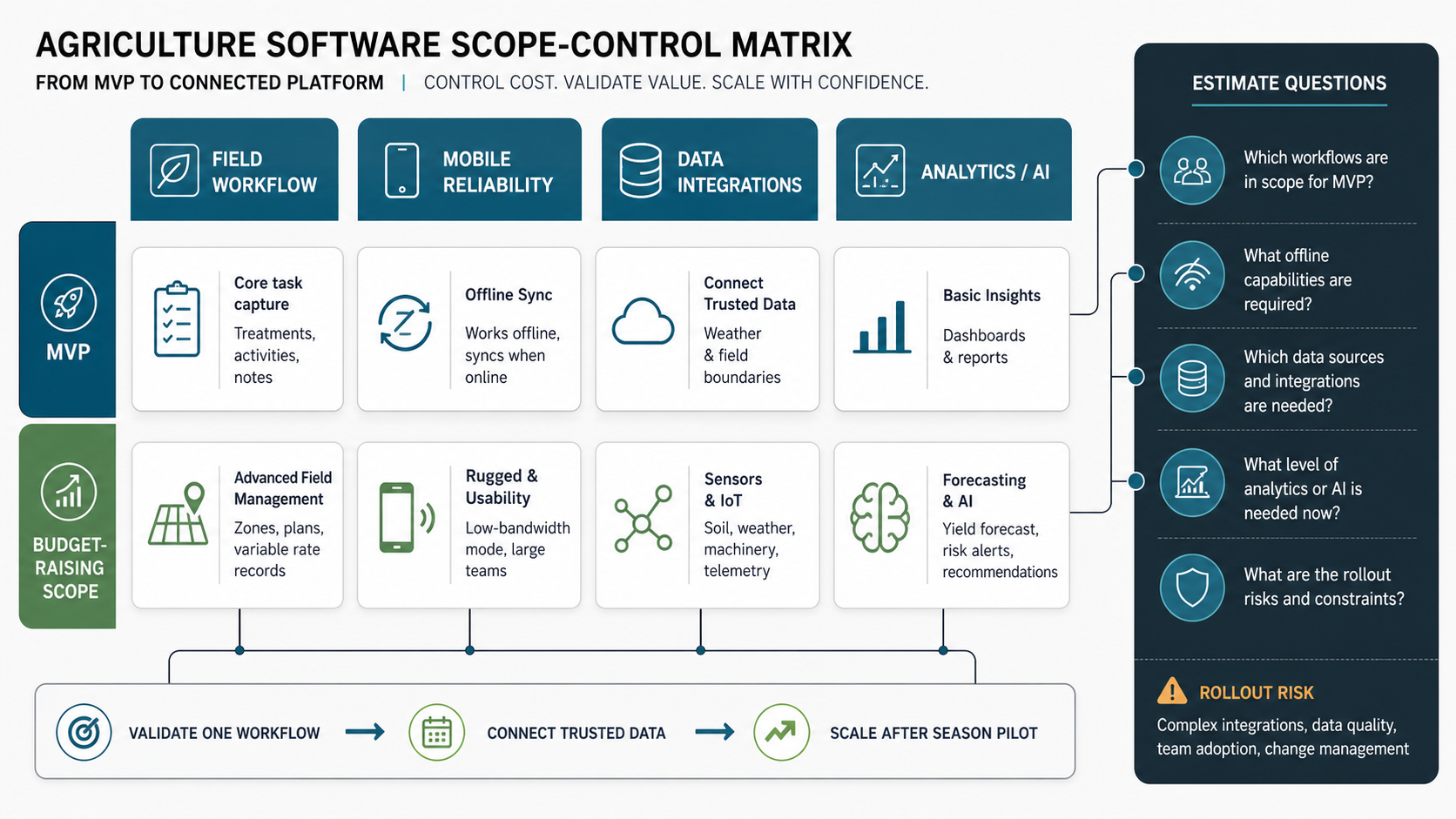
Use cost bands as a first filter, then control scope by deciding which operating risk the first release must solve. The same feature label can mean a lightweight data-entry workflow, a mobile field workflow, a connected telemetry workflow, or an AI-assisted operating system. Those are different products.
| Cost Driver | Lower-Cost MVP Version | Budget-Raising Version | Estimate Question |
|---|---|---|---|
| Field workflow depth | Record tasks, inputs, notes, and photos for one crop or team | Role-specific approvals, exception ownership, GPS context, and seasonal audit trails | Which field decision must become easier in the first season? |
| Mobile reliability | Online-first forms with limited offline drafts | Offline-first sync, conflict handling, retries, device testing, and support diagnostics | Which actions must work when connectivity is weak? |
| Data integrations | Manual import/export and one or two stable APIs | Weather feeds, IoT sensors, equipment telemetry, maps, ERP, inventory, and vendor systems | Which systems must be trusted before launch? |
| Analytics maturity | Operational dashboards and simple exception reports | Forecasting, anomaly detection, recommendations, model monitoring, and human review | What decision will analytics change, and who owns the feedback loop? |
This matrix keeps teams from pricing agriculture software as a page count. If the first release is mostly records and dashboards, it can stay lean. If it must ingest devices, support offline field work, and recommend irrigation or input changes, the estimate should include architecture, QA, observability, and support ownership from the start. Forecast-heavy products should also consider whether the work resembles enterprise forecasting software development, where decision review, scenario logic, and evidence trails matter as much as the model output.
What To Include In An Agriculture Software MVP
The first release should not try to digitize every farm workflow. A practical MVP usually focuses on one operating loop: plan work, capture field activity, track inputs, review exceptions, and learn from the data. If the MVP requires too many crops, hardware types, regions, or user groups on day one, the team spends budget resolving edge cases before proving demand.
- Field and crop setup: farms, plots, seasons, crops, varieties, field boundaries, and basic ownership or team permissions.
- Task and activity records: planting, irrigation, scouting, spraying, harvesting, maintenance, labor notes, and attachments.
- Inventory and input planning: seeds, fertilizer, chemicals, equipment, purchase requests, consumption, and low-stock alerts.
- Mobile field workflows: quick entry, photos, GPS context, offline drafts, sync status, and simple approvals.
- Operational dashboards: overdue work, input usage, field status, yield notes, cost summaries, and exception alerts.
This MVP is often enough to validate whether the team will actually use the platform. It also creates the data foundation for later analytics. If you skip this foundation and jump straight to AI recommendations, the model will inherit messy records, missing context, and weak adoption.
Features That Raise Agriculture Software Development Cost
Some features look simple in a product brief but create hidden engineering work. They affect data design, infrastructure, permissions, QA, and support.
| Feature Area | Why It Adds Cost | Scope-Control Question |
|---|---|---|
| Offline mobile | Field teams may work without reliable connectivity, so the app needs local storage, conflict handling, and sync recovery. | Which workflows must work offline in the first release? |
| IoT telemetry | Sensor readings need ingestion, validation, device status, alert rules, and failure handling. | How many device types and protocols are required now? |
| Weather APIs | Forecasts, rainfall, heat, frost, and wind data need location mapping and decision rules. | Is weather used for display, alerts, or automated recommendations? |
| Maps and geospatial data | Field boundaries, zones, scouting points, and imagery require geospatial storage and UI work. | Do users need full GIS editing or only visual field context? |
| AI forecasting | Predictions need clean historical data, model validation, explainability, and human review. | What decision will the forecast actually change? |
| Multi-tenant portals | Cooperatives, suppliers, agronomists, and farms need strict permissions and audit trails. | Which external roles need access in phase one? |
For connected telemetry and real-time operations, the implementation path often resembles an IoT app development project more than a standard admin dashboard. Device health, network reliability, calibration, and exception handling must be designed into the platform.
Integration Planning For Farm Operations Software
Integrations are one of the largest cost variables. A farm platform may need to connect to weather providers, soil sensors, irrigation controllers, accounting systems, inventory databases, farm equipment, satellite imagery providers, ERP tools, logistics platforms, or marketplace systems. Each integration adds more than an API call. It adds authentication, data mapping, retries, error states, audit trails, and support ownership.
Start by classifying integrations into three groups. First, mission-critical systems that must work before launch. Second, useful data sources that improve decisions but can wait. Third, experimental integrations that should be validated through pilots before permanent architecture decisions. This avoids building a complex integration layer before the operating model is proven. Agribusiness teams that also manage supplier, customs, inventory, or cross-border shipment workflows can use NextPage's import export management software development services as a related planning reference for role-based operations, document flows, approvals, and reporting.
Data quality is just as important as access. If field names, crop labels, equipment IDs, units, and date formats differ across systems, analytics will be unreliable. Budget for cleanup rules, import validation, and human correction workflows. That work is less exciting than AI, but it is what makes later AI credible.
When the farm platform touches finance, inventory, procurement, or ERP records, define the system of record before development starts. The Qdrant refresh surfaced NextPage's custom ERP development services as a useful companion for teams that need role-specific portals, approval workflows, inventory logic, reporting, and AI-ready operating data around the agriculture product.
Offline Mobile And Field Usability
Farm software succeeds or fails in the field. If a worker cannot capture activity quickly, see the right task, add a note, or sync data after returning to coverage, the system becomes an office reporting tool rather than an operating platform. Offline-first mobile behavior is therefore not a nice-to-have for many agricultural workflows.
Offline scope should be precise. Capturing field notes offline is different from editing maps offline, syncing inventory reservations offline, or resolving approvals offline. Each extra offline workflow adds test cases and conflict rules. A good MVP limits offline capability to the highest-value field actions, then expands after observing real usage. The ClearRoute field capture portfolio case study shows the same product pattern in another field-operations context: mobile capture, GPS context, uploads, review workflows, and operational dashboards all need to be designed together.
For AI-assisted field apps, budget separately for on-device behavior, privacy, bandwidth, and support diagnostics. NextPage's AI mobile app development cost guide is a useful companion when crop health checks, voice notes, image recognition, or local recommendations need to work near the field rather than only in the office.
Design also matters. Large forms, tiny controls, and desktop-first dashboards do not fit field conditions. Plan for quick actions, role-specific screens, photo capture, GPS hints, clear sync states, and plain-language error messages. These details keep the product usable when teams are under time pressure. If the first release depends on field staff adoption, connect the estimate to mobile app development scope as well as backend and admin work.
Analytics, Forecasting, And AI Scope
Analytics can start with simple dashboards: task completion, input usage, yield notes, irrigation events, stock levels, and cost per field. That is often enough to expose waste, missed work, or planning issues. AI forecasting should come later unless the team already has clean historical data and a clear decision model.
Useful AI use cases include irrigation recommendations, pest or disease risk flags, yield forecasts, labor planning, input optimization, and anomaly detection from sensor data. Each one needs a data source, a feedback loop, a human review path, and a way to measure whether the recommendation improved outcomes. When those predictions need to become production software rather than experiments, NextPage's AI development services help connect model design, data pipelines, QA, monitoring, and human review. Without those elements, AI becomes a feature label rather than a dependable decision tool. Treat early recommendations as decision support with confidence bands, not autonomous farm operations.
If the product roadmap includes AI, connect the first release to data readiness. Decide what must be recorded consistently, which events need timestamps and locations, and which outcomes should be captured for model evaluation. NextPage's AI data readiness checklist is a useful companion when forecasting, agents, or predictive workflows are on the roadmap. The broader custom software development cost guidance is useful here because AI and analytics cost is usually driven by uncertainty, integration risk, and validation depth.
Data Readiness And Dashboard Scope
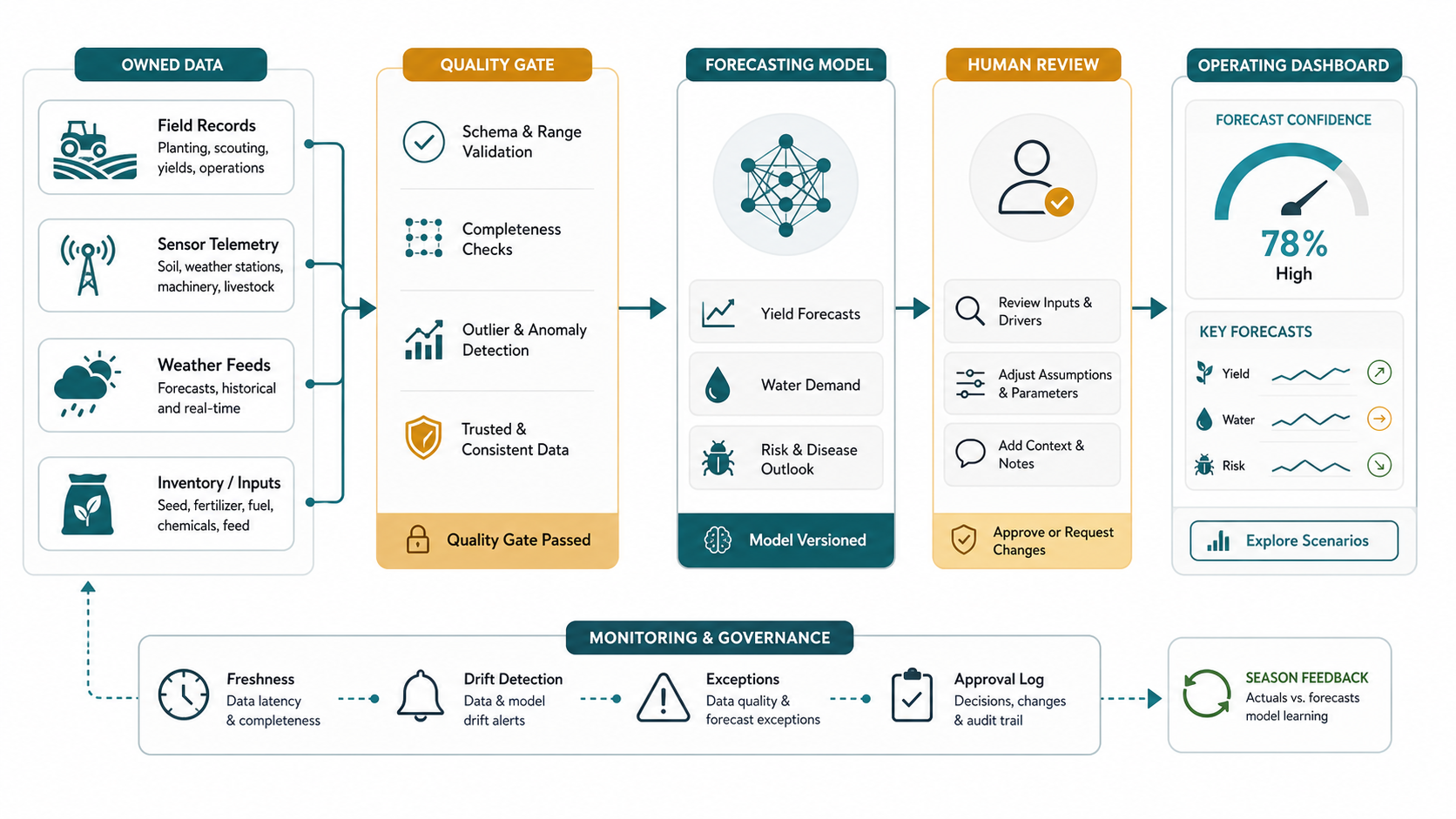
Agriculture analytics depends on whether the underlying records are consistent enough to trust. Field names, crop labels, units, input SKUs, sensor timestamps, equipment IDs, and user roles should be normalized before a team invests heavily in forecasting. Otherwise, dashboards will look polished while still producing weak operating decisions.
2026 source-status note: As of August 18, USDA ERS still shows precision-agriculture adoption rising sharply with farm size, USDA NIFA continues to define precision agriculture around high-resolution data, analysis, and precise control, and GAO still flags high up-front costs, data ownership, interoperability, and complexity as adoption barriers. For software estimates, keep release-one scope tied to field-data cleanup, offline support, vendor integration ownership, and AI automation services only after the farm can prove which decisions will be automated and who reviews exceptions.
When the roadmap includes dashboards, treat reporting as workflow software rather than a chart layer. NextPage's custom dashboard development services page is relevant for teams that need KPI ownership, source-system mapping, permissions, alerts, exports, and role-specific views. If AI recommendations are in scope, connect the pilot to predictive analytics services and machine learning development services only after the data foundation, feedback loop, and review ownership are clear.
| Readiness Area | What To Confirm | Why It Controls Cost |
|---|---|---|
| Master data | Farms, fields, crops, seasons, inputs, equipment, and users have stable IDs | Prevents rework in reporting, permissions, and integrations |
| Event quality | Field activities have timestamps, locations, owners, and correction paths | Improves dashboard trust and later model training |
| Integration freshness | Weather, sensor, inventory, and equipment data have latency and failure rules | Prevents alerts and forecasts from acting on stale data |
| Decision ownership | Each metric has an owner, action, and review rhythm | Keeps dashboards tied to operating change rather than passive reporting |
A Practical Rollout Plan
Agritech rollout should respect the operating calendar. Missing a planting, scouting, irrigation, or harvest window can delay meaningful validation. Plan the build around seasonal evidence rather than arbitrary launch dates.
- Discovery and workflow mapping: document farm roles, crops, field processes, existing tools, data sources, and the business metric the software should improve.
- MVP design: choose the first operating loop, remove low-value features, and define data fields that will support later analytics.
- Build and internal QA: develop admin, mobile, dashboard, and import/export workflows with realistic data and edge cases.
- Pilot: run the product with one farm, region, crop type, or team before expanding.
- Measure and harden: review adoption, sync failures, data gaps, alert quality, and support tickets.
- Scale: add integrations, advanced analytics, automation, or partner portals only after the core workflow is trusted.
Use NextPage's MVP Scope Builder to turn this rollout into a first-release scope, later-phase backlog, and risk list. That is especially useful when stakeholders want IoT, AI, and dashboards at once but the first pilot only needs a dependable operating loop.
Before scaling, convert the pilot evidence into an operating-cost model. Assign owners for onboarding, device support, data corrections, API subscriptions, seasonal configuration changes, dashboard governance, and model-monitoring reviews. This keeps the second release from becoming a hidden support budget after the software build is approved; the next section turns that guardrail into a scale-readiness checklist.
Field Readiness Gates Before Scaling
Precision agriculture adoption varies by farm size, region, and technology, so rollout should prove usability before the platform expands. A pilot that works for one large, digitally mature operation may still fail for smaller farms or field teams with different connectivity, training, equipment, and seasonal constraints. Treat adoption risk as a budget line, not a change-management footnote.
| Gate | Evidence To Collect | Scale Decision |
|---|---|---|
| Workflow fit | Field users complete the priority activity without reverting to spreadsheets or chat messages | Expand the same workflow to more crops, teams, or regions |
| Offline trust | Sync failures, duplicate records, and conflict corrections stay within supportable limits | Add more offline actions only after support patterns are understood |
| Data trust | Managers can explain each dashboard metric and correct bad source data | Add more integrations or analytics once records are dependable |
| Recommendation safety | AI or forecasting outputs include confidence, review, and outcome tracking | Move from advisory recommendations to workflow automation gradually |
For connected products with sensors, field devices, or cloud ingestion, the IoT mobile app development roadmap is a useful companion because it separates device contracts, mobile state, cloud ingestion, QA, and field-pilot support before a connected rollout scales.
Operating Cost Controls Before The Next Season
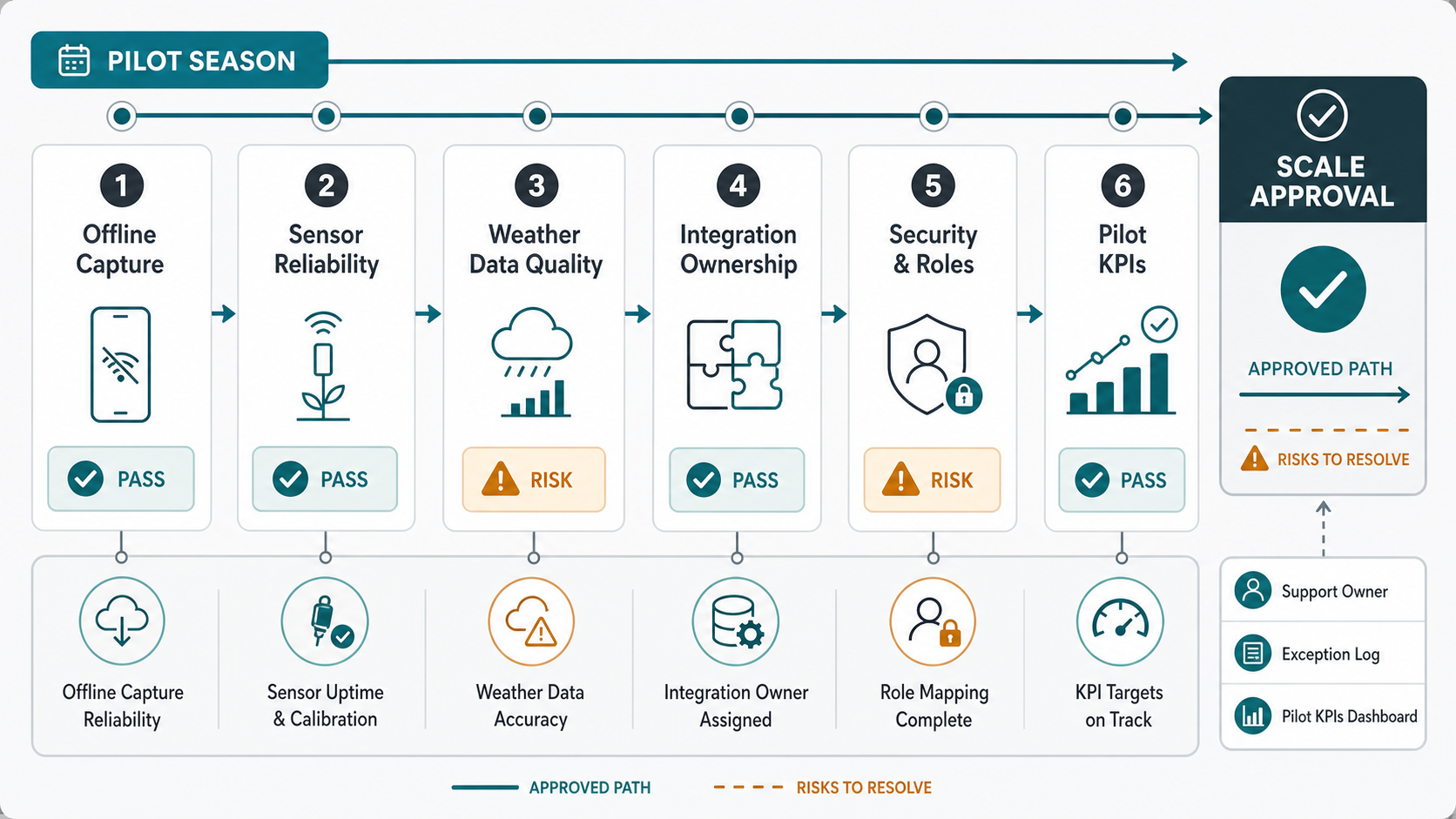
Before expanding agriculture software into another farm, crop, or season, convert the pilot into an operating-cost checklist. The build budget is only one part of the decision. Teams also need owners for device subscriptions, weather and imagery APIs, data corrections, onboarding, support diagnostics, dashboard governance, and AI model review. Without those owners, a promising pilot can become an expensive reporting system that nobody trusts during the next field window.
Use this gate before approving the next release:
| Cost Control | Owner To Name | Decision Before Scaling |
|---|---|---|
| Device and vendor costs | Operations or farm technology lead | Which sensors, controllers, weather feeds, or imagery subscriptions are permanent enough to integrate deeply? |
| Mobile support | Field operations and product owner | Which offline actions, sync errors, and upload failures need monitored support before more users join? |
| Data corrections | Analytics or operations admin | Who can fix crop labels, field IDs, units, equipment records, and bad imports without engineering help? |
| Dashboard governance | Business owner for each KPI | Which metrics trigger real operating decisions rather than passive reporting? |
| AI review cadence | Product, agronomy, or risk owner | How often will forecasts, recommendation quality, and model drift be reviewed against season outcomes? |
If the roadmap includes broader operations, finance, procurement, or inventory modernization, treat the agriculture product as part of the operating system rather than a standalone app. NextPage's ERP integration and modernization services can help map system-of-record decisions, while enterprise mobile app development services are relevant when field reliability, permissions, offline behavior, and support diagnostics are the adoption constraint.
Budget Risks To Catch Early
The most common budget risks are not hard to predict. They appear when teams underestimate field data complexity, over-scope integrations, or wait too long to test with real users.
- Hardware ambiguity: the team has not decided which sensors, controllers, or equipment data sources are in scope.
- Weak data model: fields, crops, seasons, inputs, tasks, and users are not structured consistently.
- Overloaded MVP: the first release tries to serve owners, workers, agronomists, suppliers, and partners at the same time.
- No seasonal pilot plan: the launch date is not aligned with when the software can be tested meaningfully.
- Unclear support ownership: no one owns device failures, bad imports, user onboarding, or alert tuning after launch.
When choosing a development partner, look for evidence that they can control these risks. The Custom Software Development Company Checklist can help evaluate discovery depth, architecture planning, security, QA, and delivery ownership.
When Custom Agriculture Software Makes Sense
Custom software makes sense when generic farm management tools do not match your workflow, data sources, integrations, or commercial model. That may be true for cooperatives, agritech startups, multi-site growers, input suppliers, equipment service teams, food traceability programs, or operators combining farm records with inventory, finance, logistics, and analytics.
It may not make sense if the team only needs basic recordkeeping and an off-the-shelf tool fits the workflow. The build decision should be tied to differentiation: unique operating process, proprietary data, integration needs, buyer-facing portal, or analytics that off-the-shelf software cannot provide.
NextPage helps teams plan and build custom software for operational workflows where generic products create friction. For agriculture teams, that means discovery around field processes, mobile usability, integrations, telemetry, analytics, security, and a phased launch plan that can survive real operating conditions.
Next Step: Scope The First Release Before Estimating The Full Platform
If you are budgeting agriculture software, do not start with every feature the platform might eventually need. Start with the first release that proves value: one user group, one operating loop, one region or crop pattern, and the minimum integrations needed to make the workflow trustworthy.
Then expand the estimate around clear cost drivers: offline mobile depth, IoT telemetry, weather and geospatial data, analytics, AI forecasting, permissions, QA, and support. That gives stakeholders a real budget conversation: what to build now, what to defer, and what evidence is needed before the next investment.