
Quick Answer: What Is The AI Agent Development Lifecycle?
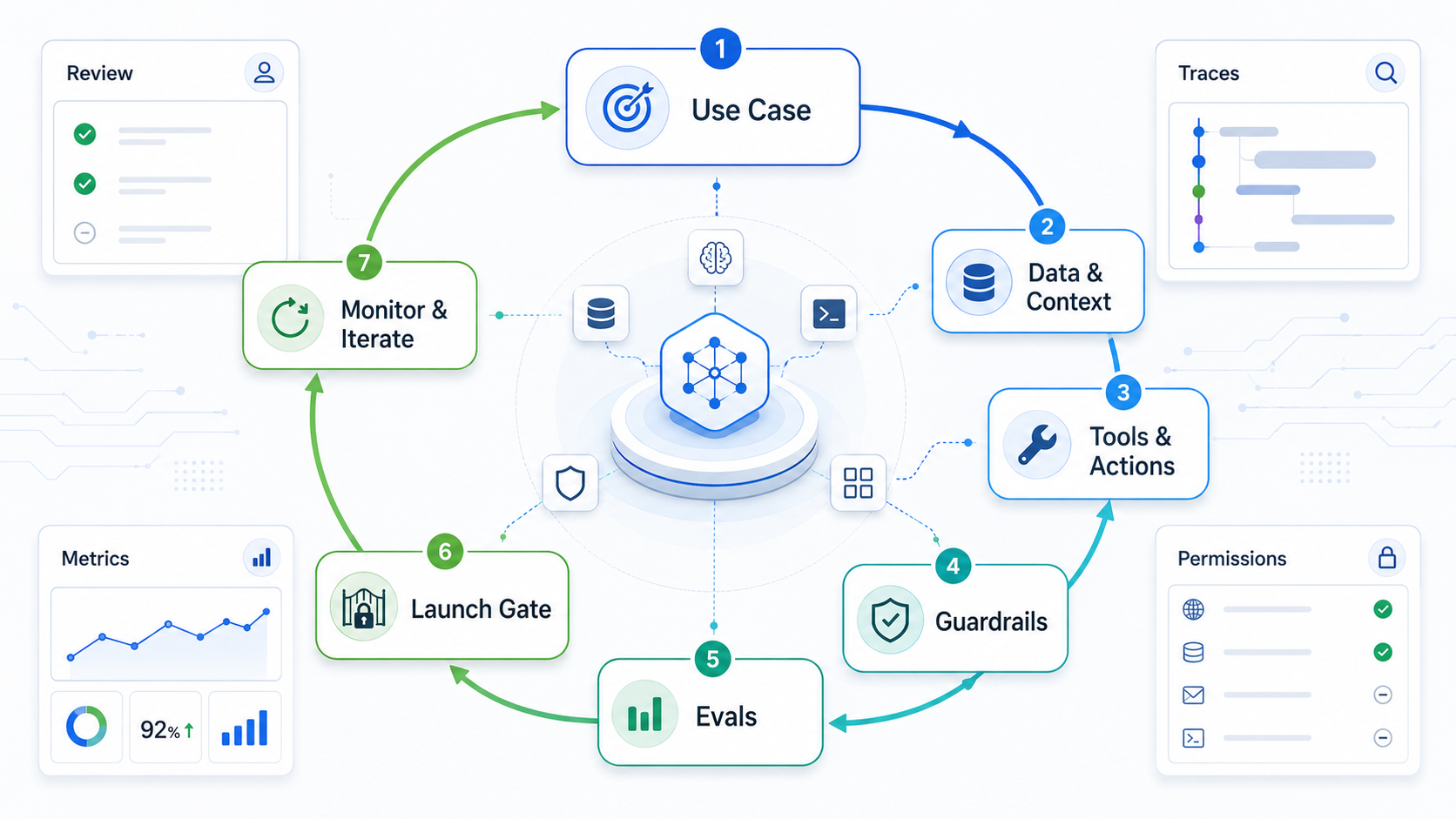
The AI agent development lifecycle is a repeatable delivery model for planning, building, testing, launching, monitoring, and improving AI agents. It exists because agents are not static chatbot features. A production agent can read context, call tools, update records, route work, ask for approval, and change business outcomes. That means the lifecycle must cover workflow ownership, data readiness, tool permissions, evals, guardrails, release gates, monitoring, and iteration after launch.
A useful lifecycle starts before model selection. First choose the workflow and the decision boundary. Then design context, tools, human review, success metrics, failure modes, and rollback. Build a narrow version, evaluate it against realistic cases, release it behind controls, and use production traces and feedback to improve the next version.
For buyers, the important shift is treating ADLC as an operating model. The team should know which workflow is ready, which data sources are approved, which tools the agent can call, which actions require review, and which metric decides whether the next permission level is earned. Teams still comparing candidates can use the Workflow Automation Opportunity Finder before committing to an agent build.
If your team is still deciding whether a workflow is ready for agentic automation, start with the AI Agent Readiness Assessment. It helps score workflow clarity, data readiness, integration access, and governance before the build becomes expensive.
Why Agents Need A Different Lifecycle
Traditional software delivery often treats release as a finish line. Agent delivery cannot. The agent's behavior depends on prompts, retrieved context, tool responses, model updates, user behavior, policy changes, and edge cases that may appear only after real use. A working demo is useful evidence, but it is not proof that the agent is safe for production.
Salesforce's current ADLC framing makes this point directly: agent deployment is day one, and teams need ongoing roles, metrics, governance, and iteration. OpenAI's agent guidance also points toward production concerns such as evals, guardrails, handoffs, tools, and traces. The practical lesson for buyers is simple: do not buy or build an agent as a one-time feature. Build an operating loop.
That loop matters most when the agent can act across business systems. A customer support agent that drafts an answer has one risk profile. An agent that updates refunds, changes CRM fields, schedules work, or triggers financial workflows needs stronger approvals, monitoring, and rollback.
Phase 1: Select The Right Workflow
The first agent should solve a narrow workflow with enough repetition, measurable value, and manageable risk. Avoid starting with vague mandates such as "build an AI agent for operations." Instead, define the task, user, input, output, systems touched, decision rights, failure cost, and escalation path.
| Workflow Question | Good Signal | Risk Signal |
|---|---|---|
| Is the workflow repeatable? | Similar cases arrive every week with clear patterns. | Every case requires unique executive judgment. |
| Is context available? | Policies, tickets, records, docs, and APIs are accessible. | Knowledge lives in scattered chats or individual memory. |
| Can success be measured? | Accuracy, resolution time, escalation rate, or savings can be tracked. | The team cannot define what a good outcome means. |
| Can humans review? | Approvers can inspect exceptions and risky actions. | The agent must act instantly with no review path. |
| Is rollback possible? | Actions are reversible or can be paused quickly. | Failures cause irreversible financial, legal, or safety harm. |
NextPage's AI workflow automation guide is a useful companion when the first decision is whether a workflow needs an agent, a copilot, a rules-based automation, or a human-reviewed assistant.
Phase 2: Define Roles And Accountability
An agent program needs named owners. The product owner defines the workflow and business metric. The domain owner validates expected answers and edge cases. Engineering owns architecture, integrations, observability, and release. Security reviews data access, tool permissions, abuse cases, and incident response. Operations or support owns day-to-day feedback and exception handling.
Do not leave "the agent" as the owner of a decision. For every tool call, record who approved the agent to perform that action, which user requested it, what policy allows it, and who reviews failures. This is where agent governance becomes practical rather than theoretical.
For higher-risk projects, use NextPage's enterprise AI agent governance checklist to plan permissions, human review, monitoring, and rollback before release.
Phase 3: Design Context, Memory, And Tools
Agents are only as useful as the context and tools they can safely use. Context design includes instructions, retrieval, user state, policy documents, examples, structured data, and conversation history. Tool design includes APIs, forms, databases, ticketing systems, calendars, payment tools, and internal services the agent can call.
The lifecycle should define what the agent can read, what it can write, what requires approval, and what it must never do. Tool permissions should be scoped to the workflow, not inherited from a broad admin account. Retrieval should use approved sources, freshness rules, and citations or traceability where possible.
If the agent works inside a workflow-heavy operations surface, use the same discipline as a custom internal platform: role-aware task state, audit history, dashboards, and repeatable handoffs. The WorkLoom operations platform case study is a useful reference for thinking about accountability and workflow visibility around automation.
If the system depends on RAG, embeddings, retrieval quality, or model orchestration, the work overlaps with LLM development. Treat the knowledge layer as software infrastructure, not as a folder of documents uploaded once.
ADLC Operating Model: Owners, Review, And Metrics
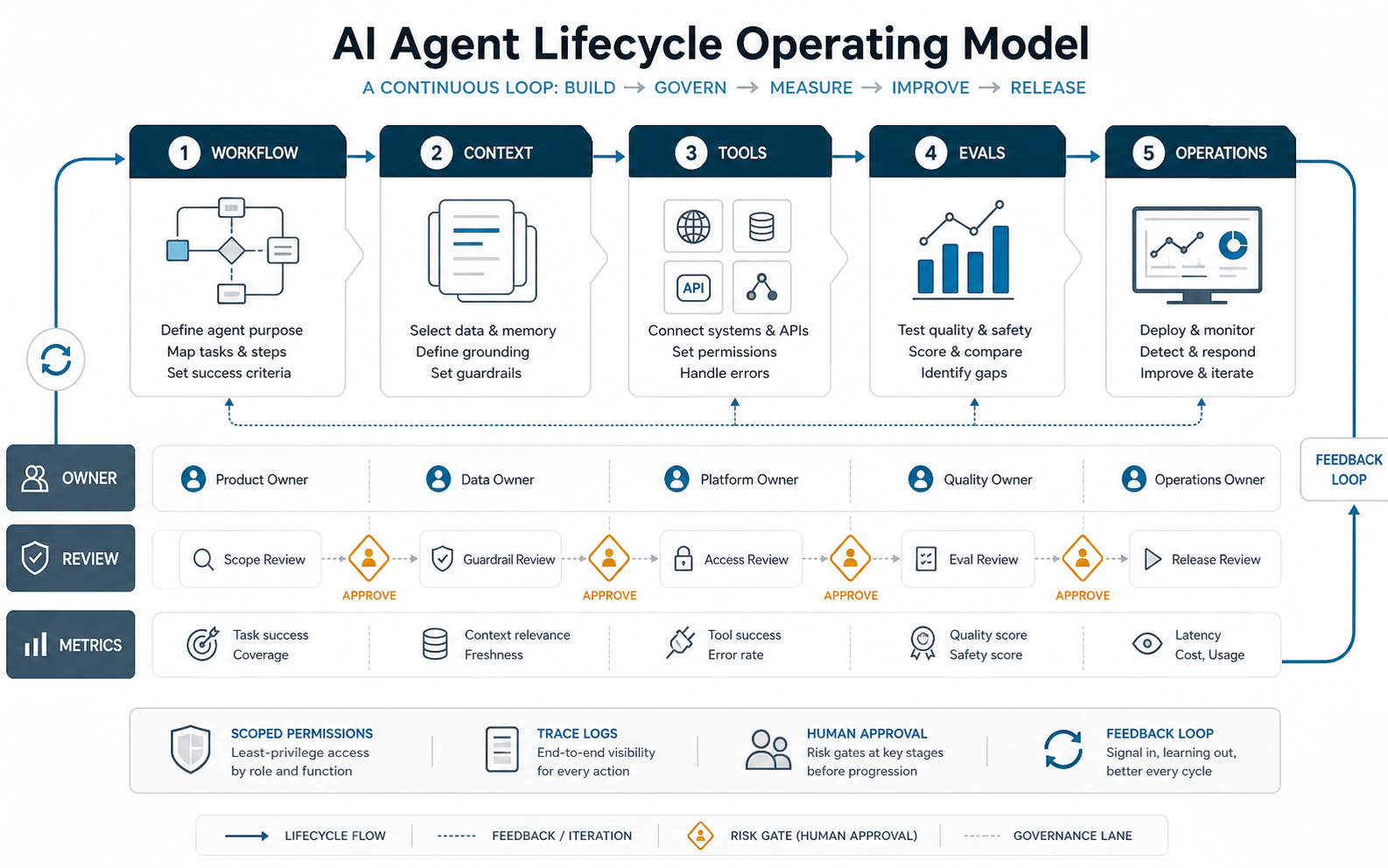
A practical ADLC model has three lanes under every phase: owner, review, and metric. The owner decides what good means. The review path decides when the agent can proceed, ask for approval, or stop. The metric shows whether the system is improving the workflow without adding hidden operational risk.
This operating model keeps the lifecycle from becoming a checklist that nobody owns. When the workflow changes, the owner updates the success criteria. When a tool permission changes, the review owner rechecks policy and rollback. When monitoring shows recurring failures, the metrics owner turns those traces into the next eval or backlog item.
Phase 4: Build Evals Before Launch
Agent evals are test suites for behavior. They should include normal cases, edge cases, policy-sensitive cases, adversarial inputs, missing-context cases, tool failures, and examples where the correct behavior is escalation rather than action. Evals should test the full workflow, not only the final text response.
Useful metrics include task success rate, policy pass rate, tool-call accuracy, retrieval relevance, hallucination rate, escalation quality, approval burden, latency, cost per completed task, user satisfaction, and incident rate. For agentic workflows, traces are important because they show the steps between input and outcome. If trace quality is weak, use the AI agent observability checklist to plan the events, dashboards, guardrail logs, and rollback evidence needed before production scale.
| Eval Type | What It Checks | Release Use |
|---|---|---|
| Golden cases | Known examples with expected outcomes | Regression baseline |
| Policy cases | Whether the agent refuses, escalates, or asks for approval | Governance gate |
| Tool cases | Correct API choice, parameters, and error handling | Integration gate |
| RAG cases | Whether the agent retrieves the right source and ignores weak context | Knowledge-quality gate |
| Production traces | What actually happened after release | Iteration backlog |
Budget should include this evaluation work. The AI agent development cost guide explains why tools, integrations, evals, governance, and monitoring often drive timeline more than the chat interface.
Phase 5: Add Guardrails And Human Review
Guardrails are not one filter. They are layered controls around input, retrieval, tool use, output, approvals, and monitoring. Rules-based checks can catch obvious invalid requests. LLM-based checks can classify intent or risk. API-level permissions can prevent unauthorized actions even if the agent prompt fails. Human review handles cases where the agent should not decide alone.
Design guardrails by risk level. A low-risk summarization agent may need source grounding and output checks. A workflow agent that changes business records needs tool scopes, approval thresholds, audit logs, rollback, and exception queues. A customer-facing agent needs escalation, tone, privacy, and compliance controls. For support use cases, the same lifecycle should be reflected in AI customer service agent development: intent mapping, approved knowledge, CRM or helpdesk handoffs, human escalation, analytics, and post-launch review.
The best guardrails are observable. If a guardrail blocks an action, record why. If humans override the agent, capture the corrected outcome. Those signals become training data for the next lifecycle pass.
Phase 6: Use Release Gates, Not Big Bang Launches
Release gates protect the business while the agent matures. Start with internal users, read-only mode, draft mode, or human-approved actions. Expand only when evals, trace review, user feedback, and operational metrics show that the agent is reliable enough for the next permission level.
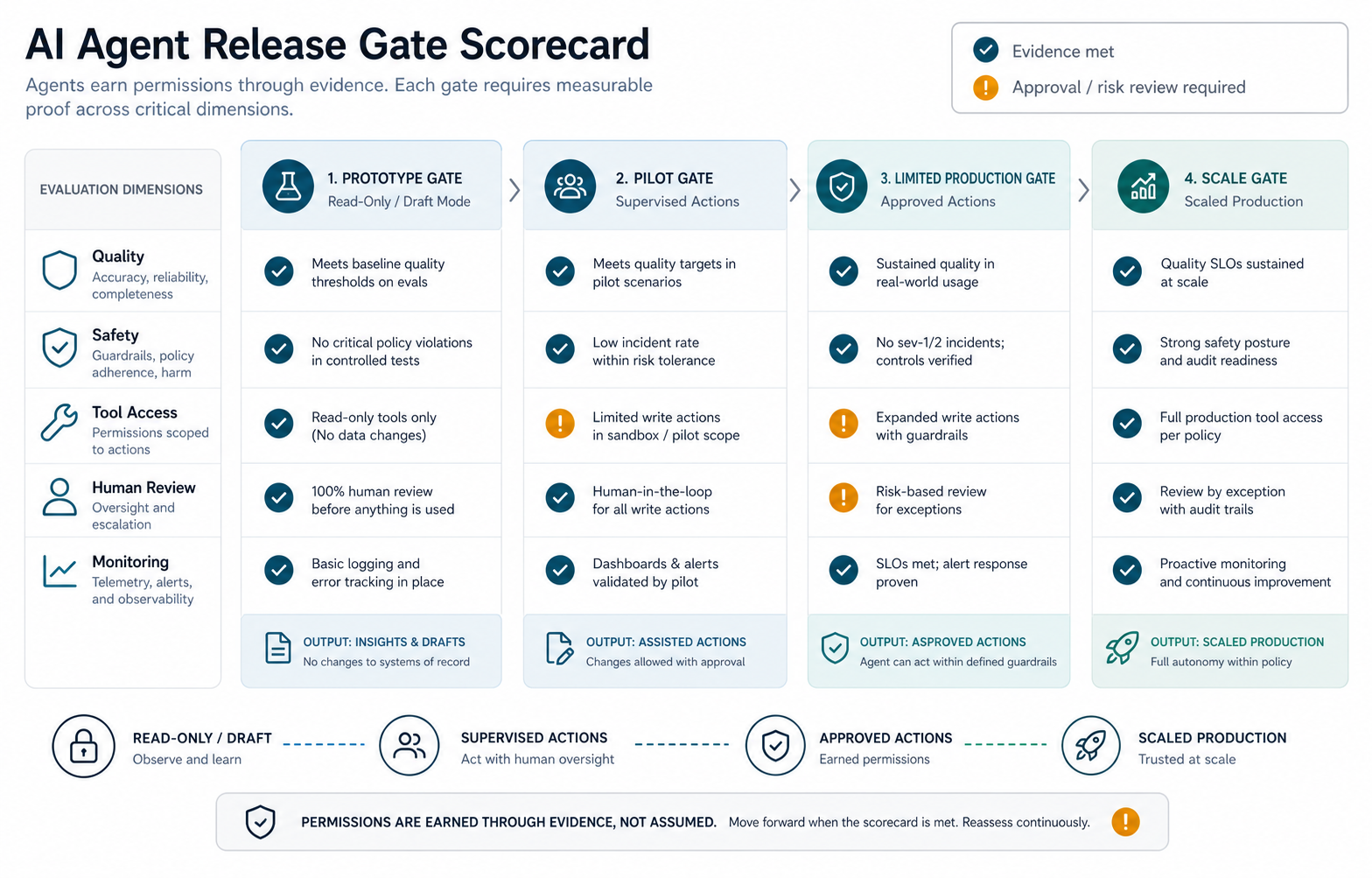
- Prototype gate: proves the workflow and context are good enough for a small internal test.
- Pilot gate: proves the agent can handle real cases with human review.
- Limited production gate: allows a narrow user group, constrained tools, and strong monitoring.
- Scaled production gate: expands users or permissions after support, security, and metrics are ready.
- Change gate: re-runs evals before prompt, model, retrieval, or tool changes affect production.
For broader production AI delivery, NextPage's generative AI development services can help connect prompts, retrieval, models, tools, evaluations, and launch controls into one delivery path.
Phase 7: Monitor, Learn, And Iterate
Monitoring should show whether the agent is creating value and whether risk is increasing. Track usage, task completion, escalation rate, blocked actions, approval rate, user corrections, retrieval failures, tool errors, latency, cost, and incidents. Review traces regularly, especially for failed or high-impact tasks.
Iteration should be evidence-driven. Do not change prompts randomly because one response looked bad. Categorize failures: missing context, wrong tool, weak instruction, unclear user input, policy conflict, integration error, or unsupported workflow. Then update the right layer and re-run evals before release.
The lifecycle becomes stronger when production feedback feeds the next build cycle. That is the difference between an AI demo and an AI operating capability. If the work is mostly routing, approval, and systems handoff rather than model-heavy reasoning, compare the scope with business process automation services so the first release uses the simplest durable automation pattern.
Metrics For The AI Agent Development Lifecycle
Agent metrics should combine business value, behavior quality, operational reliability, and governance. A support agent may track resolution time, deflection quality, escalation rate, CSAT, complaint rate, and cost per case. A sales operations agent may track clean CRM updates, quote-cycle reduction, approval accuracy, and human review load.
Do not optimize only for autonomy. A safer agent may escalate more often early in the lifecycle. That is acceptable if escalation quality is high and the system is learning. The goal is controlled business value, not maximum unsupervised action.
To connect savings with investment, use the AI Automation ROI Calculator after the workflow and measurement model are clear.
Common ADLC Mistakes
- Choosing the model before the workflow: the hard part is usually context, tools, permissions, and evaluation.
- Skipping evals: demos hide edge cases that only appear when the agent touches real systems.
- Giving broad tool access: agents should use scoped APIs, not admin-level credentials.
- Launching without rollback: every agent action should have a pause, revoke, reverse, or compensate path.
- Ignoring operating roles: someone must own trace review, feedback triage, incident response, and iteration.
NextPage Point Of View
NextPage treats AI agents as production software systems, not prompt experiments. The first deliverable is a workflow and risk map. The second is a controlled architecture for context, tools, human review, evals, and monitoring. The agent itself is only one part of that system. For teams ready to move from readiness scoring into implementation, NextPage's AI agent development work connects workflow discovery, context design, tool integration, evaluation, guardrails, and launch controls.
If your organization is planning an agent rollout, start narrow. Pick one workflow, define the owner, build the eval set, limit tool permissions, and release behind gates. Once the lifecycle is working, expand the agent's scope with evidence instead of optimism.
That is how AI agent development becomes repeatable: each release teaches the next one, and each new permission level is earned through metrics, traces, and operational confidence.