
AI agent identity governance is the control system that makes every autonomous agent known, scoped, observable, and revocable before it can touch production systems. The practical checklist starts with a registry, gives each agent its own non-human identity, limits access per workflow, logs every tool action, and defines how teams pause or revoke agents during an incident.
This matters because agents are no longer passive chat windows. They can read internal data, call APIs, update records, create tickets, trigger deployments, or delegate work to other agents. NIST's 2026 concept paper on software and AI agent identity focuses on identification, authentication, authorization, delegation, logging, and non-repudiation. Cloud Security Alliance guidance frames agentic AI as a non-human identity problem because agents can acquire permissions, invoke tools, and chain actions across systems. OWASP's agentic threat guidance points to the same operating reality: security teams need controls around goals, tools, permissions, prompts, and runtime actions.
If your organization is moving agents from pilots into agentic AI development services and business workflows, start with the AI Agent Readiness Assessment. It helps separate safe first workflows from agent ideas that need more data, access, review, or incident-response work before launch.
Quick Answer: AI Agent Identity Governance
AI agent identity governance is the set of policies, systems, and evidence that proves which agent acted, who owns it, what it was allowed to do, which credentials it used, what data and tools it touched, and how access can be changed or revoked. It treats every production agent as a distinct non-human identity instead of hiding it behind a human user's session or a shared service account.
A production-ready checklist should answer eight questions:
- Which agents exist, who owns them, and why do they exist?
- Which systems, tools, data stores, and APIs can each agent access?
- Are credentials scoped, short-lived, and rotated?
- Can authorization change when the task context changes?
- How is delegated access tied back to a human sponsor or business process?
- What must pause for human approval?
- Which logs prove intent, tool calls, decisions, and outcomes?
- How can security revoke, quarantine, or kill an agent during an incident?
2026 Source Status For Agent Identity Controls
As of July 24, 2026, agent identity guidance is moving from generic AI governance into concrete identity and authorization controls. NIST's NCCoE concept work frames software and AI agents as identities that need identification, authentication, authorization, delegation, logging, and non-repudiation. OWASP's agentic security guidance turns the same concern into practical threat categories around goals, tools, memory, supply chain, and runtime actions. Cloud Security Alliance research treats agentic AI as a non-human identity governance problem because agents can acquire permissions, invoke tools, and chain work across systems.
| Source | What It Adds To The Checklist | Implementation Implication |
|---|---|---|
| NIST/NCCoE Software And AI Agent Identity | Identity, authorization, delegation, logging, and non-repudiation for software and AI agents. | Give each production agent a distinct identity, owner, purpose, authorization boundary, and audit trail. |
| OWASP Agentic AI Threats And Mitigations | Threat-model view of agent planning, tool use, memory, inter-agent communication, and cascading failure. | Treat tool permissions, guardrails, sandboxing, and approval gates as release requirements, not optional hardening. |
| Cloud Security Alliance NHI And Agentic AI Research | Non-human identity visibility, lifecycle ownership, token sprawl, and legacy IAM gaps. | Inventory agents with the same seriousness as privileged service accounts, but add task-aware policy checks. |
| OpenAI Agent Guardrail And Human Review Docs | Runtime guardrails, approvals, and tool-use controls for agent workflows. | Route risky writes, external sends, data export, privilege changes, and irreversible actions through approval or blocking policies. |
The practical takeaway for software teams is simple: do not wait for a single final standard. Build the checklist around controls that are already stable across these sources: known identity, scoped access, task context, approval gates, durable logs, revocation, and incident-response evidence.
Why Agent Identity Is Different From Service Accounts
Traditional service accounts usually perform narrow, repeatable functions. AI agents are different because they interpret instructions, retrieve new context, choose tools, and may act through multi-step workflows. That creates authorization uncertainty: the same agent might need harmless read access during one task and risky write access during another.
This is why extending human IAM patterns without modification is weak. A human account has employment status, manager ownership, access reviews, and a known role. A generic service account has a workload owner and a fixed purpose. An AI agent needs both: workload-style lifecycle controls plus task-aware authorization and human accountability.
The most dangerous shortcut is letting agents act through a developer's token, a shared admin key, or a broad integration account. That breaks least privilege and makes audit trails vague. When something goes wrong, logs show that a credential acted, but not which agent, prompt, workflow, owner, approval, or policy decision caused the action.
The Agent Identity Control Plane
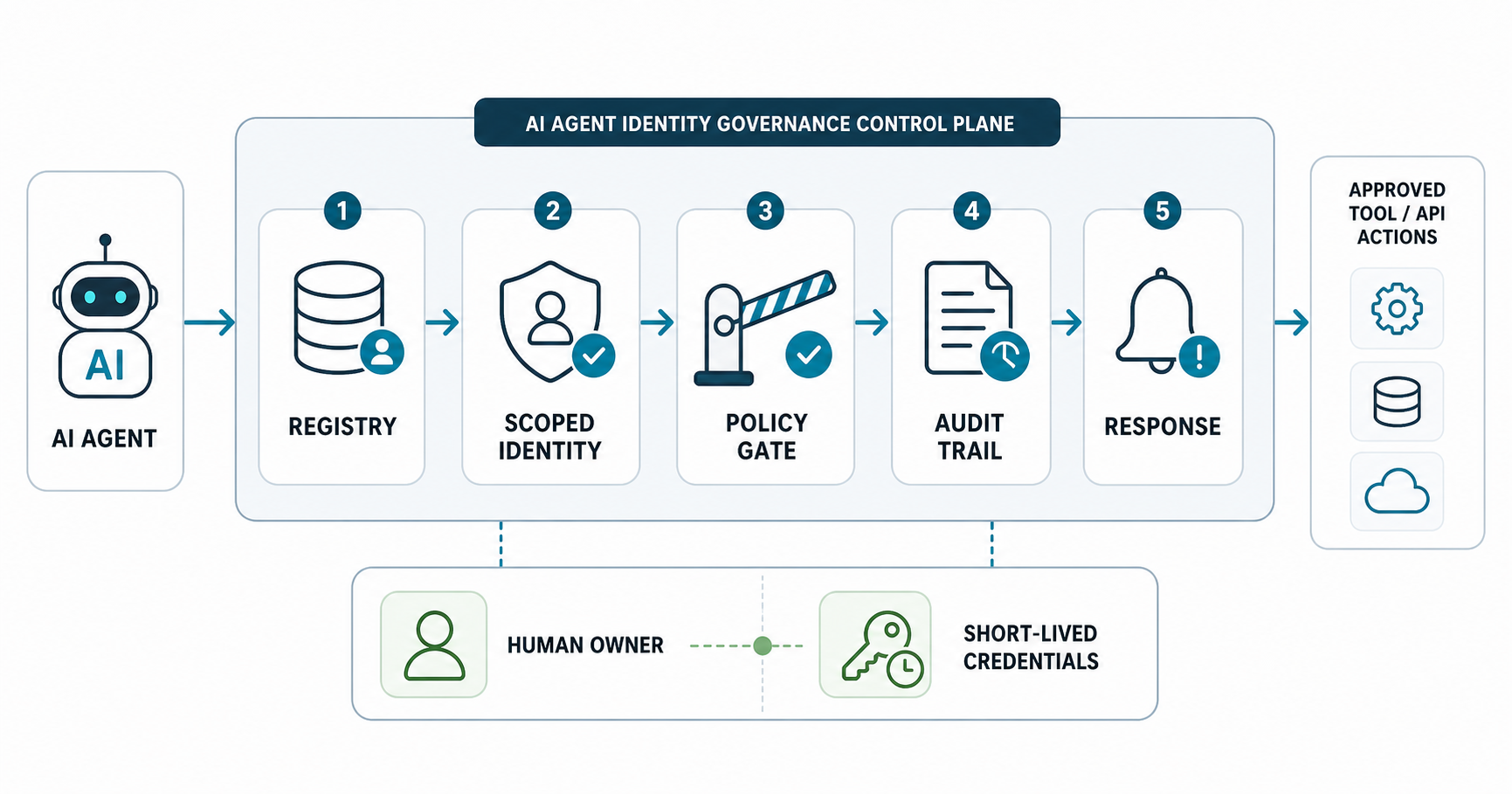
A practical control plane does not have to be one vendor product. It can combine identity provider records, cloud workload identity, secrets management, policy-as-code, observability, ticketing, and security tooling. What matters is that the controls join up. The registry should tell you which agent exists. The authorization layer should know what that agent can do. The log stream should prove what happened. The response process should revoke access without waiting for a developer to remember where the key lives.
| Control | Minimum Evidence | Common Failure |
|---|---|---|
| Agent registry | Owner, purpose, environment, systems touched, privilege scope, review date. | Agents are hidden in notebooks, workflows, browser automations, or SaaS copilots. |
| Scoped credentials | Per-agent or per-workflow credentials with expiration and rotation. | Shared API keys or standing admin roles. |
| Policy checks | Allow/deny rules by task, data class, tool, action, and approval state. | Authorization is decided only at login, not at action time. |
| Audit trail | Prompt, identity, tool call, input/output summary, approver, result, and timestamp. | Logs show API calls but not agent intent or delegated authority. |
| Incident response | Kill switch, credential revoke path, quarantine queue, evidence capture, owner alert. | Teams can disable the app but not the agent's downstream credentials. |
The Checklist For Production Agent Access
Register every agent before access. Do not wait for security review until after an impressive demo. Record the agent name, owner, business process, model/provider, deployment environment, data classes, tool list, systems accessed, expected actions, and review cadence.
Separate read, recommend, and write authority. Many agents can start with read-only context and recommendation output. Write access to CRM, finance, code, cloud, support, or customer data should require a stronger evidence package and usually a human approval gate.
Issue scoped credentials by workflow. One agent may support multiple workflows, but each workflow should have its own access profile when the risk differs. A support-triage agent does not need the same permissions when drafting a reply, updating an account, issuing a refund, or triggering an escalation.
Prefer short-lived access. Where possible, use just-in-time credentials, token exchange, workload identity, or policy-based access instead of long-lived static keys. If standing access is unavoidable, keep it narrow and review it frequently.
Bind delegated actions to a human sponsor. For "on behalf of" workflows, logs should show the human user, the agent, the task, the allowed action, and the approval state. That does not mean the agent impersonates the user. It means accountability survives delegation.
Make high-risk tool calls interruptible. Deleting data, changing production configuration, sending external messages, executing code, creating purchases, touching regulated data, or escalating privileges should pause for approval until the workflow has proved itself.
These controls align with the broader secure AI agent development checklist: tool permissions, audit logs, sandboxing, prompt-injection resilience, and human approval must be designed before the agent handles real operations.
Agent Identity Lifecycle Matrix
The lifecycle is simple enough to operationalize: register, scope, delegate, observe, revoke, and respond. The discipline is doing it for every agent, including agents embedded in SaaS tools, internal automation, RAG workflows, coding agents, security agents, and customer-support copilots.
| Lifecycle Stage | Engineering Work | Security Review Question |
|---|---|---|
| Register | Create owner and purpose metadata before deployment. | Can we find this agent during an audit? |
| Scope | Limit tools, data, actions, environments, and credential lifetime. | What is the blast radius if the agent is compromised? |
| Delegate | Bind user-approved work to agent actions without sharing human credentials. | Can we prove who authorized the action? |
| Observe | Log prompts, tool calls, policy decisions, outputs, and exceptions. | Can incident responders reconstruct the chain of events? |
| Revoke | Automate credential expiration, rotation, suspension, and decommissioning. | Can access be removed quickly without hunting for secrets? |
| Respond | Define kill switch, quarantine, evidence capture, owner alert, and rollback. | Can we contain unsafe behavior before it spreads? |
Scope Agent Access By Risk Tier
The safest agent access model is not one blanket permission set. Start with the workflow risk, then decide what the agent can read, recommend, draft, or execute. A low-risk research agent may only need retrieval access and no write authority. A support agent that drafts replies needs customer context, policy snippets, and a human approval path. A production operations agent that can change records, trigger refunds, update infrastructure, or message customers needs a much stronger release gate.
Use the Workflow Automation Opportunity Finder to separate low-risk automation candidates from workflows that need deeper access design. If the agent has a measurable operating payoff, the AI Automation ROI Calculator can help decide whether the extra governance work is worth funding.
| Risk Tier | Allowed Agent Authority | Required Evidence Before Launch |
|---|---|---|
| Tier 1: Read and summarize | Read-only retrieval, summaries, classification, and draft recommendations. | Agent owner, data classes, retrieval sources, prompt-injection tests, output review notes, and redaction rules. |
| Tier 2: Draft and queue | Create drafts, tickets, reports, or proposed updates without committing final action. | Human approval queue, policy checks, user-visible status, audit log, and rollback owner. |
| Tier 3: Approved actions | Execute bounded actions after approval, such as updating a CRM field or sending a templated message. | Per-action scopes, approver identity, tool allowlist, rate limits, exception handling, and revoke path. |
| Tier 4: Autonomous production actions | Take narrow actions without per-step approval inside a proven workflow. | Short-lived credentials, policy-as-code, live monitoring, kill switch, incident drill, and post-launch review cadence. |
Most teams should not start at Tier 4. A practical rollout moves from read-only to drafts, then approved actions, then bounded autonomy only after logs, evals, and human review show that the agent behaves reliably inside real business conditions.
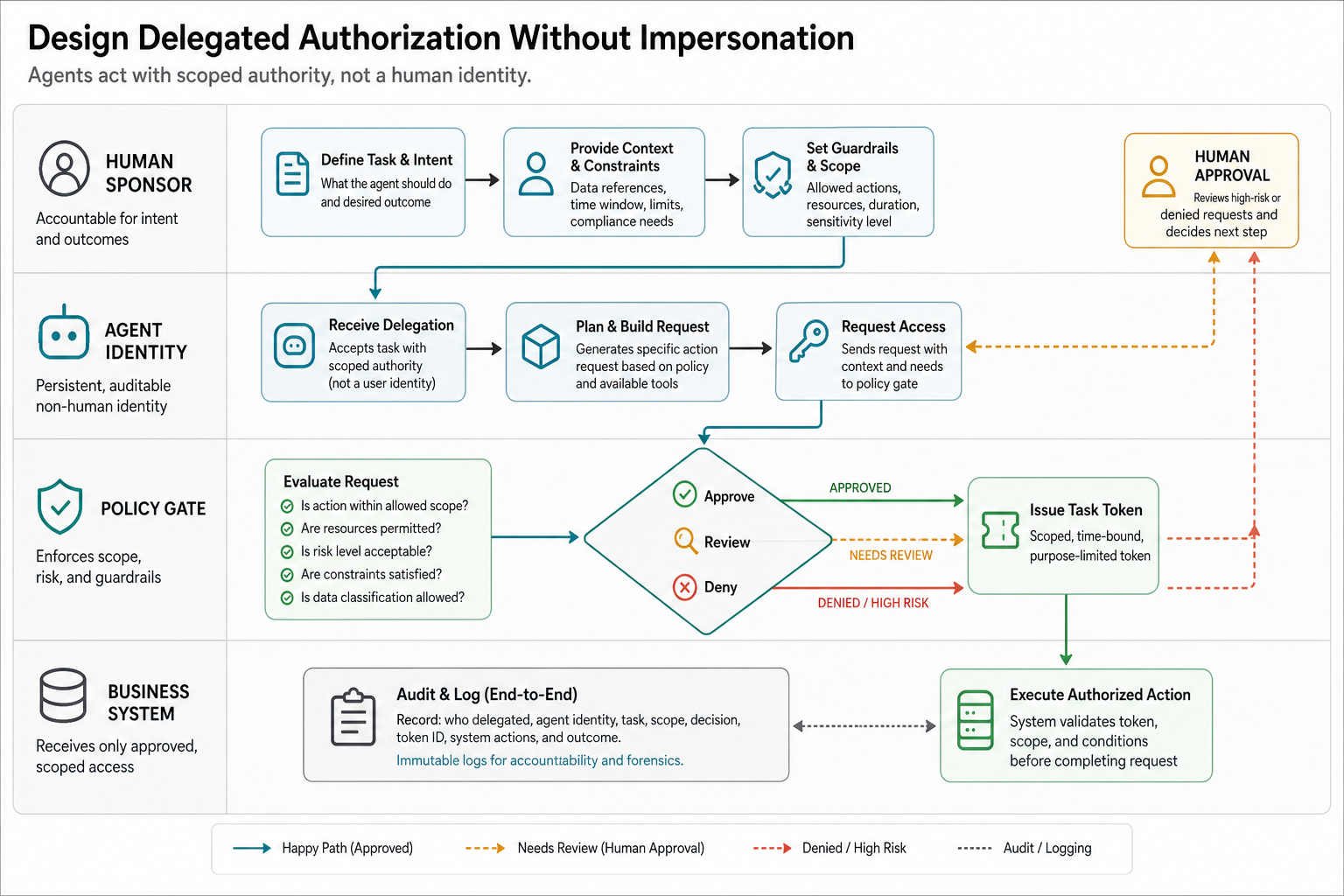
Design Delegated Authorization Without Impersonation
Delegation is where agent identity governance often breaks. A user asks an agent to do something, but the agent may call several tools, use retrieved context, and trigger downstream actions. If the agent simply borrows the user's token, security teams lose the difference between what the user directly did and what the agent decided to do on the user's behalf.
A better pattern is to keep the agent identity separate while binding each delegated action to a human sponsor, workflow, consent state, and policy decision. The audit trail should show the user request, the agent run, the tool call, the scope granted, and the approval or exception that allowed the action. This is especially important for generative AI development work that connects LLMs to CRMs, support tools, code repositories, finance workflows, or customer data.
- Do not impersonate by default: use agent or workflow credentials instead of broad human-session reuse.
- Carry delegation context: attach sponsor, purpose, ticket, workflow, and allowed action to every tool call.
- Separate consent from scope: a user request does not automatically authorize every downstream action the agent can imagine.
- Make scope visible: approval screens should explain what data, tools, and actions are being granted.
- Expire delegation: access should close when the task, session, approval window, or business process ends.
This is the engineering difference between a helpful assistant and an ungoverned automation script. NextPage's AI development services team usually designs this as part of the product architecture, not as a security add-on after the first agent demo.
Audit Logs Need Intent, Not Just API Events
Standard API logs are necessary but not sufficient. Agent investigations need the human request, agent identity, system prompt or policy version, retrieved context, selected tool, parameters, authorization decision, approval state, output, and downstream effect. Without that chain, reviewers cannot tell whether an agent followed policy, hallucinated a tool argument, responded to prompt injection, or used a credential outside its expected purpose.
Do not log sensitive raw prompts or customer data blindly. Use data minimization, redaction, hashes, event IDs, and secure evidence storage. The goal is defensible traceability, not a second uncontrolled data lake.
For regulated or critical systems, pair agent audit logs with an AI governance model. NextPage's AI governance checklist for critical infrastructure software is a useful pattern even outside utilities or public-sector work because it forces ownership, risk tiers, approval gates, and evidence.
Incident Response For Agent Identities
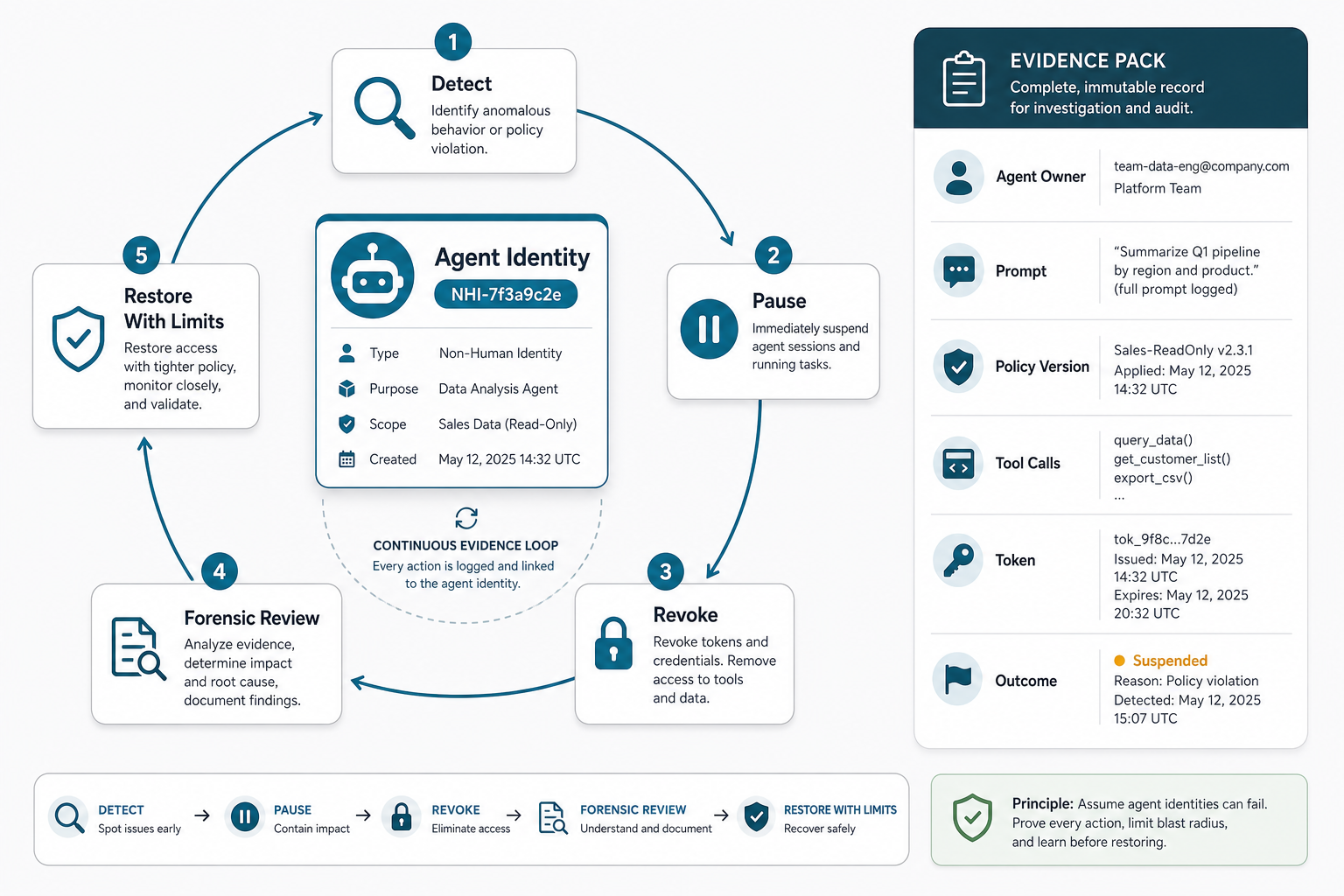
Agent incidents should not start with a debate about whether the behavior was a model issue, a prompt issue, or an IAM issue. The response plan should first contain the blast radius. Disable the agent runtime, revoke or rotate credentials, pause queued actions, preserve logs, snapshot recent prompts and tool calls, notify the owner, and identify downstream systems touched during the incident window.
Then triage root cause. Was the agent over-permissioned? Did a tool allow destructive action without approval? Did prompt injection alter its goal? Did a delegated workflow use the wrong human context? Did a credential outlive the workflow? Did another agent or integration expand the action chain?
Security validation should be part of the release path, not only incident cleanup. For high-risk agents, combine LLM application security checks, authorization tests, prompt-injection scenarios, and tool-call abuse cases. NextPage's security testing services and software QA testing services are natural companions when an agent changes production workflows.
Release Evidence Gate Before Production
Before an agent gets production credentials, the team should hold a release evidence review. This is a compact go/no-go gate that checks whether identity, access, policy, testing, monitoring, and incident response are all ready. It should be lightweight enough to run every time a new agent or high-risk workflow launches, but strict enough to block vague ownership and overbroad access.
For high-risk workflows, pair the identity checklist with agentic AI infrastructure readiness so tool permissions, observability, cost controls, and human gates are designed together.
| Gate | Pass Signal | Hold Signal |
|---|---|---|
| Registry complete | Owner, purpose, environment, model/runtime, tools, data classes, and review date are recorded. | No owner, unclear purpose, hidden SaaS agent, or undocumented tool access. |
| Credential scope | Credentials are per-agent or per-workflow, short-lived where possible, and mapped to allowed actions. | Shared API key, standing admin access, or no expiration path. |
| Policy and approvals | High-risk actions are allowlisted, validated, rate-limited, and routed for approval when needed. | Authorization happens only at login, or the model decides action safety alone. |
| Audit trail | Logs preserve intent, prompt or policy version, tool call, parameters, decision, approver, and outcome. | Logs show only API events without agent run context or delegated authority. |
| Incident response | Kill switch, revoke path, quarantine queue, evidence capture, owner alert, and rollback plan were tested. | Team can disable the app but not the agent's downstream credentials. |
Security testing and QA should both be present at this gate. Use security testing services for authorization, prompt-injection, abuse, and data-exposure paths. Use QA automation testing services when repeatable regression checks need to prove the agent still follows workflow rules after model, prompt, retrieval, or integration changes.
A 30/60/90-Day Rollout Plan
Days 1-30: find and classify agents. Build the first registry, identify shadow agents, map owners, rank workflows by data sensitivity and action risk, and block shared admin credentials for new agent work.
Days 31-60: scope and instrument access. Move priority agents to scoped credentials, add approval gates for high-risk actions, send tool-call events to your logging stack, and define revoke paths for each connected system.
Days 61-90: prove lifecycle discipline. Run access reviews, rotate credentials, test kill switches, rehearse an agent incident, and measure whether agent workflows produce useful output without increasing review load, security exceptions, or release risk.
Teams building new agents should bake these controls into the architecture from day one. NextPage's generative AI development and AI development services teams can help design the agent workflow, LLM development path, policy layer, integration contracts, and validation plan together instead of bolting governance on after launch.
What To Measure After Launch
Agent identity governance does not stop at launch. The first month of production should prove that access is being used as expected, not merely that the agent avoided a major incident. Track operational value and control quality together so the team does not choose between speed and safety.
- Access drift: new tools, scopes, data classes, or credentials added after approval.
- Approval load: high-risk actions routed for review, approved, rejected, or escalated.
- Policy failures: blocked tool calls, invalid arguments, unsafe outputs, and prompt-injection attempts.
- Audit completeness: percentage of runs with complete request, context, tool, decision, and outcome traces.
- Business value: hours saved, cycle-time reduction, quality improvement, or support load reduced.
- Incident readiness: mean time to pause an agent, revoke credentials, preserve evidence, and restore service.
For a working product example, the FieldIQ portfolio case study shows how role-aware workflows, mobile operations, platform controls, and AI assistance need to move together. Agent governance works best when it is connected to the same product and operations model instead of sitting in a separate spreadsheet.
Common Agent Identity Governance Mistakes
- Using a shared admin key: it may make the demo work, but it destroys least privilege and incident attribution.
- Logging only final API calls: investigators need the agent run, prompt or policy version, retrieved context, selected tool, and downstream result.
- Treating prompts as permissions: model instructions can guide behavior, but technical controls must enforce scopes and approvals.
- Skipping read access reviews: agents can cause harm by reading sensitive data even when they never write to a system.
- Forgetting decommissioning: retired pilots, old notebook agents, and abandoned SaaS copilots can leave credentials behind.
- Separating governance from delivery: custom agents still need product engineering, backend integration, QA, monitoring, and maintenance discipline. Treat them like custom software development, not isolated prompt experiments. Use prompt engineering services when tool-use instructions, approval boundaries, and escalation rules need to be designed before rollout.
How NextPage Can Help
NextPage helps teams move AI agents from experiments to production workflows with clearer boundaries: readiness scoring, workflow selection, agent architecture, scoped tool access, audit logging, evaluation, QA, and release planning. The goal is not to slow every agent with process. It is to make useful agents safe enough to operate inside real systems.
If your next AI agent will touch customer data, internal tools, code, cloud systems, or business records, treat identity governance as launch infrastructure. Start with a readiness review, pick one controlled workflow, and build the registry, authorization, audit, and incident-response path before the agent gets production credentials.