
An AI agent skill security checklist should prove which skills are installed, who owns them, what they can access, how they are isolated, where they came from, what they did at runtime, and how they can be revoked during an incident. Skills are not harmless prompt snippets. In a tool-using agent, a skill can encode the workflow that decides which files to read, which APIs to call, which shell commands to run, which memory to trust, and which external systems to update.
This checklist is for teams deploying coding agents, support agents, internal workflow agents, revenue-operations agents, or AI assistants that can invoke tools. It uses OWASP's Agentic Skills Top 10 as the source risk model, but turns it into a practical operating checklist for engineering, security, and product leaders. If you are still deciding whether a workflow is ready for agentic automation, start with the AI Agent Readiness Assessment before granting real system access.
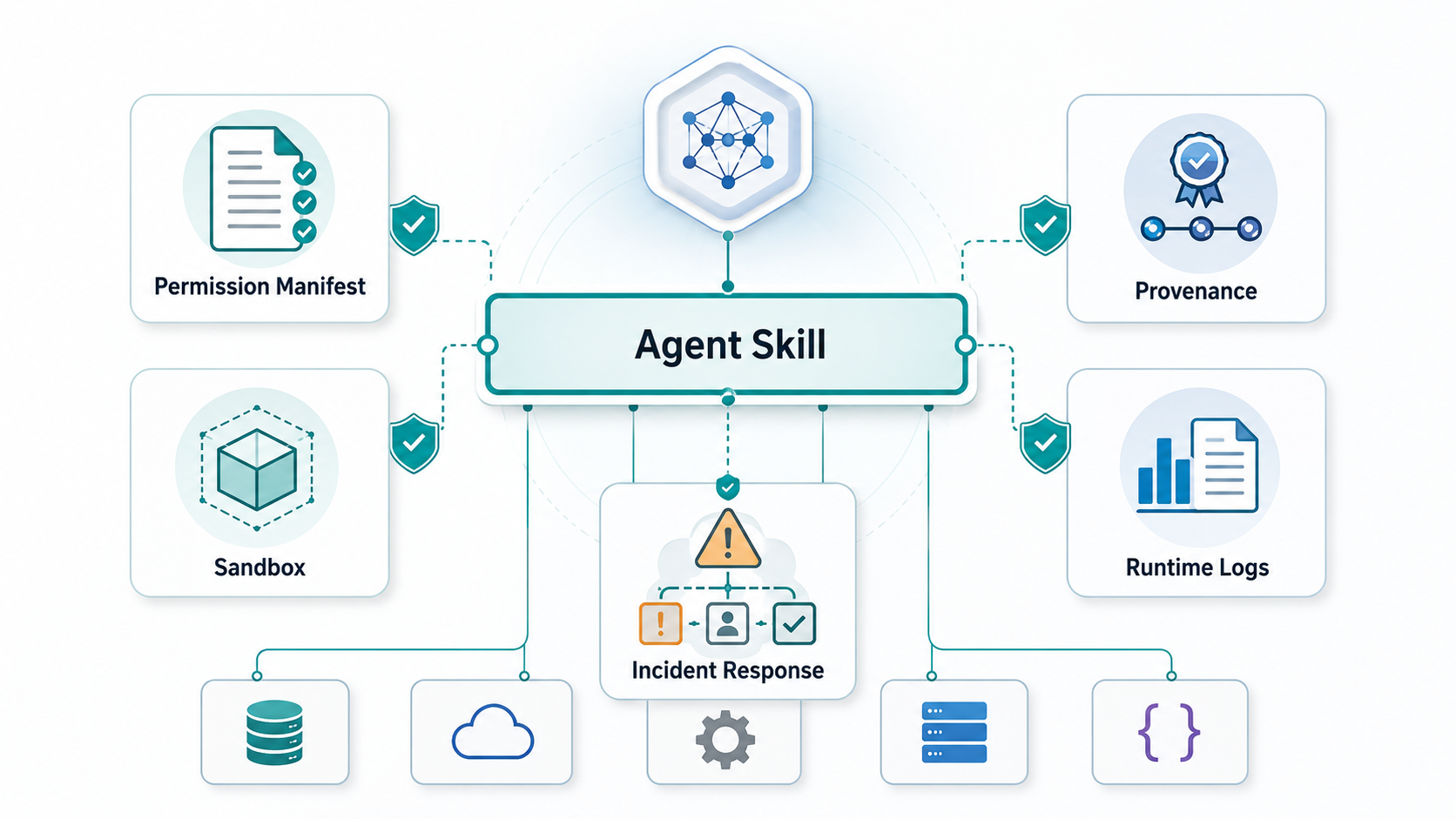
Quick Answer: What Should An AI Agent Skill Security Checklist Include?
A production checklist should cover eight control areas: inventory, provenance, permission manifests, sandboxing, installation approval, semantic scanning, runtime observability, and incident response. Each area should produce evidence, not just policy language. Evidence might include a skill registry entry, signed package metadata, a pinned version, an allowlisted file path, a network egress rule, a sandbox profile, a tool-call log, an owner review, or a tested revoke path.
The central question is simple: if a skill becomes malicious, over-permissioned, stale, or manipulated by untrusted content, can your team detect it, contain it, and prove what happened? If the answer is no, the skill should not run near production data, secrets, customer records, deployment credentials, or business-critical workflows.
Why Agent Skills Need Their Own Review
Security teams often review the model, the app, and the API integration, then assume the skill layer is covered. That misses the risky part. OWASP AST10 describes agentic skills as the behavior layer that gives an agent real-world impact: task decomposition, planning, file access, network calls, shell execution, memory use, and cross-session workflows. Securing the MCP tool list is not enough if an installed skill can tell the agent how to chain those tools in unsafe ways.
Skills also create a supply-chain problem. They can be copied across projects, installed from registries, edited by developers, bundled with scripts, or updated automatically. A three-line instruction in a skill file can be more dangerous than a long application module if the agent trusts it and has access to sensitive tools. Treat skills as executable operational logic, not documentation.
This is closely related to the broader secure AI agent development checklist, but narrower. Agent development reviews the whole system. Skill security asks whether each reusable behavior package deserves to be installed, invoked, observed, and updated.
Control 1: Build A Skill Inventory
Start with a registry of every skill, prompt package, workflow recipe, extension, plugin, and reusable agent behavior in use. Include official skills, internal team skills, copied open-source skills, vendor-provided skills, IDE extensions, browser helpers, support workflows, and automations embedded in no-code tools. Shadow skills are common because teams can add them faster than security can review them.
| Registry Field | Why It Matters |
|---|---|
| Owner and business purpose | Creates accountability for review, exceptions, and decommissioning. |
| Runtime and platform | Shows whether the skill runs in an IDE, server agent, browser agent, support tool, or workflow engine. |
| Tools and data touched | Defines blast radius for files, APIs, SaaS tools, repositories, cloud systems, and databases. |
| Source and version | Supports provenance, update review, rollback, and supply-chain investigation. |
| Risk tier | Separates read-only helper skills from skills that can write, deploy, purchase, delete, or send external messages. |
Skill Risk Evidence Matrix
A useful checklist should end in evidence that security, engineering, and product leaders can review. The evidence below turns OWASP AST10 guidance into a release artifact instead of a policy note.
| Risk Area | Evidence To Keep | Release Decision |
|---|---|---|
| Publisher and provenance | Verified publisher, source repository, package hash, signer, version, dependency list, and reviewer. | Block skills with unknown source, unsigned updates, or hidden executable payloads. |
| Permission scope | Manifest with allowed files, commands, APIs, domains, data classes, write paths, and denied operations. | Reject broad shell, network, workspace, or secret access unless a named owner accepts the risk. |
| Isolation | Sandbox profile, egress rules, environment-variable policy, browser/session boundary, and credential vault mapping. | Run high-risk skills only in constrained environments where the skill cannot expand its own authority. |
| Runtime observability | Skill version, agent identity, human requester, policy decision, tool arguments, approval state, and downstream effect. | Do not grant production write access until responders can reconstruct what happened. |
| Incident response | Disable path, token rotation path, queue pause, evidence snapshot, owner notification, and rollback checklist. | Launch only when containment can happen without waiting for the original developer. |
This matrix also connects skill security to broader AI development services work: the safest agent programs design permission envelopes, audit trails, QA, and rollback into the product architecture before autonomy expands.
Control 2: Verify Provenance Before Installation
Do not install a skill just because it appears useful or popular. Verify the publisher, source repository, license, update history, package contents, dependency list, and whether the skill includes scripts, hooks, binaries, or hidden network behavior. Pin versions and hashes where possible. Avoid automatic updates for skills that can access secrets, source code, customer data, production tools, or external messaging channels.
Skills belong in the same risk conversation as packages, build tools, and vendor integrations. The software supply chain security checklist is a useful companion when a skill pulls in code, dependencies, or registry-hosted artifacts. For high-risk skills, keep a review record that includes source, checksum, signer, reviewer, accepted permissions, expiry date, and rollback plan.
Control 3: Require A Permission Manifest
Every production skill needs a permission manifest that declares the files, tools, domains, APIs, data classes, and actions it can use. The manifest should be narrow by default. A vague permission such as network access, shell access, or read workspace is not sufficient for sensitive workflows. Declare exact paths, domains, commands, APIs, and write operations.
Use separate permission profiles for read, recommend, and write modes. A support skill that drafts a reply should not share the same rights as a skill that updates a customer account. A coding skill that reads a repository should not automatically receive permission to read environment files, deploy to production, or open outbound webhooks. This connects directly to AI agent identity governance: skills need least privilege, scoped credentials, delegated authority, and revocation paths.
Control 4: Run Skills In A Sandbox
Sandboxing is the control that limits damage when a skill is wrong, stale, or malicious. At minimum, isolate file-system access, network egress, environment variables, shell commands, credentials, browser state, and memory writes. The sandbox should enforce policy independently of the skill instructions. A skill should not be able to grant itself more access through natural language.
For local coding agents, avoid running untrusted skills on a normal workstation with access to SSH keys, browser cookies, wallet files, shell history, and production credentials. For server-side agents, isolate tenants, secrets, queues, and tool adapters. For browser agents, separate browsing state and require explicit approval for downloads, uploads, purchases, external messages, or credential entry.
Control 5: Scan For Code And Instructions
Traditional malware scanning is not enough because skill risk can live in natural-language instructions. Scan scripts, dependencies, YAML or JSON metadata, shell commands, file patterns, network calls, and hidden prompt instructions. Then add semantic review for behaviors such as reading secrets, modifying memory, exfiltrating files, weakening policy, overriding user instructions, or instructing the agent to ignore future warnings.
Human review is still needed for high-risk skills. Ask: what would this skill do if the input content were malicious? What private data can it reach? Can it communicate externally? Can it write to memory or configuration files that future agent sessions will trust? Does it contain a hidden escalation path? These are the questions that catch failures pattern matching misses.
Control 6: Log Runtime Behavior
Runtime logs should connect the skill, agent identity, human requester, task, policy decision, tool call, input summary, output summary, approval state, and downstream effect. API logs alone are weak because they show that a credential acted, not why a skill selected that action. For sensitive workflows, capture enough context for incident responders without creating a second sensitive-data repository.
Use redaction, hashes, event IDs, and secure evidence storage. Log the skill version and policy version with every material tool call. If a skill writes to a customer record, deploys code, changes a cloud setting, sends a message, reads regulated data, or exports a file, the audit trail should support reconstruction.
Teams designing long-lived agents can tie this evidence into the AI agent development lifecycle: release gates, evaluations, monitoring, rollback, and iteration metrics should all include skill-level behavior.
Control 7: Set Human Approval Gates
Skills should pause before high-consequence actions until they have earned trust through measured operation. Require approval for destructive writes, production changes, external communications, payments, credential changes, bulk exports, data deletion, privileged escalation, and cross-system actions where one mistake can cascade. Approval should be contextual: the reviewer sees the skill, requested action, data touched, reason, expected outcome, and rollback path.
Approval gates should not become permanent manual bottlenecks for every safe action. Start strict, measure false positives and workflow value, then automate low-risk paths while preserving intervention points for unusual requests. The enterprise AI agent governance model is useful here because it separates inventory, human review, monitoring, rollback, and ownership instead of treating governance as one approval checkbox.
Control 8: Prepare Incident Response
Agent skill incidents need a specific runbook. The first step is containment: disable the skill, pause queued jobs, revoke or rotate credentials, block network egress if needed, preserve logs, snapshot relevant memory and configuration, and notify the owner. Do not wait to decide whether the root cause was a bad prompt, malicious skill, weak sandbox, vulnerable dependency, or overbroad token. Contain first, analyze second.
The post-incident review should answer: which skill version ran, where it came from, which permissions it had, what content it consumed, which tools it called, what data left the boundary, which downstream systems changed, and why policy allowed the action. If the incident involved a business-critical agent, use the findings to update the skill registry, manifest template, scanning rules, sandbox profile, and approval gates.
Production Launch Gate For Agent Skills
Before a skill reaches production data, run a short launch gate with engineering, security, and the workflow owner. The goal is not to slow every experiment. It is to prevent a reusable behavior package from quietly becoming privileged operational code.
- Scope: the business workflow, users, systems touched, allowed actions, and forbidden actions are documented.
- Identity: agent identity, skill owner, credential scope, and delegated human sponsor are visible in logs.
- Tests: direct prompt injection, malicious files, unsafe tool arguments, memory poisoning, and rollback paths were tested.
- Approvals: external messages, production writes, account changes, bulk exports, and destructive actions pause for review.
- Monitoring: alerts route to the owner when policy blocks, unusual egress, repeated failures, or approval spikes appear.
If a workflow fails this gate, keep it in read-only, draft-only, or supervised mode. The AI agent observability checklist is a useful next step when the missing evidence is tracing, evaluations, guardrails, or rollback monitoring.
A 30/60/90-Day Rollout Plan
Days 1-30: inventory and freeze risky installs. Find installed skills, assign owners, classify risk tiers, block new high-risk skills without review, and remove obvious over-permissioned or unused packages.
Days 31-60: enforce manifests and sandboxing. Move priority skills to explicit permission manifests, pin versions, restrict file and network access, add approval gates, and start logging skill version plus tool calls.
Days 61-90: prove governance. Run a skill compromise tabletop, test revoke paths, review exceptions, tune semantic scanning, and add skill-level checks to release readiness. If an agent program is moving from pilot to production, use AI agent development cost planning to budget for security engineering, observability, evaluation, and incident response instead of only model and integration work.
How NextPage Can Help
NextPage helps teams design AI agents that can operate inside real business systems without hiding risk in the skill layer. That work includes workflow selection, permission design, sandboxing strategy, tool integration, audit logging, evaluation, QA, security testing, and production rollout planning.
If your agent will read internal documents, update records, call APIs, run code, use browser automation, or send external messages, treat skill security as launch infrastructure. Start with a readiness review, define a permission manifest, run the skill in a constrained environment, and make the revoke path real before the workflow reaches production.