
AI agents can work with legacy systems, but the safest integration path depends on how stable the workflow is, how much access the agent needs, and whether the legacy system already has reliable APIs. Do not start by asking whether an agent should use a browser, RPA bot, API, or modernization program. Start by mapping the workflow, permissions, audit trail, data sensitivity, exception paths, and business risk.
For many teams, the right answer is a phased mix. A UI-level agent can preserve existing approval screens when backend access would bypass controls. RPA can handle deterministic screen steps while AI classifies, summarizes, or drafts decisions. APIs are better for repeatable data exchange, transactions, and high-volume workflows. Full modernization becomes necessary when the old workflow is too brittle, too costly, or too risky to automate around.
If you need a starting point, use NextPage's AI Agent Readiness Assessment. It helps score workflow clarity, data readiness, integration access, and human-review controls before a team gives an agent production access.
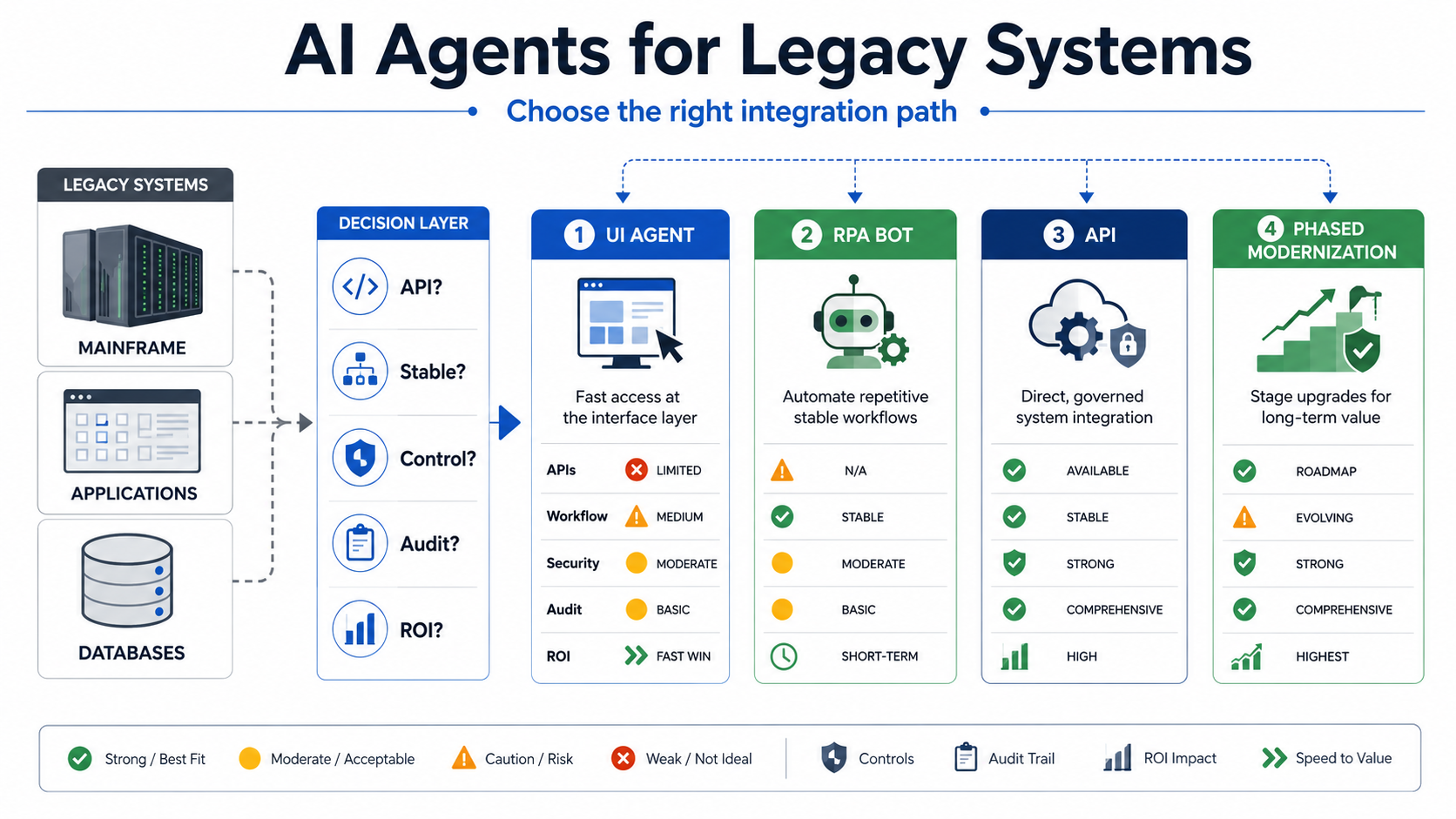
Quick Answer: AI Agents For Legacy Systems
AI agents for legacy systems should be introduced through a controlled workflow pilot, not broad system access. Choose UI automation when existing screens, approvals, and audit trails must remain intact. Choose RPA when the process is stable and repetitive. Choose APIs when the workflow needs reliable data contracts, scale, and transaction integrity. Choose modernization when the workflow is too fragile, manual, insecure, or expensive to support.
| Path | Best Fit | Main Risk | Proof Before Scaling |
|---|---|---|---|
| UI-level agent | Legacy apps with important screens, approvals, and human-style audit trails. | Slow execution, brittle selectors, unclear accountability if controls are weak. | The agent can complete the task with least privilege, visible review, and logged actions. |
| RPA plus AI | Stable repeatable workflows where AI adds classification, extraction, or exception support. | Bot maintenance grows when screens or business rules change frequently. | Exceptions, retries, and human handoffs are measured and manageable. |
| API integration | Repeatable data exchange, transactions, and workflows with clear system ownership. | Backend access can bypass legacy approval and audit flows if governance is weak. | Contracts, permissions, rate limits, rollback, and audit events are tested. |
| Modernization | High-value workflows blocked by technical debt, missing data models, or fragile systems. | Scope creep and business disruption if the migration is too broad. | The team can phase the change around one valuable workflow at a time. |
Why Legacy-System Agents Are Different
New SaaS tools often expose APIs, webhooks, permission models, and logs designed for automation. Legacy systems often do not. They may have old desktop screens, custom ERP modules, shared accounts, undocumented database fields, batch exports, fragile macros, manual approvals, and business rules living in the heads of experienced staff.
That does not mean AI agents are impossible. It means the architecture has to respect operational reality. An agent that writes directly to a backend database may look efficient but bypass approval screens, validation rules, and audit steps that protect the business. A screen-driving agent may look less elegant but can preserve the same workflow a trained employee uses today.
This is the reason the current discussion around "emulated human" AI matters. The useful idea is not pretending the agent is human. It is placing the agent where existing governance, identity, review, and logging already happen when a full backend integration would take longer or introduce more risk.
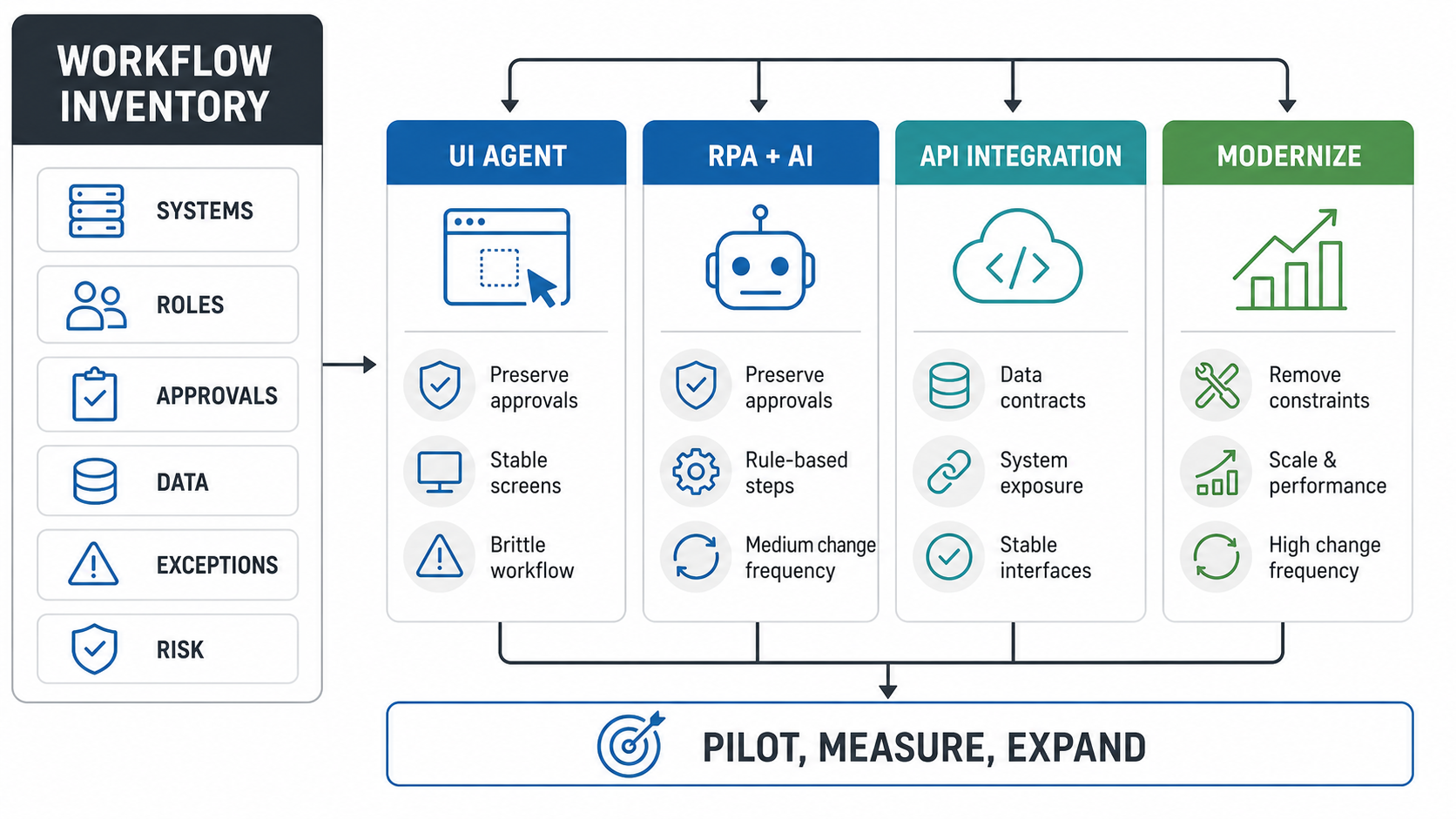
Start With A Workflow Inventory
The first deliverable should be a workflow inventory. List the systems touched, user roles, data read, data written, approvals, exceptions, failure modes, business impact, and available integration surfaces. This prevents teams from buying an agent platform before they know what the agent is allowed to do.
NextPage's enterprise AI agent governance guide is useful here because it starts with workflow ownership, permissions, human review, monitoring, and rollback. Those controls matter more in legacy environments because the system rarely exposes clean guardrails by default.
| Inventory Question | Why It Matters |
|---|---|
| Which system owns the record? | Agents should not create competing sources of truth. |
| Which user role performs the task today? | Agent permissions should map to human roles and least privilege. |
| What approval cannot be skipped? | Backend integrations can accidentally bypass legacy approval gates. |
| What happens when the task fails? | Retries, reversals, and escalation paths must be designed before production. |
| Which data is sensitive? | Personal, financial, operational, and contractual data need stronger controls. |
When UI-Level Agents Make Sense
UI-level agents are worth considering when a legacy system has no usable API, but its existing screens enforce important business rules. The agent logs in through a controlled account, reads the screen, fills forms, follows the same approval flow as a person, and leaves evidence in the same audit path.
This works best for narrow workflows: checking order status, creating draft records, reconciling simple cases, extracting information from old screens, or preparing work for a human reviewer. It is weaker for high-volume transactions, real-time workflows, or tasks where one screen change can break the automation.
The control model should be explicit. Use named service accounts where possible, session recording when appropriate, human approval before external effects, and clear limits on what the agent can click or submit. A UI-level agent is not a license to share passwords or automate around security.
When RPA Plus AI Is The Better Middle Path
RPA remains useful when the workflow is stable, rule-based, and screen-heavy. AI makes RPA more valuable when the hard part is classification, document understanding, summarization, email drafting, or exception triage. In that pattern, RPA moves through predictable screens while AI helps interpret unstructured inputs or decide which queue a case belongs in.
NextPage's robotic process automation services page reflects this split: use automation for repeatable business workflows and add AI only where it improves judgment-heavy steps. The mistake is trying to turn every old bot into an autonomous agent. Many workflows still need deterministic automation with limited AI assistance.
Use RPA plus AI when the process has clear rules, repeatable screens, manageable exception rates, and measurable time savings. Avoid it when the system changes constantly, the workflow needs deep business judgment, or a direct integration would be cheaper to maintain after the first pilot.
When APIs Are The Right Target State
APIs are usually the right target state for durable automation. They create explicit contracts for data, authentication, validation, logging, rate limits, and error handling. They also scale better than screen automation. If a workflow will run thousands of times a day or write important transaction data, APIs should be evaluated early.
The risk is governance. A backend API can skip the legacy screens where approvals, validations, and audit events currently happen. That is why API work should include permission design, approval replication, audit events, validation rules, rollback behavior, and human review gates. NextPage's API modernization for AI agents guide goes deeper on building governed APIs so agents can retrieve context and call approved tools safely.
For broader integration architecture, NextPage's enterprise software integration services page is the closer service fit. Legacy-agent work often becomes an integration project once the team discovers where the real data contracts and ownership boundaries live.
When Automation Should Trigger Modernization
Sometimes the best agent strategy is to stop automating around the old system. If a workflow depends on shared credentials, manual exports, unsupported software, unclear data ownership, fragile nightly jobs, or repeated rework, an agent may only make the technical debt move faster.
Modernization does not have to mean a risky big-bang replacement. It can mean wrapping one old module with a service layer, replacing a brittle export with an API, moving a workflow into a web portal, cleaning the data model, or rebuilding the highest-risk screen in a modern stack. Use NextPage's Legacy Software Modernization Scorecard when the team needs to compare automation payoff against modernization risk.
The decision should be economic as well as technical. If the bot maintenance cost, exception volume, compliance risk, or support burden will exceed the cost of a phased rebuild, modernization is the responsible option.
A Practical Pilot Roadmap
Phase 1: select one workflow. Pick a workflow with measurable volume, clear ownership, and limited blast radius. Good first candidates include intake triage, quote preparation, order-status lookup, invoice matching, claims pre-review, or CRM/ERP data cleanup.
Phase 2: map controls before tools. Document systems touched, credentials, data sensitivity, approvals, validation rules, audit needs, exception paths, and rollback steps. Decide what the agent may read, draft, submit, or escalate.
Phase 3: choose the integration path. Use UI automation for screen-governed work, RPA for stable repetitive tasks, APIs for durable transactions, and modernization when the workflow is too brittle to automate safely.
Phase 4: build with human review. Start with assistive or draft mode. Let the agent prepare the action, but require a person to approve external effects until accuracy, exception handling, and logs are proven.
Phase 5: measure and expand. Track cycle time, manual touches, error rate, exception volume, approval time, rework, user satisfaction, and risk events. Expand only after the pilot has stable controls.
For candidate selection, NextPage's Workflow Automation Opportunity Finder can help rank repeated workflows by savings potential and complexity before a build starts.
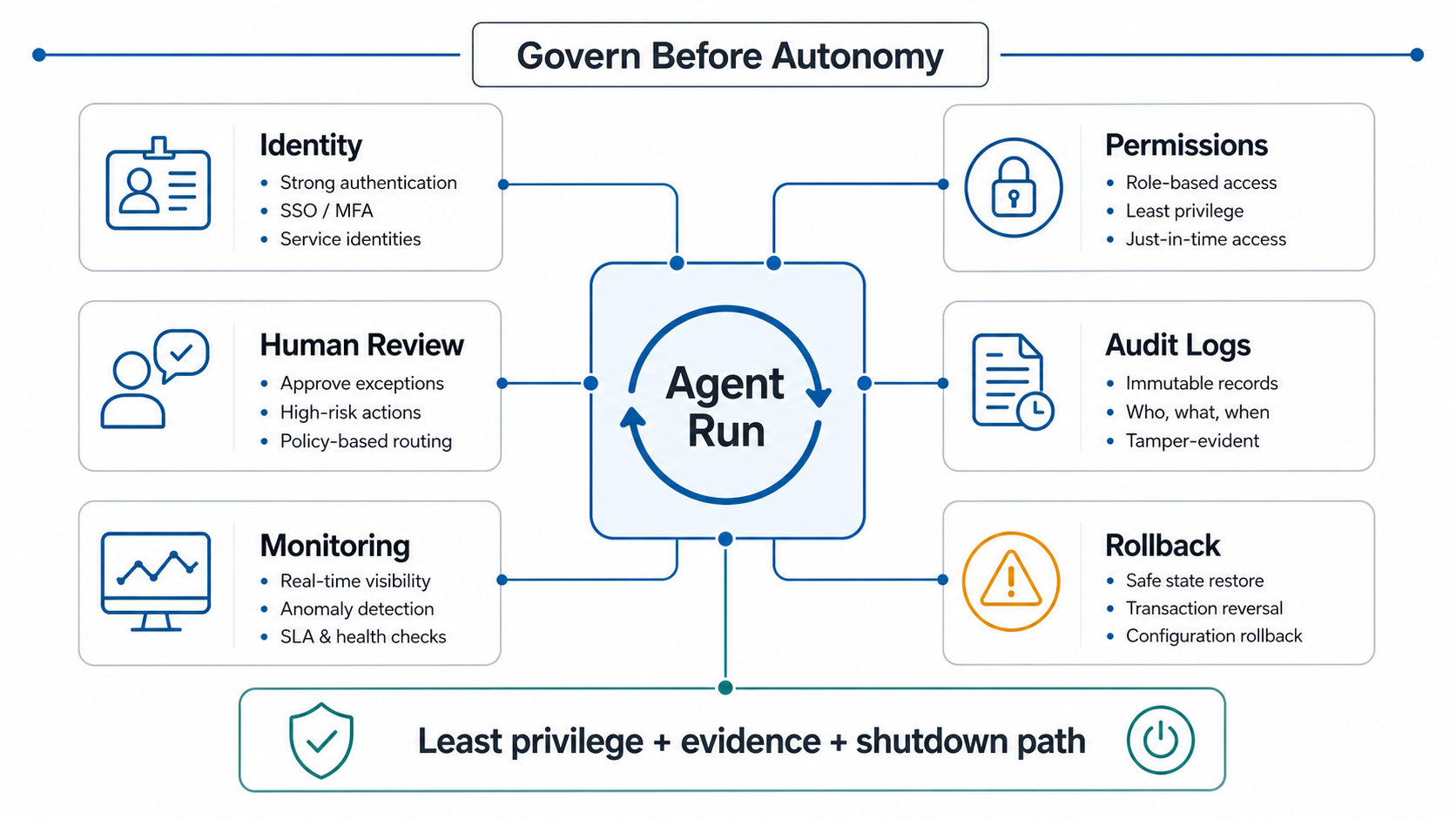
Security And Governance Controls
Legacy-system agents should be treated like digital workers with constrained roles, not like generic scripts. Give each agent a defined identity, scope, owner, access level, approval rules, logs, and shutdown path. Avoid shared human credentials. Avoid uncontrolled browser profiles. Avoid granting broad database access just because the old system is hard to integrate.
The minimum control set should include least privilege, secrets management, prompt and tool logging, input/output validation, approval thresholds, session evidence where useful, model and workflow monitoring, and a rollback plan for every write action. Human-in-the-loop review should stay in place for sensitive transactions until the team has enough production evidence to narrow the review set.
ROI And Readiness Criteria
The strongest pilots combine operational pain with manageable risk. A task that consumes hundreds of monthly hours but has clear rules, stable inputs, and human review is a better first candidate than a strategic workflow with unclear ownership and high compliance exposure.
Use NextPage's AI Automation ROI Calculator to estimate annual savings and payback, but include maintenance and exception handling in the model. Screen automation may save time quickly but require ongoing care. API integration may cost more upfront but lower long-term support. Modernization may have the longest timeline but remove the root cause.
How NextPage Can Help
NextPage helps teams turn legacy-agent ideas into controlled pilots through AI agent development, workflow discovery, and integration delivery. That can include workflow discovery, AI agent readiness assessment, integration architecture, RPA and AI automation design, API modernization, governance controls, dashboards, and phased software modernization.
The practical first step is not a platform decision. It is a workflow and risk review that identifies where an agent can help without weakening the controls that keep the business running. From there, the team can build one narrow workflow, prove value, and decide whether to expand through UI automation, RPA, APIs, or modernization.