
AI chatbot optimization and training is the operating process that turns a launched bot into a reliable support channel. It means measuring real conversations, finding failed intents, fixing weak knowledge, retraining or tuning behavior, testing the changes, and monitoring the next release. A chatbot is not optimized because it answers a demo question well. It is optimized when it improves resolution, accuracy, escalation quality, customer satisfaction, and support cost without creating new safety or trust problems.
Most underperforming chatbots have the same root issue: the team treats launch as the finish line. After real customers arrive, the bot sees vague questions, missing order context, outdated policies, regional exceptions, angry users, and edge cases that were not in the original script. NextPage's AI chatbot development work plans for that reality by designing analytics, review queues, knowledge updates, test cases, and escalation rules from the start.
Quick Answer: What Should You Optimize First?
Start with the conversations that create the most business pain. That usually means high-volume failed intents, answers that trigger repeat contacts, escalations that arrive without useful context, hallucinated or unsupported answers, and flows where customers abandon before resolution. Do not begin by rewriting every prompt or retraining a model. First identify which failures are frequent, expensive, risky, or damaging to customer trust.
A useful optimization loop has seven steps: measure the outcome, review real transcripts, classify the failure, fix the knowledge or workflow, retrain or tune only when needed, regression-test the change, and monitor the next release. The loop should run weekly for active support bots and after every major policy, product, pricing, fulfillment, or workflow change.
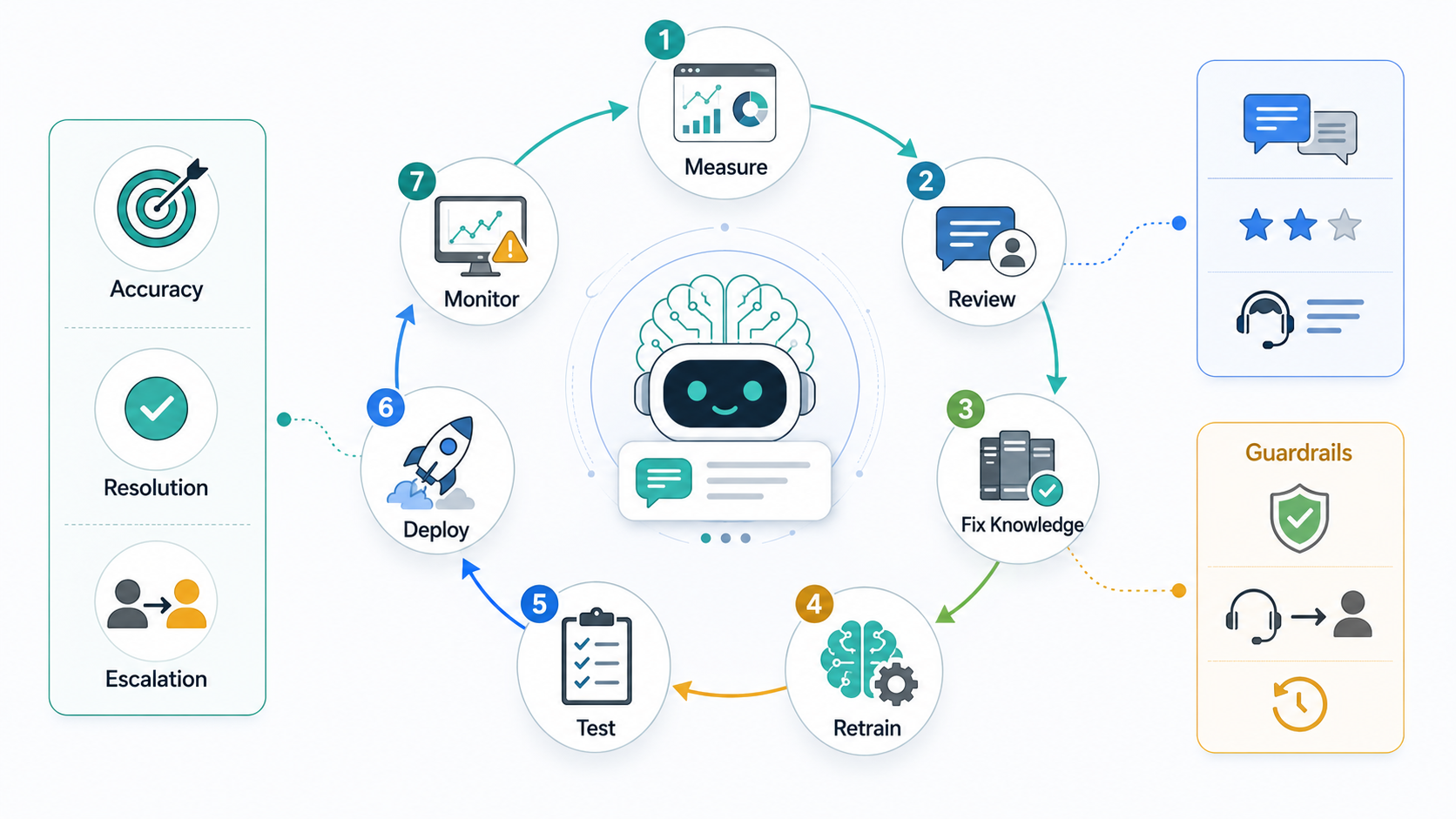
The Metrics That Actually Matter
Chatbot teams often track too many shallow metrics and too few operational ones. Message volume and sessions are useful for capacity planning, but they do not prove the bot is helping. The better question is whether the bot produces a correct, trusted, and complete support outcome with less effort for the customer and the team.
For a production support bot, the most useful scorecard balances automation with experience. Resolution rate should improve, but not by trapping customers. Escalations should be timely and well packaged, not merely lower. CSAT, repeat contact, answer defects, latency, and agent rework show whether automation is reducing friction or moving it somewhere less visible.
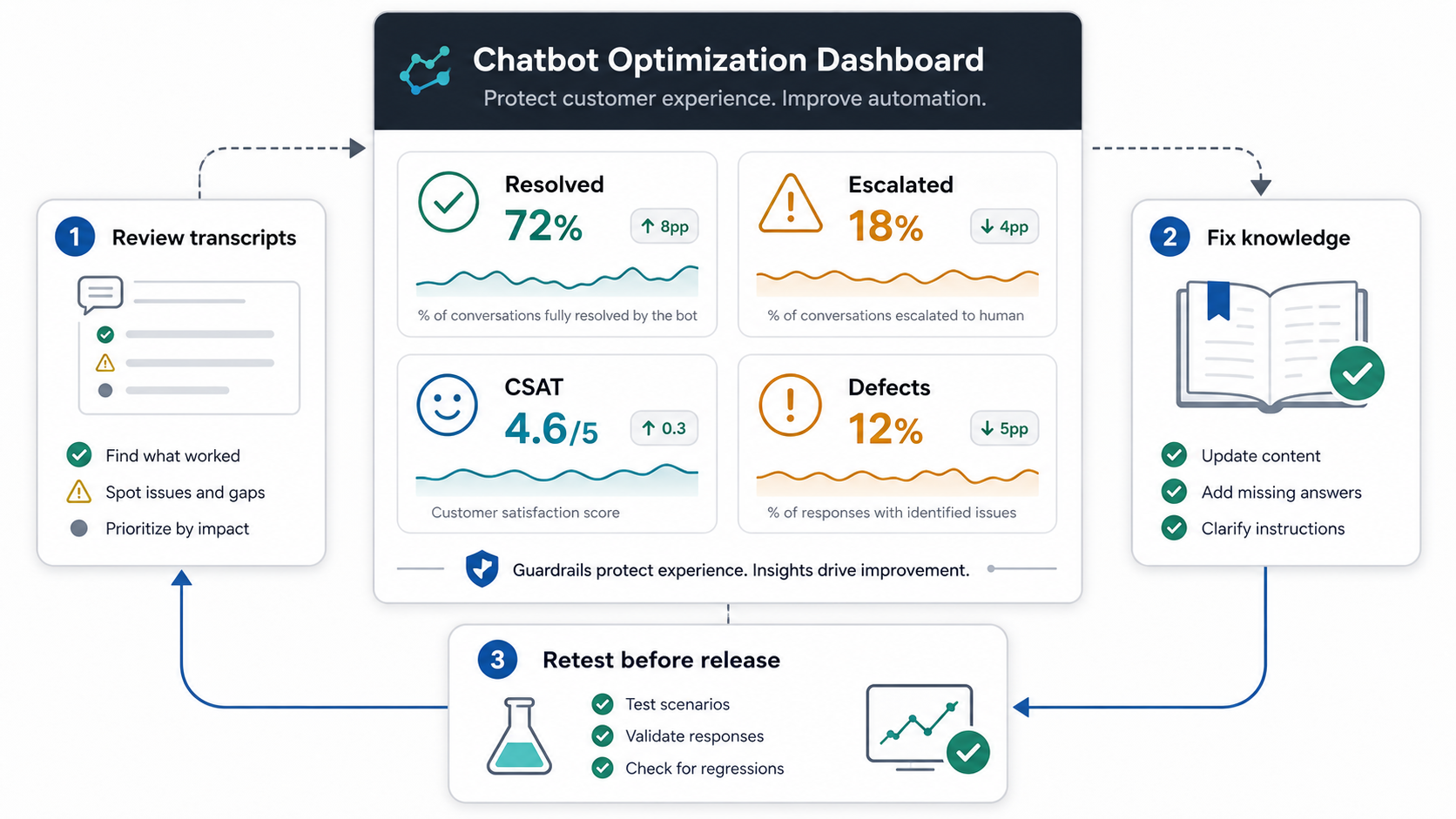
| Metric | What It Tells You | Optimization Signal |
|---|---|---|
| Resolution rate | Share of conversations solved end-to-end without repeat contact or unnecessary handoff. | Low resolution means the bot may be answering but not completing the job. |
| Deflection quality | Whether automation reduces tickets while preserving customer satisfaction and customer effort. | High deflection with falling CSAT is a warning sign, not a win. |
| Escalation rate | How often the bot transfers to a person, by intent, customer segment, and risk level. | Some escalations are healthy when billing, security, legal, medical, or high-emotion issues appear. |
| First response accuracy | Whether the first answer matches policy, account context, source evidence, and the user's actual need. | Frequent correction means retrieval, intent detection, or prompt constraints are weak. |
| Fallback and abandonment | How often the bot admits it cannot help, loops, or loses the customer before a useful outcome. | Fallbacks expose missing content, unsupported intents, unclear conversation design, or poor handoff timing. |
| Human rework | How much time agents spend repairing bot output, gathering missing context, or apologizing for bad answers. | Rising rework means automation is shifting effort, not removing it. |
| Latency, cost, and error rate | How fast, reliable, and economical the system is under real support volume. | Slow or flaky responses reduce trust even when the answer is correct. |
Use the AI Automation ROI Calculator only after these quality metrics are visible. ROI estimates are useful, but they are misleading if the bot creates hidden escalations, refunds, support rework, or customer churn.
Conversation Review Is The Training Data Engine
Real conversations are the best training source, but they need structure. Review a sample of successful sessions, failed sessions, escalations, low-rated answers, and high-value customer journeys. Tag each transcript by intent, outcome, failure type, risk level, missing knowledge, and next action. This turns vague complaints into a backlog your product, support, content, and engineering teams can work through.
Common failure types include missing knowledge, outdated policy, weak retrieval, ambiguous user phrasing, wrong account context, unsupported integration, tone mismatch, hallucination, poor handoff, and unsafe automation. Each class needs a different fix. A missing refund policy belongs in the knowledge base. Wrong account-specific answers may need authentication and permission checks. Hallucinations need grounding, refusal behavior, citations, and stronger evaluation tests. Bad handoffs need workflow design, not more model creativity.
The AI customer service agent integration guide is a useful companion here because many chatbot failures are integration failures. If the bot cannot see order status, subscription plan, ticket history, product entitlements, or CRM context, it will either guess, ask redundant questions, or escalate too late.
Fix The Knowledge Base Before You Retrain The Model
Many teams jump to retraining when the real problem is stale or unstructured knowledge. A support bot can only answer from approved information if that information is current, searchable, permission-aware, and written for retrieval. Long policy pages, duplicate articles, inconsistent product names, buried exceptions, and conflicting help-center copy all reduce answer quality.
Start by auditing the sources that feed the chatbot. Remove duplicate answers, consolidate policy variants, add clear effective dates, separate public help content from internal-only guidance, and mark regional or customer-segment exceptions. For RAG-based bots, test whether the right passage is retrieved before judging the final generated answer. If retrieval is wrong, prompt edits only hide the problem.
NextPage's LLM development projects usually treat knowledge design, retrieval evaluation, and answer validation as core engineering work. The model is one component. The source content, metadata, chunking, filters, ranking, and test set decide whether the bot can stay accurate as the business changes.
When Should You Retrain Or Fine-Tune?
Retraining is useful when the bot repeatedly fails a stable, measurable behavior after the workflow and knowledge base are already clean. Good candidates include intent classification, field extraction, routing, response formatting, tone consistency, and narrow domain language. Poor candidates include fast-changing policies, account-specific data, product inventory, or anything that should come from a live system or approved document.
Use a small evaluation set before and after every change. Include common questions, hard edge cases, adversarial wording, unsupported requests, outdated-policy traps, and escalation scenarios. Google Cloud's Gen AI evaluation guidance separates final-response quality from trajectory quality, which matters when a chatbot calls tools, retrieves knowledge, or routes cases. Microsoft Foundry's observability guidance similarly points teams toward quality, safety, groundedness, relevance, latency, error rate, and production monitoring. The practical takeaway is simple: optimize against a test set and live telemetry, not gut feel.
If the bot is allowed to act inside business systems, treat retraining as only one release step. You still need permissions, audit logs, rollback, approval boundaries, and rate limits. For higher-autonomy workflows, run the AI Agent Readiness Assessment before expanding what the bot can do.
Troubleshooting Workflow For An Underperforming Chatbot
- Group failures by intent: pricing, refunds, delivery, onboarding, cancellation, troubleshooting, account access, or lead qualification.
- Separate answer failures from workflow failures: a correct answer can still fail if the bot cannot update an order, create a ticket, or hand off cleanly.
- Check retrieval first: confirm whether the right source was found, whether it was current, and whether access filters were respected.
- Review prompt and policy constraints: make sure the bot knows when to answer, ask a clarifying question, cite sources, refuse, or escalate.
- Update test cases: every production failure worth fixing should become a regression test.
- Deploy in small batches: measure whether the fix improves the target intent without degrading adjacent flows.
This is also where service design matters. A customer support bot that transfers to a human should send the transcript, intent, customer context, failed answer, and recommended next step. The AI customer service agent development service page covers this operating model: support automation should reduce queue pressure without hiding accountability from human agents.
Guardrails And Escalation Rules
Optimization should make the bot more useful, not more reckless. Define hard escalation rules for billing disputes, legal or medical topics, security issues, angry customers, repeated failed attempts, high-value accounts, irreversible account actions, and low-confidence retrieval. Also define soft handoff triggers: uncertain intent, missing context, conflicting sources, or sentiment that suggests the customer is losing patience.
Guardrails should be observable. Track when the bot refuses, cites a source, asks a clarifying question, escalates, or invokes a tool. Review whether those actions were correct. A bot that never escalates may be overconfident. A bot that escalates too often may be undertrained, under-integrated, or blocked by poor knowledge.
This is where chatbot optimization overlaps with AI agent observability and enterprise AI agent governance. If the system can touch customer records, trigger refunds, update tickets, or make recommendations humans trust, every action should have enough trace evidence to debug, approve, reverse, and improve it.
For production AI workflows beyond support, generative AI development should include evaluations, monitoring, and human review paths from the beginning. Adding guardrails after a public incident is much more expensive than designing them into the release process.
A Practical Optimization Cadence
Run a weekly review for active bots. Look at the top failed intents, the lowest-rated answers, high-volume fallback phrases, human rework notes, slowest flows, and escalation quality. Run a monthly review for knowledge freshness, integration errors, CSAT impact, cost per resolved conversation, and new automation candidates. Run a release review whenever product policies, pricing, fulfillment, compliance requirements, or backend systems change.
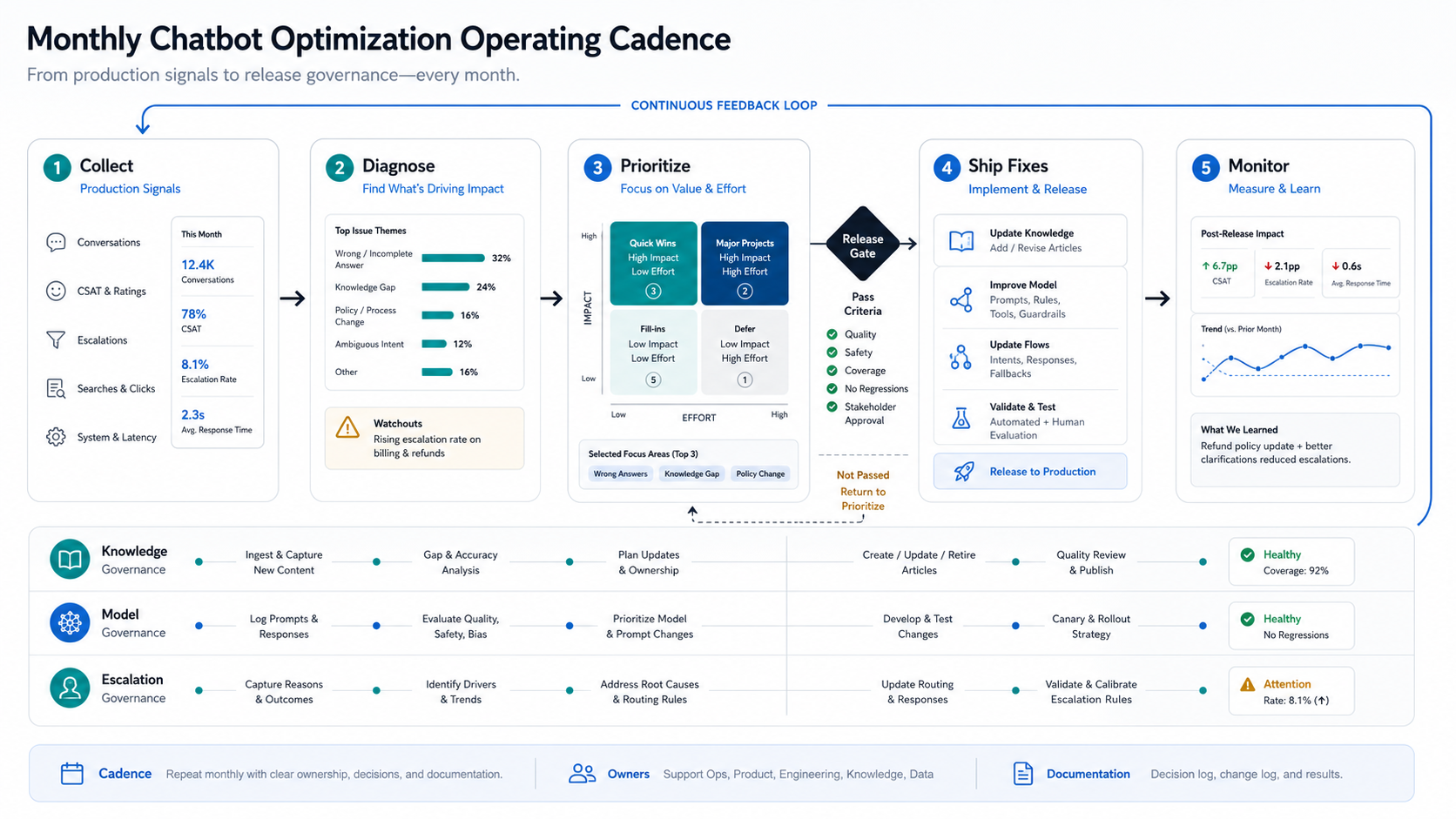
Do not make every change at once. Ship the smallest fix that can improve a measurable outcome: update a refund article, add a missing intent, improve retrieval metadata, add an escalation trigger, change a tool permission, or add a regression case. Then measure the next week of conversations.
Assign ownership for each lane. Support operations should own transcript review and escalation quality. Product or knowledge teams should own policy and help-center changes. Engineering should own retrieval, integrations, observability, and release safety. Leadership should review whether the business case is improving without creating customer-experience debt.
How To Report Chatbot Optimization ROI
Report ROI as an operations scorecard, not a single deflection percentage. Include resolved conversations, avoided handle time, escalation quality, agent rework, CSAT, repeat contact rate, cost per resolved conversation, high-risk incidents, and new knowledge gaps closed. Tie the scorecard to real support volume and realistic time savings.
The AI customer support automation ROI guide can help teams separate useful deflection from harmful deflection. A chatbot that blocks customers from reaching support may reduce tickets while increasing churn. A good bot reduces unnecessary work while making the handoff better when human help is needed.
For executive reporting, show the before-and-after by intent. For example: refund questions resolved faster after a policy rewrite, subscription questions escalated with better context after CRM integration, or billing disputes routed earlier after a new guardrail. This keeps the conversation grounded in customer outcomes instead of vanity automation rates.
How NextPage Can Help
NextPage helps teams audit, redesign, and improve AI chatbots after launch. We map failure patterns, clean up knowledge sources, improve retrieval, add evaluation sets, tune conversation flows, integrate CRM or helpdesk systems, define escalation rules, and build dashboards that show whether automation is actually helping.
If your chatbot is live but accuracy, deflection, escalation, or conversion is not where it should be, start with a chatbot performance audit. We will identify whether the fix is knowledge design, RAG evaluation, model tuning, integration work, conversation UX, analytics, or governance.