
Quick Answer: Which AI Features Make Sense For Mobile Apps?
The best AI features for mobile apps are the ones that improve a specific user workflow, can use permissioned data safely, and can be measured after launch. For most product teams, the practical shortlist includes personalization, recommendations, semantic search, chat or support copilots, voice interfaces, OCR and document capture, image understanding, fraud or risk scoring, predictive reminders, summarization, translation, and workflow automation.
The mistake is starting with a model instead of a product decision. A useful mobile AI roadmap starts with six questions: what user action should become easier, what data the app can access with consent, whether the feature must work offline or privately on-device, whether an API or SDK is enough, how errors will be reviewed, and which metric proves the feature is worth keeping.
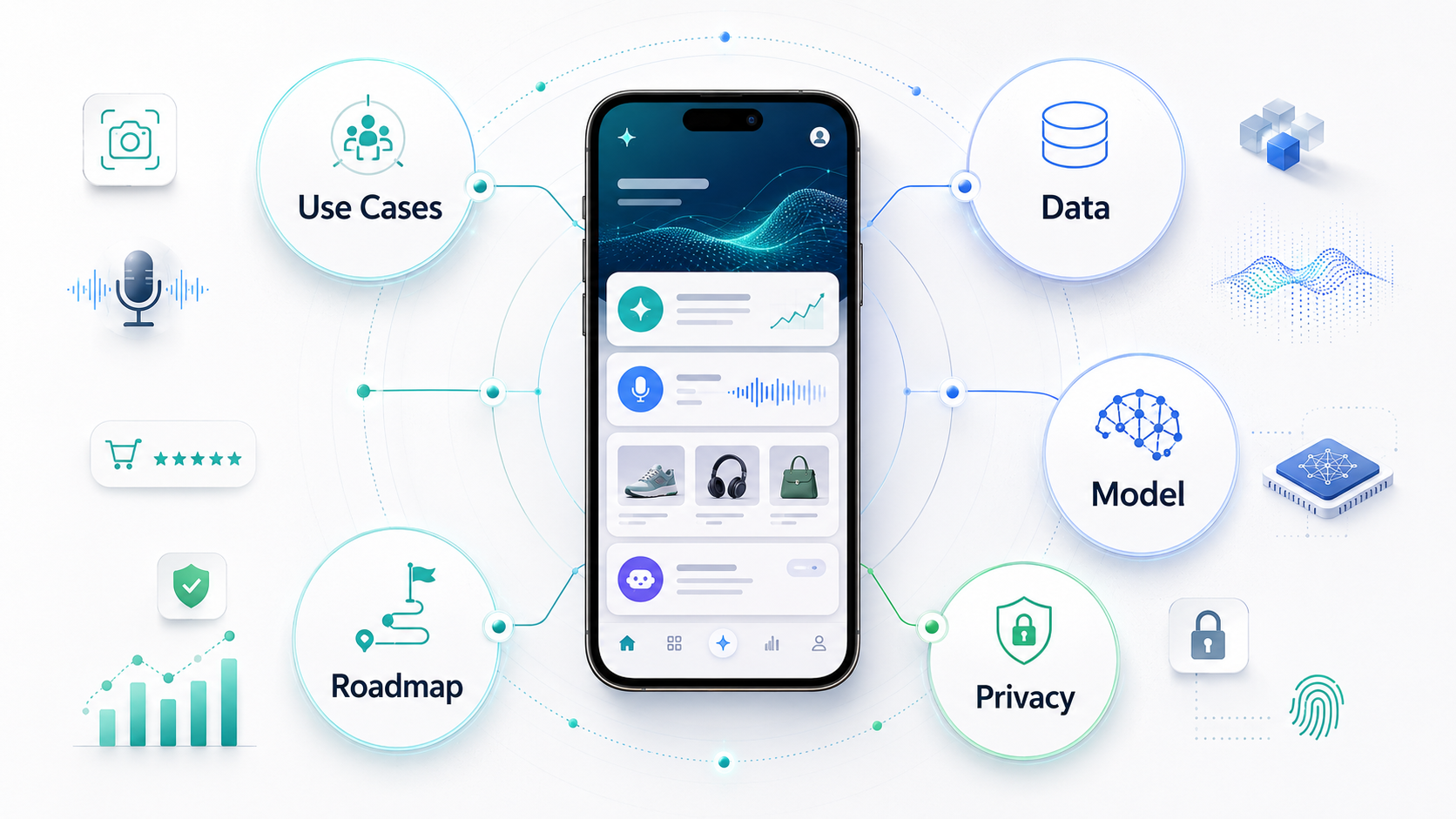
This guide is for product leaders, founders, CTOs, and operators deciding how to add AI to a customer or employee mobile app without turning the roadmap into disconnected demos. If you need a quick readiness baseline, start with the AI Agent Readiness Assessment, then use the sections below to decide which AI features belong in your MVP.
AI Feature Scorecard For Mobile Apps
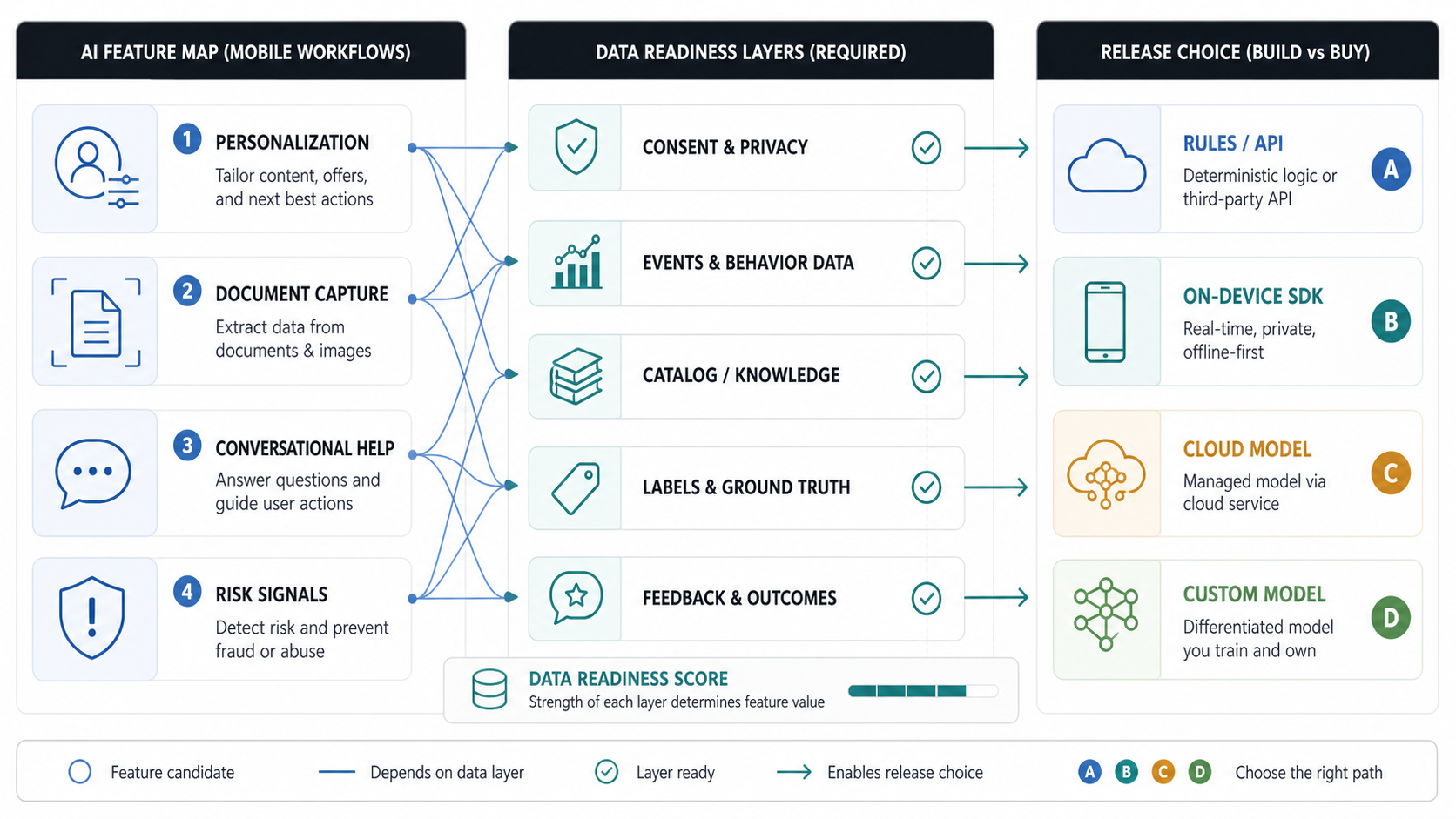
AI can improve a mobile app in many ways, but every idea should be scored against the product workflow. The same capability can be valuable in one app and wasteful in another. A retail app may need recommendations and visual search. A field service app may need photo-based issue classification and voice notes. A finance app may need document extraction, risk flags, and strict review states. A healthcare or wellness app may need coaching and summaries, but only inside clear safety boundaries.
| Feature | Useful When | Data Needed | Typical First Release |
|---|---|---|---|
| Personalization | The app has repeat users and clear preference signals. | Profile fields, events, purchases, content history, consent state. | Ranked feed, next-best action, personalized offer, or onboarding path. |
| Recommendations | Users choose from products, services, media, jobs, trips, meals, or tasks. | Catalog, behavior events, inventory, availability, ratings, constraints. | Rules plus lightweight ML before custom ranking models. |
| Chatbot Or Copilot | Users need help navigating information, forms, support, or workflows. | Knowledge base, user context, policy rules, escalation paths. | RAG or API-backed assistant with human handoff and logs. |
| Voice And Speech | Hands-free input, call workflows, accessibility, or support speed matters. | Audio, transcripts, intents, language support, privacy rules. | Voice notes, command capture, call summary, or support routing. |
| OCR And Document AI | Users upload invoices, IDs, prescriptions, receipts, tickets, forms, or contracts. | Images/PDFs, target fields, validation rules, exception workflow. | Capture, extract, pre-fill, verify, and route to review. |
| Computer Vision | The app handles photos, inspection, products, damage, quality, health, or inventory. | Labeled images, device constraints, confidence thresholds, review loop. | Detection, classification, image description, or quality check. |
| Fraud And Risk Signals | The app handles payments, wallets, bookings, claims, returns, lending, or identity. | Events, device signals, transaction history, rules, analyst feedback. | Risk score, anomaly flag, manual review queue, and audit trail. |
For a new product, pick one or two AI workflows that clearly improve activation, conversion, retention, support cost, or operational speed. If the app still needs core product work, treat AI as part of a broader mobile app development roadmap instead of a separate experiment.
Data Requirements Come Before Model Choice
Data readiness is the biggest reason mobile AI features fail. A model can summarize, classify, recommend, or answer questions only if the app has useful context, clean events, permissioned data, and a workflow that can tolerate uncertainty. This is why NextPage starts AI planning with AI development services discovery around use-case value, data readiness, integration access, and release sequencing before recommending a model stack.
Before building, inventory the data behind each feature:
- User profile fields, consent state, preferences, and segmentation rules.
- Behavior events such as searches, taps, purchases, bookings, cancellations, messages, or support tickets.
- Business data such as product catalog, prices, availability, policies, locations, documents, and staff notes.
- Media data such as images, audio, video, forms, receipts, and attachments.
- Operational feedback such as user corrections, agent review, fraud outcomes, quality labels, and support escalation results.
Then decide what is safe to use. A fitness, finance, healthcare, education, or employee app may need stricter consent, retention, masking, audit logs, and human review than a content recommendation app. Data that cannot be governed should not become model context. The companion AI implementation roadmap expands this into a delivery sequence for use-case discovery, data checks, model selection, pilot design, and production rollout.
On-Device AI, Cloud AI, Or Hybrid?
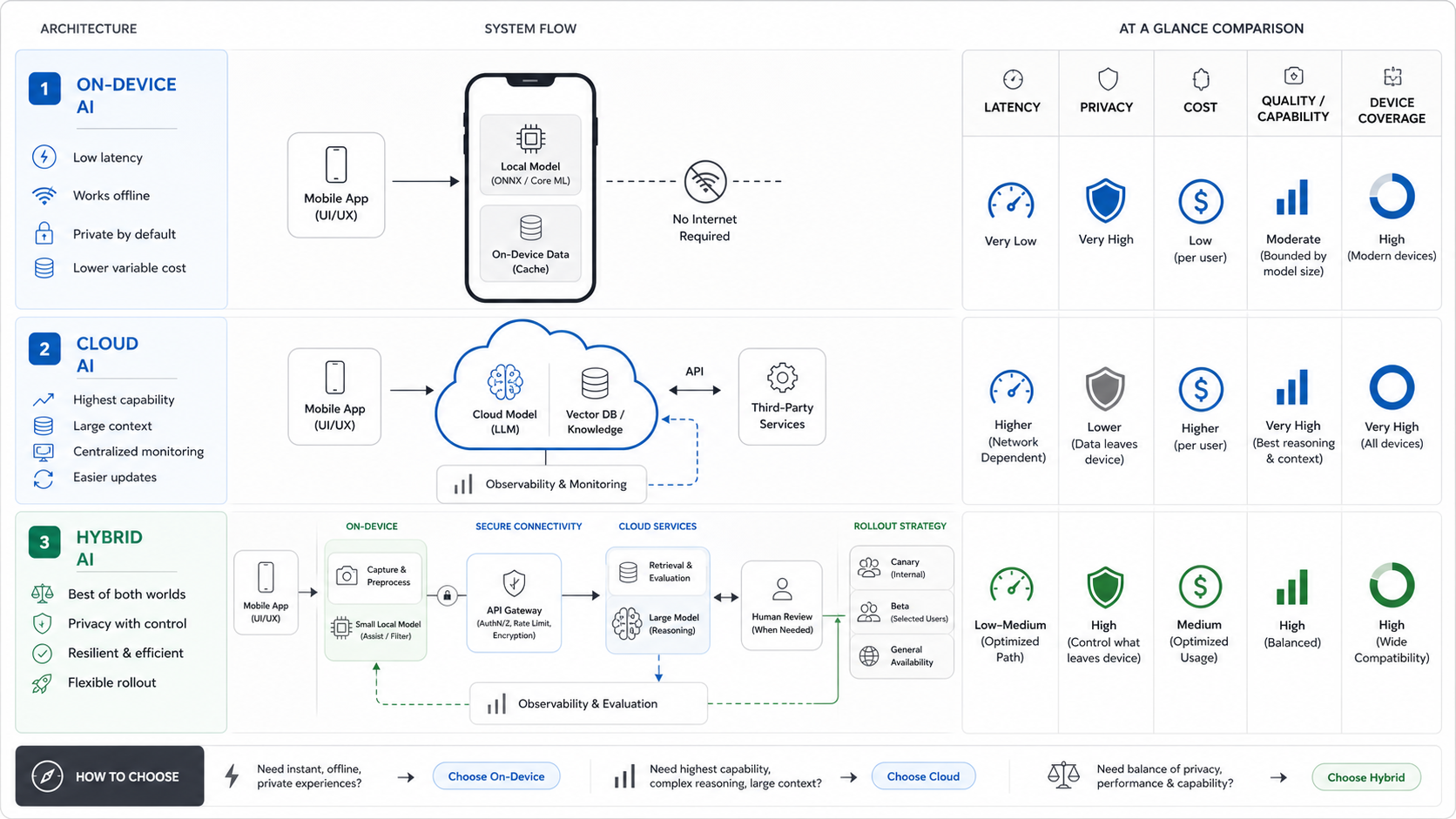
Mobile AI architecture now has more choices than a simple backend API call. Android's AI guidance points teams toward on-device options such as Gemini Nano, ML Kit GenAI APIs, ML Kit vision and language APIs, MediaPipe, LiteRT, Google AI Edge, and cloud Gemini or Firebase AI options. ML Kit's mobile SDKs are useful for ready-to-use vision and natural-language tasks, especially when real-time or offline behavior matters. Google AI Edge and LiteRT make on-device deployment more practical when latency, local data handling, and cross-platform model execution matter. Apple Foundation Models also gives eligible Apple Intelligence devices a path for private, offline, on-device app intelligence.
| Architecture | Best For | Tradeoffs |
|---|---|---|
| On-device AI | Privacy-sensitive tasks, offline use, low-latency capture, quick vision/text/audio processing, accessibility, simple summaries. | Limited model size, device compatibility constraints, harder quality control across devices, update and delivery planning. |
| Cloud AI API | Complex reasoning, large context, fresh knowledge, multimodal workflows, agentic tool use, heavy generation. | Network dependency, token cost, latency, privacy review, vendor dependency, stronger monitoring requirements. |
| Hybrid | Most production mobile AI products: local capture or pre-processing plus cloud reasoning, retrieval, evaluation, and workflow integration. | More architecture work, clearer fallback design, more testing paths, but often the best balance. |
A field app might run OCR or image checks locally, then send only structured fields to a server for validation. A shopping app might use local signals for ranking shortcuts and a cloud model for richer discovery. A support app might summarize device logs locally but use a cloud assistant for policy-aware answers. The right answer depends on privacy, latency, offline needs, model quality, cost, and device coverage.
Build Vs Buy: How To Choose The Right AI Path
Buy or integrate when the task is standard, the vendor has strong mobile SDKs, and the feature is not your differentiation. Examples include barcode scanning, basic OCR, translation, speech-to-text, standard moderation, and commodity support chat connected to a known knowledge base.
Build custom when the workflow, data, evaluation method, or user experience is proprietary. Examples include a marketplace ranking model using your supply constraints, a health workflow requiring custom safety review, a fleet risk model trained on your operations, or an employee copilot that must call internal systems with precise permissions.
Use a hybrid approach when a vendor model can do the language or vision work but your product needs custom retrieval, workflow logic, approvals, logging, cost controls, and human review. This is the most common production pattern for generative AI development: the model is only one part of the system.
| Question | Buy / API | Custom Build |
|---|---|---|
| Is the task common? | Yes: scanning, transcription, translation, simple image labels. | No: proprietary ranking, domain-specific decisions, operational judgment. |
| Is the data unique? | No, or data can be passed safely with limited context. | Yes, and quality depends on internal workflows or historical outcomes. |
| Is failure low-risk? | Yes, errors are easy to correct and not harmful. | No, errors affect money, safety, compliance, or trust. |
| Is UX differentiation important? | Low: a standard widget is acceptable. | High: the AI workflow is part of the product moat. |
If the feature is recommendation-heavy, compare the roadmap against the recommendation engine build-vs-buy guide. Recommendation systems usually look simple in the UI, but the real work sits in event tracking, catalog cleanup, experimentation, governance, and ongoing quality ownership.
A Practical Mobile AI MVP Roadmap
A strong AI MVP is small enough to evaluate and useful enough to change behavior. Avoid shipping five AI features at once. Pick one workflow, define the success metric, and collect evidence before expanding.
- Choose the workflow. Tie the feature to a measurable user or business outcome: faster onboarding, higher conversion, fewer support tickets, cleaner field reports, better discovery, or lower manual review time.
- Map data and permissions. Identify source data, consent, retention, masking, and integrations. Remove any data the model does not need.
- Prototype model behavior. Test vendor APIs, on-device options, or retrieval workflows against real examples and edge cases.
- Design the review loop. Decide what happens when confidence is low, the user disagrees, the model refuses, or the output affects a sensitive action.
- Instrument quality and cost. Track acceptance rate, correction rate, latency, token/model cost, support escalations, and crash/performance impact.
- Ship gradually. Use staged rollout, feature flags, A/B tests, and a rollback path.
For complex products, NextPage often separates discovery into a data-readiness sprint, AI prototype, mobile UX design, backend integration, QA/evaluation, and staged production rollout. Teams that need to size the business case can use the AI Automation ROI Calculator before funding a broader build.
Examples By App Type
The same AI feature should look different by industry. A generic chatbot is rarely enough.
| App Type | Useful AI Features | Watchouts |
|---|---|---|
| eCommerce And Retail | Recommendations, visual search, product Q&A, review summaries, fraud signals, personalized offers. | Inventory accuracy, hallucinated product claims, consent, returns abuse, promotion rules. |
| Healthcare And Wellness | Intake summaries, reminders, symptom triage support, coaching, document capture, risk flags. | Medical safety, regulated data, clinical review, disclaimers, escalation rules. |
| FinTech | Document extraction, transaction categorization, fraud detection, support copilots, risk alerts. | Explainability, audit trails, model bias, payment risk, compliance review. |
| Travel, Logistics, And Field Work | Route suggestions, voice notes, image inspection, predictive ETAs, incident summaries. | Offline behavior, device variance, worker trust, geolocation privacy, operational exceptions. |
| Education And Productivity | Summaries, quizzes, writing help, study recommendations, task copilots. | Age-appropriate data handling, originality concerns, content accuracy, accessibility. |
When the use case is industry-specific, do not copy a generic AI feature list. Start with the workflow, then choose the smallest AI behavior that improves it.
Chat, Voice, And Agentic Workflows Need Extra Guardrails
Mobile chat and voice features often look like simple UI additions, but production assistants need source knowledge, permissions, escalation paths, analytics, prompt and response logs, redaction, and a support model. A mobile chatbot that answers public FAQs is very different from a copilot that can read account data, draft actions, or trigger workflows.
If conversational AI is part of the roadmap, treat AI chatbot development as a product system: conversation UX, retrieval, integrations, handoff design, quality evaluation, and operating controls. For voice-driven flows, decide whether the user is capturing notes, issuing commands, dictating forms, routing support, or interacting with a more agentic workflow. The more the assistant can change data or influence decisions, the stronger the permission model, review queue, and audit trail need to be.
Evaluation And Launch Controls To Plan Before Release
AI features create new product risks. They can expose private data, make unsupported claims, increase cloud costs, slow the app, confuse users, or create support work if the output is unreliable. Treat AI launch readiness as a product, engineering, QA, legal, and support checklist.
- Privacy: minimize context, mask sensitive fields, respect consent, and log only what is necessary.
- Security: protect prompts, API keys, retrieval sources, model outputs, and tool-call permissions.
- Quality: define test sets, acceptance criteria, refusal behavior, correction flows, and human review rules.
- Performance: measure latency, app start impact, battery use, payload size, and offline behavior.
- Cost: model per-user usage, token/API cost, cache strategy, and abuse controls before a broad rollout.
- UX: disclose AI assistance clearly, show confidence or review states when needed, and make correction easy.
For mobile releases, connect this with normal device and CI coverage. The mobile test automation strategy is useful when deciding what deserves automated coverage across login, permissions, payments, notifications, offline behavior, and backend state. AI-specific tests should add golden examples, hard negatives, refusal cases, low-confidence paths, safety prompts, and cost limits.
Governance And Data Lifecycle Questions
AI readiness depends on data readiness. A team that cannot explain data sources, permissions, retention, labeling, prompt logs, embeddings, and downstream actions will struggle to defend product behavior. This is especially important when the AI feature affects people, produces recommendations, or uses personal or sensitive data.
Map the data lifecycle from input to output: what the user provides, what context the system retrieves, what the model sees, what the system stores, what logs support troubleshooting, and what humans can review. Then define data quality checks, redaction rules, access control, retention periods, deletion workflows, and customer-facing explanations. The enterprise AI readiness checklist covers this operating discipline across data, workflows, security, and governance.
The more sensitive the workflow, the more the system should prefer suggestions, pre-filled drafts, and review queues over autonomous action.
How NextPage Helps Plan AI Mobile Features
NextPage helps teams turn AI app ideas into buildable product scope. A practical engagement can start with workflow discovery, data-readiness review, model/API evaluation, privacy and security planning, mobile UX design, backend integration, and QA/evaluation setup. The goal is to decide what should be bought, what should be custom-built, and what should wait.
If you are comparing AI features for a mobile roadmap, start with the AI Agent Readiness Assessment. If the workflow is already clear, NextPage can help design and build the mobile experience, AI integration, backend services, evaluation harness, and staged launch plan.