
Quick Answer: Start API-First, Self-Host Only When The Workflow Proves It
For most AI image generation app development projects, the safest first release is an API-first workflow app that proves one repeatable business use case before the team funds self-hosted GPUs or custom model operations. The product should be designed around prompt templates, policy checks, async queues, model routing, output review, asset history, permissions, usage limits, and analytics. The model is important, but the workflow around the model is what makes the app valuable.
Self-hosting becomes worth serious planning when the product has private inputs, high steady volume, strict latency requirements, customer-specific deployment needs, custom model requirements, or margin pressure that managed APIs cannot support. Until those constraints are visible in usage data, a managed image generation API or model platform usually reduces launch risk because the team can focus on the user workflow instead of GPU scheduling, model serving, cold starts, security patching, and incident response.
This guide is for SaaS founders, ecommerce teams, agencies, media teams, creative tooling companies, and internal product teams planning an image generation product or AI visual workflow. If your roadmap is already diffusion-heavy, NextPage's Stable Diffusion development services page covers deeper implementation paths.
What You Are Really Building
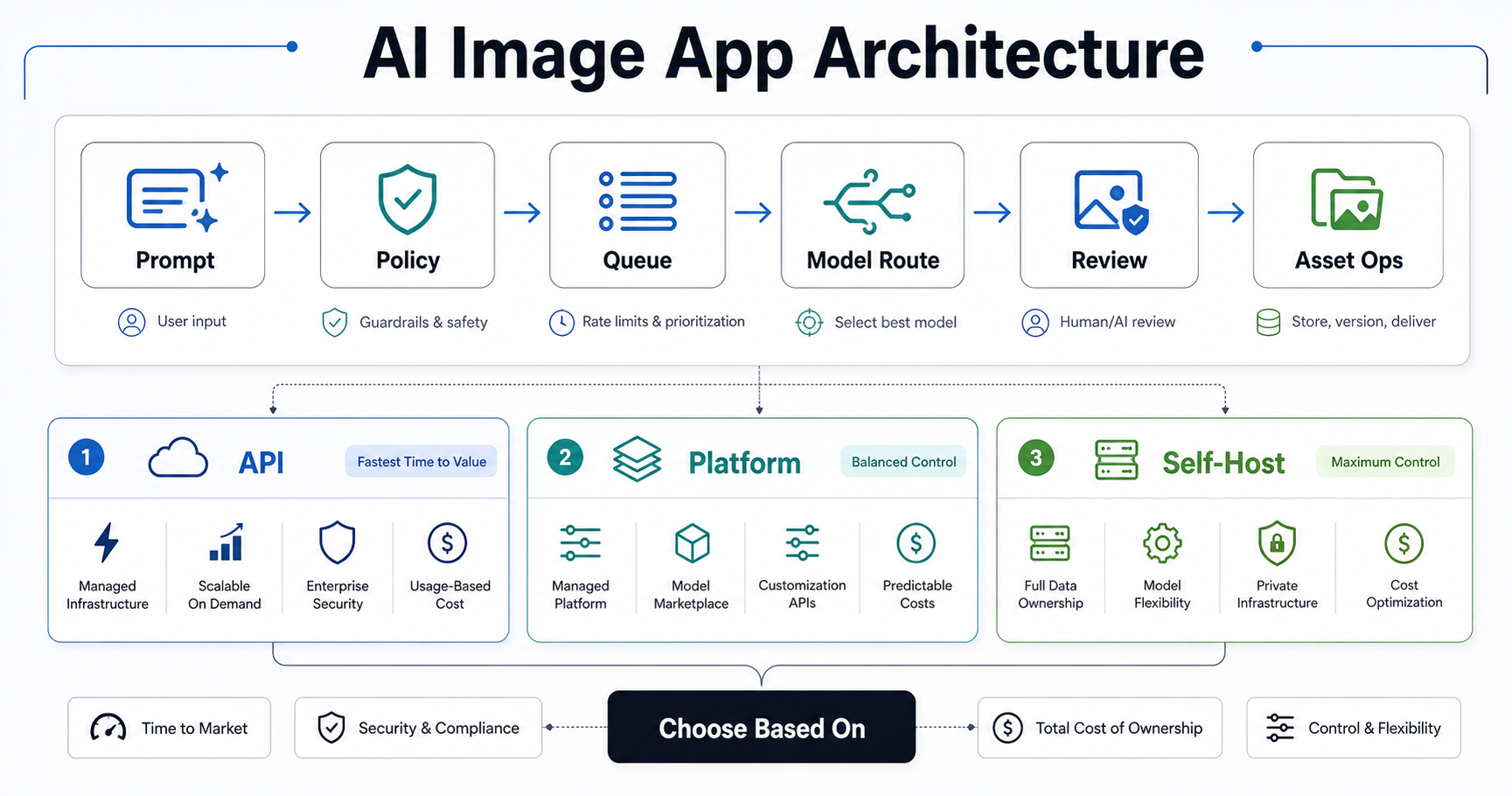
An AI image generation app is not just a text box connected to a model. The useful product is the controlled workflow around image creation. A user submits a prompt, reference image, product SKU, campaign brief, brand preset, or creative task. The app validates the input, applies policy, checks credits or permissions, places the job in a queue, routes it to the right model path, stores the output, tracks cost, and lets a person approve or reject the asset before it enters a real business system.
That surrounding workflow is where adoption happens. Ecommerce teams need product-background variants tied to catalog data. Marketing teams need campaign folders, brand presets, and approval states. Agencies need workspaces, client review, comments, and export formats. SaaS products may need image generation as one feature inside a larger design, listing, or content workflow. Internal teams often need SSO, audit logs, retention rules, and cost controls by department.
A strong model with no approval process, asset library, or cost visibility quickly becomes a novelty. A focused workflow with a good-enough model can become a reliable production tool. That is why image generation app planning should start with the workflow, not the model leaderboard.
Build, Integrate, or Self-Host: The Decision Matrix
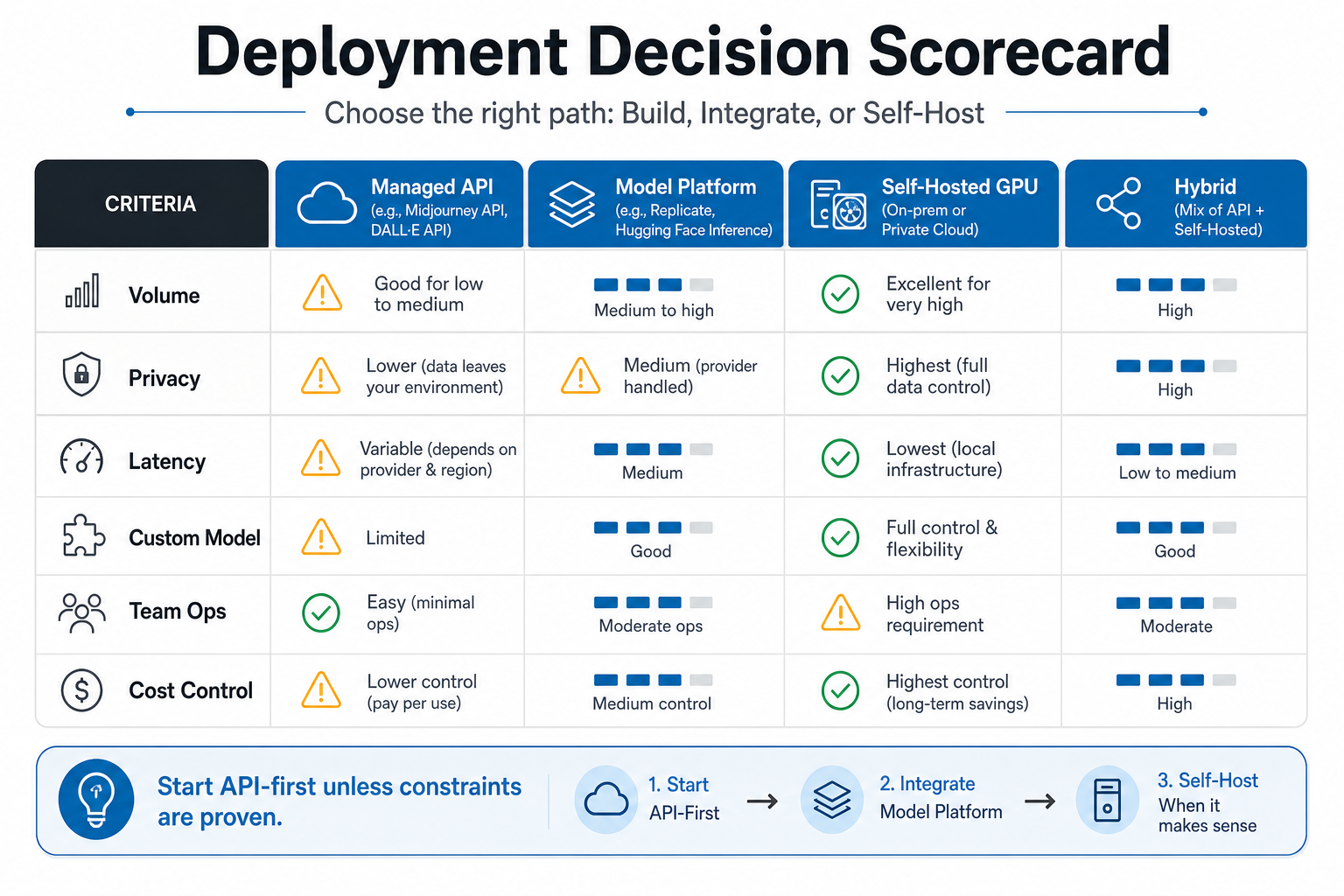
| Route | Best Fit | Main Advantage | Main Risk |
|---|---|---|---|
| Integrate a managed image API | MVPs, moderate volume, fast validation | Fastest launch with less infrastructure | Vendor pricing, rate limits, data terms, moderation behavior, and model changes |
| Use a model platform | Teams comparing several models or workflows | Experimentation without owning GPU operations | Provider dependency, platform-specific behavior, and less control over runtime internals |
| Self-host diffusion or GPU inference | Private assets, high volume, custom models, latency control | More control over routing, data, model versions, optimization, and deployment | DevOps complexity, idle GPU cost, scaling, monitoring, security patches, and incident response |
| Hybrid routing | Products with quality tiers, privacy tiers, or fallback needs | Balances speed, cost, privacy, and quality | More architecture, billing, observability, QA, and support complexity |
API-first does not mean shallow. A strong API-first app can still include prompt libraries, batch jobs, role-based permissions, billing, moderation, asset versioning, and integrations. It simply avoids building GPU infrastructure before the product proves which workflows matter. Use NextPage's generative AI architecture decision guide as a companion when comparing API, private, and hybrid patterns.
Current Model Access Options
The market gives teams several credible ways to add image generation. OpenAI's image-generation documentation covers GPT Image models that can generate and edit images from text and image inputs. OpenAI's API launch notes also emphasize safety guardrails, moderation controls, and provenance metadata for generated images. AWS Bedrock provides managed access to Amazon Titan Image Generator, including text-to-image, editing, variations, background removal, color guidance, and responsible AI documentation. Stability exposes API routes for diffusion-style generation and editing. Replicate and similar platforms let teams run many hosted public and proprietary models, often with hardware-time pricing.
The practical takeaway is that teams no longer need to start by hiring a model infrastructure team. You can prototype with a managed model path, measure accepted outputs, and then decide whether a more controlled deployment is justified. For broader production planning, NextPage's generative AI development work starts with the workflow, evaluation model, cost controls, and integration path before selecting the most complex architecture.
What Should The MVP Include?
The MVP should prove one valuable image workflow, not every generation feature. Choose a narrow job such as ecommerce product backgrounds, ad concept variants, real estate image cleanup, game asset ideation, localized campaign drafts, or internal brand-approved creative generation.
A practical first release usually includes authentication, workspace or project organization, prompt templates, generation settings, a model adapter, async job status, output history, asset downloads, basic moderation, usage limits, admin controls, and event tracking. If the app is paid, add credits, subscription limits, invoices, failed-payment handling, and abuse prevention. If it is internal, add SSO, role permissions, audit logs, retention settings, and department-level usage reporting.
Leave advanced features for phase two unless they are central to the business model. Custom training, marketplace publishing, mobile apps, collaborative editing, multi-provider routing, and deep DAM or CMS integrations can all be valuable, but they slow the first learning loop. Use the MVP Scope Builder to pressure-test which features belong in the first launch and which should wait.
Production Architecture For AI Image Workflows
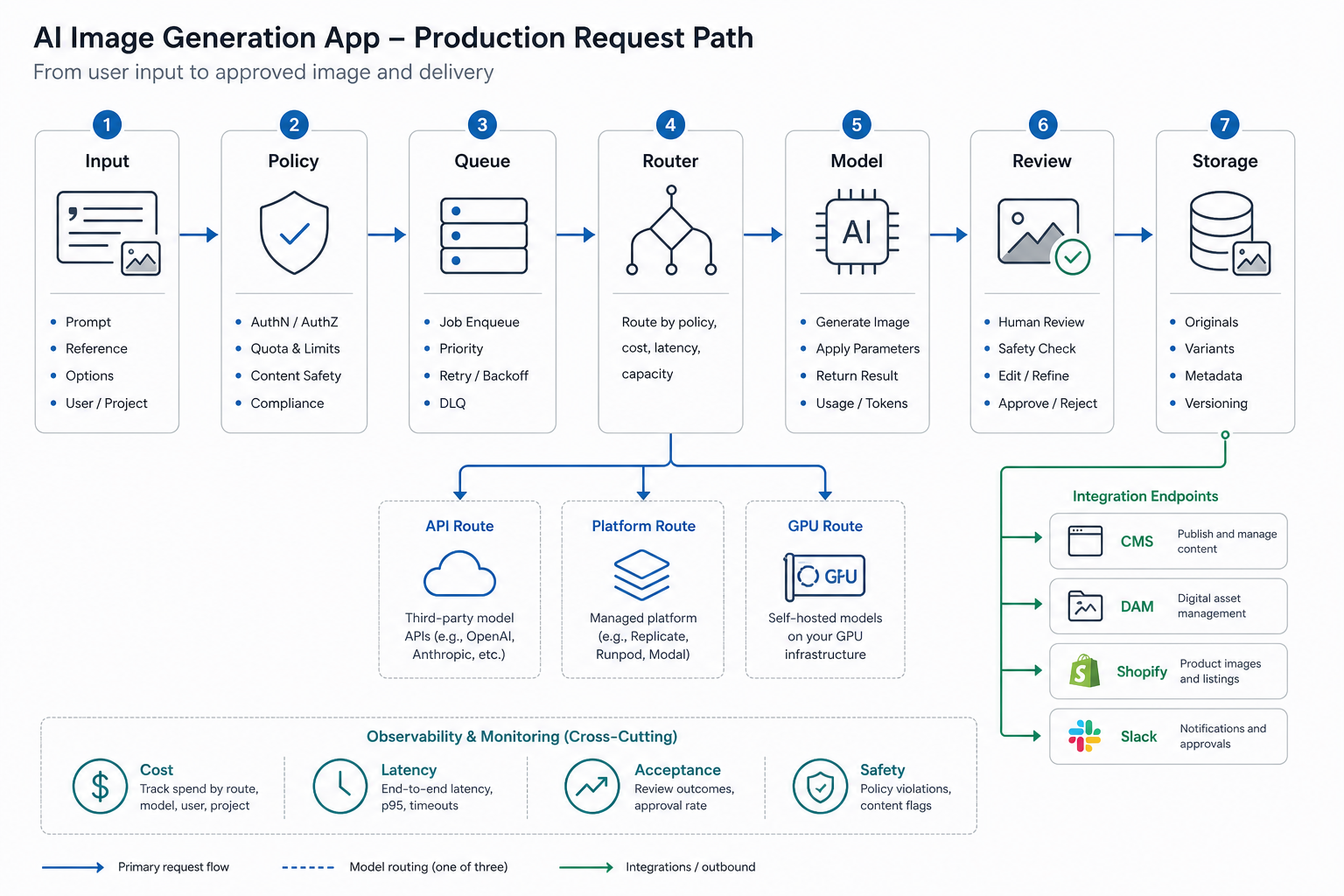
A production app needs a request path that protects users, budget, and brand quality. The architecture usually looks like this:
- Input layer: prompt, reference image, product data, brand preset, target format, and user intent.
- Policy layer: blocked input checks, file validation, brand rules, user permissions, workspace quotas, and customer data rules.
- Queue layer: asynchronous job handling, retries, cancellation, rate limits, progress updates, and priority rules.
- Model router: selection between managed API, model platform, self-hosted GPU, fallback route, or privacy tier.
- Storage layer: original inputs, generated outputs, thumbnails, metadata, prompt settings, and deletion rules.
- Review layer: automated checks, human approval, comments, rejection reasons, and version history.
- Integration layer: CMS, Shopify, DAM, social scheduler, Slack, product catalog, analytics, or internal tools.
- Measurement layer: cost, latency, failure rate, accepted output rate, model version quality, and user retention.
This overlaps with production AI development services because the model is only one component. The product also needs orchestration, permissions, evaluation, monitoring, UX design, and operating workflows.
Safety, Brand, and Rights Controls
Business image generation requires policy before scale. At minimum, define what users can submit, what the app refuses, how outputs are reviewed, how unsafe results are reported, and how long assets are retained. Public products also need abuse prevention: rate limits, payment checks, workspace quotas, prompt throttling, user reporting, and support escalation.
Brand control is separate from safety. A safe image can still be off-brand, low quality, or unusable for a campaign. Add brand presets, approved style references, output dimensions, caption guidance, review states, and rejection reasons. Over time, those rejection reasons become training data for prompt templates, model routing, or custom style work.
Rights and provenance should be discussed before launch. Decide whether generated assets need metadata, watermarks, C2PA-style provenance handling, customer terms, audit trails, or human approval before commercial use. The answer depends on the industry and distribution channel, but the decision should not be left to the last sprint. The governance pattern is similar to AI workflow automation: define the trigger, context, decision layer, review layer, monitoring, and rollback path before giving the system more autonomy.
Cost and Unit Economics
Model pricing is only one part of the budget. Teams also pay for product discovery, UX, frontend and backend development, model integration, storage, CDN traffic, logs, moderation operations, QA, analytics, support, and ongoing model/provider maintenance. If self-hosted, add GPU uptime, autoscaling, cold starts, model loading, observability, security updates, and people who can debug inference failures.
Measure cost per accepted image, not only cost per generated image. If users generate ten variants and approve one, the accepted asset cost is ten times the raw generation cost before storage, review, and support are included. Track prompt template performance, rejection reasons, latency, failed jobs, spend by workspace, output acceptance rate by model route, and refund or support events.
If you need a planning range, compare the workflow against NextPage's Stable Diffusion app development cost guide and run a rough scope through the custom software cost estimator. The fastest way to get a realistic estimate is to specify the user workflow, monthly generation volume, privacy requirements, integrations, review process, and expected launch platform.
When Self-Hosting Is Worth It
Self-hosting is worth a serious look when the product has high, steady usage that makes API margins painful; when prompts or images contain sensitive customer data; when customers require private deployment; when custom models or LoRA-style workflows create defensible quality; when latency needs predictable routing; or when the business wants full control over model versioning and rollback.
It is not automatically cheaper. Idle GPU time, autoscaling complexity, queue failures, model optimization, observability, security patching, and incident response all cost money. Many teams find the right answer is hybrid: managed APIs for general work, self-hosted routes for private or high-volume jobs, and fallback routing when a provider is slow or unavailable.
The decision should be made with operating evidence. Before self-hosting, confirm monthly volume, median and p95 latency, failed job rate, acceptance rate, provider spend by workspace, storage growth, review load, privacy constraints, and custom-model demand. If those numbers are still guesses, self-hosting can become an expensive infrastructure project before the product has proven its workflow.
A Practical Implementation Roadmap
- Define the workflow: user, input, output, review point, success metric, and business CTA.
- Select the model path: managed API or model platform first unless privacy, custom model, or volume constraints are already proven.
- Design the product controls: prompt templates, policy checks, workspace permissions, quotas, retention rules, and admin reporting.
- Build the queue and storage path: async jobs, retry logic, thumbnails, metadata, deletion, and asset search.
- Add review and measurement: acceptance rate, rejection reasons, cost per accepted asset, latency, failure rate, and provider quality.
- Integrate only where value is clear: CMS, catalog, DAM, social scheduling, ecommerce, Slack, or internal dashboards.
- Revisit infrastructure after usage data: compare API spend, rejection rate, latency, privacy needs, and custom model demand before self-hosting.
NextPage can help turn this into a build plan, architecture estimate, and launch roadmap. The most useful first conversation is not "which model should we use?" It is "which image workflow creates enough value to deserve a product around it?"