
Quick Answer: AI Integration Platform Development
AI integration platform development is the work of building a governed layer that connects SaaS apps, CRMs, ERPs, data platforms, APIs, events, and AI-assisted workflows. The goal is not just to move records from one tool to another. The goal is to make business workflows reliable enough that AI can retrieve context, recommend actions, call approved tools, and escalate exceptions without breaking permissions, auditability, or data quality.
The right architecture usually combines deterministic integration patterns with carefully bounded AI. Use normal APIs, events, queues, retries, schemas, and monitoring for the integration backbone. Add AI where the workflow needs classification, extraction, summarization, routing, decision support, or supervised tool use. If the team is still deciding whether the problem deserves custom software, start with the Build vs Buy Decision Tool before committing to a platform build.
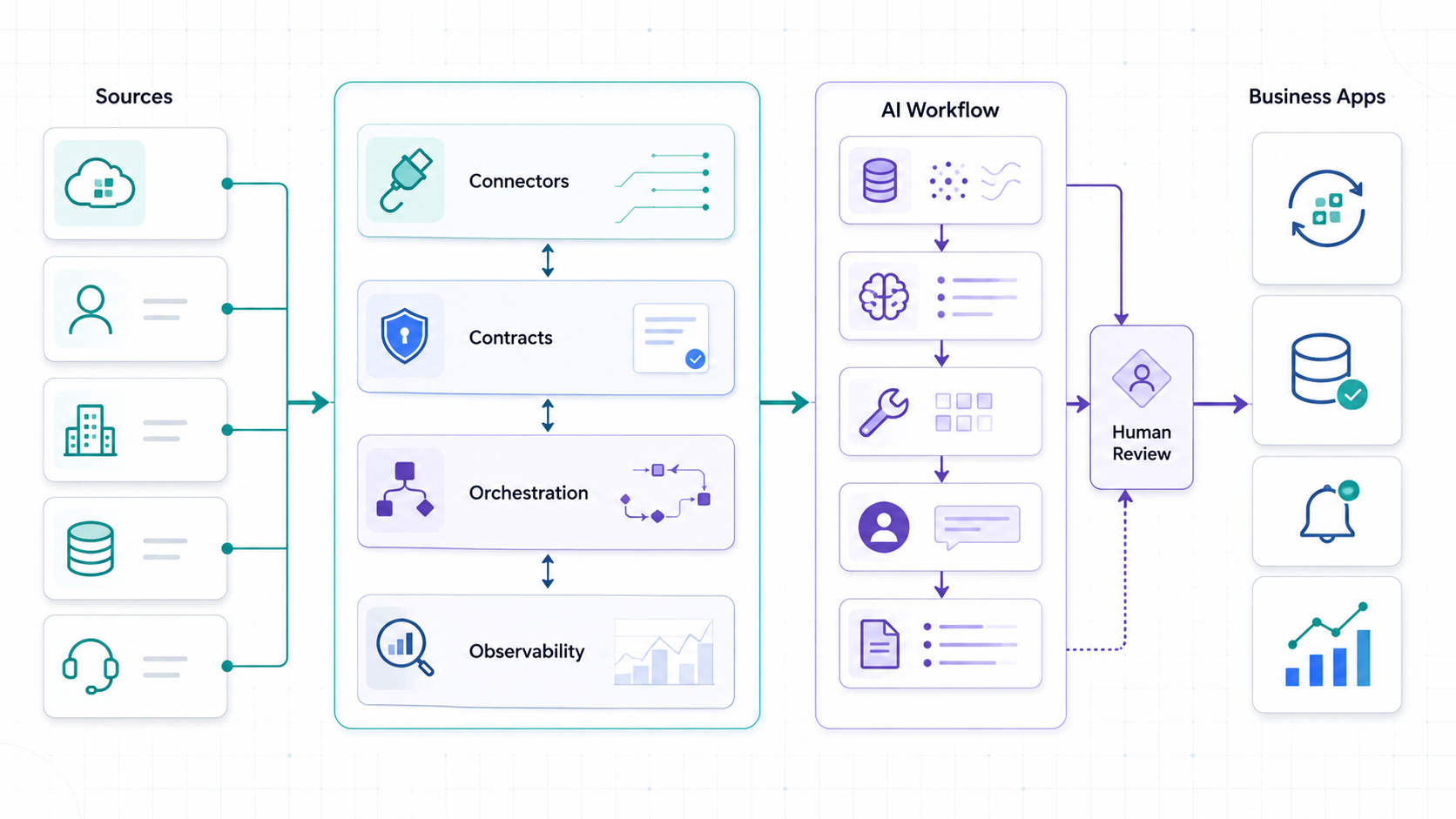
What Changes When AI Enters Integration Platforms
Traditional integration platforms move data between systems with connectors, APIs, transformations, schedules, events, and workflow rules. AI changes the problem because the platform may now interpret unstructured inputs, summarize records, classify intent, choose the next step, draft updates, or call tools on behalf of a user. That creates value, but it also increases the need for control.
The source reference for this queue item is useful because its visible article argues that AI does not simply make engineers ship faster; it changes process design, reusable skills, memory, and review discipline. That point matters for integration platforms. Prompting an assistant to write connectors is not enough. The team needs process artifacts: data contracts, connector standards, error taxonomies, permission maps, test fixtures, observability conventions, and review loops.
NextPage's guide to AI workflow automation covers the workflow side of this decision. This article focuses on the platform layer underneath: what must exist before AI workflows can safely interact with systems of record.
The AI Integration Platform Architecture Map
A production-grade AI integration platform has seven layers. Some teams buy parts of this through iPaaS, automation tools, API gateways, event brokers, or workflow engines. Others build a custom layer because their workflows, data model, tenant rules, or compliance needs are too specific for a generic platform.
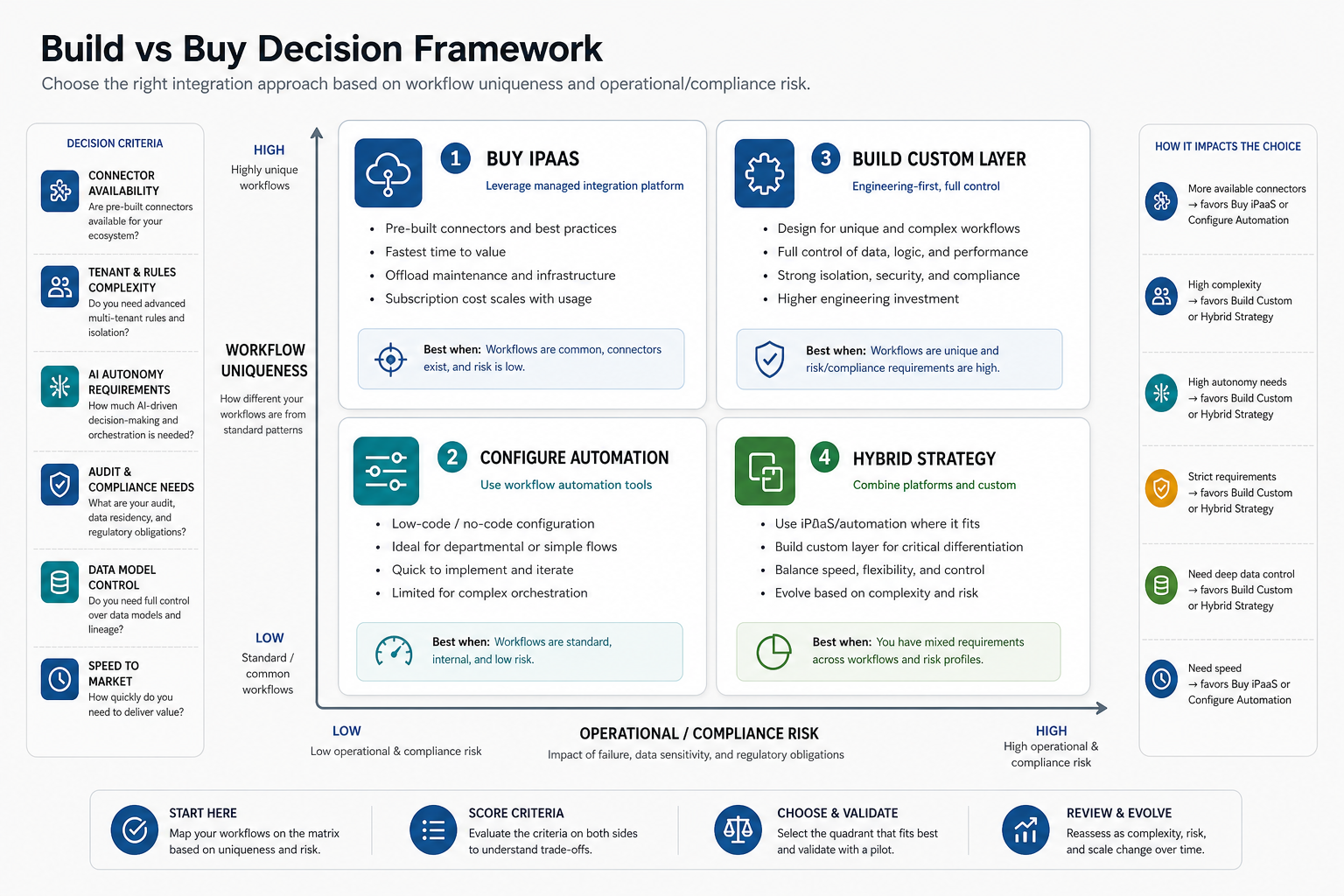
| Layer | What it does | Design questions |
|---|---|---|
| Source systems | CRM, ERP, billing, product, warehouse, helpdesk, data warehouse, email, documents, and internal tools | Who owns each source, what is the system of record, and which data is sensitive? |
| Connector layer | API clients, webhooks, file imports, database readers, event consumers, and vendor adapters | How are auth, rate limits, pagination, retries, and vendor API changes handled? |
| Contract layer | Canonical objects, event schemas, validation rules, versioning, and transformation logic | Which fields are required, who can change them, and how are versions supported? |
| Orchestration layer | Workflow state, queues, schedules, sagas, approvals, branching, and replay | Which steps are synchronous, asynchronous, reversible, or human-approved? |
| AI workflow layer | Classification, extraction, summarization, retrieval, recommendations, and approved tool calls | Where does AI add judgment, and where should rules stay deterministic? |
| Governance layer | Identity mapping, permission checks, audit logs, policy rules, human review, and rollback | What can the AI see, suggest, write, or trigger for each user and tenant? |
| Observability layer | Logs, traces, correlation IDs, metrics, cost, quality feedback, and failure queues | Can the team explain what happened across every system when a workflow fails? |
If your product already connects billing, CRM, analytics, and support tools, compare this map with NextPage's SaaS integration architecture guide. AI does not remove those fundamentals. It makes them more important.
Connector Strategy Before AI Features
Most failed integration platforms start with point-to-point scripts. They work for the first two systems, then become brittle as vendors change APIs, rate limits tighten, data ownership changes, and business users ask for more workflows. A connector strategy prevents that sprawl.
Define a standard connector contract for authentication, token rotation, pagination, rate limits, retries, webhooks, backfills, delete handling, tenant boundaries, and test fixtures. Every connector should expose health status, sync lag, last successful run, error reason, and affected records. This is not extra engineering. It is what lets an AI workflow trust the data it receives.
- Prefer official APIs when the source system is business-critical or write actions are involved.
- Use webhooks or event subscriptions for near-real-time workflow triggers where the vendor supports them.
- Use scheduled syncs when the source data changes slowly or the vendor API is rate-limited.
- Avoid fragile scraping for operational workflows unless it is a temporary migration bridge with clear ownership.
- Keep connector code boring: deterministic transformations, typed payloads, clear errors, and repeatable tests.
For buyers, the practical question is not "Can we connect this tool?" It is "Can we operate this connection for two years while the vendor, business rules, and AI workflows change?"
API, Events, or Workflow Orchestration?
Integration architecture usually blends synchronous APIs, asynchronous events, and workflow orchestration. Each choice has a cost. APIs are easier to reason about for request-response work. Events decouple producers and consumers, but require schema discipline, replay thinking, and observability. Workflow orchestration gives control over multistep processes, but can become a bottleneck if every action depends on one central brain.
| Pattern | Best fit | Watch out for |
|---|---|---|
| Synchronous API | Eligibility checks, profile lookups, pricing calls, user-triggered actions | Latency, outages, cascading failures, inconsistent auth rules |
| Event stream | Order updates, product events, audit trails, analytics feeds, downstream sync | Schema evolution, replay, consumer lag, duplicate events, eventual consistency |
| Queue-based worker | Long-running syncs, retries, enrichment jobs, document processing | Dead-letter handling, idempotency, backpressure, stuck jobs |
| Workflow engine | Approvals, multistep fulfillment, onboarding, issue escalation, case management | Versioning, state migration, owner changes, over-centralization |
| AI-assisted step | Classification, extraction, summarization, routing, draft decisions, recommendations | Grounding, permissions, hallucination, confidence, human review |
Microsoft's event-driven architecture guidance highlights the tradeoff clearly: event producers and consumers are decoupled, but teams must design for delivery, ordering, error handling, schema evolution, and observability. For AI integration platforms, that means correlation IDs, event versions, idempotent consumers, dead-letter queues, and replay tools are not optional details.
Data Contracts and Canonical Models
AI integration platforms need data contracts because AI is only useful when context is consistent. If a customer means one thing in the CRM, another in billing, and a third in the data warehouse, the AI layer will produce confident but unreliable answers. A canonical model reduces that ambiguity.
Start with the business objects that drive workflow decisions: account, customer, user, order, subscription, invoice, ticket, asset, product, shipment, vendor, policy, or case. For each object, define owner, source of truth, required fields, allowed states, identifiers, timestamps, permission attributes, and versioning rules.
Google's API design guide is relevant here because stable resource models and consistent API behavior make integrations easier to operate. Even if your platform uses events internally, business-facing objects still need resource discipline: names, IDs, relationships, lifecycle states, and error semantics that developers can trust.
| Contract area | What to define | Why AI needs it |
|---|---|---|
| Identity | Global IDs, external IDs, tenant IDs, user mapping | Prevents the AI from mixing accounts, users, or tenants |
| State | Status values, transitions, terminal states, version numbers | Lets recommendations respect workflow reality |
| Permissions | Readable fields, writable fields, approval thresholds, audit needs | Controls what AI can see or change |
| Quality | Freshness, confidence, required fields, validation errors | Helps the AI abstain, escalate, or ask for missing information |
| Provenance | Source system, timestamp, actor, sync path, transformation version | Creates evidence for audit, debugging, and user trust |
Where AI Belongs in the Platform
AI should sit behind workflow boundaries, not inside every connector. Keep low-level data movement deterministic. Put AI where it can help interpret context, reduce manual review, or prepare action for approval.
Good first use cases include classifying tickets, mapping messy fields during migration, summarizing account context before a sales handoff, extracting invoice line items, recommending routing, drafting support updates, or explaining anomalies in a dashboard. Riskier use cases include autonomous refunds, contract changes, privileged system updates, production data deletes, or decisions with compliance impact.
The right autonomy level depends on risk:
| AI role | Example | Control needed |
|---|---|---|
| Assistant | Summarizes synced account context for a user | Source links and freshness indicators |
| Recommender | Suggests a routing decision or next action | Confidence, rationale, and human accept/reject |
| Drafting copilot | Prepares a CRM note, email, or support response | Human approval before external or system-of-record updates |
| Supervised agent | Calls approved APIs to update low-risk fields | Tool allowlist, policy checks, audit log, rollback |
| Autonomous workflow | Completes a routine task end to end | Strict scope, monitoring, kill switch, exception queue |
Before moving beyond assistant or recommender mode, run a governance review. NextPage's enterprise AI agent governance guide and the AI Agent Readiness Assessment are useful checkpoints.
Observability, Retries, and Human Escalation
An integration platform becomes business-critical the moment teams rely on it for sales handoffs, fulfillment, finance, support, or reporting. AI increases the need for observability because failures can be semantic, not just technical. The workflow may complete, but route the wrong case, use stale context, or draft a poor recommendation.
Track both system and workflow signals:
- Connector health, sync lag, API errors, rate-limit events, webhook failures, and retry counts.
- Event volume, queue depth, dead-letter counts, replay jobs, and idempotency conflicts.
- Workflow completion rate, escalation rate, approval rate, edit rate, and rollback events.
- AI quality signals such as accepted suggestions, rejected outputs, missing-source failures, confidence distribution, and cost per workflow.
- Correlation IDs that connect a user request, source records, events, AI prompts, tool calls, human approvals, and final writes.
Human escalation should be part of the architecture, not a support afterthought. Define which failures go to a business owner, an integration engineer, a data steward, a security reviewer, or a customer-facing team. Then give reviewers the evidence they need: source records, proposed action, model rationale, confidence, policy checks, and rollback option.
Build vs Buy Decision Framework
Buying iPaaS or automation tooling is often right when the workflow is standard, connectors are available, the data model is simple, and the business can adapt to the platform's process. Custom development makes more sense when integration behavior is part of the product, tenant rules are complex, AI actions need tight governance, or the business workflow is a competitive advantage.
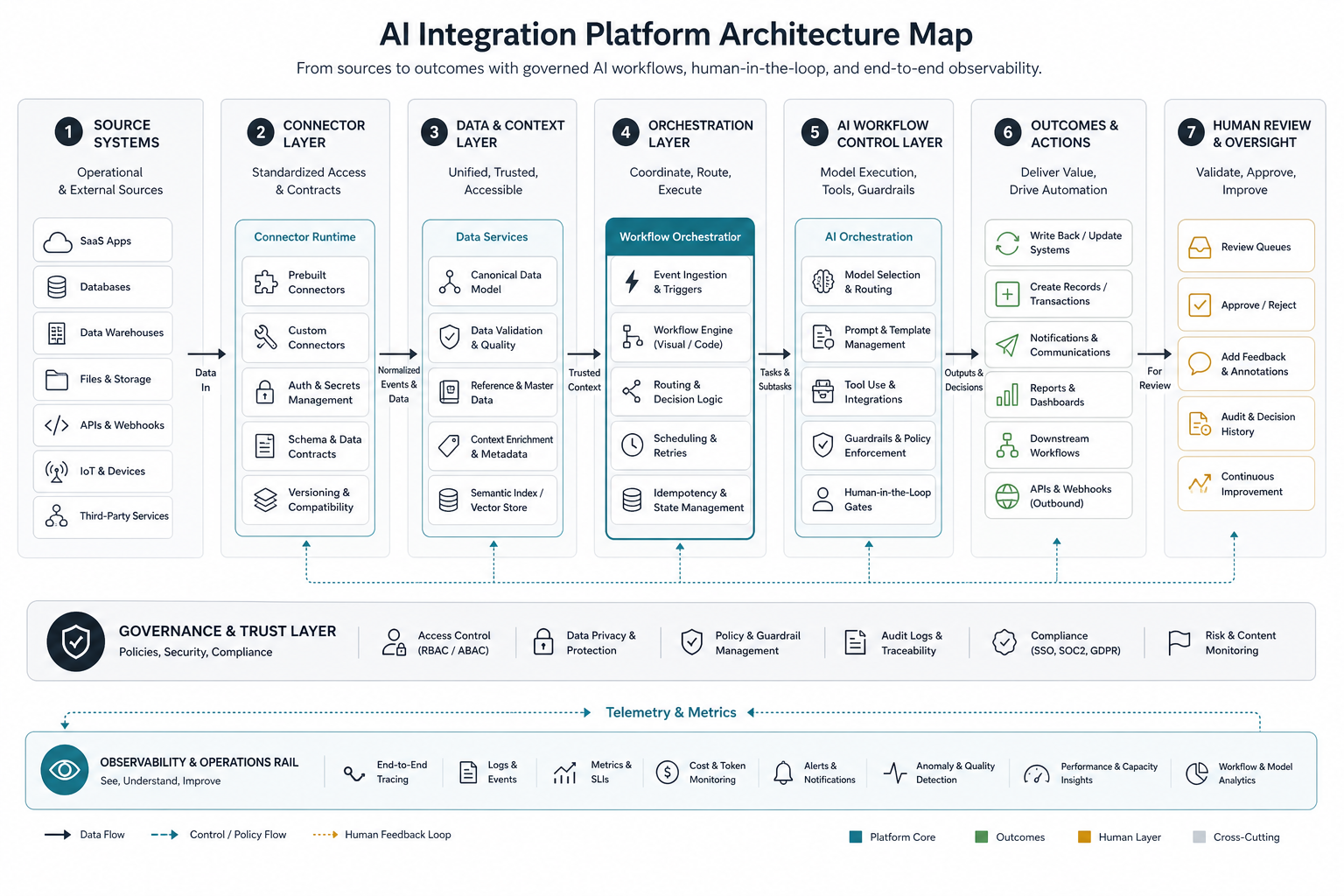
| Choose | When it fits | Common risk |
|---|---|---|
| Buy iPaaS | Standard SaaS-to-SaaS sync, known connectors, low customization, fast rollout | Connector limits, platform fees, workflow constraints |
| Configure automation tools | Department workflows, approvals, notifications, light data movement | Shadow automation, unclear ownership, brittle edge cases |
| Build custom integration layer | Product-critical workflows, complex permissions, custom data model, high reliability needs | Underestimating operations, monitoring, and connector maintenance |
| Hybrid | Commodity connectors through tools, core workflow and AI governance custom-built | Split ownership and duplicated logic |
For many teams, the strongest answer is hybrid: use existing tools where they are strong, then build custom software around the workflows that define product experience, compliance, or operational advantage. NextPage's custom software development work typically starts by mapping which parts should be bought, configured, integrated, or built.
Implementation Roadmap
A practical first release should prove one high-value workflow before trying to become a universal integration platform. Use this phased roadmap:
| Phase | Work | Output |
|---|---|---|
| 1. Workflow discovery | Map users, systems, triggers, decisions, data owners, exceptions, and business value | Integration opportunity brief |
| 2. Architecture slice | Choose API/event/orchestration pattern, canonical objects, connector standards, and AI role | Technical architecture and release scope |
| 3. Connector and contract build | Implement source connectors, validation, canonical model, test fixtures, and sync monitoring | Reliable integration backbone |
| 4. AI workflow pilot | Add retrieval, classification, summarization, recommendation, or supervised tool call with review | Controlled AI-assisted workflow |
| 5. Production controls | Add observability, cost limits, audit trail, escalation queues, replay, rollback, and owner runbooks | Operated platform release |
| 6. Expansion | Add more systems, workflows, connectors, and AI actions after quality evidence exists | Platform roadmap with governance |
If your first workflow is still unclear, use the Workflow Automation Opportunity Finder to rank candidates before investing in connector work.
Cost and Team Planning
Integration platform cost depends less on the number of screens and more on the number of systems, connector complexity, data ownership, failure handling, AI scope, and operating requirements. A small read-only integration assistant may be a focused build. A platform that writes to CRM, ERP, billing, and support systems with AI assistance needs stronger architecture, security, QA, and support planning.
Budget drivers include vendor API complexity, number of objects, historical backfill volume, transformation rules, tenant and permission model, event infrastructure, workflow engine, review UI, monitoring, model usage, security review, and support runbooks. Do not ignore maintenance. Connectors need updates when vendors change APIs, business teams add fields, or compliance rules shift.
When the platform will connect LLMs, retrieval, or supervised agents to production systems, scope the AI layer like product software rather than a model demo. NextPage's AI development services work covers the evaluation, permissions, integration depth, monitoring, and rollout controls that keep these workflows reliable after launch.
Team roles usually include a product owner, integration architect, backend engineer, data engineer, AI/LLM engineer when needed, QA automation engineer, security reviewer, and workflow owner from the business. For a first release, keep the scope narrow enough that one team can understand the full path from trigger to system write.
For a broader organizational check, compare this list with the enterprise AI readiness checklist, especially if the integration platform will touch sensitive data, cross-functional workflows, or agentic automation.
AI Integration Platform Readiness Checklist
Before building, answer these questions:
- Which workflow creates enough value to justify platform work?
- Which source system is the system of record for each business object?
- Are official APIs, webhooks, or events available for the required systems?
- Which fields are sensitive, tenant-scoped, or permission-restricted?
- What must happen when a connector fails, rate-limits, or sends invalid data?
- Which steps must be synchronous, asynchronous, replayable, or reversible?
- Where does AI add value beyond rules and transformations?
- Which AI outputs require human approval before action?
- Can every workflow run be traced from trigger to final write?
- Who owns connector maintenance, data quality, model quality, and incident response?
If several answers are unknown, the first engagement should be an integration architecture review, not a full platform build.
How NextPage Helps
NextPage helps teams design and build AI-ready integration platforms for SaaS products, internal operations, customer portals, ERP/CRM workflows, analytics pipelines, and AI-assisted automation. We start with the business workflow, then define the connector strategy, contracts, orchestration, AI role, permission model, observability, and production rollout.
If you need a platform that connects systems and supports governed AI workflows, start with an integration architecture review through custom software development. If the workflow is already defined and the main need is automation delivery, NextPage's AI automation services can help turn that workflow into a controlled production release.