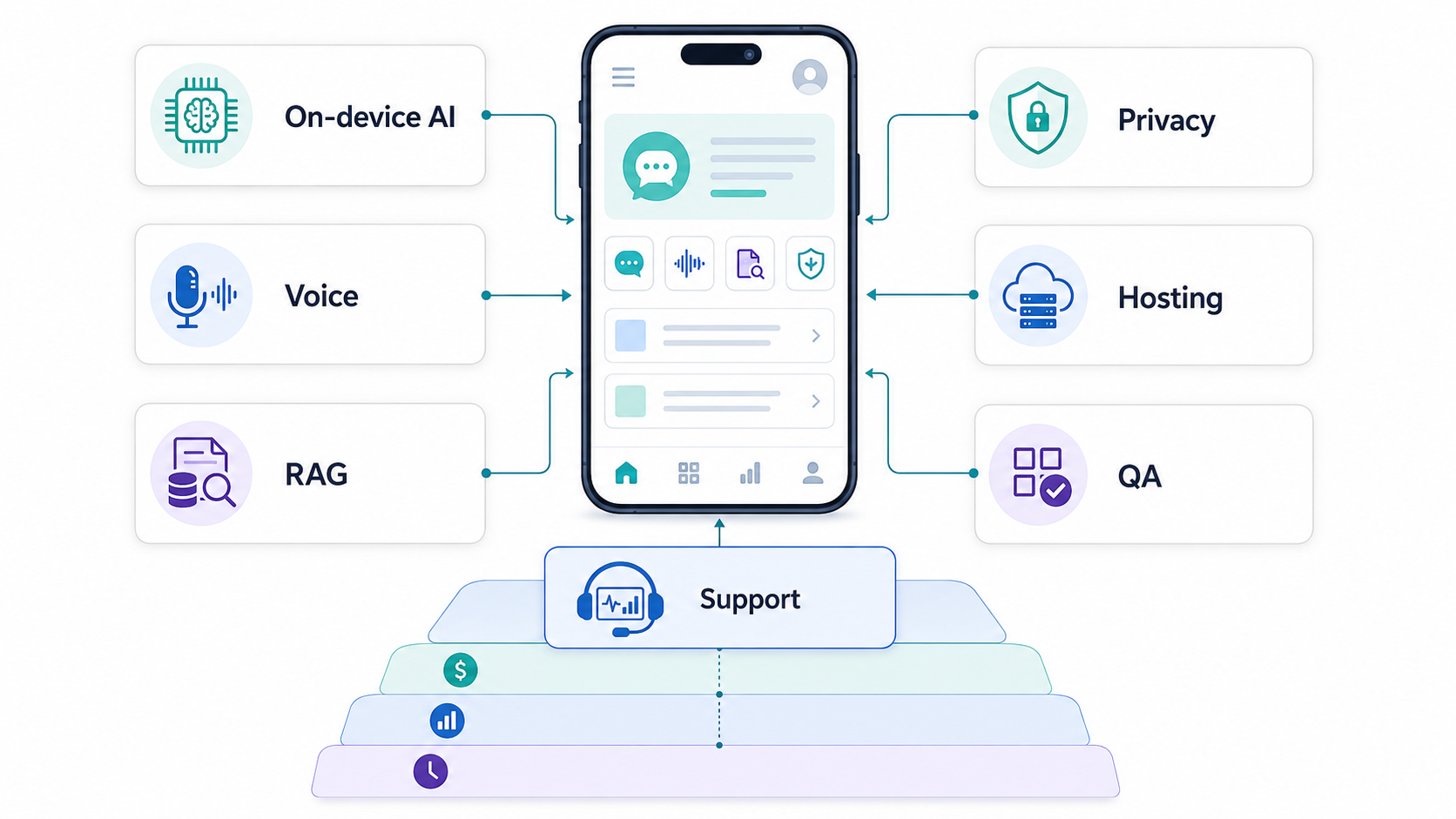

AI mobile app development cost depends less on adding an AI label and more on the product system behind the feature. A basic AI text helper inside an existing app may be a modest add-on. A production mobile product with voice, private RAG, on-device inference, recommendations, privacy controls, monitoring, and support can become a full software platform.
For planning, most AI mobile MVPs should be scoped as a standard mobile build plus extra work for data, model integration, evaluation, privacy, architecture, and post-launch monitoring. If the AI feature needs private business data, real-time voice, regulated user data, device sensors, or offline behavior, the budget should include architecture discovery before fixed estimates. Use the Custom Software Cost Estimator for a first range, then refine it around the specific AI workflow.
The practical question is not only "How much does an AI app cost?" The better question is which user decision the AI improves, where the model runs, what data it needs, how quality is tested, what privacy boundary is acceptable, and who owns the feature after launch.
Quick Answer: How Much Does AI Mobile App Development Cost?
A focused AI mobile MVP often lands above a standard app MVP because it adds model selection, prompt or retrieval design, data preparation, evaluation, privacy review, analytics, and support routines. A narrow assistant, classifier, recommendation, or summarization feature can sometimes be planned as an incremental feature. A full AI-native mobile product with accounts, backend workflows, admin tooling, RAG, voice, subscriptions, analytics, and production support should be estimated as a larger platform.
Use these ranges only for early planning. A simple AI feature in an existing app may add a low five-figure workstream when the data is clean and the model can be consumed through a managed API. A standalone AI mobile MVP commonly needs discovery, UX, mobile engineering, backend integration, data handling, evaluation, QA, and release support. A regulated, multi-role, voice-enabled, or private-data AI platform can move into a much larger budget because security, monitoring, reliability, and support are part of the product.
For baseline mobile scope, compare this article with the broader mobile app development cost guide. AI changes the estimate by adding uncertainty: model quality, API usage, latency, device coverage, privacy posture, and ongoing improvement all need budget owners.
Target Query And Buying Intent
The primary query is AI mobile app development cost. Secondary searches usually include on-device AI app cost, AI app MVP cost, LLM app development cost, voice AI app cost, RAG mobile app cost, AI feature development for mobile apps, AI app maintenance cost, and mobile AI privacy requirements. The reader is usually a founder, product manager, CTO, or operations leader deciding whether an AI feature belongs in the first release or a later phase.
This intent is mixed: the reader wants a budget answer, but they also need a decision framework. A weak article gives one broad price range. A useful article separates feature type, architecture, data scope, platform choice, QA depth, and support model so the buyer can ask for a defensible estimate.
AI Feature Cost Drivers By Type
AI cost changes by feature class. A smart search feature is scoped differently from a voice assistant, image analysis workflow, private knowledge assistant, recommendation engine, or agentic task flow. Product teams should estimate AI features around the workflow they improve, not around the model brand.
| AI Feature Type | Typical Scope Drivers | Cost Risk |
|---|---|---|
| Text assistant or summarizer | Prompt design, UI states, moderation, logging, API usage, answer evaluation. | Medium when the content is generic; higher when answers must cite private sources. |
| Voice assistant | Streaming audio, turn-taking, latency, permissions, transcripts, fallback, noise handling. | High because real-time UX and per-minute or token-based audio usage affect both build and operating cost. |
| RAG or private knowledge app | Content cleanup, ingestion, chunking, embeddings, access control, citations, freshness, evaluation. | High when user permissions, multiple tenants, or live business records are involved. |
| Recommendation engine | Events, user profiles, ranking rules, experiments, analytics, cold-start handling, feedback loops. | Medium to high depending on available behavioral data and experimentation maturity. |
| Computer vision or sensor AI | Dataset quality, model choice, device performance, edge inference, false-positive review, privacy. | High when real-world conditions vary or regulated decisions are involved. |
| Agentic mobile workflow | Tool permissions, approvals, audit logs, rollback, policy constraints, monitoring, human handoff. | Very high if the AI can change records, send messages, trigger payments, or act across systems. |
If the feature list is still broad, use the MVP Scope Builder before estimating. AI mobile apps become expensive quickly when teams try to launch every assistant, recommendation, and automation idea at once.
On-Device AI, Cloud AI, Or Hybrid?
The biggest architecture decision is where inference runs. On-device AI can reduce latency, support offline use, and keep more data local. Cloud AI can access larger models, longer context, easier updates, and stronger centralized monitoring. Hybrid AI mixes both: local processing for lightweight or sensitive tasks, cloud processing for heavier reasoning, private RAG, and fallback.
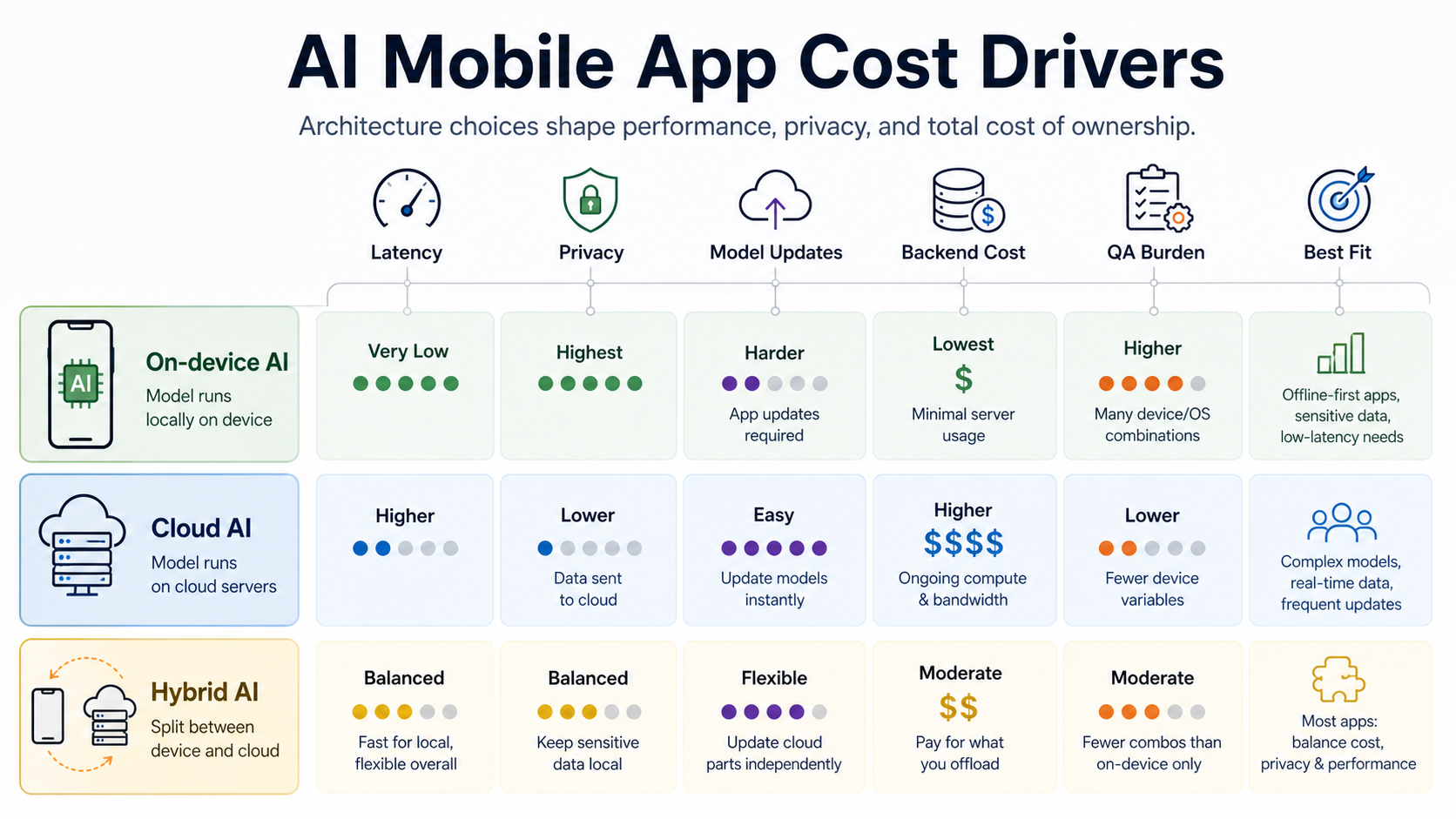
Google's Android AI guidance now treats on-device Gemini Nano, cloud Gemini models, and hybrid inference as different tools for different constraints. On-device can help with privacy, offline reliability, and cost control, while hybrid inference can fall back to cloud models when a local model is unavailable or insufficient. Apple also exposes on-device Foundation Models for Apple Intelligence, which changes the planning conversation for iOS apps that can use system-provided model capabilities.
These platform options do not remove engineering cost. They move it. On-device features need device eligibility checks, graceful fallbacks, app-update planning, battery and memory testing, and many hardware/OS combinations. Cloud features need API cost controls, network handling, data boundaries, rate limits, observability, and vendor-risk planning. A hybrid design usually fits most production mobile products, but it needs architecture discipline.
For the broader product stack decision, pair this section with NextPage's mobile app development service page and the mobile app technology stack guide.
RAG And Private Data Add Hidden Scope
RAG is often the difference between a generic AI feature and a useful business feature. It can also be the difference between a simple estimate and a larger software program. A private knowledge assistant needs source inventory, content cleanup, chunking, embeddings, vector search, permission filtering, citations, freshness rules, evaluation, and a content-owner workflow.
The key estimate question is what the mobile app is allowed to know. Public website content is simpler than private documents. Private documents are simpler than live customer records. Live records become harder when every user has different access rights, when the app supports multiple tenants, or when a wrong answer creates operational risk.
This is where AI mobile app cost overlaps with LLM development and generative AI development. The model call is only one line item. The reliable product work sits around retrieval, integration, safety, UX, and monitoring.
Voice AI And Realtime Costs
Voice AI deserves its own budget line. Real-time voice interfaces need streaming audio, permissions, interruption behavior, latency handling, transcript storage, accessibility review, noise testing, escalation states, and cost monitoring. Current platform options include Android Gemini Live API patterns through Firebase AI Logic and OpenAI's Realtime API for low-latency voice experiences. Pricing can be token-based or minute-based depending on model and provider, so product teams should model real usage instead of assuming a flat chatbot cost.
A practical estimate should define the expected number of monthly active users, average session length, audio input/output mix, transcript retention, human handoff path, and quality review process. A voice assistant that works beautifully in a quiet demo can become expensive or unreliable in real-world mobile conditions unless QA covers noisy environments, partial connectivity, accents, interruptions, and repeated failed intents.
Privacy, Security, And Compliance Costs
AI mobile features often touch sensitive data: messages, voice, photos, location, health signals, financial data, customer records, documents, or workplace knowledge. Privacy planning should happen before engineering starts because it affects consent, permissions, data minimization, model boundary, logs, retention, exports, deletion, analytics, and support workflows.
For lower-risk consumer features, the budget may include permission UX, basic content safety, analytics consent, and app store privacy disclosures. For healthcare, fintech, education, enterprise, or workplace apps, the budget should include threat modeling, secure storage, access control, audit logs, vendor review, encryption, privacy notices, and policy-backed evaluation. NextPage's mobile app security hardening services are relevant when AI features process sensitive mobile data or need production evidence before launch.
Private deployment can be justified for regulated or sensitive workflows, but it increases infrastructure and operations work. Use the private generative AI deployment guide when the app cannot send certain data to a public model endpoint.
MVP Vs Full-Scale AI Mobile Scope
An AI mobile MVP should prove one valuable behavior, not demonstrate every possible AI capability. Good MVP candidates include a narrow support assistant, onboarding helper, personalized recommendation, document summary, voice note summary, inspection checklist, or workflow copilot where the success metric is measurable.
A full-scale product adds account roles, admin workflows, analytics, subscriptions, backend operations, observability, model updates, support processes, data governance, experimentation, and release management. That is not just more engineering. It is more product responsibility.
| Scope Level | What To Include | What To Defer |
|---|---|---|
| Validation prototype | Clickable flow, sample prompts, mocked data, risk test, user feedback. | Production integrations, billing, advanced admin tools, custom model training. |
| AI mobile MVP | One core AI workflow, clean UX, backend API, basic analytics, evaluation set, privacy review, app-store-ready QA. | Multiple AI personas, broad automation, complex tenant permissions, advanced reporting. |
| Production platform | Role-based access, RAG, monitoring, cost controls, support tooling, admin workflows, QA automation, rollback, roadmap ownership. | Experimental features that do not improve the core business outcome. |
The mobile app MVP roadmap is a useful companion when the first release still feels too large.
QA, Evaluation, And Support Are Part Of Cost
AI mobile QA is more than checking whether the app opens. The team needs normal mobile QA plus AI-specific evaluation. Test login, permissions, offline states, push notifications, performance, accessibility, crashes, app store flows, and backend failures. Then add tests for answer quality, hallucination risk, unsafe responses, stale retrieval, source citations, latency, prompt injection, low-confidence behavior, and human handoff.
For on-device AI, test device eligibility, model availability, memory, battery, background behavior, and OS differences. For cloud AI, test network loss, rate limits, API errors, cost spikes, content filtering, and vendor incident behavior. For hybrid AI, test every fallback path. The mobile app QA and launch checklist covers the release gate that should surround this work.
Support also needs budget. Someone must review failure cases, update knowledge, monitor costs, handle user reports, improve prompts or retrieval, and decide when a model or platform change requires a release.
Operating Costs After Launch
AI mobile apps can have meaningful recurring costs: model API usage, vector database storage, backend hosting, observability, analytics, speech processing, content moderation, evaluation runs, support review, and maintenance. If the feature runs on-device, cloud inference may be lower, but QA, compatibility, fallback, and app-update planning become more important.
Estimate operating cost with realistic usage assumptions: monthly active users, AI interactions per user, average prompt and response size, audio minutes, retrieval volume, stored documents, peak concurrency, retention rules, and support review time. For voice and multimodal features, use provider pricing pages directly because costs change and can differ by modality.
The LLM app development cost guide goes deeper on model, RAG, evaluation, and maintenance costs when the mobile app depends heavily on language workflows.
How To Plan A Realistic AI Mobile App Budget
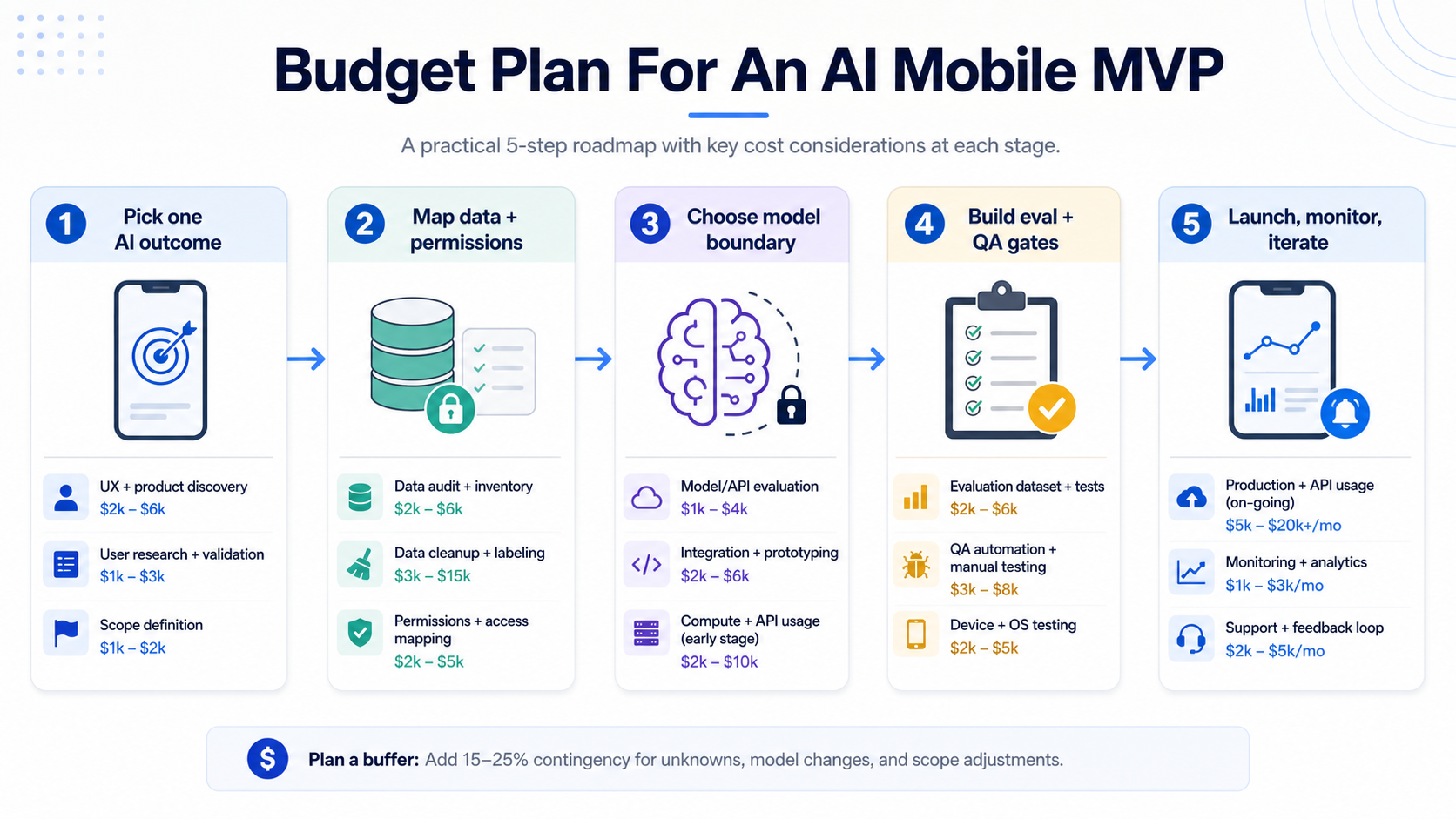
Start with the smallest user outcome that justifies AI. Then map the workflow, data boundary, model boundary, platform choice, privacy needs, evaluation method, and support owner. If the business cannot name the outcome, do not start with a model. Start with discovery.
- Define the AI job. Is the app summarizing, recommending, classifying, searching, coaching, detecting, generating, or taking action?
- Map data and permissions. Identify public data, private documents, user records, device signals, and third-party systems.
- Choose the model boundary. Decide whether on-device, cloud, or hybrid inference best fits latency, privacy, cost, and reach.
- Build evaluation early. Create test prompts, expected answers, failure cases, safety checks, and acceptance thresholds.
- Plan production ownership. Assign monitoring, support, retraining, knowledge updates, vendor review, and monthly cost review.
Budget should include discovery, UX, mobile engineering, backend APIs, data work, model integration, security, QA, launch, and maintenance. For decision support, combine the AI Agent Readiness Assessment with a scoped mobile app estimate.
Common Budget Mistakes
The most common mistake is treating AI as a single feature line. In real builds, AI touches design, backend, data, QA, security, analytics, support, and maintenance. The second mistake is choosing a model before clarifying the workflow. The third is ignoring operating cost until launch.
Other avoidable mistakes include skipping fallback states, underestimating app store privacy work, assuming voice is just chatbot UI, training a custom model before trying retrieval or prompt design, leaving evaluation to manual opinion, and launching without cost alerts. These choices create surprise spend and weak user trust.
How NextPage Can Help
NextPage scopes AI mobile app development by mapping the user workflow, mobile platform, data boundary, model choice, backend system, privacy needs, evaluation plan, and support model together. That gives product teams a budget they can defend because it names the assumptions behind the estimate.
If your app needs AI inside a serious iOS, Android, Flutter, or React Native product, start with a focused discovery pass. We can help decide whether the first release should use a managed API, on-device AI, private RAG, hybrid inference, or a simpler non-AI workflow that proves demand first. For implementation support, review NextPage's AI development services, generative AI development, and mobile app development capabilities.