
An AI sales agent implementation should start with CRM workflow design, not model selection. The agent can only qualify leads, draft outreach, route accounts, update records, and support pipeline decisions safely when the underlying CRM data, handoff rules, approval gates, and ROI metrics are clear.
This roadmap is for sales leaders, revenue operations teams, SaaS founders, and CRM owners who want to move from AI sales demos to a controlled production workflow. The practical path is to choose one high-volume sales motion, clean the data it depends on, define what the agent may read and write, add human approval where revenue or brand risk is material, and measure outcomes before widening permissions.
If you are still deciding whether a workflow is ready, start with the AI Agent Readiness Assessment. It scores workflow clarity, data readiness, integration access, and human-review controls before an AI sales agent build becomes expensive.
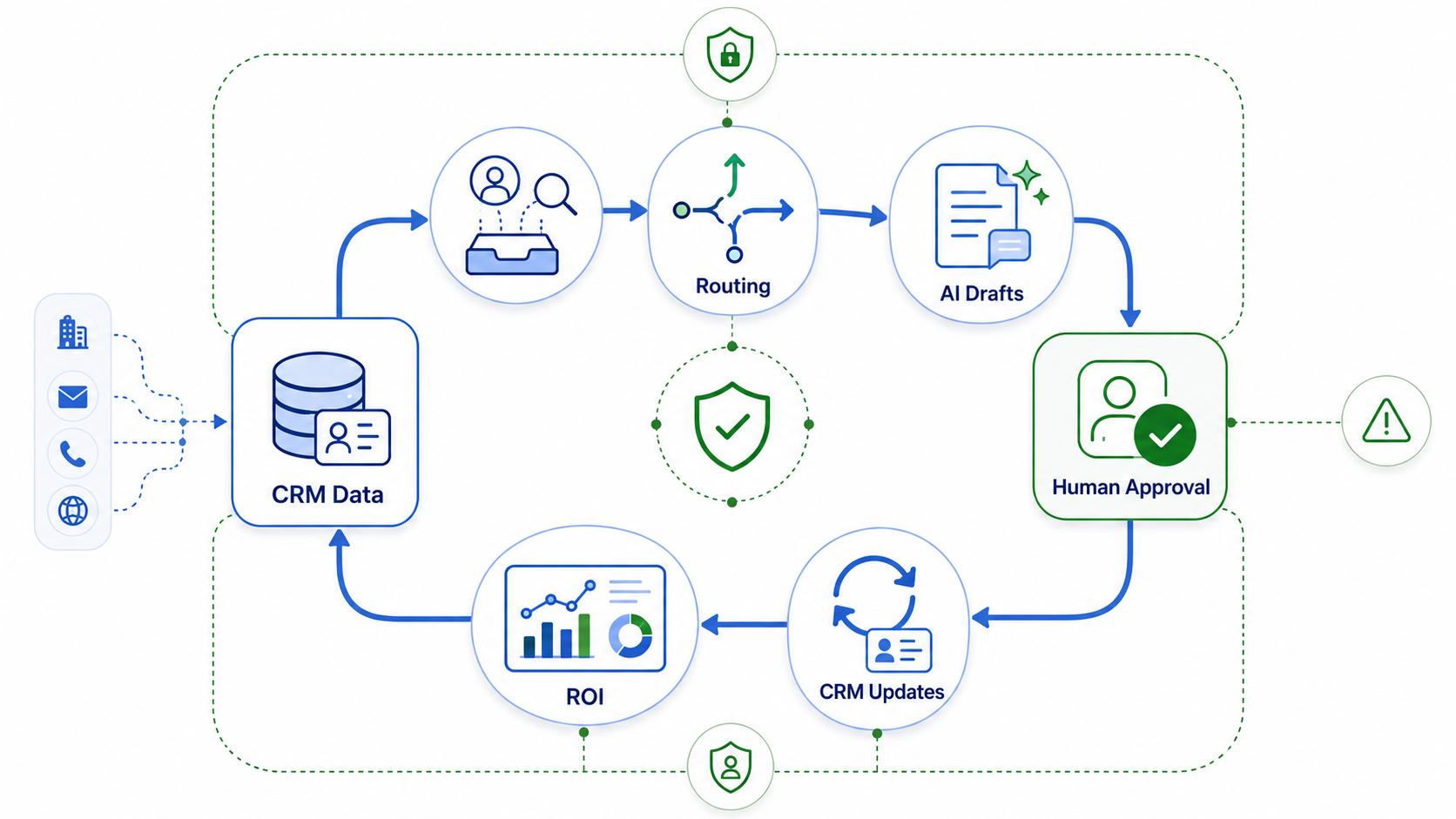
Quick Answer: What Should An AI Sales Agent Implementation Include?
An AI sales agent implementation should include a target workflow, CRM data audit, lead and account schema, routing rules, enrichment sources, AI task boundaries, human approval rules, CRM writeback design, evaluation cases, monitoring, and an ROI model. Start with one measurable workflow such as inbound lead qualification, follow-up drafting, meeting preparation, CRM hygiene, or stalled-opportunity nudges.
The first release should not try to automate every sales task. A narrow agent with clean inputs, clear permissions, and measurable outcomes will outperform a broad assistant that touches messy CRM records and creates review work for the sales team. NextPage's guide to AI agents for sales covers common sales use cases; this roadmap explains how to implement one safely.
Choose The First Sales Workflow
Pick a workflow where the sales team already has repeated volume, consistent decision rules, enough source data, and visible business value. Good candidates include inbound lead triage, SDR research briefs, first-touch email drafts, meeting summaries, CRM field cleanup, renewal-risk alerts, account expansion prompts, and next-best-action recommendations.
A weak first candidate is a workflow where every decision depends on senior judgment, the CRM is incomplete, the source of truth is scattered across private notes, or an incorrect action could create contractual, pricing, or compliance risk. In those cases, build a copilot or review queue before allowing autonomous CRM changes.
| Workflow | Agent Role | Human Approval Needed |
|---|---|---|
| Inbound lead qualification | Score fit, summarize intent, suggest owner and SLA. | Required before disqualifying or changing strategic-account ownership. |
| Outbound account research | Prepare account brief, trigger-reason summary, and talking points. | Required before sending externally visible outreach. |
| Follow-up drafts | Draft email based on call notes, product fit, and next step. | Required before sending until quality metrics are stable. |
| CRM hygiene | Detect missing fields, duplicates, stale stages, and inconsistent notes. | Required before destructive merges or high-value opportunity changes. |
| Pipeline nudges | Flag stalled deals and propose next actions. | Required before discount, forecast, or close-date changes. |
Build The CRM Data Foundation First
Sales agents depend on CRM data more than prompt language. Before implementation, audit lead source, lifecycle stage, company size, industry, geography, owner, product interest, previous interactions, opportunity value, consent status, and last activity. Decide which fields the agent can trust, which fields require enrichment, and which fields should never be inferred without review.
Data readiness is also an integration problem. Sales context may live in forms, website analytics, enrichment tools, email, calendar, call recordings, support tickets, billing systems, product usage, and customer-success notes. NextPage's CRM integration and workflow automation services focus on this exact layer: connecting CRM data with other systems so handoffs and reporting are reliable.
| Data Area | Implementation Question | Risk If Ignored |
|---|---|---|
| Lead identity | Can the agent match person, company, domain, and duplicate records? | Wrong account assignment or duplicate outreach. |
| Fit signals | Which firmographic, technographic, budget, and intent signals are approved? | Low-quality scoring and biased qualification. |
| Activity history | Can the agent read email, calls, meetings, notes, and form context? | Generic follow-up that repeats known questions. |
| Consent and region | Which communication rules apply by country, source, and opt-in status? | Compliance and brand-risk exposure. |
| Opportunity fields | Which fields can be suggested, drafted, or written automatically? | Pipeline contamination and forecast noise. |
Define Routing, Ownership, And Escalation Rules
Lead routing is one of the highest-value sales-agent use cases because speed and assignment quality affect conversion. The implementation should define territory, product line, company size, existing account ownership, partner channel, language, SLA, and strategic-account exceptions before the agent recommends an owner.
Do not leave ownership ambiguous. For every agent recommendation, store the source evidence, confidence, reason, and fallback owner. If the agent cannot decide because data is missing or rules conflict, it should create an exception task instead of guessing.
If your CRM needs deeper customization, permissions, dashboards, or workflow-specific objects, review custom CRM development services before forcing the workflow into generic CRM fields. Customization is justified when the sales process has unique account hierarchies, quote logic, approval rules, or reporting requirements.
Set The Agent Task Boundaries
A production sales agent needs explicit boundaries: what it can read, what it can suggest, what it can write, and what must be escalated. These boundaries should be implemented in application permissions and API scopes, not only in a prompt. A prompt can say "do not update opportunities without approval"; the CRM integration should also prevent that write unless an approval event exists.
Useful permissions usually progress in stages. Start with read-only research and summaries. Then allow draft creation. Then allow human-approved CRM updates. Only after the workflow is stable should the agent write low-risk fields automatically, such as task creation, internal notes, or enrichment status.
| Permission Level | What The Agent Can Do | Release Gate |
|---|---|---|
| Read-only | Summarize records, prepare briefs, flag missing data. | Retrieval quality and source coverage pass review. |
| Draft mode | Create suggested emails, notes, routing decisions, and next steps. | Sales reviewers accept drafts with limited editing. |
| Approved writeback | Update fields only after a human approves the action. | Audit logs, rollback, and approval queues are working. |
| Limited automation | Write low-risk fields or create tasks within strict rules. | Low error rate, low override rate, and stable monitoring. |
For agentic workflows that call tools, update systems, and route exceptions, NextPage's agentic AI development services can help design the orchestration, permissions, guardrails, observability, and release gates around the agent.
Design Human Approval Into The Workflow
Human approval should not be an afterthought. It is a product surface: reviewers need to see the suggested action, source evidence, confidence, risk category, editable output, and one-click approve/reject controls. The approval decision should write back to the CRM and to the agent evaluation dataset.
Use approval where the downside of a wrong action is material: sending external outreach, changing ownership, disqualifying a lead, updating forecast fields, applying discounts, changing close dates, merging duplicates, or triggering customer-facing sequences. Use sampling review for low-risk actions such as internal task creation once quality is stable.
The approval model should reduce manager burden over time. Track edit distance, rejection reason, approval time, and repeated correction categories. If reviewers keep fixing the same problem, improve data mapping, prompt instructions, or integration logic rather than asking humans to compensate indefinitely.
Plan CRM Writeback And Audit Trails
Writeback design decides whether the agent improves CRM quality or pollutes the pipeline. Every write should include who requested the action, which agent version produced it, which data sources were used, whether a human approved it, and how the change can be reversed or corrected.
For Salesforce-heavy environments, use a dedicated integration plan before production. The Salesforce integration roadmap explains how ERP, commerce, accounting, APIs, data sync, ownership, and error handling affect CRM reliability. The same discipline applies when an AI agent becomes another system writing to CRM.
Start with append-only records where possible: internal notes, suggested tasks, enrichment status, routing recommendation, or AI-generated brief. Move to field updates only after the team trusts the recommendation logic and has rollback.
Add Evals, Monitoring, And Guardrails
Sales-agent evaluation should test more than response quality. Build cases for missing data, duplicate accounts, strategic accounts, opt-out leads, stale opportunities, regional communication rules, unavailable CRM APIs, conflicting routing rules, and low-confidence enrichment. The correct behavior is often escalation, not automation.
Current production-agent guidance treats tools, guardrails, orchestration, observability, and evaluations as core concerns, not optional extras. Translate that into sales operations terms: track task success, routing accuracy, approval rate, rejection reason, hallucinated claim rate, CRM writeback errors, latency, cost per qualified lead, and downstream conversion.
Guardrails should exist at multiple layers: prompt instructions, retrieval filters, CRM permission scopes, API validation, policy checks, approval thresholds, and monitoring alerts. If the agent can contact prospects or modify records, record every action in a trace that sales, RevOps, and engineering can inspect.
Build The ROI Model Before Scaling
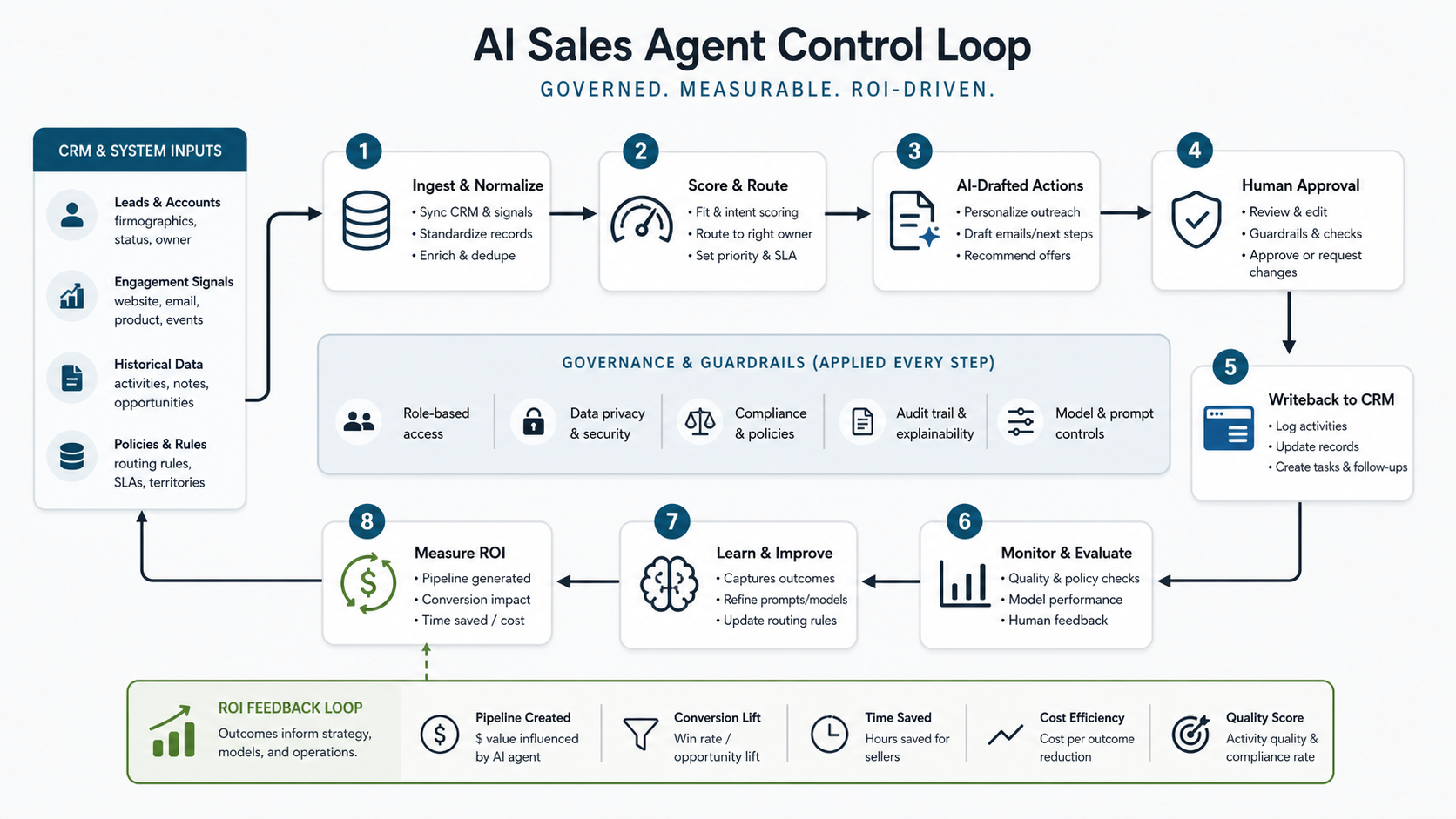
AI sales-agent ROI should be measured at workflow level, not by number of AI messages generated. A useful model combines hours saved, response speed, lead quality, conversion impact, CRM hygiene improvement, reviewer effort, model/tool cost, implementation cost, and support cost.
| ROI Line | How To Measure |
|---|---|
| Time saved | Minutes reduced per lead, account brief, follow-up, or CRM cleanup task. |
| Speed to lead | Time from form submission or trigger event to qualified owner action. |
| Quality | Reviewer approval rate, edit rate, rejection reason, and sales acceptance. |
| Revenue impact | Qualified meetings, conversion rate, pipeline influenced, renewal risk avoided. |
| Operating cost | Model cost, enrichment cost, integration maintenance, review minutes, support. |
For a directional business case, use the AI Automation ROI Calculator after you know the workflow volume, people involved, review effort, and automation potential. For broader workflow payback planning, NextPage's AI workflow automation ROI guide shows how to compare time savings, quality, review effort, integration cost, and operating risk. Scale only when the agent improves a real sales metric without increasing hidden review work.
AI Sales Agent Implementation Roadmap
Phase 1: discovery and workflow selection. Pick one workflow, define the user, inputs, outputs, owner, systems touched, risk level, and measurable outcome. Inventory CRM fields, source systems, routing rules, and approval needs.
Phase 2: data and integration foundation. Clean required fields, resolve duplicates, map enrichment sources, define identity matching, create API scopes, and build read paths. Keep writeback disabled until the agent can produce useful recommendations.
Phase 3: draft-mode agent. Generate lead summaries, account briefs, routing suggestions, and follow-up drafts. Review every output. Capture corrections as evaluation data.
Phase 4: approved CRM writeback. Add approval queues, audit logs, rollback paths, and limited write actions. Track approval rate, error rate, reviewer edits, and sales acceptance.
Phase 5: monitored expansion. Automate low-risk actions, add more workflows, integrate dashboards, and review traces weekly. Expand permissions only after metrics show stable quality and business value.
Common Implementation Mistakes
- Starting with a chatbot instead of a workflow: sales teams need actions, routing, and CRM context, not another generic answer box.
- Ignoring CRM hygiene: poor account matching, stale fields, and duplicate leads create low-quality recommendations.
- Skipping approval design: reviewers need evidence and editable controls, not a black-box recommendation.
- Giving broad write permissions too early: agent writeback should progress through release gates.
- Measuring activity instead of outcomes: more AI-generated emails do not matter unless speed, quality, conversion, or CRM health improves.
- Forgetting operating ownership: someone must review traces, monitor metrics, handle exceptions, and maintain prompt/integration versions.
How NextPage Can Help
NextPage helps teams implement AI sales agents around real workflows: CRM data readiness, lead routing, enrichment, outreach drafts, approval gates, CRM writeback, dashboards, and ROI measurement. A practical engagement starts with one workflow, one CRM integration map, one approval model, and one scorecard.
The goal is not to make the sales process look automated. The goal is to make the next sales action faster, better evidenced, and easier to audit. Once that loop works, the agent can earn more permissions through measurable quality.