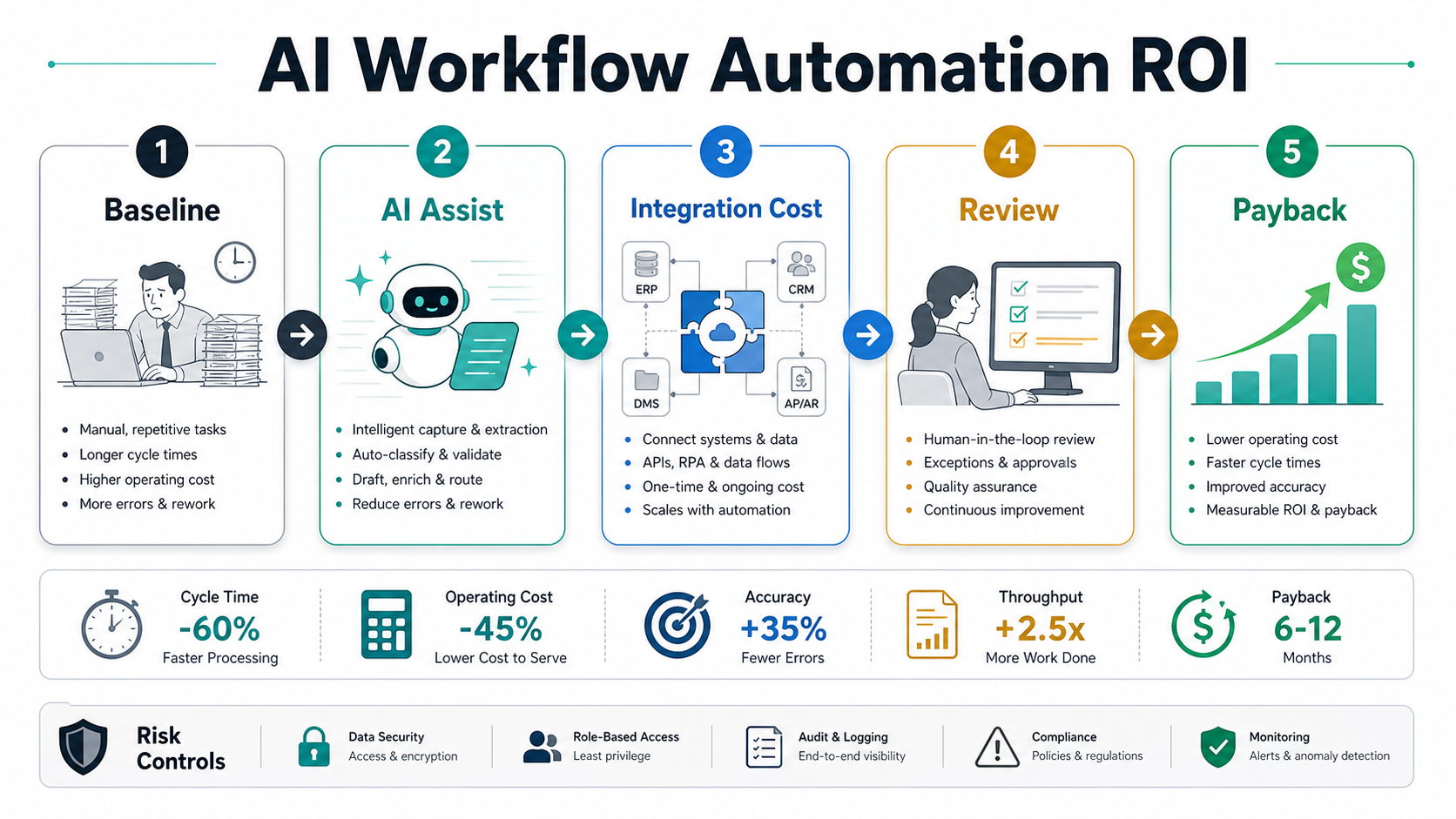

AI workflow automation ROI is the measurable value created when AI reduces repeated operational work without increasing review burden, integration cost, compliance risk, or rework. The practical calculation is simple: compare the current cost of a workflow against the cost of the AI-assisted version, then subtract build, integration, review, monitoring, and change-management cost. The harder part is choosing a workflow narrow enough to measure.
For most back-office teams, the first ROI model should focus on one repeated workflow such as invoice matching, support triage, CRM cleanup, compliance evidence review, HR onboarding, order exception handling, or reporting preparation. Start by estimating current task time, exception volume, hourly cost, error cost, and cycle-time impact. Then model the automated version with human review, API access, audit logs, fallback rules, and operating support included. If you need a quick directional estimate before deeper planning, the AI Automation ROI Calculator can convert weekly effort, team size, hourly cost, and automation potential into a first-pass savings range.
The best AI automation projects do not begin with a model demo. They begin with a workflow that has clear inputs, decision rules, owners, exceptions, and a measurable business outcome. Use the AI Agent Readiness Assessment before giving AI access to business systems, because weak data, unclear ownership, and missing review controls can erase the ROI that looked obvious in a spreadsheet.
Quick Answer: How Do You Calculate AI Workflow Automation ROI?
Calculate AI workflow automation ROI by comparing the baseline workflow cost with the expected automated workflow cost over the same period. A useful model includes time savings, error reduction, faster cycle time, improved throughput, and avoided manual rework, then subtracts implementation, integration, data cleanup, human review, monitoring, training, and ongoing support costs.
A practical formula is:
ROI = (annual benefits - annual automation cost) / annual automation cost.
Benefits usually come from five places:
- Labor hours saved: lower repeated manual review, data entry, document handling, routing, or status-checking time.
- Error reduction: fewer duplicate records, missed approvals, incorrect handoffs, or compliance evidence gaps.
- Cycle-time improvement: faster invoices, support responses, onboarding steps, approvals, reconciliations, or reporting cycles.
- Capacity gain: more work handled without adding headcount during peak volume.
- Risk reduction: better audit trails, permission controls, exception handling, and monitoring.
Costs usually include more than the model or automation platform. Include discovery, process redesign, workflow orchestration, data preparation, integrations, API usage, user interface changes, human-review time, QA, observability, incident handling, and change management. A project that ignores these costs may still save time, but the payback estimate will be unreliable.
Choose Back-Office Use Cases With A Scoring Matrix
The highest-ROI AI workflow automation candidates have repeatable inputs, high task volume, clear business rules, known exceptions, measurable outcomes, and enough manual pain to justify implementation. They also have owners who can define what good output looks like and when a human must approve or override the system.
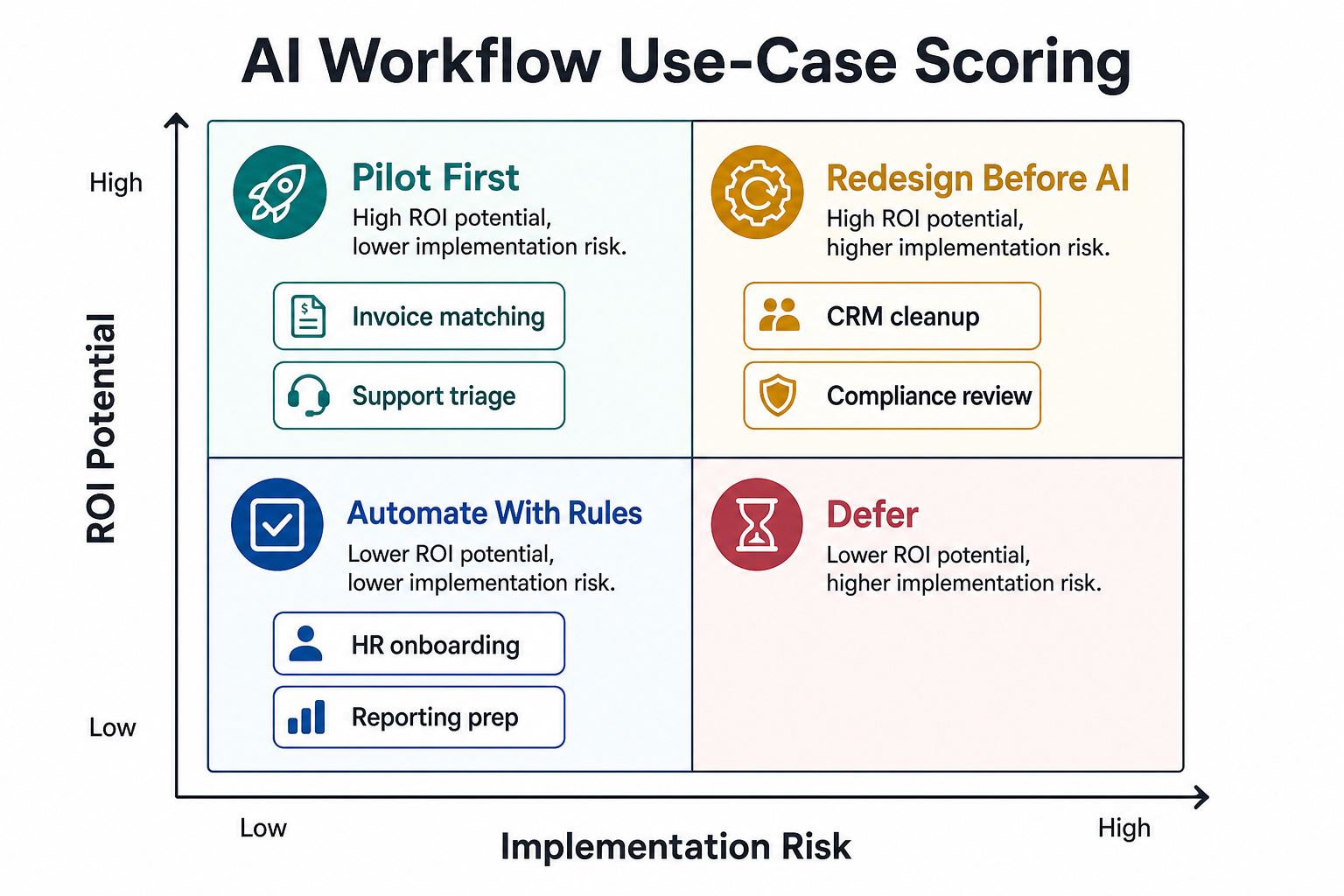
Use a scoring matrix before funding a build. Give each workflow a 1-5 score for:
- Volume: how often the task happens each week or month.
- Time cost: how many human minutes each task consumes.
- Rule clarity: how clearly the team can define correct routing, extraction, recommendation, or approval behavior.
- Data quality: whether source records, documents, messages, and labels are complete enough for automation.
- Integration access: whether the workflow can read from and write to the systems of record safely.
- Review burden: how much expert review is still required after AI assists the task.
- Business impact: whether faster or cleaner workflow execution improves revenue, cost, compliance, or customer experience.
Good first pilots often sit in the high-value, lower-risk quadrant: invoice data extraction with approval, support triage with escalation, CRM hygiene suggestions, sales account research, HR onboarding checklists, or reporting prep. Workflows with high value but high risk can still be worth building, but they need redesign, controls, and staged rollout first. For a broader workflow architecture view, use NextPage's AI workflow automation guide alongside this ROI model.
Baseline The Current Process Before Automation
A business case is only as strong as the baseline. Before automation starts, measure the current workflow in operational terms, not only opinions. Capture task volume, average handling time, queue time, rework rate, escalation rate, error rate, SLA misses, business owner effort, and downstream impact.
For example, an invoice-matching workflow might look attractive because the accounts payable team spends 25 hours per week on manual checks. The true baseline should also include vendor follow-up time, duplicate payment risk, approval delays, ERP correction work, month-end reporting friction, and the time managers spend checking exceptions. Those hidden costs often matter more than the obvious data-entry time.
Use this baseline table before modeling the automated state:
| Baseline Metric | What To Measure | Why It Matters For ROI |
|---|---|---|
| Task volume | Weekly or monthly count by workflow type | Determines whether automation savings can overcome fixed implementation cost |
| Handling time | Average minutes per task, including interruptions | Feeds the labor-savings model |
| Exception rate | Share of tasks requiring human decision or escalation | Prevents overestimating straight-through automation |
| Error and rework cost | Corrections, missed approvals, duplicate work, customer follow-up | Captures quality gains beyond time savings |
| System touchpoints | ERP, CRM, ticketing, finance, HRIS, email, spreadsheets, data warehouse | Reveals integration scope and maintenance cost |
| Owner and reviewer effort | Who approves, rejects, audits, or fixes the workflow | Keeps human-review cost visible |
Include Integration And Data Costs
AI automation ROI often fails when the spreadsheet assumes the model is the product. In production, the system must connect to data, permissions, workflows, dashboards, alerts, and audit trails. Integration work can include API contracts, OAuth or scoped credentials, event triggers, background jobs, queues, retries, admin controls, log retention, and rollback behavior.
Data work is equally important. Documents may need classification, records may need deduplication, support tickets may need clean categories, and CRM fields may need standardization before AI can make useful recommendations. If the workflow needs retrieval, summarization, or policy reasoning, teams also need source ingestion, access control, evaluation datasets, and feedback loops. NextPage's Enterprise AI Readiness Checklist is a useful companion when these data, workflow, security, and governance questions are still unresolved.
When estimating implementation cost, separate one-time and recurring costs:
- One-time: discovery, process mapping, UX, workflow service, model/prompt design, integrations, evaluation, QA, security review, rollout training.
- Recurring: model usage, monitoring, support, exception handling, periodic evaluation, source updates, regression testing, integration maintenance, and governance review.
If the workflow touches ERP, CRM, finance, HR, logistics, or support systems, compare the scope with Robotic Process Automation Services. Some workflows need classic rules and integrations before they need an AI agent. Others need AI only for classification, summarization, or exception explanation while deterministic automation handles the handoff.
Model Human Review Instead Of Ignoring It
Human review is not a sign that automation failed. In many back-office workflows, human review is the control that makes ROI sustainable. The mistake is pretending review cost disappears. A realistic model defines what AI can do automatically, what it can draft or recommend, what needs approval, and what must never be automated.
Review cost depends on confidence thresholds, workflow risk, data quality, and reviewer expertise. A support triage assistant might need light spot checks after it proves stable. A compliance evidence assistant might require every recommendation to be reviewed until the organization trusts the evaluation results. A finance workflow might allow straight-through processing only below certain value, vendor, and confidence thresholds.
Use review tiers:
- Low risk: AI drafts, labels, or summarizes; humans sample output periodically.
- Medium risk: AI recommends actions; humans approve exceptions, high-value items, or low-confidence cases.
- High risk: AI prepares evidence and suggested decisions; accountable owners approve every action.
For workflows that may evolve into agents with tool access, governance must be part of the ROI model. The Enterprise AI Agent Governance guide covers permission envelopes, human review, monitoring, audit evidence, and rollback planning.
Build A Payback Model
A payback model answers a direct question: how long until cumulative benefits exceed implementation and operating costs? For AI workflow automation, payback is usually clearer when measured by workflow, not by department-wide AI adoption.
Start with a conservative model:
- Current weekly task volume: 1,000 items.
- Current handling time: 8 minutes per item.
- Fully loaded hourly cost: $35.
- Expected automation assist rate: 45% of task time.
- Expected review overhead: 90 reviewer hours per month during rollout, declining after stabilization.
- Implementation and integration cost: one-time build plus recurring platform, model, and support cost.
Then run pessimistic, expected, and optimistic cases. The pessimistic case should include slower adoption, more exceptions, data cleanup, and extra support. The optimistic case should still include monitoring and review. If the project only looks good in the optimistic case, narrow the scope or choose another workflow.
| Payback Input | Conservative Question | Common Mistake |
|---|---|---|
| Automation rate | What share of work can AI assist after exceptions? | Assuming 100% automation from a demo |
| Review effort | How many minutes remain for approval, correction, and audit? | Treating human review as free |
| Integration cost | Which systems require read/write access, testing, and monitoring? | Counting only the model or license cost |
| Quality gain | Which errors, delays, or rework actually decline? | Claiming generic productivity without baseline evidence |
| Adoption curve | How long until users trust and consistently use the workflow? | Assuming day-one steady state |
Automation Risks That Can Reduce ROI
Automation risk is not only a compliance concern. It directly affects ROI because weak controls create rework, incidents, lost trust, and support cost. The riskiest projects usually share the same warning signs: vague workflow scope, poor data quality, hidden spreadsheet dependencies, missing API access, no accountable owner, unclear review rules, and no way to pause or roll back automation.
Common ROI reducers include:
- Bad data: stale records, duplicate customer profiles, inconsistent categories, missing labels, and conflicting source documents.
- Unclear ownership: nobody owns exceptions, approval thresholds, feedback loops, or post-launch tuning.
- Integration fragility: brittle UI automation, untested API limits, missing idempotency, and weak retry behavior.
- Review overload: AI creates more items to inspect than the team can absorb.
- Unmeasured quality: time savings look good while accuracy, CSAT, compliance evidence, or downstream rework gets worse.
- No rollback: the team cannot pause automation, reverse a bad action, or route work back to the old process during an incident.
Controls are part of the ROI system. Build audit logs, confidence thresholds, approval queues, test datasets, monitoring, and exception dashboards into the first release. If the workflow has customer, financial, safety, or compliance impact, start with supervised automation before expanding autonomy.
Back-Office AI Automation ROI Roadmap
The safest path is a staged roadmap that keeps payback visible at every step. Do not jump from idea to enterprise rollout. Move from baseline to prototype, integrate only the systems needed for the first workflow, keep human approval in the loop, measure both savings and quality, then scale only when the business case survives real usage.
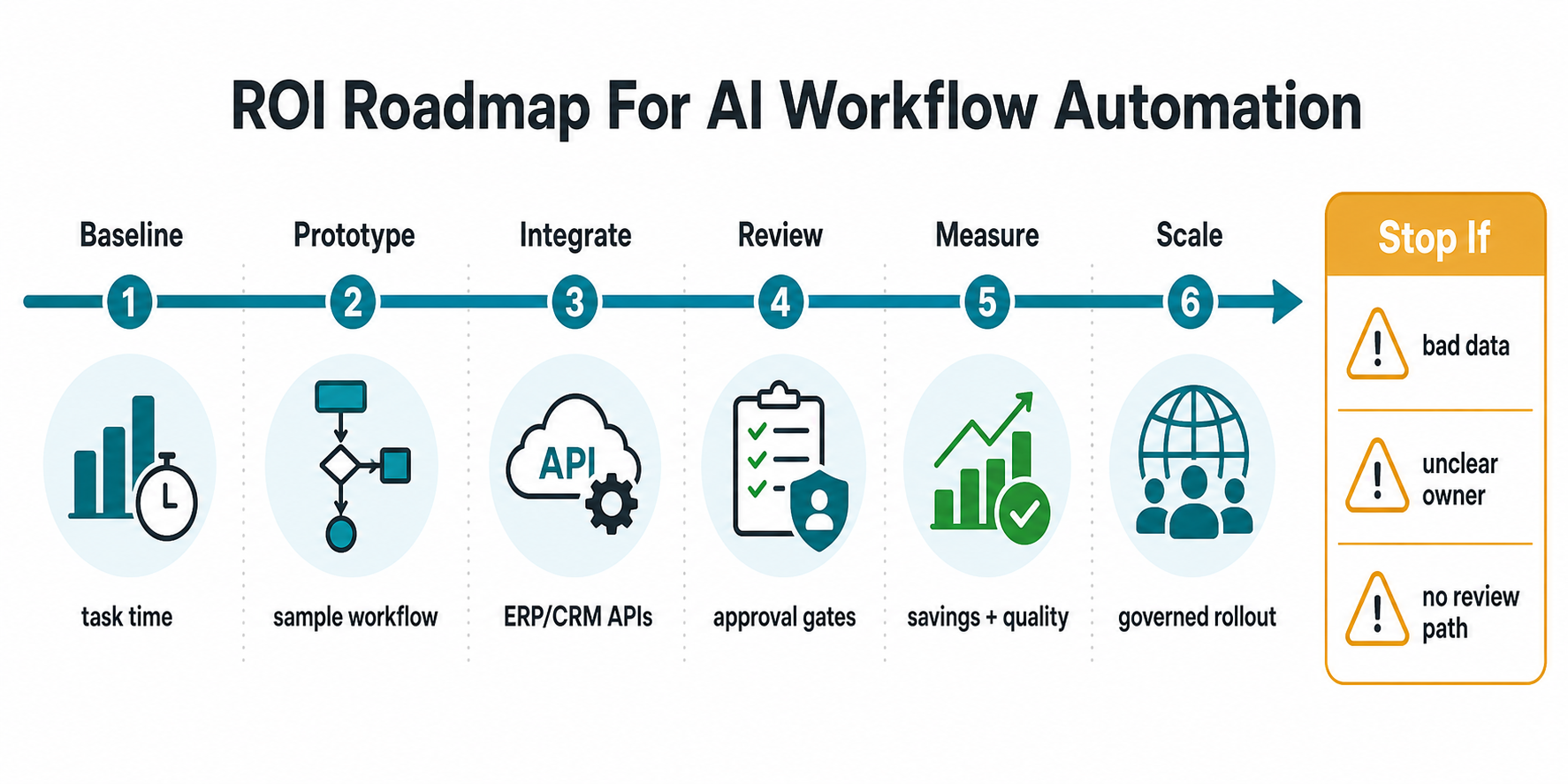
- Baseline: measure task time, exceptions, rework, system touchpoints, and owner effort.
- Prototype: test one sample workflow with real examples and success criteria.
- Integrate: connect only the systems needed for the first measurable release.
- Review: define approval gates, confidence thresholds, escalation paths, and reviewer workload.
- Measure: track savings, accuracy, cycle time, quality, adoption, support cost, and incident signals.
- Scale: expand to similar workflows only after the pilot proves value and reliability.
This is where AI automation overlaps with custom software delivery. A working system may need workflow orchestration, admin panels, queues, integration services, role-based permissions, observability, and reporting. For workflows that need deep business-specific logic, custom software development is often the foundation that makes the AI layer reliable.
What A Good ROI Dashboard Should Track
After launch, the dashboard should prove whether the automation is saving money without damaging quality. It should not show only usage or model calls. Business owners need operating metrics that map back to the original baseline.
| Dashboard Area | Metrics To Track | Decision It Supports |
|---|---|---|
| Savings | Hours saved, cost avoided, throughput per user, cycle-time reduction | Whether the workflow is paying back |
| Quality | Accuracy, rework, escalations, reopened items, reviewer corrections | Whether savings are real or shifting work downstream |
| Review | Approval queue volume, average review time, low-confidence cases, override rate | Whether human-in-the-loop effort is manageable |
| Reliability | Integration failures, retry count, latency, incident count, rollback events | Whether the automation can scale safely |
| Adoption | Active users, accepted suggestions, ignored suggestions, feedback themes | Whether the team trusts and uses the workflow |
When teams need a production build rather than a spreadsheet, NextPage's AI Development Services can connect AI workflows to real products, APIs, documents, dashboards, QA, permissions, and human-review controls.
How NextPage Can Help
NextPage helps teams turn AI workflow automation ideas into measurable software. We start by selecting the right workflow, baselining the current process, testing data and integration readiness, estimating ROI, and defining the human-review model. From there, we can design the pilot, build the workflow service, connect systems, create evaluation checks, and launch with dashboards that show savings, quality, and risk signals.
The right first release might be a rules-first automation, an RPA workflow, a document-processing assistant, a retrieval copilot, a supervised AI agent, or a custom internal tool. The architecture should follow the workflow value and risk profile, not the other way around. If your team is deciding where to start, use the calculator and readiness assessment first, then bring the strongest workflow into a scoped discovery sprint.