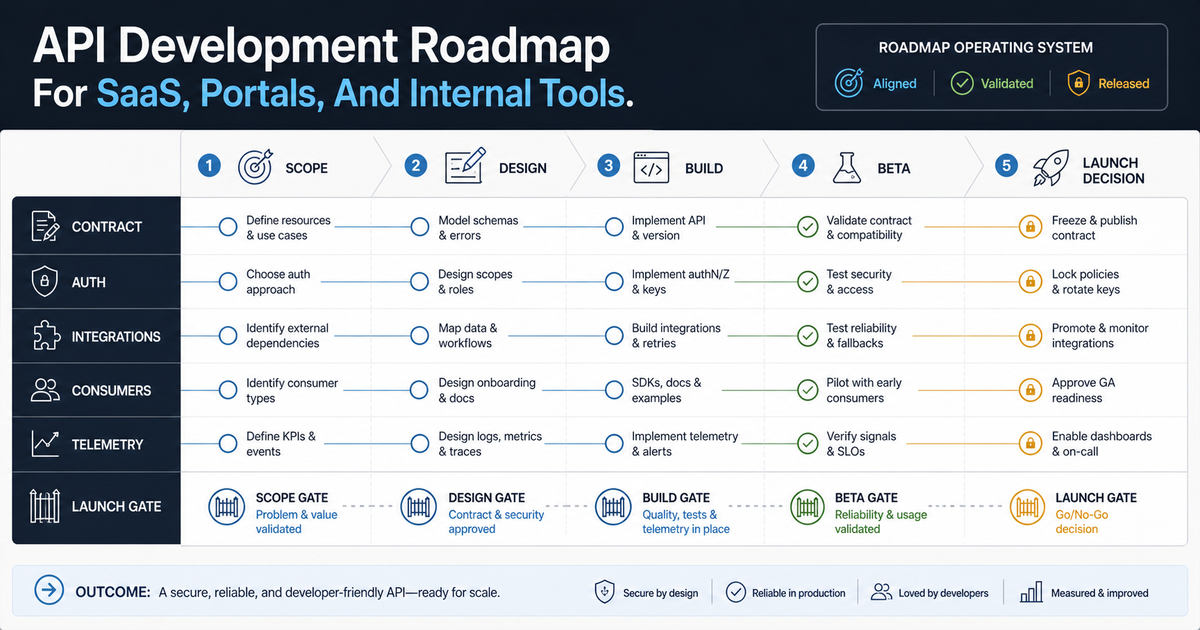

An API development roadmap should start with the business workflow, not the endpoint list. For a SaaS product, customer portal, internal tool, or partner integration, the right roadmap defines who will use the API, what data it exposes, how access is controlled, which systems it must connect, how failures are handled, and what must be ready before launch. If those decisions are skipped, teams usually get a technically working API that is hard to secure, hard to document, expensive to maintain, and painful for other teams to adopt.
This guide is for founders, product leaders, CTOs, and operations teams planning API-backed software. Use it to decide what belongs in release one, what can wait, and what to clarify before engaging a backend and API development team. If you already know the rough feature set, NextPage's Custom Software Cost Estimator can turn the integration count, user roles, workflow complexity, and platform scope into a directional budget range.
Quick Answer: What Should An API Roadmap Include?
A practical API roadmap should include seven decisions: the business use case, data model, API contract, authentication and authorization model, integration architecture, testing and observability plan, and launch/support model. In 2026, add one more explicit gate: prove the contract works for human UI teams, partner SaaS integrations, internal tools, automation jobs, and AI/tool consumers with scoped authorization, evaluation tests, telemetry, and rollback evidence before launch. For most SaaS, portal, and internal-tool projects, these decisions matter more than choosing REST versus GraphQL on day one.
For teams still proving the product, connect release-one API scope to an MVP development plan: ship the smallest contract that supports the first workflow, the first integration, and the first support handoff, then reserve platform capabilities for phase two.
The roadmap should also separate release-one scope from later platform work. A first release may only need authenticated CRUD endpoints, a few webhooks, admin audit logs, contract tests, and documentation for an internal team. A mature API product may need self-service developer onboarding, scoped API keys, versioning, rate limits, usage analytics, billing events, and partner support workflows. Postman's 2025 State of the API report shows why that contract layer matters: functional and integration testing are common, but contract testing still lags, even though API contracts now guide human developers, automation, and AI-assisted consumers.
That AI-assisted consumer layer is becoming more important for SaaS and internal-tool roadmaps. If support agents, workflow automations, reporting assistants, or partner bots will call the API later, release one should already define stable schemas, scoped access, idempotency behavior, and error responses that machines can interpret without guessing.
Before implementation starts, add one consumer acceptance row for each caller that must work in release one. This keeps the API roadmap measurable: product leaders can see which frontend, portal, partner, automation, support, and AI-agent consumers have a contract example, permission rule, error path, test owner, and launch sign-off instead of treating the API as a generic backend task.
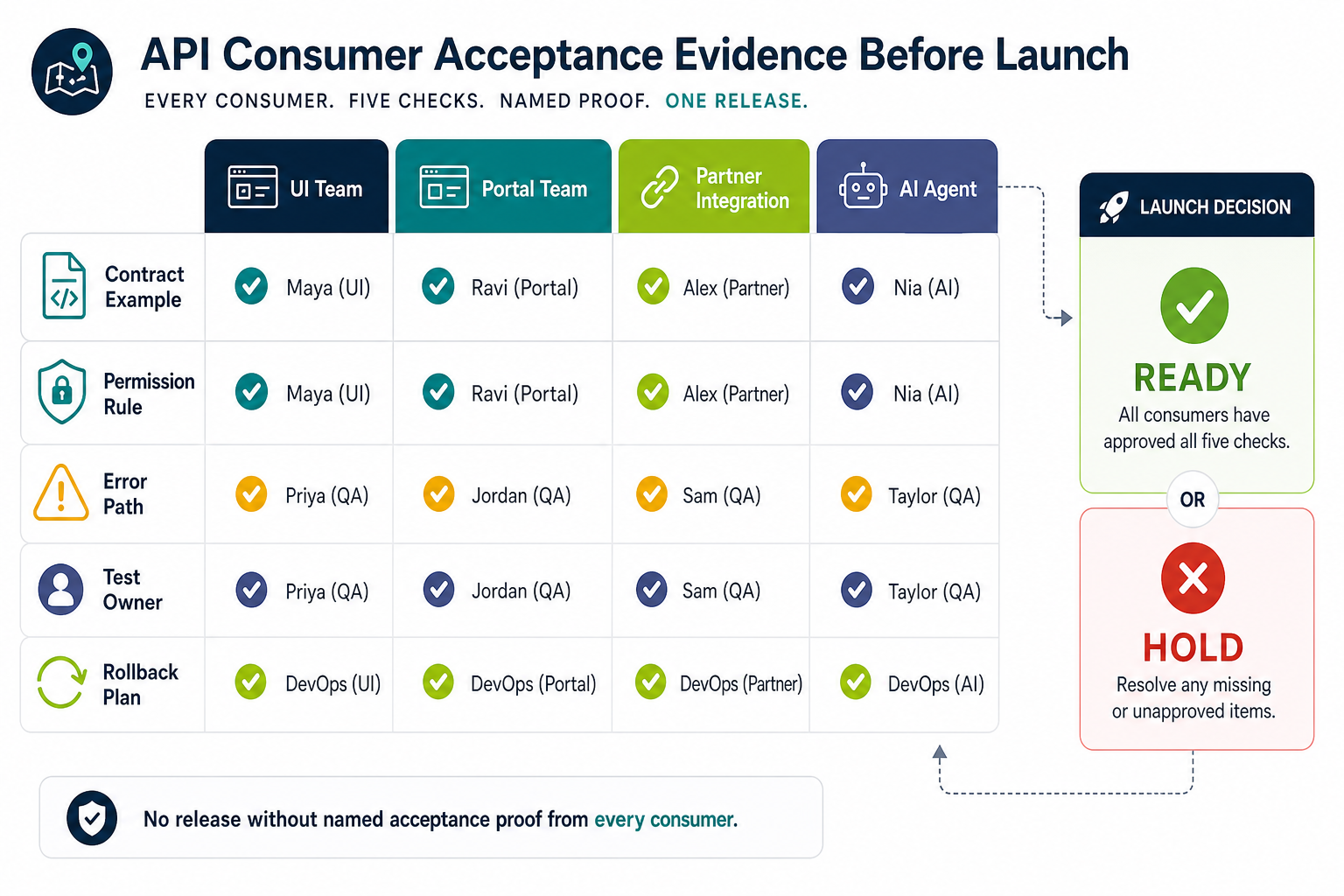
| Release-One Consumer | Acceptance Proof | Owner To Name |
|---|---|---|
| Web or mobile UI | Typed client or fixtures, pagination behavior, empty/error states, and backward-compatible response checks | Product and frontend lead |
| Customer or employee portal | Role-scoped account context, document/workflow permissions, audit trail, and support-debug view | Portal product owner |
| Partner or SaaS integration | Sandbox credentials, webhook replay, quota/rate-limit behavior, changelog, and escalation path | Integration owner |
| Automation or AI agent | Scoped tool permissions, idempotency, predictable errors, synthetic-agent tests, and rollback evidence | Automation owner and security reviewer |
For buyer planning, add one more release-one decision: who owns the contract after launch. Name the product owner for schemas, the engineering owner for breaking-change review, the security owner for access and token policy, and the support owner for developer-facing incident notes. Without those owners, API contracts drift as soon as the first portal, automation, partner integration, or AI workflow depends on them.
Start With The Job The API Must Do
APIs are often described as technical interfaces, but buyers should define them as business capabilities. A SaaS product API may let customers sync records into their CRM. A portal API may expose account, order, ticket, or document data. An internal tool API may connect approval workflows, reporting dashboards, and legacy systems. If the roadmap is really part of broader internal tool development, decide early whether the API is just a backend for one workflow or a reusable operational platform. A partner API may become a channel for distribution, revenue, or operational scale.
Write the first roadmap page in business language:
- Who will call the API: internal developers, mobile apps, customer admins, partners, vendors, AI agents, or automation platforms?
- Which workflows must be possible in release one: create, read, update, approve, sync, notify, search, report, or trigger?
- Which records are sensitive: customer data, payments, health data, documents, credentials, operational logs, or pricing?
- Which systems must stay in sync: CRM, ERP, warehouse, billing, analytics, identity provider, data warehouse, or legacy database?
- What does success mean: fewer manual steps, faster onboarding, partner integrations, lower support load, or a new API revenue stream?
If a mobile app is one of the first consumers, include client-specific rules in the API scope: offline sync, token refresh, app-version headers, pagination for small screens, retry and idempotency behavior, and backward-compatible response changes. This is where API planning should meet the broader mobile app development roadmap, because one unstable endpoint can break login, checkout, field updates, or push-driven workflows across installed app versions.
This framing keeps API development connected to product value. It also prevents the common mistake of building every possible endpoint before the team has proved which workflows users actually need.
Choose The Right API Shape
Most teams do not need one perfect API style. They need the smallest combination that matches the product. REST remains a strong default for resource-oriented business workflows. GraphQL can help when clients need flexible reads across many related objects. Webhooks are useful for event-driven updates. Batch imports, exports, and background jobs are often better than forcing heavy data sync through synchronous endpoints.
| API Need | Good First Choice | Watch For |
|---|---|---|
| Standard SaaS records | REST with OpenAPI | Overly broad endpoints and inconsistent naming |
| Complex dashboard reads | GraphQL or tailored read endpoints | Authorization and query-cost controls |
| Cross-system events | Webhooks plus retry queues | Duplicate events, missing signatures, weak replay handling |
| Large data movement | Async jobs, files, or batch APIs | Timeouts, partial failures, and support visibility |
| Partner ecosystem | Documented public API with developer portal | Versioning, rate limits, key rotation, and support ownership |
If the API is part of a larger SaaS build, connect this decision to the broader SaaS development roadmap: tenant model, roles, billing, admin panels, analytics, and customer onboarding all affect API design.
Define The Contract Before The Build
The API contract should become the shared source of truth for engineering, QA, frontend, mobile, partner, and documentation work. For many teams, an OpenAPI specification is the most practical contract because it documents endpoints, methods, schemas, status codes, examples, and authentication expectations in a format that tools can validate.
A useful contract answers:
- What resources exist and what are they called?
- Which fields are required, optional, derived, read-only, or sensitive?
- What does pagination, filtering, sorting, search, and bulk behavior look like?
- Which errors can callers expect and how should they recover?
- Which version is stable and how will breaking changes be handled?
- Which examples prove the API can support the highest-value workflows?
Do not wait until the end to write documentation. Documentation written after development often reflects implementation accidents. Documentation written alongside the contract forces useful decisions earlier. Treat the contract as a release artifact: it should be reviewed before implementation, checked in CI, used for mock responses, and updated with migration notes whenever a breaking change is proposed.
For API-backed SaaS, portals, and internal tools, make the contract review executable. Add lint rules for naming, pagination, errors, auth scopes, idempotency, deprecation flags, stable operation IDs, and example coverage. Then run those checks in CI against generated clients, mock servers, contract tests, and any AI/tool-calling consumers that depend on the API description. This catches drift before frontend teams, partner integrations, support playbooks, or agent workflows start treating an undocumented behavior as stable.
For 2026 API roadmaps, make the compatibility gate cover both tooling and agent-ready documentation quality. Name the OpenAPI version, gateway, documentation portal, SDK generator, contract-test runner, observability sink, API security test path, and AI/tool-calling consumer pattern for release one. Then check operation IDs, examples, parameters, error behavior, permissions, rate limits, webhook replay, and sensitive fields before exposing endpoints to MCP servers, generated clients, workflow automation, or partner sandboxes. Recent OpenAPI research shows stable APIs can still fail for agents when descriptions are too thin for reliable tool selection or payload construction, so run the same contract through generated clients, mock servers, contract tests, QA automation testing services, and a narrow synthetic-agent test before launch. For NextPage buyers, this gate belongs beside backend API development services and developer portal planning.
Turn that review into a small compatibility matrix before development starts. List the API description version, gateway or runtime, documentation portal, generated clients, mock server, contract-test runner, security scanner, monitoring tool, AI-agent access pattern, and deprecation-notice owner. This prevents a common roadmap failure: the OpenAPI file says one thing, generated clients assume another, AI tools infer unsafe actions, and production behavior drifts after the first integration sprint.
| Toolchain Proof | Buyer Should Ask For | Roadmap Decision |
|---|---|---|
| OpenAPI version | Which OAS version is supported by the gateway, docs, SDK, mock, test, and security tools? | Use 3.2 features only where the release-one toolchain can parse and test them. |
| Streaming or async-style responses | Can docs, clients, monitors, and tests describe event streams or sequential responses clearly? | Defer advanced patterns if support teams cannot debug them after launch. |
| AI and automation consumers | Can tool-calling workflows read examples, errors, scopes, and rate-limit behavior from the same contract? | Add machine-consumer tests before agent or automation rollout. |
| Spec-version inventory | Which OpenAPI and MCP versions are pinned in docs, validators, gateways, clients, monitors, and support runbooks? | Hold new spec features until operational tools can parse, test, and support them. |
If AI agents, workflow automations, or MCP-style tool layers may consume the API later, add a machine-consumer checkpoint to the contract review. The checkpoint should prove that schemas are strict, examples cover both success and failure paths, authorization scopes are explicit, rate-limit and retry behavior is documented, and every mutating operation has an idempotency or rollback expectation. This keeps the roadmap from treating agents as a future wrapper around a human-only API.
| Machine Consumer Check | Roadmap Evidence | Why It Matters |
|---|---|---|
| Tool-safe schemas | OpenAPI examples for required fields, nullable fields, enums, pagination, and typed errors | Agents and generated clients need predictable contracts, not implied behavior from tribal knowledge. |
| Scoped actions | Permission matrix for read, create, update, approve, export, and destructive operations | Over-broad tokens can let automation or agent workflows touch records they should never reach. |
| Replayable tests | Contract tests, mock responses, sandbox credentials, and failed-call fixtures in CI | Every consumer can prove readiness before a release, including web UI, portal, partner, automation, and AI/tool callers. |
| Operational guardrails | Rate-limit rules, idempotency keys, webhook replay, audit logs, and anomalous-traffic alerts | Machine-speed consumers turn small contract or permission mistakes into production incidents quickly. |
Prove The API Toolchain Before Using New Spec Features
Current-spec evidence lane: Keep OpenAPI 3.2.0 as the HTTP API contract baseline, use Arazzo 1.1.0 when roadmap proof depends on workflow descriptions across APIs, use AsyncAPI 3.1.0 for event-driven channels, and treat MCP behavior as a separate compatibility lane when agent or tool consumers are in scope. As of August 18, 2026, use MCP 2026-07-28 as the current checkpoint, not a release-one dependency. MCP 2026-07-28 shifts the roadmap toward stateless request/response behavior, self-describing requests, header routing, cacheable list results, authorization hardening, extensions, trace propagation, and old-client fallback. Release-one roadmaps should depend on MCP 2026-07-28 behavior only after the chosen clients, servers, gateway, logs, inspector run, and rollback path pass adapter tests.
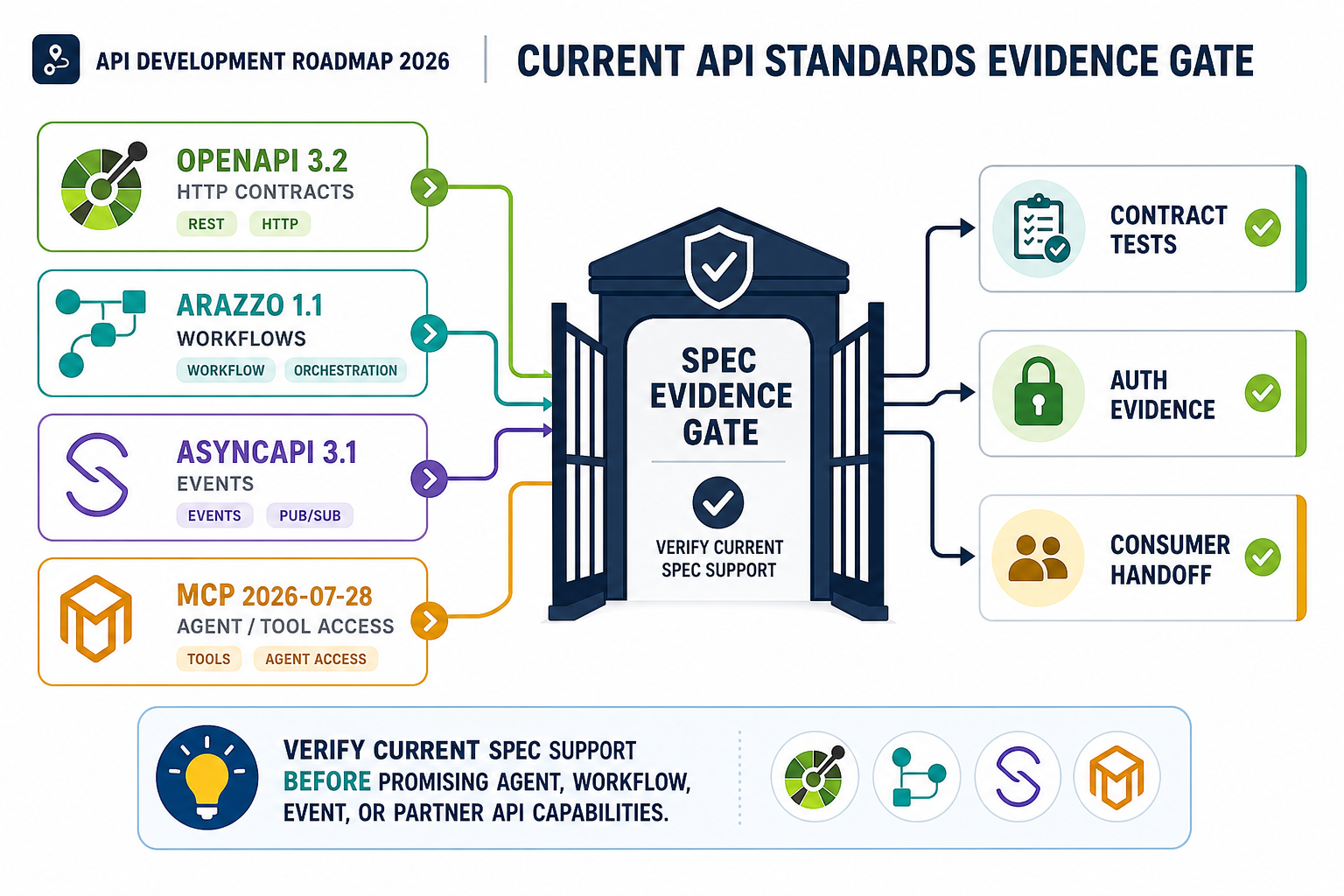
Use MCP SDK and conformance evidence as proof inputs, not a shortcut around governance. Run the chosen SDK and contract toolchain against real authentication, workflow, event, tool execution, error, timeout, logging, and rollback paths before the roadmap promises partner, workflow, event, or agent-ready access. Teams building SaaS portals, dashboards, internal tools, or workflow automations should pair this proof lane with backend and API development services planning so gateway policy, observability, and service ownership are designed before implementation.
This proof gate is especially important for SaaS products, customer portals, internal tools, partner APIs, and agent-facing workflows. In 2026, keep OpenAPI 3.2.0 as the HTTP contract baseline, then prove that the gateway, docs portal, SDKs, contract tests, auth middleware, telemetry, and support runbook preserve the same behavior. If one tool breaks the path, use a conservative subset for release one and keep the newer feature behind a phase-two gate.
| Toolchain Decision | Proof To Require | Release-One Rule |
|---|---|---|
| OpenAPI version and feature set | Spec validates in the chosen linter, docs portal, gateway, mock server, and contract-test runner. | Use 3.2 features only when every release-one tool keeps the behavior intact. |
| Streaming, async, or long-running operations | Client examples, timeout policy, retry behavior, observability labels, and support runbook are reviewed together. | Ship a simpler polling or webhook path if consumers cannot test the streaming path reliably. |
| SDKs, typed clients, and examples | Generated clients compile, examples cover success and failure states, and consumer teams pass smoke tests. | Do not call the contract stable until at least one real consumer uses the generated artifact. |
| AI or tool-calling consumers | Scopes, examples, predictable errors, audit logs, rate limits, and recovery paths work in synthetic-agent tests. | Expose preview/read operations first; gate execute/export/admin actions behind policy and review. |
For 2026 planning, separate the API description from the workflow description. OpenAPI 3.2 is useful when the team needs the current HTTP API description line and the tooling path supports it. OpenAPI 3.1 remains a practical baseline where gateways, docs, SDK generation, and contract tests are more mature. AsyncAPI 3.1 should be considered when the roadmap includes event-driven channels, messages, or streaming-style integration contracts. Arazzo is useful when buyers need executable workflow documentation that shows call sequences, dependencies, success criteria, and failure paths across one or more API descriptions.
Use this standards decision as a release gate, not a documentation preference: every selected API description, workflow file, client, gateway, security scan, and telemetry path must survive the same release-one proof run before the roadmap treats it as production-ready. For teams turning internal platforms into products, connect that gate to SaaS development services, web app development, and custom software cost estimation decisions so the roadmap covers scope, team shape, and delivery risk together.
August 9, 2026 source-status check: Use OpenAPI 3.2.0 for HTTP API descriptions, Arazzo 1.1.0 for workflow evidence, AsyncAPI 3.1.0 for event-driven contracts, MCP 2026-07-28 for agent/tool consumers, RFC 9700 for OAuth security, and OAuth 2.1 as an active draft.
| Standard Or Signal | Roadmap Rule |
|---|---|
| OpenAPI 3.2.0 | Use when release-one tools preserve the selected HTTP API features. |
| MCP 2026-07-28 | Prove stateless routing, cache behavior, authorization, logs, and rollback before agent/tool rollout. |
| OAuth / API Security | Require PKCE, strict redirect checks, least-privilege scopes, token leakage checks, and audit evidence. |
Build Security Into The Roadmap
Security is not a final review step for APIs. Pair contract tests with QA automation testing services for API and integration automation, because auth, payload, webhook, and rollback defects usually surface across workflows rather than inside a single endpoint. OWASP's API Security project emphasizes that APIs expose application logic and sensitive data, which makes authorization, authentication, object access, and data exposure risks central to the design. For buyers, the important question is not "will the API use OAuth?" It is "who can access which object, through which client, under which role, with what audit trail?"
At minimum, include these gates in the roadmap. OWASP's API Security Top 10 starts with broken object-level authorization because APIs commonly expose object identifiers through paths, query strings, headers, or payloads. That makes per-object authorization, not just login, a release-one requirement for any API that touches customer, financial, operational, health, or partner data.
For externally consumed APIs, add a security-testing checkpoint before the public beta, not after the first partner is onboarded. That checkpoint should validate object-level authorization, token scopes, rate limits, replay protection, webhook signature handling, sensitive-field exposure, and abuse paths across current and deprecated versions. Use the API-specific OWASP API Security Top 10 2023 as the release-gate baseline; the broader OWASP Top 10 2025 is useful web-application context, but it is not a replacement for the API list. If the roadmap includes a partner portal or API product, pair engineering tests with API security testing services so release evidence covers the surfaces buyers and enterprise reviewers will ask about.
For 2026 API programs, add a separate object-and-property authorization evidence review before the first external beta. This is different from checking that a user can sign in. The review should prove that each role, tenant, service account, partner key, automation token, and AI-agent scope can only read or change the specific objects and fields it is allowed to touch. OWASP still lists broken object-level authorization and broken object-property authorization as API-specific risks, so buyers should ask for replayable evidence, not a verbal security assurance.
Add AI-agent access to the same evidence pack instead of treating it as a future integration. Postman's 2025 State of the API report says only 24% of developers actively design APIs for AI agents, while unauthorized agent access is already a top security concern for 51% of developers. For a SaaS, portal, or internal-tool roadmap, that means release-one evidence should include scoped machine credentials, tool-call allowlists, rate-limit behavior, audit logs, denial cases, and rollback rules for agent-driven workflows before partner or customer adoption starts.
| Authorization Evidence | What To Prove | Release Decision |
|---|---|---|
| Tenant and object checks | Users cannot fetch, update, export, or delete records by changing object IDs, query filters, or nested payload references. | Block beta if object-level tests do not cover every sensitive resource. |
| Field and property checks | Read-only, hidden, admin-only, pricing, payment, health, or operational fields are protected on reads, writes, imports, and partial updates. | Block launch if property-level tests only cover happy-path UI screens. |
| Service-account and agent scopes | Automation jobs, partner keys, and AI-tool calls use least-privilege scopes with audit trails and revocation paths. | Limit release scope until machine consumers have separate tokens and observable permissions. |
| Regression evidence | Contract tests, authorization tests, and API security checks run after schema, role, integration, or gateway changes. | Require a signed release gate before public, partner, or customer-facing API changes. |
Security gates should cover:
- Authentication: session tokens, OAuth, service accounts, API keys, SSO, or machine-to-machine credentials.
- Authorization: role-based and object-level checks on every sensitive resource.
- Token handling: rotation, expiry, storage, revocation, and scoped permissions.
- Input validation: schema validation, file limits, search constraints, and safe parsing.
- Abuse controls: rate limits, quotas, anomaly alerts, and fraud or scraping detection where relevant.
- Auditability: logs for sensitive reads, writes, exports, admin actions, and failed access attempts.
Security scope changes cost and timeline. A lightweight internal API behind trusted infrastructure is different from a public partner API that exposes customer records and payment-adjacent workflows. For buyer planning, the practical test is whether the team can prove role checks, object checks, token scopes, audit trails, and abuse controls before the first external user or partner is onboarded.
For 2026 roadmaps, turn object-level and object-property authorization into a named evidence gate. OWASP API1:2023 focuses on broken object-level authorization, and OWASP API3:2023 focuses on sensitive object properties that are exposed or changed without proper permission checks. Buyers should ask for examples that prove a user cannot read another tenant's record, update a restricted field, export hidden data, or replay an old request against a newer contract. This belongs in the roadmap because it affects data modeling, test fixtures, admin tooling, support replay, and release sign-off.
| Authorization Evidence | What The Team Should Prove | Why It Changes The Roadmap |
|---|---|---|
| Object ownership | Users, admins, service accounts, and partners can access only records they are allowed to act on. | Requires tenant-aware fixtures, negative tests, and audit logs for reads and writes. |
| Field-level exposure | Sensitive fields are omitted, masked, or write-protected by role and workflow state. | Requires response-shaping rules, serializer review, and regression tests for each API version. |
| Permission-changing releases | Any new scope, role, field, export, or admin action has approval, migration notes, and rollback evidence. | Requires security owner review before the API contract is treated as release-ready. |
Add Secure Development Evidence Before Build Sign-Off
API security planning should produce evidence, not only promises. For regulated workflows, partner integrations, or customer portals, ask the team to show the controls that prove secure development practices are built into the roadmap: threat modeling notes, authorization test cases, dependency review, secret handling, logging decisions, and release approvals. NIST's Secure Software Development Framework is useful here because it frames secure development as repeatable practices across preparation, protection, production, and response instead of a one-time audit.
For buyers, the practical evidence gate is simple: before implementation starts, the roadmap should name who owns secure coding standards, who reviews API changes, which tests prove object-level authorization, where secrets live, how dependencies are checked, and how defects block release. Teams that already run a DevSecOps pipeline checklist can connect those controls directly to API release gates, so security evidence is collected during delivery rather than reconstructed after a failed review.
| Evidence Area | What To Ask For | Release Risk If Missing |
|---|---|---|
| Authorization proof | Role and object-level tests for sensitive resources | Users may access another tenant, account, document, or workflow |
| Secure coding practice | Review checklist, dependency checks, and secret-handling rules | Known flaws enter production through normal delivery work |
| Change control | Contract review, migration notes, and approval owner | Breaking API changes surprise frontend, mobile, partner, or automation teams |
| Operational response | Incident owner, logs, alert path, and rollback decision | Support cannot explain or contain an API issue quickly |
Plan Integrations As Products, Not One-Off Connections
Integration-heavy APIs fail when teams treat every connector as a custom side task. The roadmap should clarify whether the system will use point-to-point integrations, a hub-and-spoke middleware layer, event queues, unified third-party APIs, or a custom integration service. Each choice affects maintenance, support, observability, and future scope.
For a small MVP, one or two direct integrations can be reasonable. For a product expected to connect many CRMs, ERPs, ecommerce systems, payment providers, or workflow tools, the roadmap should include a reusable integration layer with normalized objects, retries, dead-letter queues, webhook signature verification, sync status, and admin-visible error handling. When the API must connect fragmented enterprise systems, NextPage's enterprise software integration services page is a useful companion for planning adapters, middleware, events, and operational support. If workflows later include AI automation, the API and observability layer should make it possible to trace what happened across systems; NextPage's AI integration platform architecture guide covers that cross-system pattern in more depth.
If the API may become a partner channel or paid product, add an API-product readiness lane before launch. That lane should define the developer portal owner, self-service key policy, sandbox access, usage dashboard, quota and billing events, partner onboarding checklist, support ticket categories, and adoption metrics such as first successful call, active apps, error rate by consumer, and time to resolution. This keeps the roadmap from stopping at "the endpoint works" and forces the business to decide whether the API is an internal backend, a controlled partner interface, or a revenue-bearing product with its own customer experience.
Make Release One Smaller Than The Platform Vision
A strong API roadmap protects the first release from platform bloat. Use release one to prove the most valuable workflow with stable contracts, correct authorization, clean errors, observable integration paths, and enough documentation for adoption. Push lower-value endpoints, advanced filters, public developer portals, usage billing, multi-region traffic, and partner certification into later phases unless they are core to the launch.
| Roadmap Layer | Release One | Later Phase |
|---|---|---|
| Scope | Core resources and workflows | Advanced filters, bulk actions, partner-specific endpoints |
| Access | Known users and controlled roles | Self-service keys, partner apps, delegated access |
| Docs | Contract, examples, error model | Developer portal, sandbox, SDKs, recipes |
| Operations | Logs, alerts, retry visibility | Usage dashboards, quotas, billing, support SLAs |
| Testing | Contract, auth, integration, regression tests | Load testing, chaos testing, certification suites |
If release-one scope is still unclear, use the MVP Scope Builder to separate essential workflows from later-phase platform capabilities. Teams planning customer-facing portals can also compare the roadmap against NextPage's web portal development services checklist, because portal APIs often need account access, document workflows, secure uploads, status updates, and admin visibility from the first release.
Treat The API As A Product Before Release One
The strongest API roadmaps do not stop at endpoint delivery. They define how a consumer discovers the contract, receives sandbox access, tests sample payloads, obtains scoped keys, handles errors, reads usage data, and survives future deprecation. That turns the API into a product a SaaS team, portal team, partner, or internal workflow can adopt without repeated engineering hand-holding.
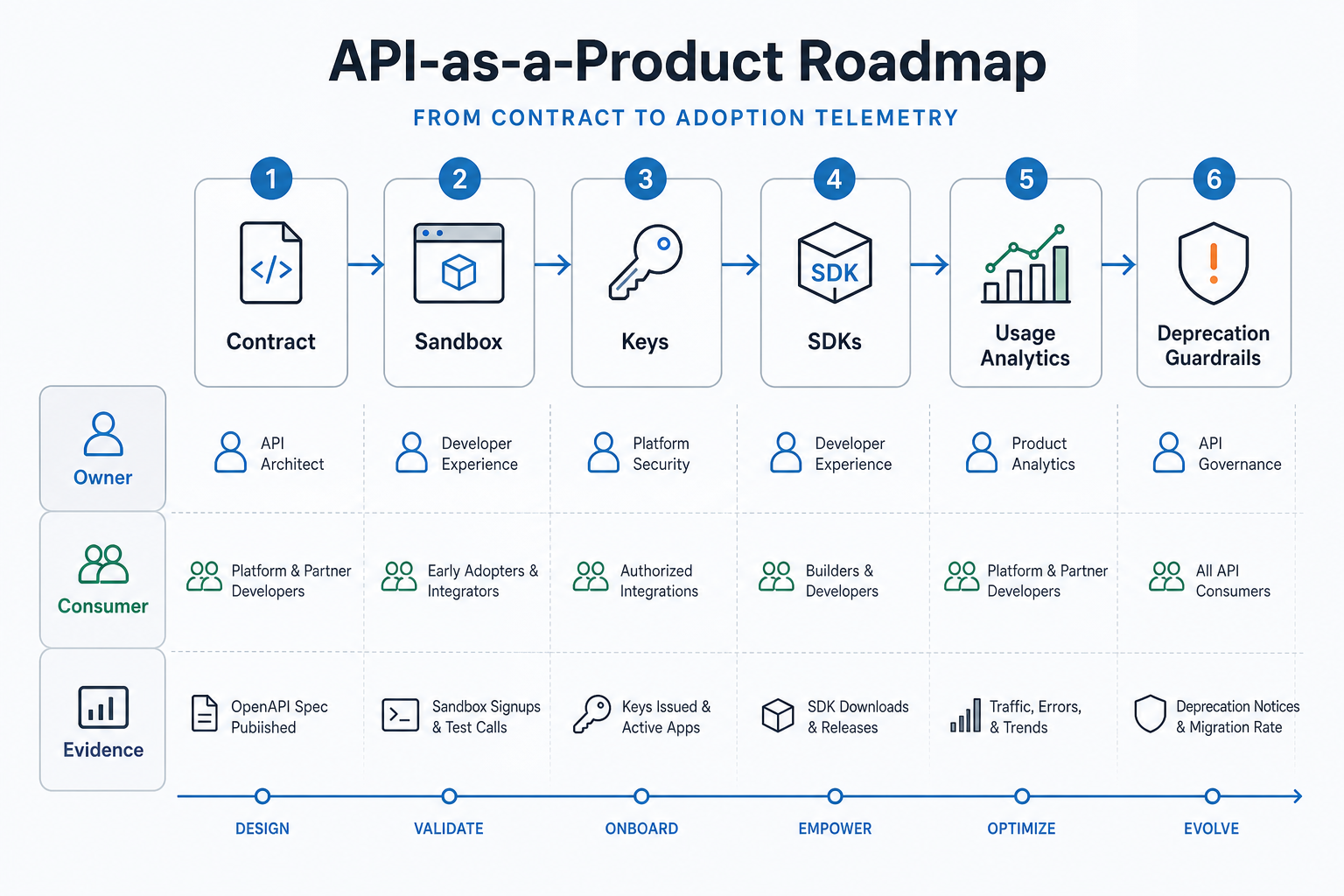
For a SaaS or portal build, make this product lane visible in the roadmap: publish the OpenAPI contract, create a sandbox path, define key ownership, decide whether SDKs or typed clients are needed, measure first successful calls, and set deprecation rules before customers depend on the API. This aligns the API with SaaS development services planning instead of treating integrations as a backend-only task.
| Capability | Release-One Evidence | Owner |
|---|---|---|
| Contract, examples, and errors | OpenAPI spec, sample states, compatibility rules, and error catalogue | API architect |
| Sandbox, keys, and limits | Sandbox tenant, scoped credentials, quota rule, support contact, and revocation path | Platform security |
| Telemetry and lifecycle | First-call dashboard, support link, deprecation notice path, and migration window | Product owner |
Hand Off The API Contract To Every Consumer Team
A contract-first roadmap still fails when each consumer team receives a different version of the truth. Before launch, prepare a handoff packet for frontend, mobile, portal, partner, support, automation, and AI-agent consumers. Name the owner, auth scope, contract version, sample payloads, expected errors, observability path, smoke-test command, and rollback contact.
| Consumer | Handoff Evidence | Failure To Prevent |
|---|---|---|
| Frontend, mobile, or portal | Typed client, tenant examples, offline/retry behavior, and regression smoke test | The UI ships against happy-path responses only. |
| Partner or support team | Sandbox credentials, webhook replay proof, request IDs, known errors, and escalation owner | Onboarding and support turn into log archaeology. |
| AI agent or automation | Scoped permissions, machine-readable examples, audit logs, and synthetic-agent tests | An agent retries unsafe actions without reviewable evidence. |
Add Agent-Ready API Access Controls And Evidence Gates
AI agents, copilots, workflow automations, and MCP-style tool layers are now realistic API consumers for SaaS and internal-tool roadmaps. Do not give them broad user-equivalent access just because release one needs automation. Define which operations can be discovered, previewed, executed, exported, retried, and recovered, then tie each action to scoped authorization, consent, telemetry, and audit evidence.
Use this gate for account changes, payment actions, document updates, customer notifications, admin exports, and workflow triggers. It pairs with an API modernization for AI agents roadmap and the AI Agent Readiness Assessment before exposing execute, export, or admin endpoints. As of August 18, 2026, use MCP 2026-07-28 as the current adoption checkpoint for authorization discovery, protected resource metadata, elicitation, tool metadata, structured output, scoped tokens, and clear tool descriptions. For roadmaps where agents will call external model APIs, internal workflow APIs, or customer data connectors, add a generative AI API integration path and use the Workflow Automation Opportunity Finder to decide which actions should stay read-only, require human approval, or wait for a later automation sprint.
| Agent-Consumer Evidence | Proof Before Launch | Risk Reduced |
|---|---|---|
| Permission design | Map each agent action to the narrowest scope, tenant boundary, object rule, and denial response. | Unauthorized or cross-account agent actions. |
| Protected resource metadata | Publish and test the authorization-server metadata a remote MCP or tool consumer will discover. | Clients accepting tokens from the wrong authorization path. |
| Resource indicators and audience binding | Prove token requests identify the intended MCP/API resource and that the API rejects wrong-audience tokens. | Bearer-token reuse across lookalike tools, tenants, or environments. |
| Human-visible summary | Show the operation, affected object, expected outcome, approval rule, and rollback owner. | Silent high-impact changes support cannot reconstruct. |
| Machine-readable contract | Keep OpenAPI examples, MCP tool metadata, stable errors, and rate-limit behavior aligned. | Agents guessing around unclear contracts or retrying unsafe failures. |
| Security replay | Capture request ID, tool name, scope, consent state, payload class, policy result, and support owner. | Incident teams lacking evidence for automated misuse. |
Add An API Release Gate Before Launch
For release gates that must cover browser journeys, API contracts, integrations, admin flows, and regression risk together, use software testing services as the independent evidence lane before approving production access.
Before an API becomes a dependency, map each release-one consumer to evidence: typed clients for web app development, role-scoped onboarding for web portal development services, scoped tokens for AI automation services, and reviewed tool permissions for AI development services. Stop launch when contract tests, object-level authorization, fixtures, observability, rollback ownership, or deprecation communication is missing.
The release gate should produce evidence a buyer, support lead, or engineering owner can inspect later: contract diff, auth matrix, consumer smoke test, error catalogue, dashboard link, owner list, and rollback note. That evidence is what keeps the roadmap useful after launch, when the API starts changing under real consumer load.
Design The Developer Portal And Partner Onboarding Path
When an API roadmap includes external partners, customer developers, marketplace integrations, or multiple internal product teams, the developer portal becomes part of release readiness. It does not have to be a large public ecosystem on day one, but release one should prove that the right consumer can discover the contract, request access, make a first call, understand errors, replay webhooks, rotate keys, and find support without a private engineering handoff.
Separate the portal scope by audience. An internal API may only need authenticated docs, typed clients, examples, and ownership metadata. A partner API needs stricter onboarding: sandbox tenants, app approval, scoped credentials, webhook replay, usage limits, changelog ownership, support SLAs, and deprecation notices. A public API product may also need pricing or usage-metering telemetry, self-service keys, SDK distribution, and a visible status/support model. If the portal supports customer workflows, connect the plan to the customer portal development guide so account permissions, document access, notifications, and support visibility are planned together.
| Portal Readiness Area | Release-One Proof | Risk If Missing |
|---|---|---|
| Discovery and first call | Docs page, OpenAPI reference, sandbox tenant, sample request, and success response. | Every integration starts with engineering-led onboarding. |
| Access and lifecycle | Scoped key request, approval owner, rotation path, revocation path, quota rule, and audit trail. | Credentials spread without clear ownership or recovery. |
| Change and support | Changelog, deprecation window, webhook replay, incident contact, and request-id debugging. | Partners discover breaking changes through failures. |
This does not mean every API needs a polished external portal before launch. It means the roadmap should decide what the consumer experience must prove before adoption scales. For many SaaS and portal products, a private portal with accurate docs, sandbox access, usage visibility, and support ownership is enough for release one; broader marketplace packaging can wait until real adoption telemetry shows which consumers and endpoints matter most.
Add Governance, Observability, And Contract Drift Checks
API roadmaps often fail after launch because no one owns the operating model. Before estimating the next phase, define who approves contract changes, who reviews access requests, who owns deprecation notices, who watches error budgets, and who responds when an integration starts sending bad data. This governance work belongs in the roadmap, not in a support scramble after customers or internal teams already depend on the API.
For API-product roadmaps, add adoption telemetry before the first external beta. Track developer activation, successful first calls, failed requests, quota events, webhook health, support tickets by endpoint, and partner time-to-first-integration. If the API may support AI agents, copilots, or workflow automation, also track scoped permissions, predictable errors, rate-limit behavior, audit trails, and synthetic-agent test results. Teams planning agentic products can connect this gate to generative AI development so model behavior, API contracts, and operational evidence are reviewed together.
| Governance Area | Roadmap Decision | Evidence To Review |
|---|---|---|
| Consumer inventory | List every frontend, mobile, partner, internal workflow, automation job, and AI/tool consumer. | Owner, auth scope, contract version, critical endpoints, rollback path, and smoke-test command |
| Contract drift | Block breaking schema, behavior, permission, or error-shape changes until affected consumers pass checks. | Contract diff, generated-client result, consumer smoke test, and approval note |
| Operational telemetry | Review adoption and failure signals every two to four weeks during beta and monthly after release one stabilizes. | Endpoint usage, failed calls, webhook retries, latency, support tickets, and documentation searches |
| Security and agent controls | Recheck object-level authorization, sensitive fields, token scopes, rate limits, and high-risk agent actions before expansion. | API security test output, permission matrix, audit log, reviewer, recovery owner, and incident replay note |
Keep this governance lightweight but explicit. Each review should close with one of four decisions: keep observing, improve documentation, harden the contract or security gate, or fund a phase-two product change. When APIs are part of larger custom software development or portal programs, this prevents API maintenance, UX work, integrations, and QA from being funded as disconnected efforts.
Plan Versioning, Deprecation, And Consumer Support
An API roadmap is not complete until it explains how the contract will change after launch. Versioning, deprecation, and support rules protect frontend teams, mobile apps, partners, workflow automations, and AI consumers from silent breakage. For a SaaS product or portal, write these rules before release one so every new endpoint has the same lifecycle expectations.
Use a lightweight lifecycle policy for internal APIs and a more explicit policy for partner or customer-facing APIs. The policy should name the stable contract, compatibility rules, migration window, deprecation notice path, support owner, and rollback decision. For teams building API-backed portals or dashboards as part of a broader web app development program, this turns API maintenance into a product habit instead of a late support task.
| Lifecycle Decision | Roadmap Rule | Buyer Question |
|---|---|---|
| Versioning | Define when changes require a new version, compatible extension, or migration note. | Which consumers break if this response shape changes? |
| Deprecation | Name the notice window, owner, documentation update, and customer-success handoff. | How much time do partners, mobile apps, or internal automations need to migrate? |
| Backward compatibility | Keep additive changes safe, test older clients, and avoid removing fields without a migration path. | Can the current API serve old and new consumers during rollout? |
| Support evidence | Track incidents, schema drift, error trends, consumer questions, and release evidence after launch. | Who sees API health and adoption problems before customers escalate? |
| Incident replay | Preserve request IDs, contract version, auth scope, payload example, response sample, and rollback decision for major API incidents. | Can support and engineering prove what changed without guessing from logs? |
For AI-assisted workflows and partner automations, add one more compatibility check: can a machine consumer still understand the contract after a minor release? OpenAPI 3.2 reinforces the value of machine-readable API descriptions, but buyers should still ask for contract tests, examples, stable error shapes, and deprecation notes that explain what changes for human developers and tool-calling systems. When release confidence depends on repeatable API checks, connect this lifecycle policy to QA automation testing services so schema validation, backward-compatibility tests, and integration smoke checks run before customers or agents discover a breaking change.
Use a small compatibility decision log for every public or shared API release. Record whether the change is additive, behavior-changing, permission-changing, or removal-based; name the affected consumers; attach the contract-test result; and decide whether the release needs a new version, a migration note, or a rollback window. Google's API versioning guidance and Microsoft's REST API design guidance both reinforce the same buyer lesson: versioning is a governance decision, not a naming convention. If the API will support copilots, tool-calling workflows, or model-driven operations, connect that governance to AI development services planning so permissions, examples, audit trails, and failure recovery are designed before agents depend on the contract.
Assign API Ownership, SLAs, And Support Handoffs
API roadmaps also need an operating model after release. Once frontend, mobile, partner, support, or AI workflow teams depend on an API, every contract change needs a named owner, response expectation, support path, and incident handoff. Without this layer, an otherwise strong roadmap can turn into unowned platform debt after launch.
Define ownership at three levels: product owner for roadmap decisions, engineering owner for contract and reliability decisions, and support owner for customer or partner communication. For customer-facing portals, connect the API owner model to the broader web portal development services rollout plan so account access, documents, requests, notifications, and support workflows are operated together instead of split across disconnected teams. If the API backs a customer-facing portal, the customer portal development guide is a useful supporting checklist for feature scope, integrations, support flows, and rollout sequencing.
| Operating Decision | Roadmap Rule | Evidence To Review |
|---|---|---|
| Ownership | Name the product, engineering, security, and support owner for every critical API surface. | RACI, release checklist, on-call path, and escalation owner |
| Service expectations | Set practical response targets for incidents, partner questions, schema changes, and data repair. | Support queue, alert policy, incident notes, and customer messaging template |
| Change approval | Require review for breaking changes, sensitive-data access, new integrations, and public contract updates. | Approval log, migration note, rollback plan, and contract-test result |
| Adoption feedback | Use support tickets, integration errors, failed requests, and documentation questions to prioritize phase two. | API dashboard, ticket tags, developer questions, and phase-two backlog |
One more buyer check belongs before cost estimation: decide which consumers need support on day one and which can wait for phase two. SaaS teams usually need frontend and support-console coverage first, portal teams need customer and account-manager paths, partner APIs need onboarding and webhook replay support, and AI workflow teams need scoped tool permissions plus audit trails. If the API is part of a broader automation roadmap, connect this support model to AI automation services so workflow design, permissions, monitoring, and rollback evidence are planned together instead of after the first agent or integration breaks.
| Consumer Type | Day-One Support Evidence | Phase-Two Signal |
|---|---|---|
| Frontend or mobile app | Stable schema, typed client or fixtures, error states, and regression checks | More screens or channels need the same contract |
| Customer or employee portal | Role-aware access, account context, document/request workflows, and support-debug path | Customers ask for self-service workflows beyond the initial release |
| Partner integration | Sandbox credentials, webhook replay, quota policy, changelog, and escalation owner | Integration failures, quota events, or onboarding tickets cluster around a few endpoints |
| AI agent or workflow automation | Scoped permissions, machine-readable examples, predictable errors, audit logs, and synthetic-agent tests | Agents need additional tools, stricter guardrails, or better recovery paths |
Add An MCP Release Watch Before Agent And Partner Expansion
Before expanding an API to partners, internal automations, or AI agents, run a release watch for MCP, OpenAPI, Arazzo workflow descriptions, gateway behavior, and tool-contract changes. As of August 18, 2026, treat MCP 2026-07-28 as the current checkpoint, not a release-one promise. Validate the chosen SDK, gateway, authorization server, logs, conformance evidence, MCP Inspector or equivalent client run, and rollback path against the stateless core, Multi Round-Trip Requests, header routing, cacheable list results, authorization hardening, extensions, trace propagation, and old-client fallback before widening access. Pair this gate with the MCP server security checklist for tool scopes and audit logs; for workflows crossing billing, CRM, analytics, or notifications, use the SaaS integration architecture guide before an agent can act on shared records.
Turn API Telemetry Into A Phase-Two Backlog
The roadmap should not end at launch. After the first release, review adoption telemetry every two to four weeks and decide which API surfaces deserve more investment, better documentation, stronger guardrails, or retirement. This is where an API becomes a managed product instead of a collection of endpoints.
Track signals that buyers, support teams, and engineers can act on: endpoint usage, failed requests by consumer type, slow responses, authorization denials, webhook retries, duplicate payloads, documentation searches, support tickets, partner onboarding questions, and agent/tool execution failures. Those signals should feed one phase-two backlog that product, engineering, security, and support can review together.
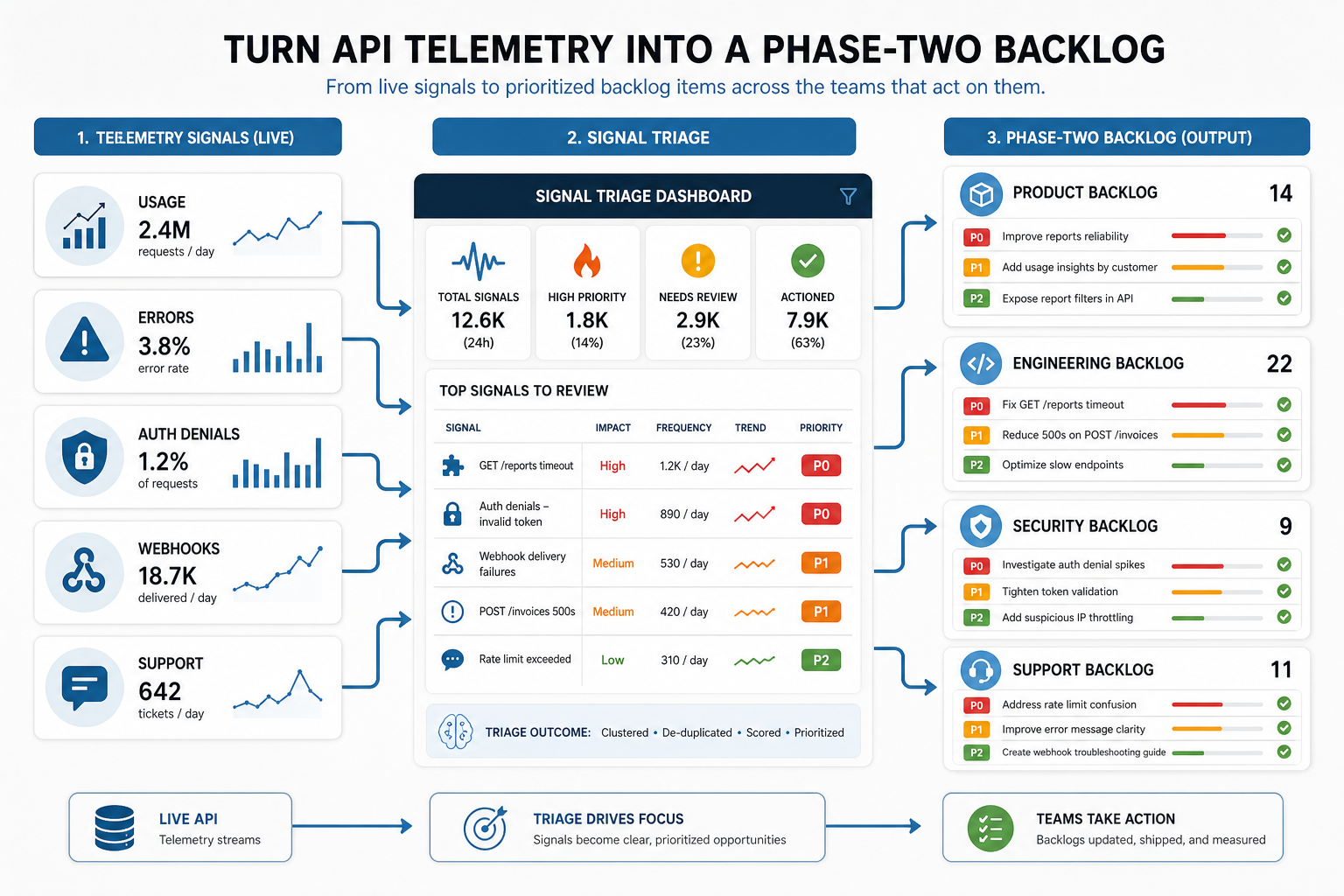
Postman's 2025 State of the API research reinforces why this belongs in the roadmap: 89% of developers use AI, but only 24% design APIs for AI agents, and 51% cite unauthorized agent access as a top security risk. Treat telemetry as product evidence, not just engineering logs, so release-two funding follows measured adoption and measured risk.
| Telemetry Signal | Roadmap Decision | Owner To Name |
|---|---|---|
| High usage on a manual workaround endpoint | Promote the workflow into a supported product surface with examples, limits, and regression checks. | Product owner and API engineering lead |
| Repeated 401, 403, or scope errors | Clarify permissions, improve onboarding, add sandbox examples, or split access scopes. | Security owner and developer-experience owner |
| Webhook retries, duplicate events, or replay requests | Add idempotency proof, replay tooling, clearer event contracts, and operational runbooks. | Integration owner and support lead |
| Partner or AI-agent failures on predictable errors | Improve machine-readable examples, error shapes, rate-limit guidance, and synthetic-agent tests. | Automation owner and QA lead |
| Documentation searches with no matching example | Prioritize docs, SDK snippets, changelog notes, or developer portal improvements before new endpoints. | Developer-experience owner |
Turn that review into a fixed operating cadence instead of an occasional analytics check. A two-week cadence works for active SaaS, portal, and partner pilots; a monthly cadence is usually enough for stable internal APIs. Each review should close with one of four decisions: keep observing, improve documentation, harden the contract or security gate, or fund a phase-two product change.
| Review Cadence | Decision To Make | Evidence To Bring |
|---|---|---|
| Every two weeks during beta or partner onboarding | Which endpoint, error path, or permission model is blocking adoption? | Usage trend, failed calls, support tickets, onboarding notes, and contract-test failures |
| Monthly after release one stabilizes | Which API surfaces deserve product investment, retirement, or stricter limits? | Endpoint adoption, latency, quota events, webhook retries, and developer-documentation searches |
| Before each major workflow or AI-agent rollout | Which contract, scope, audit, or rollback evidence must be proven before expansion? | Consumer-readiness transcript, synthetic-agent tests, authorization results, and incident replay notes |
For SaaS platforms and portals, connect telemetry reviews to SaaS development services and custom software development planning so API maintenance, UX, integrations, and QA are funded together.
A practical rule: do not approve a phase-two API feature unless the team can name the consumer, adoption signal, failure mode, support owner, and measurement window. This prevents roadmap growth from becoming endpoint sprawl and gives buyers a clearer way to compare API work against frontend, automation, analytics, and integration priorities.
Estimate API Development Cost By Risk Driver
API development cost depends less on endpoint count and more on risk. Ten simple endpoints around one database can be cheaper than three endpoints that connect a legacy ERP, support delegated authorization, expose sensitive records, and need real-time sync.
The main cost drivers are:
- Data model complexity: number of core objects, relationships, states, and validation rules.
- Access complexity: roles, permissions, tenants, service accounts, customer admins, and partner access.
- Integration count: internal systems, third-party platforms, webhooks, batch jobs, and API limits.
- Reliability expectations: retry design, queues, idempotency, observability, uptime, and support tools.
- Documentation maturity: internal docs, public docs, examples, sandbox, SDKs, and onboarding flows.
- Security/compliance depth: audit logs, encryption expectations, data residency, reviews, and testing.
For growing products, architecture choices also affect future cost. If the API must support more users, data, regions, and integrations over time, include scalability work early enough to avoid a rewrite. NextPage's scalable software development services page explains how growth-readiness connects architecture, infrastructure, QA, and support. If legacy APIs must be upgraded before new products or AI workflows can rely on them, the API modernization for AI agents guide explains how to plan scoped access, observability, contract testing, and rollout gates around older systems.
API Roadmap Checklist Before Hiring A Team
Before asking for a quote, prepare a short brief with these details:
- Primary API use case and the first three workflows it must support.
- User roles, tenant model, and object-level access rules.
- Core data objects and any source systems that own those records.
- Required integrations, API limits, webhook needs, and sync frequency.
- Security expectations, compliance constraints, and audit requirements.
- Documentation audience: internal developers, customer developers, partners, or public users.
- Launch standard: MVP, internal rollout, customer beta, partner API, or API product.
- Support model: who monitors failures, answers developer questions, approves changes, and maintains the API evidence pack?
- Compatibility policy: what counts as a breaking change, who approves deprecation, and which consumers must pass contract tests before release?
A development partner should be able to turn that brief into a roadmap, not just a ticket list. Ask how they will validate the API contract, test authorization, simulate integration failures, document examples, handle versioning, and transfer operational knowledge after launch. If you are comparing vendors, NextPage's custom software development company checklist gives a broader set of scope, security, delivery, and support questions to pressure-test proposals.
Next Step
If you are planning a SaaS platform, customer portal, internal workflow tool, API product, or integration-heavy product, start by writing the API roadmap in product language and naming the evidence pack that must exist before launch. Then estimate the build using the Custom Software Cost Estimator and use the result to scope a focused discovery call around architecture, integrations, security, developer onboarding, and release-one priorities. If the roadmap needs extra API, QA, AI, and web delivery capacity under one governance model, compare the handoff plan against NextPage's IT outsourcing services delivery model before staffing release one.