
Quick Answer: App Localization Checklist
An app localization checklist is the launch plan that proves your product can work for users in another language, region, store, and support environment. It should cover internationalization, language scope, glossary and translation memory, UI expansion, right-to-left layouts, date and currency formats, notifications, app store metadata, QA evidence, analytics, and post-launch support.
The mistake is treating localization as a translation task that starts after the product is built. For a mobile or SaaS product, localization touches code, design, content, support, payments, compliance copy, app store assets, and release operations. A good checklist helps the team decide which markets are ready now, which need engineering changes first, and which should wait for a later rollout. If the team needs implementation support, app localization services should connect product architecture, translation workflow, QA evidence, and store launch planning instead of treating localization as copy handoff.
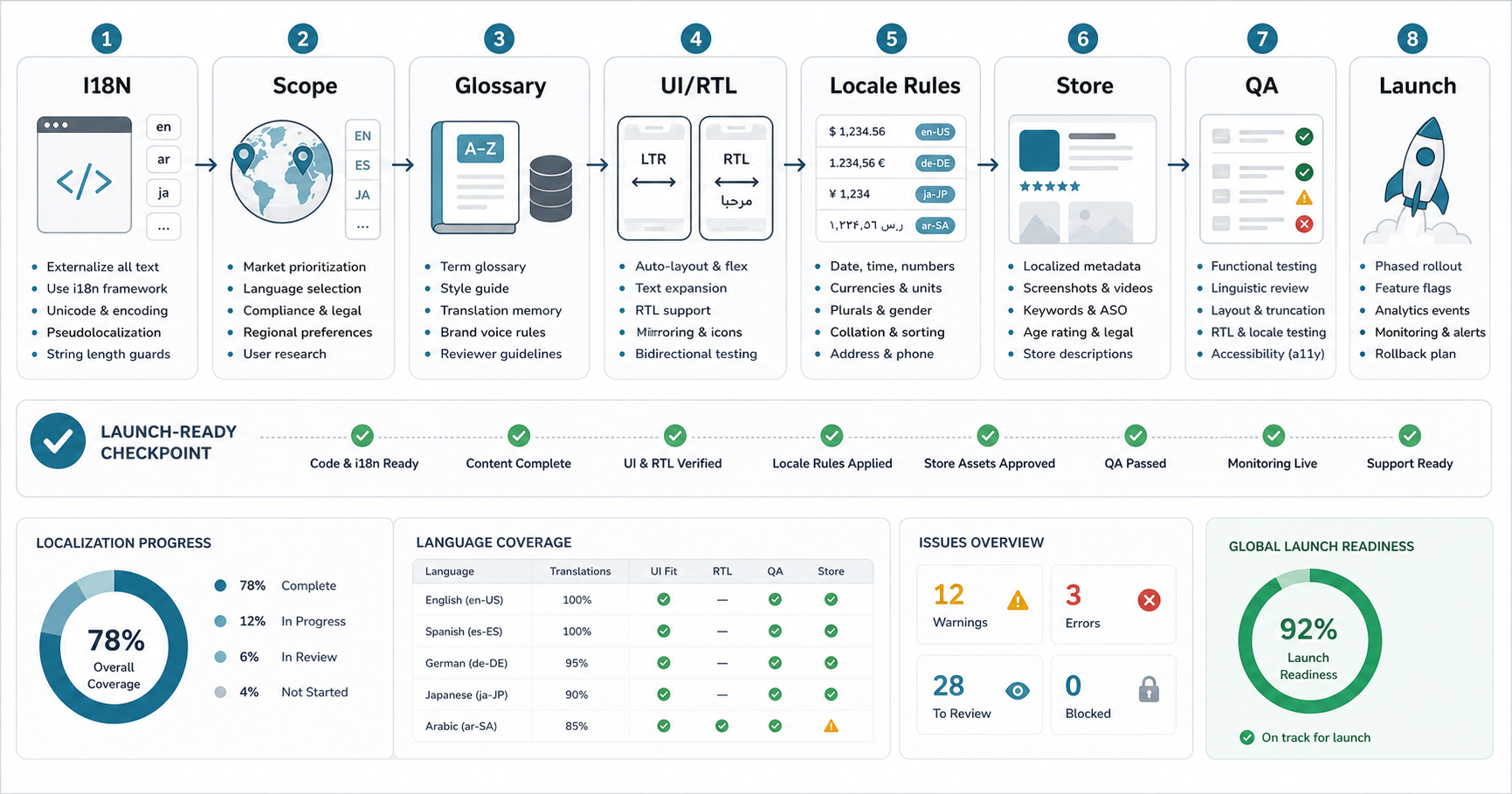
App Store Localization Checklist For A Global Release
Use one copy of this release record per language and market. Record the app build, store listing version, reviewer, evidence link, and a pass, fix, or hold decision. A translated listing is not proof that the installed app supports that language.
| Release check | Suggested owner | Evidence to attach before approval |
|---|---|---|
| Listing language and fallback | Store manager | Preview the localized title, descriptions, and fallback listing. Record the language and storefront tested; do not assume one country means one language. |
| Screenshots and product claims | Designer and native-language reviewer | Compare every screenshot and caption with the release build. Check that the displayed features, language coverage, and offers are available in that market. |
| Installed app journey | Mobile QA | On the release candidate, complete onboarding, sign-in, the core task, an error path, and support in the target locale. Include device, OS, app language, and region in the test record. |
| Purchase and operational rules | Product and QA | Where applicable, test displayed currency, subscription terms, purchase recovery, local formats, and confirmation messages using the appropriate test environment. |
| Support and policy destinations | Support owner | Open support and privacy links from the listing and app. Confirm that users can understand the available help and that the advertised support coverage is staffed. |
| Availability and release decision | Release owner | Record selected markets, approved build and listing versions, unresolved exceptions, monitoring owner, and the response if a locale fails after launch. |
Copy into your release ticket: Language/market: ___; build/listing version: ___; reviewer/date: ___; evidence links: ___; open blockers: ___; decision and owner: ___; post-launch check: ___.
Apple manages localized product-page information in App Store Connect; adding a metadata language does not add that language to the app binary. Google Play also provides a separate workflow for translated store text and localized graphic assets. Check both the listing and the installed experience before signing off.
If the record exposes gaps across engineering, translation, and release ownership, an app localization readiness review can turn the unresolved checks into a scoped launch plan.
Start With Localization Vs Internationalization
Internationalization is the product readiness work that makes localization possible. It means user-facing strings, formats, layouts, images, and content are separated from fixed code assumptions. Localization is the adaptation for a specific language, region, culture, store, and support context.
Apple's current localization guidance emphasizes preparing strings, images, dates, currencies, numbers, and resources so the app can be translated and tested by language and region. App Store Connect supports 50 localized metadata languages and locales after its 2026 expansion, which makes store localization a larger planning surface than many product teams expect. Android guidance is similar in spirit: keep localized UI resources separate from core behavior, provide complete default resources, use qualified resource folders, and test with pseudolocales so Android can load the best match for the user's locale.
For a business team, the practical question is simple: can the app handle another market without emergency engineering work? If the answer is unclear, start with an audit before sending strings to translators. Teams localizing a SaaS product should also include tenant settings, localized billing messages, role names, dashboards, and browser fallback behavior; that is where SaaS development services and localization readiness overlap.
1. Choose Markets And Languages With Product Evidence
Do not localize every language because it appears in a market-size spreadsheet. Pick languages and regions where there is evidence: existing traffic, waitlist signups, support requests, sales conversations, partner demand, app store search demand, or operational readiness.
Separate language from region. Spanish for Spain, Mexico, and Latin America may share parts of a translation workflow, but pricing, date formats, legal copy, support hours, payment options, examples, and screenshots can still differ. The checklist should record the launch unit clearly: language only, language plus region, or market-specific rollout. For a deeper example of internationalization and localization tradeoffs in a market-specific mobile product, use NextPage's Global Taxi App Localization guide as a supporting reference.
| Decision | What To Check | Launch Signal |
|---|---|---|
| Language priority | Search demand, customer pipeline, product usage, support requests | There is measurable demand, not just theoretical reach |
| Market readiness | Payments, taxes, legal copy, support coverage, app store territory | The team can serve users after acquisition |
| Release scope | Full product, core flows, help center, store listing, notifications | The first localized experience will not feel half-finished |
If the market is still exploratory, use NextPage's MVP Scope Builder to define a focused first rollout instead of translating the entire product surface at once. Once the language scope is clearer, the custom software cost estimator can help separate translation, UI, QA, backend, support, and store-work costs.
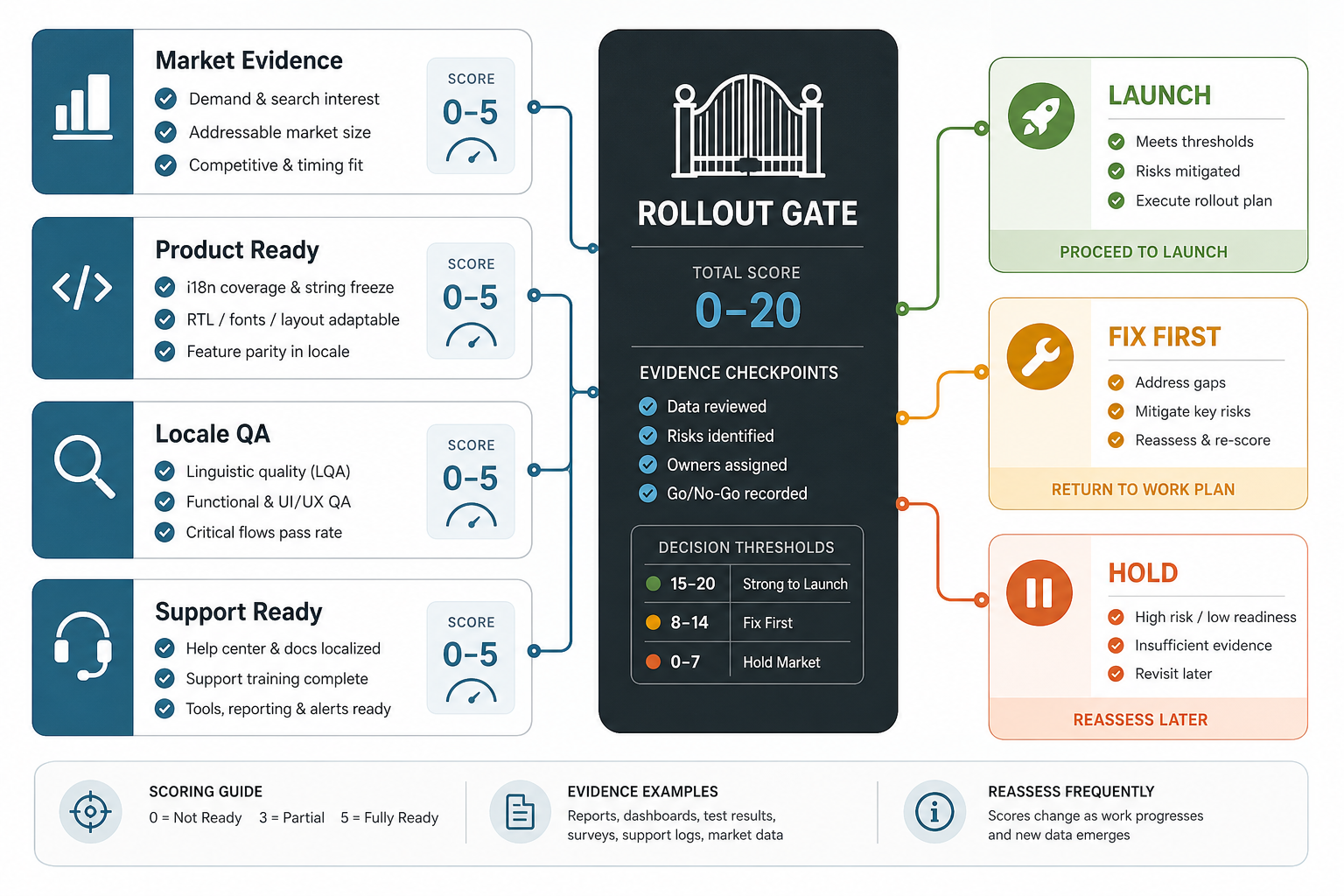
Market Rollout Decision Gate: Launch, Fix First, Or Hold
Before the first localized release, turn the checklist into a go/no-go decision. A market should not launch just because strings are translated. It should launch when demand, i18n readiness, locale QA, store assets, support coverage, measurement, and ownership are good enough for real users.
| Gate | Evidence To Review | Decision Rule |
|---|---|---|
| Launch | Demand signal, completed translations, passed locale QA, store assets, support owner, and analytics segmentation | Release the market with first-week monitoring and rollback owner assigned |
| Fix first | Translation is ready but UI overflow, payment, support, legal, RTL, or app-store evidence is incomplete | Block launch until the missing evidence is closed and retested |
| Hold market | Demand is weak, operations cannot support users, or engineering assumptions are still market-specific | Keep the market in discovery and avoid spending on full localization yet |
This gate also keeps localization budgets realistic. For mobile-first products, pair the rollout decision with a practical mobile app development cost view so localization is planned as product work, not just vendor translation spend.
2. Audit In-App Strings, Product Content, And Hidden Copy
The first working checklist item is a string and content inventory. Include visible UI labels, empty states, error messages, onboarding, account emails, push notifications, transactional SMS, payment messages, legal notices, help content, admin screens, dashboards, reports, exports, and any text inside images or templates.
Engineering should remove hard-coded strings and expose copy through the platform's localization system. Product and content teams should decide which strings are translatable, which terms must stay unchanged, and where a translator needs context. Android's guidance specifically calls out translator context because a short button label, a form hint, and a status label can use the same English word but require different translations.
- String key: stable identifier that survives copy changes.
- Source text: approved base-language text.
- Context: where the text appears, character limits, tone, and user action.
- Variables: placeholders, names, dates, numbers, amounts, and product terms that must not be broken.
- Owner: product, legal, support, marketing, or engineering reviewer.
3. Build A Glossary And Translation Memory Before Translation
A glossary prevents the product from using three different translations for the same feature, role, plan, action, or support term. Translation memory keeps approved previous translations reusable, which improves consistency and cost control as the app grows.
The glossary should include product terms, feature names, plan names, industry terms, words not to translate, tone rules, formality level, and examples of accepted phrasing. Do this before the first translation batch. If the glossary is created after translation starts, reviewers will spend time fixing avoidable inconsistencies.
For regulated, healthcare, finance, HR, or marketplace apps, add a legal and trust layer: consent terms, refund language, pricing claims, user-generated content rules, safety disclaimers, and support promises need market-aware review. Do not let a generic translation workflow decide those alone.
4. Prepare UI Layouts For Text Expansion, Truncation, And RTL
Many localization failures are design failures. Translated text can be longer, shorter, more formal, or structurally different from English. Buttons, tabs, cards, sidebars, charts, onboarding screens, app store screenshots, and push notifications need enough space to adapt.
Test text expansion before final translation. Use pseudo-localization or test strings that simulate longer words, diacritics, and variable length. For Arabic, Hebrew, Urdu, Persian, and other right-to-left languages, test the whole interface: navigation direction, icons, timelines, progress indicators, input fields, charts, maps, and mixed-language content.
Teams planning a new build should include this in the product architecture. NextPage's mobile app development work covers iOS, Android, cross-platform apps, backend coordination, QA, and release readiness, which is where localization needs to be designed in rather than patched later. For SaaS or browser-based products, the same planning belongs in web app development architecture: routing, content models, locale-aware forms, analytics, and support flows need to be ready before translation starts.
5. Localize Formats, Payments, And Operational Rules
Translation does not localize a product by itself. Users also expect dates, times, currencies, units, addresses, phone numbers, names, plural rules, sorting, search, tax copy, invoice fields, and payment methods to make sense in their region. Apple highlights date, currency, and number preparation as part of localization; Android's resource model also expects default and locale-specific resources to work predictably.
| Area | Checklist Item | Common Failure |
|---|---|---|
| Dates and time | Format by locale and timezone | Users misread booking, renewal, or delivery dates |
| Currency and tax | Show symbols, decimals, tax copy, and invoice fields correctly | Pricing feels misleading or checkout fails |
| Names and addresses | Support local field order and optional fields | Forms reject valid users |
| Notifications | Localize push, email, and SMS templates with variables intact | Broken placeholders or confusing transactional messages |
| Search and sorting | Handle accents, scripts, synonyms, and local naming conventions | Users cannot find products, people, or content |
6. Localize App Store And Play Store Assets Separately
App store localization is not the same as app binary localization. Apple documents that App Store Connect metadata languages are separate from adding languages to the app binary. Descriptions, keywords, screenshots, privacy policy URL, support URL, promotional text, and release notes need their own workflow.
For Google Play, plan the store listing, screenshots, feature graphic, short description, long description, release notes, tags, country availability, privacy/data safety answers, and any custom listing strategy. A store listing that promises a localized experience while the actual app remains mostly untranslated will create low trust, poor reviews, and weak conversion.
Use NextPage's App Store Optimization (ASO) guide as a companion for metadata, screenshot, and positioning decisions. For localization, make sure every store claim matches the real in-app experience, including language coverage, payment support, data-safety answers, and support availability in that market.
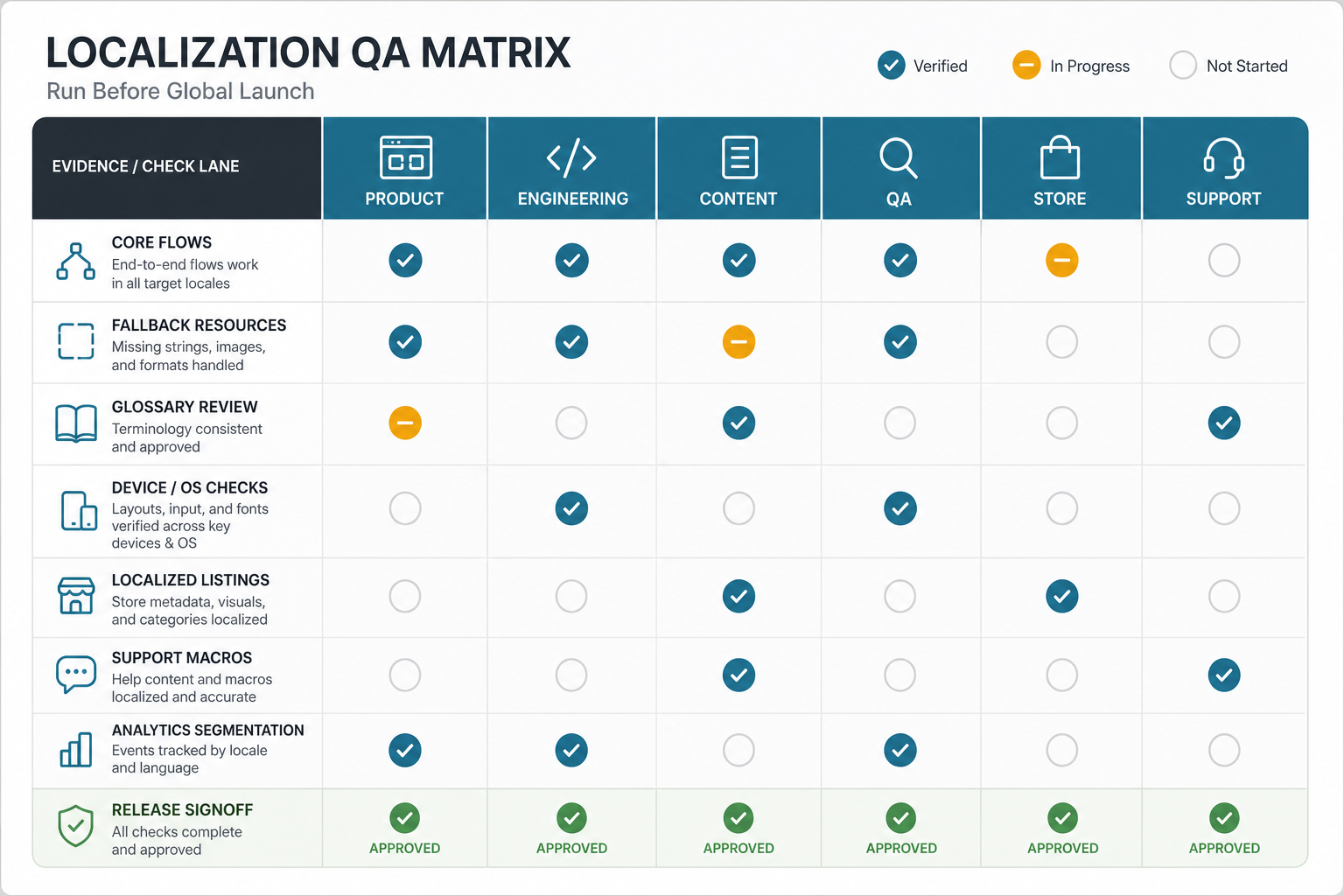
7. Run A Localization QA Matrix Before Launch
Localization QA should test language quality, product behavior, layout behavior, store readiness, and support readiness together. A translated string review alone is not enough. The team needs evidence that the app works on real devices, with real locale settings, real data, and the same integrations users will hit after launch. For teams with recurring releases, QA automation testing services can turn locale smoke checks, regression paths, screenshot checks, and store-readiness evidence into repeatable release gates.
| Workstream | QA Evidence | Owner |
|---|---|---|
| Product | Core flows, onboarding, pricing, permissions, and first-run experience pass in target locales | Product manager |
| Engineering | Fallback resources, RTL behavior, formatters, variables, and locale switching work | Engineering lead |
| Content | Glossary, tone, legal copy, help content, notifications, and support macros are reviewed | Content or localization owner |
| QA | Device/OS matrix, regression, accessibility, screenshots, and defect severity are documented | QA lead |
| Store | Metadata, screenshots, review notes, privacy answers, and territory settings are ready | Growth or release owner |
| Support | Known issues, escalation path, language coverage, and first-week monitoring are prepared | Support lead |
For broader release discipline, pair this with the Mobile App QA and Launch Checklist and the Mobile App Testing Checklist Before Launch.
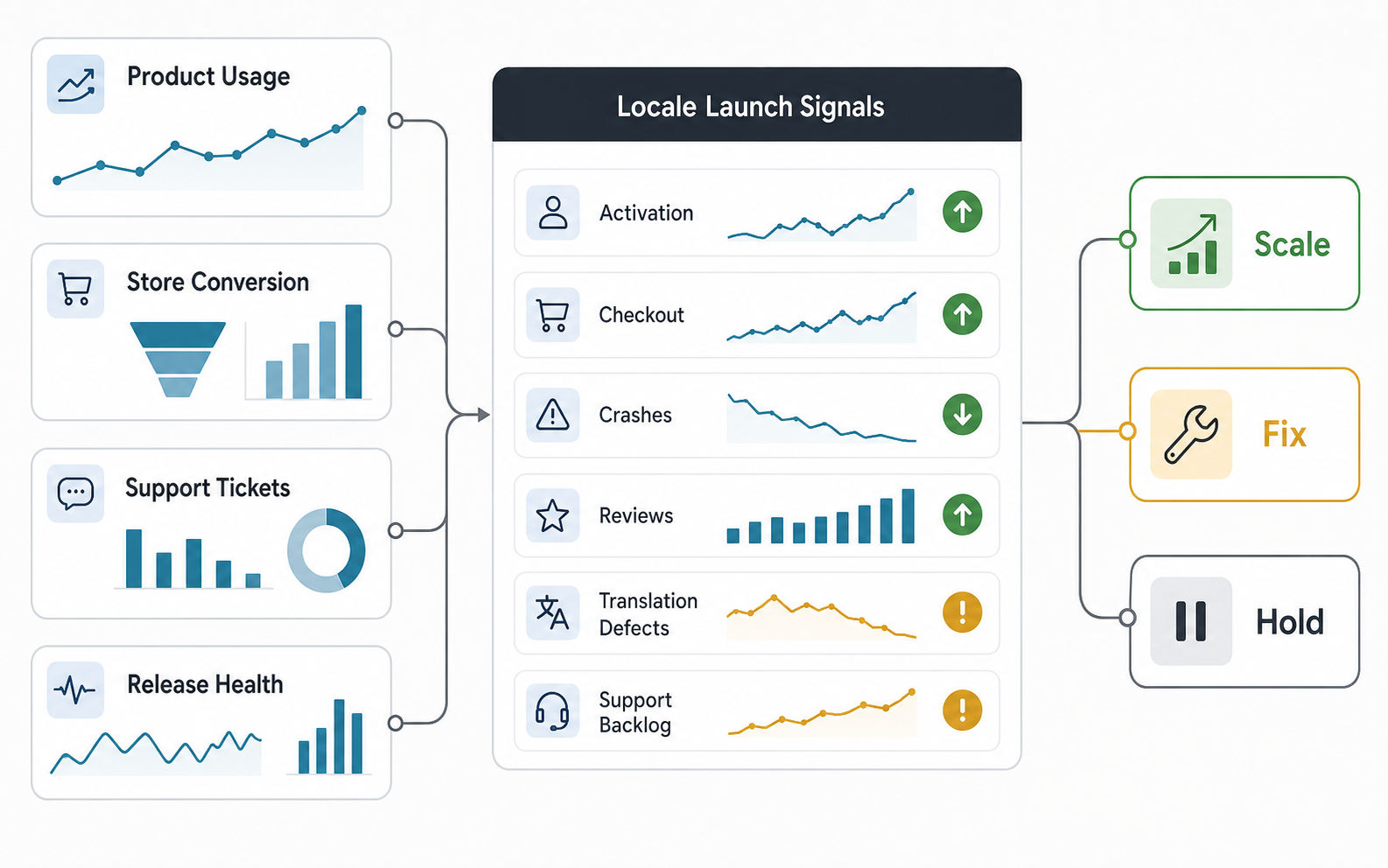
Add Locale Telemetry Before Launch
Before a localized release scales, define the signals that will prove the market is healthy. Store analytics, product analytics, crash reporting, review monitoring, and support tags should all be segmented by locale or market. Without that segmentation, teams only see a blended global average and miss whether one language has checkout failures, poor onboarding, translation defects, or support backlog.
| Signal | What To Segment | Action If It Fails |
|---|---|---|
| Activation | Signup, onboarding completion, first key action, and permission acceptance by locale | Review localized onboarding copy, screenshots, and first-run defaults |
| Conversion | Store listing views, install rate, checkout, subscription starts, and payment failures | Fix store metadata, local pricing copy, payment methods, or trust signals |
| Release health | Crashes, slow screens, failed API calls, missing resource fallbacks, and RTL defects | Hold scale-up until engineering and QA close locale-specific defects |
| Support load | Ticket topics, refund reasons, translation complaints, review themes, and response coverage | Add help content, support macros, escalation ownership, or market-specific release notes |
Use these signals in the first-week review. A localized market can scale when activation, conversion, quality, reviews, and support load are stable. If one signal is weak, fix that path before expanding acquisition or translating the next market.
8. Launch, Measure, And Improve By Market
Localization launch is not done when the app reaches the store. Watch activation, onboarding completion, search, checkout, subscription starts, support tickets, reviews, crashes, uninstall rate, refund requests, and content engagement by locale or market. If the data is not segmented, the team cannot tell whether the localized experience is working.
Assign owners for first-week monitoring and post-launch fixes. Keep a backlog for language quality issues, confusing screens, missing help content, store listing changes, payment issues, and product improvements. NextPage's Post-Launch Mobile App Maintenance Checklist is useful once the localized release becomes part of regular product operations.
When NextPage Can Help
NextPage helps teams plan and build mobile, web, and SaaS products that can expand into new markets without fragile last-minute localization work. Our app localization services connect product architecture, language workflow, QA, app store assets, analytics, and release operations. If the localized release is part of a new product bet, NextPage's MVP development team can help reduce the first-market scope before translation and engineering spend expand.
If you are preparing a multilingual launch, start with a localization readiness review: i18n audit, string inventory, glossary, UI expansion, RTL risk, locale formats, store metadata, QA matrix, and first-market rollout plan. For early scoping, combine that review with the MVP Scope Builder, a practical mobile or web app delivery plan, and a cost range before translation begins.