
Quick Answer: B2B App Development Cost
B2B app development cost depends on the workflow the app must run, the number of user roles, the systems it has to integrate with, the security model, the data migration effort, and the launch support required after real customers or internal teams start using it. A narrow B2B MVP may focus on one buyer, partner, or operations workflow. A production B2B platform may need admin controls, approvals, CRM or ERP integration, analytics, mobile access, audit logs, SSO, and support tooling.
For planning, treat the estimate as a scope decision rather than a screen count, especially when the work is closer to B2B app development services than a generic brochure-style app. A B2B app with ten simple screens can be cheaper than a five-screen workflow that touches pricing rules, customer-specific catalogs, approvals, payment terms, inventory, and role-based reporting. Start with NextPage's Custom Software Cost Estimator, then refine the range around release-one workflows, integrations, security, QA, and post-launch ownership.
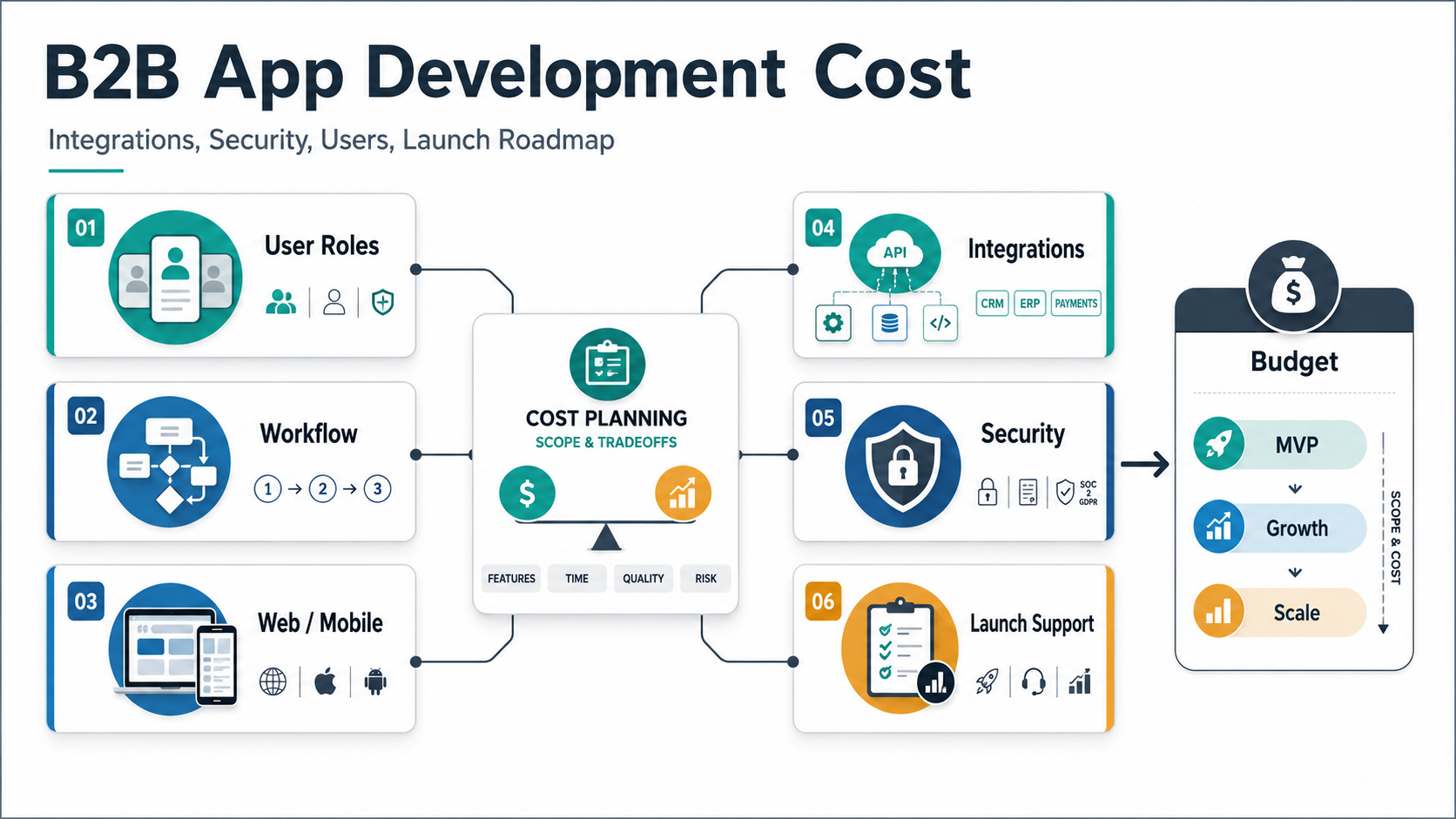
Why B2B App Cost Varies So Much
Two B2B apps can look similar in a pitch deck and still require very different budgets. One may be a simple sales enablement app for a small team. Another may be a customer portal that handles negotiated pricing, purchase approvals, quote requests, order history, document access, support tickets, and ERP synchronization.
The expensive parts are often not the visible screens. Budget moves when the app has to represent real business rules: who can see which account, who approves a request, how pricing is calculated, which data source wins when systems disagree, what happens when an integration fails, and what evidence is needed for finance, sales, support, or compliance teams.
This is why a serious B2B app estimate should start with the operating model and the custom software development decisions behind it. If the app supports a sales rep, distributor, buyer, branch manager, vendor, partner, or internal operations user, each role needs clear permissions, dashboards, notifications, and support paths. That role model affects UX, backend architecture, QA, admin tooling, and maintenance.
B2B App Cost Bands By Scope
Use cost bands as planning signals, not fixed quotes. Market ranges vary by geography, team seniority, delivery model, design quality, and risk exposure. The useful question is what kind of release you are funding.
| Scope tier | Typical release | Budget signal | What to validate early |
|---|---|---|---|
| Focused MVP | One core workflow, two to three roles, basic admin, one or two integrations, simple reporting | Lower to mid when the workflow and data are known | Workflow acceptance criteria, data ownership, and first integration quality |
| Growth release | Multiple workflows, richer admin controls, notifications, dashboards, mobile/web coverage, CRM or ERP integration | Mid to high because edge cases and support needs increase | Role model, integration reliability, analytics, and launch support |
| Enterprise platform | Multi-tenant or multi-branch access, SSO, audit logs, advanced security, data migration, complex integrations, performance requirements | High when the app becomes business-critical infrastructure | Security architecture, migration plan, uptime expectations, and support operations |
If the first release is mostly browser-based, compare assumptions with NextPage's web app development cost guide. If the release must support field teams, account managers, or customers on phones, compare the mobile layer with enterprise mobile app development services.
Match The Cost Model To The B2B App Type
A B2B app estimate becomes clearer when the team names the product type before pricing the backlog. A customer-facing portal, partner ordering app, distributor workflow, internal approval platform, field-sales app, and SaaS replacement all have different risk profiles even when the screen count looks similar.
| B2B app type | Cost pressure | Planning link |
|---|---|---|
| Customer or partner portal | Account hierarchy, document access, support tickets, and self-service workflows | web portal development services |
| Workflow automation app | Approvals, routing, exceptions, notifications, and audit-ready status history | business process automation services |
| SaaS replacement | Feature parity decisions, data migration, reporting, permissions, and adoption risk | SaaS replacement services |
| Sales or account operations app | CRM sync, pricing rules, quote workflows, approval rules, and role-based dashboards | custom CRM development cost |
For a portal-heavy product, use the customer portal development guide to pressure-test self-service scope, admin tools, integrations, and support workflows before treating the first quote as final.
The Cost Drivers That Matter Most
B2B app cost rises when the app needs to protect business rules, not when it merely adds another page. The strongest estimate breaks cost drivers into decisions the buyer can control.
| Cost driver | Lower-complexity version | Higher-complexity version |
|---|---|---|
| User roles | Admin and standard user | Account teams, customers, approvers, vendors, branches, delegated access, audit controls |
| Workflow depth | Submit, review, approve | Conditional routing, SLAs, exceptions, escalations, reversals, scheduled jobs |
| Channel coverage | Responsive web app | Web portal plus native or cross-platform mobile apps with offline or device features |
| Integrations | One stable API | CRM, ERP, payment, inventory, document, analytics, and notification systems with retries and reconciliation |
| Security | Email login, HTTPS, basic roles | SSO, MFA, tenant isolation, encryption, audit logs, data retention, compliance controls |
| Data migration | Clean import from one source | Legacy records, duplicates, custom IDs, historical orders, account hierarchies, and parallel-run validation |
| Reporting | Basic dashboard and export | Role-aware analytics, scheduled reports, drill-downs, snapshots, and finance-ready evidence |
For a broader cost model, cross-check the same assumptions with NextPage's custom software development cost guide. B2B apps are custom software when they encode workflows and integrations that generic SaaS cannot represent cleanly.
MVP vs Growth vs Enterprise Scope
The fastest way to reduce cost without weakening the product is to separate release one from later phases. A B2B MVP should prove one high-value workflow for a defined group of users, and it should be treated as a MVP scope builder decision rather than a wish-list exercise. It should not try to absorb every report, branch rule, customer exception, and integration on day one.
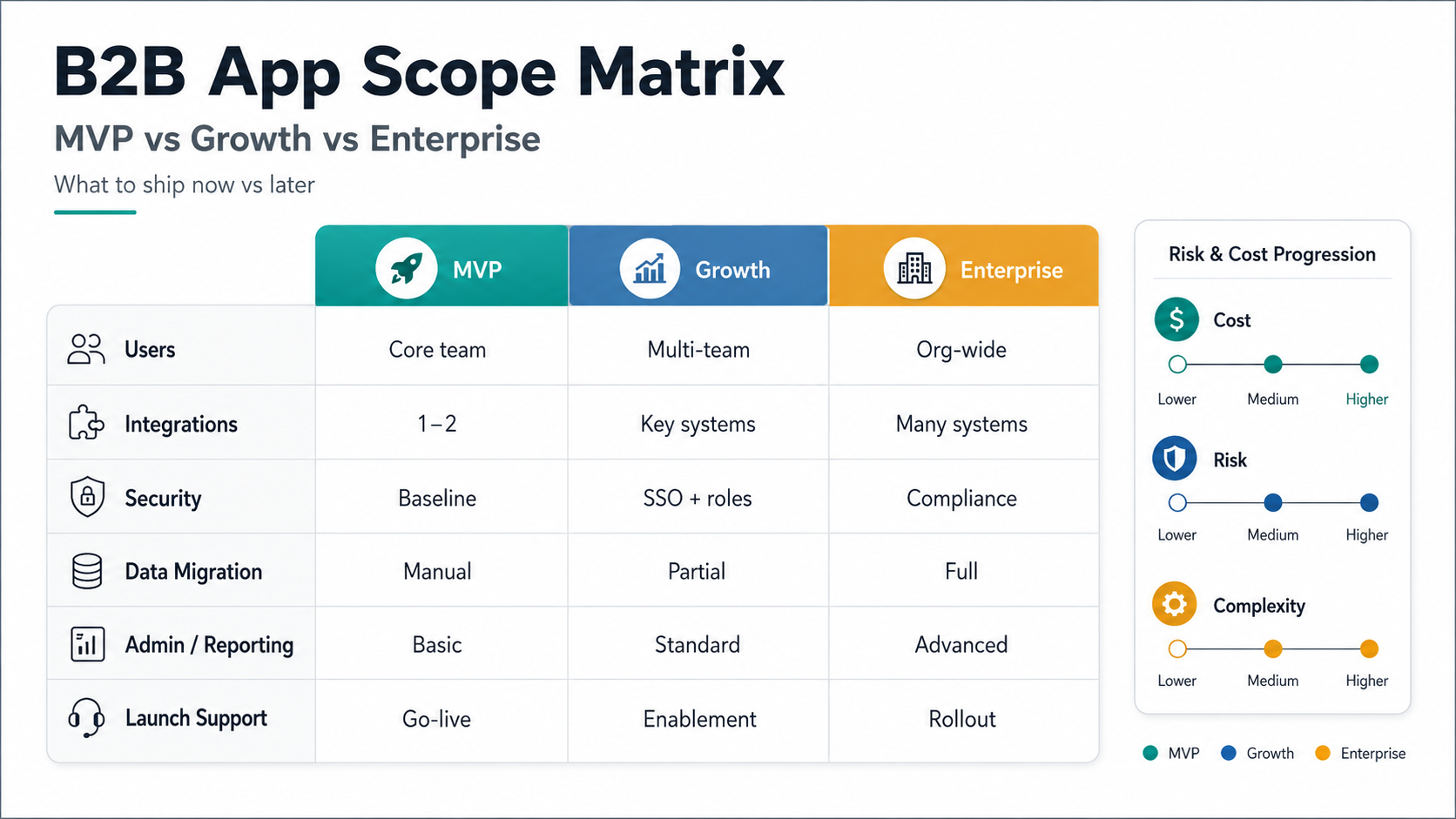
| Decision | MVP answer | Later-phase answer |
|---|---|---|
| Who must use it first? | One primary user group and one admin role | Partners, customers, branches, vendors, and support users |
| Which workflow proves value? | Quote request, approval, order capture, field update, or support intake | Automation across sales, operations, finance, service, and analytics |
| Which integrations are required? | Only the systems needed for the first workflow | ERP, CRM, payment, inventory, BI, documents, identity, and messaging |
| What reporting is needed? | Operational dashboard and export | Role-aware analytics, forecast views, finance reports, and executive dashboards |
Use the MVP Scope Builder when the backlog is too broad. It helps separate build-now features from later-phase ideas before they inflate the first estimate.
Integration Costs In B2B Apps
Integrations are one of the biggest reasons B2B app estimates change after discovery. A demo integration can be simple. A production integration needs authentication, error handling, retries, logging, monitoring, data mapping, sandbox access, rate-limit planning, and support diagnostics.
Common B2B integrations include CRM, ERP, inventory, payment gateways, accounting, e-signature, ticketing, marketing automation, identity providers, analytics, document storage, and notification systems; teams with ERP-heavy scope should compare assumptions with ERP integration and modernization services before locking the budget. Each one should be classified by business criticality. If an integration failure blocks orders, pricing, approvals, or customer support, it needs stronger engineering and QA than a nice-to-have reporting sync.
Budget should also include reconciliation. B2B apps often sit between systems of record. When the app says an order is approved but the ERP rejects a line item, the support team needs a clear state, retry path, and audit trail. That operational tooling is rarely visible in early mockups, but it matters once users rely on the app.
Integration Readiness Before Estimation
Before pricing a B2B app, classify every integration by launch dependency. A read-only CRM lookup, a two-way ERP order sync, a payment-term rule, and a document archive do not carry the same engineering risk. The estimate should state which system is the source of truth, how conflicts are resolved, and what the support team sees when a sync fails.
- Access: confirm API credentials, sandbox environments, rate limits, and vendor support windows.
- Data mapping: map account IDs, product IDs, pricing terms, tax rules, statuses, owners, and historical records.
- Error states: define retries, dead-letter queues, manual overrides, user-facing messages, and alert ownership.
- Evidence: log important requests, approvals, exports, sync failures, and admin changes without exposing sensitive data.
If ERP is central to the release, use the ERP integration cost guide to separate API work, migration work, reporting, and post-launch support before merging everything into one broad app estimate.
Security And Compliance Budget
B2B security is not just login. A partner portal, distributor app, or internal workflow app may expose pricing, contracts, customer records, operational data, or payment details. The estimate should include security decisions before build begins.
- Identity: decide whether email login is enough or whether SSO, MFA, password policies, and session controls are required.
- Permissions: model account, branch, team, customer, and admin access before database work starts.
- Auditability: record important changes to approvals, pricing, account settings, exports, and admin actions.
- Data protection: plan encryption, retention, backups, file handling, and least-privilege access.
- Vendor risk: review third-party APIs and SaaS dependencies that will touch sensitive workflows.
Security can be phased, but it should not be postponed blindly. If a B2B app handles sensitive data or business-critical workflows, cutting security and QA usually creates more expensive rework after launch.
Team And Timeline Planning
B2B app development needs more than frontend and backend tickets. The team has to understand workflows, design role-specific UX, build APIs, manage integrations, test edge cases, deploy safely, and support the first users.
| Role | What the role protects | When it becomes essential |
|---|---|---|
| Product lead | Scope, stakeholder tradeoffs, acceptance criteria, release sequencing | Any B2B app with multiple departments or customer-facing users |
| UX/UI designer | Role-specific flows, dashboards, forms, admin usability | Portals, apps used daily, and workflows with approvals or exceptions |
| Frontend/mobile engineer | Responsive UI, state, accessibility, platform behavior, offline constraints | Web portals, mobile apps, dashboards, and field workflows |
| Backend engineer | Data model, permissions, APIs, business rules, integrations | Nearly every production B2B app |
| QA engineer | Regression coverage, role paths, integration errors, release confidence | Apps with approvals, payments, sensitive data, or many user roles |
| Cloud/DevOps engineer | Environments, deployments, monitoring, backups, reliability | Business-critical apps with uptime or security expectations |
A focused MVP may be planned in a shorter delivery cycle when workflow and data are known. A growth or enterprise release usually needs discovery, UX, architecture, build, QA, migration, launch support, and post-launch iteration. Timeline pressure should reduce optional scope before it reduces security, integration reliability, or QA.
Hidden Costs That Surprise Buyers
Most budget surprises come from work that was not named early enough. Watch these items before approving a B2B app estimate.
- Stakeholder discovery: sales, operations, finance, support, and IT may each carry different rules for the same workflow.
- Admin tooling: internal teams need safe ways to manage users, accounts, records, failed jobs, and support cases.
- Data cleanup: old CRM, ERP, spreadsheet, or order data may contain duplicates and undocumented rules.
- Integration support: logs, retry tools, reconciliation reports, and alerting are part of production readiness.
- Training and rollout: B2B users need onboarding, documentation, support flows, and feedback loops.
- Maintenance: APIs, mobile OS behavior, dependencies, security patches, and cloud costs keep changing after launch.
If the app is transaction-heavy, compare hidden cost patterns with NextPage's eCommerce app development cost guide. If the app is role-heavy with dispatch, routing, or operational coordination, compare with the taxi app development cost guide for another example of multi-role workflow budgeting.
How To Build A Defendable B2B App Budget
A defendable B2B app budget explains what the first release will prove, what is intentionally deferred, and what uncertainty still needs reserve. It should be clear enough for founders, product leaders, operations teams, finance, and vendors to challenge.
- Name the primary workflow. Define the trigger, input, decision, output, owner, and business result.
- Map roles and permissions. Role complexity affects UX, backend architecture, QA, and support.
- Separate web, mobile, and admin surfaces. Do not assume every role needs every platform in version one.
- Rank integrations by launch dependency. Build only the integrations required to prove the first workflow.
- Decide security and audit expectations early. These choices affect architecture, test cases, and delivery timeline.
- Hold a risk reserve. Keep capacity for data cleanup, API changes, user feedback, and launch hardening.
NextPage estimates B2B app development by mapping workflows first, then translating those workflows into UX, architecture, integrations, team capacity, QA, cloud operations, and support. Use the Custom Software Cost Estimator for a directional range, then review the assumptions with a team that can turn scope into a practical release plan.
Cost-Control Checkpoints Before Signoff
Before approving a B2B app budget, review the estimate against checkpoints that prevent expensive rework. The goal is not to make the app artificially small. The goal is to fund the first release that proves business value without hiding integration, security, migration, or support work.
| Checkpoint | Question to answer | Why it protects budget |
|---|---|---|
| Workflow ownership | Who owns the process after launch? | Prevents orphaned admin tools and unclear support paths. |
| Build vs buy fit | Which requirements cannot be solved cleanly by SaaS? | Connects scope to the build vs buy software decision. |
| Release-one exclusions | Which reports, roles, integrations, and edge cases are deferred? | Keeps the MVP from absorbing every stakeholder request. |
| Operational readiness | How will support diagnose failed approvals, syncs, exports, or payments? | Avoids a launch that works only in demos. |