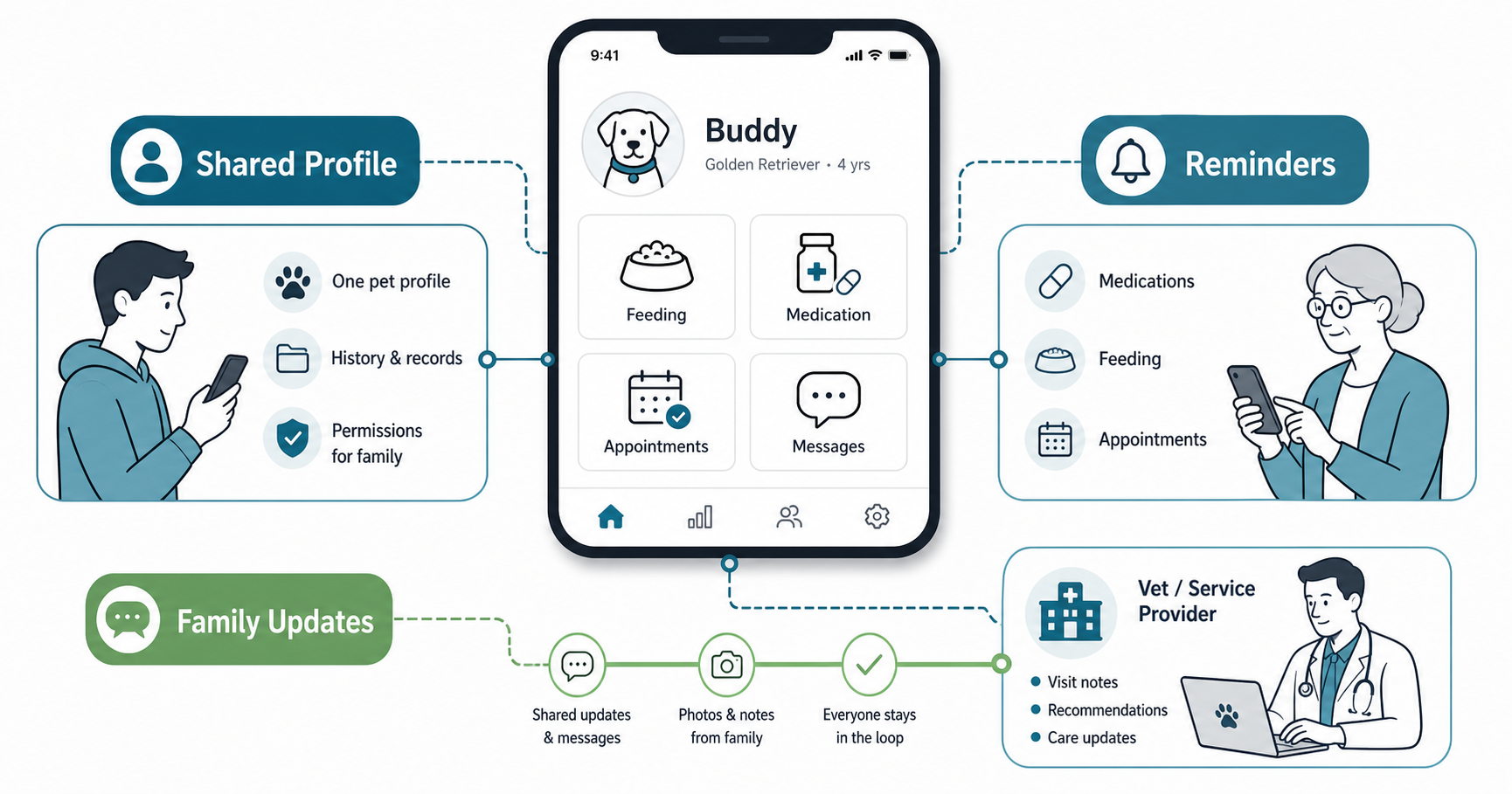

Pet care apps can do more than track walks, food, grooming, and appointments. When they are designed well, they become a shared care space where younger pet owners, parents, older relatives, sitters, vets, and service providers can coordinate without making anyone feel lost in the technology.
The real opportunity is not simply adding more features. It is building an age-inclusive product that helps every generation participate in daily care at the level they are comfortable with. That means clear reminders, simple permissions, accessible interfaces, family updates, and trustworthy records that reduce confusion rather than creating another app people ignore.
Quick Answer: How Do Pet Care Apps Bridge The Generation Gap?
Pet care apps bridge the generation gap by turning pet care into a shared workflow. Younger owners can manage scheduling, digital records, payments, photos, and app settings, while older caregivers can receive simple reminders, confirm completed tasks, view vet instructions, and share updates without learning a complex system. For product teams, the goal is to make the same pet profile useful to different generations with different comfort levels, communication preferences, and accessibility needs.
That approach makes a pet care product stronger commercially too. A family-ready product is easier to adopt, easier to recommend, and better aligned with the practical expectations of a modern mobile app development project: useful onboarding, dependable reminders, accessible UX, and workflows that support real-life usage instead of idealized single-user behavior.
Why Age-Inclusive Pet Care App Design Matters
Many pet care apps are designed for one primary user: the person who downloads the app, creates the pet profile, and manages care. In real households, care is often shared. A grandparent may feed the pet during the day. A parent may book grooming. A younger owner may upload vaccination records. A sitter may need temporary access. A vet or trainer may need accurate history before offering advice.
If the app assumes every user is equally tech-savvy, the product quickly creates friction. Seniors may miss small text, complicated navigation, or unclear alerts. Busy parents may not want another noisy notification channel. Younger users may expect photo updates, chat, and automation. The product has to support these differences without splitting the household into disconnected experiences.
NextPage's supporting article on community spaces in pet care apps covers the broader engagement layer. For this post, the focus is more specific: how to design pet care workflows that let multiple generations coordinate confidently around the same animal.
What Pet Care Apps Need To Support Every Age Group
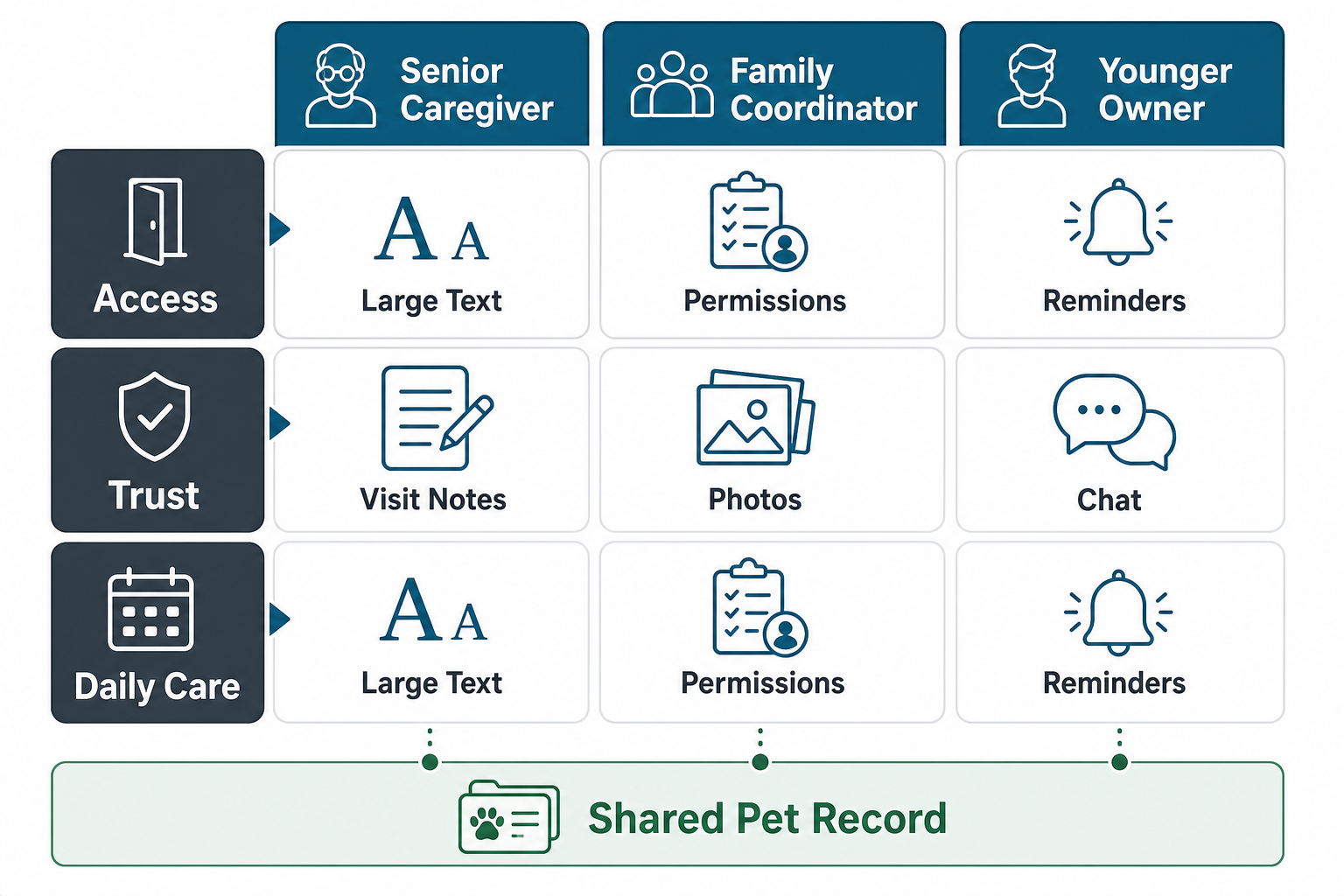
An age-inclusive pet care app should start with shared care needs, not demographic assumptions. Older users do not all need the same interface. Younger users do not all want automation. The better product question is: what does each care role need to do quickly, safely, and repeatedly?
| Care Role | Primary Need | Useful App Features | Design Risk To Avoid |
|---|---|---|---|
| Senior Caregiver | Simple confidence | Large text, reminder confirmation, one-tap call, clear medication or feeding notes | Small labels, hidden settings, too many alerts |
| Family Coordinator | Shared visibility | Permissions, calendar, care history, handoff notes, recurring tasks | Unclear ownership of tasks |
| Younger Owner | Speed and flexibility | Photos, chat, automation, digital records, integrations, payment flows | Forcing every user through the same advanced path |
| Vet, Trainer, Or Sitter | Context at the right time | Temporary access, visit notes, vaccination record, appointment summary | Over-sharing private household data |
The strongest apps treat accessibility, permissions, and notification design as product strategy. They are not polish items added at the end. They determine whether a household keeps using the product after the first week.
Designing Shared Care Workflows Without Creating New Confusion
Pet care coordination breaks down when everyone receives different information or when no one knows who is responsible for the next task. A useful app makes responsibility visible. It should show what needs to happen, who owns it, whether it was completed, and what changed afterward.
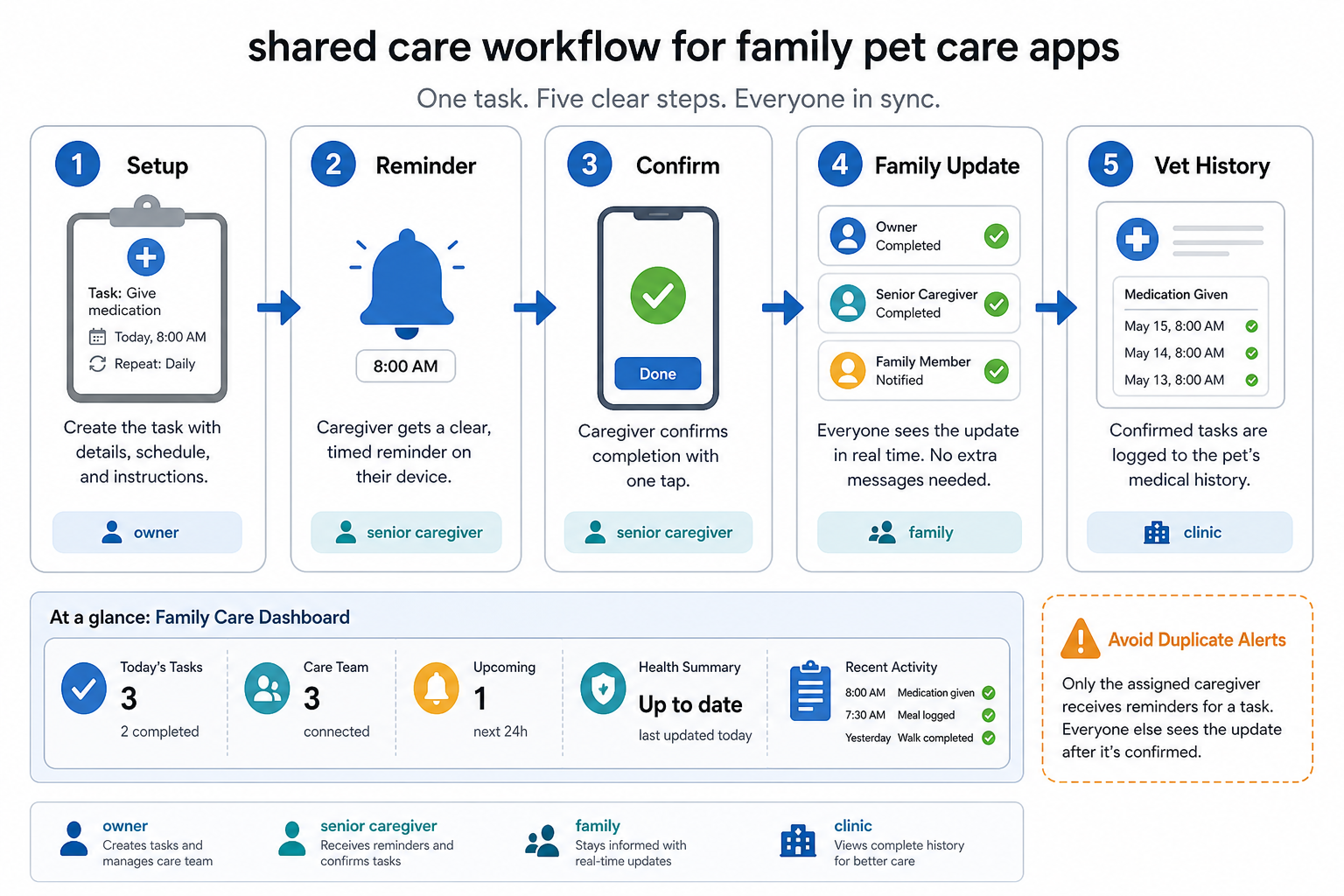
A practical shared-care flow usually looks like this:
- Set up the pet profile: Add basic details, feeding routines, medications, vaccinations, preferred vets, and emergency contacts.
- Assign care tasks: Let the family coordinator assign recurring or one-time tasks to the right person.
- Send clear reminders: Use plain-language reminders with one main action, such as "Confirm feeding" or "Call vet".
- Capture completion: Make confirmation simple enough for less technical users while allowing notes or photos for users who want detail.
- Update the shared record: Keep the care timeline current so family members, sitters, and vets can trust the history.
The key is avoiding duplicate alerts. If every family member gets every notification, the app becomes noise. If only one person gets the alert, shared care fails. Use role-based notifications, escalation rules, and digest updates so each person receives only what they need.
Accessibility Choices That Make Pet Care Apps Easier For Seniors
Senior-friendly design is not about making a separate "elderly mode" that feels limited. It is about making core workflows understandable, readable, and forgiving. The same choices often help every user, especially during stressful pet care moments.
- Readable typography: Use clear type sizes, strong contrast, and generous spacing for care instructions.
- Plain-language labels: Prefer "Vet Visit" over internal terms such as "event object" or "medical entry".
- One clear primary action: Each reminder screen should make the next step obvious.
- Forgiving controls: Avoid tiny tap targets, destructive swipes, and hidden gestures for critical care tasks.
- Human fallback: Include a quick call option for family members, vets, sitters, or support when the app is not enough.
Accessibility should also cover trust. Older caregivers need to know who can see information, who changed a task, and whether a reminder was completed. Audit trails and simple permissions make the app feel safer.
Features That Help Families Coordinate Pet Care
The most valuable features are the ones that reduce handoff mistakes. A pet care app for all ages should include:
- Shared pet profiles: A single source of truth for food, medicine, allergies, documents, microchip details, and emergency contacts.
- Role-based permissions: Owners, family members, sitters, vets, and service providers should have different levels of access.
- Smart reminders: Feeding, medication, vaccination, grooming, walking, and appointment reminders should be configurable by role.
- Care timeline: A chronological record of completed tasks, visits, notes, photos, and health changes.
- Photo and note updates: Lightweight updates keep remote family members involved without requiring long messages.
- Emergency mode: Critical health and contact information should be easy to access when speed matters.
These features also make the product more credible for a serious build. When planning a custom app, treat care coordination as a first-class workflow in the product requirements, not a set of disconnected screens.
What Product Teams Should Prioritize First
If the app is early-stage, do not try to build every possible pet care feature at once. Start with the workflows that create repeat usage and household trust.
| Priority | Build First | Why It Matters |
|---|---|---|
| 1 | Shared pet profile and care timeline | Creates the core record that every user trusts |
| 2 | Reminders with completion confirmation | Turns the app into a daily utility |
| 3 | Role-based family permissions | Lets multiple generations participate safely |
| 4 | Accessible reminder and task screens | Reduces support burden and senior-user drop-off |
| 5 | Provider and vet handoff notes | Improves care continuity beyond the household |
This order helps teams avoid a common mistake: building advanced community or marketplace features before the core care loop works. Engagement features matter, but the product has to earn daily trust first.
Common Mistakes In Multi-Generation Pet Care Apps
The biggest mistakes usually come from treating different age groups as a marketing segment instead of a workflow reality.
- Assuming one user owns all care: Real care often involves multiple family members and temporary helpers.
- Overloading notifications: Too many alerts train users to ignore the app.
- Hiding important settings: Privacy, reminders, and permissions must be easy to understand.
- Making seniors dependent on younger users: The app should support independence where possible.
- Ignoring offline context: Pet care still happens through calls, visits, and face-to-face handoffs. The app should support those moments, not replace them entirely.
How To Build A Pet Care App That Families Keep Using
A family-ready pet care app needs strong product discovery before development. Interview different household roles, map the care journey, prototype reminder flows, test readability, and validate permissions before investing in complex integrations. Then build the product in increments: profile, reminders, timeline, family access, provider handoff, and finally community or marketplace expansion.
For teams evaluating a build, the most important question is not "How many features can we add?" It is "Which care loop will users repeat every week?" Once that loop is reliable, the app can expand into richer pet health management, community engagement, appointments, insurance, grooming, and commerce.
Key Takeaways
- Pet care apps bridge generations when they turn care into a shared, trusted workflow.
- Mixed-age households need simple reminders, readable interfaces, permissions, and shared history.
- Accessibility and notification design are core product decisions, not cosmetic improvements.
- Start with the shared pet profile, care timeline, reminders, and role-based permissions before expanding into advanced features.
- The best app experience supports online coordination while respecting the offline reality of family care.