
Quick Answer: When Custom Employee Management Software Makes Sense
Custom employee management software makes sense when your HR workflows, employee data model, approval paths, reporting needs, or integration requirements no longer fit cleanly inside off-the-shelf HR software. If the team mostly needs standard employee records, onboarding, time off, payroll handoff, and basic performance reviews, buying a mature HRMS is usually faster. If HR, operations, finance, and managers keep moving work into spreadsheets, chat, email, side databases, and manual exports, a custom platform or workflow layer becomes worth evaluating.
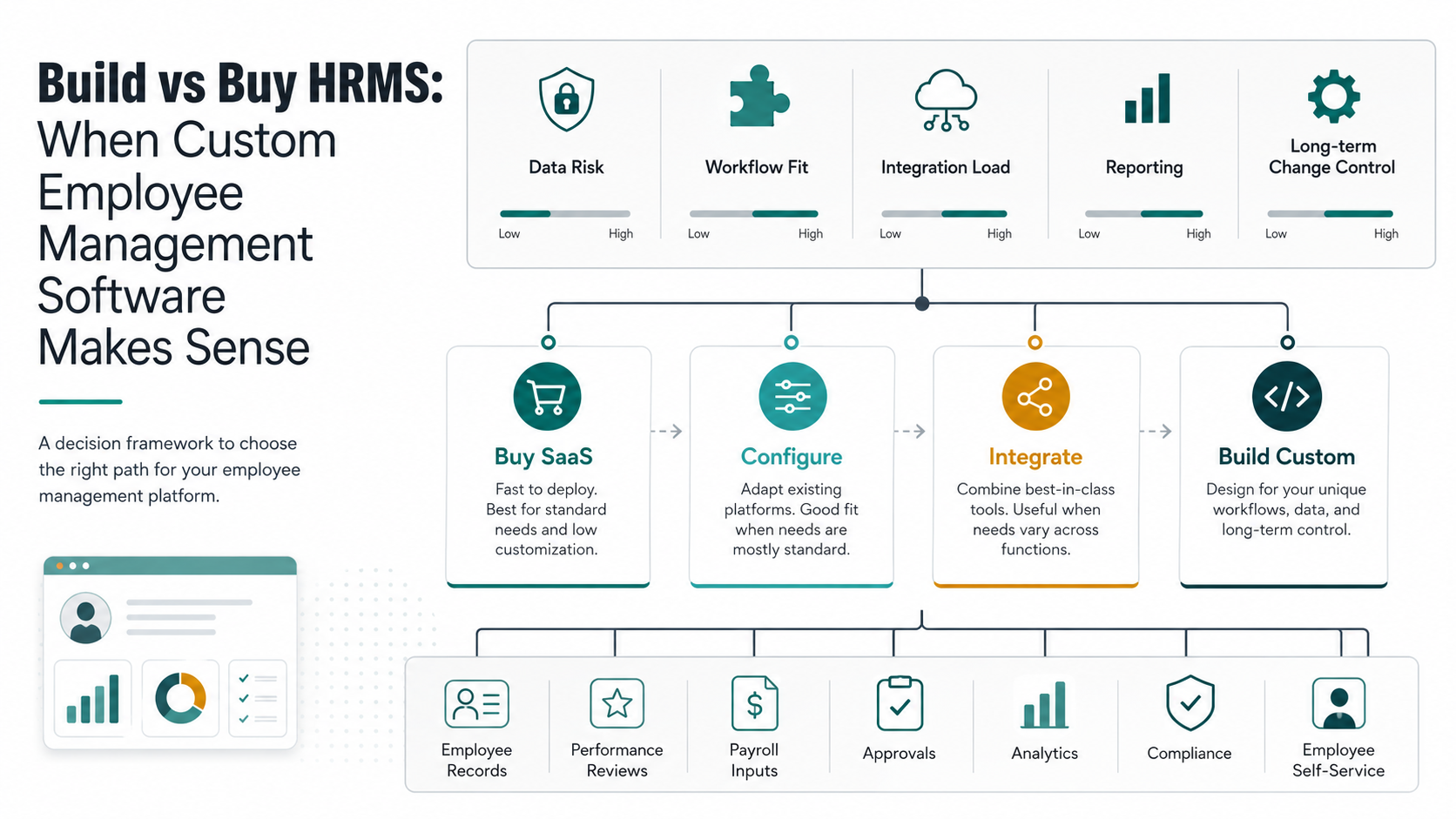
The best decision is rarely simply build or buy. Most teams have four paths: buy HR SaaS, configure an HRMS, integrate existing HR tools, or build custom employee management software around the real operating model. The right path depends on workflow fit, employee-data risk, payroll and compliance boundaries, reporting ownership, user adoption, and the cost of change over time.
If you need a structured answer, start with NextPage's Build vs Buy Decision Tool. If your answer points toward custom workflows, use this guide to pressure-test the scope before estimating a build.
Why HRMS Build-Vs-Buy Is Different
HR software is not ordinary internal tooling. It stores sensitive employee records, compensation inputs, attendance data, performance feedback, manager notes, compliance evidence, and sometimes payroll or benefits data. A sloppy workflow is inconvenient in most business systems; in HR it can create privacy, trust, compliance, and employee-relations problems.
That is why the decision should start with data and responsibility, not feature lists. A vendor page may show modules for employee profiles, attendance, leave, payroll, goals, reviews, feedback, and analytics. Those modules matter, but the deeper question is whether the system can represent how your company actually makes people decisions. Review cycles, probation workflows, variable pay inputs, role changes, disciplinary records, internal mobility, manager approvals, and multi-country policies often create edge cases that generic software handles only partially.
For many companies, a bought HRMS is still the right answer. Mature platforms can handle standard HR operations with less risk than a custom build. Custom software becomes relevant when the cost of adapting the business to the tool is higher than the cost of owning a focused workflow.
The Four Paths Before A Custom Build
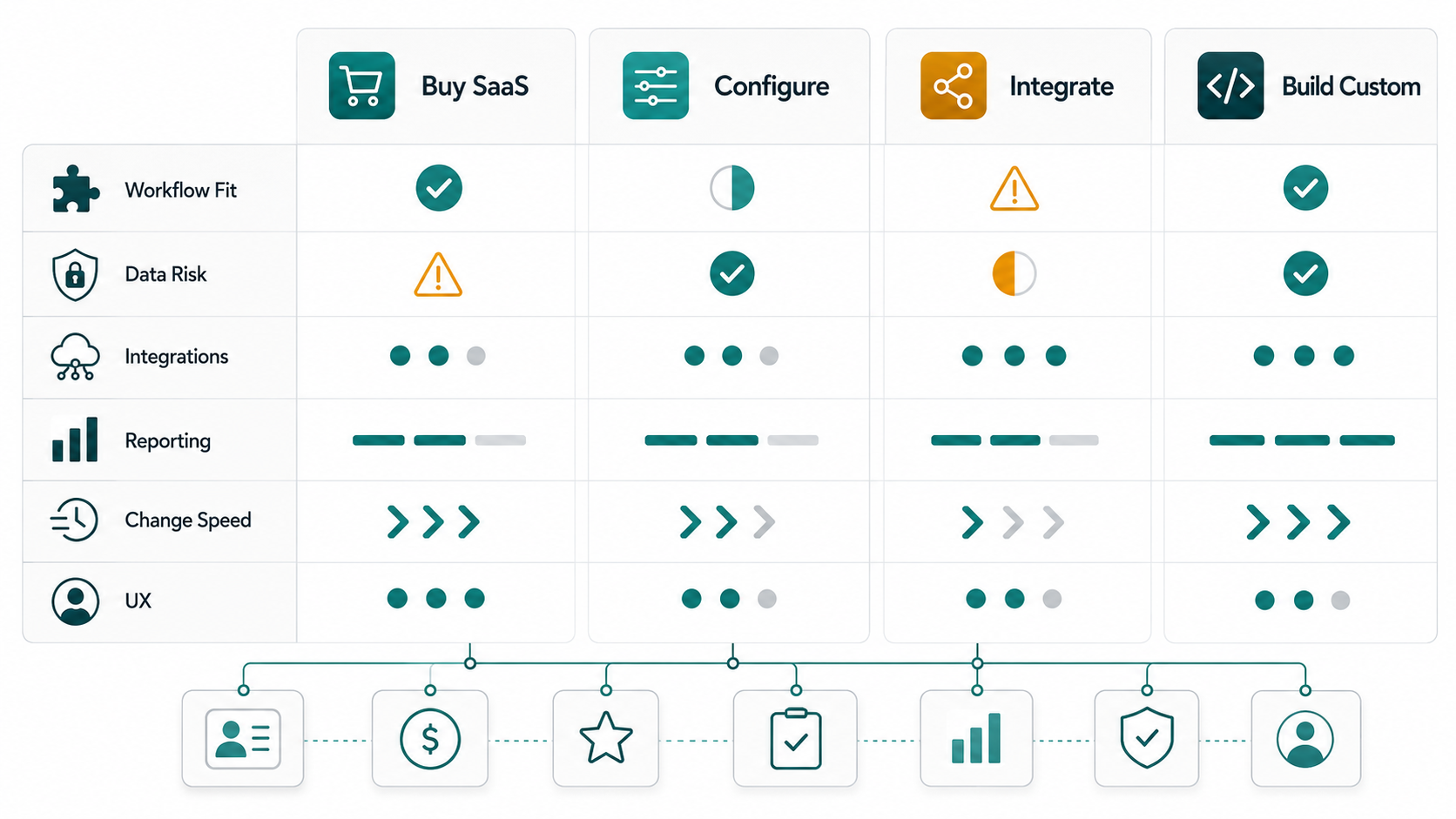
Before committing to custom employee management software, compare four paths. This keeps the discussion practical and prevents the team from turning frustration with one tool into an oversized software project.
| Path | Best fit | What to watch |
|---|---|---|
| Buy HR SaaS | Standard HR workflows, fast rollout, known compliance needs, limited customization | License tiers, data portability, reporting limits, integration depth |
| Configure HRMS | Core process fits, but needs custom fields, templates, approvals, or review cycles | Admin complexity, brittle configuration, hidden implementation cost |
| Integrate HR Tools | Separate systems are useful, but data and reporting need one operating layer | Sync failures, duplicate records, ownership rules, monitoring |
| Build Custom | Workflow, data model, permissions, analytics, or employee experience is too specific | Maintenance, adoption, security, roadmap discipline |
If the work is mostly configuration, stay in SaaS. If the real pain is fragmented data, consider an integration or reporting layer first. If the workflow itself is the advantage or the risk, custom software deserves serious analysis.
Signals You Have Outgrown Standard HR Software
The strongest build signals are operational, not cosmetic. A custom UI is rarely enough reason to build. Durable workflow friction is.
- HR data is duplicated across tools. Employee records, reviews, attendance, payroll inputs, and manager notes live in separate systems with manual reconciliation.
- Approvals are happening outside the HRMS. Promotions, role changes, leave exceptions, performance actions, and compensation inputs move through chat or spreadsheets.
- Reporting requires analyst cleanup. Leadership dashboards depend on exports, joins, manual corrections, and definitions that change by department.
- Review cycles do not match the software. The company needs custom goal structures, calibration, 360 feedback, manager chains, or project-based performance inputs.
- Permissions are more nuanced than roles allow. HR, finance, managers, leadership, employees, and regional admins need different visibility into sensitive records.
- Employee experience suffers. People cannot easily update data, request changes, see status, complete reviews, or trust that records are current.
When several of these symptoms appear together, the issue is not one missing feature. It is workflow fit.
Where Custom Employee Management Software Helps
A custom platform is strongest when it models the work that makes your company different. That may include employee performance management, custom appraisal cycles, role-specific approval paths, HR service requests, internal mobility, training workflows, policy acknowledgements, or manager dashboards.
For example, a company with simple annual reviews can probably configure a standard platform. A company with quarterly objectives, project-based feedback, calibration meetings, skill matrices, probation checkpoints, and role-specific promotion evidence may need a custom performance layer. That layer might still integrate with an HRMS for employee master data, payroll IDs, and status changes.
NextPage's employee performance management software development work focuses on those custom review cycles, goal workflows, dashboards, approvals, and integrations. The point is not to rebuild every HR module. The point is to own the workflows where generic software creates friction.
What To Keep In SaaS
Even when custom software makes sense, not every HR function belongs in a custom build. Payroll calculation, statutory compliance, benefits administration, tax reporting, and commodity HR records often belong in proven systems with mature controls and support. Custom software should usually connect to those systems rather than replace them.
Keep bought software where standardization reduces risk. Build custom software where workflow ownership, user experience, reporting, or integration control creates a measurable benefit. This hybrid approach is often the cleanest path: retain the system of record, build the workflow layer, and integrate the data that leaders and managers need.
If payroll and HR operations are central to the scope, review the service boundary carefully. NextPage's HR and payroll software development approach starts by mapping users, records, approvals, payroll inputs, sensitive data, and the first workflow that should leave spreadsheets.
Integration And Data Ownership
Integrations can make or break HR software. Employee management rarely lives alone. It may need identity management, payroll, attendance devices, accounting, project management, helpdesk, learning systems, document storage, e-signatures, analytics, and communication tools.
Every integration needs ownership rules. Which system owns employee status? Where does a manager change start? When does payroll receive an approved change? How are failed syncs handled? Who can see compensation fields? Can historical review records move when an employee changes teams?
These questions are why custom employee management work often looks like custom software development, not just HR configuration. The architecture has to protect sensitive data, support audits, and give non-technical admins enough control without making the system fragile.
Cost And Scope Drivers
Custom HRMS cost depends less on the word HRMS and more on the number of workflows, roles, integrations, data rules, reports, and release risks. A focused employee review workflow is one scope. A full employee operations platform with profiles, onboarding, attendance, leave, performance, payroll inputs, service requests, analytics, permissions, and integrations is a very different build.
| Driver | Lower scope | Higher scope |
|---|---|---|
| User roles | HR admins, employees, managers | HR, finance, executives, regional admins, contractors, auditors |
| Workflows | One review or request process | Onboarding, reviews, leave, approvals, performance, payroll inputs, documents |
| Integrations | One HRMS or CSV import | Payroll, identity, attendance, accounting, BI, documents, communication tools |
| Data controls | Basic role permissions | Field-level access, audit logs, regional rules, retention, approval evidence |
| Reporting | Operational dashboards | Executive analytics, workforce trends, compensation inputs, custom KPIs |
| Rollout | Small internal pilot | Multi-team training, migration, policy alignment, support, change management |
For a directional range, use the Custom Software Cost Estimator. Treat the output as a planning band, then validate it with a workflow map and integration inventory.
A Practical Implementation Roadmap
The safest custom HR build starts narrow. Choose one painful workflow, prove adoption, then expand. Trying to replace the entire HR stack in one release is usually slower, riskier, and harder to adopt.
- Map the current workflow. Capture users, records, approvals, exceptions, reports, and tools involved.
- Define the system boundary. Decide what remains in HR SaaS, payroll, finance, identity, and analytics tools.
- Prioritize version one. Pick the workflow that removes the most manual work or risk with the least migration complexity.
- Design permissions early. HR data visibility should be a first-class design decision, not a late access-control patch.
- Plan integration failure handling. Build retry, audit, owner, and notification rules for sync problems.
- Pilot with real managers and HR users. Measure completion rates, data quality, cycle time, and support questions.
- Expand only after trust is established. Add analytics, automation, and adjacent workflows once people rely on the system.
This is similar to the discipline described in NextPage's internal tool development guide: build when the workflow is important, specific, and risky enough to justify ownership.
When SaaS Replacement Is The Right Frame
Sometimes the HRMS decision is part of a broader SaaS replacement pattern. Teams have accumulated multiple tools, each solving part of the problem, while the real operating layer lives in spreadsheets and manual coordination. In that case, the right project may be a custom workflow platform that connects HR, finance, operations, and reporting.
NextPage's SaaS replacement and custom workflow software services are designed for this kind of situation: keep what works, replace what creates workarounds, and build the owned layer around roles, approvals, exceptions, reporting needs, and data flows.
Final Decision Checklist
Use this checklist before starting a custom employee management build:
- Can a standard HRMS handle the workflow with reasonable configuration?
- Are the current workarounds creating measurable cost, delay, risk, or employee frustration?
- Which system owns employee master data, payroll inputs, documents, and review history?
- What sensitive fields need field-level visibility or audit trails?
- Which integrations are required for version one, and which can wait?
- What reporting decisions must the platform support?
- Who will administer the system after launch?
- How will adoption be measured across HR, managers, and employees?
If most answers are simple, buy or configure. If the answers expose unique workflows, sensitive data paths, reporting gaps, and integration ownership problems, custom employee management software may be the more durable path.
NextPage Point Of View
NextPage does not treat custom HRMS as a default answer. The best solution may be SaaS, configuration, integration, or a focused custom workflow layer. The decision should come from the operating model, not a feature wishlist.
When custom software is justified, the first release should be narrow enough to launch and important enough to matter. Start with the workflow that creates the most repeated friction, connect only the systems needed for trust, and expand after real usage proves the model. That is how custom employee management software becomes an advantage instead of another internal system people work around.