
The build vs buy software decision in 2026 is no longer a simple choice between expensive custom development and convenient SaaS. SaaS is still the fastest answer when a standard workflow already fits. Custom software is still the better answer when the workflow is a source of advantage, control, compliance, or operating leverage. The practical middle ground is often hybrid: buy commodity capabilities, then build the workflow layer that makes the business different.
Use this rule first: buy when the problem is common, build when the workflow is strategic, and go hybrid when standard tools handle part of the job but leave expensive gaps in approvals, data, reporting, integrations, or customer experience. The wrong decision usually shows up later as subscription sprawl, manual workarounds, brittle integrations, shadow spreadsheets, or a custom system nobody owns after launch.
If your team is choosing between SaaS and custom software, evaluate total cost of ownership, workflow fit, data control, integration depth, security, launch timeline, maintenance ownership, and long-term optionality. The cheapest option on day one is not always the lowest-risk option over three years.
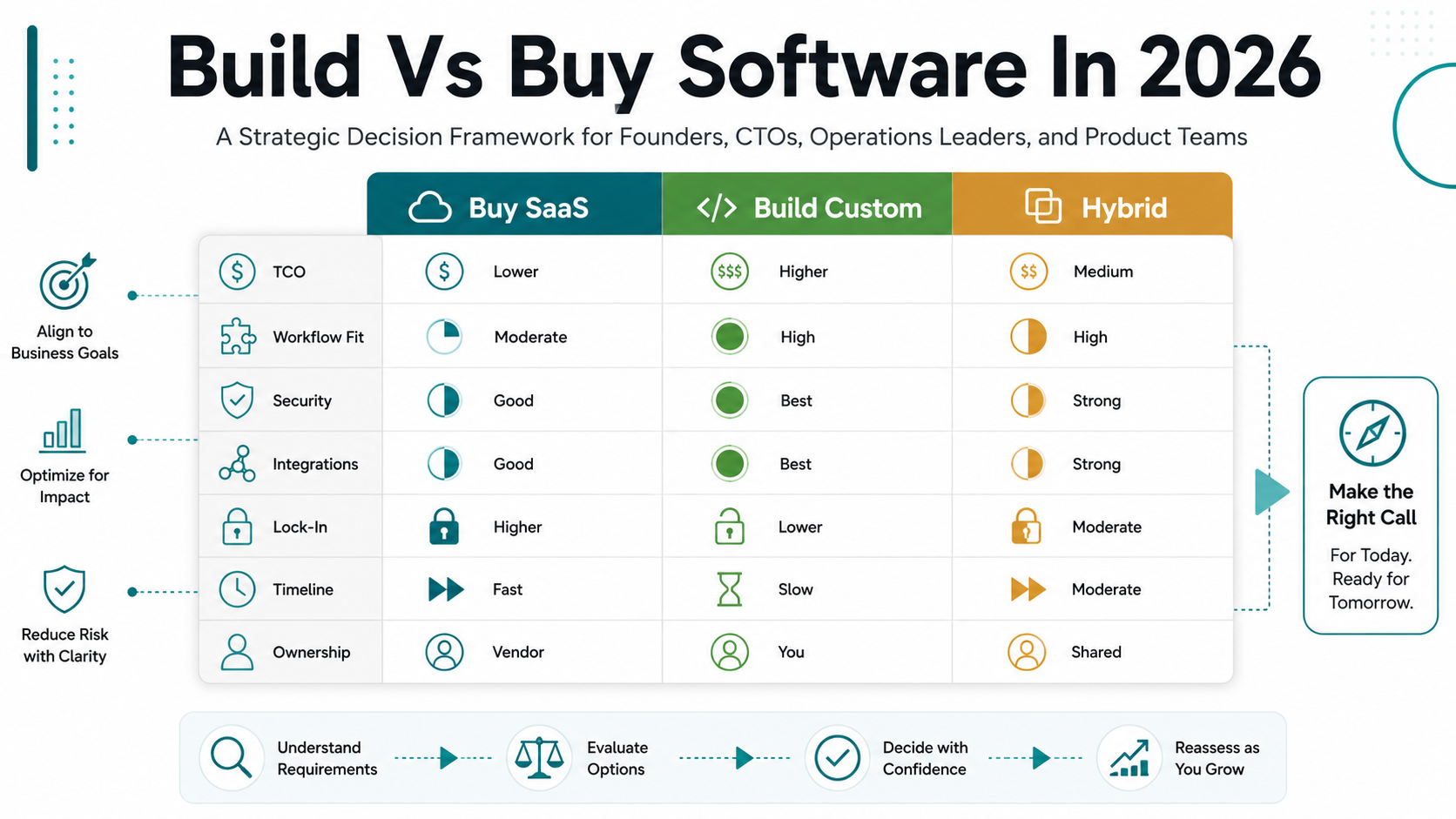
Quick Answer: Build Vs Buy Software In 2026
Buy SaaS when your workflow is standard, the tool already covers most of the requirement, implementation risk is low, and speed matters more than ownership. Build custom software when the process is unique, revenue-impacting, compliance-sensitive, integration-heavy, or difficult to run inside generic tools. Use a hybrid model when SaaS handles commodity functions such as payments, authentication, email, search, CRM, or analytics, but your core workflow still needs a custom layer.
| Decision Path | Best Fit | Main Risk | What To Validate First |
|---|---|---|---|
| Buy SaaS | Common workflow, fast rollout, limited customization, predictable users. | Seat costs, feature limits, data lock-in, and workflow compromise. | Can the team run the process with minimal workarounds? |
| Build custom | Unique workflow, competitive advantage, heavy integrations, special security or reporting. | Scope creep, maintenance ownership, longer launch path. | Will three-year gains exceed build and operating cost? |
| Hybrid | Commodity tools plus custom workflow, data, automation, or customer experience layer. | Integration complexity and unclear system ownership. | Which parts are commodity and which create advantage? |
Before you choose, run the scenario through the Build vs Buy Decision Tool. It helps separate problems that deserve custom software from problems that can stay in SaaS, low-code, or integration layers.
What Changed In 2026
Three forces changed the conversation. First, AI-assisted development reduced the cost of producing a first version, which makes custom internal tools more accessible. Second, SaaS spending keeps spreading across teams, creating pressure to consolidate or replace tools that do not fit. Third, security, data governance, and integration requirements have become more important as software touches more operational decisions.
Retool's 2026 build-vs-buy reporting is a useful market signal: surveyed enterprise builders are replacing some SaaS tools with custom builds, but the same shift also creates shadow IT and governance questions. The lesson is not that every company should rebuild its stack. The lesson is that custom software is easier to start, so leaders must be more disciplined about what they approve, how they secure it, and who owns it after launch.
The best 2026 decision framework is therefore not "AI makes build cheap" or "SaaS is always safer." It is a portfolio decision. Keep generic capabilities in SaaS when they work. Build the workflows that create leverage. Use APIs, data contracts, and phased scope to avoid rebuilding the commodity parts of the stack.
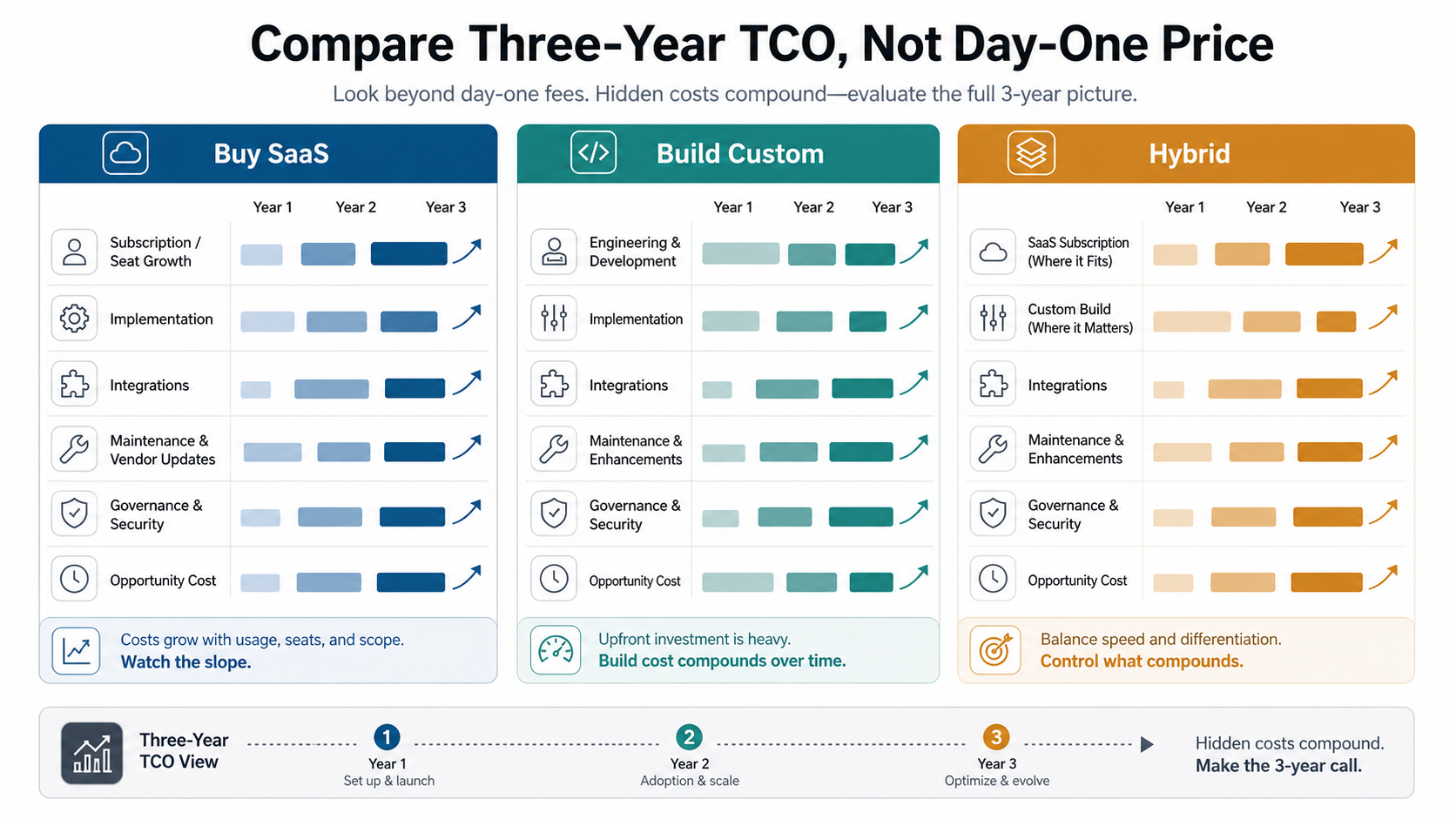
Compare Three-Year TCO, Not Day-One Price
Day-one price is the easiest number to compare and the least reliable one. SaaS may start low but scale with seats, usage, modules, add-ons, implementation services, premium support, and data export limits. Custom software starts higher but can avoid per-seat economics when the process has many users, heavy data ownership needs, or ongoing customization.
| Cost Driver | SaaS Buying Question | Custom Build Question |
|---|---|---|
| Licensing | How do seat, usage, AI-feature, and enterprise-tier costs change as the team grows? | What functionality must be built now versus deferred? |
| Implementation | How much configuration, migration, training, and process redesign is required? | How much discovery, design, architecture, QA, and rollout work is needed? |
| Integrations | Are required APIs available on the purchased plan, and do they support the needed data model? | Which systems need reliable sync, audit logs, retries, and support ownership? |
| Maintenance | What does the vendor handle, and what still falls to internal admins? | Who owns bugs, security patches, roadmap changes, hosting, monitoring, and documentation? |
| Opportunity cost | What process compromises or manual work will continue? | What revenue, savings, or speed does the custom workflow unlock? |
For budget planning, pair the build-vs-buy decision with the Custom Software Cost Estimator and the custom software development cost guide. Screen count alone is a weak estimate. Roles, workflows, data rules, integrations, AI features, reporting, security, and QA drive the real budget.
When Buying SaaS Makes Sense
Buying is usually right when the workflow is well understood across the market. Accounting, payroll, basic CRM, email marketing, help desk, identity, analytics, payments, scheduling, and commodity project management often have mature SaaS options. If a tool supports 80 percent or more of the required workflow without risky workarounds, buying can preserve cash and reduce delivery risk.
SaaS also makes sense when the team needs a capability immediately, the vendor's roadmap is ahead of what you could fund, compliance certifications are stronger than what you can maintain internally, or the process is not a meaningful differentiator. Buying lets your team focus engineering attention on workflows that are closer to revenue, customer experience, or operational advantage.
The warning sign is customization by workaround. If users export data to spreadsheets every week, build side databases, skip required approval steps, or use chat messages to coordinate what the SaaS cannot model, the real cost is already higher than the subscription invoice.
When Custom Software Makes Sense
Custom software makes sense when the workflow itself is the asset. That can mean a proprietary pricing model, a specialized operations workflow, a marketplace matching process, an internal portal with deep ERP logic, a regulated approval trail, or a customer experience that off-the-shelf tools cannot reproduce.
It also becomes more attractive when SaaS pricing grows with every user but the business value comes from broad internal adoption. A custom workflow system may serve operations, finance, sales, support, partners, and customers without forcing every participant into a paid seat. The economics are strongest when the software removes manual work, reduces errors, increases throughput, or helps the company offer something competitors cannot easily copy.
When the build case is strong, start with custom software development discovery rather than jumping into a full platform. The first decision should be what must be custom, what can be bought, what can wait, and what must be proven before larger investment.
The Hybrid Model Is Often The Practical Answer
Hybrid software combines purchased systems with custom workflow layers. For example, a company might keep Stripe for payments, Auth0 or Microsoft Entra for identity, HubSpot or Salesforce for CRM, and a reporting warehouse for analytics, then build a custom portal, rules engine, approval workflow, or integration layer around them. When the winning path is a portal, dashboard, or workflow surface, connect the decision to web app development rather than treating it as a narrow integration task.
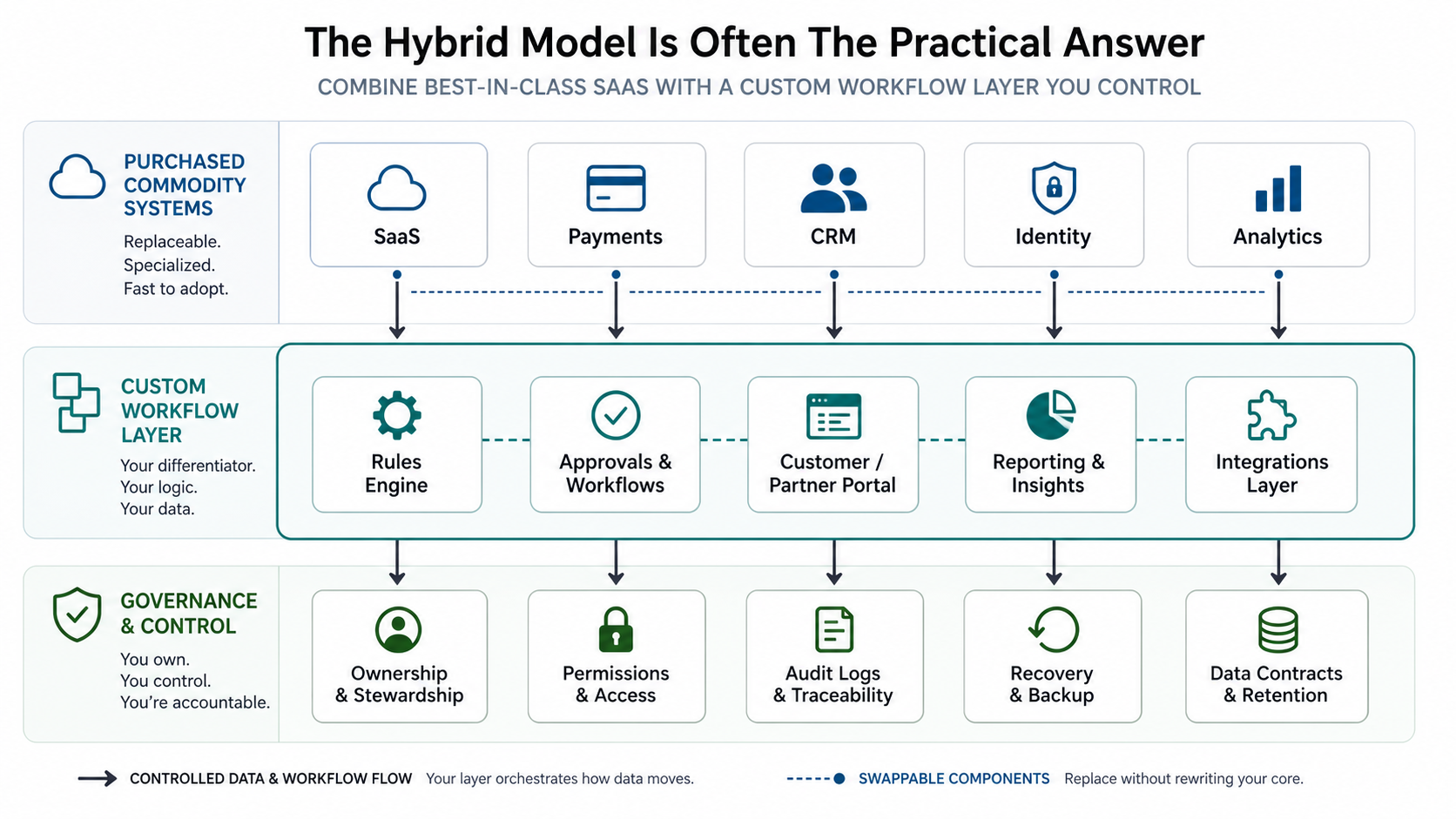
This avoids two bad extremes: overpaying SaaS vendors for a workflow they cannot model, and rebuilding commodity capabilities that are already reliable elsewhere. Hybrid architecture works best when the team defines clear system ownership. Which tool is the source of truth? Which service owns customer records? Where do approvals live? How are retries, errors, permissions, and audit logs handled? If ERP, CRM, warehouse, finance, or legacy systems are part of the map, review the work as ERP integration and modernization services before promising a simple SaaS switch.
For teams modernizing a tool stack, SaaS replacement and custom workflow software services can help map which subscriptions stay, which are consolidated, and where a custom layer would create better control or economics.
Build-Vs-Buy Decision Scorecard
Score each dimension from 1 to 5. A low score favors buying; a high score favors custom or hybrid software. The goal is not to produce a magical total. The goal is to expose where the risk actually lives. For domain-specific product features, compare this broader checklist with focused examples such as the recommendation engine build-vs-buy guide, where data control and ranking logic can decide the path.
| Dimension | Low Score Means | High Score Means |
|---|---|---|
| Workflow uniqueness | The process matches common SaaS assumptions. | The process is proprietary or unusually complex. |
| Strategic value | The tool supports operations but does not create advantage. | The workflow affects revenue, margin, speed, retention, or customer experience. |
| Integration depth | Simple exports, imports, or standard connectors are enough. | Multiple systems need reliable sync, transformation, permissions, and error handling. |
| Security/control | Vendor controls and standard roles are enough. | Data sensitivity, auditability, access control, or compliance requires deeper ownership. |
| Change rate | The process is stable and follows market norms. | The workflow changes often or must evolve faster than vendor roadmaps. |
| Operating ownership | The team does not want to maintain software. | The team has or can fund clear product, engineering, and support ownership. |
If the score is mixed, the right answer is often a phased MVP. Use the MVP Scope Builder to separate the smallest useful workflow from later automation, analytics, AI, and integration layers.
Security, Data Control, And Lock-In
Security is not automatically better in SaaS or custom software. A mature SaaS vendor may provide stronger baseline security than a rushed internal build. A well-built custom system may provide better access control, audit evidence, data minimization, and workflow-specific safeguards than a generic SaaS product. The deciding factor is maturity, not category.
Ask where sensitive data lives, who can access it, how permissions are tested, how exports work, whether logs are complete, and what happens if the vendor changes pricing or API access. Lock-in is not only a contract problem. It can also be a data model problem, a workflow dependency problem, or a lack-of-documentation problem.
Custom builds need their own guardrails: secure architecture, secrets management, backup plans, dependency updates, monitoring, and release checks. SaaS purchases need vendor review, admin governance, data retention rules, and offboarding plans. Either path can fail when ownership is unclear. If a build partner will own delivery, use a custom software development company checklist to test source-code ownership, access control, QA evidence, documentation, and rollback before kickoff.
Evidence To Collect Before Deciding
Before approving either path, collect evidence from real work rather than vendor demos. Pull current SaaS invoices, admin exports, usage by role, manual workaround examples, integration failure logs, spreadsheet copies, support tickets, approval delays, reporting gaps, and security exceptions. Then separate the evidence into three groups: what a SaaS tool can already handle, what needs configuration or integration, and what still requires custom workflow ownership.
This evidence keeps the decision grounded. A small team may discover that buying SaaS is enough once process cleanup is done. A scaling team may discover that seat growth and manual reconciliation justify a hybrid layer. A regulated or operations-heavy team may discover that custom software is not a luxury; it is the only way to encode permissions, audit logs, data contracts, and exception handling into the workflow.
A Practical Implementation Roadmap
Start with workflow evidence. Interview users, map current tools, list manual workarounds, identify reports leadership trusts, and document where handoffs fail. Then compare SaaS options against real scenarios rather than feature grids. If no tool fits, define the smallest custom workflow that removes the biggest bottleneck.
- Inventory current subscriptions, spreadsheets, manual processes, and shadow tools.
- Score workflow uniqueness, strategic value, integration depth, security, change rate, and ownership.
- Shortlist SaaS tools that cover at least 80 percent of the process with acceptable compromise.
- Estimate custom and hybrid options using realistic scope, QA, integration, hosting, and maintenance assumptions.
- Run a pilot or MVP before committing to a full replacement.
- Assign long-term product ownership before launch.
If the winning option is a web-based workflow or portal, use the web app development cost guide to understand why users, roles, permissions, integrations, and reporting usually matter more than page count.
Handoff And Ownership After Launch
The build-vs-buy decision is not complete until ownership is assigned. SaaS needs admins, configuration rules, access reviews, renewal ownership, integration monitoring, and offboarding steps. Custom software needs a product owner, code repository ownership, release process, support queue, documentation, security patching, backup checks, and a roadmap budget. Hybrid software needs both: SaaS vendor governance plus custom workflow ownership.
Make this explicit before launch. Name the system owner, technical owner, data owner, support owner, and escalation owner. Decide how changes are requested, how production access is reviewed, how incidents are logged, and when the team should revisit the decision. A good build-vs-buy decision should reduce operating risk after launch, not merely win approval in a planning meeting.
Common Build-Vs-Buy Mistakes
The first mistake is choosing SaaS because the demo looked complete. Demos show the happy path. Real operations include exceptions, permissions, bad data, approvals, missing fields, audit requests, and integration failures.
The second mistake is choosing custom because the first version now looks easier with AI. AI-assisted development can accelerate delivery, but it does not remove the need for architecture, QA, security, maintainability, documentation, and accountable ownership.
The third mistake is ignoring internal adoption. A custom system that perfectly models a workflow but is slow, confusing, or poorly supported will fail. A SaaS tool that users hate will create shadow processes. Implementation quality matters on both paths.
The fourth mistake is failing to decide who owns the system after launch. SaaS still needs administrators and process owners. Custom software needs a maintenance plan, support path, roadmap owner, and budget for change.
NextPage Point Of View
NextPage's view is simple: do not build what the market already solved well, and do not force a strategic workflow into a tool that makes your team work the wrong way. The best decision is usually specific, not ideological. Buy commodity capabilities, build the workflow that creates advantage, and connect both with clean integration boundaries.
If you are unsure, start with the decision tool, then estimate the custom or hybrid scope. A focused discovery pass can usually tell whether the right next step is SaaS configuration, integration cleanup, MVP build, phased replacement, or a larger custom platform roadmap. For a concrete example of a custom optimization workflow becoming a defensible operating layer, review the HeatPilot portfolio case study.