
A cloud-based HRMS for remote teams should do more than store employee records online. It should let employees update information, request leave, mark attendance, complete onboarding, access payslips, and follow approval workflows without depending on office paperwork or HR follow-ups. For managers, it should provide visibility into attendance, leave balances, approvals, payroll inputs, compliance tasks, and workforce reports across locations.
The right system is not just a feature checklist. Remote and hybrid HR operations need clear workflow ownership, secure access, role-based permissions, audit logs, payroll handoff rules, support responsibilities, and a rollout plan that people will actually use. If the HRMS only digitizes forms but leaves attendance exceptions, approval delays, payroll corrections, and reporting gaps in spreadsheets, the company has moved the problem to the cloud instead of solving it.
If you are planning a custom HRMS or modernizing disconnected HR tools, start by mapping the workflows before comparing software. NextPage's HR and payroll software development services help teams define users, modules, approval paths, payroll inputs, reports, sensitive data, and the first workflow that should move out of spreadsheets.
Quick Answer: What Should A Cloud-Based HRMS For Remote Teams Include?
A cloud-based HRMS for remote teams should include employee self-service, mobile-friendly access, attendance and leave management, onboarding, document management, approvals, payroll inputs, reporting, role-based permissions, audit logs, integration support, and a clear support workflow. For hybrid teams, it should also handle location-aware attendance rules, manager approvals, policy exceptions, and workforce visibility across office, remote, field, and contractor groups.
At minimum, evaluate the HRMS across six operating questions:
- Can employees complete routine HR tasks without asking HR? Self-service should cover profile changes, documents, leave, attendance, payslips, and requests.
- Can managers approve work quickly? Leave, attendance corrections, onboarding tasks, asset handoffs, and policy exceptions need clear routing.
- Can payroll trust the data? Attendance, leave, overtime, reimbursements, deductions, and final settlement inputs need validation before payroll runs.
- Can the company prove who changed what? Sensitive employee and payroll data require access controls, audit trails, and change history.
- Can leadership see workforce patterns? Reports should reveal absence trends, hiring bottlenecks, approval delays, attrition signals, and compliance tasks.
- Can the rollout survive real adoption? Training, support, phased launch, and workflow governance matter as much as software features.
Cloud HRMS Operating Model For Distributed Teams
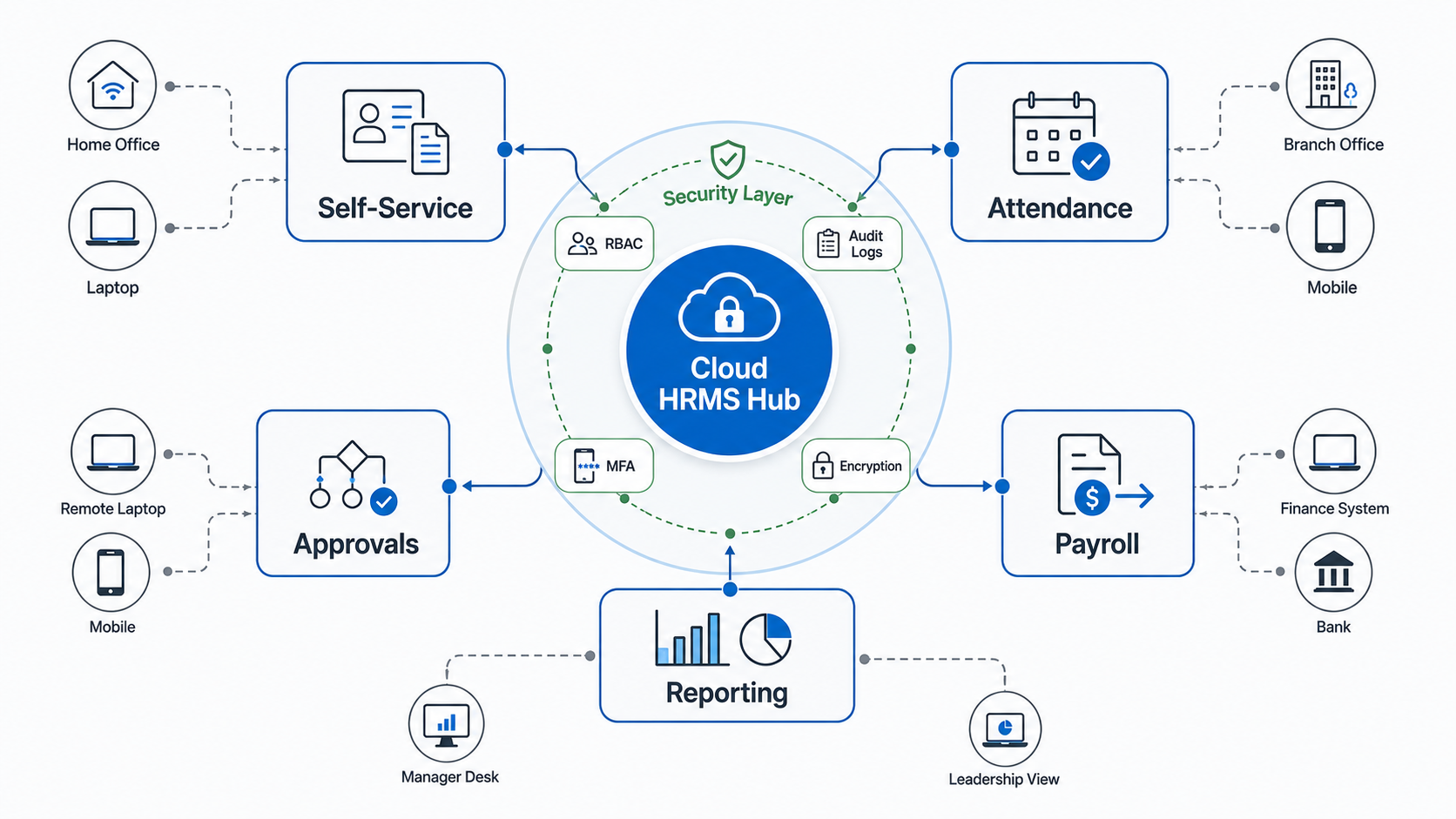
Remote HRMS planning starts with the operating model. In an office-first company, many exceptions are handled informally: an employee asks a manager, HR updates a spreadsheet, payroll receives a correction, and the final record may live across email, chat, and a payroll file. Distributed teams cannot rely on hallway context. The system must make the workflow visible.
The central HRMS should own employee records, request routing, policy rules, attendance inputs, leave balances, document storage, and reporting definitions. Around that hub, employees need mobile and browser access, managers need approval queues, HR needs policy configuration, payroll needs validated inputs, and leadership needs dashboards. The security layer should wrap the whole workflow, not sit as an afterthought.
This is where cloud access helps most. HR, managers, and employees can act from any approved location, but the company still needs guardrails: MFA, role-based access, device/session controls, audit logs, and data export rules. Without those controls, remote access becomes a data exposure risk instead of an operational upgrade.
Core HRMS Features Remote And Hybrid Teams Need
Most HRMS product pages list similar modules. The buying decision should focus on whether each module handles the remote-work version of the workflow.
| Capability | What Remote Teams Need | Implementation Detail To Check |
|---|---|---|
| Employee self-service | Profile updates, documents, payslips, tax details, policy acknowledgements, and requests available without HR intervention. | Approval rules, field-level permissions, document expiration reminders, and mobile usability. |
| Attendance and time | Remote, office, field, shift, and flexible schedules with exception handling. | Geo/device rules, correction approvals, overtime logic, holiday calendars, and payroll cutoffs. |
| Leave management | Policy-based leave requests, balance visibility, manager approvals, and team calendars. | Carry-forward rules, probation rules, unpaid leave, overlapping requests, and payroll impact. |
| Onboarding | Digital joining forms, document collection, account setup, asset handoff, training tasks, and manager check-ins. | Task ownership across HR, IT, finance, managers, and the employee. |
| Payroll handoff | Validated attendance, leave, overtime, reimbursements, deductions, and changes before payroll processing. | Reconciliation reports, lock dates, exception queues, and integration format. |
| Reporting | Dashboards for headcount, absence, attrition, approvals, onboarding progress, and compliance. | Role-based reports, export controls, definitions, scheduled reports, and drill-down access. |
| Integrations | Connections to payroll, accounting, identity, collaboration, BI, project, and helpdesk tools. | API availability, webhook support, retry handling, error logs, and data ownership. |
If the product cannot support the exceptions in your HR policy, a custom workflow layer may be more useful than forcing the team into a rigid module. For example, attendance corrections may require manager approval for remote staff, HR review for field staff, and payroll lock controls for month-end. A generic request form may work at 30 employees, but it can break once payroll volume and compliance expectations increase.
Security Controls Matter More When HR Goes Remote
HRMS data is sensitive by default. It can include addresses, identity documents, salary, bank details, tax records, performance notes, disciplinary records, medical or benefit information, and manager comments. Remote access increases convenience, but it also increases the number of devices, networks, sessions, exports, and integrations that can touch employee data.
Start with access design. Employees should see only their own data and approved self-service fields. Managers should see team information needed for decisions, not payroll fields they do not need. HR may need broader access, but even HR roles can be split by function: recruitment, payroll, compliance, admin, and leadership reporting. Finance may need payroll inputs without full employee records.
Then define technical controls. A credible cloud HRMS rollout should include MFA, strong password/session policies, role-based access control, audit logs, encryption in transit and at rest, backup and retention rules, controlled exports, environment separation for testing, and a documented offboarding process. If the HRMS integrates with payroll, accounting, identity, or collaboration tools, integration logs and failure alerts should be part of the plan.
Security also affects reporting. Leadership dashboards are useful, but broad exports can leak sensitive data. Reports should be role-aware, and the company should decide which fields are visible, downloadable, masked, or restricted. The question is not only whether the software is secure. The question is whether your implementation uses the security model correctly.
A Practical Cloud HRMS Rollout Plan
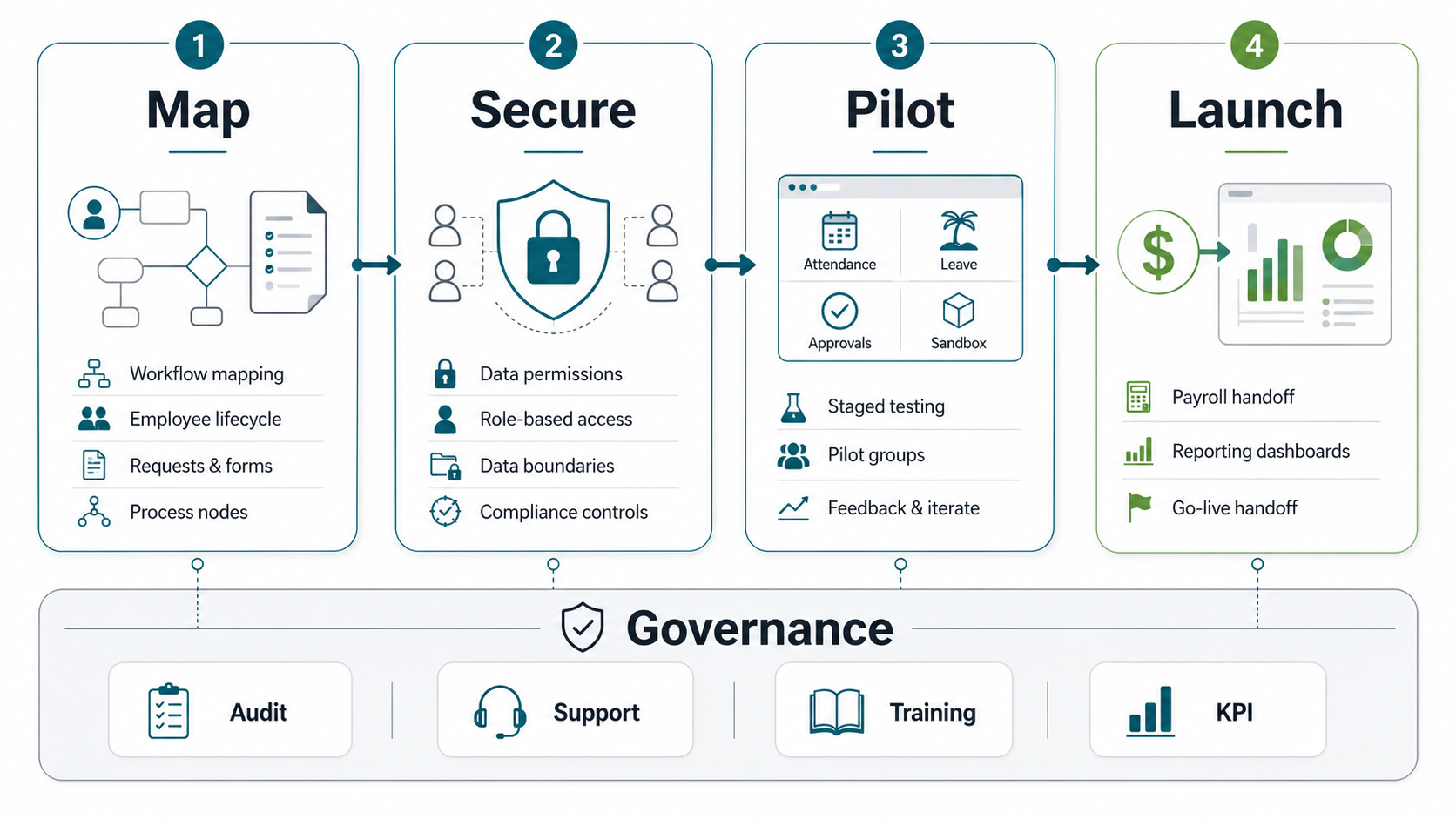
Cloud HRMS implementation should not start by importing every employee record and announcing a new portal. Start with one or two workflows that create the most operational pain, then expand after the data and adoption model works.
| Phase | Goal | Key Output |
|---|---|---|
| 1. Map workflows | Document current HR, manager, employee, payroll, and IT handoffs. | Workflow map, role matrix, data inventory, approval paths, and release-one scope. |
| 2. Secure data and roles | Configure access, sensitive fields, document rules, and audit requirements. | RBAC model, MFA/session policy, audit log checks, and report permissions. |
| 3. Pilot critical workflows | Test attendance, leave, onboarding, and approvals with a representative team. | Exception list, training notes, data corrections, and support queue patterns. |
| 4. Launch payroll handoff and reporting | Move validated inputs into payroll and leadership reporting. | Payroll reconciliation, dashboards, lock dates, support ownership, and KPI review cadence. |
The pilot should include real exceptions, not only happy-path demos. Test missed attendance, late corrections, half-day leave, overlapping leave, manager absence, probation rules, payroll cutoff changes, duplicate employee records, contractor access, and offboarding. These scenarios reveal whether the system is ready for remote operations.
Training should be role-specific. Employees need to know how to make requests and check status. Managers need to know where approvals sit and what evidence is required. HR needs to know how to change policy rules and resolve exceptions. Payroll needs to know when data is locked and how exceptions are escalated.
Should You Buy SaaS HRMS Or Build A Custom HRMS?
Most teams should evaluate SaaS HRMS first when the requirements are standard: employee records, leave, attendance, onboarding, documents, and basic payroll integration. A good SaaS system can reduce launch time and provide mature security, mobile access, and product updates.
Custom HRMS or a custom workflow layer becomes more attractive when the operating model is unusual; use a Build vs Buy Decision Tool to compare SaaS configuration, integration, and custom software before committing budget. Examples include complex shift rules, field workforce attendance, multi-entity payroll handoffs, country-specific compliance, custom approval chains, legacy payroll formats, project-based compensation, internal ERP integration, or reporting that spans HR, finance, delivery, and operations. Teams with performance-review and attendance exceptions should also compare these needs with employee performance management software development scope.
| Choose SaaS When | Consider Custom Or Hybrid When |
|---|---|
| Your policies fit standard HRMS modules. | Your workflows need non-standard approval or payroll logic. |
| You need a quick launch with common HR features. | You need deep integration with internal systems, ERP, BI, or legacy payroll. |
| Your reporting needs are mostly standard. | You need custom workforce, cost, utilization, or compliance dashboards. |
| You can adapt the process to the product. | The product must adapt to the operating model. |
| Subscription cost is predictable at your employee count. | License, customization, manual workarounds, or integration cost becomes high. |
A hybrid path often works well. Use a SaaS HRMS for standard employee records and self-service, then build custom integrations, dashboards, approval automations, or payroll validation layers around it. If you need to model budget before deciding, start with the Custom Software Cost Estimator and then pressure-test the workflow with a technical discovery session.
Questions To Ask Before Selecting A Cloud HRMS
Use these questions with SaaS vendors, custom software partners, and internal stakeholders.
- Which workflows must work on day one? Attendance, leave, onboarding, payroll inputs, employee records, and document collection usually have different urgency.
- Who owns every approval? Remote teams need explicit routing when a manager is absent, a request crosses a payroll cutoff, or HR needs extra evidence.
- How will payroll trust the data? Define validation, lock dates, exception queues, reconciliation reports, and integration ownership.
- What access should each role have? Separate employee, manager, HR, payroll, finance, IT, and leadership permissions.
- What happens when an integration fails? Look for retry logic, error queues, alerts, logs, and a support owner.
- How will adoption be measured? Track login rate, request completion time, approval aging, correction volume, payroll exceptions, and support tickets.
- Which reports are decision-critical? Avoid building dashboards no one owns. Start with absence, approval delays, onboarding completion, payroll exceptions, and workforce trends.
Common Mistakes In Remote HRMS Rollouts
The first mistake is treating remote HRMS as a software purchase instead of an operating change. Employees will not adopt the system if managers still approve requests in chat and HR still fixes everything manually. The new system must become the source of truth for requests and records.
The second mistake is delaying security design. If roles, exports, audit logs, and offboarding are configured after launch, sensitive data may already be exposed too widely. Access design belongs in phase one.
The third mistake is skipping payroll reconciliation. Payroll teams need confidence that attendance, leave, overtime, reimbursements, and deductions are complete before processing. If the HRMS does not reduce payroll exceptions, it will not earn trust.
The fourth mistake is launching too broadly. A phased rollout lets you fix policy logic, edge cases, training gaps, and support patterns before every employee depends on the system. Start narrow, measure adoption, then expand.
How NextPage Helps Plan Cloud HRMS For Remote Teams
NextPage helps teams turn HRMS ideas into implementable workflows. We map the HR, employee, manager, payroll, and reporting handoffs; define the first release; decide what should be bought, customized, or built; and plan integrations with payroll, accounting, identity, ERP, and analytics systems.
If your remote HR process is still running through spreadsheets, chat approvals, manual payroll corrections, and disconnected documents, the first step is not a feature list. It is a workflow digitization roadmap. Start with custom HR and payroll software development discovery, or use the cost estimator to frame the first budget conversation.