
A cloud POS modernization roadmap should start with operational risk, not with a vendor demo. Restaurants are not only replacing terminals. They are changing how orders, payments, kitchen routing, delivery channels, loyalty, inventory, staff permissions, reconciliation, and reporting move through the business during live service.
The safest migration path is to treat POS replacement as a staged software modernization program. First stabilize what must keep working, then map integrations and data, then pilot a complete service flow, then expand by location or concept. A rushed cutover can make the new POS look bad even when the real issue is missing menu data, weak network design, payment exceptions, or delivery orders that bypass the kitchen workflow.
If the current estate is aging, use NextPage's Legacy Software Modernization Scorecard before vendor selection. It helps separate visible UI pain from deeper modernization risks such as integrations, data ownership, security, reporting, support, and migration complexity.
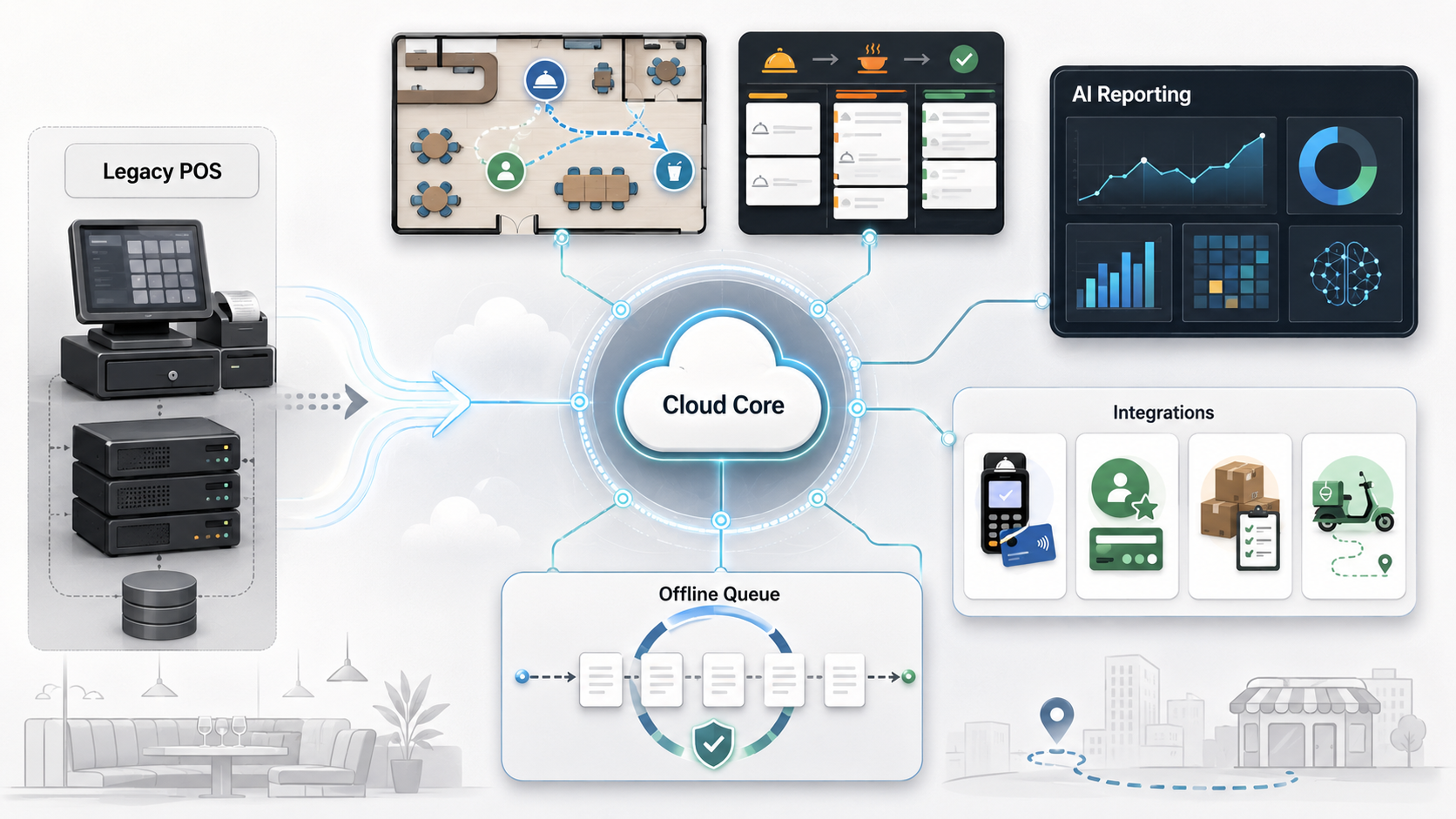
Quick Answer: Cloud POS Modernization Roadmap
A practical cloud POS modernization roadmap has six stages: assess the legacy estate, define the target operating model, map integrations and data, design offline and payment resilience, pilot one complete restaurant workflow, and roll out with reporting and support controls. The goal is not simply to move POS screens to the cloud. The goal is to keep service running while creating cleaner data, easier integrations, multi-location visibility, and a platform for automation. Treat the roadmap as a migration, integration, and change-management program rather than a procurement checklist.
| Roadmap Stage | Key Decision | What To Prove |
|---|---|---|
| Discovery | Which locations, terminals, menus, modifiers, payments, and integrations are in scope? | The migration inventory is complete enough to prevent cutover surprises. |
| Target model | Cloud, hybrid, or cloud with local fallback? | The model supports peak service, multi-location operations, and outage procedures. |
| Data migration | What owns menu, item, tax, staff, customer, gift card, and sales history data? | Real records import cleanly and reconcile against finance reports. |
| Integrations | Which systems must sync with POS in real time? | Kitchen, delivery, inventory, loyalty, accounting, and analytics flows work end to end. |
| Pilot rollout | Which location or service model validates the risk? | Staff can run live service, recover exceptions, and trust reports. |
| Scale | How will support, monitoring, training, and analytics mature? | The platform improves operations instead of creating a new support burden. |
Why POS Modernization Is Different From A Simple POS Switch
A restaurant POS sits at the center of service. It touches front-of-house order taking, kitchen display systems, payments, tips, shifts, discounts, taxes, delivery channels, loyalty, gift cards, inventory, accounting, and owner reporting. That makes modernization different from replacing a back-office tool. A failure during dinner service is visible immediately.
Legacy POS systems often become difficult because they are reliable in one narrow operating model but expensive to change. Cloud POS platforms can improve remote management, updates, integrations, reporting, and multi-location control, but they introduce their own dependencies: network quality, device management, cloud availability, integration queues, payment rules, and vendor APIs.
NextPage's enterprise application modernization roadmap makes the same point in a broader context: modernization succeeds when teams reduce risk in waves, not when they rewrite or replace everything at once. For restaurants, those waves must respect live service.
Start With A Legacy Estate Assessment
The first step is a factual inventory. List locations, concepts, terminals, handhelds, printers, kitchen screens, cash drawers, payment devices, menu sources, modifier rules, tax rules, comp workflows, discounts, staff permissions, third-party delivery tablets, online ordering, loyalty, gift cards, inventory tools, accounting exports, data warehouses, and reporting dependencies. Use a formal data migration checklist for source ownership, field mapping, validation evidence, cutover rules, and rollback planning before any location moves.
Then separate what is merely inconvenient from what is operationally risky. Slow report exports may be a nuisance. A payment workflow that cannot reconcile offline transactions is a risk. Manual delivery order re-entry is a labor issue and a kitchen accuracy issue. Inconsistent menu modifiers across platforms can become a margin, customer experience, and support problem.
This is where modernization planning should borrow from legacy application modernization roadmap thinking: stabilize fragile workflows, document dependencies, choose migration waves, and avoid a big-bang cutover unless the estate is simple enough to justify it.
Define The Target Operating Model Before Vendor Selection
Restaurant teams often compare POS products feature by feature: cloud reporting, handhelds, KDS, loyalty, online ordering, payments, inventory, or table management. That comparison matters, but it should come after the operating model is clear. For estates moving from on-premise systems, the operating model should also reference the same uptime, data integrity, and rollback discipline used in cloud migration services.
Ask how the business should run after modernization. Will menu changes publish centrally across locations? Will online orders route directly to the kitchen? Will managers see real-time labor and sales dashboards? Will loyalty, gift cards, and offers stay in the POS ecosystem or connect to a separate CRM? Will finance reconcile by location, channel, tender type, and settlement batch? Will franchisees need role-limited reporting?
The right answer may be pure cloud for simpler environments, a hybrid pattern for restaurants with strict offline needs, or a cloud POS plus custom integration layer for multi-location brands with delivery, loyalty, inventory, and reporting complexity. The roadmap should make that decision explicit before contracts are signed.
Plan Data Migration Around Real Restaurant Records
Data migration is not just exporting menus. A useful migration plan covers menu items, categories, modifiers, combos, taxes, service charges, discounts, staff roles, historical sales, customer records, loyalty balances, gift cards, vendor items, recipe mappings, inventory units, order channels, and reporting dimensions.
The team should run test imports with real messy records. A hand-cleaned sample hides the problems that will slow launch: duplicated menu items, inconsistent modifiers, missing tax categories, closed locations still appearing in reports, old staff permissions, and sales history that does not map cleanly to the new reporting structure.
| Data Area | Migration Risk | Control |
|---|---|---|
| Menu and modifiers | Wrong prices, unavailable items, or kitchen confusion. | Run side-by-side menu validation by location and order channel. |
| Payments and tenders | Settlement and reconciliation mismatches. | Test refunds, tips, partial payments, offline payments, and batch reports. |
| Customers and loyalty | Lost balances, duplicate profiles, or broken offers. | Validate identity matching, opt-ins, points, gift cards, and promotion rules. |
| Inventory | Bad recipe units, purchasing noise, and unreliable food cost reports. | Map units, vendors, recipes, waste, transfers, and counting workflows. |
| Reporting history | Owners lose trend continuity after launch. | Preserve enough historical data for year-over-year and location comparisons. |
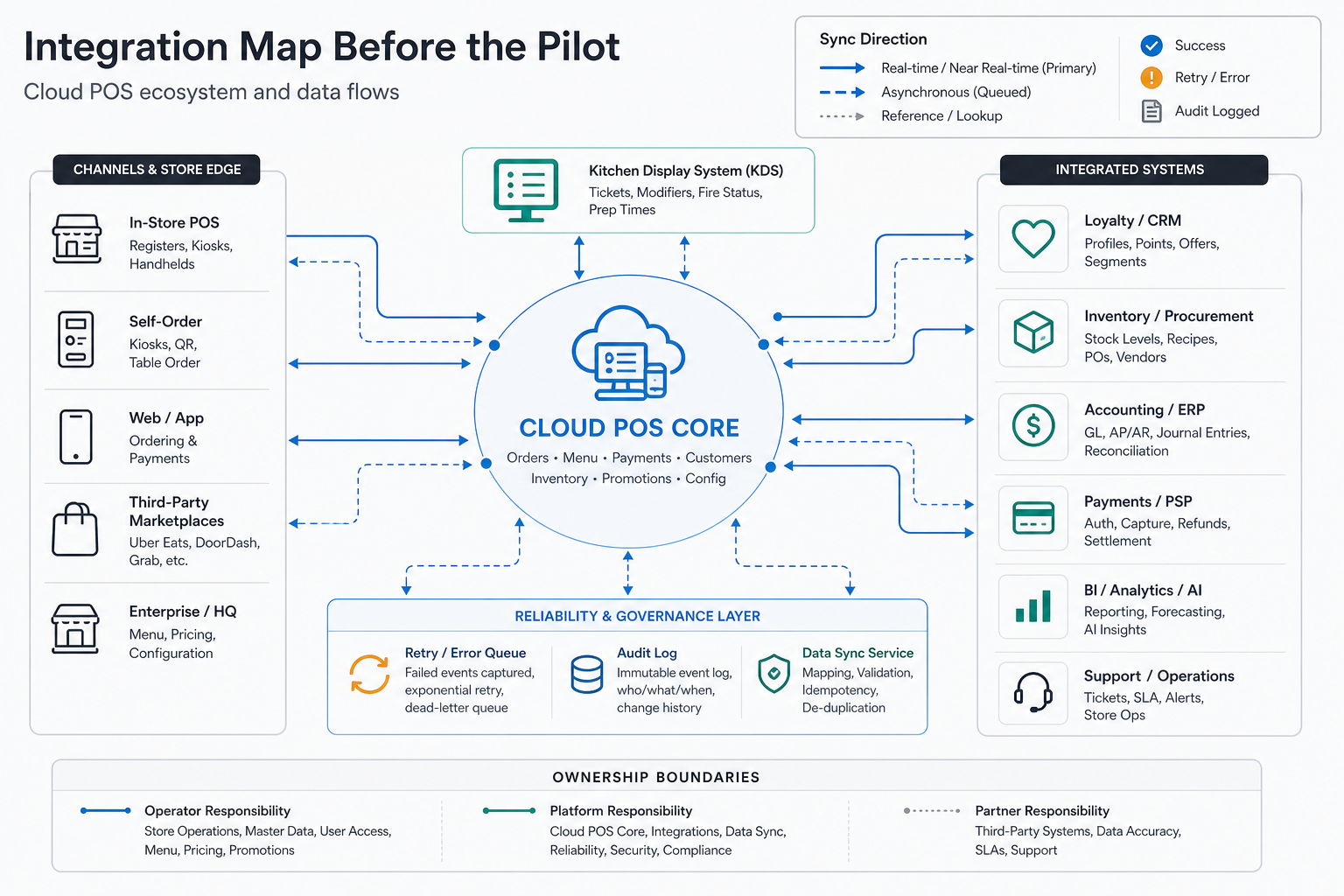
Build The Integration Map Before The Pilot
Modern restaurant operations rarely live inside one POS. Online ordering, marketplaces, reservations, loyalty, marketing automation, delivery dispatch, inventory, labor scheduling, accounting, payroll, CRM, data warehouses, BI dashboards, and AI reporting may all depend on POS data.
For each integration, define ownership, sync direction, timing, failure behavior, retry rules, and auditability. Menu data may publish from POS to ordering channels. Delivery orders may flow back into POS and then into kitchen displays. Sales data may feed dashboards, accounting, and labor planning. Inventory may need item-level sales data, not just end-of-day totals. A backend/API layer is often the safer place for retries, webhooks, audit logs, and reconciliation rules; NextPage covers that pattern in its backend and API development services.
If the scope includes custom operations logic, compare the build against NextPage's restaurant management software development cost guide. POS modernization often exposes adjacent needs: custom dashboards, kitchen workflows, inventory exceptions, vendor ordering, and owner analytics.
Design Offline Resilience And Payment Controls Explicitly
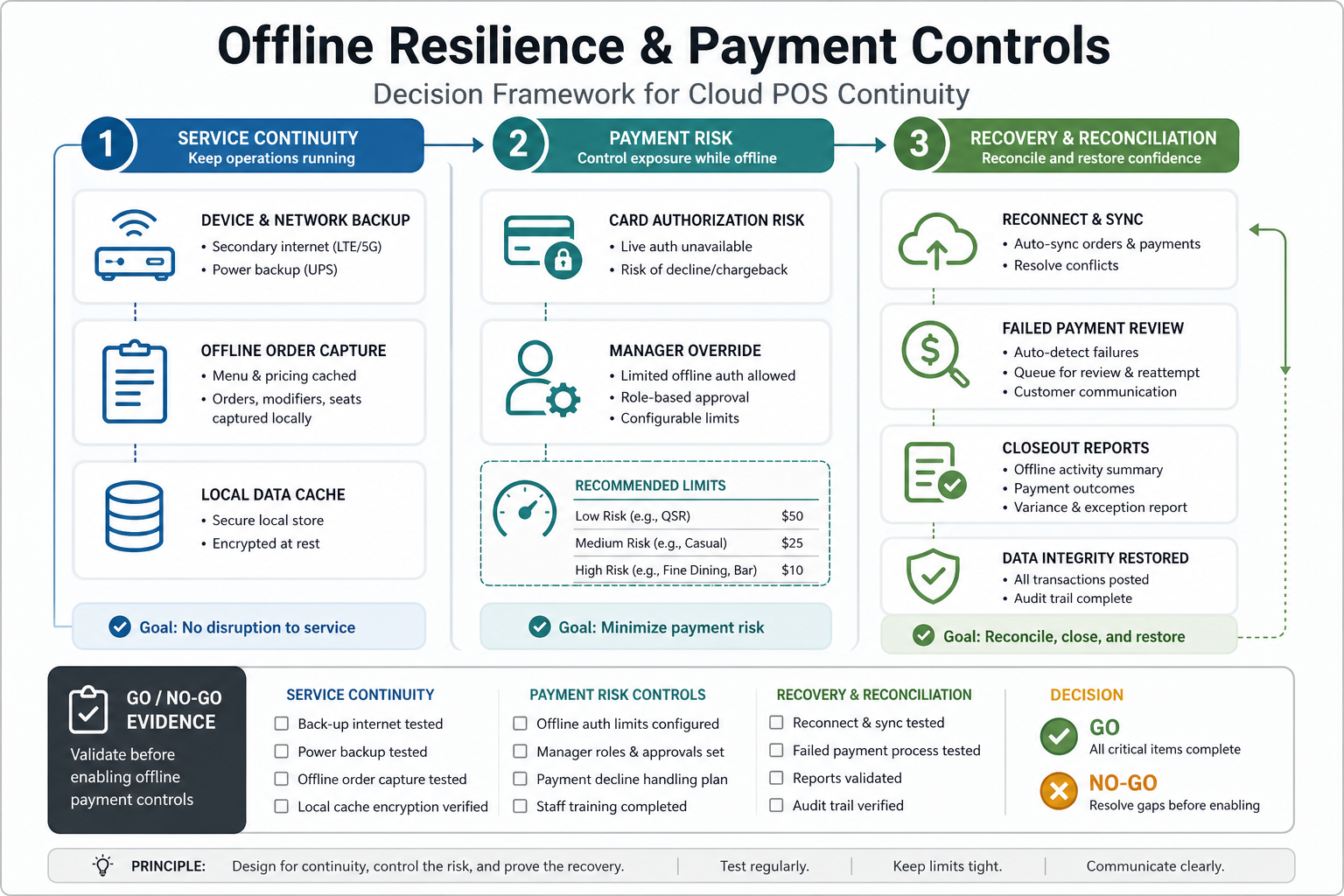
Offline mode is not a magic guarantee. Official provider documentation shows that offline behavior varies by device, payment method, service disruption, network condition, and recovery flow. Restaurants need documented procedures for what staff can still do, what must wait, how payments are authorized later, how failed payments are handled, and how managers reconcile open checks, shifts, tips, and reports after reconnect.
The modernization plan should cover local network design, backup internet, device charging, payment-device behavior, kitchen routing during outages, printed fallback procedures, manager overrides, and reconciliation reports. A restaurant that accepts offline card payments also accepts some payment risk until transactions reconnect and settle.
For cloud-heavy estates, resilience also belongs in application and infrastructure planning. NextPage's cloud performance optimization services page is relevant when the POS ecosystem depends on reliable APIs, observability, latency control, and cost-aware cloud operations.
Pilot One Complete Service Flow
A pilot should prove a complete workflow, not a partial screen demo. Pick one location, concept, or service model that represents enough real complexity: dine-in with table service, quick-service rush, drive-through, bar tabs, delivery-heavy operation, or multi-brand kitchen. Run realistic scenarios across opening, peak service, discounts, refunds, split checks, delivery orders, kitchen routing, staff clock-out, closeout, and reconciliation.
Train staff on both normal operation and exception handling. Track order errors, payment issues, kitchen delays, manager overrides, integration failures, support tickets, and report mismatches. The pilot should produce a go/no-go list for broader rollout and a backlog for configuration, data cleanup, integration fixes, and training changes.
Do not scale until the pilot proves the operating loop: order capture, kitchen execution, payment, customer communication, inventory signal, closeout, and management reporting.
Prepare AI Reporting After Data Quality Is Stable
AI reporting can be valuable for multi-location restaurants, but only after the data foundation is trustworthy. Forecasting, anomaly detection, labor recommendations, menu engineering, promotion analysis, and owner summaries all depend on clean item data, channel labels, time periods, refunds, discounts, comps, labor data, inventory units, and location metadata.
Start with dashboards that operators can verify. A custom dashboard can show sales by location, channel mix, labor percentage, average ticket, voids, discounts, refunds, item mix, delivery fees, payment exceptions, and inventory variance. NextPage's custom dashboard development services are the natural path when canned POS reports do not match the decisions leadership needs to make. If the roadmap includes forecasting, anomaly detection, or margin recommendations, treat it as a staged predictive analytics services program with monitoring and review loops, not a one-off dashboard add-on.
Once dashboards reconcile with finance and operations, AI features become safer. The model can explain why Friday delivery margins changed, which locations have unusual refund patterns, or where menu item performance is drifting. Without data governance, AI only makes reporting confusion faster.
Implementation Checklist
- Inventory every POS-dependent workflow, device, integration, report, and payment path.
- Define the target operating model before comparing vendors.
- Run real menu, modifier, tax, staff, loyalty, gift card, and sales-history imports.
- Map every integration by owner, sync direction, frequency, retry behavior, and failure alert.
- Write offline operating procedures for payments, checks, tips, shifts, kitchen routing, and recovery.
- Pilot one complete restaurant workflow under realistic peak-service conditions.
- Measure support tickets, payment exceptions, order errors, kitchen delays, report mismatches, and staff training gaps.
- Scale by location wave only after the pilot closes critical operational risks.
- Build reporting and AI on reconciled data, not on raw exports nobody trusts.
How NextPage Can Help
NextPage helps restaurant and multi-location operators plan and build the software layer around POS modernization: legacy software modernization, integration architecture, cloud migration planning, custom dashboards, restaurant operations software, data pipelines, and phased rollout support. When POS modernization overlaps with ordering or delivery channels, the integration economics in the food delivery app development cost guide can help scope menu sync, marketplace orders, refunds, support tooling, and reconciliation.
A practical engagement starts with discovery and modernization scoring, then moves into data and integration mapping, MVP architecture, pilot planning, and implementation. That keeps the work grounded in service continuity while still moving the business toward cleaner systems, better reporting, and more automation.