
Quick Answer: When Is Composable Commerce Worth A Migration?
Composable commerce is worth a migration when your current store cannot support the customer experience, channel mix, checkout rules, integrations, or release speed the business now needs. It is not automatically better than headless commerce, Shopify Plus, BigCommerce, Magento, Salesforce Commerce Cloud, or a focused custom storefront. The right answer depends on how much control you need over the storefront, checkout, catalog, promotions, ERP, inventory, order management, and customer data.
A useful migration roadmap starts with one question: which commerce capabilities must become more flexible, and which should stay boring? If the business only needs a faster storefront and better content control, a headless storefront on top of a strong commerce backend may be enough. If teams need to swap catalog, search, CMS, checkout, OMS, loyalty, pricing, and personalization services independently, composable commerce becomes more compelling. If most pain comes from internal workflows, a custom operations layer or integration platform may create more ROI than a full replatform.
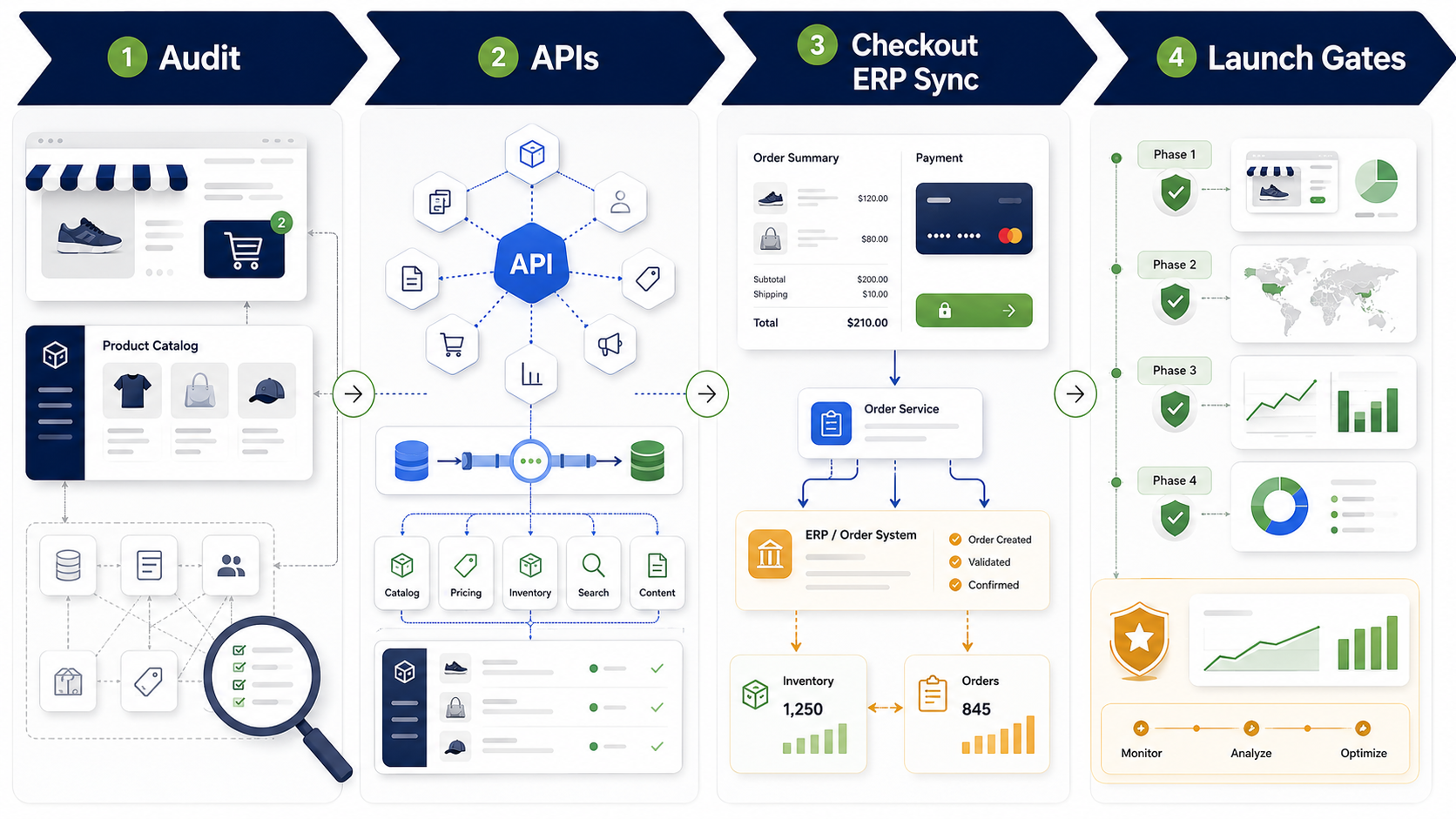
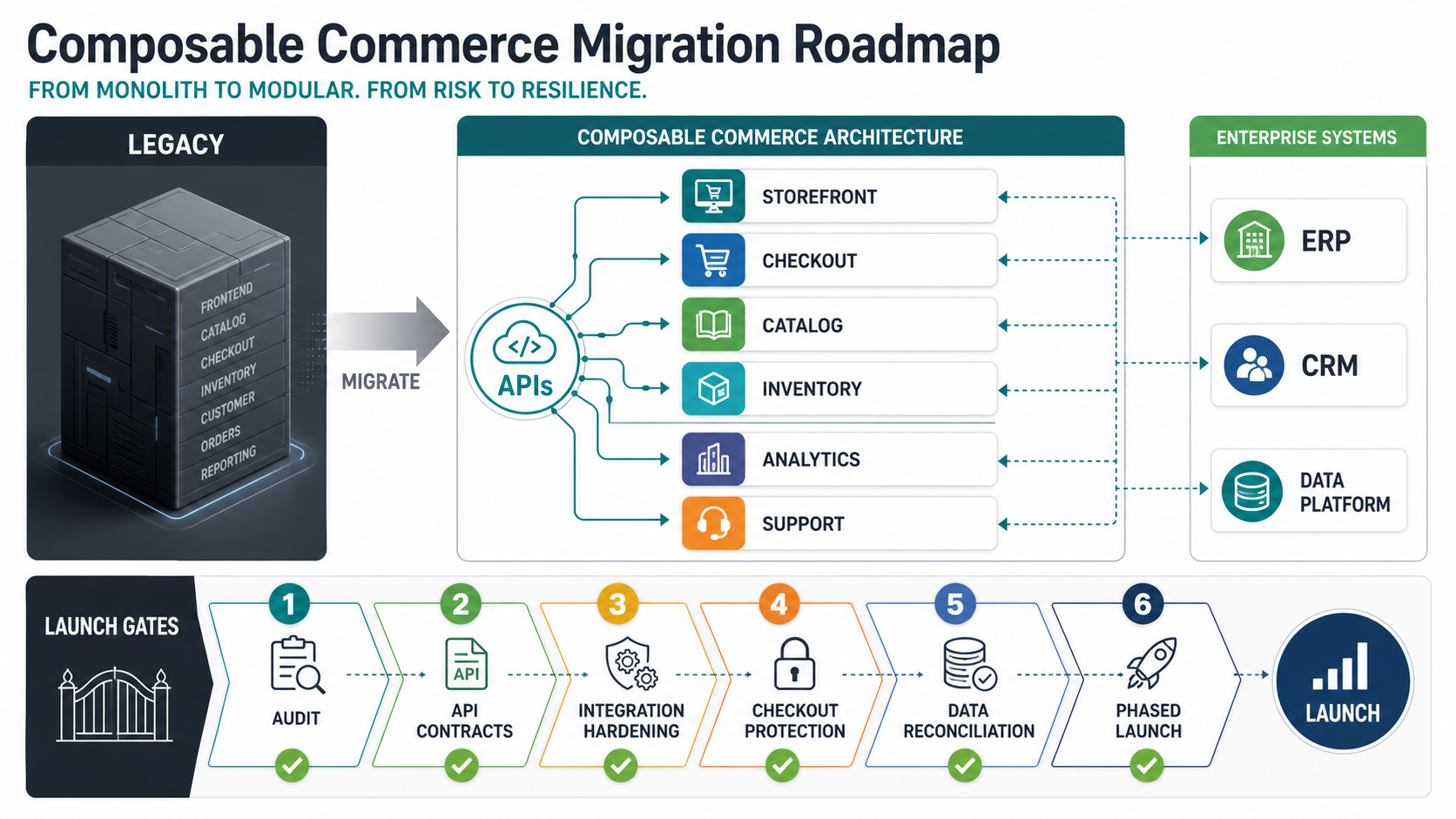
The practical roadmap is phased: audit the current stack, define the target architecture, stabilize APIs and data ownership, protect checkout and payment risk, integrate ERP/order/inventory systems, migrate catalog and customer data, launch by segment or market, then optimize with analytics and release gates. The sections below give a decision model, integration checklist, cost ranges, and cutover plan for teams evaluating the move.
Headless vs Composable Commerce: The Decision That Matters
Headless commerce decouples the customer-facing storefront from the commerce backend. The frontend can be built with a modern web framework while product, cart, checkout, order, and customer functions remain in a commerce platform. Shopify's headless documentation, for example, centers on custom storefronts that use Shopify's commerce APIs and developer stack. BigCommerce's headless documentation similarly frames the storefront as a separate presentation layer that can be a CMS, mobile app, kiosk, static site, or custom frontend.
Composable commerce goes further. Instead of decoupling only the frontend, it treats commerce capabilities as replaceable components. A team may use one vendor for catalog, another for search, a CMS for content, a payment provider for checkout, an OMS for fulfillment, an ERP for financial and inventory truth, a loyalty service, a pricing service, and custom middleware. The MACH Alliance definition is useful here: microservices based, API-first, cloud-native SaaS, and headless.
The mistake is treating "composable" as a badge instead of an operating model. Composable commerce adds vendor choice and release flexibility, but it also adds integration ownership. Someone must own API contracts, failure handling, data consistency, observability, deployment sequencing, support, and vendor changes. If that operating model is missing, a composable build can become a more expensive version of the same old stack complexity.
Migration Readiness Scorecard
Before choosing a platform, score the migration need across business, architecture, and operations. A retailer with one country, simple catalog, standard checkout, and limited integrations may not need a composable architecture. A B2B distributor with contract pricing, quote workflows, ERP stock commitments, regional catalogs, multiple storefronts, custom checkout, and marketplace channels probably needs a more modular approach.
| Signal | Headless May Be Enough | Composable May Be Worth It |
|---|---|---|
| Storefront experience | You need faster pages, richer content, or a custom frontend. | You need multiple storefronts, apps, kiosks, marketplaces, and regional experiences from shared services. |
| Checkout | You can use the platform checkout with light extensions. | You need complex payment rules, B2B terms, quote-to-order, split shipments, or market-specific checkout logic. |
| Catalog | Products, variants, and pricing fit the platform model. | Catalog, PIM, pricing, bundles, subscriptions, and merchandising need separate ownership. |
| ERP and operations | ERP sync is simple and can run through standard connectors. | ERP, OMS, WMS, accounting, CRM, and inventory need event-driven handoffs and exception queues. |
| Release model | One platform team can coordinate releases. | Multiple teams need independent releases across frontend, catalog, search, checkout, and operations. |
If most signals land in the first column, start with a focused headless or platform migration. If several land in the second column, composable commerce deserves a serious business case. For platform-specific migration planning, NextPage's Shopify Plus migration checklist is a useful companion because it covers checkout, integrations, app replacement, and cutover planning.
Phase 1: Audit The Current Commerce Stack
The first migration phase is not vendor selection. It is a systems audit. Map every capability the current commerce stack performs: storefront, CMS, product catalog, search, merchandising, cart, checkout, payments, taxes, shipping, promotions, loyalty, customer accounts, pricing, inventory, order management, returns, customer service, analytics, CRM, ERP, accounting, warehouse, fraud, and marketing automation.
For each capability, document the owner, source of truth, integration method, sync frequency, failure mode, manual workaround, revenue impact, and replacement priority. The point is to find the true constraints. A slow storefront may be visible, but the deeper blocker may be pricing rules trapped in ERP, order edits handled manually, inventory sync that cannot support real-time availability, or checkout customizations that prevent platform upgrades.
This audit should also capture technical debt: custom plugins, unsupported APIs, brittle ETL jobs, duplicate product records, unowned scripts, hidden cron jobs, and manual order correction. These items become migration risks. If they are not surfaced early, they reappear during cutover when the business has less time to make good architecture decisions.
Phase 2: Define The Target Architecture
A target architecture should show which systems own which data and which capabilities can be replaced later. Avoid diagrams that simply list vendor logos. A useful architecture names the data flows: product data from PIM to storefront, price and stock from ERP to commerce, cart state to checkout, payment authorization to order, order to OMS or ERP, shipment updates back to customer account, and analytics events to reporting.
For many teams, the target architecture has four layers. The experience layer includes storefront, CMS, mobile app, and merchandising UI. The commerce services layer includes product, cart, promotion, checkout, customer, pricing, and search services. The operations layer includes ERP, OMS, WMS, accounting, CRM, and support. The integration layer includes API gateway, event bus, sync jobs, webhooks, observability, and exception handling.
NextPage scopes this kind of work through custom eCommerce web app development services when the storefront, portal, or commerce workflow needs more control than an off-the-shelf theme can provide. The architecture should still be pragmatic. Do not split every capability into a separate service if your team cannot support the operational load.
Phase 3: Stabilize APIs And Data Ownership
Composable commerce lives or dies by API contracts. Decide which APIs are customer-facing, which are internal, which are vendor APIs, and which are wrapped behind your own integration layer. A direct frontend-to-vendor pattern may be acceptable for simple catalog reads. It is risky for pricing, customer-specific availability, payment, order edits, returns, or anything that needs auditability and fallback behavior.
Data ownership must be explicit. Product descriptions may live in the CMS or PIM. SKU identifiers may originate in ERP. Inventory availability may come from WMS plus store stock. Customer records may live in commerce, CRM, or identity. Promotions may be configured in the commerce platform but constrained by finance. If two systems can update the same field without a rule, the migration is not ready.
BigCommerce's headless documentation notes that multi-part operations can require several API calls and recommends grouping related requests with a correlation ID. That is a practical pattern beyond BigCommerce: use correlation IDs, idempotency keys, retry rules, event logs, and exception queues so commerce operations can be traced across services. Without those controls, support teams cannot explain why a customer saw a price, why an order failed, or whether an ERP update reached the storefront.
Phase 4: Protect Checkout And Payment Risk
Checkout is where architecture ambition meets revenue risk. Many headless and composable projects go wrong because teams under-scope checkout. They plan the product pages and content experience, then discover that payment methods, taxes, shipping rules, discounts, gift cards, fraud, address validation, customer groups, B2B terms, refunds, and post-purchase edits are harder to move than the storefront.
Decide early whether checkout will remain platform-owned, become platform-extended, or move into a more custom flow. Platform-owned checkout usually lowers compliance and maintenance burden. Platform-extended checkout can support moderate business rules. Custom checkout can support complex models, but it increases responsibility for reliability, security, payment provider behavior, tax accuracy, accessibility, analytics, and support operations.
A migration roadmap should include checkout parity tests, payment sandbox tests, abandoned-cart analytics, fraud rules, refund scenarios, tax edge cases, order confirmation emails, customer-service order lookup, and rollback behavior. Do not treat checkout as one user story. It is a revenue system with many failure paths.
Phase 5: Plan ERP, Order, And Inventory Sync
ERP integration is often the real cost center. Commerce teams think in carts, orders, and conversion. Operations teams think in credit limits, stock commitments, invoices, purchase orders, warehouse rules, returns, tax documents, and month-end close. The migration has to satisfy both.
Start with the core objects: products, variants, price lists, customer accounts, addresses, tax rules, inventory, carts, orders, payments, shipments, returns, invoices, credits, and refunds. For each object, define source of truth, sync direction, update frequency, validation rules, conflict handling, and support owner. Then identify which operations must be real time and which can be batch. Not every sync needs to be instant, but customers should not be allowed to buy unavailable stock because a batch job is stale.
NextPage's ERP integration cost guide is useful for budget planning because integration cost depends on systems, data objects, APIs, reporting gaps, and exception handling. For broader CRM and reporting handoffs, the Salesforce integration roadmap shows how expensive failures often happen between sales, operations, finance, and support.
Phase 6: Migrate Catalog, Content, And Customer Data
Catalog migration is not a simple export/import task. Commerce catalogs often contain variants, bundles, subscriptions, localized descriptions, SEO metadata, images, attributes, category rules, merchandising collections, product relationships, digital products, B2B price lists, and discontinued SKUs. A composable architecture may split that data across commerce, PIM, CMS, search, and ERP, so mapping quality matters.
Plan data migration in rehearsal cycles. Run a sample migration first, then a full dry run, then delta sync, then freeze windows for high-risk fields. Validate product URLs, redirects, image URLs, structured data, search indexing, category pages, filters, price display, stock labels, and customer account access. If SEO traffic matters, redirect planning and canonical paths need product, content, and analytics owners in the same room.
Customer data deserves extra caution. Decide what history moves, what stays in legacy systems, how passwords or identity migration will work, how consent records are preserved, and how customer support will access old orders. A clean storefront launch still fails if support teams cannot answer basic questions on day one.
Phase 7: Launch In Slices, Not One Big Bang
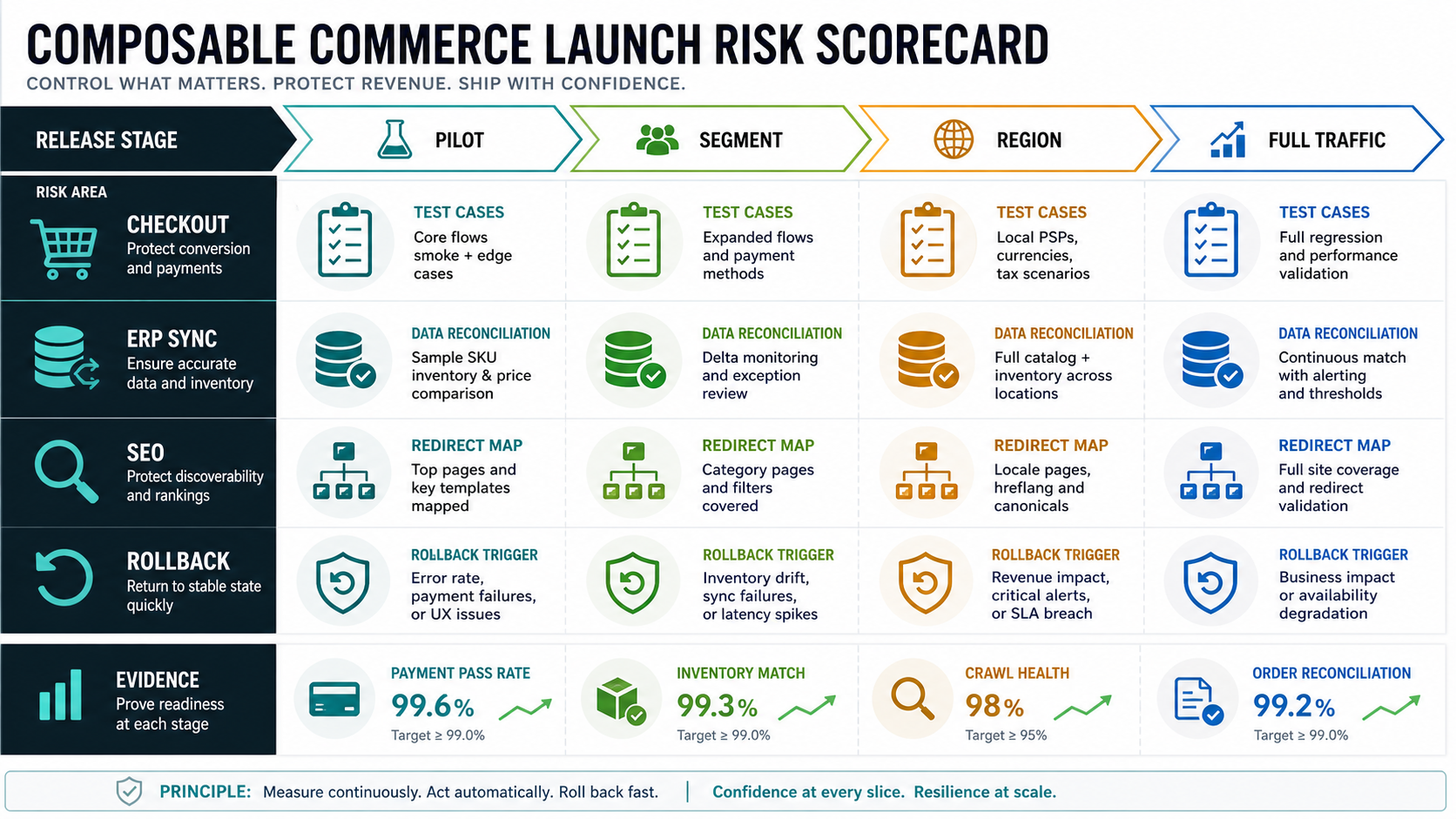
The safest launch plan slices the migration by risk. You might launch a new content storefront first while keeping checkout on the existing platform. Or migrate one country, brand, product category, B2B customer group, or low-risk channel before moving the full store. The right slice depends on revenue concentration and operational complexity.
Each slice needs release gates: performance baseline, checkout success rate, payment authorization rate, ERP order acceptance, inventory accuracy, support readiness, analytics parity, SEO validation, accessibility checks, rollback plan, and customer communication. These gates protect the business from launching a technically complete system that cannot operate under real traffic.
Teams planning inventory-heavy commerce should also look at NextPage's work around warehouse and inventory management software. Even when the buyer is retail, the same lesson applies: stock visibility, order status, and fulfillment exceptions are operating workflows, not just API calls.
Cost Drivers And Budget Ranges
Composable commerce migration cost depends less on the word "composable" and more on how many systems, channels, roles, data objects, checkout rules, and support workflows must move. Teams comparing migration scope against broader custom commerce work should also benchmark assumptions against NextPage's eCommerce app development cost guide. A focused headless storefront may be a moderate web app project. A multi-vendor composable rebuild with ERP, OMS, PIM, CMS, custom checkout, data migration, and multi-market rollout is a full digital platform program.
| Migration Type | Typical Scope | Planning Range | Risk Notes |
|---|---|---|---|
| Headless storefront refresh | Frontend, CMS integration, platform APIs, SEO redirects, analytics | $35,000-$120,000+ | Risk centers on performance, SEO, content model, and checkout handoff. |
| Platform migration with integrations | Commerce platform, catalog migration, checkout, apps, ERP/CRM connectors | $90,000-$300,000+ | Risk centers on data quality, connector gaps, and cutover sequencing. |
| Composable commerce program | Multiple vendors, integration layer, PIM/CMS/search/OMS, custom workflows | $250,000-$750,000+ | Risk centers on ownership, API contracts, observability, and vendor coordination. |
| Enterprise multi-market rollout | Regional catalogs, tax, languages, warehouses, B2B rules, phased migration | $750,000+ | Risk centers on governance, release management, and operating model maturity. |
Use these as planning ranges, not fixed quotes. The fastest way to reduce budget risk is to separate must-have launch capabilities from future replaceable capabilities. NextPage's custom software cost estimator can help scope team shape, timeline, integration complexity, and budget drivers before procurement. The broader web app development cost guide is also useful when the migration includes custom portals, admin workflows, or app-like customer experiences.
Build vs Buy Decisions In A Composable Stack
Composable commerce does not mean build everything. Buy commodity capabilities when the vendor model fits and the cost of ownership is lower than maintaining custom code. Search, CMS, payments, tax, fraud, email, product reviews, and analytics are often better bought or integrated. Build where the business process is genuinely differentiating: custom pricing, B2B approval flows, marketplace operations, subscription logic, field-sales ordering, returns workflows, or unique fulfillment rules.
A practical test is whether the capability changes how the business competes. If it does, a custom or heavily tailored layer may be justified. If it is table stakes, prefer a stable platform or service. NextPage's custom software development cost guide explains why cost is driven by workflow complexity, user roles, integrations, and risk rather than the raw number of screens.
Common Migration Mistakes
- Choosing vendors before mapping ownership: a tool list cannot solve unclear data ownership.
- Underestimating checkout: payment, tax, shipping, discounts, fraud, refunds, and B2B terms need their own test plan.
- Ignoring support workflows: customer service needs order lookup, refund context, customer history, and fallback access on launch day.
- Moving dirty catalog data: bad attributes, duplicate SKUs, weak images, and broken categories become more visible in a modern storefront.
- Skipping observability: distributed commerce needs logs, correlation IDs, dashboards, alerts, and exception queues.
- Launching everything at once: one big cutover increases revenue risk and makes rollback harder.
- Over-composing too early: too many vendors can slow a team that has not built the operating model to manage them.
Composable Commerce Migration Checklist
- Map current commerce capabilities, integrations, manual workarounds, owners, and failure modes.
- Decide whether the business needs headless, composable, platform migration, or targeted custom workflow improvements.
- Define source of truth for product, price, inventory, customer, cart, order, payment, shipment, and return data.
- Document API contracts, authentication, rate limits, idempotency, retries, correlation IDs, and exception handling.
- Choose checkout ownership and test payment, tax, fraud, shipping, promotions, refunds, and order edits.
- Plan ERP, OMS, WMS, CRM, accounting, and analytics handoffs with real operational owners.
- Run catalog, content, SEO, redirect, customer, and order-history migration rehearsals.
- Launch by market, channel, customer group, or product category when possible.
- Set release gates for performance, conversion, checkout success, order acceptance, inventory accuracy, support readiness, and rollback.
- Use post-launch analytics to remove weak services, tune integrations, and decide which capabilities should become more composable later.
How NextPage Helps With Commerce Migration Planning
NextPage helps eCommerce teams turn architecture ambition into ecommerce replatforming and migration work with a phased implementation plan. We start by mapping the current stack, business constraints, integration risks, data ownership, checkout requirements, and operating workflows. From there, we can recommend a focused headless build, platform migration, composable architecture, custom workflow layer, or staged modernization path.
For teams that need customer-facing storefronts, portals, dashboards, or internal commerce workflows, we combine web app development, integration planning, database design, QA, and production rollout. For operations-heavy teams, we pay special attention to ERP, inventory, order management, support workflows, and reporting so the new storefront does not outrun the business systems behind it.
If you are planning a commerce replatform, start with a scoped estimate before vendor selection. Use the custom software cost estimator to model budget and timeline, then bring the output into a discovery call so the roadmap can separate essential launch work from capabilities that can become composable over time.