
Quick Answer: Conversational AI Implementation Cost
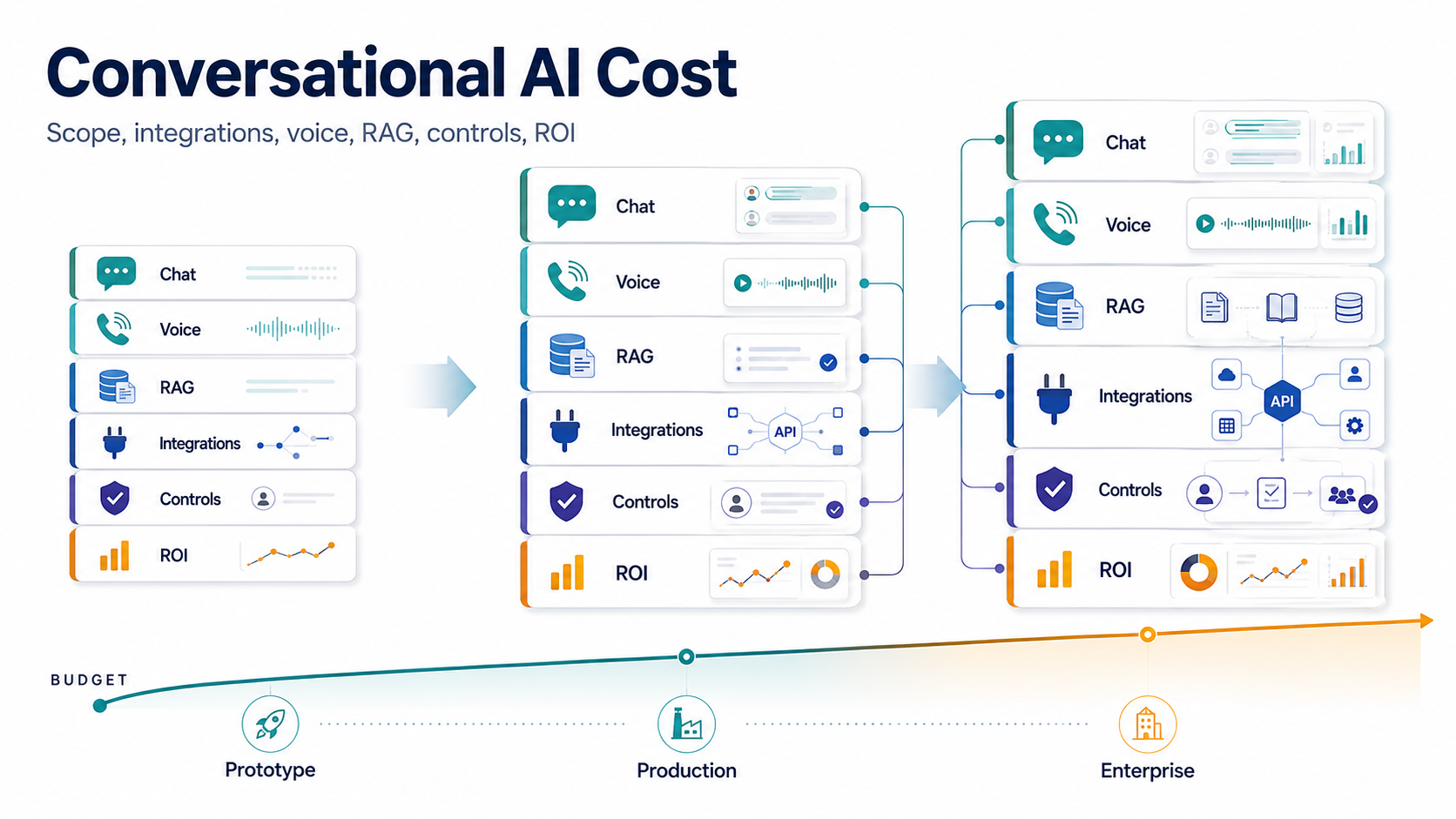
Conversational AI implementation cost in 2026 depends on the channels you support, the quality of the knowledge system, the depth of business integrations, the controls around unsafe answers or actions, and the operating model after launch. A website chat prototype is a different investment from a voice-and-chat support assistant that reads customer history, cites approved knowledge, opens helpdesk tickets, updates CRM fields, escalates risky cases, and reports ROI to support leaders.
For planning, separate three budgets. First is the build budget: discovery, conversation design, RAG setup, integrations, testing, and launch. Second is the run-rate budget: model tokens, voice minutes, transcription, telephony, storage, monitoring, analytics, and support. Third is the change budget: content refresh, prompt and retrieval tuning, new workflows, compliance reviews, and incident response. Teams that only price the model API usually under-budget the real system.
If the workflow, data, integrations, and human-review policy are not clear yet, start with the AI Agent Readiness Assessment. It helps decide whether the first release should be an FAQ assistant, a RAG support copilot, a voice agent, or a controlled workflow agent. If the use case is already support-heavy, compare the scope with NextPage's AI customer service agent development path before pricing full autonomy.
Planning Ranges For Conversational AI Cost
Use ranges carefully. They are useful for budget alignment, but they are not a substitute for scope discovery. The same "conversational AI" label can mean a public FAQ widget, an authenticated RAG assistant, a voice agent, or a governed workflow layer that reads and writes across business systems.
| Scope | Typical Build Budget | Run-Rate Drivers | When It Is Enough |
|---|---|---|---|
| Chat prototype | Low five figures when content, flows, and channels are narrow | Model usage, basic analytics, light content updates | Testing one use case before committing to integrations |
| RAG support MVP | Mid five figures when retrieval, citations, handoff, and evaluation are included | Embeddings, vector storage, token usage, review cycles, content ownership | Answering from approved docs while humans handle risky cases |
| Integrated support assistant | High five to low six figures when CRM/helpdesk context, permissions, and audit logs matter | Integration maintenance, monitoring, QA, analytics, escalation review | Reducing repetitive support work with measurable quality controls |
| Voice or omnichannel agent | Six figures and up when voice, telephony, realtime audio, memory, and workflow actions are in scope | Voice minutes, transcription, TTS, telephony, channel fees, call QA, failover | Automating higher-volume journeys where latency and handoff quality matter |
The better question is not "what does a chatbot cost?" It is "what evidence would justify the next layer of cost?" Start with the smallest release that can prove answer quality, handoff quality, safety, and cost per useful outcome.
Cost Tiers For Conversational AI Projects
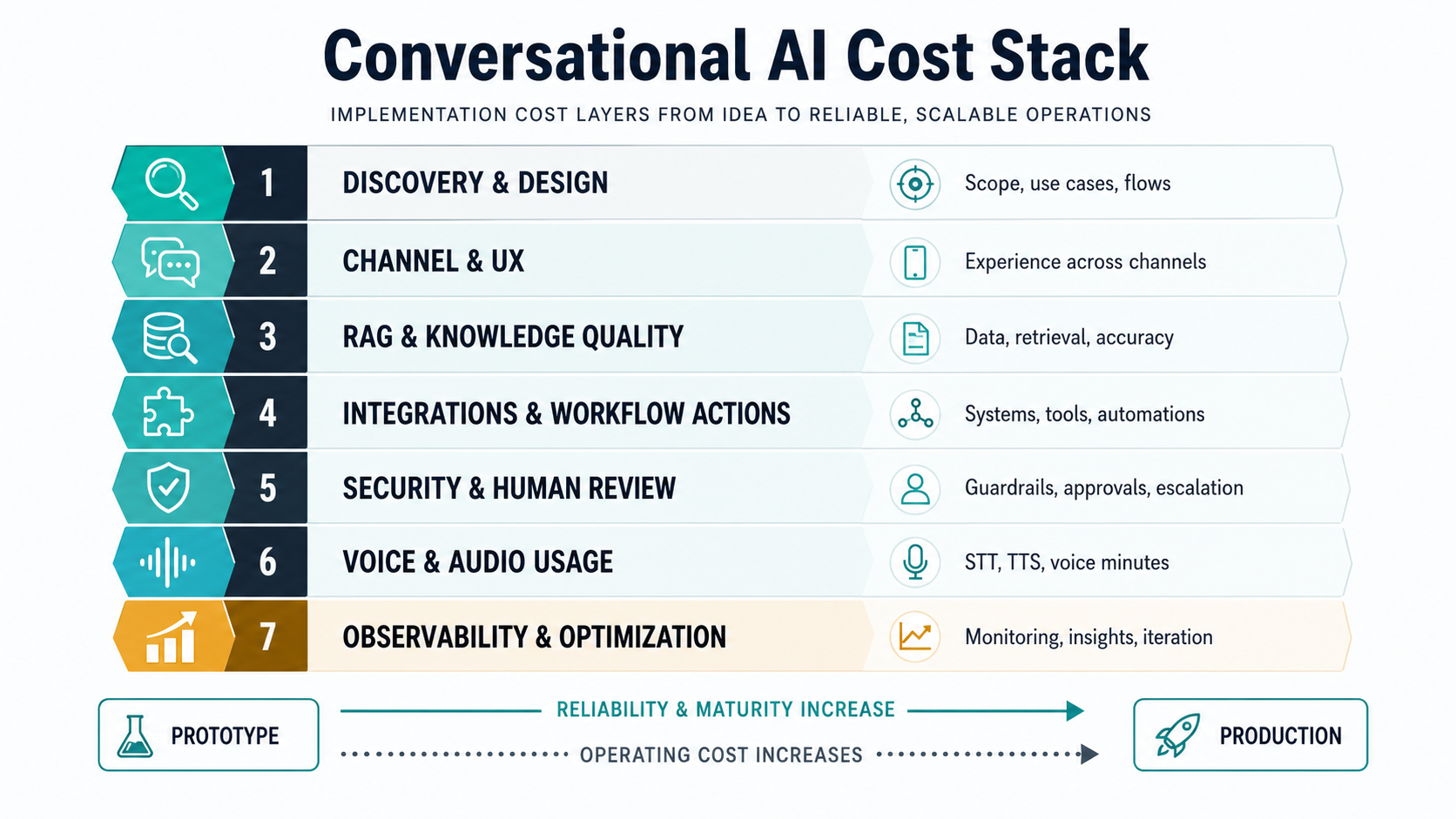
The safest way to estimate cost is to choose the lowest scope tier that can create measurable value. A narrow chatbot can be useful without pretending to be autonomous. A production conversational AI system needs stronger engineering because it must behave consistently across real customers, edge cases, and internal systems.
| Tier | Typical scope | Main cost drivers | Best fit |
|---|---|---|---|
| Prototype | Single channel, limited content, no live writes, manual review | Conversation UX, prompt design, small knowledge set, basic analytics | Testing a support, sales, onboarding, or internal-helpdesk concept |
| MVP assistant | Website or in-app chat with RAG, escalation, and approved answers | Document ingestion, retrieval tuning, citations, handoff, answer evaluation | Reducing repetitive questions while keeping humans in the loop |
| Production support assistant | Chat plus CRM or helpdesk context, ticket routing, analytics, permissions | Authentication, user roles, integrations, audit logs, regression tests, monitoring | Support teams that need measurable deflection and service quality |
| Omnichannel conversational AI | Chat, voice, messaging channels, memory, workflow actions, multilingual support | Voice latency, telephony, channel orchestration, compliance, operations, failover | Teams automating customer journeys across support, sales, operations, and service |
The jump between tiers is usually driven by reliability and integration, not the label on the AI model. A bot that only answers from a static FAQ has a small blast radius. A voice agent that can reschedule appointments, update a CRM, or promise a refund needs access control, policy checks, durable logs, fallback paths, and a clear owner for exceptions.
Do not compare vendors or internal estimates unless the same tier is being priced. One proposal may include only a hosted chat widget and prompt setup. Another may include authenticated retrieval, CRM lookup, ticket creation, staging environments, evaluation datasets, content governance, analytics dashboards, and post-launch tuning. Those are not the same deliverable even if both are called conversational AI.
A useful estimate should name what is excluded. Common exclusions include contact-center telephony fees, WhatsApp or SMS charges, helpdesk licenses, data cleanup, knowledge-base rewriting, multilingual translation review, custom reporting, security review, and ongoing model usage. Listing exclusions early avoids surprise when the pilot turns into production work.
What Changes Cost Between Chat And Voice?
Chat is usually the cleaner first release because the user can pause, read, correct, and wait. Voice has stricter timing and experience constraints. It needs speech-to-text, text-to-speech or realtime audio, telephony, barge-in handling, turn-taking, interruptions, and a fallback when latency or confidence drops.
Official vendor pricing also shows why voice has a different run-rate model. OpenAI publishes separate pricing for text, audio, realtime, and speech models. Twilio's conversational AI pricing separates conversation processing from voice, SMS, WhatsApp, transcription, memory, and related channel costs. That means a voice AI estimate should model cost per minute, cost per resolved conversation, escalation rate, and telephony charges, not just token usage.
For many teams, a phased roadmap is better than launching every channel at once. Start with a strong chat assistant on one support journey. Add voice only after you understand the conversation tree, escalation reasons, knowledge gaps, and the measurable ROI target. NextPage's AI chatbot development work usually treats chat as the controlled learning environment before moving into higher-risk voice or action-heavy workflows. When the use case is call-center specific, the voice AI agent development plan needs latency, call transfer, recording, QA, and supervisor-review requirements from day one.
Voice also changes testing. A chat answer can be reviewed as text. A voice flow must be tested for interruptions, background noise, silence, pronunciation, accent tolerance, transfer timing, consent language, and cases where a caller changes intent mid-sentence. If the voice agent books appointments or collects sensitive information, the QA plan should include transcript review, call replay, and explicit stop conditions.
Omnichannel projects add another layer: continuity. A customer may start on web chat, move to WhatsApp, and later call support. The assistant should not force the customer to repeat context, but it also should not expose private context to the wrong channel or user. That is why channel orchestration, identity, memory, and data-retention choices belong in the estimate.
RAG And Knowledge Quality Cost Drivers
Retrieval-augmented generation is often the difference between a demo and a business-ready assistant. RAG lets the system answer from approved knowledge, but it adds work that should be budgeted explicitly: source cleanup, chunking, embeddings, permission rules, freshness checks, citations, answer evaluation, and content ownership.
The cheapest RAG setup points at a small clean knowledge base. The expensive version connects policy documents, product docs, support macros, CRM notes, order records, billing state, and private customer context. Each extra source creates questions: Who owns the content? How often does it change? Which users can access it? Should the bot cite it? What happens when retrieval finds conflicting answers?
| RAG decision | Budget impact | Planning question |
|---|---|---|
| Source count | More ingestion, mapping, and freshness checks | Which sources are necessary for the first valuable workflow? |
| Permissions | Role-aware retrieval, authentication, and audit logs | Can every user see every document, or does access vary by role/account? |
| Answer quality | Evaluation sets, regression tests, retrieval tuning, review workflow | What must the assistant prove before it can answer customers? |
| Content operations | Owner time, refresh cadence, outdated-content alerts | Who keeps knowledge current after launch? |
Use LLM development discipline here: retrieval design, evaluation, safety checks, and monitoring are part of the product, not optional polish. For larger private knowledge systems, the same planning should cover source ownership, permission-aware retrieval, freshness checks, and evidence that answers can be traced back to approved material.
Evaluation is the part teams most often skip in early budgets. Build a small but realistic set of questions from support tickets, sales calls, onboarding transcripts, and policy edge cases. Mark expected answers, required citations, disallowed claims, and escalation triggers. Run that set before launch and after every meaningful change to prompts, documents, models, or integrations. Without this layer, teams cannot tell whether a lower model bill actually made the assistant worse.
RAG maintenance should also be assigned to a business owner. Engineering can build ingestion and retrieval, but product, support, legal, or operations teams usually own the truth of the content. If the owner is unclear, the assistant gradually becomes stale and the support team stops trusting it.
Integrations And Workflow Actions
Integrations are where conversational AI cost rises quickly. Reading a help-center article is simple. Reading account status from a CRM, checking order history, creating a support ticket, updating a lead stage, scheduling a callback, or handing off to a live agent requires secure API access, field mapping, retries, rate-limit handling, structured logs, and rollback thinking.
Estimate integrations by business risk. A read-only integration that shows delivery status has a smaller risk profile than an action that changes billing, cancels an order, modifies a patient record, or approves a financial request. The more the assistant can change, the more you need policy gates, approvals, and test cases.
A practical first release often limits actions to low-risk handoffs: classify the issue, gather required fields, create a draft ticket, suggest a response, or prepare a supervisor summary. Deeper action can come later, once the team has observed real conversations and failure patterns. For existing products, generative AI integration services should include an integration inventory and a workflow-risk map before implementation starts.
For each integration, define the allowed operation in plain language. "Use Salesforce" is too vague. "Read account tier and last renewal date" is a low-risk read. "Create a renewal-risk task for the account owner" is a moderate write. "Change contract terms" should probably never be automated without approval. This distinction keeps the build focused and gives security reviewers something concrete to approve.
Integration estimates should also include sandbox access and test data. Many AI pilots slow down because the vendor or internal team receives production credentials late, lacks realistic examples, or cannot test edge cases safely. A good project plan budgets time for API documentation review, staging configuration, permission setup, and failure-mode testing before the assistant is exposed to users.
Security, Compliance, And Human Review
Security and compliance are not separate from cost; they define the acceptable design. A conversational AI system may handle PII, payment context, health details, employee data, contracts, or account-specific information. That changes logging, retention, redaction, access control, vendor selection, model-routing, and human-review requirements.
At minimum, budget for authentication, role-based access, PII handling, prompt and response logging, approved-source boundaries, escalation triggers, and admin visibility. Regulated workflows may need data residency review, audit evidence, incident response, and a narrower set of model or hosting options. If the assistant can take action, define what it is allowed to do autonomously, what requires approval, and what is always escalated.
Human review is also a cost lever. It may look slower, but it can make a first launch safer and cheaper than over-engineering full autonomy. A support copilot that drafts responses for agents can build confidence before customer-facing automation. A voice bot that transfers uncertain calls can still reduce queue pressure without taking risky actions.
The review model can change by topic. Password reset, order status, appointment reminders, and basic product questions may be safe for direct response. Billing disputes, refunds, medical advice, employment issues, legal commitments, or angry customers may require human review or immediate transfer. That policy should be encoded in the assistant and reflected in the ROI model because some conversation categories will remain human-led.
Auditability matters when the assistant gives wrong advice or changes a record. Store enough information to reconstruct what happened: user intent, retrieved sources, prompt version, model version, tool call, response, confidence signal, escalation decision, and final outcome. This evidence helps with debugging, customer support, and governance.
Run-Rate Cost Model
Production conversational AI needs a monthly cost model. Include model input and output tokens, audio or realtime usage, transcription, text-to-speech, telephony, messaging-channel fees, vector database storage, embedding refreshes, analytics, monitoring, evaluation runs, and support time. High-volume systems should model peak traffic and retry behavior, not only average conversations.
A useful model tracks cost per conversation and cost per resolved outcome. For support, that might mean cost per contained ticket, cost per escalated case, and cost per human-assisted resolution. For sales, it might mean cost per qualified lead, booked demo, or completed onboarding step. The AI Automation ROI Calculator is a better starting point than raw token math because it ties automation value to time saved and throughput.
Model usage is still worth optimizing, but optimize it after quality is measurable. Common controls include routing simple intents to smaller models, limiting retrieved context, summarizing long histories, caching stable answers, reducing retries, and using confidence thresholds to escalate instead of looping. These controls can reduce spend without weakening the customer experience.
Run-rate cost should include people, not only platforms. Someone will review failed conversations, update content, tune prompts, maintain integrations, watch analytics, and decide what to automate next. If that operating owner is not budgeted, the system may launch successfully and then decay.
Support ROI And Success Metrics
Conversational AI ROI should be measured against operational outcomes, not novelty. Common metrics include deflection rate, containment rate, average handle time, first-response time, escalation quality, CSAT, resolution accuracy, supervisor review time, lead qualification rate, and after-hours coverage. The system should also track where automation fails: missing knowledge, ambiguous intent, integration error, policy block, low confidence, or customer frustration. The companion guide on AI agents for customer support explains the architecture and human-review design behind those metrics.
For support teams, connect ROI to a clear baseline. How many repetitive tickets arrive each month? What is the current cost per ticket? Which categories are safe to automate? What percentage should still escalate? How will quality be reviewed? NextPage's AI customer support automation ROI guide is a useful companion when the primary business case is service efficiency, and the related AI chatbot development cost guide helps compare narrower chat-first scope against broader conversational AI programs.
Do not treat deflection as the only success metric. A bot can deflect tickets by frustrating customers or giving shallow answers. Pair deflection with resolution accuracy, escalation quality, CSAT, complaint rate, and agent rework. For sales and onboarding, pair automation volume with conversion quality, meeting-show rate, account fit, and handoff completeness.
Set a review cadence for ROI. In the first month, review weekly because the assistant is still learning from real traffic. After stabilization, review monthly against cost, quality, and business outcomes. Use the findings to decide whether to expand to another journey, add voice, improve RAG, or deepen integrations.
Build Vs Buy Framework
Buy when the workflow is common, data is simple, risk is low, and the vendor already supports your channels and systems. Build or customize when the workflow is differentiated, data access is complex, customer experience matters, compliance is strict, or the assistant must fit proprietary operations. Many teams land in the middle: buy model and infrastructure primitives, then build the workflow layer, integrations, controls, and analytics around them.
| Choose | When it works | Watch out for |
|---|---|---|
| Packaged platform | Standard support or sales workflows with common integrations | Vendor lock-in, limited customization, hidden usage tiers |
| Custom conversational AI | Differentiated workflows, sensitive data, complex integrations | Higher discovery, engineering, testing, and maintenance ownership |
| Hybrid approach | You need speed plus custom business logic | Clear boundaries between vendor features and owned workflow code |
Phased Implementation Roadmap
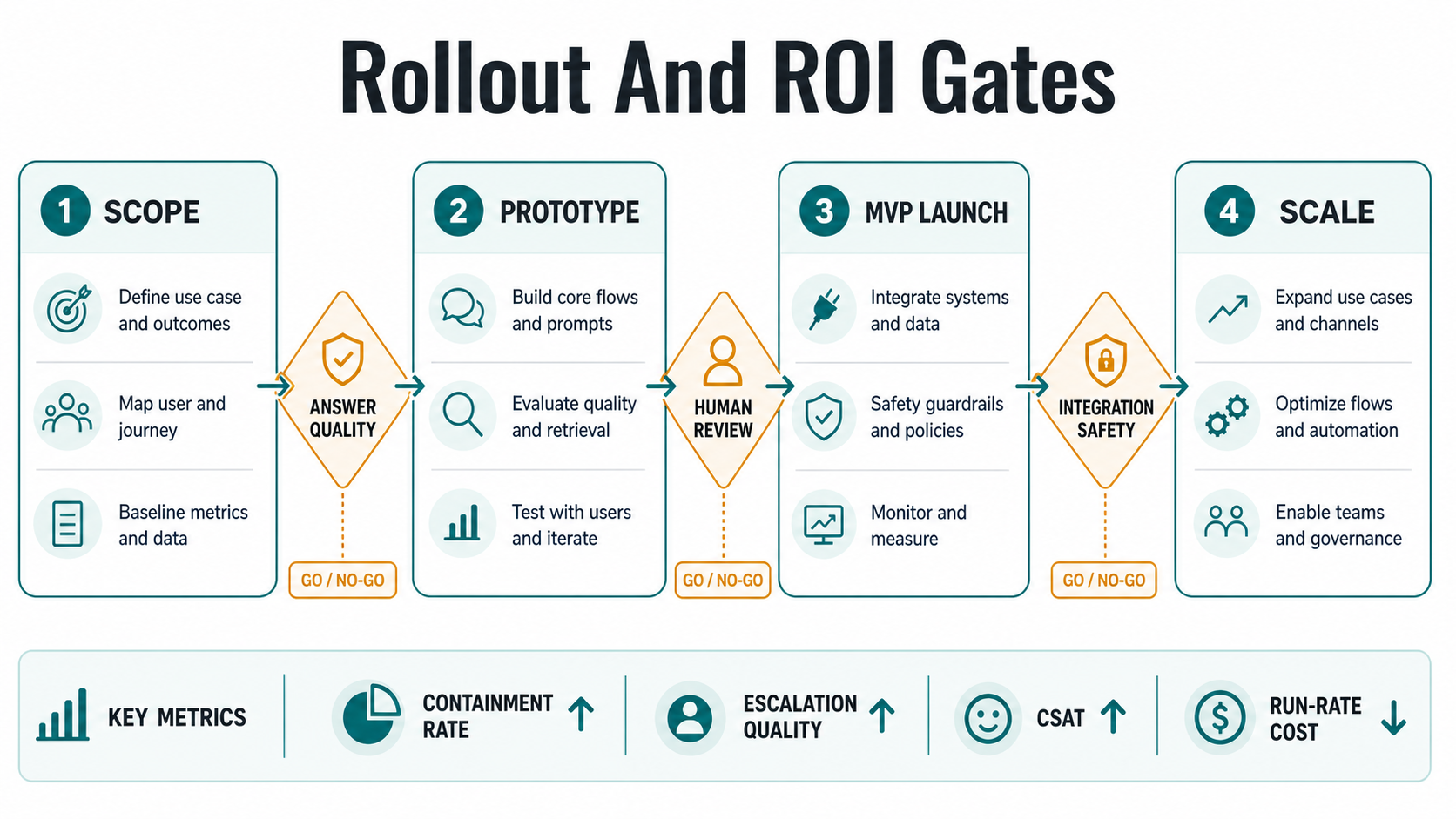
A strong conversational AI rollout starts narrow. Phase one maps the workflow, knowledge sources, user roles, risk limits, and ROI metric. Phase two builds a controlled prototype and evaluates answers against real examples. Phase three launches an MVP with human handoff, analytics, and limited production traffic. Phase four adds integrations, voice, multilingual support, or workflow actions only after the first journey is stable.
This sequencing keeps cost tied to evidence. It also prevents the common mistake of buying an omnichannel platform before the team understands which conversations should be automated. The goal is not to replace humans everywhere; it is to route the right work to AI, humans, or a hybrid flow with measurable quality.
Before each phase, ask what proof would justify the next spend. A prototype should prove that the assistant can answer realistic questions. An MVP should prove that users accept the experience and humans can supervise it. A production release should prove quality, security, and ROI under real load. Voice and workflow actions should come after the team has evidence that the core conversation is worth scaling.
NextPage Planning Checklist
- Define one high-volume conversation journey with a measurable outcome.
- List every knowledge source and mark whether it is public, private, stale, or role-restricted.
- Decide whether the first release is chat-only, voice-only, or omnichannel.
- Separate read-only context from workflow actions that modify business records.
- Set escalation rules for low confidence, sensitive topics, angry users, and regulated requests.
- Model build cost, run-rate cost, human review, and content operations separately.
- Choose success metrics before implementation starts.
If you want a grounded estimate, bring this checklist into a short discovery session. NextPage can help scope the first workflow, map integrations, design RAG and evaluation, and decide whether the right path is chatbot, voice AI, LLM application, or a broader agentic support system.