
A custom software scalability checklist should answer one practical question: can your system keep serving users when workload, data, integrations, and team activity grow at the same time? Scalability is not just faster pages or larger servers. It is the ability to add capacity without exposing hidden bottlenecks in architecture, database design, API contracts, background jobs, deployment safety, support ownership, or cost.
Use this checklist before a product launch, traffic campaign, enterprise rollout, SaaS replacement, cloud migration, funding milestone, or modernization project. Score each area as green, yellow, or red. Green means you have current evidence. Yellow means the design may work but has untested assumptions. Red means growth is likely to create outages, manual work, inconsistent data, slow releases, or expensive emergency refactoring.
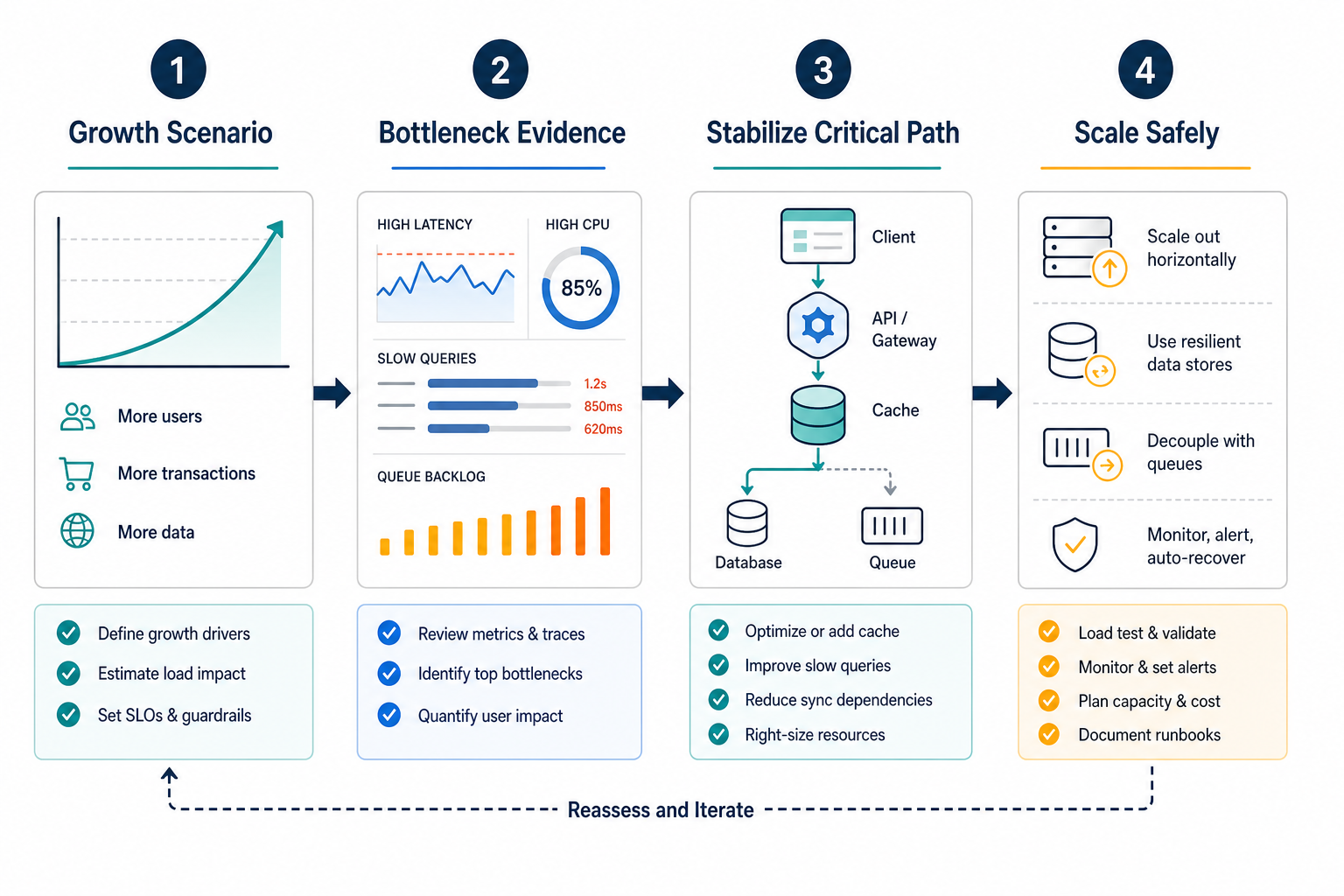
The shortest version is this: define the growth scenario, identify the bottleneck with evidence, protect the data path, make integrations resilient, measure the system under load, and confirm the team can operate what it ships. Scaling the wrong layer only moves the failure somewhere else. If the review exposes a broader delivery or architecture gap, NextPage's scalable software development services can turn the checklist into a phased remediation roadmap.
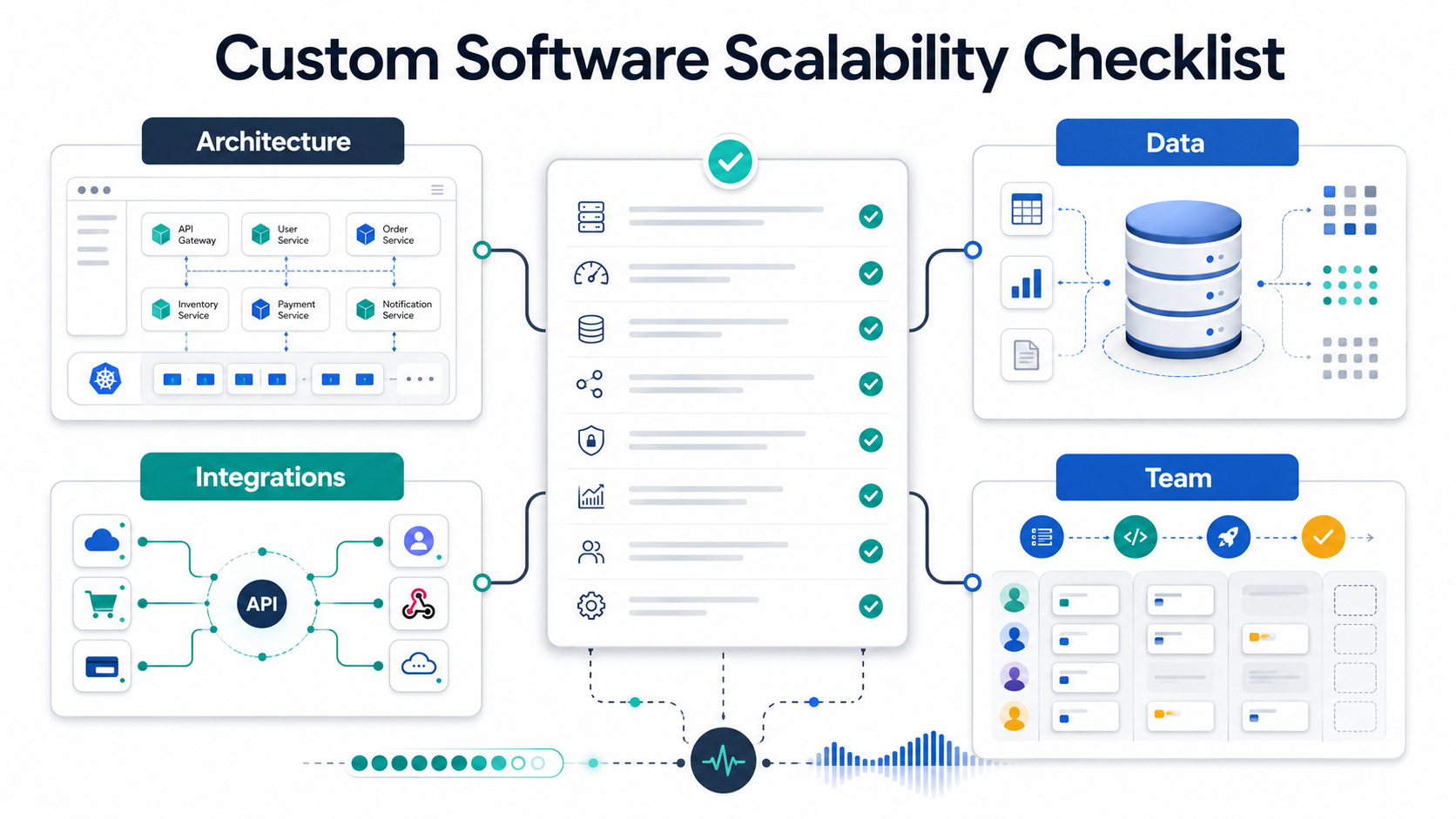
Quick Answer: Custom Software Scalability Checklist
A custom system is ready to scale when it has clear growth scenarios, modular architecture, database headroom, pagination and caching, async processing for slow work, resilient API integrations, load-test evidence, observable production metrics, security controls, deployment rollback paths, and a team that owns runbooks, incidents, and roadmap tradeoffs.
| Checklist Area | Green Signal | Red Flag |
|---|---|---|
| Architecture | Critical paths are known, modular, and scalable where needed. | One service, lock, cron job, shared state path, or release gate blocks all growth. |
| Data | Indexes, query plans, retention, backups, and read/write patterns are tested. | The team discovers database limits only during peak load. |
| Integrations | APIs, webhooks, retries, rate limits, and idempotency are designed explicitly. | External calls run synchronously through user-facing flows without fallback. |
| Operations | Metrics, logs, traces, alerts, runbooks, and rollback paths exist. | Incidents require guessing because the system is not observable. |
| Team | Ownership, documentation, release discipline, and support roles are clear. | Only one developer understands the scale-critical parts. |
If several rows are yellow or red, start with a focused architecture and codebase review before funding new features. For budget planning, pair the technical review with the Custom Software Cost Estimator so refactoring, infrastructure, QA, security, and integration work are visible in the estimate.
Define The Growth Scenario Before Choosing Tactics
Scalability reviews fail when the team says "we need to scale" without defining what is growing. A system may need to handle more concurrent users, higher request rate, larger files, more tenants, bigger reports, more mobile sessions, more partner integrations, heavier background jobs, sharper daily peaks, or more regulated audit activity. Each scenario stresses a different part of the product.
Write the scenario in operational terms: stimulus, source, affected user journey, current baseline, target load, acceptable latency, error budget, queue depth, recovery expectation, and business impact. For example: "During monthly billing close, 400 finance users and five ERP integrations submit 3x normal transactions for four hours while customer dashboards remain below 1.5 seconds p95 latency."
That level of detail keeps the team from over-engineering everything. It also reveals whether the next move is query optimization, caching, async processing, API throttling, infrastructure changes, deployment cleanup, or deeper architecture refactoring.
Architecture Readiness Checklist
Architecture scalability starts with boundaries. The system should separate user-facing work from slow work, isolate high-traffic paths from admin or reporting flows, and make it possible to scale the components that actually carry load. A modular monolith can scale well when boundaries are clean. Microservices can fail badly when they add network hops, shared databases, and distributed debugging before the team needs them.
- Map the top five user journeys and the services, databases, queues, caches, files, and external APIs they touch.
- Identify hidden singletons such as global locks, serial schedulers, shared file storage, single worker queues, one oversized database table, or a manual release gate.
- Confirm the application can add stateless web or worker capacity without corrupting sessions, files, or background jobs.
- Define where synchronous processing ends and async processing begins.
- Document which modules can be replaced, extracted, or scaled independently later.
The goal is not to split everything into services. The goal is to make bottlenecks visible and keep future refactoring possible. If the current product is tightly coupled but valuable, a staged custom software development plan can preserve the working parts while rebuilding scale-sensitive modules first. For backend-heavy products, NextPage's backend and API development services are a useful fit when database models, queues, files, admin workflows, and integrations need one reliable architecture.
Data And Database Readiness Checklist
Most scaling work eventually reaches the data layer. Stateless application servers are easier to replicate than stateful databases, search indexes, files, analytics jobs, and cross-system records. Before buying larger instances, inspect whether the database is doing unnecessary work.
| Data Question | Evidence To Collect | Typical Fix |
|---|---|---|
| Are the slow queries known? | Query logs, p95/p99 query latency, explain plans, top table scans. | Indexes, query rewrite, denormalized read models, pagination. |
| Is read traffic separated from write pressure? | Read/write ratio, report load, dashboard frequency, replica lag. | Read replicas, cache layer, async reporting, materialized views. |
| Can data volume grow without table pain? | Largest tables, retention rules, archival needs, tenant distribution. | Partitioning, retention jobs, storage lifecycle, tenant strategy. |
| Are backups and restores tested? | Restore drill results, RPO/RTO targets, backup coverage. | Automated restore testing, documented recovery playbooks. |
| Can analytics run without harming production? | Warehouse syncs, long-running reports, lock waits, batch windows. | ETL/ELT pipeline, event stream, reporting database. |
Database changes are often the most expensive late-stage fixes, so treat data design as a growth feature. If the checklist exposes migration or workload-baseline risk, compare it with the AWS database migration checklist and the cloud performance audit checklist before deciding whether the right move is tuning, read scaling, managed database migration, or data-model redesign.
API And Integration Readiness Checklist
Integrations are where many custom systems look scalable in isolation but fail in production. A user request that waits on a CRM, ERP, payment gateway, inventory system, email provider, AI service, or partner API inherits that system's latency, outage patterns, rate limits, and data quality problems.
- Use pagination, filtering, and bounded payloads for list endpoints.
- Make write operations idempotent so retries do not create duplicate orders, invoices, users, or tasks.
- Move slow, unreliable, or third-party calls out of the critical user path when possible.
- Track rate limits, webhook failures, retry counts, dead-letter queues, and sync lag.
- Version APIs and data contracts before partners or mobile apps depend on them.
- Define source-of-truth rules for every shared object.
When integration sprawl is the real issue, the answer may not be a bigger server. It may be a cleaner workflow layer. NextPage's ERP integration and modernization services help teams stabilize API adapters, queues, permissions, background jobs, and operational reporting around ERP-adjacent work.
Performance And Load Testing Checklist
Load testing should prove the specific growth scenario, not create a vanity traffic number. Start with the journeys that matter most to revenue, operations, support, or customer trust. Then test normal traffic, expected peak, failure conditions, and recovery behavior.
| Metric | Why It Matters | Watch For |
|---|---|---|
| p95 and p99 latency | Shows the experience of slower requests, not just averages. | Tail latency spikes when queues, database pools, or external APIs saturate. |
| Error rate | Shows whether the system fails cleanly under pressure. | Timeouts, 500s, duplicate work, and partial writes. |
| Throughput | Shows useful work completed per second or minute. | Throughput plateaus even after adding capacity. |
| Queue depth and age | Shows whether async work is keeping up. | Backlogs that keep growing after the traffic spike ends. |
| Saturation | Shows stressed resources before user-visible failure. | Connection pools, CPU, memory, disk I/O, cache misses, and thread pools. |
Load-test results should create decisions: which bottleneck gets fixed first, what can wait, what must be monitored, and what capacity threshold triggers action. For broader budget planning, pair this review with NextPage's custom software development cost guide so architecture, integrations, security, QA, and post-launch support are part of the estimate.
Observability And Operations Checklist
Scalability without observability is guesswork. The team needs to know what the system is waiting on, whether user-facing paths are healthy, whether background work is falling behind, and whether recent releases changed behavior.
- Dashboards show request volume, latency, errors, queue depth, database pressure, cache hit rate, external API health, and infrastructure saturation.
- Logs include correlation IDs across user request, worker job, database operation, and third-party call.
- Traces reveal which dependency slows a request.
- Alerts map to user impact and ownership, not just raw CPU thresholds.
- Runbooks describe how to pause jobs, drain queues, roll back releases, clear stuck records, and communicate incidents.
- Deployment automation supports rollback and environment parity.
A mature operating model often matters more than the chosen framework. Teams that can see bottlenecks early can scale deliberately. Teams that cannot see them tend to overspend on infrastructure or discover problems through customers. When the bottleneck spans code, cloud infrastructure, database pressure, and cost, NextPage's cloud performance optimization services connect measurement with the remediation plan.
Security And Compliance Readiness Checklist
Growth increases risk surface. More users, tenants, integrations, data exports, admins, background jobs, and vendors create more permission paths and more ways sensitive data can leak. Scalability work should not bypass security review; it should make controls more explicit.
- Role and permission checks are centralized, tested, and logged.
- Tenant boundaries are enforced at the application and data-access layers.
- Secrets, API keys, and webhook credentials are rotated and scoped.
- Audit logs capture sensitive actions and data exports.
- Background jobs and integrations follow the same data rules as the main app.
- Dependency updates, vulnerability scanning, backup encryption, and retention policies are documented.
If you are evaluating a development partner for scale-sensitive work, use the custom software development company checklist alongside this technical review. Scalability requires delivery discipline, security judgment, and long-term ownership, not only coding capacity.
Team Readiness Checklist
Software does not scale beyond the team that operates it. A technically sound architecture can still fail if releases are risky, knowledge sits with one person, support has no escalation path, or product leaders keep adding scope without understanding system limits.
| Team Area | Ready | Not Ready |
|---|---|---|
| Ownership | Every critical component has a named owner and backup. | Incidents wait for the one person who knows the system. |
| Documentation | Architecture decisions, runbooks, data flows, and integration contracts are current. | Knowledge lives in chat threads and old tickets. |
| Release process | Tests, migrations, feature flags, rollback, and monitoring are standard. | Deployments are manual and high-stress. |
| Product tradeoffs | Roadmap decisions include scalability, support, security, and maintenance cost. | Every new feature is treated as isolated UI work. |
| Support feedback | Incidents and user pain feed backlog priorities. | The team fixes symptoms repeatedly without root-cause work. |
For teams rebuilding in phases, the MVP Scope Builder can help separate the smallest high-impact release from later platform work, analytics, automation, and integration improvements.
Scalability Scorecard
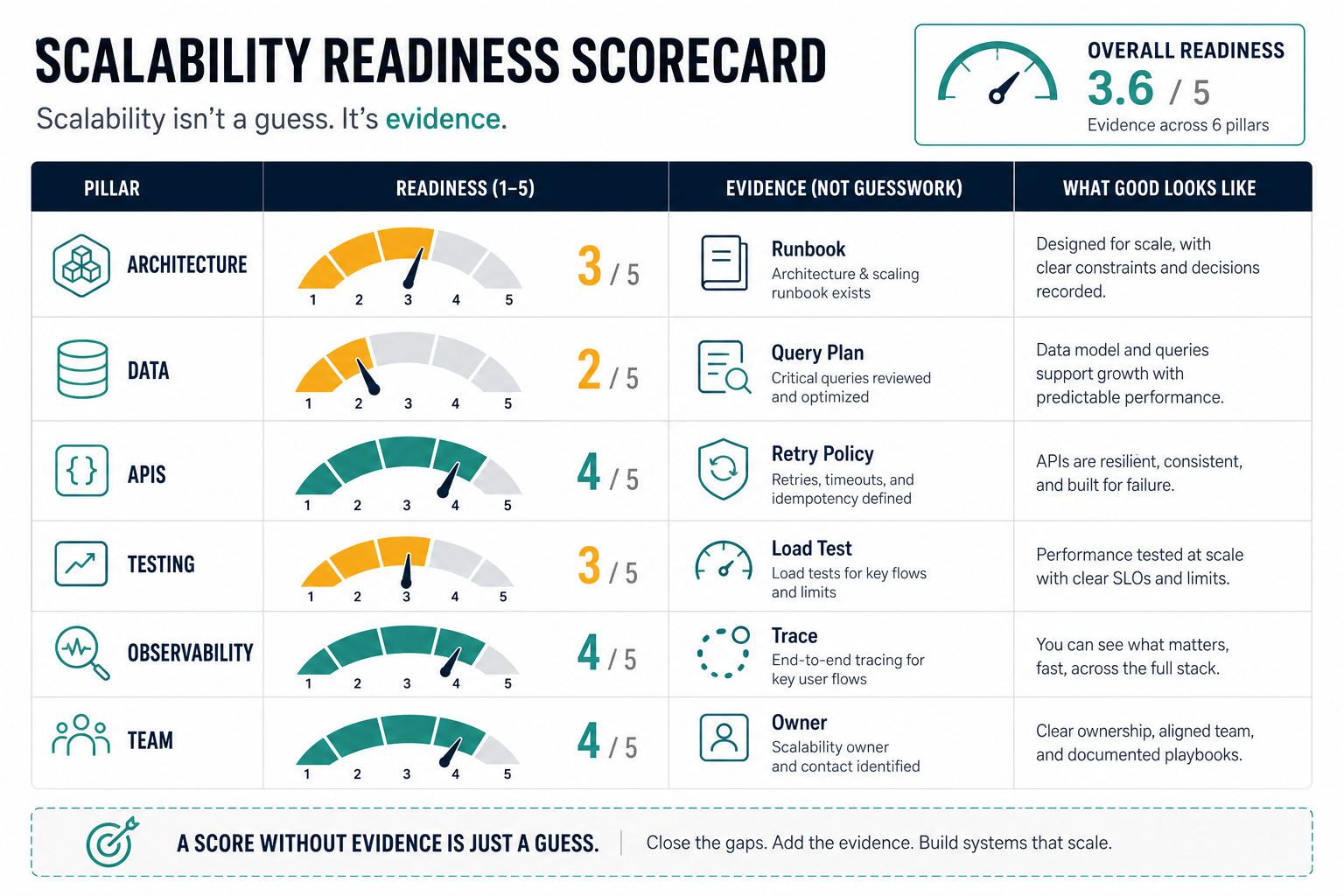
Score each area from 1 to 5. A score of 1 means the system has no evidence or clear owner. A score of 3 means the design is plausible but untested. A score of 5 means the team has current production evidence, test results, documentation, and ownership.
- Growth scenario is explicit and tied to business impact.
- Critical user journeys and dependencies are mapped.
- Application boundaries make the real bottleneck scalable.
- Database queries, indexes, retention, and backups are tested.
- APIs support pagination, idempotency, retries, and versioning.
- Slow work uses queues or workers with backlog monitoring.
- Caching strategy is intentional and safe for data freshness.
- Load tests cover peak and failure scenarios.
- Observability shows latency, errors, saturation, queues, and dependencies.
- Security, permissions, audit logs, and tenant boundaries are scale-ready.
- Deployments, rollback, and incident runbooks are rehearsed.
- Team ownership and roadmap tradeoffs are clear.
Scores below 36 usually indicate a system that can grow only with careful supervision. Scores from 36 to 48 suggest targeted remediation before major growth. Scores above 48 indicate a stronger foundation, but they still need periodic review as product usage changes. If a legacy system scores low because of fragile dependencies, unsupported versions, or unclear ownership, compare the findings with the Legacy Software Modernization Scorecard.
What To Fix First
Fix the bottleneck closest to user impact first. If the database is saturating, do not start with microservices. If integrations are timing out, do not only add web servers. If releases are risky, do not increase traffic until rollback and observability are reliable. If product scope keeps changing, do not overbuild infrastructure for a workflow that has not stabilized.
A pragmatic order is usually: measure, stabilize critical paths, protect data, isolate slow work, harden integrations, improve deployment safety, then refactor architecture in slices. That path avoids a big-bang rewrite while still reducing the risk that growth breaks the product.
When the review turns into a larger modernization decision, use the legacy application modernization roadmap to decide whether to stabilize, rehost, replatform, refactor, rebuild, replace, or use a strangler migration around the riskiest parts.
NextPage Point Of View
Most scalability projects should not begin with a platform rewrite. They should begin with evidence: the growth scenario, the critical journey, the bottleneck, the data path, the integration path, and the operating owner. Once those are clear, the next step is usually a focused slice of work: query fixes, queue design, integration hardening, cloud performance tuning, release cleanup, or one modular rebuild.
NextPage is most useful when a growing product has real business value but the current software foundation is starting to constrain reliability, speed, reporting, integrations, or team confidence. The right engagement may be a scalability audit, backend architecture review, cloud performance pass, ERP integration modernization, legacy refactor, or phased custom software build. The checklist above is the intake: it shows where evidence is strong, where assumptions are risky, and where a practical roadmap should start.