
Custom software usually costs more upfront, while off-the-shelf software usually looks cheaper in month one. The better decision is the one with the lower total cost of ownership over three years for your workflow, integration needs, data model, AI roadmap, and operating risk. In 2026, that comparison is no longer just build versus buy. Many teams should buy the commodity system, build the workflow layer that differentiates them, and connect both with clean APIs, owned data, and governance.
Off-the-shelf software is the right answer when the process is standard, time-to-value matters, and configuration is enough. Custom software becomes the better investment when the workflow creates advantage, integrations are central to the business, data needs to be owned and modeled carefully, or AI automation will sit on top of the process. The mistake is choosing from sticker price alone.
If you need a starting budget, use the Custom Software Cost Estimator first, then pressure-test the result with the Build vs Buy Decision Tool. Then use the framework below to compare software costs across licensing, implementation, integration, migration, workarounds, maintenance, AI readiness, and opportunity cost.
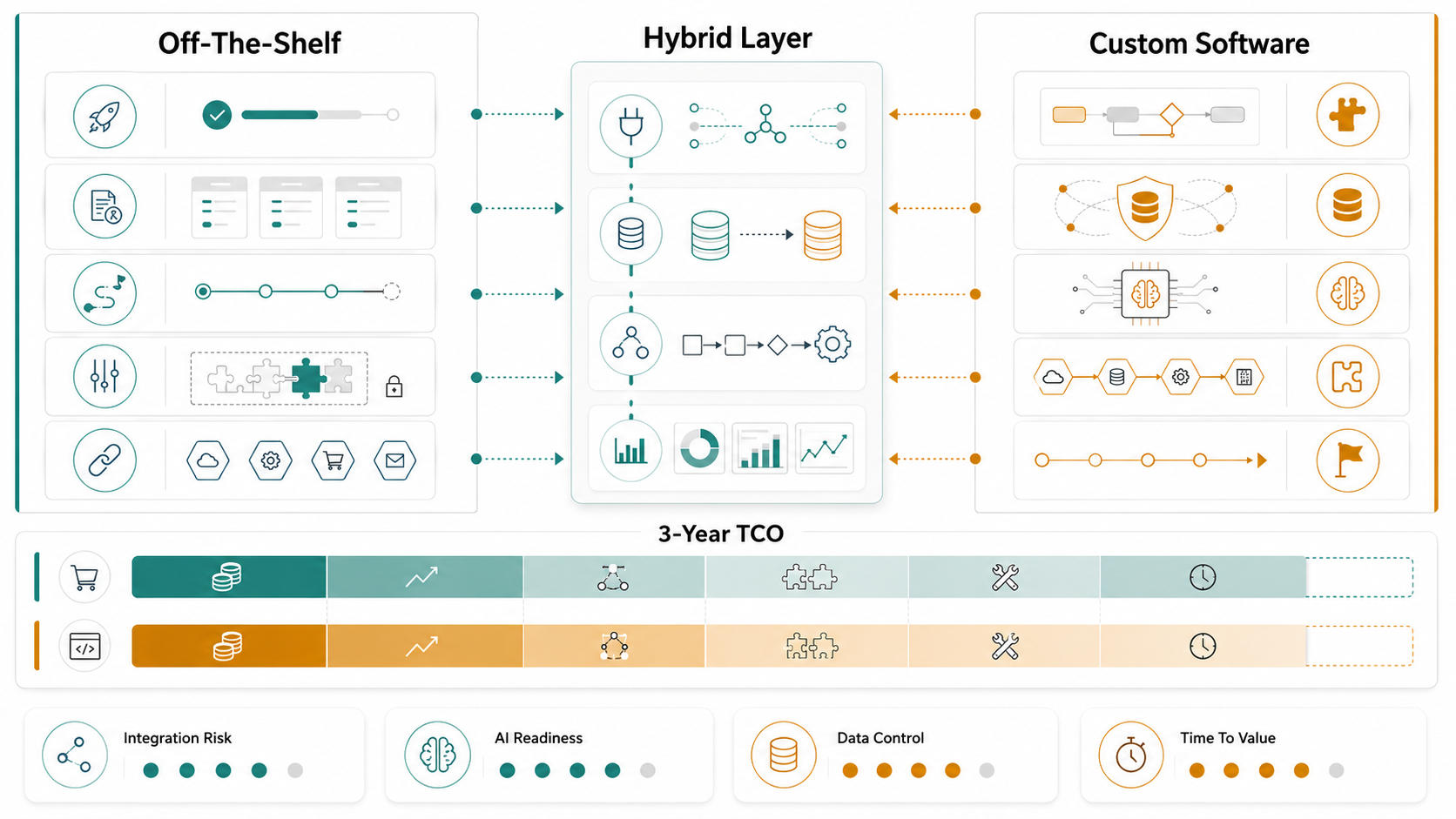
Quick Answer: Custom Software Vs Off-The-Shelf Total Cost
Off-the-shelf software usually wins on speed and predictable starting cost. Custom software usually wins on workflow fit, integration depth, data ownership, and long-term control. A hybrid approach wins when a purchased platform handles commodity functions while custom software owns the differentiating workflow, automation, reporting, customer experience, or AI layer.
| Decision Area | Off-The-Shelf Is Usually Better When | Custom Software Is Usually Better When |
|---|---|---|
| Launch speed | You need a working system quickly and the process is standard. | You can invest in discovery and phased delivery because fit matters more than speed. |
| Cost model | Seat count is modest, add-ons are limited, and the vendor price is stable. | Licenses, integrations, and workarounds will cost more than building the right workflow. |
| Workflow fit | Your team can adapt to the tool without hurting service quality or margins. | The workflow is unique, revenue-generating, regulated, or operationally complex. |
| Integration | Native connectors cover the systems that matter. | ERP, CRM, finance, data warehouse, partner, or legacy integrations are central. |
| AI readiness | You only need embedded vendor AI for generic tasks. | You need AI over proprietary data, rules, decisions, workflows, or customer experience. |
A useful comparison should run for at least three years. One-year comparisons overvalue fast setup and undervalue subscription growth, integration debt, data cleanup, and productivity losses from mismatched workflows. NextPage's custom software development cost guide can help pressure-test the build side after the decision starts leaning custom.
Why 2026 Changes Build Vs Buy Software Decisions
AI-assisted development has compressed some build timelines, but it has not removed the cost of owning software. Teams still need product strategy, architecture, security, data modeling, QA, release management, support, and governance. At the same time, off-the-shelf platforms are adding AI features that can be useful, but those features often work best inside the vendor's own data and workflow model.
The practical question is not "Can we build it?" It is "Should we own this capability, and can we operate it better than a vendor?" If the capability is a standard back-office need, buying is usually rational. If it is how the business sells, serves, prices, schedules, approves, routes, analyzes, or differentiates, ownership may create long-term leverage.
This is why many strong decisions are hybrid. For a broader strategy comparison, the supporting Build Vs Buy Software In 2026 guide can help stakeholders align before tool selection starts. A company might buy accounting, payroll, CRM, or ticketing, then build a custom portal, integration layer, analytics model, AI assistant, partner workflow, or customer-facing experience around those systems. NextPage's custom software development work often starts with that boundary: what should be bought, what should be owned, and what should be connected cleanly.
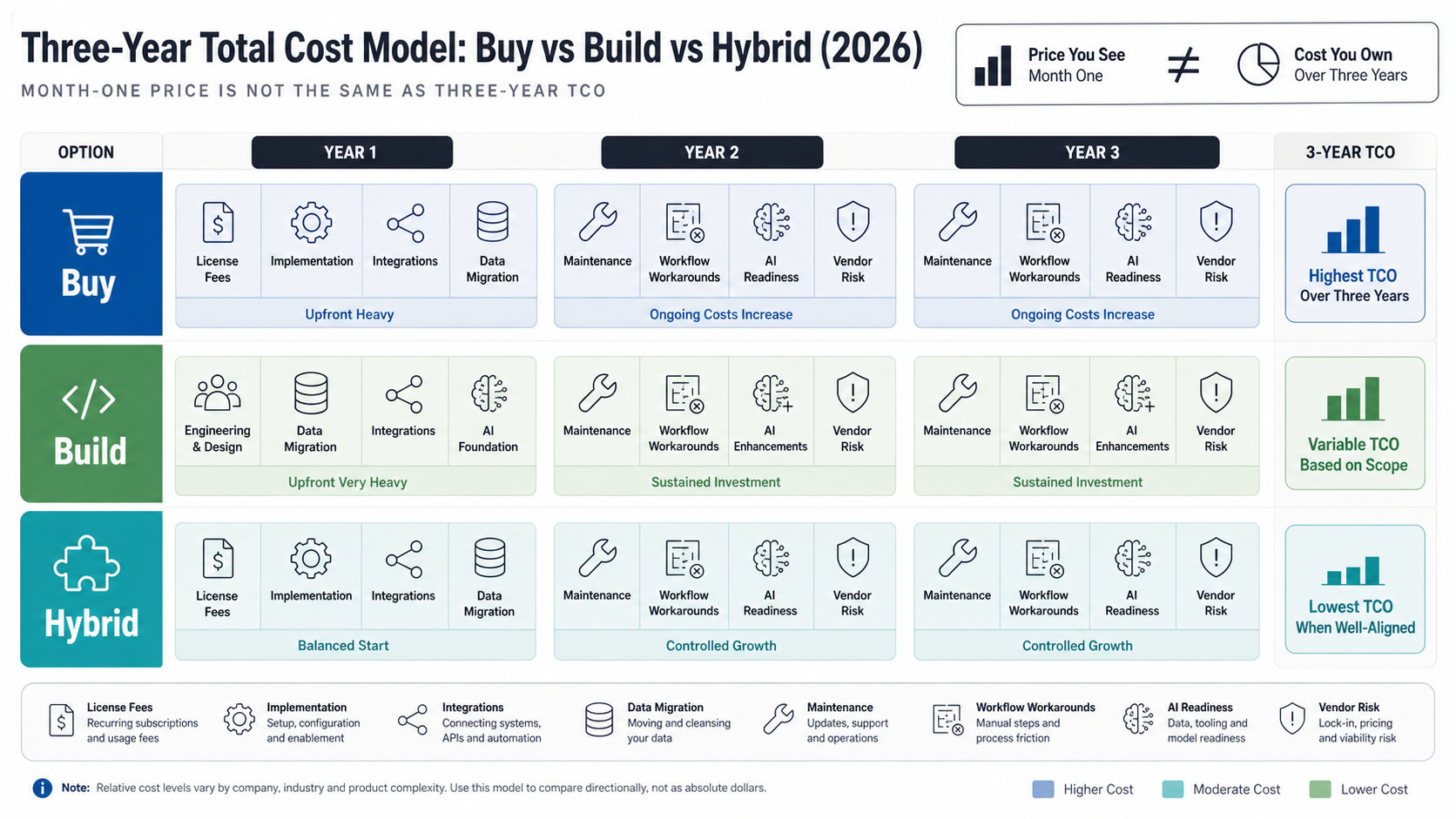
The Three-Year Total Cost Model
Compare total cost across the same cost lines. Do not compare a vendor subscription against only developer salaries. Off-the-shelf software has implementation and operating costs. Custom software has discovery, build, maintenance, hosting, support, and improvement costs. Both need adoption work.
| Cost Line | Off-The-Shelf Cost | Custom Software Cost | What To Watch |
|---|---|---|---|
| Initial setup | Configuration, vendor onboarding, admin setup, training. | Discovery, UX, architecture, development, QA, launch. | Fast setup can hide later workflow mismatch. |
| Licensing | Per-seat, usage, storage, AI add-ons, premium support. | Usually none, except third-party services and infrastructure. | Model user growth, price increases, and feature tier changes. |
| Integration | Native connectors, iPaaS, custom middleware, manual exports. | Purpose-built APIs, sync jobs, events, data contracts. | Integration tax is often the real build-versus-buy swing factor. |
| Workarounds | Spreadsheets, duplicate entry, manual approvals, shadow tools. | Lower if the workflow is designed correctly; higher if scope is weak. | Measure staff time and error cost, not only software invoices. |
| Maintenance | Vendor updates, admin management, reconfiguration. | Security patches, enhancements, monitoring, support. | Both models need ownership; neither is maintenance-free. |
| Exit cost | Data export, migration, contract timing, retraining. | Refactoring, platform migration, technical debt cleanup. | Plan reversibility before the first contract or sprint. |
A simple calculation is enough for the first pass: three-year software cost equals setup plus subscriptions plus integrations plus migration plus support plus workaround labor plus opportunity cost. The numbers will be imperfect, but the exercise exposes assumptions before the team commits.
Integration Risk Is Often The Deciding Factor
Off-the-shelf platforms often look attractive because they list dozens of integrations. The detail that matters is whether those integrations support your actual workflow, data fields, approval rules, latency needs, and reporting model. A connector that syncs contacts is not the same as an integration that handles quoting, inventory, pricing, invoices, customer history, and exceptions.
Custom software can be designed around the systems of record from the start. That does not make it automatically cheaper, but it can reduce years of fragmented data, duplicate entry, and unreliable reporting. If the business depends on ERP, CRM, warehouse, finance, support, or partner data moving correctly, integration should carry a high weight in the decision score.
Use enterprise software integration services thinking even when you buy SaaS. Define the source of truth, sync direction, error handling, ownership, audit trail, and fallback process. The more systems the decision touches, the less useful a generic feature comparison becomes.
AI Readiness Changes The Cost Equation
AI features inside off-the-shelf tools can be useful for summarization, search, drafting, recommendations, and admin productivity. They are less useful when the intelligence needs to understand proprietary workflows, combine data across systems, follow custom rules, or trigger actions outside the vendor's product boundary.
Custom software can make AI easier to govern because the data model, workflow states, permissions, event history, and audit logs can be designed for automation. That matters for RAG assistants, copilots, recommendation engines, forecasting, agentic workflows, and decision support. AI works better when the underlying software has clean data and predictable processes.
The same logic applies to a hybrid layer. Buy the stable system of record, then build the AI-ready workflow, reporting, or automation layer on top. For teams considering that route, NextPage's AI development services are most useful after the build-versus-buy boundary is clear.
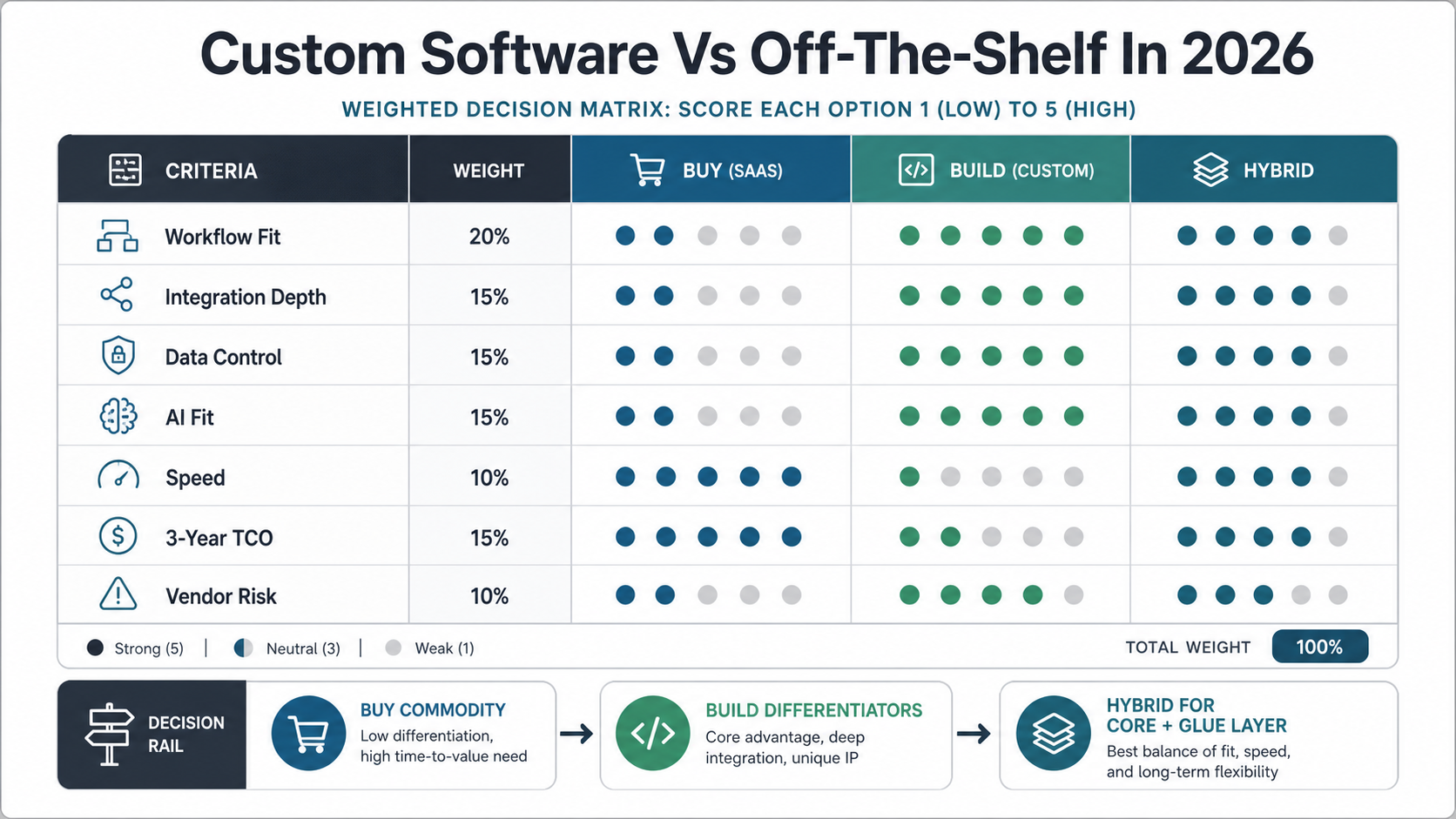
A Weighted Decision Matrix
Use a weighted score when stakeholders disagree. Give each criterion a weight from 1 to 5, then score buy, build, and hybrid from 1 to 5. Multiply weight by score. The value is not mathematical precision. It is forcing the team to say which tradeoffs matter.
| Criterion | Suggested Weight | Buy Favors | Build Favors | Hybrid Favors |
|---|---|---|---|---|
| Time to value | 4 | Immediate deployment. | Phased MVP if workflow can wait. | Buy core now, build gaps next. |
| Workflow differentiation | 5 | Low differentiation. | High differentiation. | Differentiated layer over standard core. |
| Integration complexity | 5 | Native connectors are enough. | Deep or unusual integrations. | Custom integration layer around SaaS. |
| Data ownership | 4 | Vendor model is acceptable. | Owned model and portability required. | Vendor plus owned warehouse or workflow data. |
| AI roadmap | 4 | Generic embedded AI is enough. | Proprietary AI workflows needed. | Custom AI layer over bought systems. |
| Compliance/security | 3 | Vendor certifications fit. | Controls must match unique requirements. | Vendor core plus custom governance layer. |
If buy wins, still document integration and exit assumptions. If build wins, start with a scoped MVP rather than a broad platform rewrite. If hybrid wins, make the system boundary explicit so the team does not accidentally build a fragile pile of plugins.
When Off-The-Shelf Software Is The Right Choice
Off-the-shelf software is usually right for standard workflows that do not differentiate the business. Examples often include payroll, basic accounting, commodity HR administration, simple CRM usage, email marketing, helpdesk ticketing, and collaboration tools. The vendor has already solved the common edge cases, support burden, updates, and security reviews.
Buying also makes sense when the organization lacks the capacity to own a custom system. Custom software needs product ownership after launch. If nobody can prioritize improvements, review analytics, manage support, and fund maintenance, a purchased product may be safer.
The warning sign is over-customization. If the team needs many plugins, custom fields, scripts, exports, manual fixes, and exceptions to make the tool work, the off-the-shelf path may be creating a hidden custom system without the control of owning one.
When Custom Software Becomes The Better Investment
Custom software becomes attractive when the workflow is the business. That may mean proprietary pricing, complex scheduling, partner operations, field workflows, approval rules, customer portals, marketplace logic, logistics, regulated case management, or data-heavy internal tools. In those cases, standard software can force the company to operate like everyone else.
Custom also makes sense when integration is the product. If users need one reliable workflow across CRM, ERP, billing, inventory, analytics, documents, payments, and support, a tailored platform may reduce operational drag. NextPage's web app development work often fits this pattern: the visible app matters, but the real value is the workflow and systems behind it.
The better custom path is incremental. Start with the workflow slice that creates measurable value, connect only the systems required for that slice, ship a usable release, and expand from evidence. A custom platform should earn its next phase.
The Hybrid Path: Buy The Core, Build The Glue Layer
For many teams, the best answer is neither pure buy nor pure build. Buy the stable core where vendor depth matters. Build the glue layer where workflow fit, customer experience, data control, and AI readiness matter. This can include custom portals, dashboards, partner tools, automation services, API orchestration, reporting layers, and AI assistants.
A hybrid strategy works when boundaries are clean. The bought system should remain the system of record for the functions it owns. The custom layer should not become an undocumented patchwork. Use API contracts, event logs, data ownership rules, monitoring, and rollback paths.
When the bought platform is still strategically useful, NextPage's SaaS development services can help create the custom product or workflow layer around it rather than forcing a full replacement.
Decision Checklist
- Is the workflow standard enough that adapting to a vendor process will not hurt margins, speed, or customer experience?
- What will the software cost at the expected user count in year three?
- Which integrations are required for the workflow to be trusted?
- How much manual workaround labor will remain after implementation?
- Who owns the data model, reporting, and audit trail?
- Will future AI features need proprietary data, permissions, and workflow history?
- Can the organization maintain custom software after launch?
- What is the exit path if the vendor or custom architecture stops fitting?
How NextPage Can Help
NextPage helps teams make build-versus-buy decisions with practical engineering evidence. We map the workflow, systems of record, integration needs, data ownership, security constraints, AI roadmap, and three-year cost model before recommending custom, off-the-shelf, or hybrid implementation.
If the decision points toward custom or hybrid, we can scope an MVP, design the architecture, build the web app or integration layer, migrate data, connect APIs, and create a roadmap that supports AI and automation without overbuilding the first release. The goal is not to sell custom software for every problem. It is to put ownership where it creates leverage and buy where the market already solves the problem well.