
Database selection for web applications should start with the product workload, not the trendiest database name. A SaaS dashboard, ecommerce portal, booking system, marketplace, internal workflow tool, and analytics product all store data, but they do not ask the database the same questions. The right choice depends on relationships, query patterns, consistency, write volume, reporting, search, compliance, backups, team skills, and cost.
For many web apps, a relational database such as PostgreSQL or MySQL is still the safest primary system of record because it handles structured data, transactions, constraints, joins, and reporting-friendly models well. That does not mean every problem belongs in one relational database. Product teams often add a cache for speed, a search index for full-text discovery, an object store for files, a queue for background work, and an analytics store when reporting grows beyond operational queries.
If you are planning a web app or SaaS platform, treat database selection as an architecture decision. NextPage's SaaS development services and scalable software development services help teams map product workflows, user roles, tenant boundaries, integrations, reporting, deployment, monitoring, backups, and growth assumptions before the first schema is locked in.
Quick Answer: How Do You Choose A Database For A Web Application?
Choose a database for a web application by matching the database to the workload. Start with the data model, relationships, transaction needs, query patterns, expected traffic, consistency requirements, reporting needs, compliance constraints, backup and recovery expectations, and the team's operating skills. Use one reliable primary database first when possible, then add specialized stores for search, caching, analytics, or event processing only when the workload justifies them.
A practical decision sequence is:
- Define the source of truth. Decide which records are business-critical: users, orders, subscriptions, inventory, appointments, projects, invoices, or tenant data.
- Map the query patterns. List the screens, filters, reports, background jobs, and API calls the app must support.
- Set consistency rules. Decide where stale data is acceptable and where transactions must be correct immediately.
- Estimate growth and operations. Consider read/write volume, storage growth, backups, restore time, monitoring, and team familiarity.
- Add specialized stores carefully. Cache, search, analytics, and document stores are useful, but each one adds synchronization and failure modes.
Database Selection Decision Map
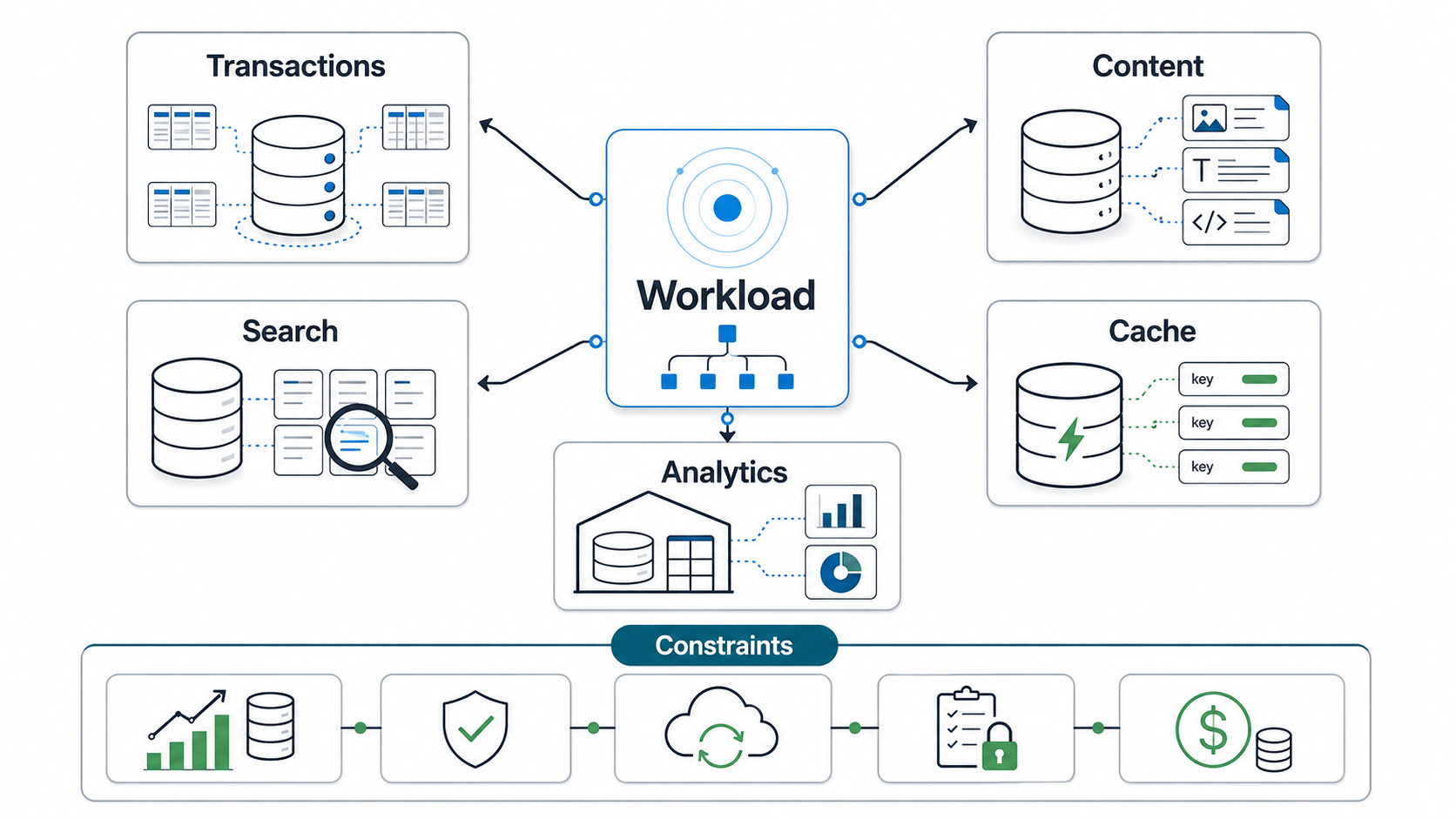
The first mistake is asking whether PostgreSQL, MySQL, MongoDB, Redis, or another product is best. The better question is: what job must each data component perform? Your source-of-truth database should protect important records. A cache should reduce repeated reads. A search index should improve discovery. An analytics store should answer aggregate questions without slowing the transactional app.
This distinction matters because databases optimize for different tradeoffs. Relational databases are strong for structured records, constraints, joins, and transactions. Document databases can fit flexible content and nested objects, but relationships and reporting need careful modeling. Key-value and cache stores are fast for direct lookup, but they should not become hidden sources of truth. Search engines are built for relevance and filtering, not financial correctness. Analytics databases are built for large scans and aggregates, not user-facing transactional workflows.
Most product teams do not need every category on day one. A focused MVP may only need a managed relational database, object storage, and backups. A mature SaaS platform may later add Redis, OpenSearch or Elasticsearch, a data warehouse, and event pipelines. The architecture should evolve from evidence, not from a desire to look sophisticated.
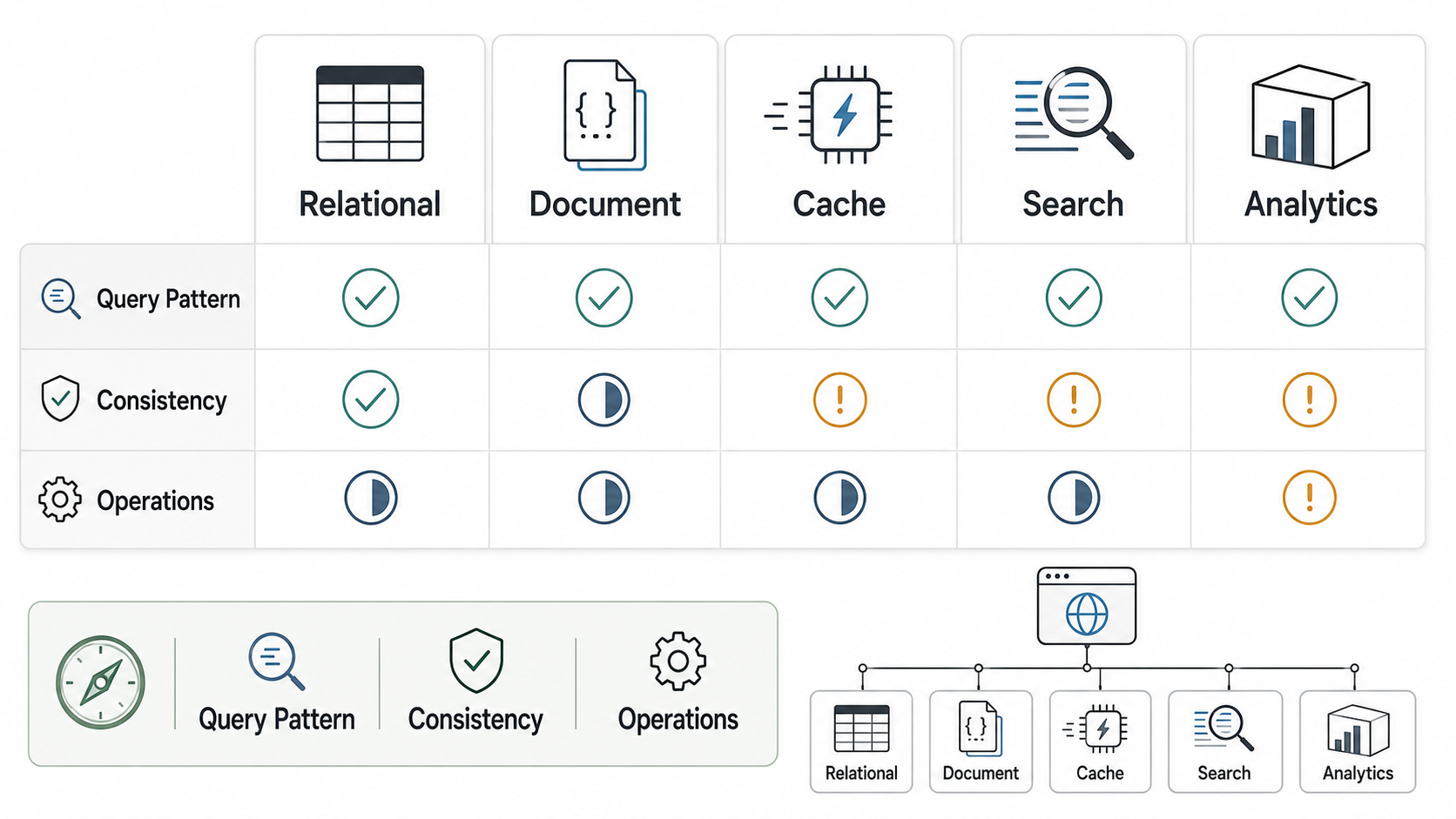
Database Types Compared For Web Apps
| Database Pattern | Best Fit | Watch Out For |
|---|---|---|
| Relational database | Users, orders, subscriptions, payments, bookings, workflows, approvals, inventory, finance, and data with clear relationships. | Overloading it with full-text search, huge analytics scans, or unplanned multi-tenant growth without indexes and partition strategy. |
| Document database | Flexible content, catalogs, event-like objects, configuration, drafts, and records that are usually retrieved as whole documents. | Reporting, joins, cross-document consistency, and schema drift if ownership is weak. |
| Cache or key-value store | Sessions, rate limits, expensive query results, temporary state, queues, leaderboards, and low-latency lookups. | Using cache as the only source of truth or failing to define expiry, invalidation, and fallback behavior. |
| Search index | Full-text search, faceted filters, fuzzy matching, relevance ranking, and discovery experiences. | Index lag, reindexing, inconsistent results, and treating search as the authoritative database. |
| Analytics store | Dashboards, aggregates, cohort analysis, event analysis, operational BI, and historical reporting. | Feeding it poorly modeled events or running heavy reports on the transactional database until app performance suffers. |
A web app can use several of these patterns, but every extra data store needs a reason. You need to know which system owns each record, how data moves, what happens when sync fails, how recovery works, and which reports are allowed to use eventually consistent data.
Why Relational First Is Often The Safest Default
For many product teams, a relational database is the best starting point. It supports structured data, unique constraints, foreign keys, transactions, joins, migrations, reporting, and a large talent pool. If your app has users, organizations, roles, subscriptions, invoices, approvals, comments, orders, inventory, or bookings, those records usually have relationships that a relational model can represent clearly.
Relational-first does not mean old-fashioned. Modern managed relational databases can support web apps with automated backups, replicas, monitoring, encryption, point-in-time recovery, and scaling options. PostgreSQL and MySQL ecosystems also work well with ORMs, migration tools, analytics pipelines, and cloud hosting platforms.
The risk is not choosing relational. The risk is ignoring design discipline. You still need indexes for common filters, data types that match reality, constraints for business rules, migration review, backup testing, and query monitoring. A relational database can become slow if every dashboard query scans production tables or every API endpoint fetches too much data.
When A Document Database Makes Sense
A document database can be useful when records are naturally document-shaped and often read as complete objects. Examples include configurable forms, content blocks, product catalogs with variable attributes, user preferences, draft documents, flexible metadata, or event payloads. The model can evolve without a rigid table migration for every field.
That flexibility is not free. If the product later needs complex relationships, strict transactional updates across many records, or detailed reporting, the team may have to denormalize heavily or build extra data pipelines. Document databases can work very well, but the team needs conventions for schema versions, validation, indexes, and ownership of nested fields.
Use document storage because the data shape and query pattern fit, not because the product requirements are unclear. If the app is unclear, discovery and prototyping should happen before the database becomes the product strategy.
When To Add Cache, Search, And Analytics
Specialized stores usually become valuable after the product has enough traffic, search needs, or reporting pressure to justify the operational overhead.
Add a cache when repeated reads are expensive, latency matters, or session/rate-limit state needs fast lookup. Define expiry, invalidation, fallback, and monitoring from the beginning. A cache miss should be a recoverable event, not a production outage.
Add a search index when users need relevance ranking, full-text search, typo tolerance, faceted filters, or fast discovery across records. Keep the primary database as the source of truth and treat the search index as a projection that can be rebuilt. Plan for index lag and reindexing.
Add an analytics store when dashboards and historical reporting start competing with user-facing transactions. This is often the right time to review events, data definitions, and ownership. NextPage's cloud performance optimization services help teams identify whether slow screens come from query design, database load, infrastructure sizing, caching gaps, or reporting pressure.
SaaS And Multi-Tenant Database Decisions
SaaS products add another layer: tenant isolation. A simple B2B SaaS app may use one database with tenant IDs on every table. A higher-compliance product may require separate schemas or databases for large customers. Enterprise customers may ask for region-specific data residency, export controls, audit logs, retention rules, and stronger backup guarantees.
The best tenant model depends on customer size, compliance expectations, reporting, support workflows, and cost. Shared tables are simpler and cheaper early, but they require strict authorization checks and careful indexing. Separate databases increase isolation but add operational complexity, migrations, monitoring, and cost. Separate schemas sit between those patterns.
If tenant architecture is part of the product strategy, make it an explicit design decision. NextPage's SaaS development work covers tenant architecture, roles, admin panels, subscriptions, integrations, analytics, deployment, monitoring, and scaling planning so the database model supports the business model.
Operational Criteria Product Teams Should Not Ignore
Database selection is not finished when the schema looks right. Product teams also need to know how the database will be operated.
- Backups and restore testing: Know the backup frequency, retention period, restore process, and recovery time objective.
- Migrations: Plan schema changes, rollback strategy, migration windows, and data backfills.
- Monitoring: Track slow queries, locks, replication lag, storage growth, CPU, memory, connection pools, and error rates.
- Security: Use least-privilege access, encryption, secret rotation, network controls, audit logs, and environment separation.
- Compliance: Define retention, deletion, export, data residency, and access-review rules for sensitive products.
- Cost: Include storage, replicas, backups, data transfer, managed-service tiers, support, and engineering time.
If a database choice looks cheap but requires constant firefighting, manual reporting, or risky migrations, it is not cheap. If a managed service is more expensive but gives reliable backups, monitoring, scaling, and support, it may reduce total delivery risk. Use the Custom Software Cost Estimator to frame budget, then refine the architecture with real workload assumptions.
Database Migration Risks To Discuss Early
Database choices become expensive to change after the product has real users. Migration is not only moving rows from one system to another, and larger platform moves often need an application replatforming plan before the database cutover. It includes data mapping, downtime planning, dual writes, validation, reconciliation, rollback, application code changes, reporting updates, and support training.
Discuss migration risk before launch if any of these are likely: rapid tenant growth, changing reporting needs, future marketplace features, AI/search roadmap, regional compliance, enterprise customer isolation, or legacy system integration. When the move includes infrastructure, data, and application hosting changes, treat it as a cloud migration services workstream rather than a simple export/import task. A small upfront design decision can prevent a painful rewrite later.
If performance is already a problem, do not assume the answer is a new database. First inspect query plans, indexes, network latency, cache behavior, connection pools, ORM usage, background jobs, and dashboard load. The cloud performance audit checklist is a useful starting point before committing to a database migration.
How NextPage Helps With Database Architecture Decisions
NextPage helps product teams turn database selection into a practical architecture plan. We map user workflows, source-of-truth records, query patterns, tenant boundaries, integrations, reports, security controls, backups, migration risk, and scaling assumptions. Then we recommend the smallest reliable architecture that can support the first release and grow safely.
For a new web app, that may mean a managed relational database, object storage, and clear backup rules. For a SaaS product, it may include tenant isolation, event tracking, search, and reporting pipelines. For a modernization project, it may mean stabilizing the current database before introducing new stores. Start with a web app architecture review, or use the cost estimator to frame the first build range.