
Quick Answer: How To Develop A Doctor Appointment Booking App
To develop a doctor appointment booking app, start by defining the healthcare workflow, user roles, appointment rules, compliance needs, integrations, and operating model before design or coding begins. A useful product usually needs patient search, doctor profiles, real-time availability, booking confirmation, reminders, cancellations, admin controls, payments or billing rules, analytics, and secure handling of health-related data.
The strongest projects treat the app as a healthcare operations platform, not only a calendar interface. Patients need a simple way to find care, providers need reliable schedule control, and administrators need visibility into no-shows, cancellations, support issues, and provider utilization. If the product must work on iOS and Android, plan the build with proven mobile app development practices instead of treating each platform as a separate experiment.
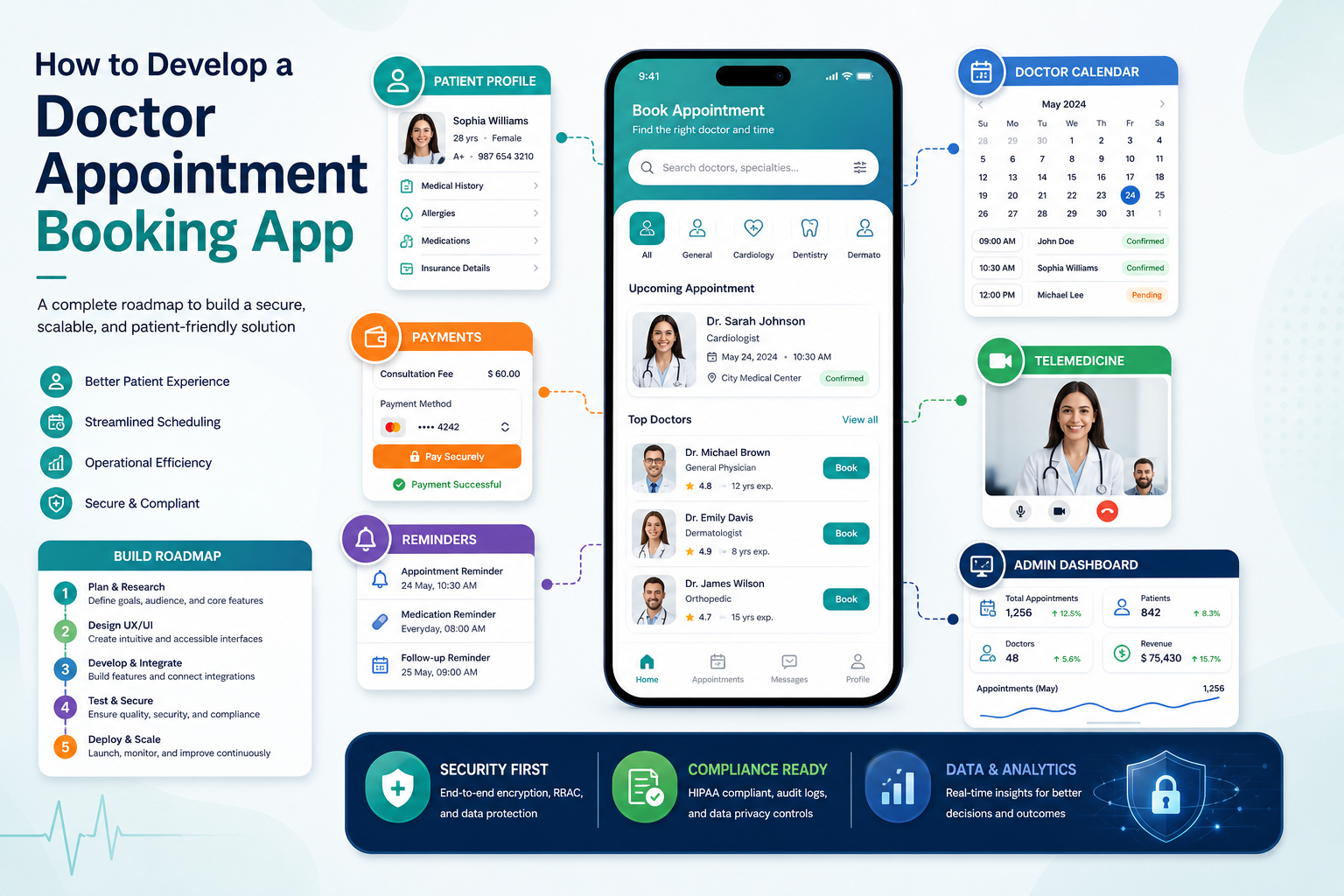
Define The Product Model Before Features
Before listing screens, decide what kind of appointment product you are building. A clinic-owned booking app is different from a multi-provider marketplace, a hospital network app, a specialty care platform, or a telemedicine-first product. Each model changes onboarding, search, provider verification, schedule ownership, billing, support, and compliance depth.
At minimum, map three roles: patients, healthcare providers, and administrators. Patients search, compare, book, reschedule, pay, receive reminders, and prepare for visits. Providers manage availability, appointment types, visit notes, cancellations, and patient communication. Administrators manage providers, profiles, slots, support tickets, reports, refunds, and policy settings.
Start With A Clean Booking Workflow
The booking workflow is the product's core. A patient should be able to move from intent to confirmed appointment without unnecessary calls or confusing choices. A practical flow includes specialty or symptom search, location or teleconsultation preference, doctor profile review, slot selection, patient details, confirmation, reminder setup, and easy rescheduling.
For deeper planning around slot rules and no-show reduction, connect this build with the guide on scheduling and reminders in doctor appointment booking apps. That workflow affects the database model, notification service, provider calendar controls, support tooling, and analytics.
Choose MVP Features That Prove Real Usage
A lean MVP should prove that patients can find the right provider, book a real slot, receive confirmation, and complete the appointment. Avoid launching with too many advanced modules before the core journey is stable. Start with account setup, provider search, profile pages, availability, booking, reminders, cancellation rules, admin scheduling, and basic reporting.
The feature list should still leave room for growth. Telemedicine, payments, prescriptions, document uploads, insurance workflows, EHR or EMR integrations, waitlists, ratings, and care-plan reminders can be staged after the product has reliable usage data. For a feature-level breakdown, use the companion article on key features for doctor appointment booking apps.
Plan The Development Workflow
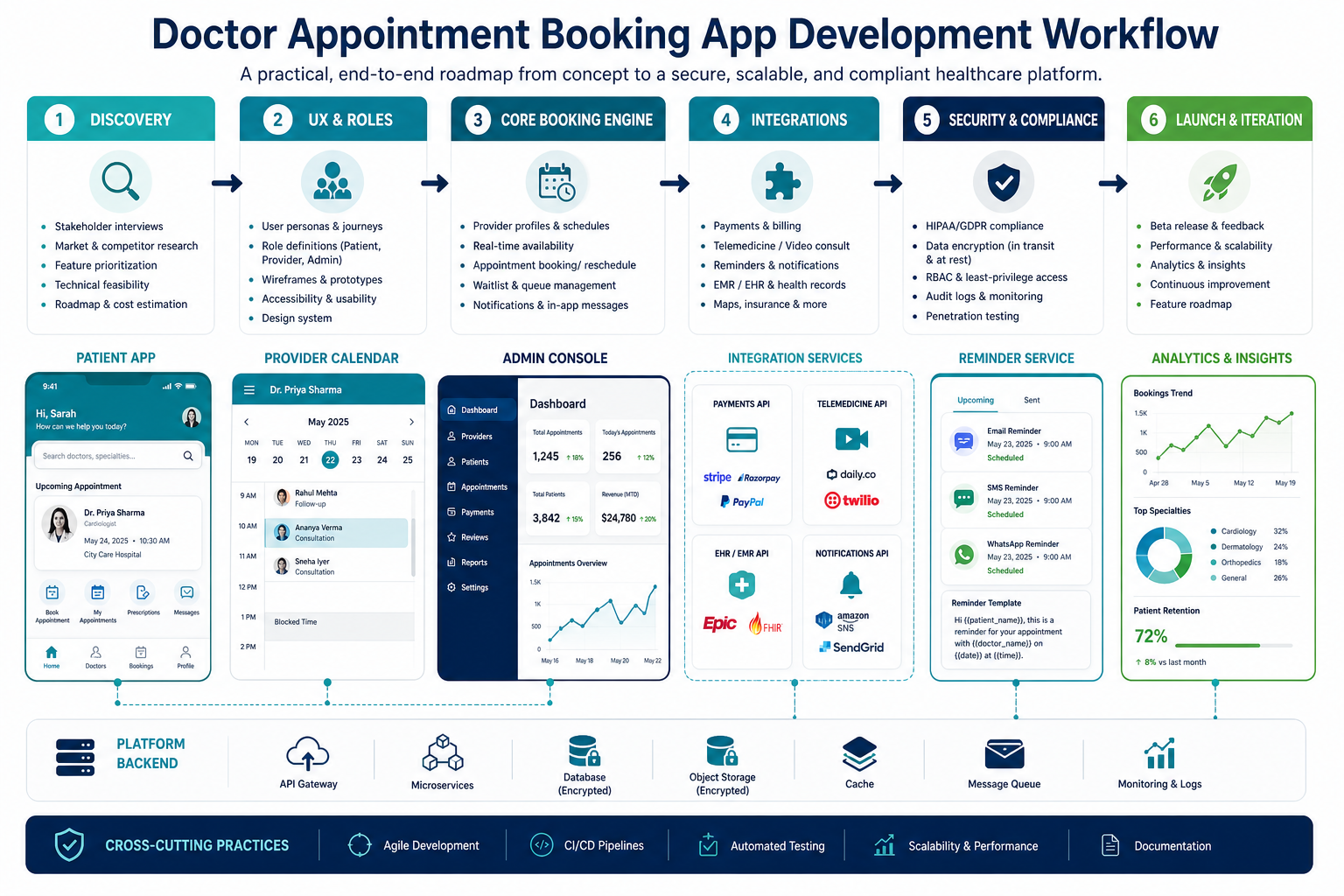
A practical development workflow starts with discovery and product scoping. Interview patients, clinic staff, doctors, administrators, and support teams. Document booking rules, appointment types, cancellation policies, payment expectations, medical data sensitivity, support escalation, and regulatory requirements. This stage prevents expensive rework after the app is already designed.
Next, design the UX and data model together. Patient screens, provider calendars, and admin panels all depend on the same booking objects. The backend should define appointments, availability blocks, provider locations, services, patient records, reminders, payments, cancellations, and audit logs clearly before engineering scales.
Design For Patients, Providers, And Admins
Patients need fast search, clear doctor profiles, transparent fees, appointment type labels, accessible forms, reminders, and trust signals. Providers need simple schedule management, appointment context, cancellation controls, and low-friction communication. Admin teams need provider onboarding, profile moderation, booking oversight, support views, refund handling, reporting, and role-based permissions.
Do not let one role dominate the design. A patient-friendly app with weak admin tools will create manual work behind the scenes. A provider-heavy product with a confusing patient flow will struggle with adoption. The best design choices reduce friction for all three groups.
Build Security And Compliance Into The Architecture
Doctor appointment apps often handle sensitive personal and health-related information. Security and compliance should influence authentication, role-based access, consent capture, audit trails, encryption, logging, data retention, vendor choices, backup practices, and support workflows. Treat privacy as an architecture requirement, not a legal page added at launch.
Compliance needs vary by geography and operating model. HIPAA, GDPR, local healthcare privacy rules, and internal clinic policies may affect how data is stored, processed, accessed, and deleted. For budgeting and architecture detail, compare your scope against healthcare app development cost drivers.
Decide Which Integrations Are Essential
Common integrations include SMS, email, push notifications, payment gateways, maps, telemedicine video, calendar sync, EHR or EMR systems, CRM tools, analytics, and customer support software. Each integration adds value, but it also adds failure modes, compliance questions, testing effort, and long-term maintenance.
Start with the integrations required to complete the real appointment journey. For many MVPs, reminders, payments, analytics, and support tooling are more urgent than deep clinical system integration. For hospitals or enterprise clinics, EHR connectivity and identity controls may be essential from day one.
Estimate Cost By Scope, Not By Screens
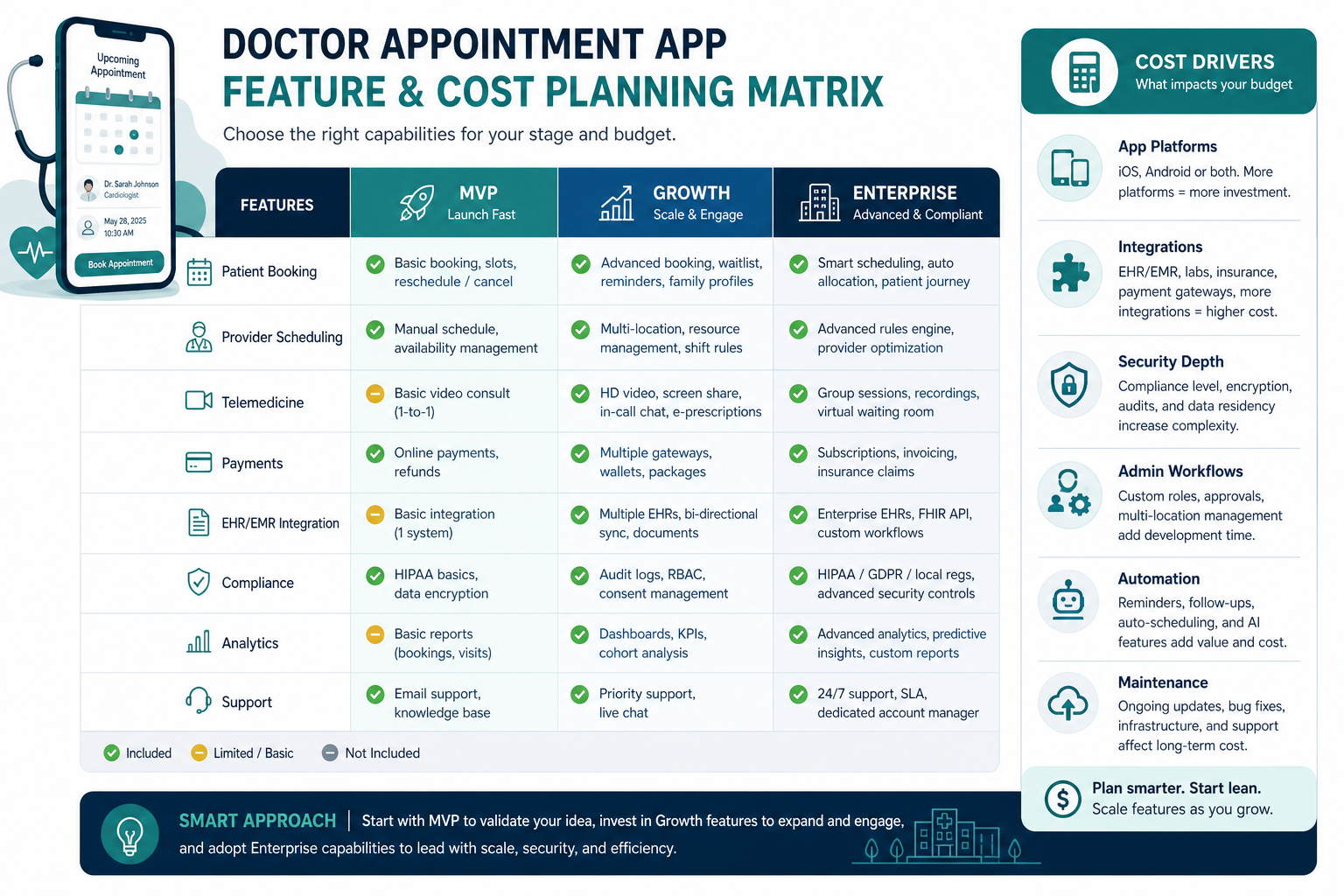
The cost to develop a doctor appointment booking app depends on product model, number of platforms, role complexity, booking logic, integrations, compliance depth, admin workflow, analytics, and maintenance expectations. A simple clinic MVP is very different from a multi-location healthcare marketplace with provider onboarding, payments, telemedicine, insurance, and enterprise reporting.
Use cost ranges only as planning tools. A realistic estimate should separate discovery, UX, backend, mobile apps, admin console, integrations, QA, security review, deployment, analytics, and maintenance. When scope is still uncertain, the Custom Software Cost Estimator can help compare MVP, growth, and enterprise assumptions before committing to a build.
Test With Real Healthcare Edge Cases
Testing should cover more than happy-path booking. Include double-booking prevention, time zone handling, doctor cancellations, late patient cancellations, refund cases, reminder failures, missing patient details, unavailable providers, telemedicine link failures, payment disputes, permission boundaries, and admin override actions.
Healthcare users lose trust quickly when appointments fail. QA should include device testing, accessibility checks, notification delivery checks, security testing, load testing for peak booking periods, and role-based permission reviews. The team should also test support playbooks so staff know what to do when an appointment changes or fails.
Launch With Operational Metrics
A launch is successful only if the app improves healthcare access and operational reliability. Track search-to-booking conversion, appointment completion, cancellation rate, no-show rate, provider utilization, support volume, reminder performance, payment success, patient satisfaction, profile completeness, and repeat booking.
These metrics tell the team where to invest next. Low conversion may mean weak search, poor profiles, too few providers, or confusing fees. High no-show rates may point to reminder timing, cancellation policy, or appointment confirmation issues. Strong operational metrics make the product easier to scale into more locations and specialties.
Prepare For Future Scale
If the app may expand across cities, countries, specialties, or provider networks, design configuration carefully. Languages, currencies, appointment types, cancellation policies, provider fields, support scripts, consent text, and payment methods should be configurable where possible. Hard-coded market assumptions make future rollout expensive.
For international expansion, review the guide to scaling a doctor appointment app globally. Global rollout introduces localization, data residency, payment, support, and provider onboarding complexity that should influence the original platform design.
Common Mistakes To Avoid
The most common mistake is building a polished patient app while ignoring provider and admin operations. Another is adding advanced features before the core booking workflow is reliable. Teams also underestimate compliance, calendar complexity, reminder logic, provider onboarding, support processes, and maintenance cost.
Doctor appointment booking apps matter because they remove friction from healthcare access. But that value only appears when the product reliably connects patient intent with real provider availability. For the strategic context, read why doctor appointment booking apps matter before finalizing the roadmap.
Final Recommendation
Build the doctor appointment booking app around the operational workflow first: patient search, provider availability, appointment confirmation, reminders, admin visibility, and secure data handling. Then layer in telemedicine, payments, prescriptions, EHR integrations, analytics, and multi-location support based on real usage and business priorities.
A strong development plan is practical and staged. Start with the smallest reliable healthcare workflow, test it with real users and staff, measure appointment outcomes, and expand only after the platform can support patients, providers, administrators, and compliance needs without manual workarounds.