
Building an eLearning app like Byju's is no longer just about copying video lessons, quizzes, and a freemium subscription. The stronger opportunity in 2026 is to study what made large education platforms attractive, then design a more focused product with clear learning outcomes, controlled scope, reliable content operations, and sustainable unit economics.
Byju's remains a useful reference because it showed how mobile learning, structured courses, parent involvement, adaptive practice, and paid subscriptions can scale. It is also a cautionary example. Public reporting in 2026 continues to describe insolvency and creditor disputes around Think & Learn, Byju's parent company, so founders should avoid treating the brand as a simple success template. Use the model for product lessons, not for unchecked expansion.
This guide explains how to develop a Byju's-like eLearning app with the right audience, feature architecture, monetization model, cost drivers, AI and AR decisions, and launch roadmap. If you already know the product category but need implementation help, NextPage's mobile app development team can translate that scope into app UX, backend architecture, integrations, and release planning.
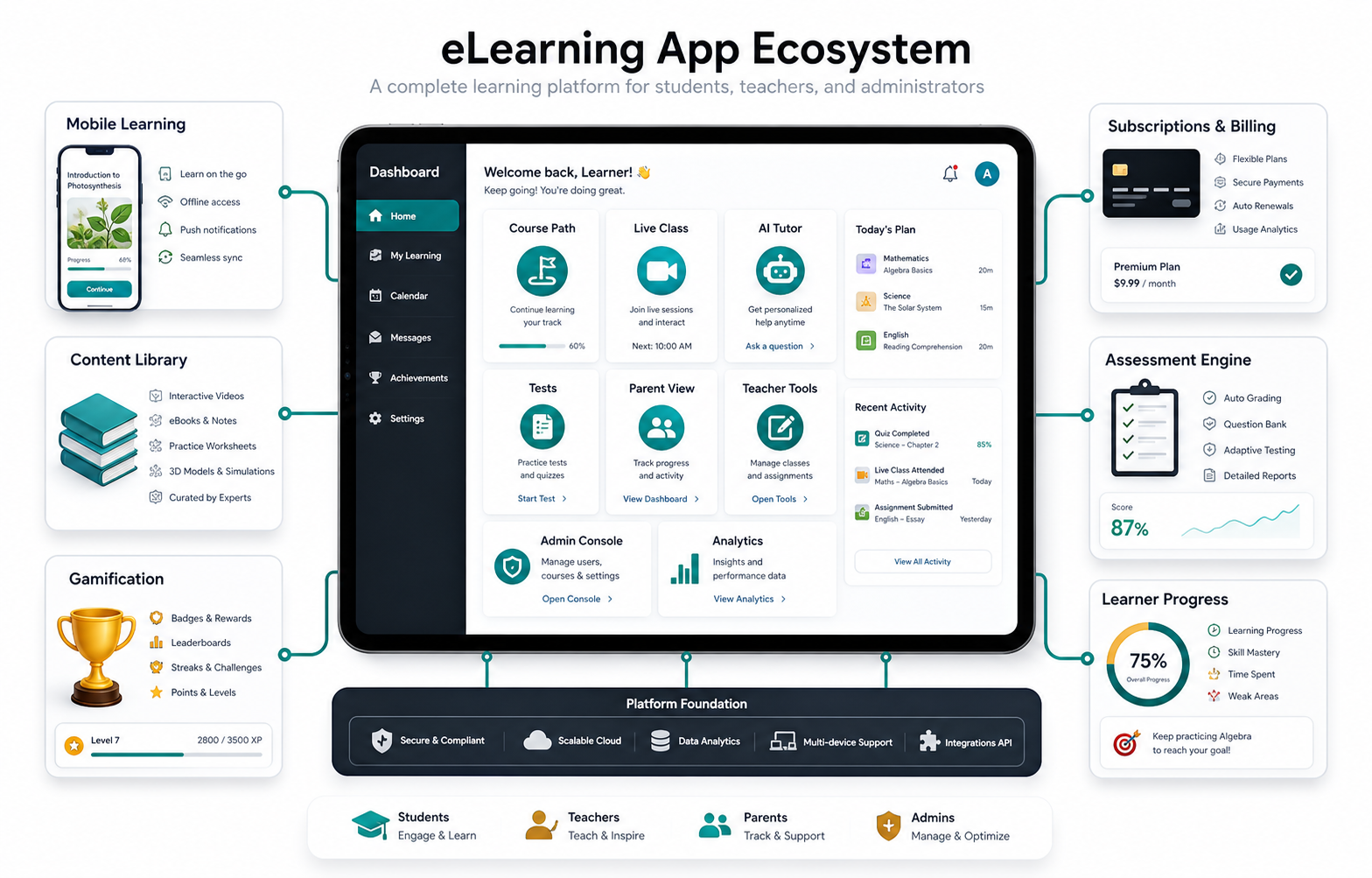
Quick Answer: How Do You Build An eLearning App Like Byju's?
To build an eLearning app like Byju's, start with one learner segment and one learning outcome, then design the core loop: onboarding, course discovery, lesson consumption, practice, assessment, progress feedback, and renewal. Add the right role-based portals for students, teachers, parents, and admins. Only then layer advanced features such as AI tutoring, AR simulations, gamification, live classes, and marketplace-style commerce.
The safest build path is a focused MVP, not a full clone. A practical MVP usually includes student registration, course catalog, video or interactive lessons, quizzes, progress tracking, payments or subscriptions, notifications, an admin CMS, and basic teacher or support workflows. Use the Custom Software Cost Estimator to sanity-check budget and timeline before expanding into advanced AI or AR scope.
What The Byju's Model Teaches Founders
Byju's became a reference point because it made learning feel mobile, visual, structured, and aspirational for students and parents. Its model combined free trials, paid courses, test preparation, rich content, mentor support, and brand-led trust. Those pieces are still relevant, but they need a more disciplined product strategy today.
The key lesson is not "build everything." It is "build a learning system that proves progress." A new eLearning product should measure whether learners understand lessons, return to practice, complete assessments, and get support before they churn. That is why product discovery matters. A small discovery phase can define audience, content model, roles, compliance needs, and monetization before engineering begins.
Choose The Right eLearning Business Model
Most Byju's-like products use one or more monetization models. The right model depends on the audience and the cost of serving each learner.
| Model | Best Fit | What To Validate |
|---|---|---|
| Freemium trial | Consumer learning and test prep | Trial-to-paid conversion, support load, and content depth |
| Subscription | Ongoing courses, language learning, skill practice | Retention, weekly active use, and renewal triggers |
| Course purchase | Exam modules, certification prep, professional training | Course completion, assessment outcomes, and upsell path |
| Institution license | Schools, coaching institutes, and enterprise training | Admin reporting, cohorts, integrations, and onboarding effort |
| Hybrid marketplace | Teacher-led courses or tutoring networks | Quality control, payouts, scheduling, and dispute handling |
Do not pick monetization only because a competitor used it. A freemium model can bring signups but also raise infrastructure, content, and support costs. A paid course model may grow slower but produce cleaner learning and revenue signals.
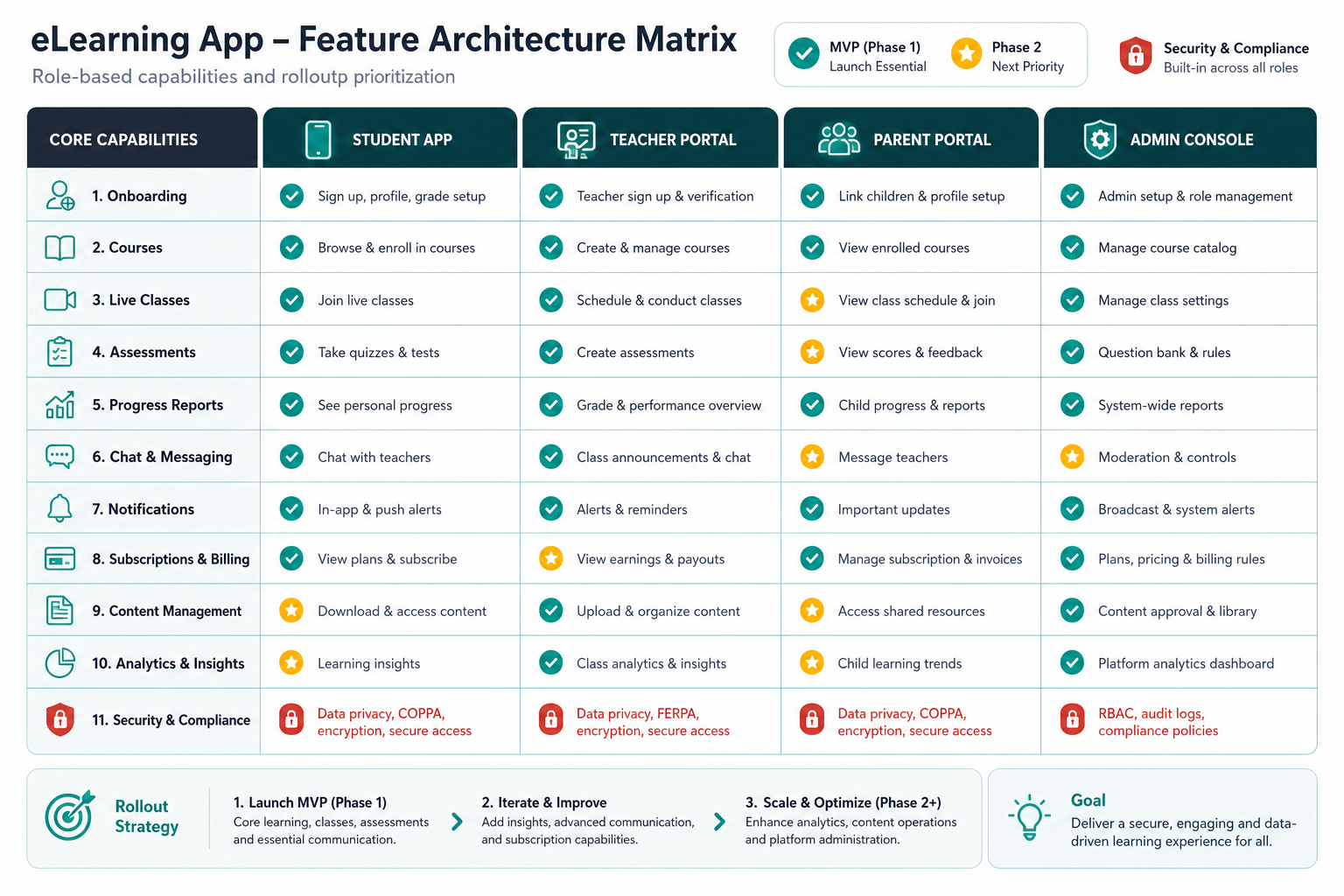
Plan Student, Teacher, Parent, And Admin Panels
A Byju's-like app usually needs multiple product surfaces. Each surface should exist because it supports the learning journey, not because a feature checklist says so.
Student App Features
The student app is the main learning surface. It should include registration, onboarding, course discovery, lesson playback, notes, quizzes, assignments, progress dashboard, downloads or offline mode, certificates, chat or doubt support, and purchase history. The experience should make the next action obvious after every lesson.
Teacher Portal Features
The teacher portal helps instructors manage live classes, lesson plans, assignments, doubt resolution, attendance, student reports, and feedback. If teachers create content, the portal also needs review workflows, versioning, moderation, and asset management.
Parent Portal Features
A parent portal matters for K-12 products because the buyer and learner are often different people. Parents need student progress, purchases, class schedules, reminders, invoices, reports, and a simple way to contact support or teachers. Keep the portal clear; too much dashboard noise can reduce trust.
Admin Console Features
The admin console controls courses, content, batches, teachers, students, payments, coupons, notifications, tests, support tickets, analytics, and compliance settings. This is where many eLearning builds become expensive, so define which admin workflows are required for launch and which can wait.
Advanced Features Worth Considering
Advanced features can make an eLearning app stronger, but each one adds product, data, and operational complexity.
- AI tutoring: useful for explanations, practice questions, recommendations, and learner gap analysis when content sources and guardrails are clear.
- Adaptive learning paths: adjust lessons and tests based on performance rather than showing every learner the same sequence.
- Gamification: use streaks, challenges, badges, and levels to reinforce practice, not to distract from mastery.
- AR or simulation learning: valuable for science, engineering, medicine, safety training, and spatial topics where interactive practice improves understanding.
- Live classes: add scheduling, attendance, recordings, chat moderation, and teacher workflows.
- Ecommerce integration: supports course bundles, books, study material, and upsells, but needs inventory, tax, payment, and support planning.
For AI tutor scope, pair product planning with the related guide on education app development cost, because AI changes architecture, QA, moderation, and privacy requirements. If the app needs broader custom workflows, compare the plan with custom software development instead of forcing everything into a generic learning template.
What Drives The Cost Of An eLearning App?
The cost to develop an eLearning app like Byju's depends on the learning model, user roles, content depth, platforms, integrations, and support needs. A basic content-and-quiz MVP is very different from a multi-role platform with live classes, AI tutor, AR simulations, payments, cohort analytics, and institution dashboards.
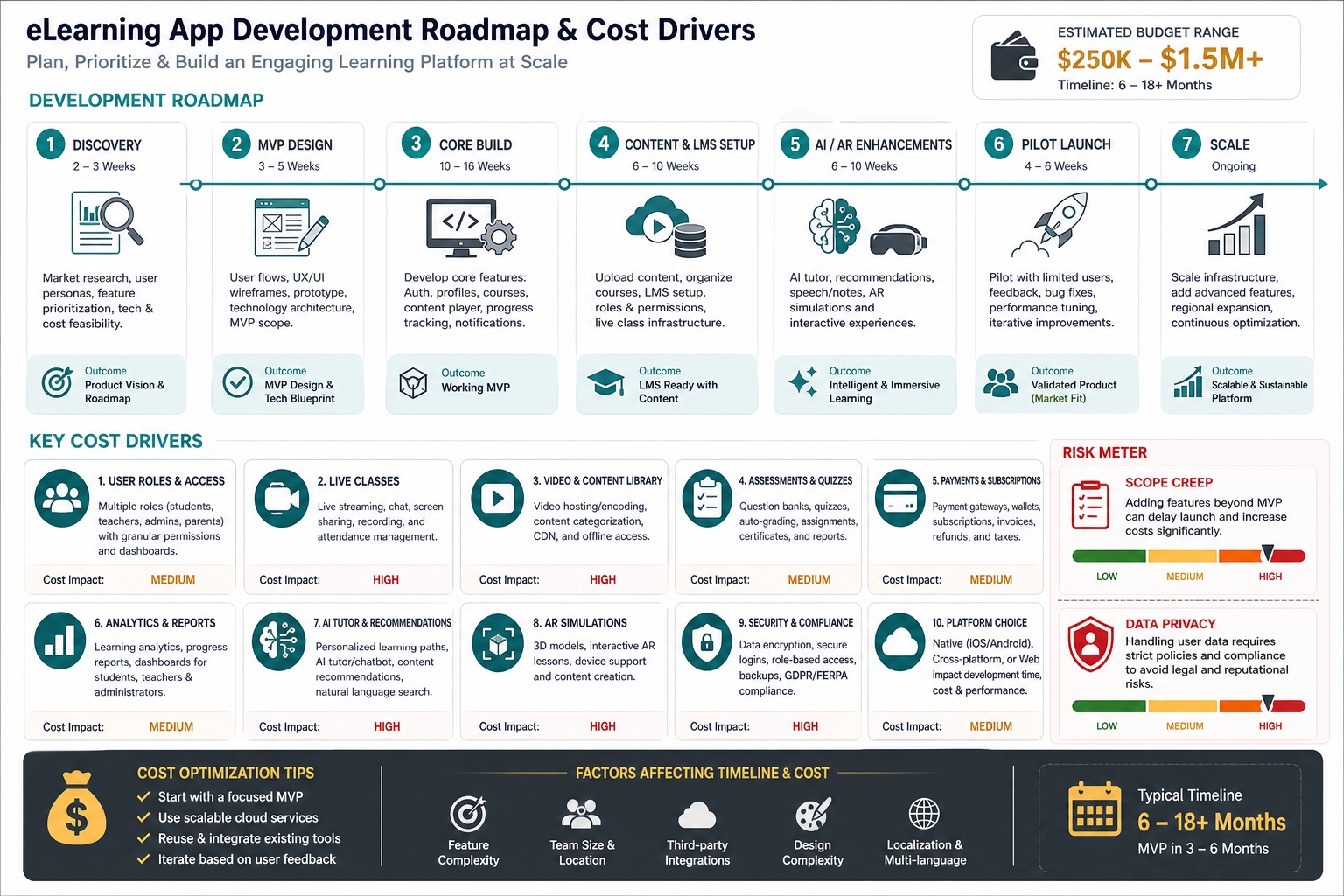
- Platform choice: Android, iOS, web, tablets, and offline access all change build and QA effort.
- Content operations: video hosting, interactive lessons, transcripts, localization, and content approval workflows require planning.
- User roles: student, parent, teacher, admin, institution, and support roles create permission and workflow complexity.
- Payments: subscriptions, trials, coupons, invoices, refunds, and app-store billing affect architecture and support.
- Analytics: progress reports, cohort dashboards, assessment scoring, and learning insights require clean data design.
- Security and privacy: child data, student records, payment information, and chat data need access controls and retention rules.
A Practical Development Roadmap
Use a phased roadmap so the product can learn from real users before the expensive feature set hardens.
- Discovery: define audience, curriculum, learning outcomes, monetization, roles, risks, and launch metrics.
- MVP design: map the learner journey, core screens, admin workflows, analytics events, and content model.
- Core build: develop authentication, course catalog, lesson player, quizzes, progress, payments, notifications, and admin CMS.
- Content setup: prepare videos, quizzes, transcripts, metadata, categories, and quality review processes.
- Pilot launch: release to a narrow cohort, measure learning progress, support tickets, conversion, and retention.
- Scale phase: add AI tutoring, AR modules, teacher tools, institution dashboards, and integrations only where the data supports them.
For teams comparing MVP options, the MVP Scope Builder can help separate launch-critical workflows from phase-two ideas.
Mistakes To Avoid When Building A Byju's-Like App
The most common mistake is building a full competitor clone before validating one clear learning use case. Other risks include weak content quality, too many user roles at launch, poor onboarding, heavy video costs, untested subscriptions, confusing parent dashboards, missing analytics, and AI features without guardrails.
Another mistake is treating "edtech" as one market. A test-prep app, corporate LMS, language learning product, tutoring marketplace, and school communication platform have different buyer behavior, content operations, and success metrics. The product plan should reflect the specific category.
Final Recommendation
Build an eLearning app like Byju's only after defining what you will do differently and more sustainably. Start with a focused learner segment, a measurable learning promise, and a controlled MVP. Use role-based panels, subscription or course monetization, analytics, and support features only where they improve learning and retention.
Once the core loop works, expand into AI tutoring, AR learning, live classes, commerce, and institution dashboards. That sequence gives you a better chance of building a durable education product instead of an expensive feature clone.