
Quick Answer: .NET MAUI App Development Cost And Timeline
.NET MAUI app development cost depends less on the framework name and more on the release you are trying to ship. A narrow prototype can be planned in weeks. A lean .NET MAUI MVP with shared C# screens, authentication, a simple backend, and one or two integrations often needs 10 to 16 weeks. A production app with iOS, Android, Windows, macOS, admin tooling, analytics, offline behavior, payments, enterprise identity, device APIs, QA, launch, and maintenance can take 4 to 8 months or more.
Use public cost ranges as market context, not as a quote. A useful estimate should separate discovery, UX, shared .NET MAUI frontend, native platform work, backend APIs, integrations, admin tools, QA, release operations, and support. If you need a first-pass planning number, start with NextPage's Custom Software Cost Estimator, then refine the result around .NET MAUI-specific risks.
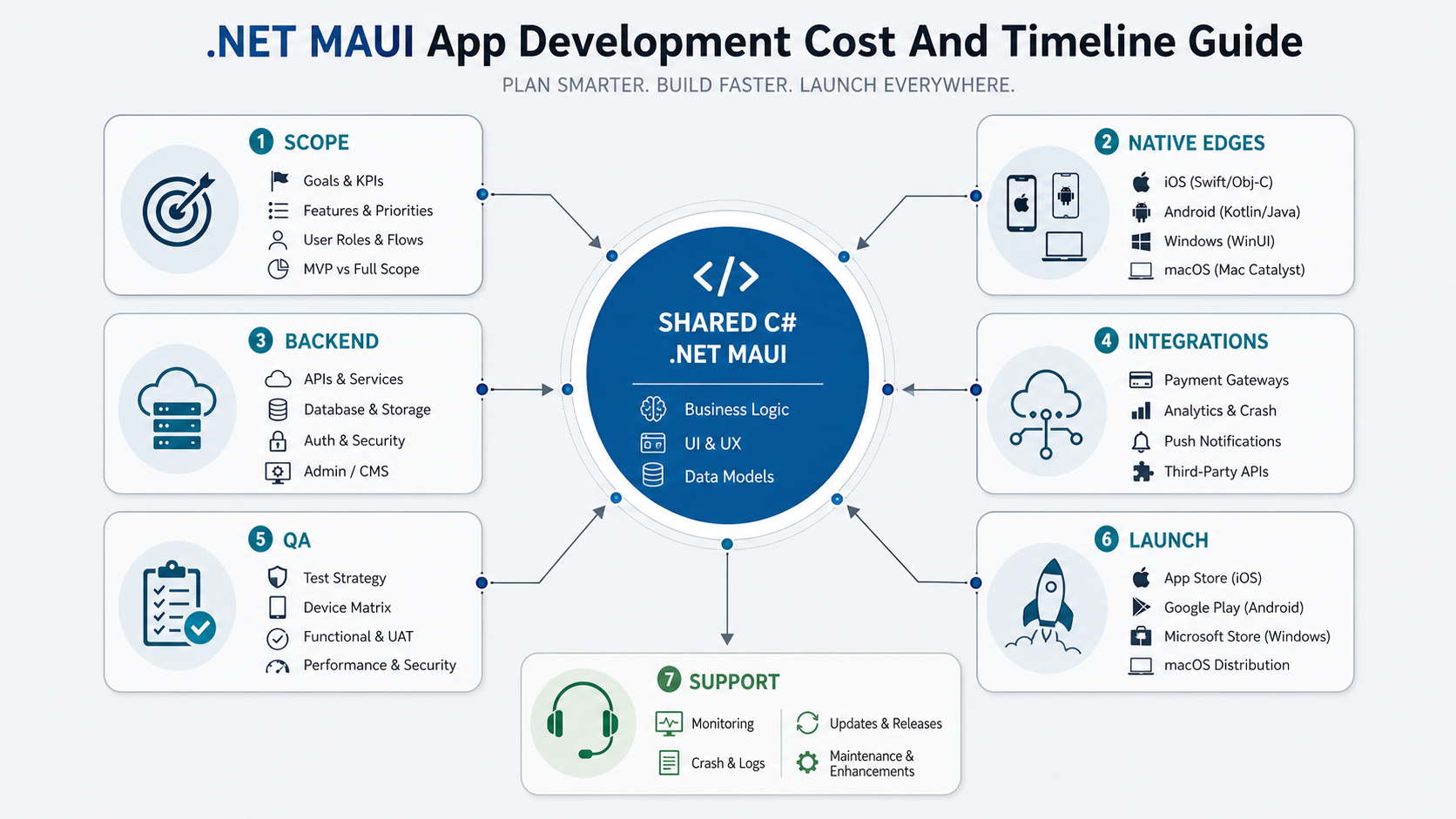
When .NET MAUI Fits The Budget
.NET MAUI is strongest when the product can benefit from a shared C# codebase, Microsoft ecosystem alignment, and native mobile or desktop targets. It can be a good fit for internal operations apps, B2B workflow tools, field-service apps, desktop-plus-mobile products, Microsoft 365 or Azure-connected systems, and teams that already have .NET engineering capability.
Microsoft's current documentation positions .NET MAUI for Android, iOS, macOS through Mac Catalyst, and Windows through WinUI. That breadth is useful, but it does not remove platform decisions. A mobile-only app, a desktop-heavy app, and a MAUI Blazor hybrid app have different testing, UX, packaging, and release needs. NextPage's .NET MAUI App Development Services page explains how platform-fit planning compares MAUI with Flutter, React Native, native apps, desktop apps, and mobile-first web.
The cost advantage is real only when enough product logic, UI structure, validation, state, and API contracts can be shared. If the app depends heavily on platform-specific camera behavior, Bluetooth, background work, advanced gestures, custom native modules, or very different desktop and mobile workflows, the estimate should include native edge work instead of assuming one codebase solves everything.
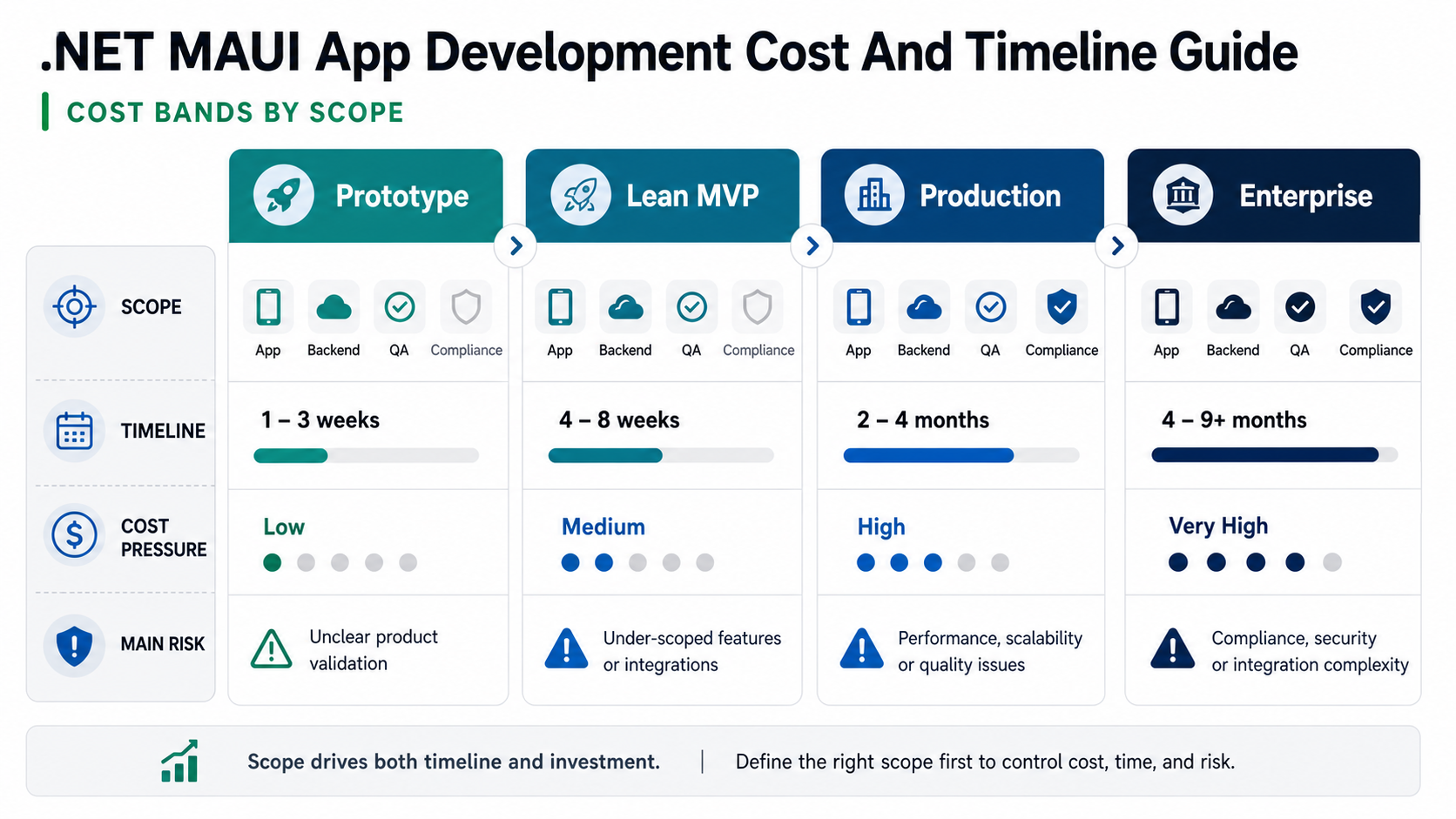
.NET MAUI Cost Bands By Scope
The table below is a planning model, not a fixed quote. Geography, team model, design maturity, API readiness, security expectations, stakeholder speed, and testing depth can move the number materially.
| Release Scope | Typical .NET MAUI Build | Budget Signal | Timeline Signal |
|---|---|---|---|
| Prototype | Clickable flow, technical proof, sample data, limited platform testing | Lowest spend; useful before committing to engineering | 2-6 weeks |
| Lean MVP | Shared C# app, core workflow, auth, simple backend, one or two integrations, mobile QA | Lower to mid range when version one is tightly scoped | 10-16 weeks |
| Production App | Custom UX, backend APIs, admin tools, analytics, notifications, app-store launch, monitoring | Mid to high range because launch quality and operations matter | 4-8 months |
| Enterprise Or Regulated App | SSO, audit logs, offline sync, compliance evidence, desktop support, device policies, support SLAs | Highest because architecture, security, QA, and governance are deeper | 8-12+ months |
What Drives .NET MAUI App Cost?
| Cost Driver | Lower-Cost Version | Higher-Cost Version |
|---|---|---|
| Platform Targets | iOS and Android with similar workflows | iOS, Android, Windows, macOS, tablet layouts, and platform-specific UX |
| Backend | Simple CRUD APIs and a few tables | Complex domain model, reporting, events, imports, backups, and admin controls |
| Integrations | One payment, map, chat, analytics, or identity provider | ERP, CRM, SSO, IoT, legacy APIs, webhooks, sync jobs, and vendor approvals |
| Device Behavior | Forms, lists, content, notifications | Offline sync, camera, Bluetooth, location, media, background tasks, and native modules |
| Security | Standard auth, HTTPS, basic privacy controls | MFA, SSO, audit logs, tenant isolation, encryption, threat modeling, compliance evidence |
| QA And Release | Small device matrix and manual regression | Cross-platform regression, accessibility, performance, app-store evidence, monitoring |
Integration readiness is a common budget trap. Payment gateways, maps, Microsoft identity, CRM, ERP, analytics, support chat, and vendor APIs can require sandbox data, security review, webhook handling, retry logic, and support escalation. If integrations are central to the product, use the Mobile App Integrations Checklist before treating them as a small line item.
.NET MAUI Vs Flutter, React Native, Native Apps, And PWA
.NET MAUI should not be chosen only because it is cross-platform. It should be chosen because the product, team, and roadmap benefit from C#, .NET libraries, Microsoft tooling, and shared app logic. If your team already runs a .NET backend, uses Azure, depends on Microsoft identity, or wants mobile plus Windows desktop support, MAUI may reduce coordination cost.
React Native can be stronger when the team is JavaScript/TypeScript-heavy or when the product needs a large ecosystem of mobile packages. NextPage's React Native App Development Services page is useful for comparing shared iOS and Android products with native boundaries. Flutter can be a good fit when consistent custom UI across platforms is the main product advantage. Native Swift and Kotlin are safer when platform quality, deep device APIs, app-store conventions, or performance are the deciding factors.
A PWA or mobile-first web app may be enough when installability, push, offline, and device APIs are not central to the business case. The Native Vs Cross Platform Mobile App Development guide can help when the cost question is really a platform-strategy question.
Timeline By Workstream
A .NET MAUI timeline is usually constrained by decisions and dependencies, not only coding speed. Discovery and UX can run quickly when scope is clear. Backend and integrations slow down when API owners, data models, roles, and edge cases are unresolved. QA expands when the product targets multiple operating systems, device classes, and release channels.
| Workstream | What Happens | Schedule Risk |
|---|---|---|
| Discovery | Workflow mapping, platform fit, MVP boundaries, acceptance criteria | Stakeholders cannot agree on release-one scope |
| UX And Architecture | Information architecture, design system, app shell, API contracts, offline decisions | Desktop and mobile workflows are treated as identical when they are not |
| Frontend Build | .NET MAUI screens, state, validation, platform-specific handlers, accessibility | Native edge cases appear late |
| Backend And Admin | APIs, database, roles, admin dashboards, reporting, integrations | Admin tooling is omitted from the estimate |
| QA And Launch | Device matrix, regression, stores, packaging, monitoring, support handoff | Release evidence is left until the final sprint |
For broader schedule planning, compare your scope against NextPage's Mobile App Development Timeline guide. It helps separate prototype, MVP, production, and complex-product timelines before framework-specific assumptions distort the estimate.
Support Policy And Upgrade Planning
.NET MAUI ships as part of the broader .NET platform, so the support window matters to the budget. Microsoft ties .NET MAUI support to the same lifecycle style as the .NET release it ships with. A production estimate should therefore name the target .NET version, planned SDK upgrade cadence, Visual Studio/Xcode/Android SDK dependencies, and the regression budget needed when platform tooling changes.
This is especially important for enterprise and regulated apps. The cheapest launch plan can become expensive if the app is hard to rebuild six months later. Include dependency review, store policy checks, crash monitoring, security updates, and platform test passes in the maintenance plan. If the app will replace Xamarin or older hybrid code, use NextPage's Xamarin To .NET MAUI Migration Services planning to separate lift-and-shift work from architecture cleanup.
.NET MAUI Estimate Readiness Scorecard
A .NET MAUI estimate is useful only when the assumptions are visible. Score each category as clear, partially clear, or unresolved before comparing vendors. Unresolved categories should become discovery work, not hidden fixed-price risk.
| Estimate Input | Ready Signal | Risk If Missing |
|---|---|---|
| Product Scope | Core workflow, roles, screens, acceptance criteria, and exclusions are named. | The team prices a feature list instead of a releasable app. |
| Platform Targets | iOS, Android, Windows, macOS, tablet, and minimum OS expectations are explicit. | Desktop/mobile differences and testing scope are underestimated. |
| Native Edge Work | Camera, GPS, Bluetooth, background work, notifications, offline sync, and handlers are known. | Shared-code assumptions break late in the build. |
| Backend And Admin | APIs, data model, identity, admin users, reports, and support actions are visible. | The app ships screens but lacks the operating system behind them. |
| Quality Gate | Device matrix, accessibility, performance, security, and regression scope are defined. | The app reaches launch without enough release evidence. |
| Maintenance Owner | SDK upgrades, store accounts, monitoring, support, and release cadence have owners. | Post-launch fixes become emergency effort. |
Example Estimates By Product Type
Two .NET MAUI projects with the same screen count can have very different budgets. A field inspection app may have fewer screens than a marketplace, but offline sync, photo capture, geotagging, and supervisor review can make it more expensive than a simple customer app. A desktop-plus-mobile operations tool may reuse domain logic well, but packaging, keyboard workflows, window layouts, and IT deployment can add work that a mobile-only quote would miss.
| Product Type | Why .NET MAUI May Fit | Estimate Watch-Outs |
|---|---|---|
| Internal Workflow App | Shared C# app connected to existing .NET APIs, Azure, or Microsoft identity | Role permissions, audit trail, admin changes, user training, support handoff |
| Field-Service Or Inspection App | Mobile and tablet workflow with offline data capture and controlled sync | Offline conflict handling, camera/media storage, GPS accuracy, device testing |
| B2B Customer Portal Companion | Mobile access to orders, approvals, documents, and notifications | ERP/CRM integration, identity, data freshness, push rules, admin support |
| Desktop-Plus-Mobile Operations App | Windows users and mobile users can share a C# product foundation | Different UX patterns, desktop packaging, keyboard/mouse flows, platform QA |
| Regulated Enterprise App | .NET ecosystem can support identity, logging, and controlled deployments | Compliance evidence, tenant boundaries, audit logs, security testing, change control |
What To Include In A .NET MAUI Estimate
A useful .NET MAUI estimate should separate discovery, UX, shared C# frontend, native platform edges, backend, integrations, admin tooling, QA, launch, and maintenance. It should also show assumptions: target devices, minimum OS versions, accessibility expectations, API owners, analytics events, support window, and what is excluded from version one.
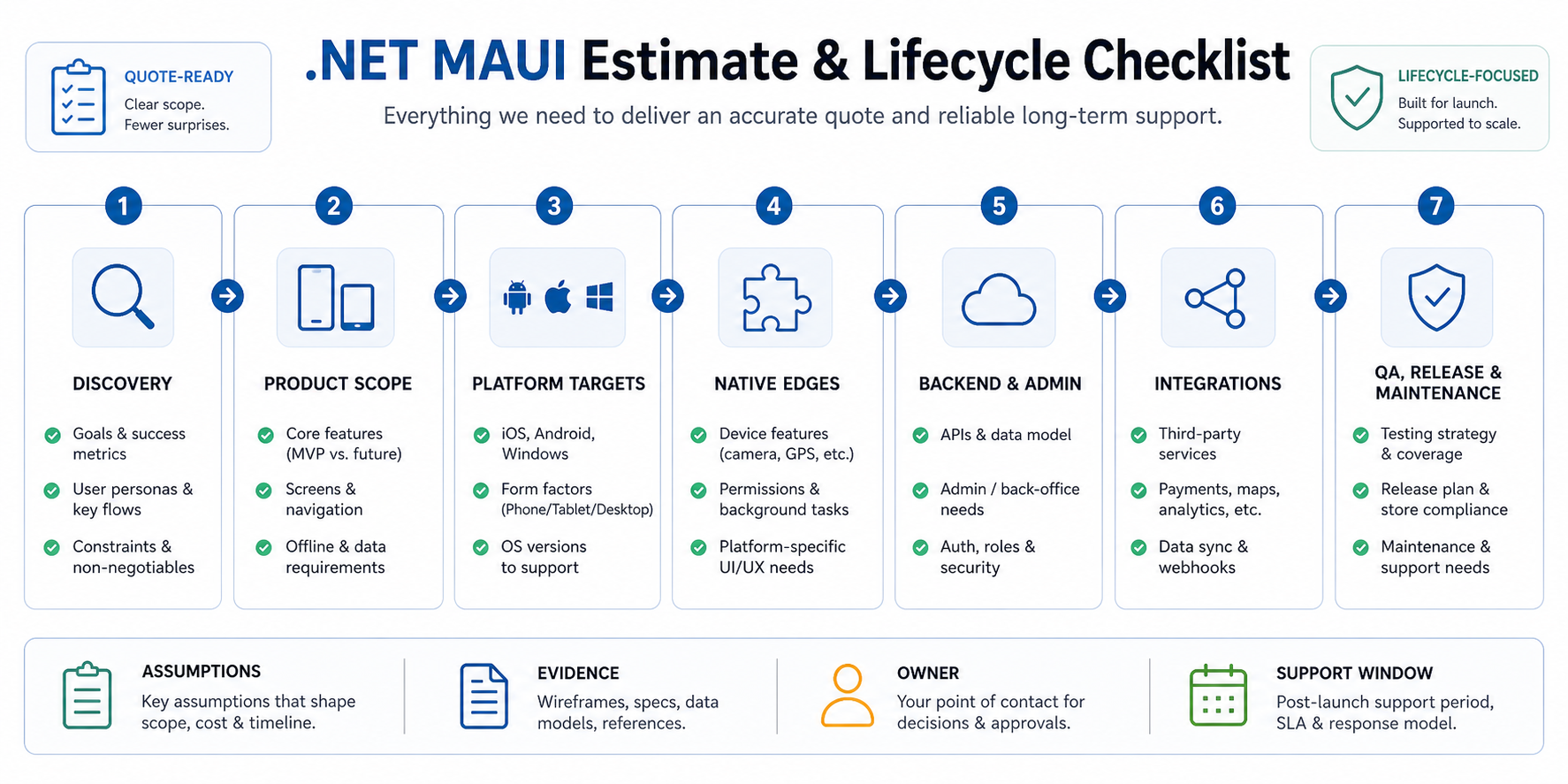
- Scope: core workflow, users, screens, permissions, edge cases, acceptance criteria, and exclusions.
- Platform targets: Android, iOS, Windows, macOS, tablet layouts, minimum OS versions, and MAUI Blazor needs.
- Shared and native work: reusable C# logic, UI structure, platform handlers, native modules, device APIs, and desktop differences.
- Backend: APIs, database, admin tools, authentication, reporting, cloud environments, backups, and monitoring.
- Integrations: Microsoft identity, Azure, ERP, CRM, payments, maps, analytics, chat, legacy systems, and webhook ownership.
- Quality: device matrix, OS coverage, accessibility, performance targets, offline test cases, security review, and release evidence.
- Maintenance: .NET release updates, dependency reviews, app-store changes, crash fixes, analytics reviews, and roadmap releases.
If the team is still debating version-one scope, use the MVP Scope Builder before collecting fixed-price quotes. For broader budget context, compare the estimate with NextPage's Mobile App Development Cost In 2026 guide.
Hidden Costs That Surprise .NET MAUI Teams
Many .NET MAUI estimates miss admin dashboards, account deletion, accessibility, analytics event design, offline conflict handling, app-store screenshots, privacy answers, enterprise distribution, device testing, crash monitoring, and support workflows. These items do not always look like features, but they decide whether the app survives real users and release review.
Framework lifecycle planning also matters. Because .NET MAUI moves with the .NET ecosystem, a production app needs budget for SDK, dependency, Visual Studio, Xcode, Android SDK, and platform policy updates. Maintenance is not only bug fixing; it is keeping the app buildable, testable, and releasable as the surrounding toolchain changes. The Post-Launch Mobile App Maintenance Checklist can help turn that work into a plan instead of an afterthought.
Maintenance And Ownership Plan
Plan a maintenance budget before launch. For a simple app, maintenance may mean dependency updates, store policy changes, crash fixes, OS compatibility, and small feature releases. For an enterprise app, maintenance often includes monitoring, access reviews, backup validation, security patches, integration changes, support triage, analytics review, and release notes for internal stakeholders.
Ownership should also be explicit. Decide who owns Apple, Google, and Microsoft store accounts, signing certificates, package names, cloud environments, database backups, analytics, SSO configuration, support escalation, and incident response. If a vendor builds the app but your team owns production support, the handoff needs runbooks, credentials, build instructions, monitoring access, and a regression checklist.
A practical rule: if the app connects to revenue, operations, sensitive data, or field work, estimate at least the first 90 days after launch as part of the project. That period catches real-device issues, stakeholder change requests, analytics gaps, and integration edge cases that are hard to prove in a staging environment.
Questions To Ask Before Approving A Quote
- Platform fit: Why is .NET MAUI the recommended stack for this product instead of native, Flutter, React Native, or web-first?
- Shared-code assumptions: Which parts of the app are expected to be shared, and which parts need platform-specific implementation?
- Backend readiness: Are APIs, data models, admin tools, and identity flows already available, or are they part of the estimate?
- Offline and sync: Does the app need offline mode, background sync, retry queues, or conflict resolution?
- QA evidence: Which devices, OS versions, screen sizes, accessibility checks, performance targets, and regression suites are included?
- Launch ownership: Who owns store accounts, signing, screenshots, release notes, privacy answers, support handoff, and post-launch monitoring?
- Maintenance: What is included after launch, what is billed separately, and how are framework or SDK upgrades handled?
If a quote cannot answer these questions, the risk has not disappeared. It has only moved into change requests, launch delay, or maintenance debt.
How NextPage Estimates .NET MAUI Apps
NextPage estimates .NET MAUI apps by mapping the operating workflow first, then translating it into shared C# scope, native platform edges, backend architecture, integrations, QA depth, launch work, and post-launch ownership. That gives founders and product leaders a budget they can defend because it names the assumptions behind the number.
For a narrow MVP, the answer may be a disciplined .NET MAUI app with a compact backend and limited integrations. For a production product, the answer may include admin tools, analytics, accessibility checks, regression automation, release management, and maintenance capacity. For enterprise or regulated apps, the estimate should include identity, auditability, security, compliance evidence, monitoring, and phased rollout.
Start with the Custom Software Cost Estimator, then review the result with a team that can challenge the scope, expose .NET MAUI risks, and turn the estimate into a practical build plan. If release quality is the biggest unknown, NextPage's mobile app testing services can help turn QA assumptions into a launch gate.