
Quick Answer: What Does DPDP-Compliant App Development Require?
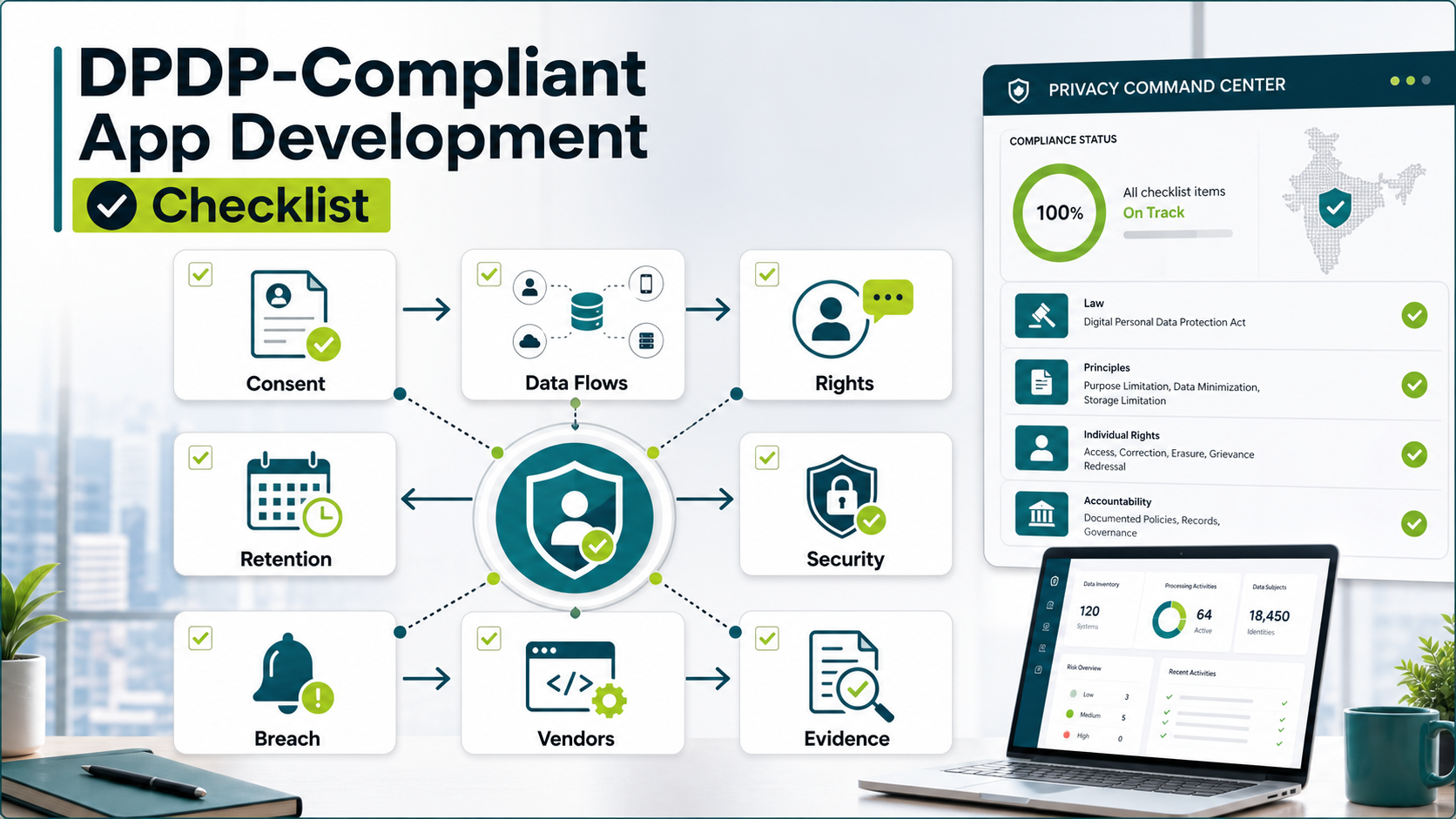
DPDP-compliant app development means designing the product, backend, integrations, support workflow, and release process so personal data is collected for clear purposes, protected with reasonable safeguards, and usable by people exercising their rights. It is not only a privacy-policy rewrite. For most customer-facing web apps, mobile apps, portals, and internal tools, the work touches consent notices, data-flow inventory, user-rights requests, retention, deletion, grievance handling, breach response, role-based access, audit logs, vendor integrations, and QA evidence.
The practical starting point is a product map: which screens collect personal data, which APIs process it, which databases store it, which third-party systems receive it, who can access it, how long it is retained, and how a user can withdraw consent or request correction, access, erasure, nomination, or grievance redressal. Treat that map like a delivery artifact, not a legal appendix; it should influence app UX, backend contracts, admin permissions, analytics, vendor selection, and QA evidence. Once that map exists, engineering can turn DPDP obligations into backlog items instead of vague compliance tasks.
This checklist is for product, legal, compliance, and technology leaders planning India-market software changes. It is implementation guidance, not legal advice. Use counsel for statutory interpretation, then use this article to scope the app and workflow changes your software team must actually build.
As of August 18, 2026, teams should treat DPDP as a dated implementation program, not a wait-and-see policy issue. Current official sources include the Digital Personal Data Protection Act, 2023, the notified Digital Personal Data Protection Rules, 2025, and MeitY's live act-and-policies record. The practical product timeline remains phased: Consent Manager-related Rule 4 is scheduled around the one-year mark after publication, while core operating rules such as notices, consent, rights, safeguards, breach intimation, children's data, Significant Data Fiduciary duties, and cross-border or state-request provisions are scheduled around the eighteen-month mark. In practice, product teams should be ready for consent-manager readiness around November 2026 and broad operating controls around May 2027, subject to counsel's interpretation and any later government notification.
Why DPDP Work Belongs In The Product Backlog
The Digital Personal Data Protection Act, 2023 and the Digital Personal Data Protection Rules, 2025 create a compliance program, but many obligations become software behavior. India Code and MeitY materials list the Act, the 2025 Rules, commencement notifications, and Data Protection Board materials. MeitY's Rules notification phases the framework: procedural/Data Protection Board provisions are already active, Consent Manager-related provisions follow at the one-year mark, and most operational obligations follow at the eighteen-month mark. Current business guidance continues to summarize the broad compliance deadline as May 2027. Current professional guidance summarizes the framework as applying to digital personal data processed in India, offline data that is later digitized, and certain processing outside India when goods or services are offered to data principals in India. That scope means many software teams cannot treat DPDP as a document-only exercise. This is especially important for SaaS products with admin panels, analytics, support tooling, and customer workspaces; teams planning those platforms should include privacy architecture inside the same scope as SaaS development services, not as a separate end-of-project checklist.
For the rest of 2026, the important shift is from awareness to operating readiness. Product teams should keep a dated DPDP assumptions log covering notice versions, consent-manager behavior, grievance contact points, Data Protection Board reporting expectations, cross-border transfer assumptions, processor contracts, and breach-response owners. The law and rules belong with counsel; the engineering backlog should show how those decisions become screens, APIs, queues, logs, test cases, and release gates.
The reference competitor page covers audits, documentation, consent systems, DPIA, RoPA, data transfer support, and privacy architecture. Those are useful service categories, but buyers still need the next layer: what must change in the app? Which releases are risky? Which admin screens prove requests were handled? Which logs are retained? Which integrations need new contracts or controls? NextPage's angle is to translate compliance themes into product decisions, engineering tasks, QA checks, and evidence.
A useful DPDP implementation backlog should answer five questions: what data is collected, why it is collected, where it moves, who controls it, and what happens when a user exercises a right or a breach is suspected. If the backlog cannot answer those questions, the system may look compliant in policy language while still failing in production workflows.
Step 1: Map Personal Data Flows Before Changing Screens
Start with a data-flow inventory. List every personal-data touchpoint in the product: signup forms, profile fields, KYC steps, lead forms, chat widgets, analytics events, support tickets, payment metadata, CRM syncs, push notification tokens, device identifiers, health or financial attributes, uploaded documents, and admin exports. Then map each touchpoint to the purpose, lawful basis or consent flow, storage location, retention trigger, access roles, and downstream processors.
Do not limit the exercise to visible UI forms. Many risk points live in background systems: event tracking, logs, data warehouses, CRM enrichment, notification providers, fraud tools, customer-support platforms, and manual spreadsheets. DPDP readiness improves when engineering and operations identify these hidden flows early, because it is cheaper to adjust event taxonomies and integrations before release than to discover them during an audit or incident. The same discipline applies to app integrations: NextPage's mobile app integrations checklist is a useful companion when consent state, retries, webhooks, support tools, and vendor payloads must stay consistent.
For teams still sizing the work, NextPage's custom software cost estimator can help convert privacy backlog scope into a directional timeline and team shape. Compliance features often change complexity because they add admin workflows, integration reviews, audit logs, testing needs, and production support ownership. Teams planning data movement alongside DPDP controls can also use the data migration checklist to avoid losing consent state, deletion markers, suppression flags, and audit fields during platform changes.
Data-Flow And Consent Architecture For DPDP Apps
A DPDP-ready architecture usually needs a shared consent and notice service, data inventory, purpose and retention rules, user-rights queue, processor register, audit log, and security controls that every product surface can call. MeitY's Code for Consent initiative is another signal that consent management is moving toward modular, integrable systems rather than static privacy copy. If consent lives only inside one screen, support agents, analytics events, marketing tools, and backend jobs can drift away from the user's current choice.
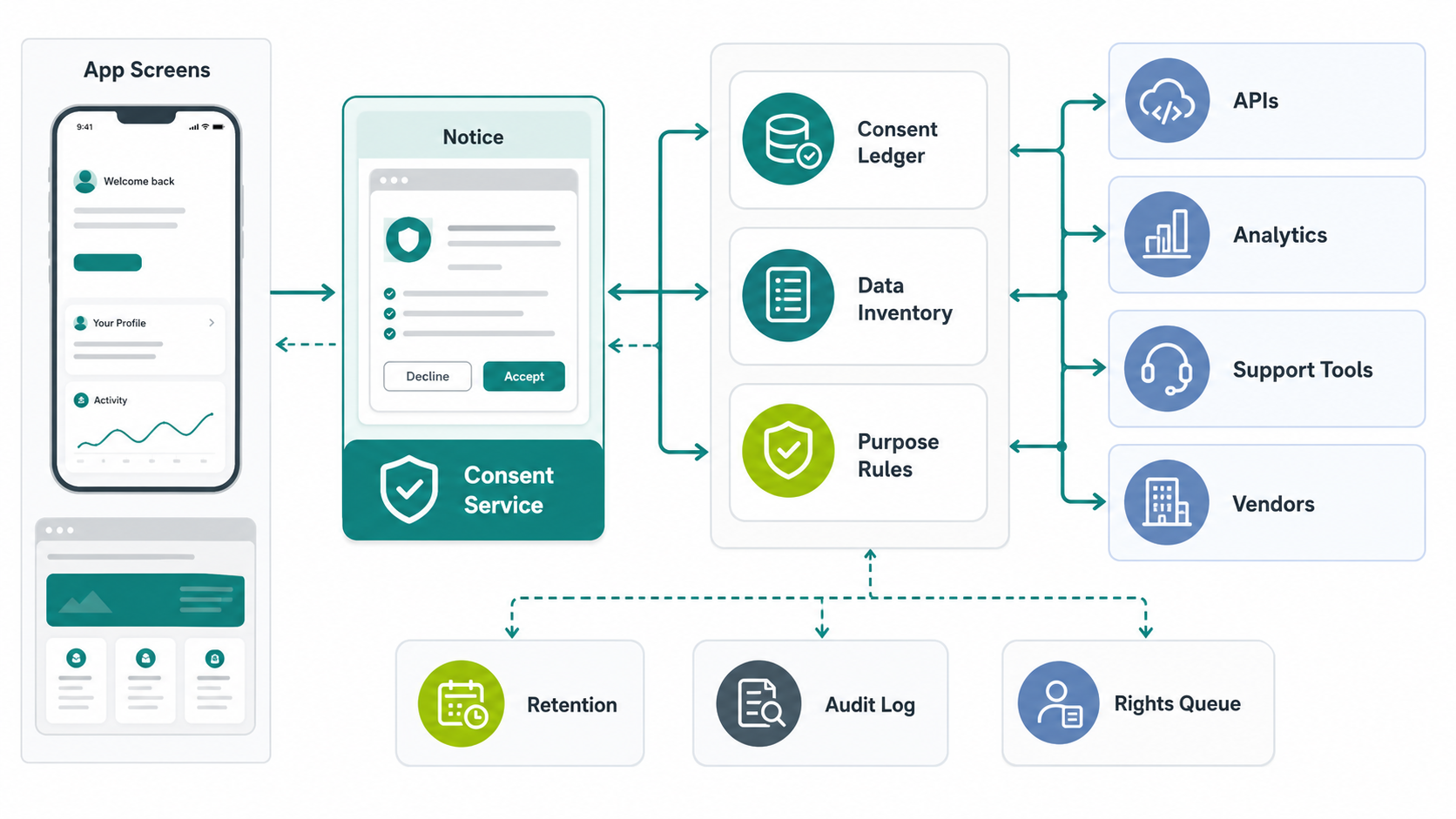
The practical engineering question is simple: can every downstream system answer which purpose applies, which notice version was shown, which consent state is current, which processor received the data, and what evidence exists if the user withdraws consent or raises a request? If not, privacy logic is probably fragmented. Teams planning the scope can pair the MVP scope builder with a DPDP data-flow map to decide what must ship in the first release and what can safely follow. Where DPDP work replaces spreadsheet or SaaS workarounds, NextPage's SaaS replacement and custom workflow software services show how permissions, logs, exports, backups, and admin visibility can be designed as owned workflow controls.
Step 2: Design Notices And Consent As Product UX
Consent is not just a checkbox. A DPDP-ready consent experience should explain what personal data is collected, the specific purpose, the product or service context, how the person can withdraw consent, how rights can be exercised, and where complaints can be raised. The notified 2025 Rules put that work into product terms: notices should be independently understandable, clear, simple, purpose-specific, and connected to communication links for withdrawal, rights exercise, and complaints. That means product teams need to design notices as usable flows, not hidden legal text.
Good consent UX is contextual. A fitness app asking for health data needs different timing and explanation than a marketplace collecting delivery details. A B2B portal that stores employee contact data needs a different control model than a consumer app with behavioral analytics. The notice should appear close to the relevant collection point, use plain language, and connect to a preference or rights center when the user wants to change decisions later.
Engineering should store consent records with enough structure to prove what was shown, which purpose was accepted, when the action occurred, which version of notice applied, and which system consumed the consent state. That usually requires a consent service or shared data model, not scattered booleans across product tables. For mobile-first teams, this should be included in vendor and platform requirements; the mobile app development RFP checklist shows how to ask vendors about data, security, compliance, retention, and audit expectations before scope is locked.
Step 3: Build A User-Rights And Grievance Workflow
DPDP readiness requires a way for data principals to make requests and for the organization to process them consistently. The app may need a rights portal, support workflow, admin queue, verification step, SLA tracking, escalation rules, and evidence export. At minimum, product teams should plan access, correction, erasure, nomination, grievance, withdrawal, and complaint-routing workflows where relevant to their product and counsel's interpretation.
The technical design should prevent support agents from improvising with sensitive data. A better pattern is a controlled request queue: request type, identity verification status, affected systems, assigned owner, deadline, action log, approval step, and final response. For erasure or correction, the workflow should call internal APIs or jobs rather than asking a support user to edit data manually in the database. The same queue discipline applies to other regulated operations; NextPage's Workflow Automation Opportunity Finder can help teams rank which repeatable compliance workflows are ready for automation and which still need human review.
Rights workflows often touch multiple systems. Deleting a profile in the main app may not erase CRM records, analytics identifiers, support attachments, marketing lists, warehouse rows, or vendor copies. That is why the earlier data-flow inventory matters. The request workflow should show which systems are in scope, which are legally retained, and which deletion or correction jobs have completed.
Step 4: Minimize Data And Control Retention
Data minimization is easier to claim than to operate. Product teams should review each field and event for necessity, purpose, and retention. If a field is useful only for a one-time onboarding step, the system may need a shorter retention policy or transformed value rather than indefinite storage. If a log contains personal data accidentally, update the logging policy before scaling traffic.
Retention should be implemented as a system behavior: expiry dates, deletion jobs, anonymization routines, exception rules, evidence logs, and alerts when jobs fail. For ecommerce, social media, gaming, fintech, healthcare, and education products, the exact policy may vary, but the engineering pattern is similar: make retention visible, testable, and auditable.
If your first release cannot include every advanced automation, separate MVP controls from later-phase controls. NextPage's MVP Scope Builder is useful when compliance, product, and engineering leaders need to decide what must ship before launch and what can be safely phased after a controlled release.
Step 5: Secure The Data Lifecycle, Not Only The Login
Reasonable security safeguards should cover more than authentication. DPDP-ready applications need role-based access, least-privilege admin panels, encrypted transport, secure storage, secrets management, audit logs, backup controls, vulnerability management, access reviews, environment separation, and incident monitoring. For mobile apps, add secure local storage, API authorization, certificate and token handling, device-risk decisions, safe push-notification content, and pre-release hardening evidence. Teams with sensitive mobile data can use NextPage's mobile app security hardening services to turn privacy and security controls into testable remediation work.
Security also needs product-specific controls. A customer-support dashboard should hide unnecessary sensitive fields. The privacy planning pattern is similar in sensitive verticals such as education software; NextPage's education app development cost guide explains why consent, retention, access control, vendor review, and secure workflows belong in the scope before engineering starts. A data export should be permissioned, logged, and watermarked where useful. A bulk upload tool should validate purpose and access. A reporting dashboard should aggregate or mask data unless the user role needs row-level detail. For teams moving sensitive workloads at the same time, NextPage's cloud migration services planning model is relevant because identity, secrets, backups, audit trails, and least-privilege access must survive the move.
NextPage's security testing services and software QA testing services are relevant because DPDP release readiness is not just code review. Teams need repeatable checks for access control, request workflows, logging, edge cases, and regression risk before production changes go live.
Step 6: Plan Breach Response Inside The System
Breach response is an operating workflow, but software can make it faster and more reliable. The notified 2025 Rules require affected-data-principal communication without delay and Data Protection Board intimation with follow-up detail within 72 hours, unless the Board allows a longer period. Your legal team should confirm the exact obligations for your case, but engineering should still prepare the evidence system.
A practical breach workflow includes incident intake, affected data categories, affected users, affected processors, detection timestamp, containment actions, communication approvals, remediation steps, and evidence export. Products that handle health or financial data often need even tighter consent and disclosure controls; the healthcare data exchange software guide shows how consent, access control, audit trails, and integration boundaries become product features. Logs should support investigation without overexposing personal data to every responder. Monitoring should detect unusual exports, failed access attempts, privilege changes, and bulk record access.
Do not wait for a breach to learn whether logs exist. Run tabletop simulations with engineering, support, legal, security, and leadership. The output should become backlog: missing logs, missing ownership, unclear vendor contacts, untested notification paths, and dashboards that cannot answer basic impact questions.
Step 7: Review Processors, Vendors, And Cross-Border Flows
Most apps depend on processors and third-party systems: cloud hosting, analytics, CRM, email, SMS, push notifications, support desks, payment gateways, fraud tools, LLM APIs, file storage, data warehouses, and BI dashboards. DPDP readiness requires a vendor inventory tied to actual data flows, not just a procurement spreadsheet.
For each vendor, record the data shared, purpose, region, transfer mechanism, contract status, retention, deletion process, breach contact, and fallback plan. If the vendor is used only for analytics or enrichment, challenge whether the same business outcome can be achieved with less personal data. If the vendor powers core product behavior, design the rights workflow so user requests can flow to that system without manual guesswork.
Cross-border transfer rules and government notifications can change, so treat cross-border flow review as a maintained register. The product architecture should make it possible to identify which services process Indian personal data, which regions are used, and which controls apply.
Step 8: Create Release Evidence And Operating Ownership
A DPDP-ready release should produce evidence. That evidence may include data-flow maps, notice copy versions, consent test cases, rights-request test results, retention job logs, access-control review, processor inventory, breach tabletop notes, security test results, and open-risk decisions. The same evidence discipline appears in NextPage's AuditLedger financial audit platform, where traceable workflows and review records are central to product trust. Without evidence, teams rely on memory and screenshots when questions arise later.
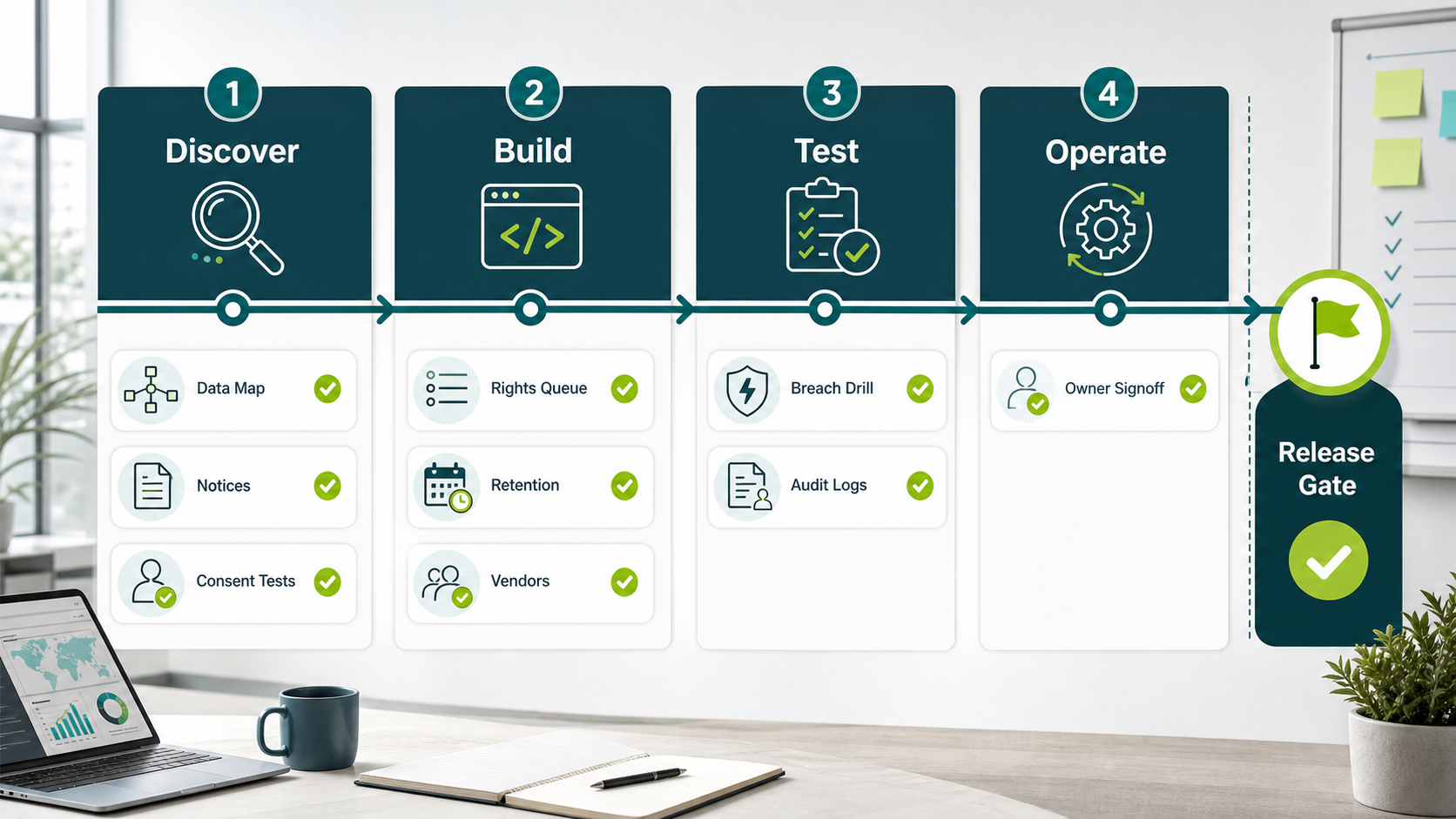
Before release, run a readiness gate that covers data maps, notice and consent UX, rights workflows, retention jobs, access-control tests, processor review, breach tabletop notes, log retention, and named owners. Ownership matters as much as artifacts. Assign owners for notice updates, consent-service maintenance, rights-request queues, vendor review, security controls, breach simulations, QA evidence, and post-release monitoring. If everything belongs to compliance in theory but engineering owns the systems in practice, workflows will drift. For MVP teams, the release gate should separate must-have DPDP controls from later-phase improvements; an MVP development company should still prove consent, rights, security, and vendor evidence before a real user pilot handles personal data. NextPage's mobile app QA launch checklist is a useful release companion when consent, permissions, offline behavior, analytics, crash monitoring, and support workflows need regression coverage.
For custom apps and internal workflow products, NextPage's web app development, mobile app development, and enterprise mobile app development services teams can plan the product, API, admin, and release layers together instead of bolting compliance on after launch.
DPDP App Development Checklist
| Area | Questions To Answer | Software Work To Plan |
|---|---|---|
| Data inventory | What personal data is collected, processed, stored, shared, and exported? | Data-flow map, event taxonomy, processor register, database field review |
| Notice and consent | What is shown to users, when, in which language, and for which purpose? | Contextual notices, consent records, preference center, version history, consent-manager API |
| User rights | How can users request access, correction, erasure, withdrawal, nomination, or grievance redressal? | Rights portal, admin queue, verification, SLA tracking, completion logs |
| Retention | How long is each data type kept and what triggers deletion or anonymization? | Retention jobs, exception rules, deletion evidence, monitoring alerts |
| Security | Who can access data and how are misuse, exports, and privilege changes detected? | RBAC, audit logs, encryption, access reviews, testing, incident monitoring |
| Vendors | Which processors receive personal data and where do they process it? | Vendor inventory, integration review, deletion hooks, breach contact records |
| Breach response | Can the team identify affected users, systems, data categories, and processors quickly? | Incident workflow, evidence export, notification workflow, simulation tests |
| Release evidence | Can the team prove what was tested, accepted, deferred, and owned? | QA plan, security report, risk register, dated assumptions log, OpenSpec/change trail, owner matrix |
How To Prioritize The First Release
Do not start by trying to automate every compliance activity. Start with the controls that reduce the highest production risk: data-flow inventory, consent notice updates, rights-request intake, role-based access, retention gaps, vendor register, and breach evidence. Then add automation where manual handling would create delay, inconsistency, or security exposure.
A sensible first release may include notice UX, consent logging, a user-rights intake form, an internal request queue, basic deletion/correction jobs, admin audit logs, and QA evidence. A second release may add vendor workflow integrations, automated retention, advanced dashboards, breach simulation evidence, and stronger cross-system deletion orchestration. Mature programs can add privacy engineering guardrails to CI/CD, data catalog sync, and policy-as-code checks.
For products that already collect sensitive or high-volume data, treat DPDP work as modernization. NextPage's custom survey management software development page is a useful adjacent example because owned feedback workflows need consent language, role-based access, audit history, retention, and data ownership decisions before sensitive responses are collected.
Common Mistakes To Avoid
- Leaving DPDP to legal copy only: notices matter, but production behavior matters too.
- Ignoring hidden data flows: analytics, logs, CRM, BI, support, and exports can carry personal data.
- Building rights workflows manually: manual database edits are risky and hard to prove later.
- Collecting fields because they might be useful: every extra field adds purpose, access, retention, and breach exposure.
- Forgetting mobile constraints: local storage, push notifications, permissions, and device identifiers need review.
- Skipping evidence: release teams need test results, owner decisions, and audit trails, not just final screenshots.
How NextPage Helps With DPDP-Ready Apps
NextPage helps teams turn DPDP readiness into a buildable software roadmap through custom software development: data-flow discovery, app UX changes, consent and preference architecture, rights-request workflows, admin panels, security controls, QA evidence, and production rollout. We work with your legal/compliance guidance and focus on what needs to be changed in the product, integrations, and operating workflow.
For new products, we can scope DPDP-aware requirements before the MVP so consent, retention, access, and evidence are not retrofitted later. For existing apps, we can audit the data path, identify engineering gaps, and prioritize remediation by risk and release effort. For regulated or sensitive workflows, we can pair engineering with QA and security testing so the release has evidence, not assumptions.
If your app handles Indian customer, employee, health, financial, educational, marketplace, or behavioral data, start with a DPDP app and data-flow readiness review. The best outcome is a clear backlog: what to fix now, what to phase, what to document, and what to test before the next production release.