
Quick Answer: What Should An eCommerce Checkout Optimization Checklist Cover?
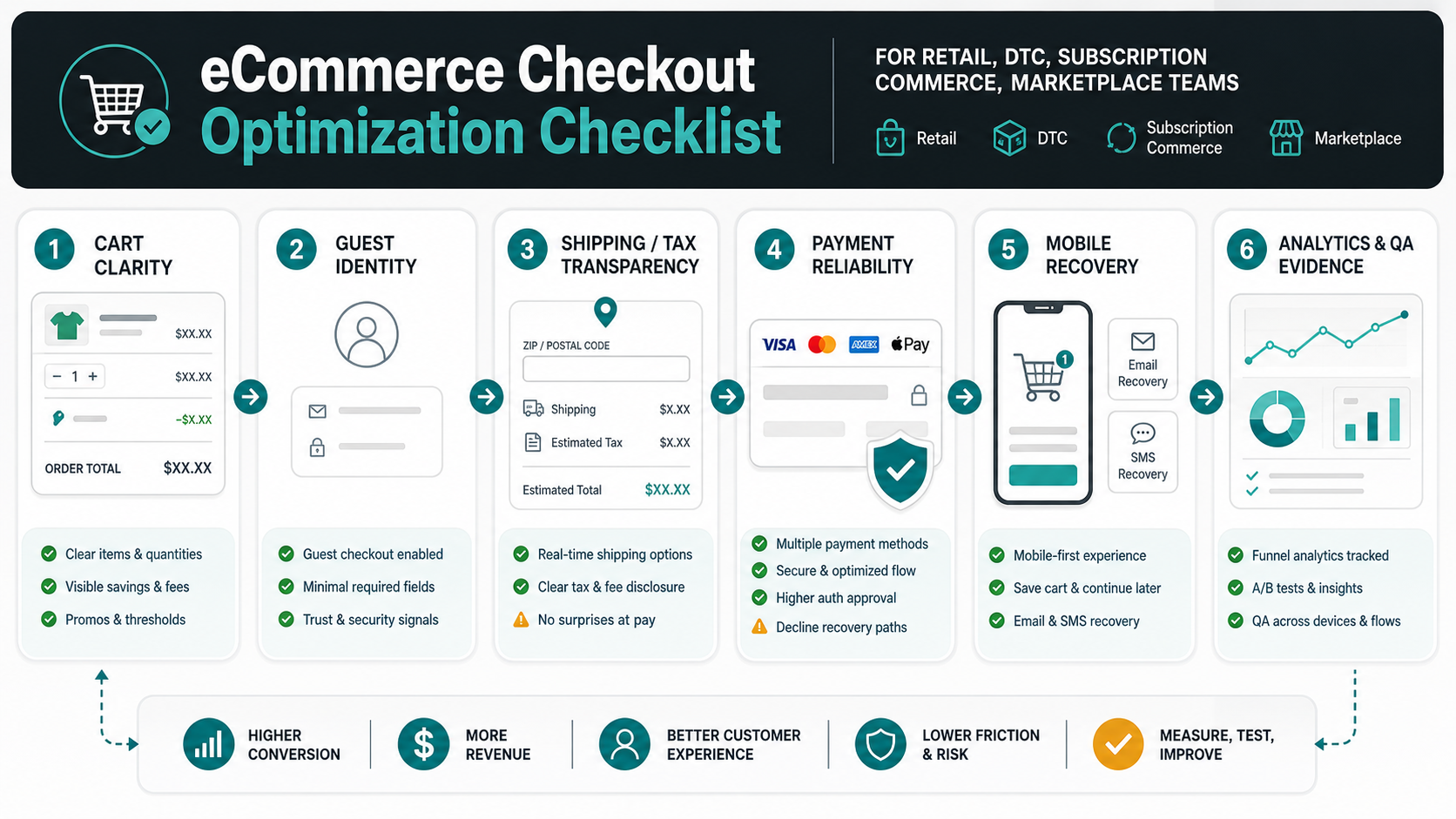
An eCommerce checkout optimization checklist should cover the full revenue path from cart review to order confirmation: cart clarity, guest checkout, shipping and tax transparency, payment method fit, mobile form design, fraud and risk controls, performance, error recovery, analytics, QA, and post-launch experiments. The goal is not a prettier checkout in isolation. The goal is to remove the specific points where ready-to-buy customers hesitate, fail, distrust the site, or choose a competitor.
Start with evidence before redesigning screens. Segment abandonment by device, traffic source, product category, payment method, shipping option, coupon behavior, checkout step, and customer type. Then map each drop-off to a fix that can be owned by UX, engineering, payments, operations, analytics, or customer support. A short checkout with hidden costs is still a bad checkout. A beautiful mobile form with slow payment callbacks is still a bad checkout. A payment page with no event tracking is impossible to improve with confidence.
NextPage treats checkout optimization as a product and engineering workflow. It combines eCommerce conversion optimization services, payment integration, performance work, analytics instrumentation, and QA evidence so teams can ship changes safely and measure whether conversion actually improved.
Why Checkout Leaks Revenue Even On Mature Stores
Cart abandonment is normal because many shoppers compare prices, save items, research shipping, or browse without purchase intent. But a large share of checkout loss is still addressable. Baymard's cart abandonment research reports a documented average abandonment rate above 70%, and its checkout UX research continues to point to solvable causes such as high extra costs, forced account creation, long flows, unclear total cost, slow delivery, limited payment trust, payment method gaps, and site errors.
The strategic mistake is treating these issues as copy tweaks. Checkout is a system that depends on frontend UX, backend order state, tax and shipping logic, inventory accuracy, payment authorization, fraud review, analytics, and support visibility. When one layer fails, the customer experiences friction even if the visible screen looks polished.
The OrangeMantra reference page covers broad eCommerce portal development, cart optimization, mobile optimization, payment gateways, integrations, and platform selection. The gap is a practical checklist that connects those themes to implementation evidence buyers need before briefing a product or engineering team. This post fills that gap.
The Checkout Diagnostic Map
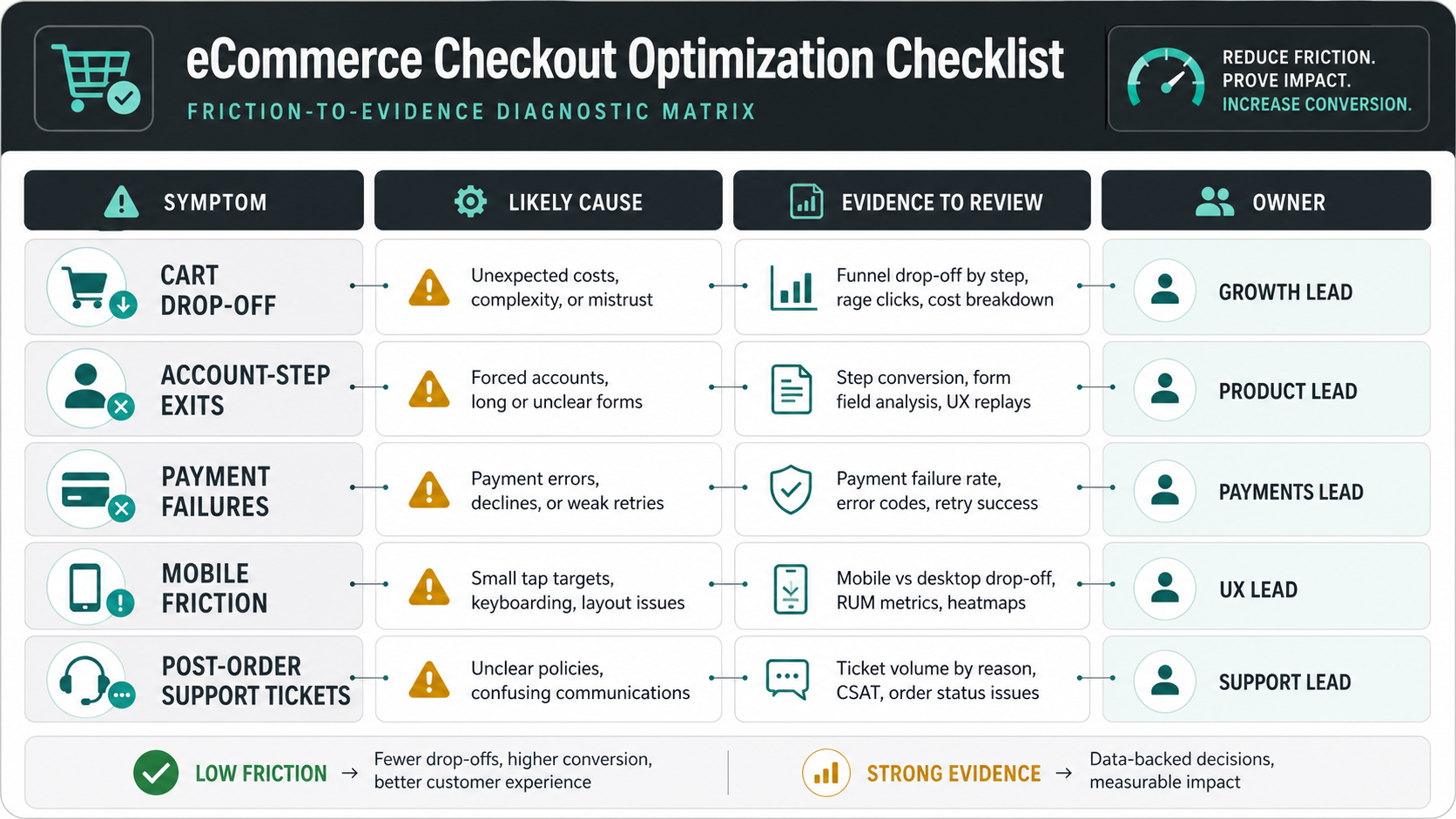
Use this diagnostic map before approving a redesign. It links symptoms to likely causes, evidence to collect, and the team that should own the fix.
| Symptom | Likely cause | Evidence to review | Owner |
|---|---|---|---|
| High cart-to-checkout drop-off | Unexpected shipping, weak cart clarity, poor coupon behavior, or low trust. | Cart events, coupon attempts, shipping estimator usage, rage clicks, session replays. | Product, UX, analytics. |
| High account-step abandonment | Guest checkout is hidden or account creation feels mandatory. | Account-step exits, sign-in failures, password reset starts, guest button clicks. | UX, identity, engineering. |
| Payment failures spike | Gateway errors, unsupported wallets, declined cards, 3DS issues, webhook gaps. | Gateway codes, method mix, retry success, callback latency, order reconciliation. | Payments, backend, support. |
| Mobile conversion trails desktop | Slow pages, cramped forms, keyboard issues, address friction, wallet gaps. | Core Web Vitals, field error rates, scroll depth, device split, wallet adoption. | Frontend, UX, performance. |
| Completed orders create support tickets | Unclear delivery dates, tax/shipping mismatch, confirmation gaps, inventory errors. | Ticket tags, cancellation reasons, order status events, fulfillment exceptions. | Operations, integrations, support. |
Cart Optimization Checklist
The cart is where shoppers confirm value, total effort, delivery expectations, and trust. Treat it as a decision screen rather than a passive product list.
- Show the real order picture: product name, variant, quantity, price, savings, availability, return eligibility, delivery estimate, and seller or warehouse when relevant.
- Make quantity changes hard to mis-enter: use plus/minus buttons with direct text entry, immediate recalculation, and clear undo or update states.
- Expose costs early: shipping, taxes, duties, fees, discounts, and minimum-order thresholds should appear before the shopper reaches payment.
- Handle coupons carefully: avoid a large empty coupon field that sends users hunting for codes. Show applied promotions, invalid-code reasons, and eligible offers.
- Keep recovery paths visible: save for later, wishlist, contact support, delivery questions, and return-policy links can prevent exits when shoppers are unsure.
- Protect inventory trust: do not allow out-of-stock surprises after payment. Reserve stock or clearly disclose real availability and backorder rules.
If the cart needs deeper platform or workflow changes, connect the checklist to custom eCommerce web app development rather than treating it as a theme tweak.
Guest Checkout, Account, And Identity Checklist
Forced account creation remains one of the fastest ways to lose high-intent users. Accounts are useful for retention, support, loyalty, and B2B purchasing, but the account model should not block a first purchase unless the business genuinely requires it.
| Checkpoint | Better implementation | Metric to watch |
|---|---|---|
| Guest checkout visibility | Make guest checkout a primary option, not a small link below sign-in. | Account-step abandonment and guest selection rate. |
| Password creation | Use minimal, clear requirements and support password managers. | Password validation errors and account creation exits. |
| Returning user recovery | Offer magic links, reliable reset emails, and clear sign-in fallback. | Reset starts, reset completion, support tickets. |
| Post-purchase account creation | Invite users to save details after payment using the order email. | Account conversion after purchase. |
| B2B approvals | Separate buyer identity from purchase authority and approval limits. | Approval completion time and order exception rate. |
Shipping, Tax, And Total Cost Checklist
Unexpected cost is a checkout killer. The user does not care whether the surprise came from shipping logic, tax calculation, payment fees, address validation, or a promotion rule. They only see that the order changed late.
Show cost drivers as early as possible. Let users estimate shipping in the cart. Use delivery dates or date ranges instead of vague speed labels. If expedited delivery has a cutoff time, localize it or display a countdown that the shopper can understand without time-zone math. For cross-border stores, disclose duties, tax handling, and delivery responsibility before payment.
Teams should test total cost with real scenarios: guest user, logged-in user, loyalty discount, free-shipping threshold, gift card, coupon, split shipment, pickup, remote postal code, tax-exempt customer, failed address validation, and inventory change between cart and payment.
Payment Method And Gateway Checklist
Payment optimization is not just adding more icons. It is about matching customer preference, reducing input friction, handling failures, and reconciling orders correctly. Stripe's payment method guidance reinforces a practical point: payment method fit varies by country, currency, customer type, and payment flow. A checkout should support the methods buyers expect while still keeping order state, refunds, webhooks, and support visibility reliable.
- Support relevant methods: cards, wallets, UPI or local methods where relevant, BNPL only when risk and margin fit, bank transfer or invoice terms for B2B.
- Prioritize mobile wallets: wallet checkout can reduce typing and address friction on mobile when implemented cleanly.
- Handle declines with recovery: show clear retry options, alternate payment methods, and customer-safe error messages.
- Design for asynchronous payment: webhooks, callbacks, abandoned 3DS sessions, pending statuses, duplicate prevention, and reconciliation must be reliable.
- Keep trust visible: explain security, returns, support, and payment timing without cluttering the payment screen.
- Measure method-level performance: track authorization rate, failure reason, retry success, payment latency, refund issues, chargebacks, and manual review rate.
Payment gateway work affects budget because it touches security, backend state, order creation, refunds, and reconciliation. The eCommerce App Development Cost guide breaks down why payment and checkout work should be scoped beyond the visible button.
Mobile Checkout Checklist
Mobile checkout should be designed for short attention, small screens, autofill, thumb reach, inconsistent networks, and payment handoffs. A desktop form compressed into a mobile viewport is not enough.
| Mobile area | Checklist item | Evidence |
|---|---|---|
| Performance | Keep cart and checkout fast under real mobile network conditions. | LCP, INP, checkout API latency, gateway callback timing. |
| Forms | Use correct input types, autofill attributes, inline validation, and short field groups. | Field error rate, keyboard mismatch, abandoned field events. |
| Address | Support autocomplete, apartment/unit clarity, editable summaries, and local address formats. | Address validation failures and delivery exceptions. |
| Wallets | Show wallet options early when available and test device/browser compatibility. | Wallet impression, click, authorization, and fallback rates. |
| Recovery | Persist cart state and recover after app switches, OTP, 3DS, or network interruption. | Resume success and payment-session timeout rate. |
For mobile apps or PWA checkout flows that depend on payments, analytics, notifications, or support handoffs, compare the integration work with the mobile app integrations checklist before committing to a release date.
Fraud, Risk, And Review Checklist
Checkout optimization should not blindly approve every order. The right target is fewer unnecessary false positives while keeping fraud, chargebacks, and fulfillment risk within acceptable limits.
Use risk scoring that accounts for order value, payment method, customer history, address mismatch, device signals, velocity, product risk, delivery type, and region. Route only the right orders to manual review. Give support and operations teams enough context to make decisions quickly. Avoid fraud rules that create silent payment failures or confusing rejection messages.
For high-value or regulated commerce, include audit logs, role-based access, manual override reason codes, and review SLAs. Measure approval rate, false decline rate, review time, chargeback rate, cancellation rate, and customer complaints after risk decisions.
Checkout Analytics And Conversion Metrics
A checkout cannot be optimized if events are missing or inconsistent. Define the funnel before running experiments, and make the dashboard useful for operators rather than only for marketing summaries.
| Metric | Why it matters | Segment by |
|---|---|---|
| Cart-to-checkout rate | Shows whether cart content, costs, trust, or CTA placement is blocking progress. | Device, traffic source, category, coupon, stock status. |
| Checkout-step completion | Reveals the exact step where friction appears. | Guest vs logged-in, shipping option, payment method. |
| Field error rate | Identifies form design and validation problems. | Field name, device, browser, country. |
| Payment authorization rate | Separates payment failures from UX abandonment. | Gateway, method, issuer, 3DS, currency. |
| Order exception rate | Measures post-payment quality problems. | Inventory, address, tax, fraud, fulfillment, support reason. |
| Revenue per checkout session | Prevents optimizing conversion while hurting margin or average order value. | Promotion, shipping tier, category, customer type. |
If checkout reporting is scattered across analytics, gateway logs, ERP, support tools, and spreadsheets, a marketing analytics dashboard development workflow can unify funnel and order evidence. For larger builds, use the Custom Software Cost Estimator to separate quick UX fixes from deeper platform work.
QA And Release Checklist
Checkout releases need scenario-based QA, not only visual approval. Test happy paths and failure paths with real payment sandbox cases, real shipping/tax rules, and realistic mobile devices.
- Guest checkout, logged-in checkout, new account creation, password reset, and abandoned sign-in recovery.
- Card success, card decline, wallet success, 3DS challenge, pending payment, webhook delay, duplicate callback, refund, and cancellation.
- Shipping estimator, free-shipping threshold, pickup, split shipment, invalid address, remote postal code, and delivery-date calculation.
- Coupon success, invalid coupon, expired coupon, promotion stacking, gift card, tax calculation, and order total changes.
- Mobile Safari, Chrome Android, low bandwidth, autofill, keyboard type, app switch, OTP, and payment redirect recovery.
- Analytics events, consent behavior, server-side events, order attribution, and dashboard freshness.
If the work is part of a replatform or checkout migration, review the Shopify Plus Migration Checklist and WooCommerce Migration Services because checkout, app replacement, integrations, SEO redirects, and cutover planning often move together.
Implementation Roadmap: What To Fix First
Do not begin with a redesign sprint unless the evidence points there. Prioritize fixes by revenue impact, implementation effort, risk, and confidence.
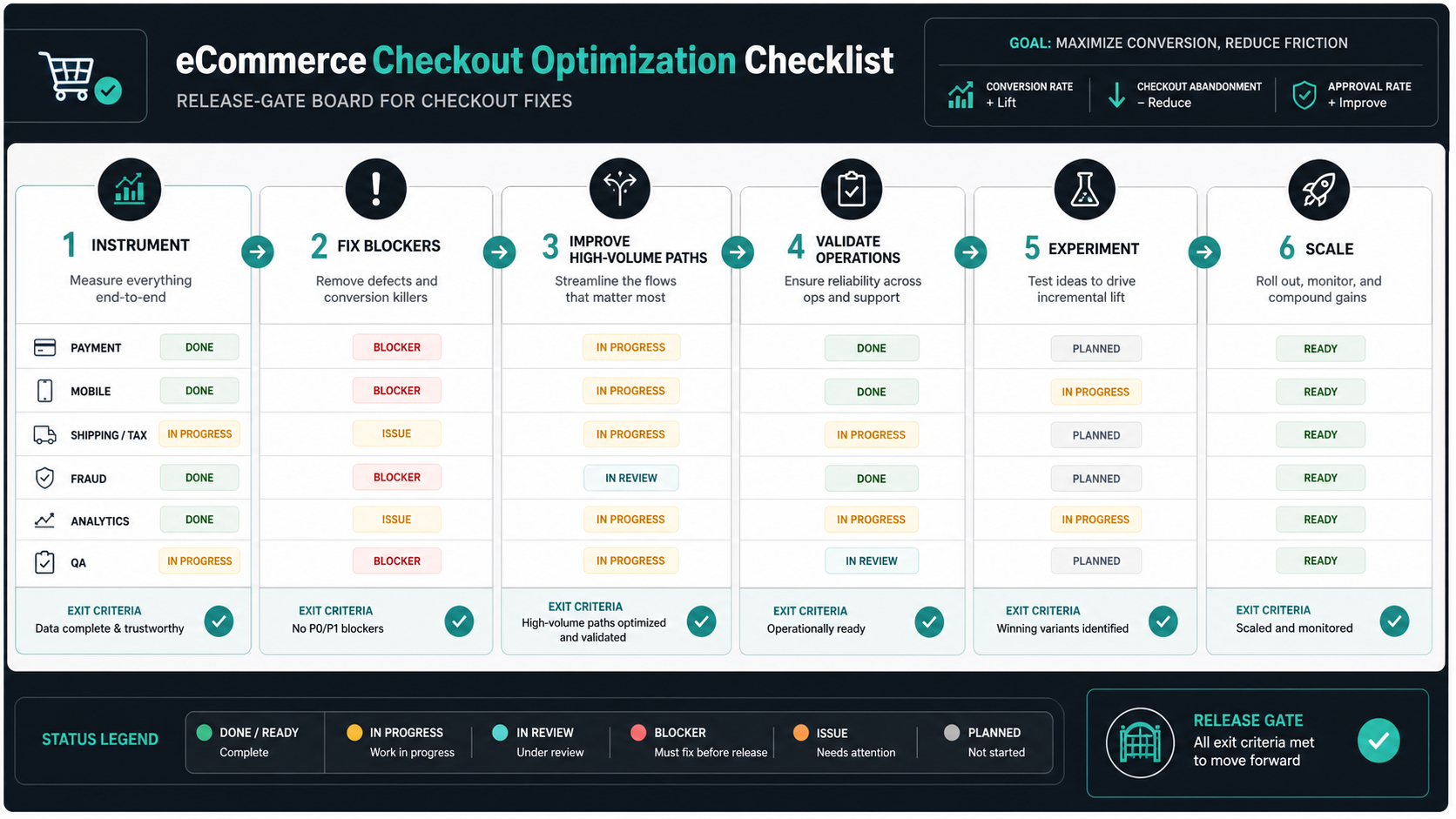
- Instrument the funnel: ensure cart, checkout, payment, error, and order events are trustworthy.
- Remove obvious blockers: forced account creation, hidden total cost, broken coupons, weak guest checkout, slow mobile pages, and payment errors.
- Improve high-volume paths: optimize the device, traffic source, product category, and payment method that carry the most revenue.
- Fix operational surprises: inventory, address, tax, fraud, fulfillment, and support issues that appear after payment.
- Experiment carefully: A/B test copy, layout, payment order, shipping presentation, and trust cues with guardrails.
- Scale what works: turn winning fixes into design-system patterns, QA cases, analytics alerts, and release standards.
NextPage's Point Of View
The best checkout optimization projects are not cosmetic. They are cross-functional product improvements that connect UX, engineering, payments, operations, analytics, QA, and support. The winning team knows which friction points are measurable, which fixes are safe to ship quickly, and which require deeper architecture or integration work.
NextPage can help audit the funnel, prioritize fixes, implement checkout and payment improvements, and build the reporting needed to prove impact. If your cart, checkout, or payment flow is leaking revenue, start with a checkout audit that turns abandonment evidence into a practical conversion roadmap.