
Quick Answer: What Should eCommerce Order Fulfillment Automation Connect?
eCommerce order fulfillment automation should connect order capture, payment status, inventory availability, ERP records, warehouse work, CRM/support updates, delivery tracking, returns, and analytics in one controlled operating flow. The goal is not to remove every human decision. The goal is to automate predictable handoffs, surface exceptions early, and give operations leaders reliable proof that each order moved through the right state.
This roadmap is for retail CTOs, eCommerce operations leaders, warehouse managers, and DTC teams scaling beyond manual order checks, spreadsheet reconciliation, and disconnected tools. It complements retail eCommerce modernization services by translating fulfillment pain into integration decisions, workflow rules, dashboards, and rollout phases.
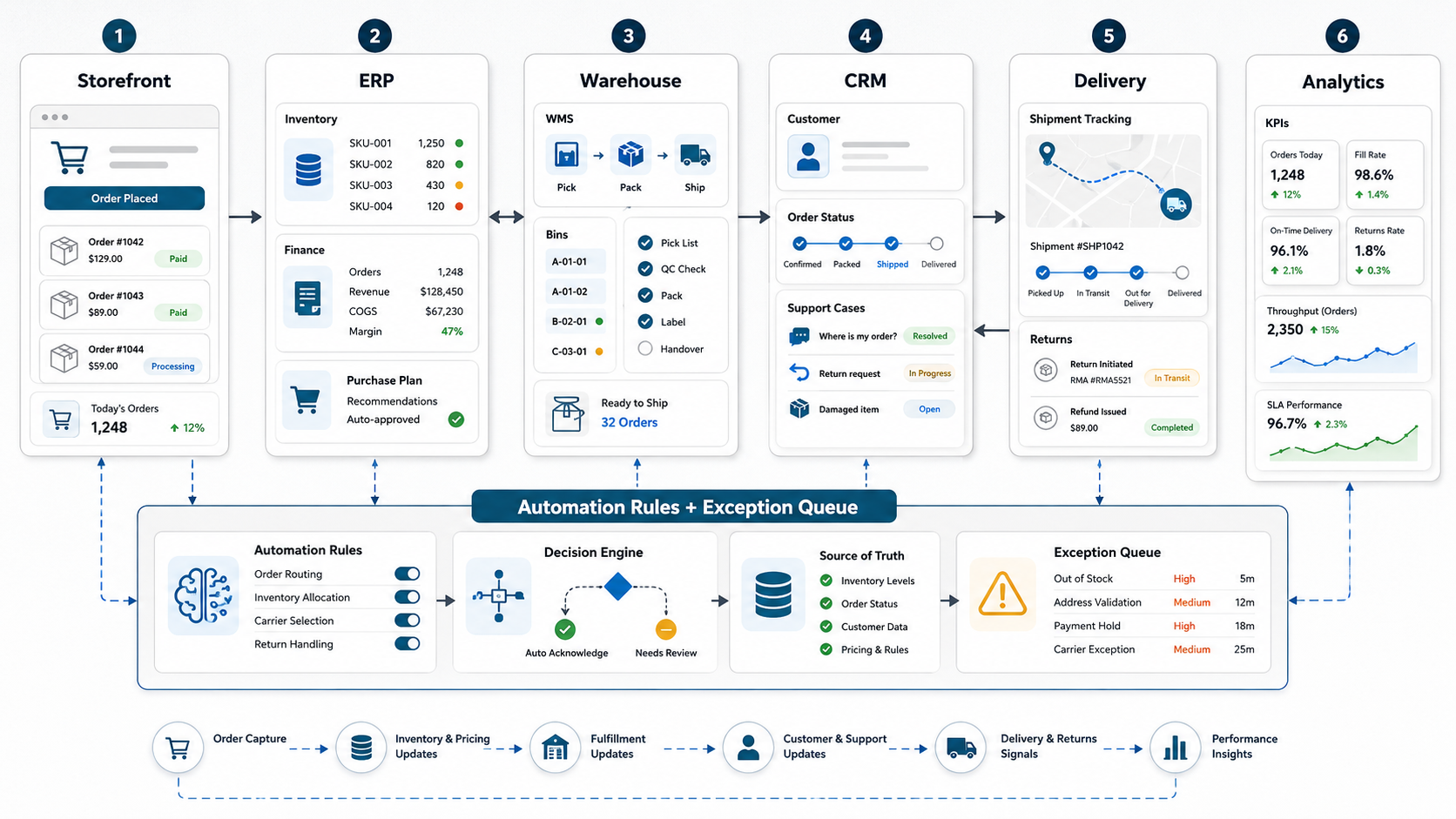
Why Fulfillment Automation Breaks Or Scales eCommerce Growth
Order volume exposes every manual workaround. A team can survive early growth by exporting orders, updating inventory manually, sending warehouse notes in chat, and checking delivery status by hand. At scale, those same habits create overselling, delayed picks, missed SLAs, duplicate customer updates, slow returns, and weak visibility into profit by channel.
The source case study validates the pattern: Shopify Plus integration, warehouse agility, automated product listing, seamless order processing, ERP migration, CRM connectivity, centralized modules, and analytics all matter when an eCommerce operation wants to grow without losing control. Shopify's own order guidance also frames fulfillment as a state flow: an order is placed, paid, fulfilled, and archived, with automation possible around payment capture, fulfillment service notification, and archiving. The hard part is making those states reliable across the systems outside the storefront.
1. Define The Fulfillment Operating Model First
Start with the operating model before choosing connectors. Write down each order state, the system that owns it, the event that moves it forward, and the exception that stops it. A useful model should cover at least these states:
| Order state | Primary owner | Automation decision | Exception to surface |
|---|---|---|---|
| Order placed | Storefront or OMS | Create order, reserve stock, notify payment flow. | Fraud hold, incomplete payment, invalid address. |
| Inventory confirmed | ERP or inventory service | Allocate stock by warehouse, channel, and priority. | Oversell, stock mismatch, split shipment. |
| Pick and pack released | WMS or warehouse queue | Send pick task, packing rules, carrier constraints. | Damaged item, missing SKU, substitution needed. |
| Shipped | Carrier or delivery service | Send tracking, update order and CRM timeline. | Label failure, delayed pickup, delivery exception. |
| Returned or exchanged | Returns workflow | Authorize return, update stock disposition, trigger refund rules. | Policy mismatch, damaged return, fraud signal. |
This model keeps automation grounded. If the team cannot name the source of truth or exception owner for a state, the integration is not ready for full automation.
2. Decide Source Of Truth For Orders, Inventory, And Customers
Most fulfillment failures are not caused by a missing connector. They happen because two systems believe they own the same record. The storefront may own checkout and customer-facing order status. The ERP may own inventory, purchasing, invoices, and finance. The WMS may own pick, pack, bin location, and shipment confirmation. The CRM or helpdesk may own service history and customer outreach.
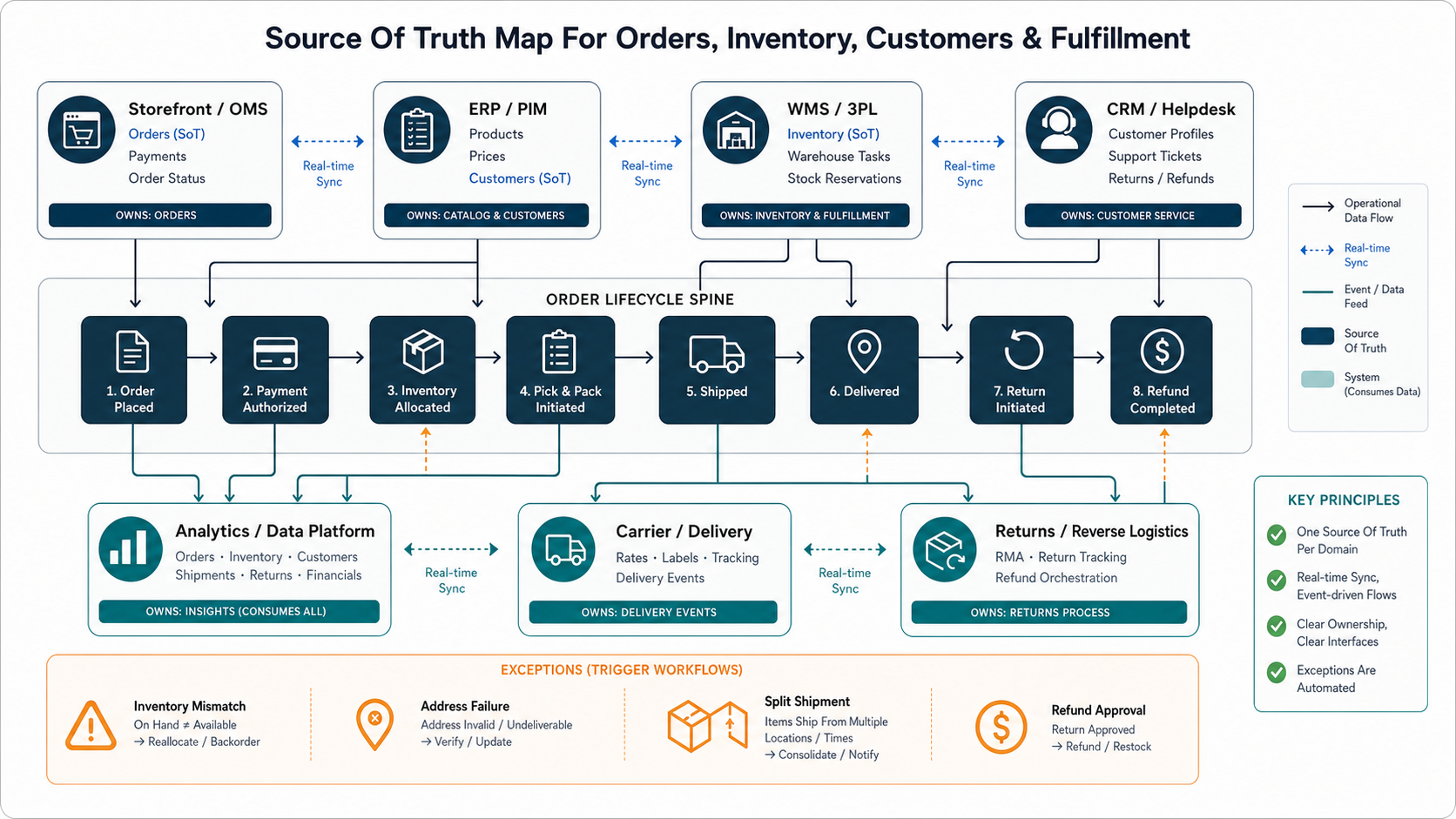
Use ERP integration and modernization services thinking here: define source-of-truth ownership, sync direction, update frequency, replay rules, duplicate prevention, and repair paths before building automation. If Shopify Plus is part of the estate, the Shopify Plus migration checklist is useful for integration inventory and cutover planning.
| Data object | Common source of truth | Risk if unclear |
|---|---|---|
| Product and SKU catalog | ERP, PIM, or commerce platform | Wrong product data, inconsistent bundles, listing errors. |
| Available inventory | ERP, WMS, or inventory service | Overselling, false availability, backorder confusion. |
| Order lifecycle | Storefront or OMS | Missed fulfillment steps and weak customer visibility. |
| Customer profile | CRM, CDP, or commerce platform | Duplicate profiles and inconsistent support history. |
| Shipment and delivery status | WMS, 3PL, or carrier integration | Late notifications and manual status chasing. |
3. Automate Rules, But Design Exception Queues
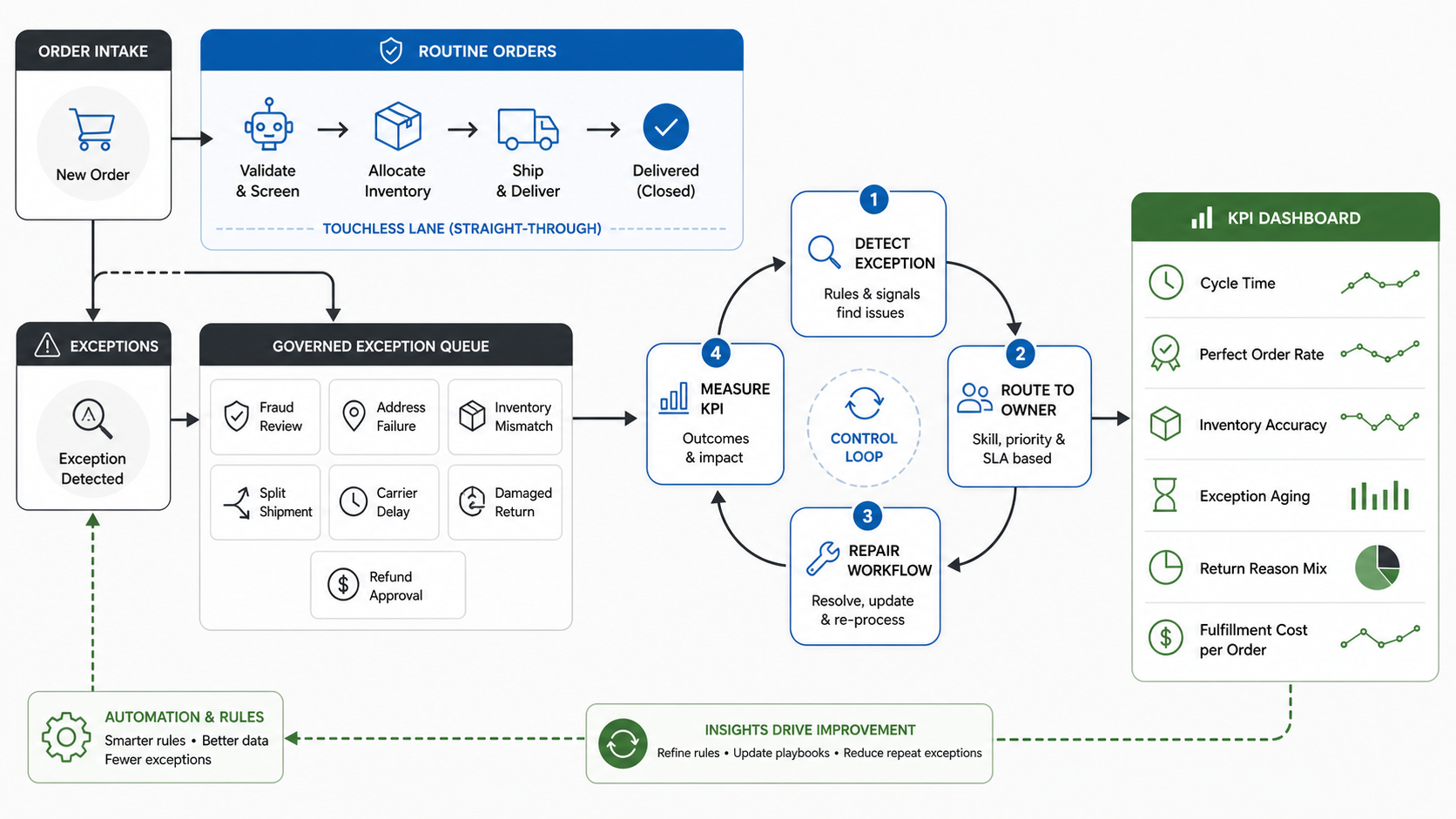
The safest fulfillment automation separates routine orders from exception work. Routine orders can move through payment capture, inventory allocation, warehouse release, label creation, customer notification, and archiving. Exception orders should be routed to a named queue with a reason, owner, SLA, and repair action.
Good exception queues include fraud review, address failure, inventory mismatch, split shipment, payment hold, restricted item, carrier outage, damaged return, refund approval, and high-value order review. This is where business process automation services and custom workflow software become relevant: off-the-shelf connectors may move data, but custom workflows often decide who should act when data is not clean enough for automation.
4. Make The Warehouse Handoff Operational, Not Just Technical
A warehouse integration should do more than send an order to a WMS. It should send the information warehouse teams need to pick, pack, prioritize, and resolve issues. Include SKU, quantity, bin/location, batch/lot rules, substitutions, shipping service, promised delivery window, packing requirements, inserts, gift rules, fraud holds, and customer notes only when operationally necessary.
Then send useful signals back: accepted, allocated, picked, packed, label created, shipped, partially shipped, held, cancelled, returned, restocked, quarantined, or damaged. Each returned signal should update customer-facing order status, support visibility, and analytics. For a shipped commerce operating model, the VenueCart portfolio case study shows why checkout, vendor tools, dashboards, notifications, and admin workflows need to be designed as one system.
5. Connect CRM And Support To The Fulfillment Timeline
Customer support should not ask the warehouse for every order update. A useful fulfillment automation roadmap pushes clean timeline events into CRM, helpdesk, or customer service tools: order received, payment confirmed, fulfillment released, shipment created, delivery delayed, return authorized, refund pending, and refund complete.
Do not flood CRM with noisy technical events. Send customer-relevant state changes, exception reason codes, and next actions. This helps support teams answer questions quickly and helps marketing teams avoid sending promotions or review requests during open fulfillment problems.
6. Build Fulfillment Analytics Around Decisions
Dashboards should help operators decide what to fix. Avoid dashboards that only count total orders and revenue. Track the metrics that reveal broken handoffs, inventory risk, warehouse load, customer impact, and cost leakage.
| KPI | What it reveals | Useful breakdown |
|---|---|---|
| Order cycle time | How long orders take from placement to shipment. | Channel, warehouse, carrier, product category. |
| Perfect order rate | Orders shipped complete, accurate, on time, and damage-free. | SKU, warehouse, carrier, customer segment. |
| Inventory accuracy | Whether available-to-promise can be trusted. | SKU, location, adjustment reason. |
| Exception rate | Where automation still needs human repair. | Exception type, owner, SLA, aging. |
| Return reason mix | Product, listing, sizing, quality, or delivery problems. | SKU, channel, cohort, vendor. |
| Fulfillment cost per order | Cost impact of carrier, warehouse, split shipments, and returns. | Warehouse, carrier, destination, product group. |
The dashboard should tie metrics to action: which SKU needs a listing fix, which warehouse has delayed picks, which carrier is missing delivery windows, which channel creates the most exceptions, and which workflow needs a rule change.
7. Roll Out Fulfillment Automation In Phases
Do not automate the entire fulfillment estate in one launch. Start with visibility, then controlled automation, then exception routing, then optimization. A practical rollout looks like this:
- Discovery: Map order states, systems, data owners, manual steps, exception types, and KPIs.
- Integration foundation: Connect storefront, ERP, WMS/3PL, CRM, carrier, and analytics with source-of-truth decisions.
- Automation rules: Automate low-risk payment, inventory allocation, fulfillment release, shipment update, and archiving paths.
- Exception queues: Route high-risk or failed orders to the right team with SLA and repair evidence.
- Dashboard and governance: Track cycle time, perfect order rate, exception aging, inventory accuracy, returns, and cost.
- Optimization: Tune rules, reduce exceptions, improve carrier decisions, add forecasting, and refine warehouse workload planning.
8. Decide What To Buy, Integrate, Or Build
Buy standard capabilities when the workflow is common and the platform already fits: storefront fulfillment settings, WMS features, 3PL portals, OMS tools, carrier tools, and ERP modules. Integrate when systems are strong individually but handoffs are weak. Build custom software when the fulfillment workflow is a competitive advantage, the exception rules are specific, or the team needs a unified operations layer across multiple platforms.
The best path is often mixed: keep Shopify, ERP, WMS, CRM, and carrier systems where they work, then build the integration and exception layer that reflects your operating model. Use a custom software cost estimator when the build scope includes dashboards, queues, integration middleware, role-based workflows, or custom customer updates. For broader budget framing, compare the fulfillment scope with the eCommerce app development cost guide so inventory, returns, support, payments, and analytics are not treated as small add-ons.
NextPage's Fulfillment Automation Readiness Checklist
- Document every order state from placement to return, including owner and pass/fail event.
- Decide source of truth for product, inventory, order, customer, shipment, refund, and return records.
- Map storefront, ERP, WMS/3PL, CRM, carrier, analytics, and finance integrations.
- Separate touchless automation rules from exception queues and manual approval points.
- Define warehouse payloads, return signals, and customer-facing status updates.
- Build KPI dashboards around cycle time, perfect order rate, inventory accuracy, exceptions, returns, and cost.
- Run pilot automation on a low-risk order segment before expanding to all channels.
- Review exception aging weekly and convert repeat issues into rule, data, or integration fixes.
NextPage helps retail and eCommerce teams modernize fulfillment by connecting commerce, ERP, warehouse, CRM, delivery, and analytics workflows with practical automation and clear exception ownership. Start with retail eCommerce modernization services when the operating model needs to scale, and use ERP, workflow automation, or custom software support when disconnected systems are causing the fulfillment drag.